

Write Stories by
Manipulating Visual Elements
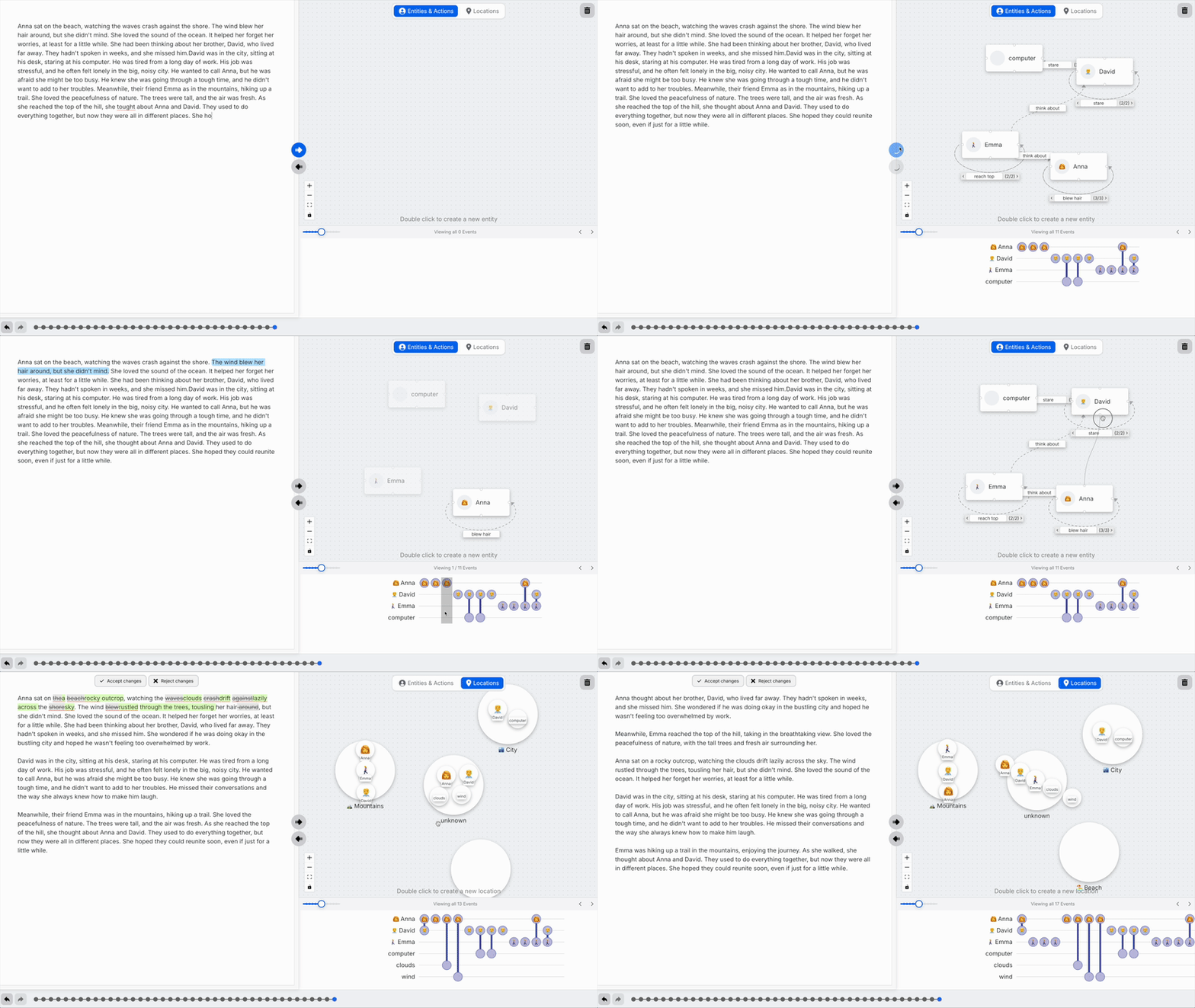
Revolutionary system that automatically visualizes your story's chronological events, characters, and their actions. Edit your narrative by simply interacting with these visual representations - hover, connect, move, and reorder to transform your text.
Monica
I just wrote a detective story, and the visual timeline showed me that my protagonist was in two places at once! I simply dragged the character to the correct location, and the system automatically rewrote that scene. It's like having a story continuity editor that works in real-time.
Interactive Visual Story Editing
Transform how you write stories through intuitive visual manipulation. Each interaction with visual elements automatically generates corresponding text edits.
Interactive Timeline Editing
Hover over the timeline to review chronological events and visualize character movements. Reorder events to automatically update your story text.
💡 Drag events along the timeline to restructure your narrative flow
Character Connection System
Connect two characters visually to suggest text edits that reflect new interactions and relationships in your story.
💡 Draw connections between characters to generate dialogue and interaction scenes
Visual Character Positioning
Move characters within scenes to automatically suggest text edits that reflect their new positions and spatial relationships.
💡 Drag characters to new locations and watch the story adapt
Event Resequencing
Reorder story events in the visual timeline to automatically generate text edits that reflect the new chronological structure.
💡 Rearrange story beats to explore different narrative structures
How Visual Story Writing Works
Experience the future of storytelling where visual manipulation drives narrative creation
Write Your Story
Start with your narrative text. Our AI automatically analyzes and visualizes the chronological events, characters, and their movements.
Explore Visual Timeline
Hover over the interactive timeline to review event sequences and see how characters move through your story world.
Manipulate Elements
Connect characters, move them to new positions, or reorder timeline events through simple drag-and-drop interactions.
Auto-Generate Edits
Watch as your text automatically updates to reflect the visual changes, maintaining narrative coherence and flow.
Why Visual Story Writing Changes Everything
Eliminate Plot Holes
Visual timeline reveals inconsistencies in character positioning and event sequencing before they become problems.
Intuitive Story Structure
Manipulate story elements visually rather than hunting through text documents to make structural changes.
Real-time Continuity
Maintain story continuity automatically as the system tracks character movements and timeline consistency.
Ready to Transform Your Story Writing?
Experience the future of narrative creation where visual manipulation drives story development.