Todas as postagens
Turn a Photo Album into a Comic Story Without Losing Who Is Who

Jay
20 de novembro de 2026
To turn a photo album into a comic story, give each picture a clear job. Some images identify a person or pet; others establish a location, action, or prop. If you send several photos without making that distinction, key decisions—who is present, who holds the bag, and what happens next—are left ambiguous.
LlamaGen.AI's picture-to-comic page is the practical starting point for photo conversion. This example focuses on the extra structure needed for a six-scene album: an identity map, a story order, a source comparison, and two visible corrections.
What this sample represents
Made November 21, 2026: all six source photographs in this article are synthetic demonstration images of fictional adult siblings Nora and Eli with their fictional dog Pip. They were generated directly through a locally configured Vertex setup, as were the comic outputs. No customer album, real family archive, or private photograph was used. The source pack labels the photos as synthetic.
That makes the example reproducible without exposing someone else’s memories. It also limits the conclusion: this walkthrough demonstrates input organization and visual review, not verified preservation of a real person’s likeness. We did not run a signed-in photo-product upload or measure storage, retention, or native export behavior.
For an actual family photo comic, use images you are allowed to transform and publish, and confirm the intended use with the people involved. Keep identifying details out of a public example when they are not necessary to the story. This tutorial does not establish a service-specific privacy policy.
Give identities stable names
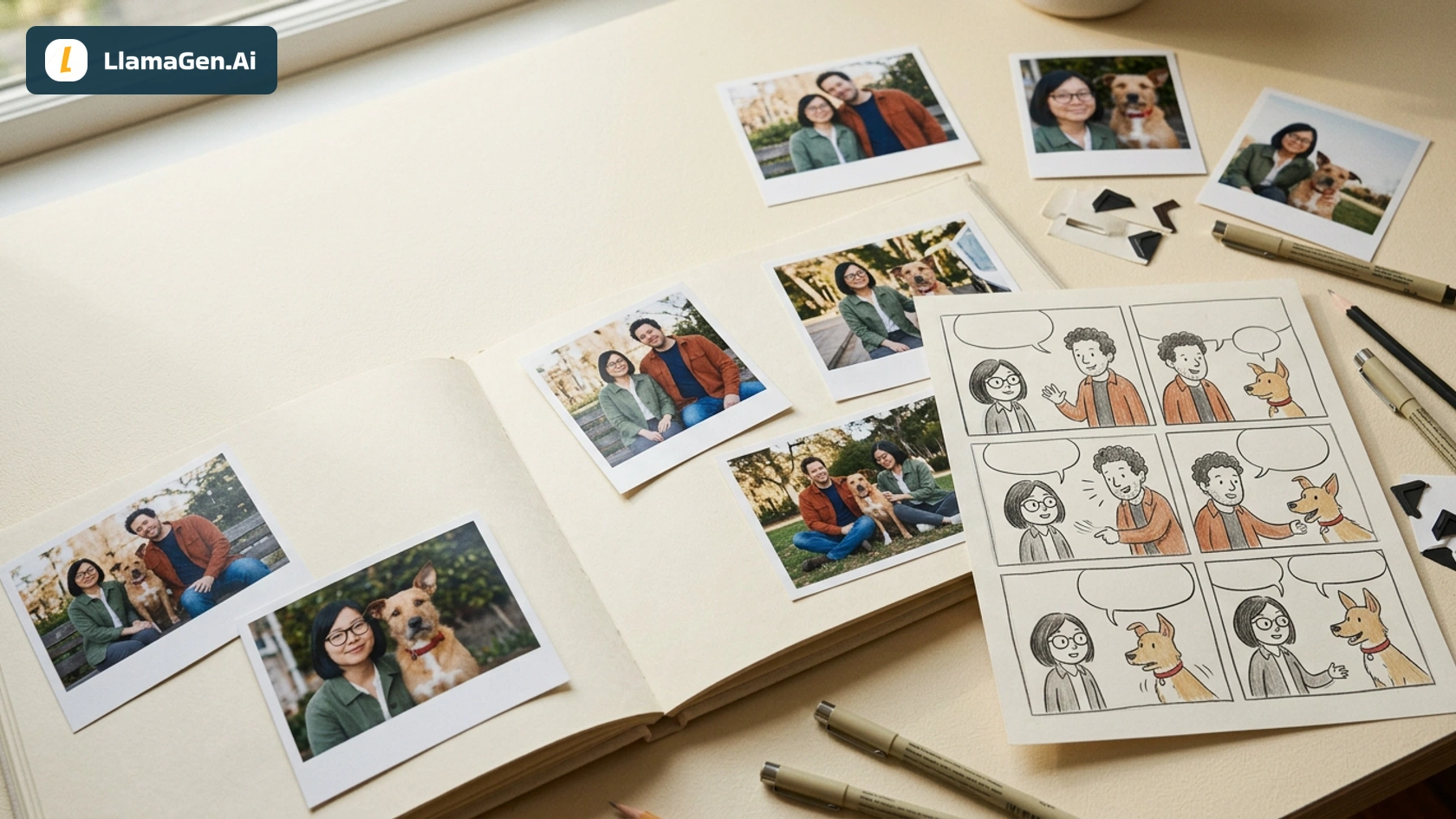
The approved sample cast contains three subjects:
| ID | Identity anchors | Things that can change |
|---|---|---|
| Nora | Straight black bob, round black glasses, green jacket, shorter adult silhouette | Pose, gaze, camera distance |
| Eli | Short curly dark hair, stubble, rust overshirt, taller adult silhouette | Pose, whether he carries the bag |
| Pip | Tan terrier, red collar, white chest and paw markings, asymmetric ears | Gait, direction of gaze |
These are the selected visual anchors for this exercise. Outfit color helps identify the adults, but it cannot replace a face check. A dog with a similar tan coat can still have the wrong ears or markings.
The cast reference was generated before the scene photographs. Its wording was not accepted blindly: the visible reference, rather than an unfulfilled prompt detail, became the comparison target. Pip’s front-paw marking boundaries remain variable, so we do not describe a precise marking outline as perfectly preserved.
Separate six scene inputs from the identity reference
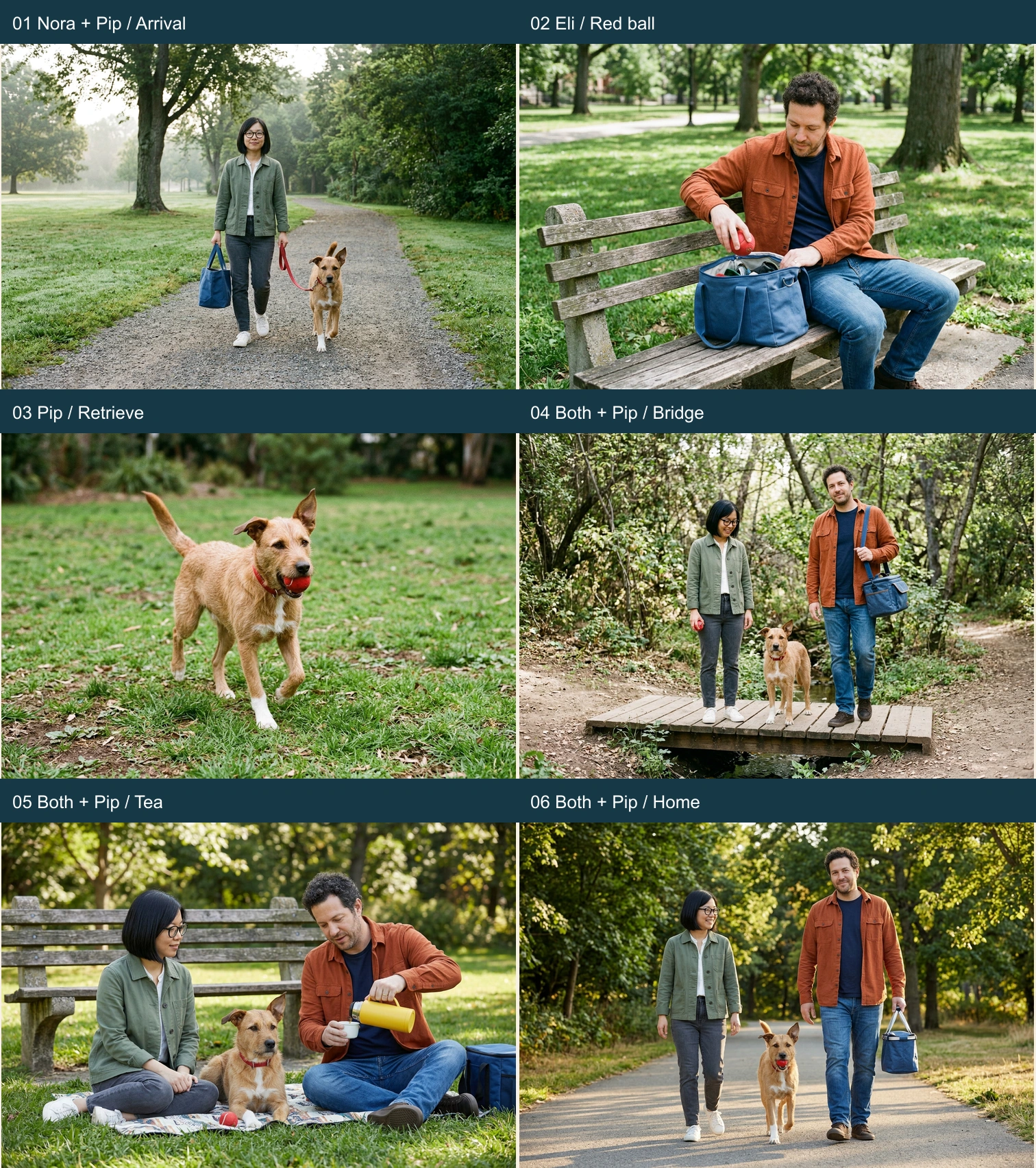
The six photographs have different roles:
- Nora arrives with Pip and the blue picnic bag.
- Eli takes a red ball from the bag at a bench.
- Pip carries the ball on the grass.
- The two adults and Pip cross a footbridge; no ball is visible.
- Eli pours tea from a yellow thermos during a picnic.
- Both adults walk home with Pip carrying the ball and Eli carrying the bag.
This is an authored sequence for the synthetic album. It does not recover a real date, location, or chronology from image metadata. With a real album, write the intended order yourself when the source files do not establish it.
The bridge source deserves special attention. The original generation direction requested a ball, but the resulting photograph did not show one. Our comic contract follows the actual photograph: no visible ball in scene four. Source fidelity is a comparison against the image you selected, not only against the prompt you hoped it would satisfy.
Compare a conversion with a story adaptation
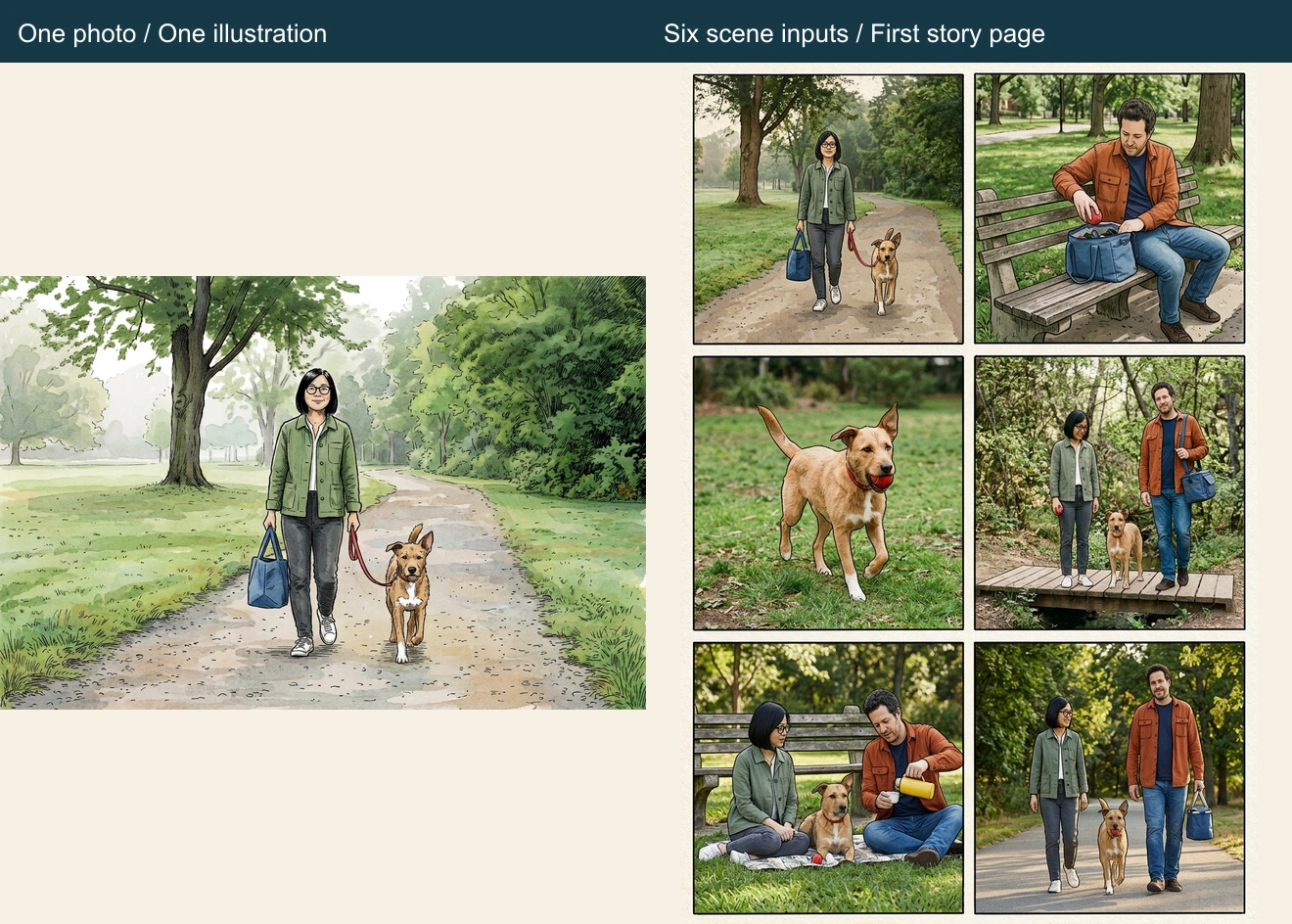
We generated both a single-image comic conversion of photo one and a six-panel page from the cast reference plus all six scene photographs. Both outputs are retained in the synthetic album source pack.
The single conversion keeps Nora, Pip, the path, and the bag in one composition. It cannot establish the ball’s later journey or the tea scene. The six-panel request adds an explicit reading order and per-panel subject list. That request is an adaptation instruction: one cast reference followed by six source scenes, with a short contract for each panel.
A shortened form of the real direction is:
Exactly six panels, two columns by three rows.
Use the cast reference for Nora, Eli and Pip.
Use scene photos 1–6 for the corresponding actions.
Panel 4: both adults and Pip on the bridge; no ball visible.
Panel 5: Eli pours from the yellow thermos into a white cup.
Do not invent a real date, location or family history.
The downloadable package includes the full requests and outputs. This comparison does not measure which conversion route is faster or cheaper, and it is not a controlled success-rate study.
Inspect people, pet, and props separately
The first comic kept the adult roles recognizable in this visual review: Nora retained the bob and glasses; Eli retained the curls, rust shirt, and taller build. Pip appeared as one dog rather than a duplicated pet. Those observations do not make the whole page correct.
Two mismatches remained. The bridge panel added a red ball to Nora’s hand even though the selected source photo had none. In the final walking panel, Pip had both ears upright, following that snapshot instead of the asymmetry in the cast reference.
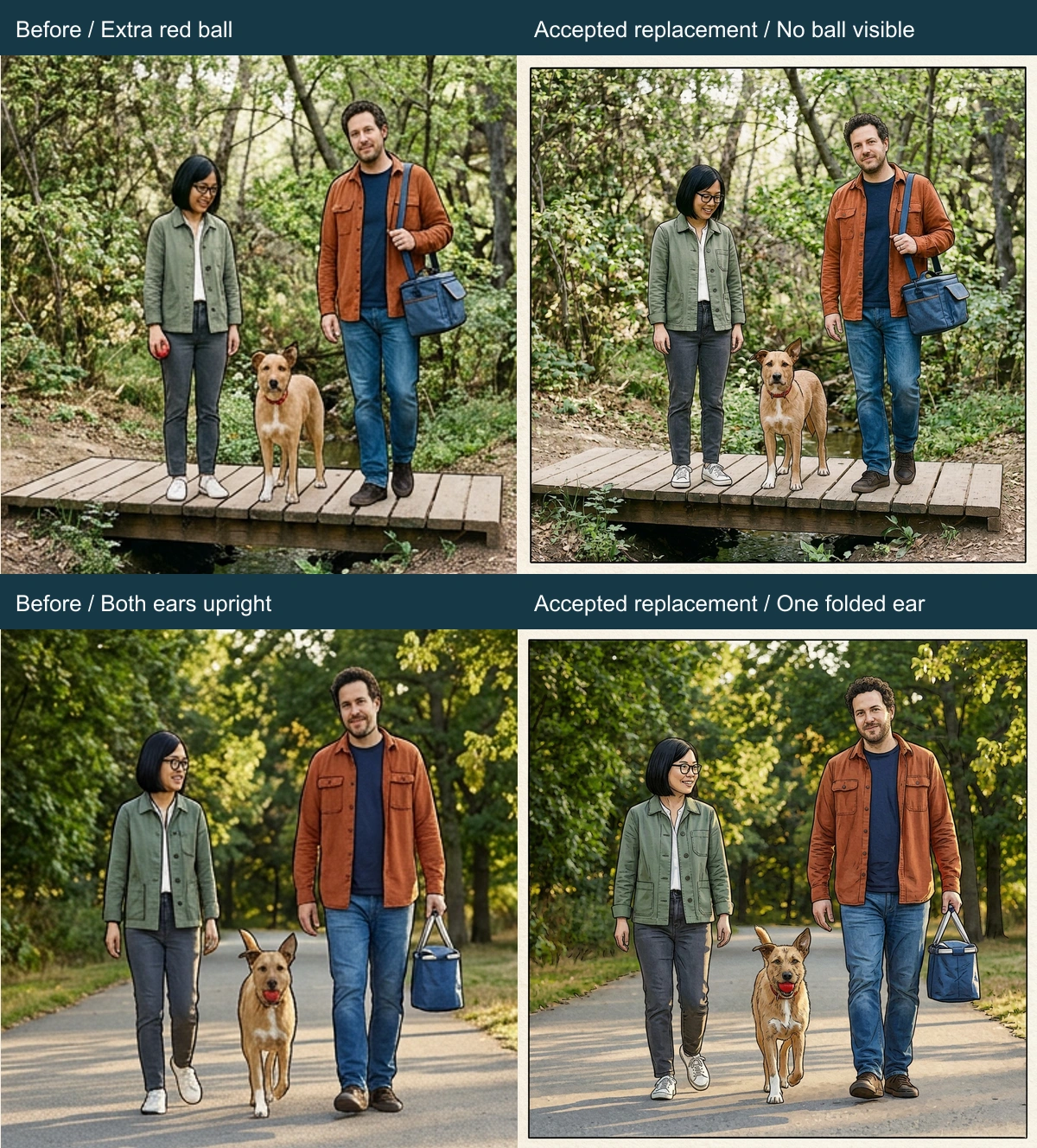
We generated two replacement panels. The bridge repair used photo four as the authority for empty hands and the visible blue bag. The walk-home repair explicitly chose the cast reference for Pip’s ear shape. This second correction is an identity-normalization decision: the source snapshot itself has both ears lifted. It should not be described as a faithful copy of that snapshot’s exact ear pose.
Both replacements were placed into the page locally. Pixels outside the two selected rectangles were checked and remained identical. That is a property of this local composition, not a claim that a native comic editor locked every other panel during generation.
Review the assembled page
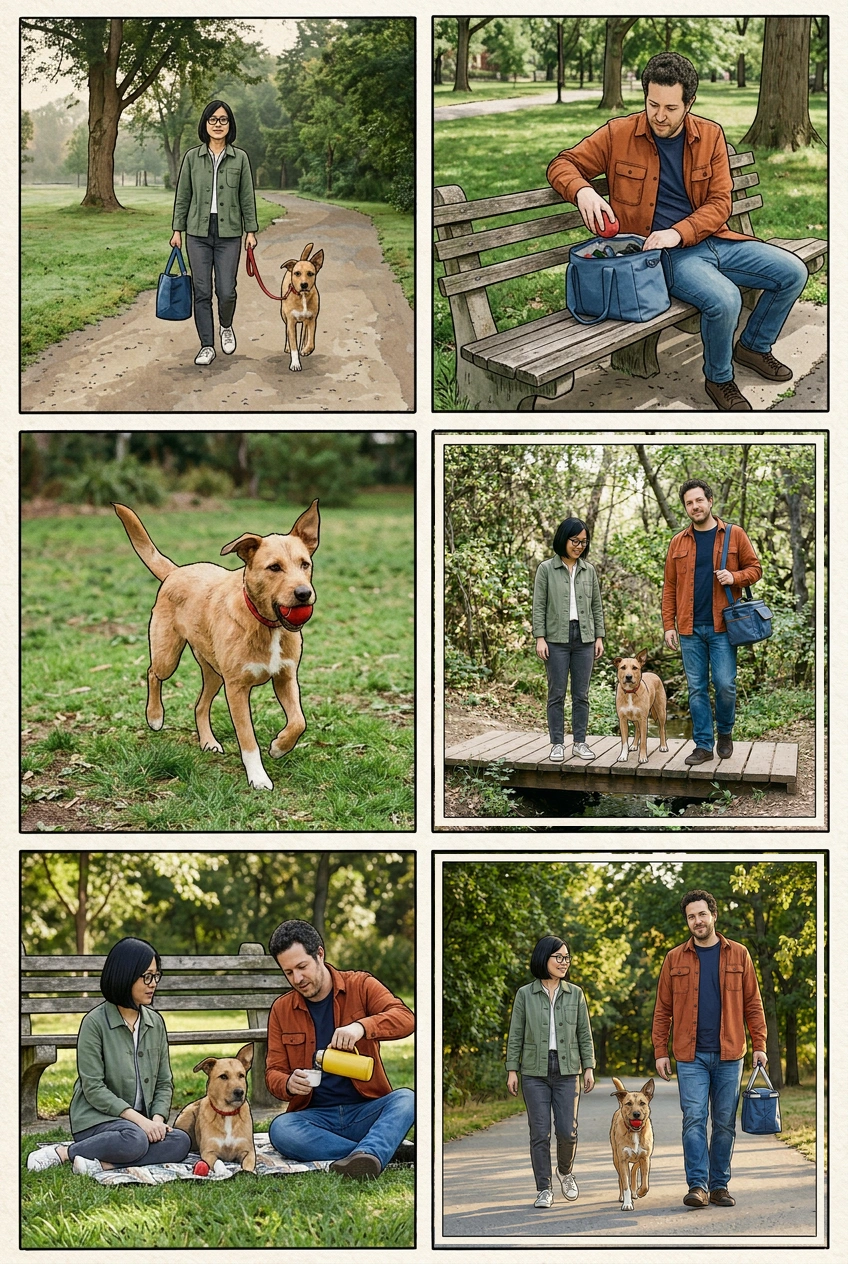
Read the page in rows. The bag begins with Nora, appears with Eli at the bench and bridge, and ends with Eli. The red ball is introduced at the bench, carried by Pip, absent from view on the bridge, visible at the picnic, and carried home. The yellow thermos belongs to the picnic action rather than appearing in every panel.
The final page still has differences worth recording. The blue bag’s construction and handles vary between images. Pip’s white markings are approximate. Human expressions and clothing folds change with camera angle, and the replacement panels have slightly different line density. A small synthetic case cannot establish reliable identity preservation across arbitrary family albums.
This kind of review is more useful than an overall “consistent” score. It tells the next editor which facts were checked, which changes were intentional, and which details could still be refined.
Package the work for another editor
The identity and scene map names the cast, scene assignments, and remaining limits. The source ZIP contains the synthetic cast, six photos, one-photo conversion, first comic, two replacements, and their request records. Keep those files distinct so a later revision does not accidentally treat a generated scene as the original photograph.
This example uses ordinary image files and a locally assembled PNG. It does not claim that the photo product saved an album project, exposed editable layers, or exported these exact files. Check the available controls in your own current account before planning a delivery around them.
For a two-person relationship story, the couple-photo comic workflow covers a narrower narrative. For recurring characters, use the character reference-sheet guide and six-panel reference-image tutorial.
Start your next album with a cast map and six sentences describing what is actually visible. Then open Picture to Comic, keeping single-photo conversion, story sequencing, and final identity review as explicit decisions.
Related hot tags
Photo to Comic
Worked Example
Consistência de Personagem
Comic Workflow
Ferramentas populares para criadores
Transforme inspiração em sua próxima história
Crie quadrinhos, storyboards e fotos estilosas com LlamaGen.
01
Gerador de Quadrinhos IA
Transforme uma ideia em tirinhas polidas em minutos.
Criar quadrinhos02Gerador de Mangá IA
Crie arte mangá expressiva e histórias com vários painéis.
Crie mangá com IA03Gerador de Storyboard IA
Visualize cada cena antes de começar a produção.
Crie storyboards com IA04Transformar foto em quadrinho
Transforme qualquer foto em uma ilustração estilo quadrinho.
Crie quadrinhos a partir de fotos05Criador de Tiras de Quadrinhos IA
Monte tirinhas compartilháveis com personagens consistentes.
Crie tirinhas com IA
Desperte sonhos nos jovens
Onde milhões de histórias ganham vida
Um resumo dos lançamentos mais recentes de recursos do LlamaGen, melhorias no produto, atualizações de design e correções importantes de bugs.