Todos os posts
Make an AI Film Feel Real: Blocking, Reactions, and Continuity in a Quiet Scene

Jay
23 de novembro de 2026
AI film continuity is often easiest to evaluate in a quiet scene with only a few moving parts. Put two people at one table, keep one mug and one notebook in view, and every shift in position becomes noticeable. A richer background or more cinematic texture will not explain why a table suddenly appears behind a seated character.
This article compares an actual 30-second first assembly with a 24-second revision of the same illustrated scene. You can use LlamaGen.AI Storyboard to plan a scene like this, then keep a separate record of which visual and editorial decisions survive review.
Watch both actual edits
First assembly — 30 seconds:
Revised scene — 24 seconds:
Download the first assembly and the revised scene. Both are 1280×720 at 24 fps and silent. Local captions carry the dialogue; this is not a test of acting, voice generation, or lip sync.
Scope, November 23, 2026: the source is our Maya-and-Theo station scene from the six-shot drama pilot. Vertex supplied new stills; Veo 3.1 Fast through Replicate supplied motion. The revision changes inputs, source selection, playback direction, and timing together. It is a worked repair case, not a controlled experiment that isolates one variable or proves that viewers find it more realistic.
Separate the discussion prompt from the evidence
In the Reddit film discussion that prompted this topic, the author says the voices are real actors. Commenters question restrained reactions and changing furniture, food, display shapes, and corridor geography. Those are their observations, not our independent frame-by-frame review of that film.
So we built an owned scene with an explicit room map. The goal is narrative credibility: the viewer should understand what each person notices and where the objects remain. Photorealism is a different problem. Our example stays illustrated throughout.
Establish room geography before close-ups
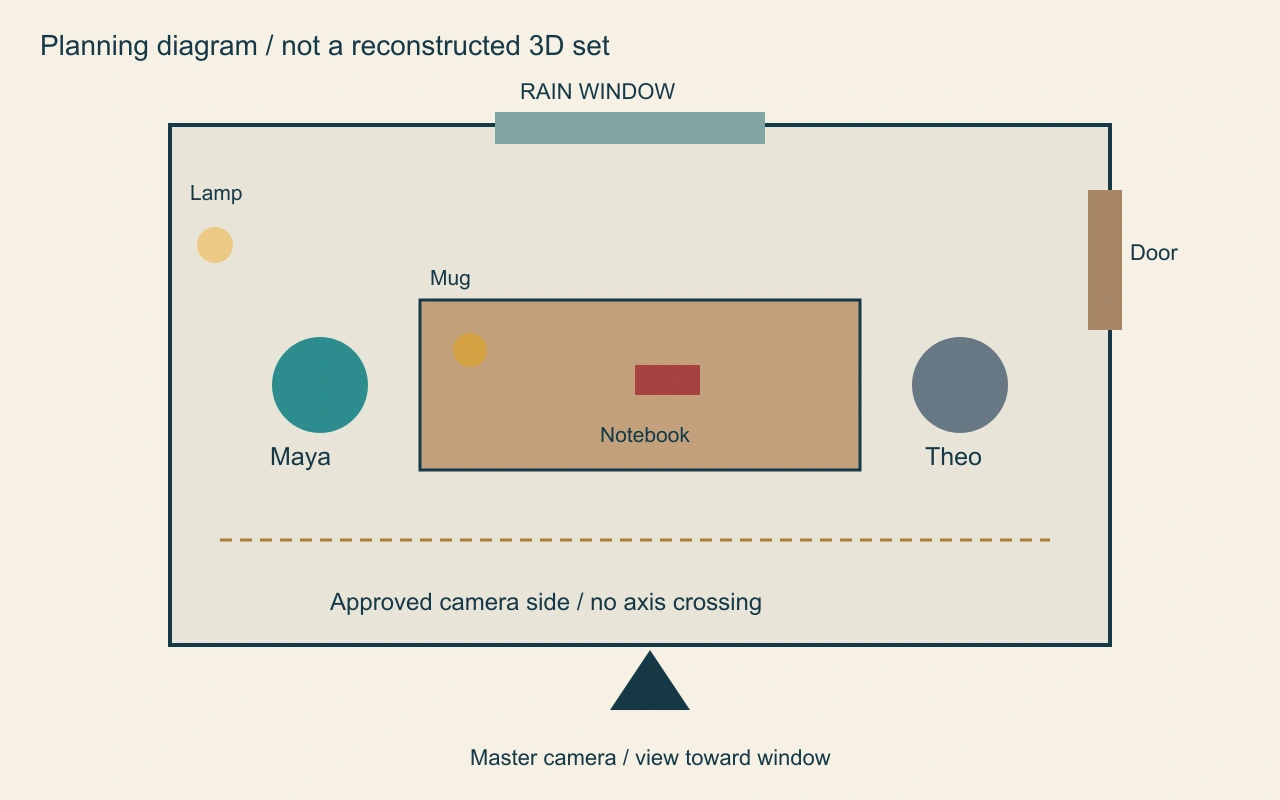
Maya is on the left and Theo on the right in the master view. The rainy window is behind their shared table, the door is on the right, and the lamp is on the left. The mug belongs on Maya's side. This downloadable floor plan is a planning diagram, not a measured reconstruction of a 3D set.
A closer shot may crop out the mug or the other actor. That absence is not automatically a continuity error. An unrelated table appearing behind Theo is different: it creates a new spatial relationship that the master shot never established.
The first close-up had exactly that problem. We replaced the background with a simpler wall and door edge, then generated a new reaction clip from the corrected image. Simplifying the background reduced the number of spatial facts the close-up needed to preserve.
Review the starting frame before animating it
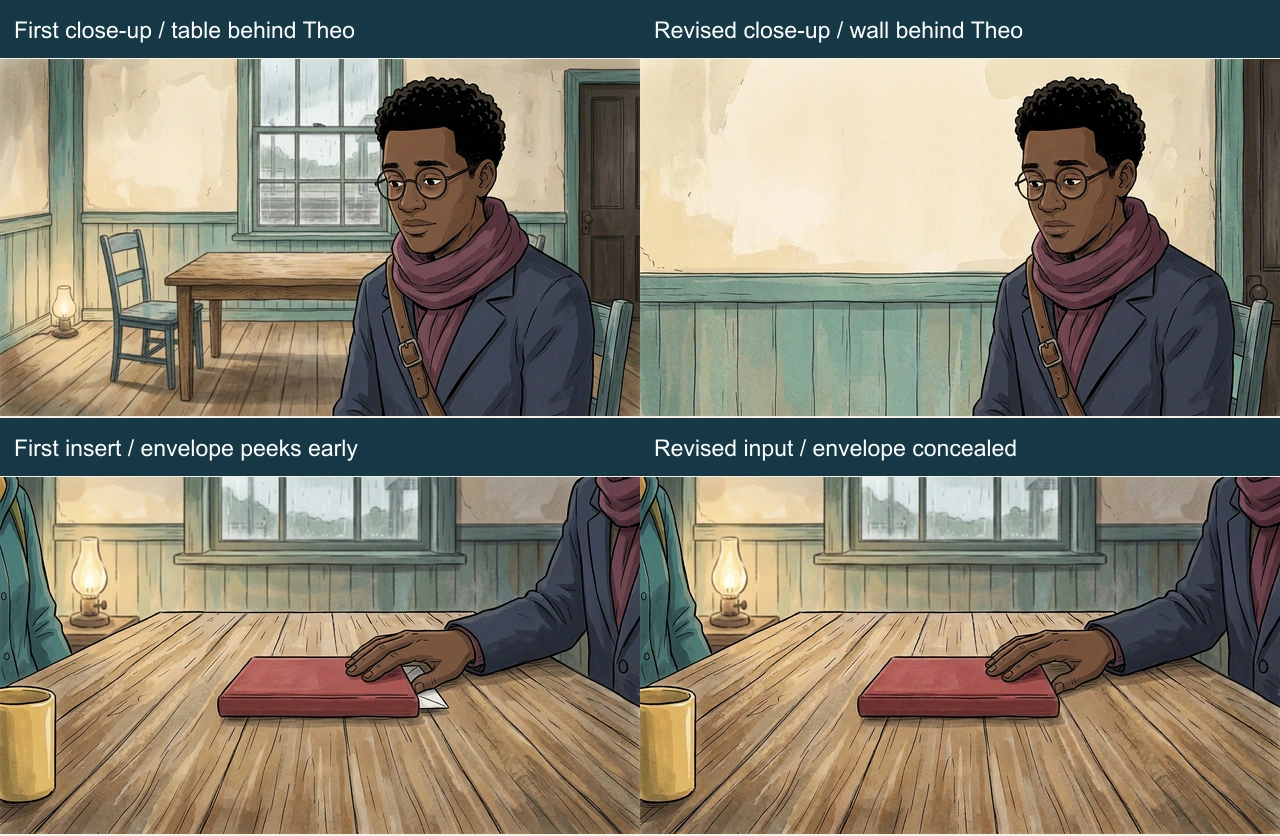
The first notebook insert also showed white paper protruding from a closed red notebook. Our planned reveal belonged later. The corrected still hid the envelope completely before a new opening request.
This prevents a common review mistake. If the initial frame already contradicts the script, later animation may preserve the wrong thing very consistently. In that case, fixing motion alone is a much harder route to the intended scene.
Keep the input change separate from the output judgment. The revised still fixed the early paper reveal; it did not guarantee that the following animation would keep an envelope flat while the cover moved.
Inspect what actually happens inside the shot
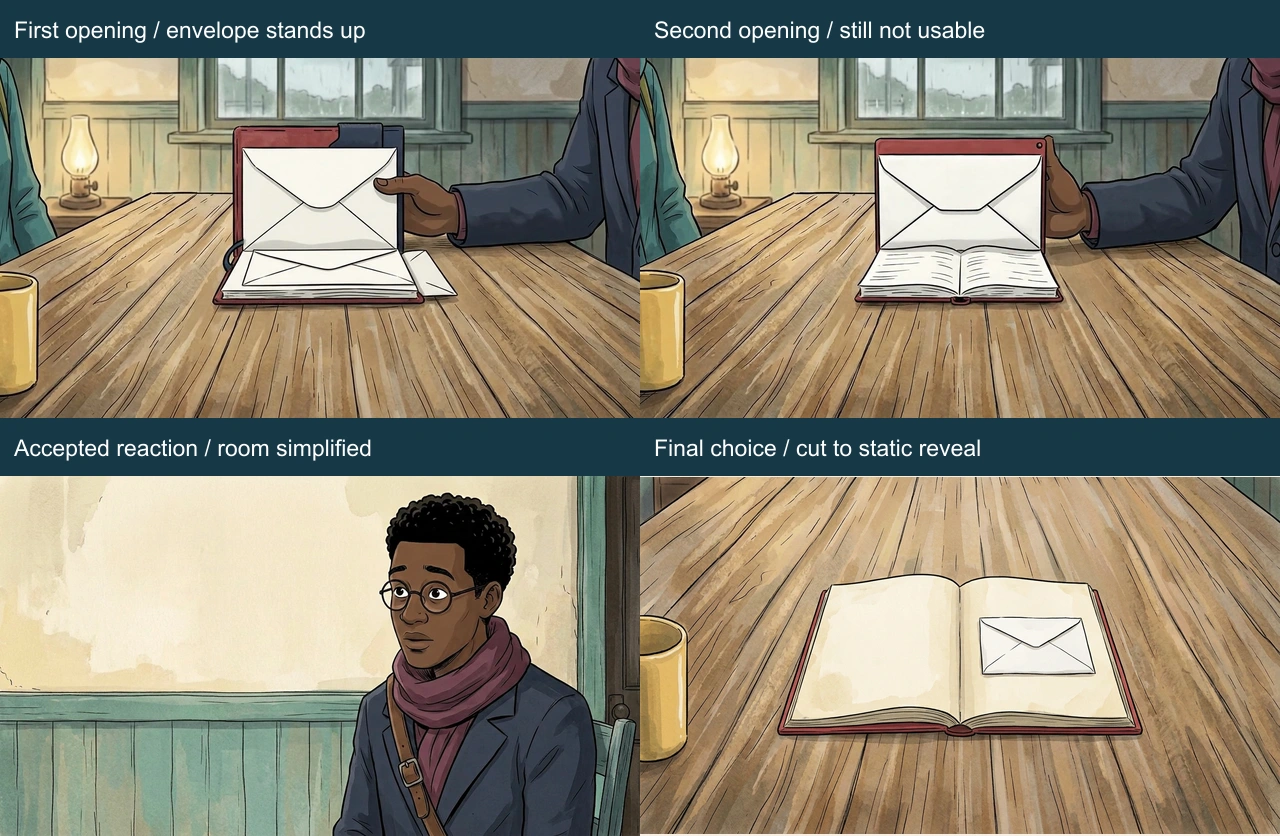
Both opening clips raised a large envelope with the notebook cover. The second request removed the prematurely visible paper at the start, but its later movement still missed the planned physical relationship. We kept both clips and chose not to use either opening action in the final revision.
The selected replacement is an open-notebook still with a smaller envelope lying on the page. We hold it for four seconds in the revised scene. The cut skips the opening action rather than pretending to repair every intermediate frame. That is a practical editorial fallback when the reveal matters more than watching the mechanism.
The slide had a different problem: it traveled left toward Maya. We reversed that source interval locally so it moved right toward Theo. Reversal is visible in the edit manifest and should be reviewed like any other intervention. If a reverse makes a blink, hand release, or cloth movement look unnatural, it needs a different solution.
Give the reaction its own time
The scene asks Theo to notice that Maya kept something for him. The reaction request specified a small change in gaze and a softened expression. It did not ask for a large smile, speech, or a camera move.
We kept the corrected reaction for five seconds while reducing setup time elsewhere. That makes the reaction a distinct beat instead of forcing it into the same interval as the object transfer. It remains a selected model performance, not directed acting validated by a human performer.
The timing change is:
| Shot | First assembly | Revised scene | Main change |
|---|---|---|---|
| S010 | 5 seconds | 3 seconds | Shorter establishment |
| S020 | 5 | 3 | Shorter listening beat |
| S030 | 5 | 4 | Reverse selected motion direction |
| S040 | 5 | 5 | Use corrected reaction source |
| S050 | 5 | 4 | Replace opening motion with still reveal |
| S060 | 5 | 5 | Retain shared closing view |
| Total | 30 | 24 | Six narrative beats retained |
The timing CSV preserves these decisions. Shorter is not inherently better; this is simply the chosen rhythm for this case, with no retention or conversion claim attached.
Check the cuts after fixing the sources
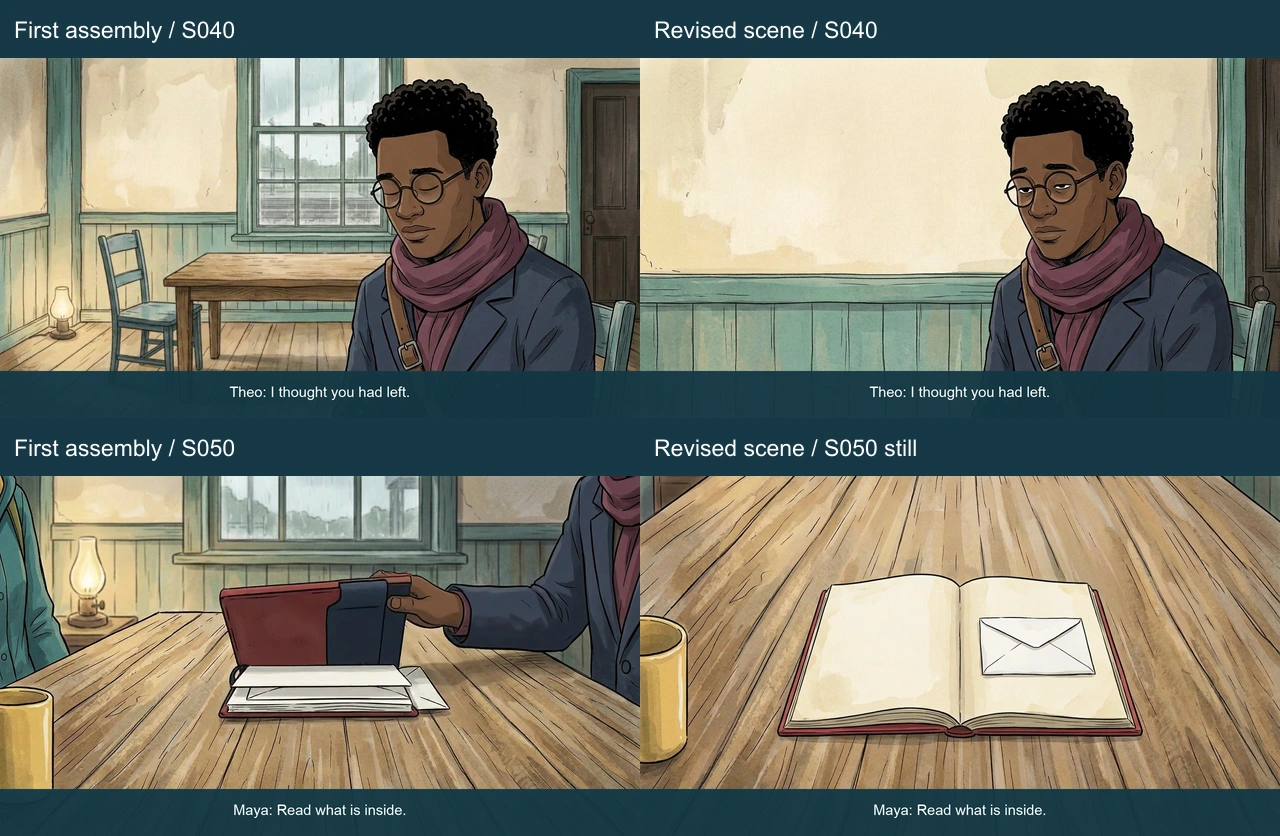
Play through the cuts, then step back through selected frames. Check where the viewer expects the notebook to be, whether Theo's eyeline matches that location, and whether the next wide shot introduces an unexplained state.
The revision improves two explicit input facts and avoids the unreliable opening. It does not make the scene perfectly continuous. Table scale, bag placement, and the notebook's position still vary. The envelope is less legible in the closing wide shot than in the dedicated insert. Those observations remain in the continuity review.
The final files were checked for frame counts and playback. The first has 720 frames; the revised scene has 576. Passing those checks means the exported files play at their recorded duration. It does not establish emotional impact, photographic realism, or flawless physical continuity.
Carry the review forward
For your own quiet scene, decide what changes emotionally, draw a simple room map, approve the starting states, inspect the generated action, and then review the cuts. Keep camera-side decisions, prop states, and editorial substitutions in separate fields so another editor can understand the revision.
The storyboard-to-video handoff checklist covers packaging. The two-OC scene focuses on identities and speaker ownership. This case adds motion and cut review without making a new tool-ranking claim.
Continue with Storyboard using the planning controls available in your account. This production used local editing and does not establish native keyframe editing, automatic room memory, or an end-to-end Studio repair workflow.
Related hot tags
AI Filmmaking
Continuidade
Worked Example
Ferramentas populares para criadores
Transforme inspiração na sua próxima história
Crie comics, storyboards e fotos estilizadas com o LlamaGen.
01
Gerador de Banda Desenhada IA
Transforme uma ideia em tiras de comic polidas em minutos.
Criar BD02Gerador de Manga IA
Crie arte de manga expressiva e histórias com múltiplos painéis.
Crie manga com IA03Gerador de Storyboard IA
Visualize cada cena antes de o processo de produção começar.
Crie storyboards com IA04Transformar imagem em comic
Transforme qualquer foto numa ilustração em estilo comic.
Crie comics a partir de imagens05Criador de Tiras de Banda Desenhada IA
Construa tiras partilháveis com personagens consistentes.
Crie tiras de comic com IA
Desperte sonhos nos mais jovens
Onde milhões de histórias ganham vida
Um resumo dos mais recentes lançamentos de funcionalidades do LlamaGen, melhorias do produto, atualizações de design e correções de erros importantes.