Do not copy a novel into comic panels sentence by sentence.
A stronger adaptation starts by sorting the manuscript into three decisions:
cut -> keep -> visualize
Cut prose that only repeats information. Keep the beats that change the story. Visualize the moments a reader can understand through action, expression, setting, objects, camera distance, and silence.
For a faster first pass, upload your manuscript or chapter to LlamaGen.AI Novel to Comic and ask for an adaptation map before generating finished panels.
Why Novel Adaptation Feels Hard
Novelists rely on tools that comics cannot always use directly:
Novel tool
Why it breaks in comics
Adaptation move
Internal monologue
The reader cannot see it unless it becomes behavior
Turn thought into action, pause, object, or framing
Long description
A panel can become crowded
Choose one story-relevant visual signal
Summary
It skips time efficiently in prose
Convert only the key change into a visual beat
Backstory
It can stop the page
Use a prop, location, flash image, or short caption
Voice
It lives in sentence rhythm
Registro de alterações
Desperte sonhos nos jovens Onde milhões de histórias ganham vida
Um resumo dos lançamentos mais recentes de recursos do LlamaGen, melhorias no produto, atualizações de design e correções importantes de bugs.
✦
✧
✦
✧
Um novo meio para Narrativa
Crie histórias, quadrinhos, animações, jogos e muito mais sem limites — em segundos, com apelo para o público moderno
Novel to Comic Adaptation: What to Cut, Keep, and Visualize - LlamaGen.AI Blog
Preserve it through captions, dialogue, and visual contrast
The goal is not to remove the writer's voice. The goal is to decide where that voice belongs.
Example scope and source
Updated November 19, 2026. This lesson keeps its original Mira scene and cut/keep/visualize method. Older planning boards and historical time estimates are not presented here as proof of a new product run. This update includes a real four-panel page, a generated replacement for the ticket reveal, and a locally lettered reading copy.
The first page was generated with Vertex Nano Banana 2.1 through LlamaGen.AI's image playground. The replacement was generated directly through Vertex using local credentials. Other panels were preserved during local assembly. No signed-in manuscript upload or whole-novel conversion was performed; the actual input scope was the short owned scene below. Settled costs and native Studio credits were not available.
Mira returns to the apartment she left three years ago. She tells herself she only came to pick up her father's old field notebook, but the room still looks arranged for someone who expected her back.

The window is open. The desk lamp is on. A cup sits beside the chair, still clean except for one ring of tea at the bottom.

Mira remembers every promise she made in this room. She also remembers breaking the important one.

When she opens the notebook, a train ticket slips out. The destination is not printed, but the date is tomorrow.
This is a strong prose moment. It carries memory, guilt, setting, and an object reveal.
If you adapt every sentence literally, the comic becomes stiff. The scene needs a visual plan.
Step 1: Sort the Scene into Cut, Keep, and Visualize
The first pass is not panel layout. It is triage.
Use this table:
Manuscript element
Adaptation decision
Why
Mira returns after three years
Keep
It defines the emotional pressure
She tells herself she came for the notebook
Keep, but compress
This can become a caption or a look toward the desk
Room arranged as if expected
Visualize
The setting can say this without dialogue
Window open, lamp on, clean cup
Visualize
These are story clues
She remembers promises
Cut from literal prose
Too abstract if repeated in full
She broke the important promise
Keep as subtext
Show hesitation before touching the notebook
Train ticket with tomorrow's date
Visualize
This is the page-turn reveal
The strongest adaptation choice is this:
Do not explain that Mira feels watched by the past.
Show a room that behaves as if it waited for her.
Step 2: Convert Paragraphs into Scene Jobs
Do not ask:
How do I turn this paragraph into a panel?
Ask:
What job should this moment do for the reader?
For this scene:
Scene job
Visual solution
Establish return
Wide shot of old apartment doorway
Show emotional resistance
Mira pauses before entering
Make the room feel active
Open window, lamp, clean cup
Reveal guilt without explaining it
Mira cannot touch the notebook at first
End with a hook
Ticket falls from notebook
This keeps the story alive. You are adapting function, not grammar.
Step 3: Turn Internal Monologue into Visible Evidence
Interior voice is where many novel-to-comic adaptations lose power. The answer is not to delete thought. The answer is to give it a visible container.
Use this conversion table:
Prose thought
Comic version
"She did not want to be here."
Mira stands outside the open door, one foot still in the hallway
"The room expected her."
Lamp on, chair pulled out, window moving the curtain
"She remembered the promise."
Close-up of her hand stopping above the notebook
"She knew tomorrow would not wait."
Ticket lands face-up in a pool of light
If the thought matters, give it a body.
Step 4: Build a Visual Bible Before Pages
Long-form adaptation needs continuity. A single page can survive loose planning. A chapter, episode, or visual novel route usually cannot.
Create a simple visual bible:
Story bible item
Visual bible version
Character description
Front, side, expressions, outfit notes
Setting description
Room angle, light source, recurring props
Important object
Notebook, ticket, cup, desk lamp
Emotional tone
Color palette, shadow level, camera distance
Timeline clue
What changes between first visit and return
For writers, this is the bridge between prose continuity and visual continuity.
Step 5: Upload the Manuscript for an Adaptation Map
I am adapting this prose scene into comics, manga, webtoon, or a visual novel.

Please return:
1. What to cut.
2. What to keep.
3. What to visualize.
4. The scene job.
5. A 6-8 beat visual sequence.
6. Character continuity notes.
7. Location and prop notes.
8. A failed adaptation risk list.
9. A panel prompt brief for the first version.

Do not adapt sentence by sentence. Preserve the emotional core and make the scene readable visually.
Then upload the manuscript or chapter.
The useful output is not the final image yet. The useful output is the adaptation map.
Step 6: Choose the Right Visual Format
The same novel scene can become different outputs:
Format
Best use
Adaptation rule
Comic page
Dense story change
5-8 panels, strong page turn
Manga page
Mood and reaction
More close-ups, more silence
Webtoon episode
Scroll rhythm
One beat per vertical section
Visual novel scene
Dialogue and choices
Background, sprite states, choice moment
Pitch package
Testing market fit
Character sheet, sample page, scene board
Do not choose the format only because it looks good. Choose it because it matches the reading rhythm.
Why a one-step brief can lose the scene
Consider this deliberately underspecified teaching prompt:
Turn this novel scene into a comic.
The following table describes adaptation risks. It is not a measured failure log for that prompt.
Problem
Why it happened
Fix
Too much caption text
The prose was copied directly
Cut narration before panel planning
Room clues disappeared
The prompt focused on character emotion
Give each clue a visual job
Mira looked different across panels
No visual bible
Lock character references first
The ticket reveal was too small
No page-turn planning
Assign the reveal its own panel
The tone became melodramatic
No mood constraints
Define camera distance and silence
Resolve these decisions in the adaptation map before requesting the art.
A four-panel adaptation with an actual revision
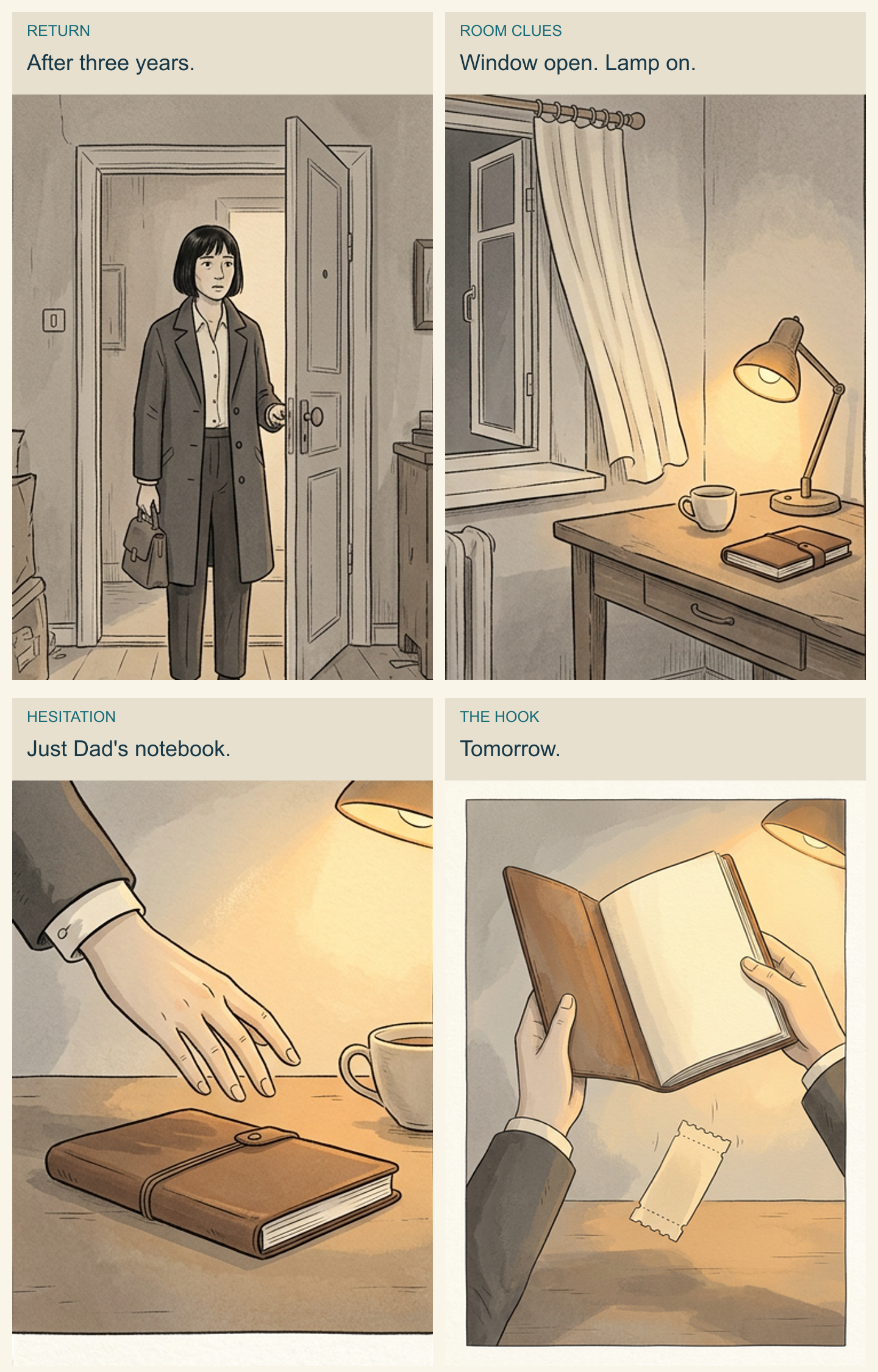
A novel-to-comic workflow should make its editorial decisions visible. This prose scene contains guilt, a room that seems to be waiting, and a ticket dated tomorrow. A four-panel page cannot give every sentence equal weight, so the adaptation prioritizes the causal turn before deciding which descriptions to compress.
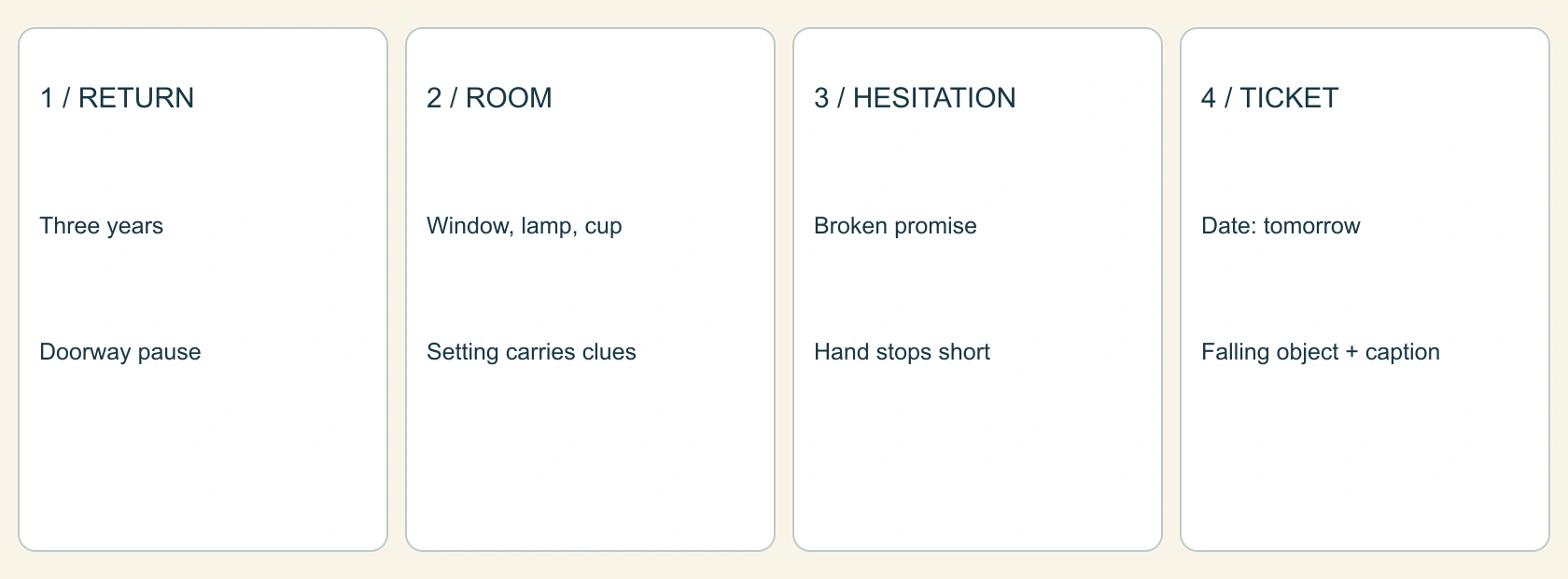
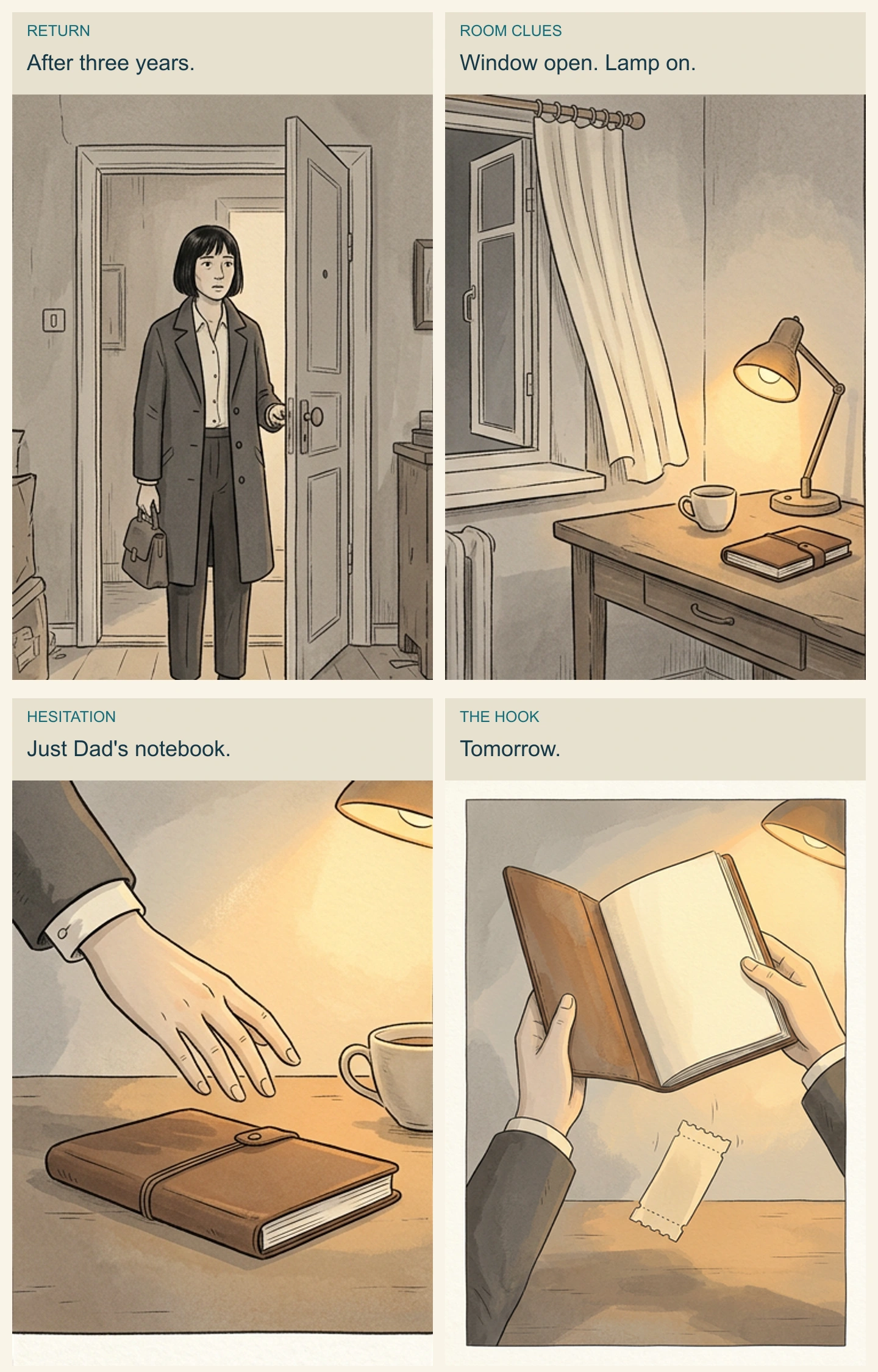
The page uses four beats. Panel 1 combines the return and threshold pause. Panel 2 gives the room clues their own image. Panel 3 isolates the hesitation at the notebook. Panel 4 carries the ticket reveal. The illustrated Mira is an adult with a short black bob, charcoal coat, and cream shirt; these are approved visual design choices for an otherwise lightly described prose character.
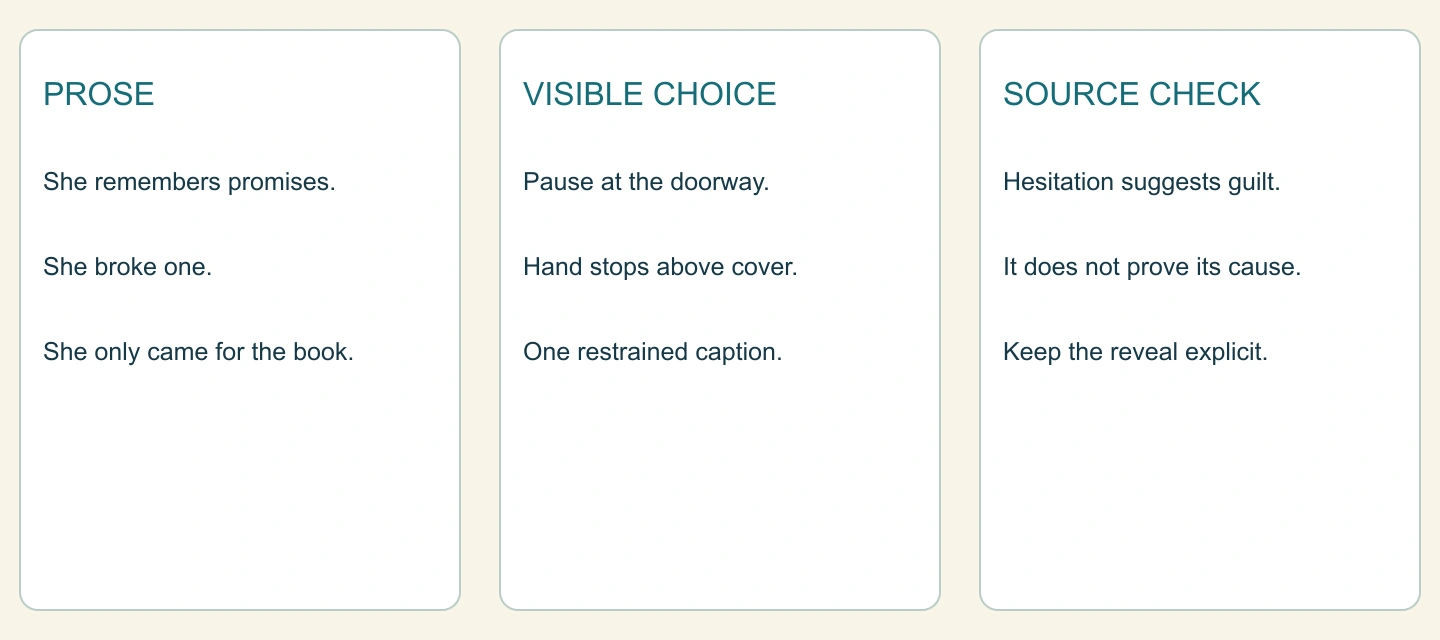
This editorial diagram separates visible hesitation from the exact promise named in the prose. A hovering hand can suggest resistance, but it cannot by itself tell the reader which promise Mira broke. In this short adaptation, that fact remains subtext. In a longer chapter, where the promise drives a later decision, you would likely need a more explicit caption, prop, or earlier setup scene.
Source element
Decision
What the page does
Return after three years
Keep in concise words
Doorway image plus “After three years.”
Window, lamp and cup
Visualize
Separate still-life panel preserves all three
Repeated memories of promises
Cut literal repetition
Hand stops above the notebook
Father's field notebook
Keep as recurring object
Same brown notebook across desk and reveal
Ticket dated tomorrow
Keep the hook
Falling ticket plus exact caption “Tomorrow.”
Unprinted destination
Preserve omission
Ticket has no readable destination
This is not the same as deleting every thought. The prose's emotional effect survives through a pause and one restrained line. Image and text divide the work. For a longer source, use chapter-to-comic beats and panel-count planning before expanding the sequence.
What the first image missed
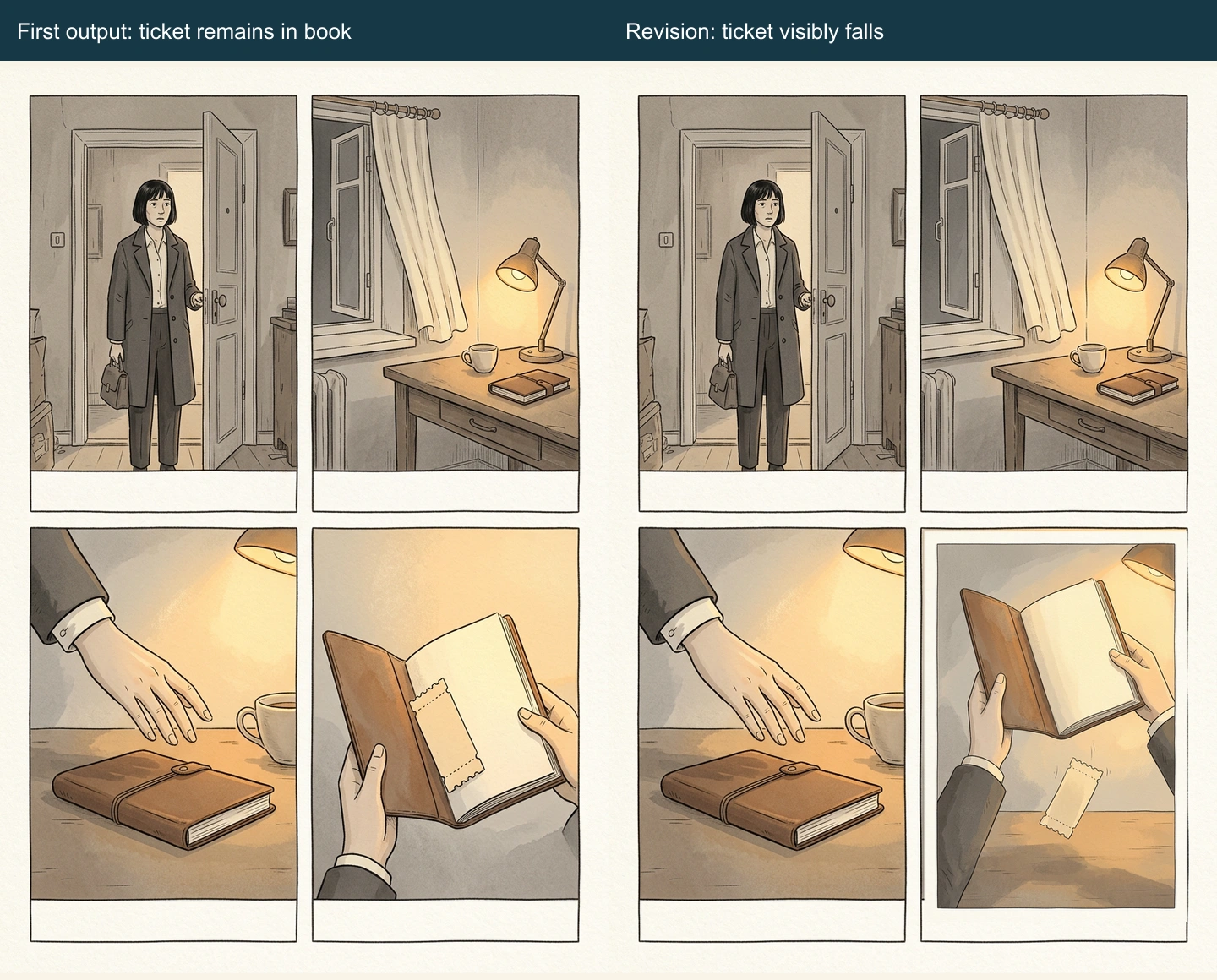
The actual first output contains four principal panels and preserves the open window, lit lamp, cup, and brown notebook. Its last panel shows the ticket still tucked against the notebook page. That makes it a discovery image, while the source explicitly describes the ticket slipping out.
The replacement request asked for one panel with a visible gap between the open book and the falling cream ticket, the same sleeves and lamplight, and no readable date or destination. This was a real visual revision of an observed result, not an invented “bad prompt” comparison.
The new panel makes the fall clearer. It was resized and placed inside the last panel locally; zero pixels outside that replacement rectangle changed. The camera, hands, and book within the replacement area do change. This is local composition, not a claim that a native Studio edit locked every other pixel.
Add the source-critical words separately
The reading copy uses four exact editorial text bands. “After three years” preserves elapsed time. “Just Dad’s notebook” compresses Mira's stated reason for coming. “Tomorrow” carries the date from the source. The generated ticket itself is blank: this is not an example of the image model rendering a correct date, and the printed caption is not a verified booking document.
Open the full reading-copy PNG. It is a locally assembled teaching page, not a native layered export or a print-ready master. Compare it with the downloadable source to see which information moved into text and which became image.
The train nature of a small blank perforated ticket is less explicit than the prose. The reading copy preserves the timing and the missing destination, but a longer adaptation could establish a railway motif earlier or use a short “train ticket” caption. This example does not claim complete factual communication through artwork alone.
Use the source-fidelity review to record what is visible, what requires words, and what remains intentionally ambiguous. Unlike the separate PDF worked example, this lesson focuses on narrative choices rather than native PDF ingestion or extraction accuracy.
A Reusable Adaptation Checklist
Before generating final pages, ask:
Question
Pass condition
What changes in this scene?
One-sentence answer
Which prose can be removed?
Anything repeated by image or action
Which image carries the hook?
One clear reveal panel
Which object repeats later?
Add it to the visual bible
Which emotion must survive?
Convert it into posture, distance, or choice
Which format are we making?
Comic, webtoon, manga, visual novel, or pitch
FAQ
Should I adapt the whole novel at once?
No. Start with one chapter or one scene. If that sample works visually, then scale the method.
Should I keep the narrator?
Sometimes. Keep narration when it adds voice or irony. Cut it when the image already communicates the same information.
Can this work for visual novels?
Yes. The same adaptation map can become background notes, sprite states, CG scene ideas, dialogue beats, and choice points.
Where should I start in LlamaGen.AI?
Start at LlamaGen.AI Novel to Comic. Upload a chapter, ask for an adaptation map, then turn the strongest beats into visual prompts.
Build the next scene from approved decisions
Novel adaptation is not compression. It is translation.
You are translating prose tools into visual tools: thought into action, description into setting, memory into props, and chapter rhythm into panels or scenes.
Upload one chapter to LlamaGen.AI Novel to Comic, ask for cut, keep, and visualize, and build the visual plan before making final comic pages.
Related hot tags
Novel to Comic
Story Adaptation
Tutorial
Narrativa
Ferramentas populares para criadores
Transforme inspiração em sua próxima história
Crie quadrinhos, storyboards e fotos estilosas com LlamaGen.