The project: turn one coaching lesson into six visual beats
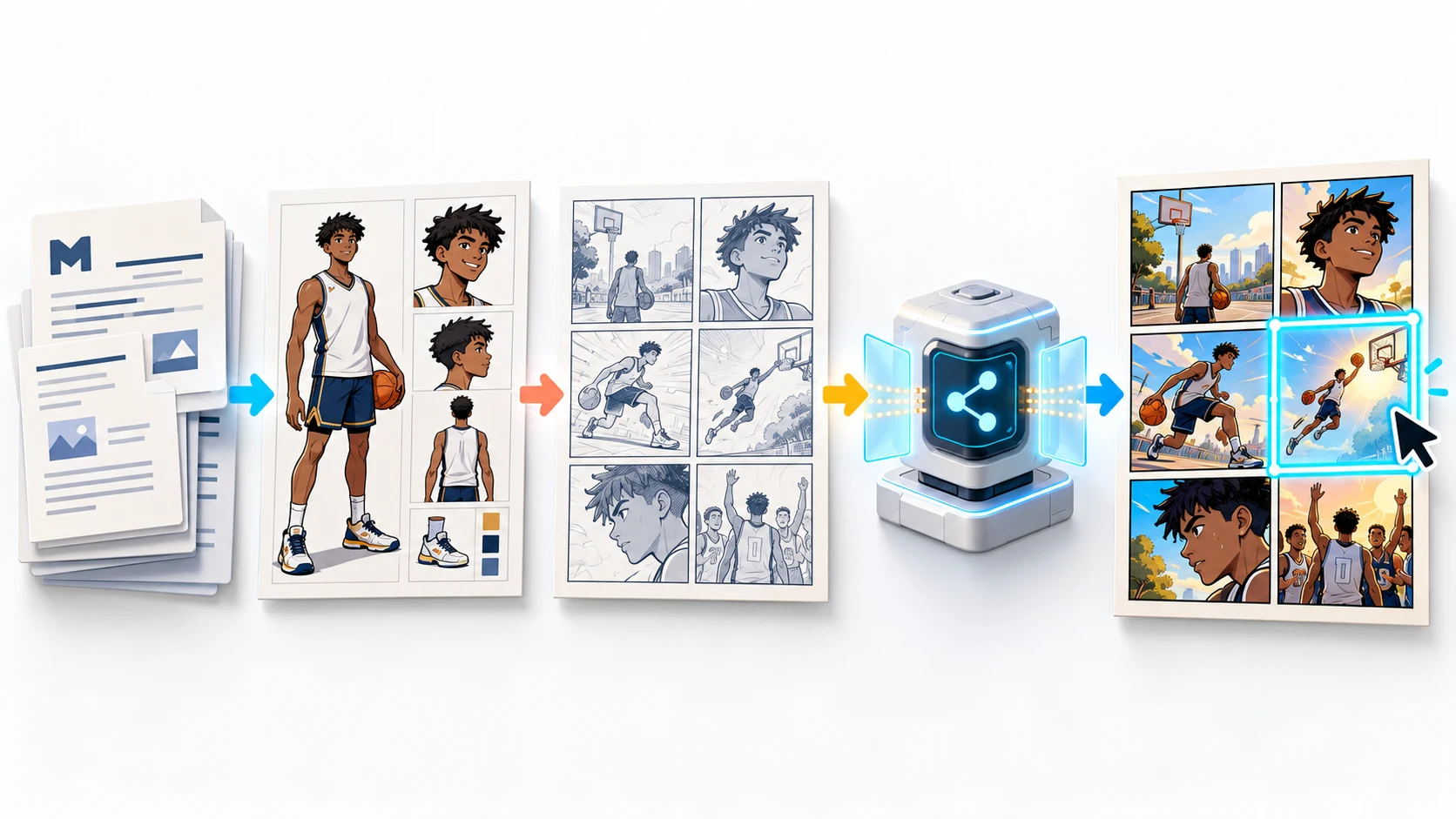
Claude Code is most useful for comics when the source material already lives in files. A coach, school communications team, or youth program may already have a lesson plan, a participant guide, a character reference, and rules that need to survive every revision. Those inputs need more structure than a single image prompt.
This walkthrough uses one fictional U14 basketball lesson:
check shoes and warm up before the drill
call clearly before receiving a pass
help a teammate after a fall
listen during the coach's recap
finish with one team reflection
The goal is not to replace a coach or local safety policy. It is to create a short visual teaching aid that an adult can review before sharing. The U.S. National Youth Sports Strategy identifies teamwork, leadership, relationships, and quality programming as meaningful youth-sports outcomes. A comic can make those expectations easier to scan and discuss.
We checked the live LlamaGen.AI plugin page, setup guide, Comic API documentation, and current MCP tool contract on October 13, 2026. The hosted MCP exposes four primary tools:
Tool
Role in this workflow
search_llamagen_docs
Reads current setup, authentication, limits, webhook, and error-handling guidance.
get_comic_api_usage
Checks the LlamaGen.AI plan and remaining Comic API credits before generation.
Дневник на промените
Разпалете мечтите на младите Където милиони истории оживяват
Преглед на най-новите функции на LlamaGen, подобрения на продукта, обновления в дизайна и важни корекции на грешки.
✦
✧
✦
✧
Нова среда за Разказване на истории
Създавайте неограничени истории, комикси, анимации, игри и още — за секунди, които докосват съвременната публика
create_comic_generation
Starts a generation with a prompt plus optional style, panel count, size, and one public character reference URL.
get_comic_generation_status
Polls the generation and can inspect generation, page, or panel status.
The current write tool creates a generation task. It does not silently rewrite files, publish the lesson, or replace a panel inside an existing page. Final layout, speech bubbles, panel replacement, and approval still happen in LlamaGen.AI. That boundary is useful: Claude Code orchestrates, and a human still approves.
Audience, learning goal, approved sequence, prohibited claims, and adult reviewer.
cast.md
Stable visual facts for recurring players and the coach.
style.md
Art direction, camera language, panel order, age-appropriate tone, and visual exclusions.
scene-plan.json
The approved panel-by-panel plan that generation must follow.
review-checklist.md
Continuity, readability, sports equipment, safeguarding, and policy checks.
generation-log.md
Generation ID, date, tool calls, outcome, errors, and panels marked for revision.
Do not place the LlamaGen API token in this folder. Keep it in the environment or a protected secret store.
Step 1: write a production brief, not a motivational paragraph
Use a compact lesson.md:
# U14 basketball communication comic

Audience: players ages 13-16
Learning goal: show that clear calls, teammate support, and respectful reflection
make practice safer and easier to follow.

Approved beats:
1. Jordan checks tied shoes and joins the warm-up.
2. Jordan raises a hand and calls before the pass.
3. Jordan receives the basketball in control.
4. Jordan helps a teammate stand after a normal loss of balance.
5. The adult coach leads a calm recap.
6. The team names one communication habit to repeat.

Guardrails:
- supervised indoor practice
- no diagnosis or medical instruction
- no real school or team marks
- no humiliation, punishment, or unsafe contact
- final output requires adult review
This is specific enough for visual planning while leaving local rules with the actual organization.
Step 2: lock the recurring player
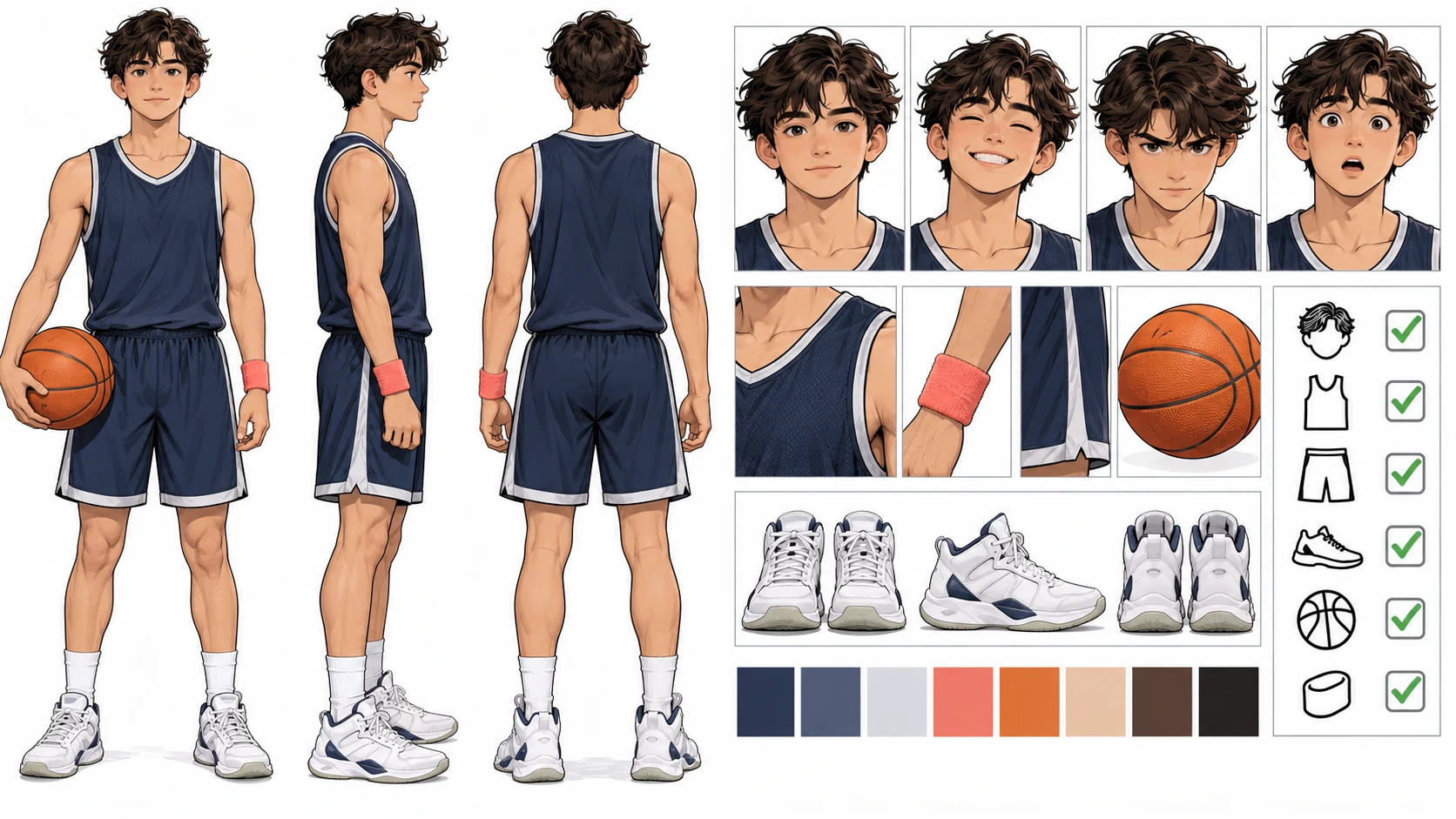
The character record should describe only facts that affect the image:
# Jordan continuity record

Age: 15
Hair: short dark curls with a clean tapered side
Uniform: plain navy practice jersey and shorts, no team logo
Anchor prop: coral wristband on the left wrist
Shoes: white high-top basketball shoes
Body language: attentive, cooperative, never aggressive

Continuity rules:
- preserve age, face, hair, jersey color, wristband side, and shoes
- use a basketball, never a soccer ball
- keep the adult coach visually distinct from players
If you have an approved character image, upload it to a public HTTPS location and pass it as characterImageUrl. The current MCP accepts one optional public character reference URL.
Step 3: connect Claude Code to Comic MCP
Create or rotate a token in LlamaGen.AI settings, then register the hosted MCP at user scope:
export LLAMAGEN_API_TOKEN="<YOUR_LLAMA_GEN_API_TOKEN>"

claude mcp add --scope user --transport http \
  --header 'Authorization: Bearer ${LLAMAGEN_API_TOKEN}' \
  llamagen https://llamagen.ai/api/mcp
Ask Claude Code to list the LlamaGen tools before any generation. If the four primary tools do not appear, stop and fix the endpoint, environment variable, or authorization header. Never paste the token into a story file, screenshot, prompt, or public URL.
Step 4: make Claude Code plan before it spends credits
Use this project prompt:
Read lesson.md, cast.md, style.md, and review-checklist.md.

1. Search the current LlamaGen Comic MCP documentation.
2. Check LlamaGen Comic API usage and report it separately from Claude usage.
3. Build scene-plan.json for one six-panel landscape comic.
4. For every panel include camera distance, action, emotion, background,
   continuity anchors, and the teaching purpose.
5. Flag any unsafe, medical, or policy-sensitive statement.
6. Show me the plan and wait for explicit approval.
7. Do not call create_comic_generation until I approve.
The approval gate matters. It lets a coach or communications lead fix the lesson before generation credits are used.
Step 5: validate scene-plan.json
A useful plan is concrete enough to audit:
{
  "audience": "ages 13-16",
  "panelCount": 6,
  "readingOrder": "left-to-right",
  "panels": [
    {
      "panel": 1,
      "camera": "medium-wide",
      "action": "Jordan checks tied shoes, then joins the warm-up line",
      "continuity": ["navy jersey", "coral left wristband", "white shoes"],
      "teachingPurpose": "pre-practice preparation"
    },
    {
      "panel": 4,
      "camera": "medium",
      "action": "Jordan offers a hand to a teammate after a normal loss of balance",
      "continuity": ["same Jordan", "basketball visible", "coach supervising"],
      "teachingPurpose": "teammate support"
    }
  ]
}
Before approval, check three layers:
Story: Does each panel advance one visible beat?
Sport: Are the ball, court, uniforms, and body mechanics plausible?
Education: Can the intended lesson be understood without a paragraph of exposition?
Step 6: create and poll the generation
After approval, Claude Code can call create_comic_generation with the following contract:
{
  "prompt": "The approved six-panel youth basketball lesson from scene-plan.json",
  "style": "bright modern educational graphic novel, clean ink, age-appropriate",
  "panelCount": 6,
  "size": "16:9",
  "characterImageUrl": "https://your-approved-public-reference.example/jordan.webp"
}
characterImageUrl is optional. Do not invent one. Creation returns a generation ID; Claude Code should save that ID in output/generation-log.md, poll get_comic_generation_status, and report completed assets or errors without exposing the token.
A redacted log can look like this:
## Generation run
- Verified: 2026-10-13
- MCP server: llamagen
- Input: approved scene-plan.json
- Requested panels: 6
- Generation ID: [redacted in public copy]
- Status: completed / failed / needs review
- Credits: copy the actual usage response; never estimate
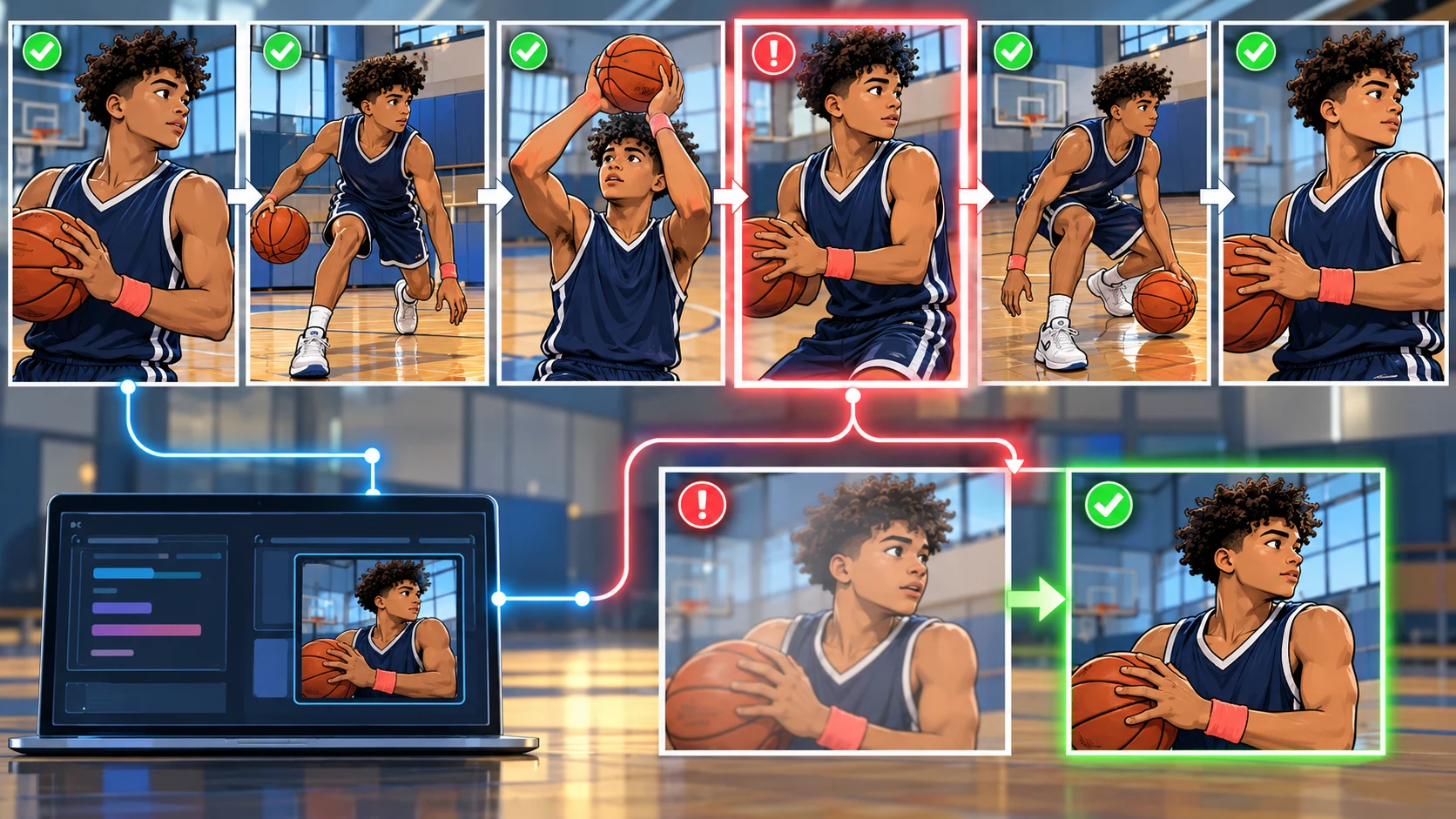
- Review: panel 4 needs a continuity repair
Step 7: repair one panel without discarding the page
Suppose panel 4 changes the jersey color, drops the wristband, or substitutes the wrong ball. Preserve the five approved panels. Create a replacement-panel brief that repeats only the necessary anchors:
Create one replacement comic panel for panel 4.
Jordan is the same 15-year-old athlete from the approved reference: short dark curls,
plain navy practice jersey, coral wristband on the left wrist, white high-top shoes.
Jordan offers a hand to a teammate after a normal loss of balance.
Keep the same medium camera angle, indoor gym, basketball, pose direction,
adult supervision, bright educational graphic-novel style, and no readable text.
The current MCP creates that replacement as a new generation task. It does not patch an existing page in place. Review the result, then replace the weak panel in the LlamaGen.AI editor and keep the other five panels unchanged.
Review checklist for youth sports content
Before publishing, ask an adult reviewer to confirm:
the characters look age-appropriate and are fictional or used with consent
the lesson matches the program's current rules and terminology
the coach remains visibly responsible for supervision
no panel gives medical, rehabilitation, or return-to-play advice
equipment and court details match the sport
body contact and gestures do not normalize unsafe behavior
the same player keeps the same face, uniform, wristband, and shoes
panel order is obvious on a phone and on a printed handout
captions and speech bubbles are readable and accessible
the final asset contains no private player data, secrets, or unauthorized marks
Common failure modes
Claude Code sees no LlamaGen tools
Confirm the endpoint is https://llamagen.ai/api/mcp, the token is available to the Claude Code process, and the authorization header is present. Then list tools again before generating.
The sequence looks exciting but teaches nothing
Return to teachingPurpose in scene-plan.json. Every panel should show one behavior, consequence, decision, or reflection. Remove decorative action that competes with the lesson.
The player changes between panels
Shorten the continuity record to the most visible anchors and repeat them in each relevant panel. Use one approved public reference image when available.
One panel is wrong
Do not regenerate all six by default. Write a replacement brief for the failed panel, preserve its camera and context, generate the replacement, and swap it in the editor.
FAQ
Can Claude Code create a full comic through LlamaGen.AI?
Claude Code can organize files, plan pages, call the current Comic MCP, and poll generations. LlamaGen.AI performs the visual generation and provides the editing surface. For a longer book, work page by page and keep an approved character record.
Can the MCP edit one existing panel directly?
The current write tool creates a comic generation. For a bad panel, create a focused replacement as a new task, inspect it, and replace the panel in the LlamaGen.AI editor.
Does Claude usage include LlamaGen.AI generation credits?
No. Claude handles its own model conversation and file work. LlamaGen.AI Comic API credits pay for comic generation. Check both separately before a batch.
Is an AI comic enough for sports safety instruction?
No. Treat it as a reviewed communication aid. A qualified adult must confirm the final content against current team, school, league, and local requirements. Do not use generated comics as medical or return-to-play guidance.
Build the first reviewed lesson
The useful pattern is simple: source files, explicit guardrails, an approved panel plan, one generation call, a saved generation ID, and focused repair. That makes Claude Code a project operator instead of a prompt improviser.