


LlamaGen logoLlamaGen brand
Prijavi seSubscribe Now20% Off
  1. Home
Kreiraj stripove
How to Create High-Quality Comic Prompts
All posts

How to Create High-Quality Comic Prompts
Saika
Saika
February 27th, 2026
Kopiraj link
  • Part 1: Character Creation
  • Key Elements for Character Creation:
  • Part 2: Crafting Detailed Prompts
  • Part 3: Scene Creation in Comics
  • Suggested Order for Scene Descriptions:
elevate-your-comics.png
Elevate your Comics with LlamaGen

Creating high-quality comics has never been easier, thanks to today's advanced text-generating image engines. These tools excel in understanding prompts and generating impressive visuals. However, the quality of the final comic is highly dependent on the precision of the prompts provided by the user. In this blog, we will explore how to craft effective prompts that will help you generate compelling comic content.

Part 1: Character Creation

Comics differ from traditional illustrations in that they require not only high image quality but also strong character development and a consistent artistic style. Therefore, starting with character creation is essential. When designing a character, focus on more than just their appearance. Consider their background story, personality traits, and behavioral characteristics. These elements add depth and make your characters relatable.

Key Elements for Character Creation:

  • Appearance Features: Think about hairstyle, skin color, and distinctive features.
  • Background Story: What experiences have shaped your character?
  • Personality Traits: Are they brave, shy, or cunning?
  • Behavioral Characteristics: How do they act in various situations?

Part 2: Crafting Detailed Prompts

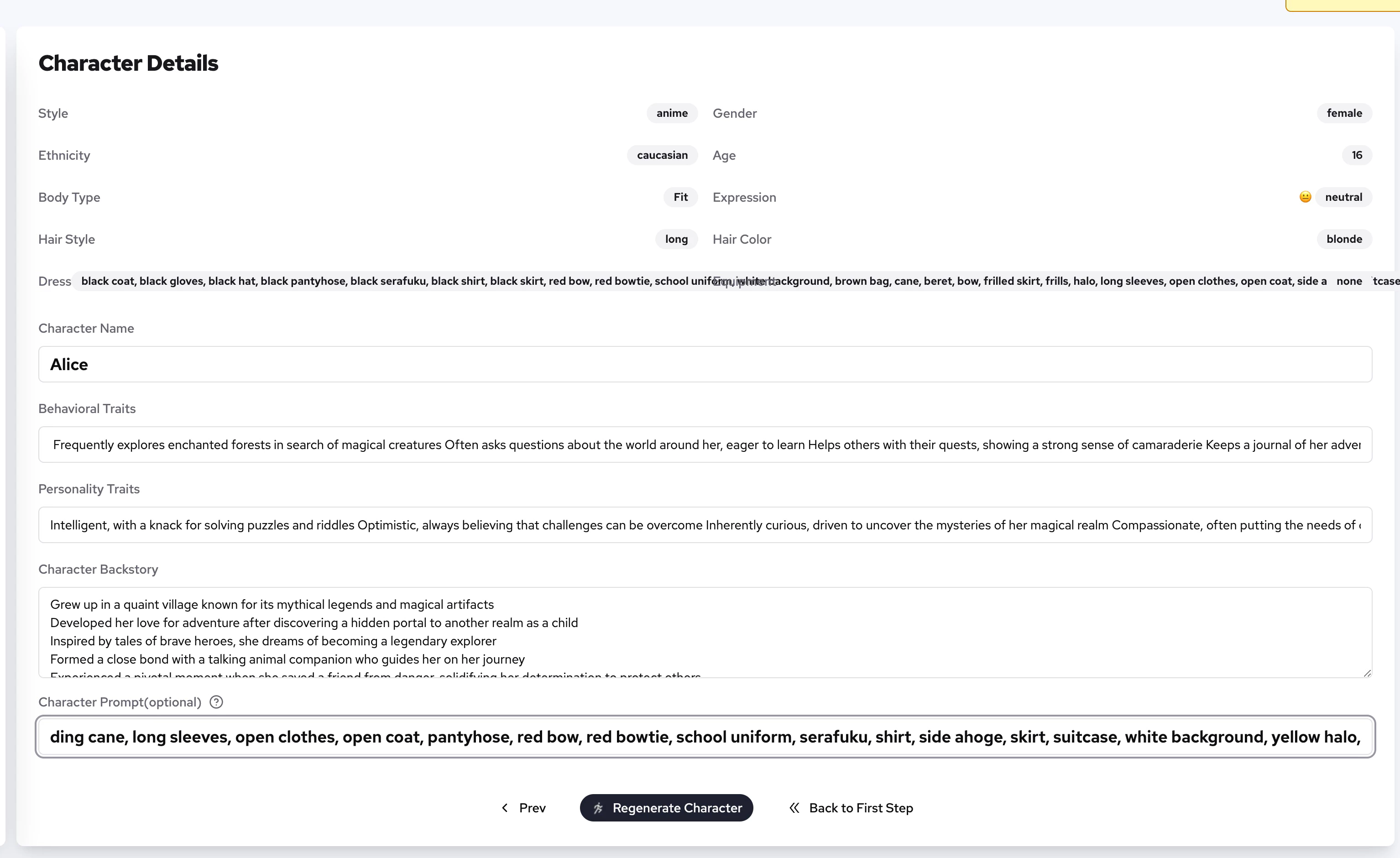
A well-crafted prompt is crucial for generating the desired character. Aim for detail in your descriptions while keeping them concise enough for easy adjustments. A good rule of thumb is to prioritize the order of features in your prompt. Here’s a recommended structure:

  1. Physical Characteristics: Start with the basics—hairstyle, skin color, eye color, and any unique physical traits.
  2. Clothing and Accessories: Describe what your character wears and any significant accessories.
  3. Art Style and Features: Specify the artistic style and any detailed features that should be highlighted.

Naming your character is also vital. A unique and appropriate name helps the model comprehend and accurately depict your character.
LlamaGen.Ai

Here's a simple example prompt:

Behavioral Traits

  • Frequently explores enchanted forests in search of magical creatures
  • Often asks questions about the world around her, eager to learn
  • Helps others with their quests, showing a strong sense of camaraderie
  • Keeps a journal of her adventures, documenting her discoveries
  • Engages in playful debates with fantasy beings, testing her wits

Personality Traits

  • Intelligent, with a knack for solving puzzles and riddles
  • Optimistic, always believing that challenges can be overcome
  • Inherently curious, driven to uncover the mysteries of her magical realm
  • Compassionate, often putting the needs of others before her own
  • Creative, using her imagination to devise clever solutions to problems

Character Backstory

  • Grew up in a quaint village known for its mythical legends and magical artifacts
  • Developed her love for adventure after discovering a hidden portal to another realm as a child
  • Inspired by tales of brave heroes, she dreams of becoming a legendary explorer
  • Formed a close bond with a talking animal companion who guides her on her journey
  • Experienced a pivotal moment when she saved a friend from danger, solidifying her determination to protect others

Character Prompts

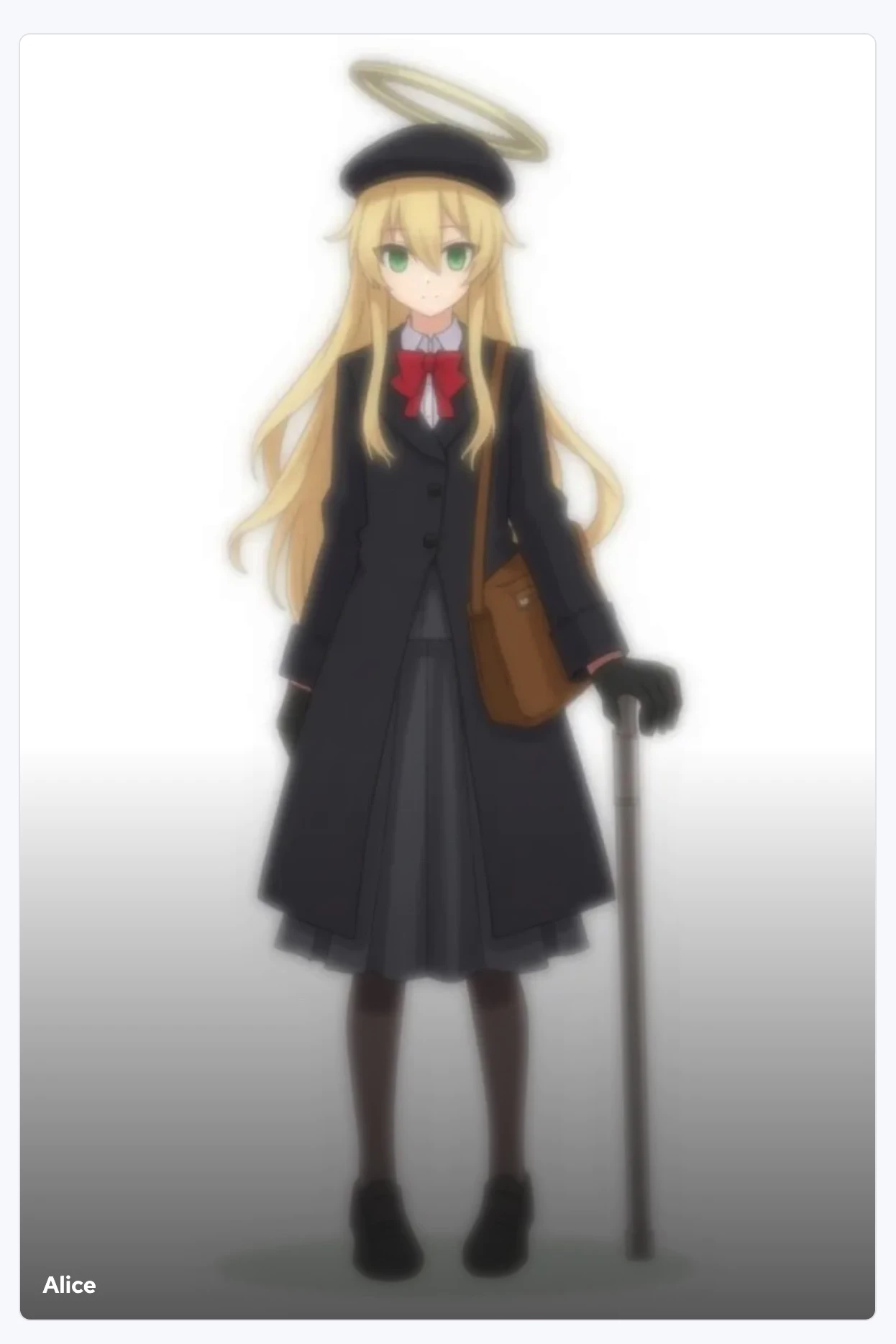
  • full body, green eyes, blonde hair, long hair, hair between eyes, hair intakes, beret, black coat, black gloves, black hat, black pantyhose, black serafuku, black shirt, black skirt, bow, bowtie, brown bag, cane, coat, frilled skirt, frills,gloves, halo, hat, holding, holding cane, long sleeves, open clothes, open coat, pantyhose, red bow, red bowtie, school uniform, serafuku, shirt, side ahoge, skirt, suitcase, white background, yellow halo,
LlamaGen.Ai

Part 3: Scene Creation in Comics

Once your characters are ready, it’s time to focus on creating the scenes that will bring your comic to life. Organize each panel with a clear label, such as "Panel 1:", and use short, descriptive sentences to illustrate the environment and objects in each scene. When describing character behavior, utilize natural language to convey their actions seamlessly.

Suggested Order for Scene Descriptions:

  1. Characters and Behavior: Introduce the characters and outline their actions.
  2. Environmental Details: Mention any important objects or elements in the scene.
  3. Use parentheses If something is not ideal, use parentheses to emphasize the part you want to express.
  4. Scene Appearance: Describe the setting and atmosphere.
  5. Separate Character Descriptions If there are multiple characters, describe their appearance, behavior, and actions separately. Ensure clear subjects so that the model understands which character is being described. Include appropriate shot descriptions to help the model generate visuals that enhance storytelling. This approach is crucial for effectively handling prompts involving multiple characters.

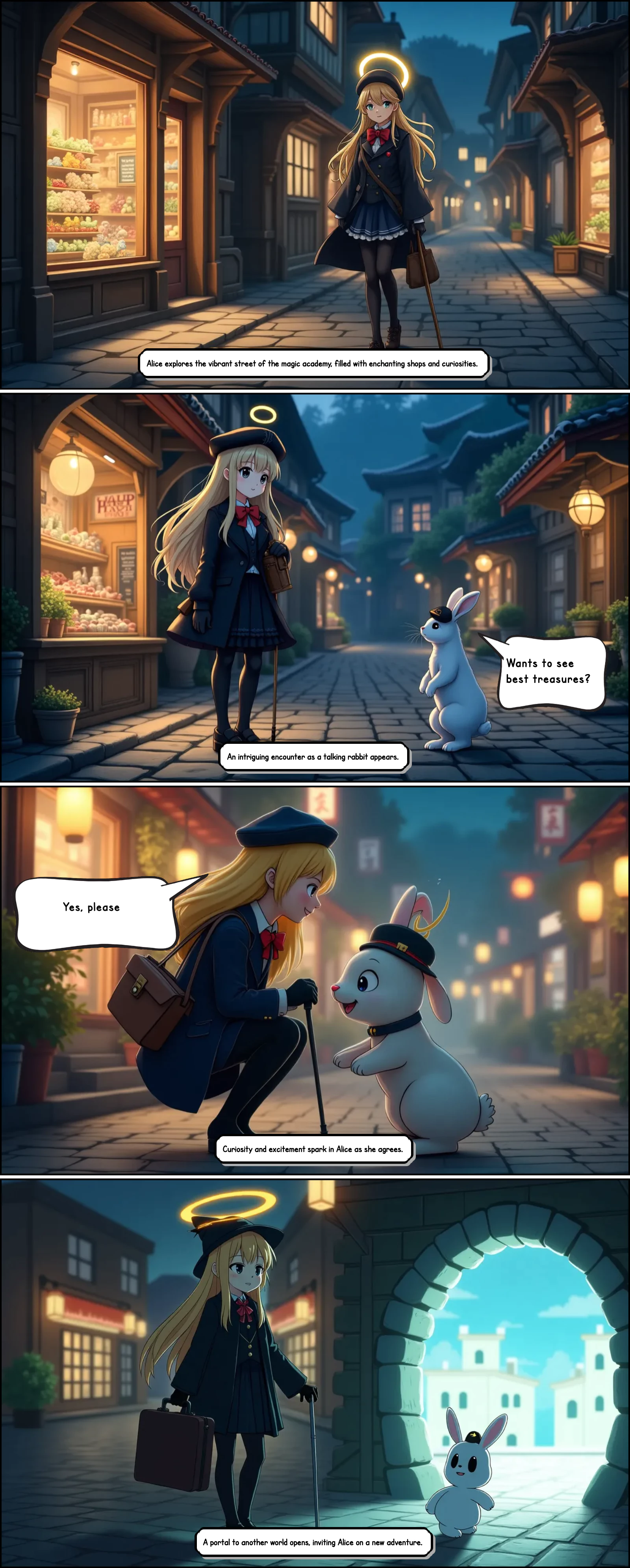
Here’s a simple four-panel comic description as an example:

  • Panel 1: Alice walks on the street of the magic academy. There are magical shops on both sides of the street of the magic academy. She looks at the goods in the windows of the magic shops with interest. The lights of the shops shine vertically on Alice's head.

  • Panel 2: rabbit, A rabbit talks to Alice. It's a cute rabbit with white hair and a black hat, in anime style. The rabbit asks Alice if she wants to see best treasures. Alice,Alice looks surprised.

  • Panel 3: Alice's curiosity turns into happiness, with soft eyes and a smile. Yes. The rabbit and Alice face the audience sideways. Alice leans over and says to the rabbit, Yes.

  • Panel 4: Rabbit, a prototype space crack appeared behind the rabbit, and inside was a daytime world with buildings with white walls. The rabbit stretched out its front paws and bent its body to invite Alice to enter.

  • Stone streets, wooden buildings, fantasy style, animation style, night, quiet atmosphere.
LlamaGen.Ai

By using tools like llamagen.ai, creators can simplify the process of comic creation, making it more accessible and efficient. However, remember that sophisticated prompt writing enhances the quality of your work.

If you have any ideas or comments, please feel free to reach out! Your feedback is invaluable and will help us make comic creation even more engaging and enjoyable.

Related hot tags

Popular creator tools

Turn inspiration into your next story

Create comics, storyboards and stylized photos with LlamaGen.

01

AI generator stripa

Turn an idea into polished comic strips in minutes.

Kreiraj stripove
02

AI generator manga

Create expressive manga art and multi-panel stories.

Create manga with AI
03

AI generator storyboarda

Visualize every scene before production starts.

Create storyboards with AI
04

Turn Picture into Comic

Transform any photo into a comic-style illustration.

Create comics from pictures
05

AI kreator stripova

Build shareable strips with consistent characters.

Create comic strips with AI

LlamaGen community

checkmark

Get hands-on help with your comics

checkmark

Showcase your comics to fellow LlamaGen creators

checkmark

Participate in special events to win gifts

Dnevnik promjena

Rasplamsajte snove mladih
Gdje milioni priča oživljavaju

Pregled najnovijih izdanja LlamaGen funkcija, poboljšanja proizvoda, ažuriranja dizajna i važnih ispravki grešaka.


✦
✧
✦
✧

Novi medij za pripovijedanje

Stvarajte neograničene priče, stripove, animacije, igre i još mnogo toga—u sekundi, na način koji odjekuje kod moderne publike

LlamaGen logo

Predvodimo budućnost AI generisanja stripova

  • 24/7 podrška
  • Nedjeljna ažuriranja
  • Sigurno i usklađeno
  • 99.9% dostupnosti

Download LlamaGen for free

iOSDesktop

Pitajte AI o LlamaGen-u

Proizvod
  • Latest launches
  • Funkcije
  • Comic strip maker
  • Manga StudioNovo
  • Pretvorite sliku u strip
  • Strip u video
  • AI Comic Factory
  • Comic Agent
  • iOS & Android
  • Mac i Windows
  • Preuzmi
  • Comic ZapNovo
  • AI generator stripa
  • AI Generator Crtanih Filmova
  • AI generator webtoona
  • Comic Strip Maker
  • Pretvorite sliku u strip
  • AI generator manga
  • Prevodilac Mange
  • Fotografija u anime
  • Anime u stvarni život
  • Manga Colorizer
  • Generator anime likova
  • Pixel game asset tools
  • AI sprite sheet generator
  • Best pixel game tools 2026
  • Program za izradu stripova od fotografija
  • Alternativa za Comic Life
Plans
  • Cjenovnik
  • Starter
  • Pro
  • Enterprise
  • Education
  • Comic API
Kompanija
  • Talk to Our Founder
  • O nama
  • Plan razvoja proizvoda
  • Karijere
  • Pošaljite nam email
  • Naš svijet maskota
Sister products
  • LlamaGen porodica
  • CineoBoardNovo
  • Comics API
  • Comic Zap
Zajednica
  • Kreatori
  • Partneri
  • Partner
  • Iskustva korisnika
Resursi
  • Dnevnik promjena
  • Blog
  • Guides
  • Personalized Comics
  • Funkcije
  • Alternative
Help
  • Centar za pomoć
  • Trust
  • Safe AI
  • Professional Services
  • Često postavljana pitanja
Alati
  • AI Logo Generator
  • Grokbot Style Character Generator
  • PNG to Comic
  • Tekst u strip
  • PDF to Comic
  • Script to Comic
AI alati
  • AI Outfit Extractor
  • AI Hairstyle Changer
  • AI Manga Hairstyle Changer
  • AI Wind Effect Generator
  • AI Depth Map Generator

Proizvod

  • Latest launches
  • Funkcije
  • Comic strip maker
  • Manga Studio
English (Australia)English (Canada)English (United Kingdom)English (India)SpanishFrench (Standard)Italian (Standard)JapaneseKoreanGerman (Standard)Chinese TraditionalChinese Traditional (Hong Kong)Chinese SimplifiedPortugueseTurkishPolishDutch (Standard)DanishThaiIndonesianNorwegian BokmålRussian
LinkedInX (Twitter)
  • Home
  • Articles
  • Blog
  • Kreiraj
  • Cjenovnik
  • API

Prethodni blogovi

Bible Comic Accuracy Checklist: Scripture, Context, Art, and Review

Bible Comic Accuracy Checklist: Scripture, Context, Art, and Review

A practical checklist for tracing every Bible comic panel to Scripture, reviewing context and visual

Jay
Jay
October 16th, 2026
How to Turn a Bible Lesson into a 6-Panel Sunday School Comic

How to Turn a Bible Lesson into a 6-Panel Sunday School Comic

A practical workflow for turning one Bible lesson into a six-panel comic, discussion prompts, and a

Jay
Jay
October 15th, 2026
Claude Code + Comic MCP: Turn a Youth Sports Lesson into Editable Comic Panels

Claude Code + Comic MCP: Turn a Youth Sports Lesson into Editable Comic Panels

A practical Claude Code and LlamaGen.AI Comic MCP workflow for turning a coach-approved youth basket

Monica
Monica
October 13th, 2026
How to Turn Couple Photos Into a Personalized Comic

How to Turn Couple Photos Into a Personalized Comic

Use two adults' photos and shared memories to create a personalized couple comic with stronger liken

Jay
Jay
October 13th, 2026
Pogledaj sve blogove
Kontaktirajte prodaju
  • Education Plans
  • Nastavnici
  • Studenti
  • Nastavnici i učenici
  • Startupi
  • Popusti za obrazovanje
  • Medijski paket
  • KOL Partnership
  • Sadržaj
  • Velika
  • Zid ljubavi
  • LlamaGen MCPNovo
  • LlamaGen Developer
  • Best AI Apps
  • GPT-6 Manga Coloring Guide
  • Claude Comic Book Skill
  • Gemini AI Comic Guide
  • Taj strip
  • Popusti za obrazovanje
  • Popust za studente
  • Sigurnost
  • Pristupačnost
  • Video tutorijal
  • Kontaktirajte nas
  • Sitemap
  • Book to Comic
  • Pretvorite sliku u strip
  • AI Generator Piksel Arta
  • Educational Comics
  • AI generator videa
  • Gemini AI Video Generator
  • Besplatan AI generator videa bez lica
  • Strip u video
  • Make Storyboard Software
  • AI generator storyboarda
  • Screenwriting Software
  • Screenplay Editor
  • Story AI
  • AI generator priča
  • Storybook Generator
  • AI generator slika
  • AI razdvajač slojeva
  • AI Camera Angle Control
  • AI Generator Piksel Arta
  • Pixel game asset tools
  • AI sprite sheet generator
  • Sprite sheet slicer
  • Best pixel game tools 2026
  • Animation API
  • ChatGPT/Codex Plugin
  • ChatGPT Install Guide
  • Claude Code Plugin
  • Claude Code Install Guide
  • AI White Background
  • AI Object Remover
  • AI Virtual Try-On
  • AI Unblur Images
  • AI Denoise
  • AI Photo Restoration
  • AI Product Shadows
  • AI Background Generator
  • AI Headshot Generator
  • AI Emoji Maker
  • AI Background Changer
  • AI Open Eyes
  • AI Beauty
  • AI Product Photography
  • Novo
  • Pretvorite sliku u strip
  • Strip u video
  • AI Comic Factory
  • Comic Agent
  • iOS & Android
  • Mac i Windows
  • Preuzmi
  • Comic ZapNovo
  • AI generator stripa
  • AI Generator Crtanih Filmova
  • AI generator webtoona
  • Comic Strip Maker
  • Pretvorite sliku u strip
  • AI generator manga
  • Prevodilac Mange
  • Fotografija u anime
  • Anime u stvarni život
  • Manga Colorizer
  • Generator anime likova
  • Pixel game asset tools
  • AI sprite sheet generator
  • Best pixel game tools 2026
  • Program za izradu stripova od fotografija
  • Alternativa za Comic Life
  • Sister products

    • LlamaGen porodica
    • CineoBoardNovo
    • Comics API
    • Comic Zap
    • Velika

    Plans

    • Cjenovnik
    • Starter
    • Pro
    • Enterprise
    • Education
    • Comic API
    • Kontaktirajte prodaju
    • Education Plans
    • Nastavnici
    • Studenti
    • Nastavnici i učenici
    • Startupi
    • Popusti za obrazovanje

    Kompanija

    • Talk to Our Founder
    • O nama
    • Plan razvoja proizvoda
    • Karijere

    Help

    • Centar za pomoć
    • Trust
    • Safe AI

    Zajednica

    • Kreatori
    • Partneri
    • Partner
    • Iskustva korisnika
    • Zid ljubavi
    • LlamaGen MCPNovo
    • LlamaGen Developer

    Resursi

    • Dnevnik promjena
    • Blog
    • Guides
    • Personalized Comics

    Alati

    • AI Logo Generator
    • Grokbot Style Character Generator
    • PNG to Comic
    • Tekst u strip

    AI alati

    • AI Outfit Extractor
    • AI Hairstyle Changer
    • AI Manga Hairstyle Changer
    • AI Wind Effect Generator
    • AI Depth Map Generator
    • AI White Background
    • AI Object Remover
    • AI Virtual Try-On
    • AI Unblur Images
    • AI Denoise
    • AI Photo Restoration
    • AI Product Shadows
    • AI Background Generator
    • AI Headshot Generator
    • AI Emoji Maker
    • AI Background Changer
    • AI Open Eyes
    • AI Beauty
    • AI Product Photography
    Instagram
    YouTube
    Facebook group
    Reddit
    Discord
    Email support
    PrivatnostUslovi

    © 2026 LlamaGen.Ai Sva prava zadržana

    LinkedInX (Twitter)InstagramYouTubeFacebook groupRedditDiscordEmail support
    PrivatnostUsloviPreuzmi branded materijale© 2026 LlamaGen.Ai Sva prava zadržanaSve usluge su dostupne online
    How to Create High-Quality Comic Prompts - LlamaGen.AI Blog
    Pošaljite nam email
  • Naš svijet maskota
  • Medijski paket
  • KOL Partnership
  • Sadržaj
  • Professional Services
  • Često postavljana pitanja
  • Sigurnost
  • Pristupačnost
  • Video tutorijal
  • Kontaktirajte nas
  • Sitemap
  • Funkcije
  • Alternative
  • Best AI Apps
  • GPT-6 Manga Coloring Guide
  • Claude Comic Book Skill
  • Gemini AI Comic Guide
  • Taj strip
  • Popusti za obrazovanje
  • Popust za studente
  • PDF to Comic
  • Script to Comic
  • Book to Comic
  • Pretvorite sliku u strip
  • AI Generator Piksel Arta
  • Educational Comics
  • AI generator videa
  • Gemini AI Video Generator
  • Besplatan AI generator videa bez lica
  • Strip u video
  • Make Storyboard Software
  • AI generator storyboarda
  • Screenwriting Software
  • Screenplay Editor
  • Story AI
  • AI generator priča
  • Storybook Generator
  • AI generator slika
  • AI razdvajač slojeva
  • AI Camera Angle Control
  • AI Generator Piksel Arta
  • Pixel game asset tools
  • AI sprite sheet generator
  • Sprite sheet slicer
  • Best pixel game tools 2026
  • Animation API
  • ChatGPT/Codex Plugin
  • ChatGPT Install Guide
  • Claude Code Plugin
  • Claude Code Install Guide


