All posts
Two OCs in One Comic Panel: Keep Identities and Speakers Clear

Jay
November 20th, 2026
Multiple character consistency gets harder when two OCs share a prop and the camera reverses. A teal coat staying teal is only one check. You also need to track whose face is visible, which hand touches the notebook, and who owns the next line of dialogue.
This two-OC dialogue scene pairs our existing adult character Maya with a new adult character, Theo. Start with LlamaGen.AI's AI Comic Generator for the comic workflow, or OC Maker to develop your own cast. Below are the approved references, the six-panel first output, the actual corrections, and a locally lettered reading page.
Lock two identities before placing them together
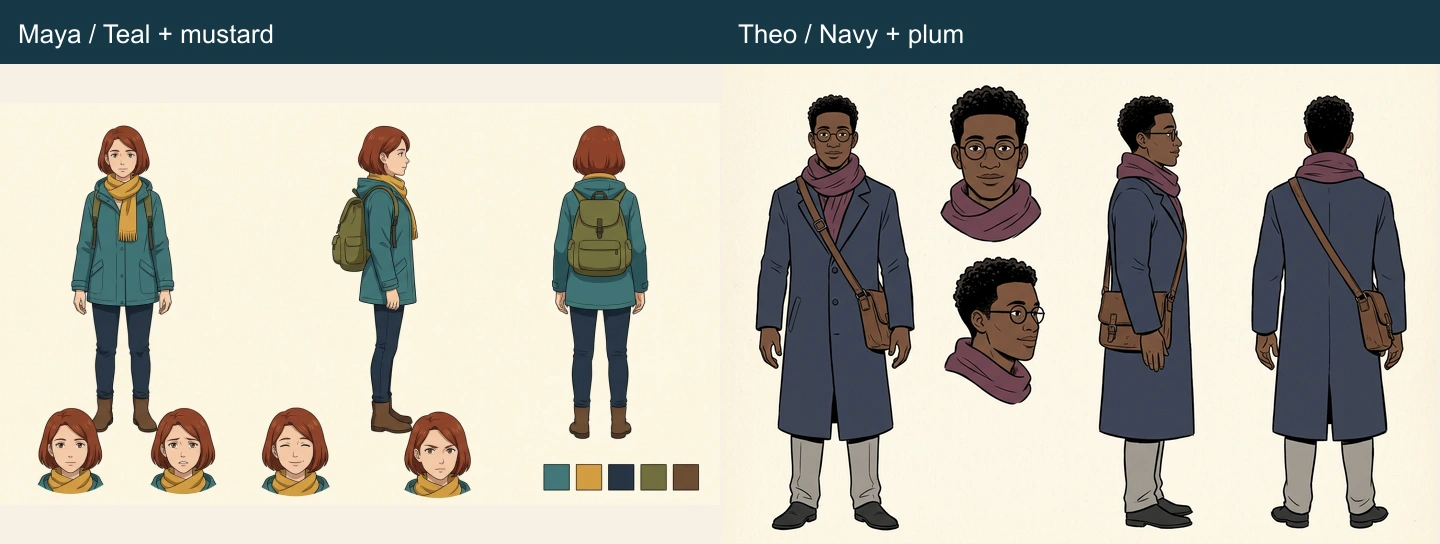
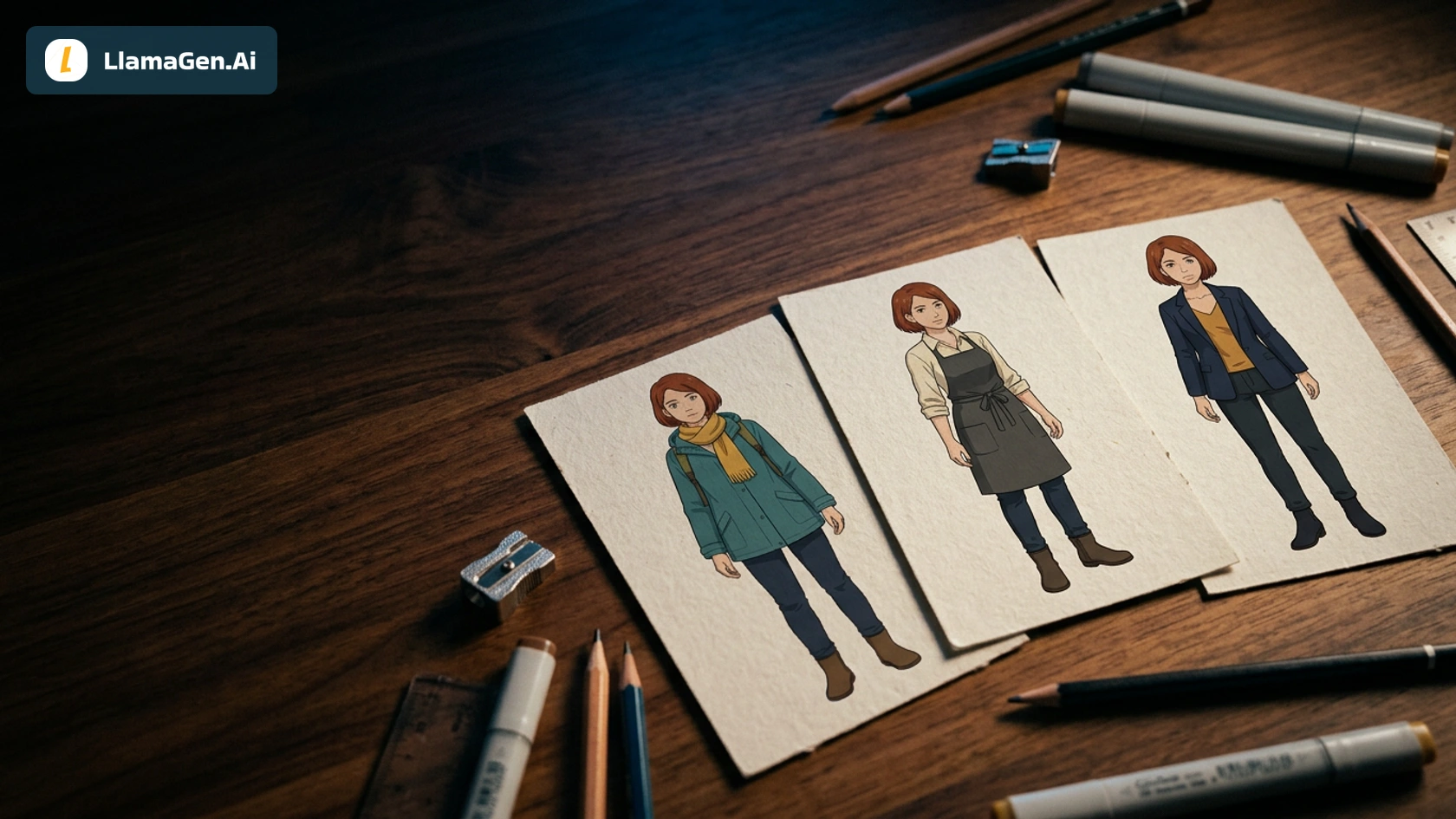
Maya keeps her established short auburn bob, warm brown eyes, teal raincoat, mustard scarf, dark jeans, brown boots, and olive backpack. Theo has dark brown skin, short black curls, round glasses, a navy coat, plum scarf, gray trousers, and a brown crossbody satchel.
The direction asks for Maya to read around 165 cm and Theo around 185 cm. Those are art-direction targets, not measurements recovered from the generated image. In review, we look for a clear taller/shorter relationship in comparable views; a close-up cannot establish absolute height.
| Check | Maya | Theo |
|---|---|---|
| Face and hair | Auburn bob, established adult face | Black curls, dark skin, round glasses |
| Main clothing | Teal coat, mustard scarf | Navy coat, plum scarf |
| Carried bag | Olive backpack | Brown crossbody satchel |
| Initial screen position | Left | Right |
| Story prop at start | Holds one red notebook | Empty hands |
Distinct silhouettes help the reader separate them, but they do not excuse a face swap. Keep the two source records separate, and use stable names throughout the scene contract. The character consistency checklist covers the broader review process; this case focuses on a shared shot and a camera reversal.
Write the six-panel interaction before the dialogue
The story is a simple notebook question. Maya asks whether the notebook belongs to Theo. He accepts it, asks to open it, realizes it is not his, and goes with Maya to ask at the station desk.
| Panel | Visible action | Camera and position | Prop state |
|---|---|---|---|
| 1 | The two adults face each other | Wide, Maya left and Theo right | Closed notebook with Maya |
| 2 | Maya raises the cover for inspection | Same axis | Still closed |
| 3 | Maya passes it toward Theo | Hand close-up | One closed book, distinct hands |
| 4 | Theo asks before opening | Reverse, Theo left and Maya's back at right | Closed with Theo |
| 5 | Theo inspects it | Back to Maya left and Theo right | Open with Theo |
| 6 | Maya points toward the desk | Wide on the master axis | Closed with Theo |
The reverse shot is intentional. “Maya is always the left-hand speaker” would be the wrong rule here. Identity stays attached to the character; screen position belongs to the current camera view.
We requested a two-column, three-row page with no generated dialogue. Upper areas were reserved where practical, and exact words were added locally later. That keeps a visual correction from forcing a dialogue rewrite.
Keep the first output and name its actual problems
Production scope, November 21, 2026: the new Theo reference, six-panel page, and replacement images were generated directly through locally configured Vertex. Maya's approved reference is reused from the earlier tutorial. We then composed replacement rectangles and an editable SVG locally. No native signed-in Studio project or export was performed, and no general success percentage is inferred from this single case.
The first page preserved the main identity distinction in our visual review: Maya remained auburn-haired in teal and mustard, while Theo retained curls, glasses, and navy with plum. The wide views also showed Theo as taller. Two story details still needed work.
In panel three, a lower supporting palm hovered below the book while another hand rested above it. The intended transfer was harder to read than the scene contract. In panel four, Theo had already opened the book, one beat before the planned question and opening.
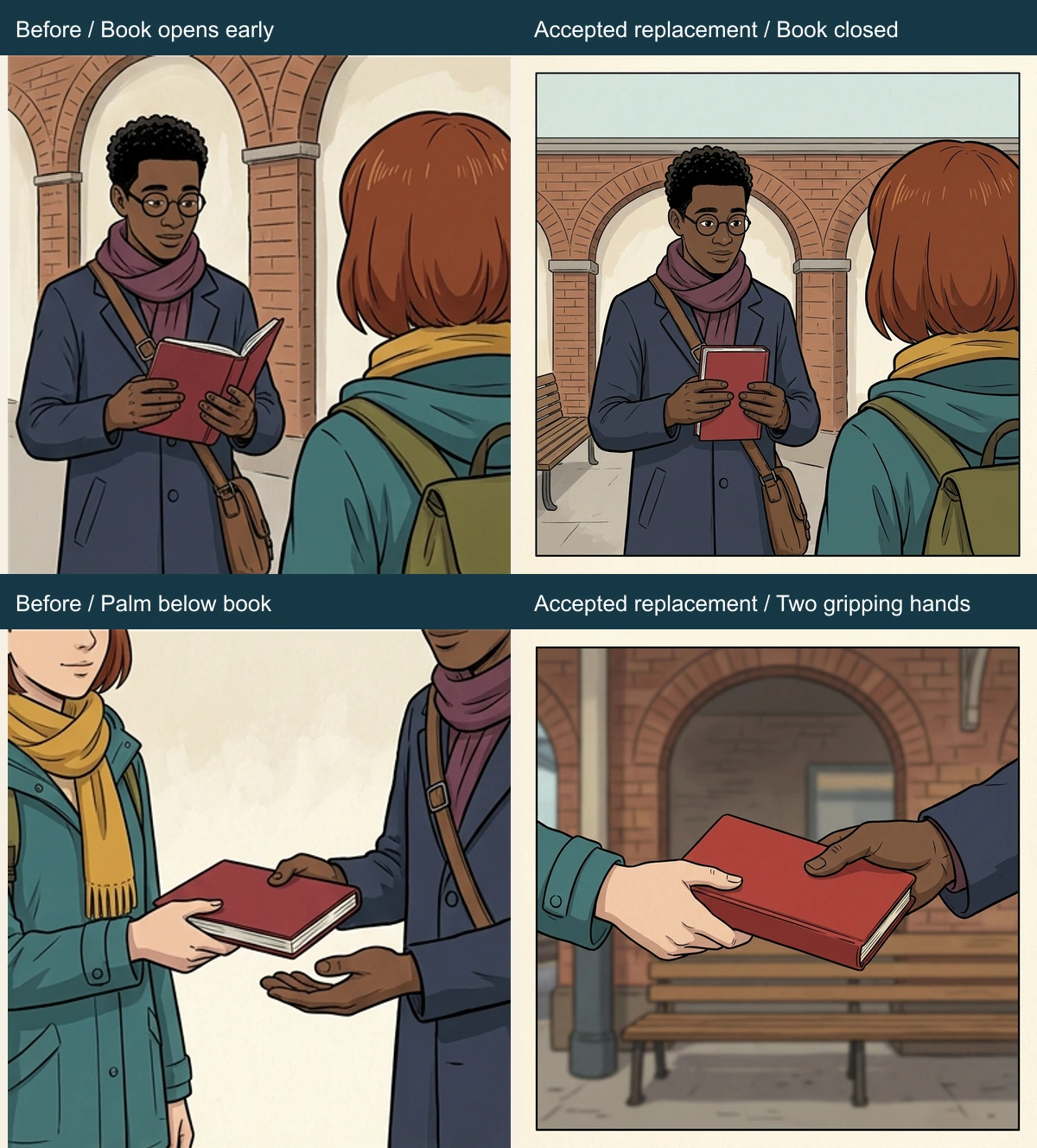
We requested a handoff replacement first. That first repair still included the hovering palm and an additional hand. It is retained in the source pack, rather than being omitted from the record or counted as a clean fix.
The second handoff request simplified the composition to the notebook and exactly two gripping hands: one pale hand from a teal sleeve on the left, one dark hand from a navy sleeve on the right. Both touch the same closed book. Removing the wider torso context made the grip easier to inspect, although it also changed the framing and background detail.
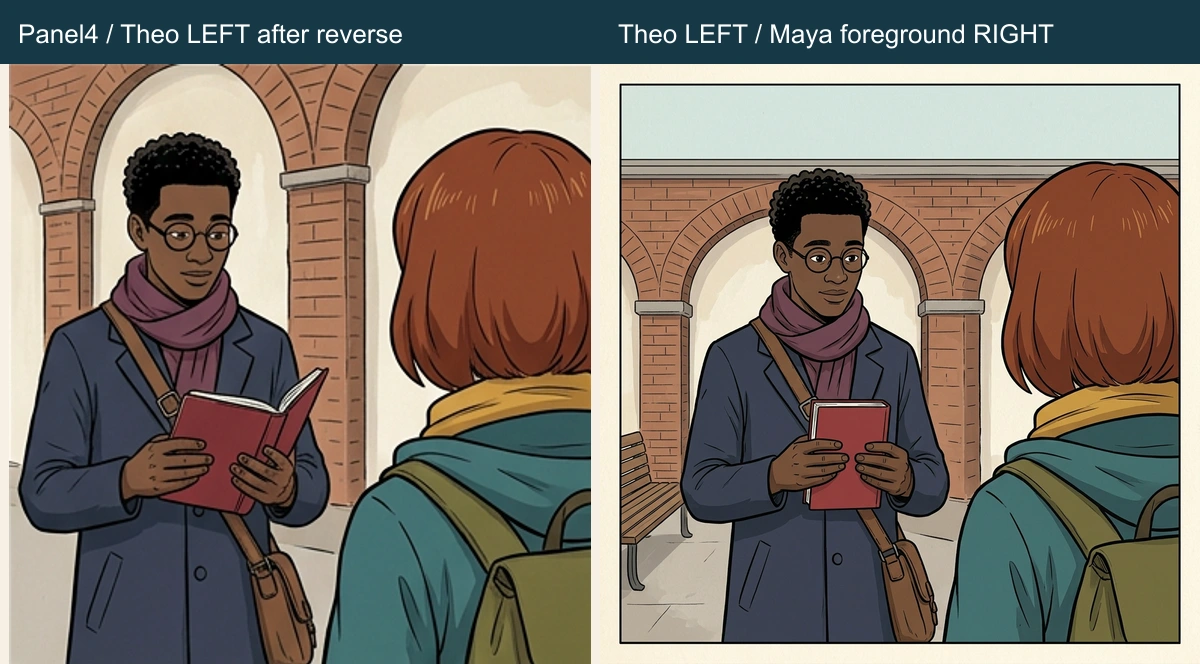
A separate replacement kept Theo facing the camera on the left, Maya's auburn head and backpack in the right foreground, and the notebook visibly closed. The next panel can then perform the opening.
Treat the reverse shot as a speaker-map change
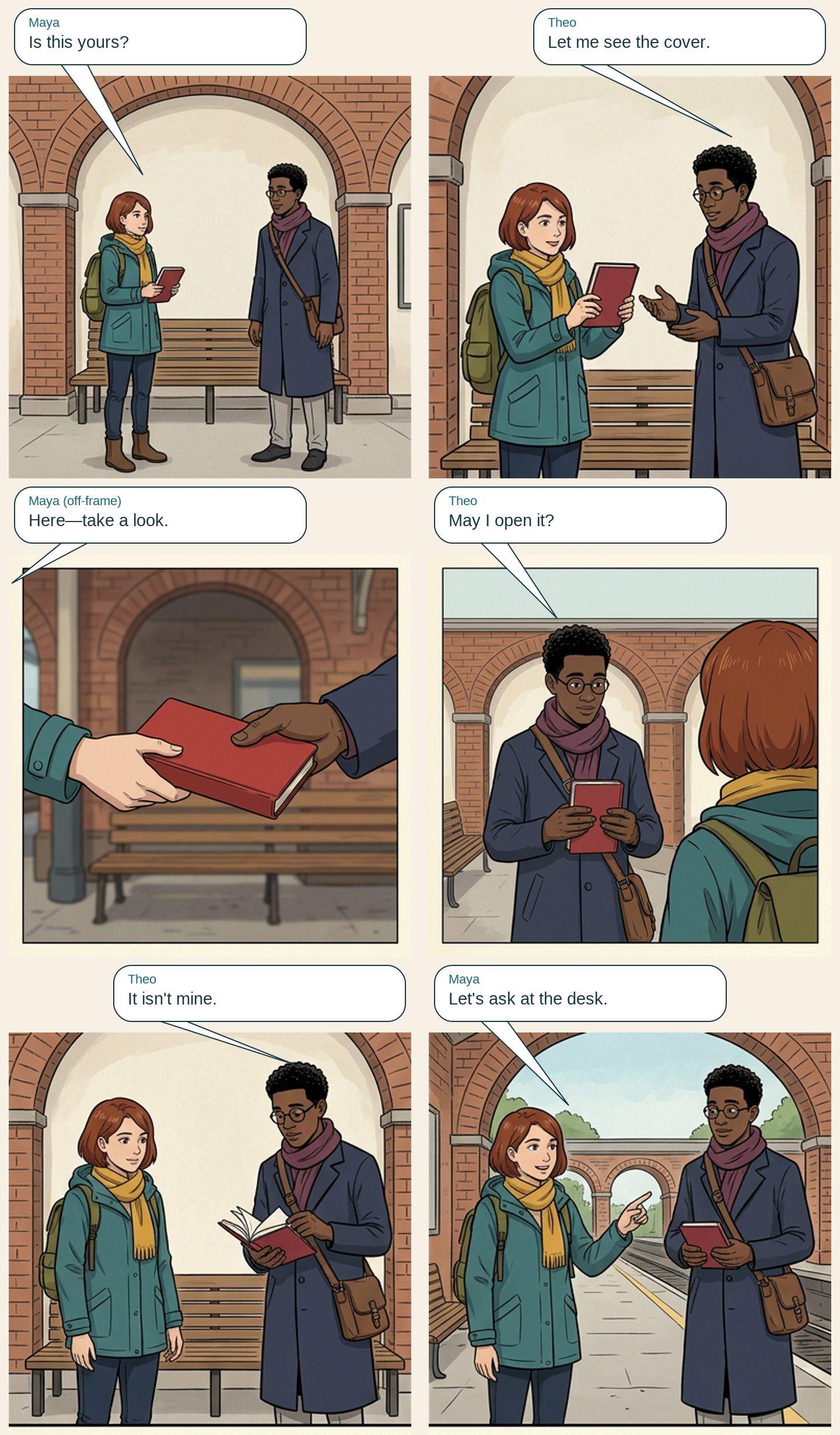
The speaker table for the final reading page is deliberately short, with one line per panel:
| Panel | Speaker | Screen location | Exact local line |
|---|---|---|---|
| 1 | Maya | Left | Is this yours? |
| 2 | Theo | Right | Let me see the cover. |
| 3 | Maya | Off-frame left | Here—take a look. |
| 4 | Theo | Left after the reverse | May I open it? |
| 5 | Theo | Right | It isn't mine. |
| 6 | Maya | Left | Let's ask at the desk. |
Panel three is a close-up without visible speaking mouths. The label explicitly identifies Maya as an off-frame voice, and the balloon points toward the left frame edge. It is not a balloon attributed to a hand. In panel four, Theo's balloon moves left with his screen position; his name and identity do not change.
For denser conversations, first check whether the reading path can stay simple. More balloons can hide the hands or make the order ambiguous. The speech-bubble placement guide covers that layout problem separately.
Read the assembled dialogue page
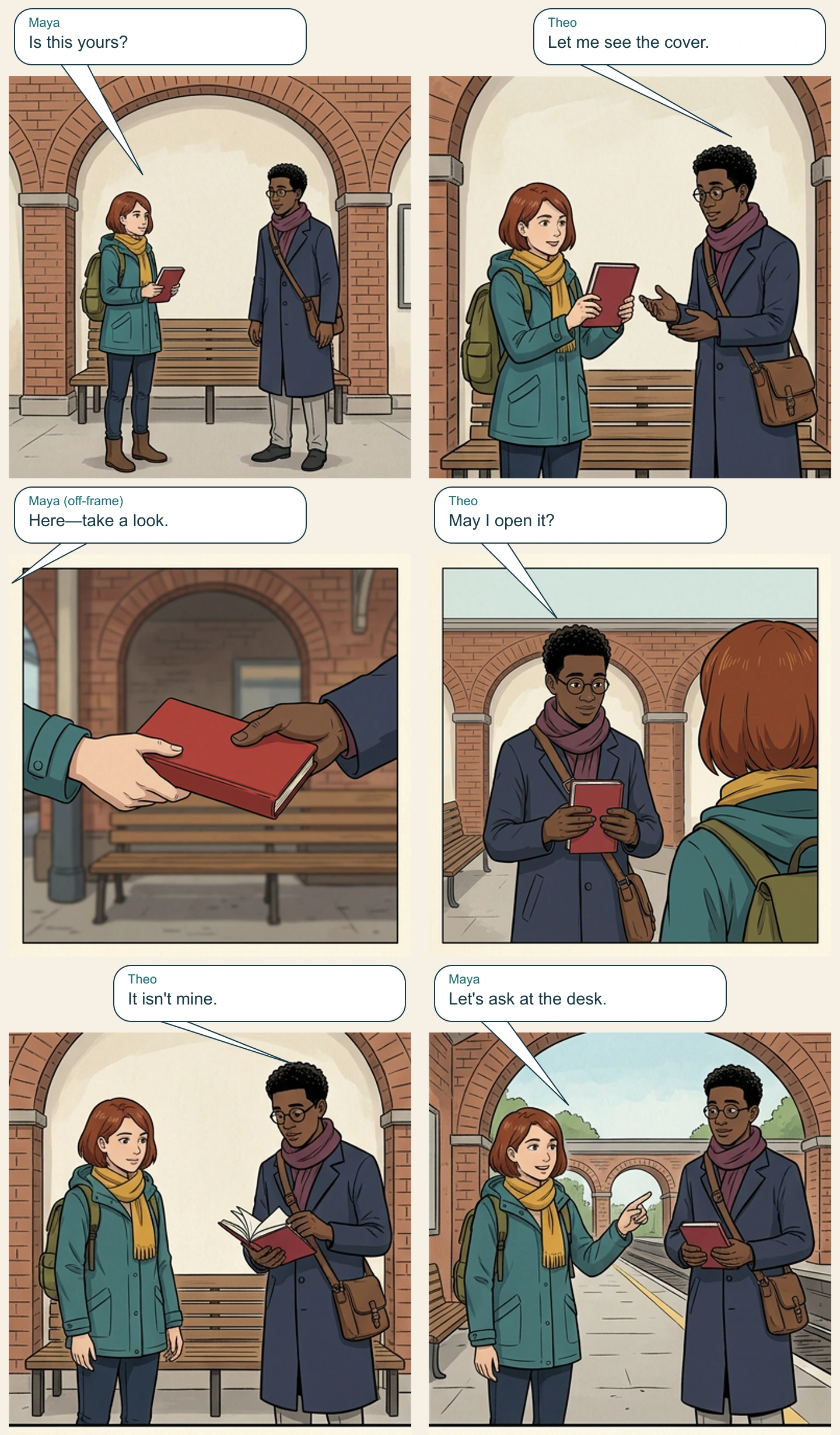
The page reads left-to-right, row-by-row. Local lettering uses named balloons and reserved space above the artwork. It is a teaching layout, not evidence that the image model generated correctly spelled dialogue or that the production editor exposed these layers.
Download the editable SVG reading page and speaker map. The SVG embeds the panel artwork and keeps dialogue as text, so another editor can revise a line without regenerating a face. Font appearance can vary between applications; inspect it in the editor you plan to use.
The two accepted visual replacements were inserted into the original page locally. A pixel comparison confirmed that the other regions remained unchanged. That gives this assembled artifact a narrow, checkable property; it does not establish atomic panel-locking behavior in a native generation service.
Review three different kinds of continuity
First check identity: face, hair, glasses, coat, scarf, and bag belong to the right adult. Second check staging: Theo's relative height, the axis reversal, and who holds the notebook make sense. Third check dialogue ownership: each line names the intended speaker, and its placement follows the camera.
The result still has limits. The handoff repair uses a closer crop and a softer background than adjacent panels. Satchel orientation and fine coat construction vary. We have not run a reader study to establish whether every viewer identifies the speakers immediately, and the relative-height check is limited to suitable views.
Those limits are reasons to retain the source package, not to flatten the result into an unsupported “100% consistent” score. The package contains the first page, both handoff attempts, the reverse repair, the new Theo reference, and Maya's source reference.
For your own two-character scene, approve each OC separately, assign the shared prop once per beat, write camera positions per panel, and add dialogue only after the interaction is readable. Continue in AI Comic Generator, with OC Maker supporting reusable character records.
Related hot tags
OC Maker
Последователност на героя
Comic Dialogue
Популярни инструменти за творци
Превърнете вдъхновението в следващата си история
Създавайте комикси, сторибордове и стилизирани снимки с LlamaGen.
01
Генератор на AI комикси
Превърнете идея в завършени комикс ивици за минути.
Създай комикси02Генератор на AI манга
Създавайте изразителна манга и много панелни истории.
Създавайте манга03AI генератор на сториборд
Визуализирайте всяка сцена преди да започне продукцията.
Създавайте сторибордове04Превърнете снимка в комикс
Превърнете всяка снимка в илюстрация в комикс стил.
Създавайте комикси от снимки05Създател на AI комикс ленти
Създавайте лесни за споделяне ивици с последователни персонажи.
Създавайте комикс ивици
Разпалете мечтите на младите
Където милиони истории оживяват
Преглед на най-новите функции на LlamaGen, подобрения на продукта, обновления в дизайна и важни корекции на грешки.