


All posts
How to Make an AI Drama: A Six-Shot Pilot and Series Continuity Plan

Jay
November 23rd, 2026
Learning how to make an AI drama is easier when you start with a scene small enough to finish and inspect. This example limits the scope to two original adult characters, one station room, one notebook, and a small emotional change. The result is a playable 30-second illustrated pilot plus a continuity package for a possible second episode.
Use LlamaGen.AI Storyboard to organize your own sequence; the public storyboard overview explains the planning workflow. In this case, the images, video requests, and final edit were prepared outside a signed-in Studio session, with the production boundary stated below.
Watch the actual six-shot pilot
Download the 30-second pilot. It is 1280×720, 24 fps, and 720 frames, with no audio stream. The on-screen words are local editorial captions; there are no recorded actors, generated voices, or verified lip-sync performances.
Production scope, November 23, 2026: still images were generated directly with local Vertex configuration. Station motion was generated with Veo 3.1 Fast through Replicate. The final six-shot edit uses five generated-motion sources and one static reveal hold, plus local captions. One motion source is reversed locally. This is an illustrated dramatic scene, not a photorealistic production, a complete AI drama series, or a native Studio export.
A filmmaker asking about AI drama production described difficulty getting consistent, usable clips for a first episode. That discussion motivates this small, reviewable production unit. It does not establish which provider is best or how quickly another creator can finish an episode.
Define the dramatic change before requesting shots
Our short scene is called The Return. Maya has kept a notebook with a letter inside. Theo arrives believing she may have left. The notebook and the final exchange suggest that they can begin again. This is an original teaching scene, separate from the earlier lost-notebook comic.
The visual task is deliberately modest: show the two people listening, make the notebook matter, reveal the letter, and return to a shared wide view. A six-shot scene does not have room to explain a full backstory. The captions provide dialogue, but they do not prove that the image model acted or spoke those lines.
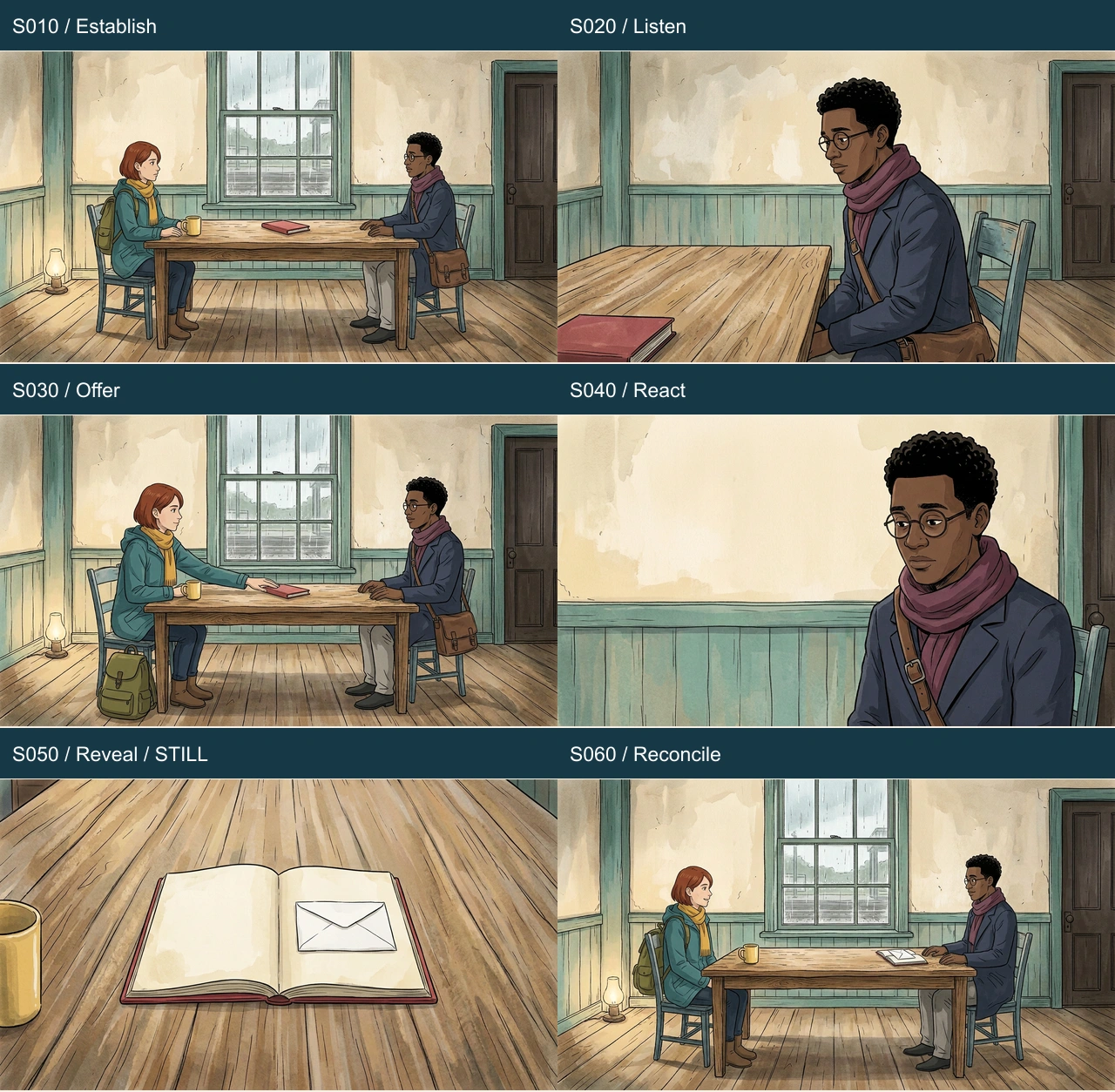
| Shot | Beat | Final treatment | Duration |
|---|---|---|---|
| S010 | Establish the uneasy meeting | Generated wide shot | 5 seconds |
| S020 | Theo looks toward the notebook | Generated medium shot | 5 seconds |
| S030 | Maya offers the kept object | Generated motion reversed in the edit | 5 seconds |
| S040 | Theo reacts | Generated motion from a corrected close-up | 5 seconds |
| S050 | Reveal the letter | Locally held still of the open notebook | 5 seconds |
| S060 | Return to the two people | Generated wide shot | 5 seconds |
These six intervals total 30 seconds. They are editing decisions, not a claim that the model natively generated six connected shots in one request.
Approve a small reference kit
Maya retains her auburn bob, teal coat, mustard scarf, and olive backpack. Theo retains dark skin, black curls, round glasses, a navy coat, plum scarf, and brown satchel. Their references come from the earlier two-OC dialogue case.
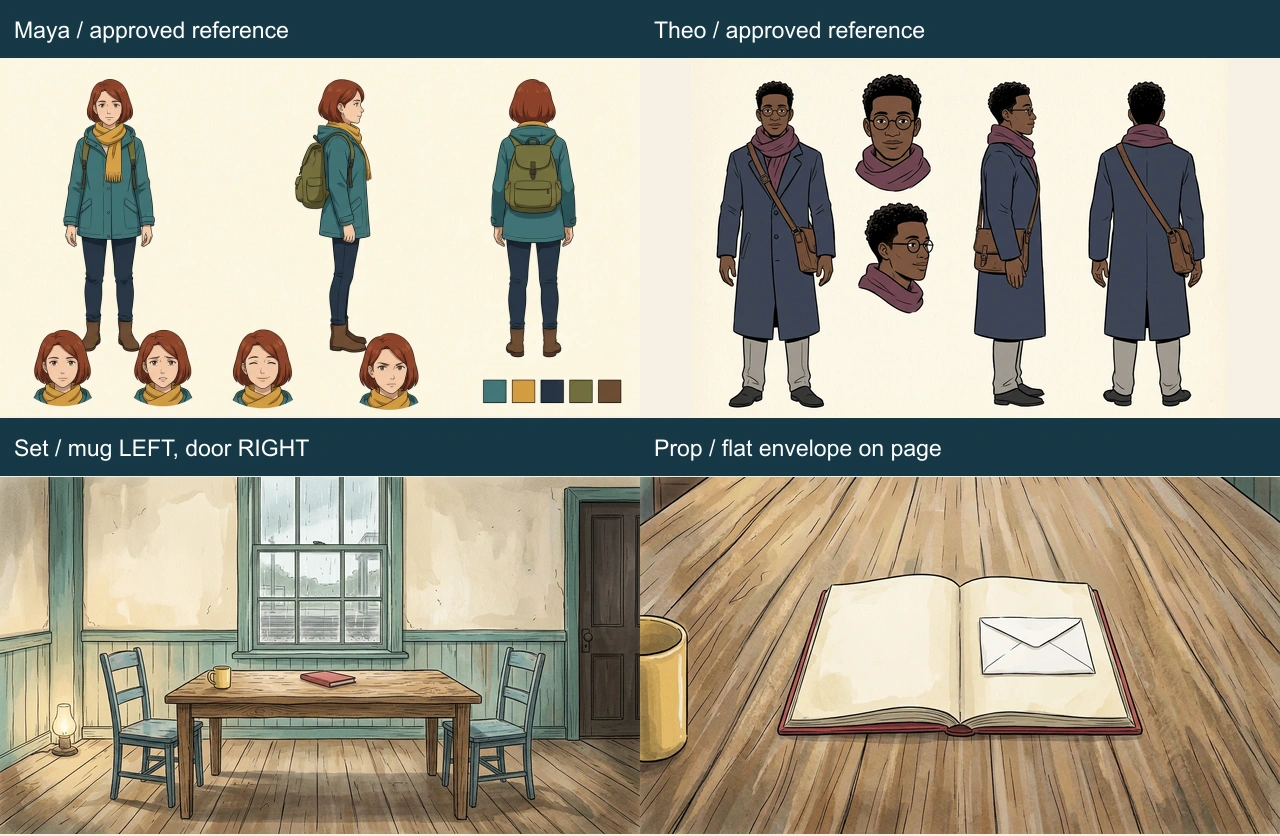
The new set has a wooden table, blue chairs, a rainy window behind the table, a door on the right, and a lamp on the left. A yellow mug belongs on Maya's side. Give the room and the prop their own reference records instead of expecting a face reference to preserve the entire set.
The approved image is the authority for visible detail. For example, the generated lamp is a small oil lamp, even though the initial direction described a floor lamp. Review should follow the selected image rather than claiming that every word of the first prompt was fulfilled.
Write start, action, and end states
A useful shot direction separates the action from the constraints:
S030: Maya is left; Theo is right.
Start: one closed red notebook is under Maya's hand.
Action: move that notebook toward Theo by a small amount.
End: stop before another action begins.
Preserve: faces, clothing, one book, yellow mug on the left.
Camera: fixed; no new angle or extra people.
The actual output still needs inspection. A clear request is not evidence that the result obeyed it. Keep stable shot IDs, reference versions, and the selected source for each interval. The downloadable shot list records the final treatments, including the reverse edit and still hold.
Keep the actual failures in the production record
The first close-up placed a table behind Theo, conflicting with the master view. A corrected image removed that table, and a new motion request used the corrected close-up. The first notebook input also let white paper peek out before the reveal; its replacement concealed it.
Motion introduced further issues. The notebook slide traveled toward Maya instead of toward Theo. Reversing the selected interval changed its screen direction. That is a local edit, not a successful new generation, and it does not guarantee that reversed gestures will always look natural.
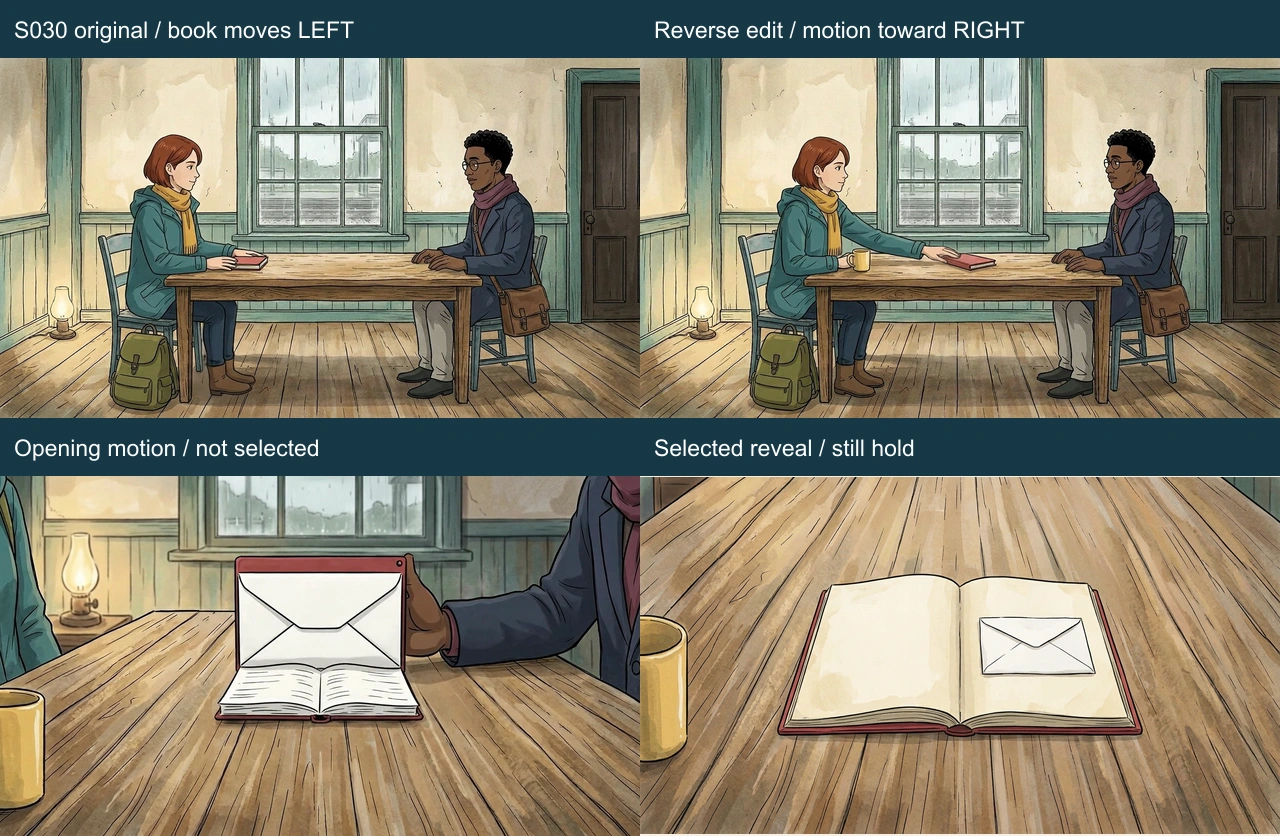
The opening action was less cooperative. Both the initial and revised motion raised the envelope with the cover, making the reveal look physically wrong. Instead of reporting a clean repair, both attempts remain in the source pack, and the cut goes directly to a separately generated still with the envelope lying flat on a page.
That decision preserves a visible story beat while reducing an unreliable action. The final scene therefore contains a static reveal. It should not be presented as 30 seconds of continuously generated character motion.
Carry story state into the next episode
An AI drama series needs more than a reusable face. The next scene must know who has the notebook, whether it is open, where the envelope is, and what the characters have learned.
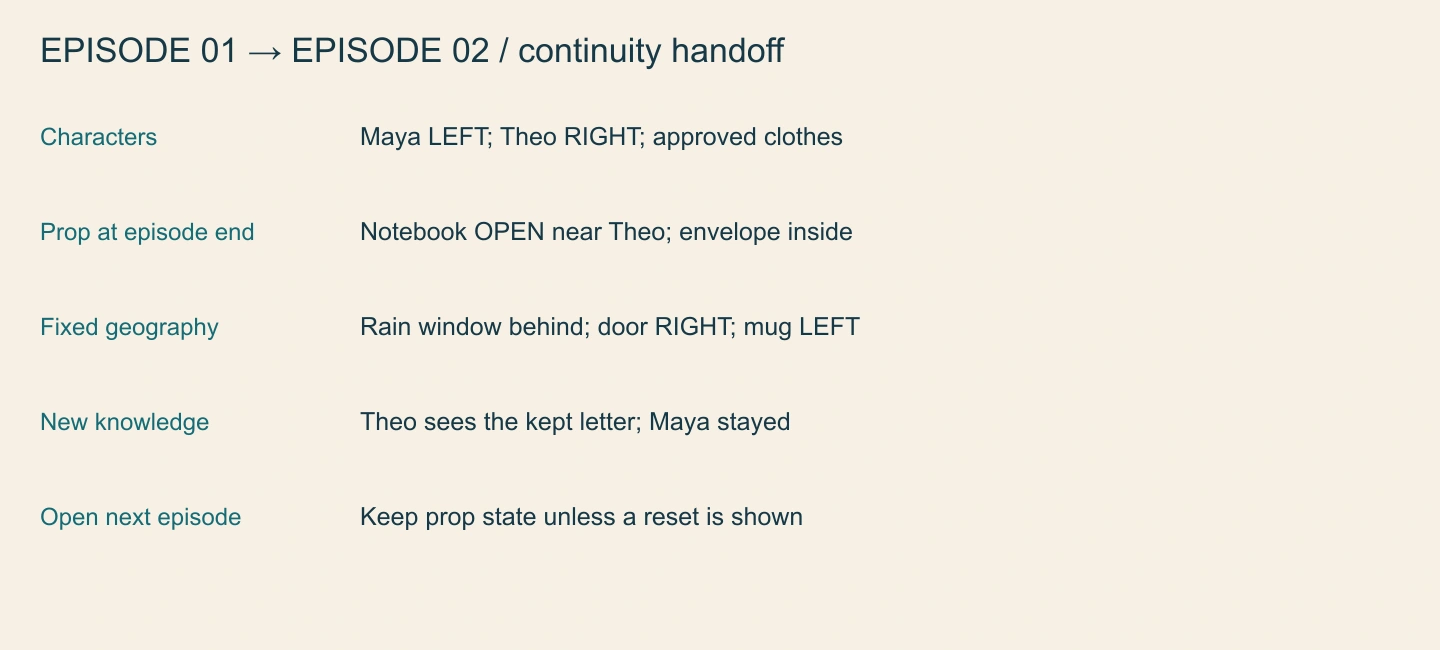
The episode continuity file records the intended end state: the notebook is open near Theo, the envelope is inside, the mug remains on Maya's side, and the two people have acknowledged the kept letter. That file is an editorial handoff, not automatic memory inside a generation model.
If episode two begins with a closed notebook in Maya's bag, either show the transfer or record a deliberate reset. Otherwise, a future editor may treat an unexplained change as an intentional story choice. Keep knowledge state separate from costume state: a character can look identical while behaving as though an earlier conversation never happened.
Package the scene before scaling
The pilot source pack retains the first six station clips, two additional motion attempts, stills, and request records. Rejected material is included so the final choice can be traced. The record does not establish a settled production cost, a success percentage, or a repeatable delivery speed.
There are still visible limits. Table proportions, bag placement, and notebook position vary between views. The final wide shot makes the envelope much smaller than the insert. There was no audience study, actor performance comparison, or voice-continuity test. These are review points for a next pass, not details erased by a technically valid MP4.
For the separate 30-second first assembly and 24-second continuity revision, read the quiet-scene case. For a general production package, use the storyboard-to-video handoff checklist.
Start your own pilot in Storyboard, approve a small kit, and finish one scene before expanding the episode count. A reviewable scene and a state ledger give the next episode something concrete to inherit.
Related hot tags
AI Drama
Storyboard
Worked Example
Populaarsed loojatööriistad
Muuda inspiratsioon oma järgmiseks looks
Loo LlamaGeniga koomikseid, süžeeskeeme ja stiliseeritud fotosid.
01
AI koomiksi generaator
Muuda idee mõne minutiga viimistletud koomiksiks.
Loo koomikseid02AI manga generaator
Loo väljendusrikast mangakunsti ja mitme paneeliga lugusid.
Loo mangat03AI-stsenaariumi generaator
Visualiseeri iga stseen enne tootmise algust.
Loo süžeeskeeme04Muuda pilt koomiksiks
Muuda iga foto koomiksistiilis illustratsiooniks.
Loo piltidest koomikseid05AI koomiksiribade looja
Loo jagatavaid koomikseid, kus tegelased püsivad järjepidevad.
Loo koomikseid
Süüta noorte unistused
Kus miljonid lood ärkavad ellu
Ülevaade LlamaGeni uusimatest funktsioonidest, tootetäiustustest, disainiuuendustest ja olulistest veaparandustest.


