Logo LlamaGenZnačka LlamaGen
Přihlásit sePředplatit nyníSleva 20 %
  1. Domů
Vytvářet komiksy
Motion Comic vs Animatic: Which Should You Make?
Všechny příspěvky

Motion Comic vs Animatic: Which Should You Make?

Jay
Jay
10. října 2026
Kopírovat odkaz
  • The Short Answer
  • Motion Comic vs Animatic at a Glance
  • The Six-Panel Test
  • Workflow A: Build the Animatic
  • 1. Put the Six Panels in Story Order
  • 2. Assign a Duration to Every Panel
  • 3. Add Only Necessary Camera Movement
  • 4. Use Scratch Audio
  • Workflow B: Build the Motion Comic
  • 1. Choose Hero Panels
  • 2. Separate Artwork by Motion Responsibility
  • 3. Add Motion That Expresses Story
  • 4. Refine Audio After Motion Locks
  • What Research Says About Motion-Comic Complexity
  • Test Result
  • Decision Checklist
  • A Practical Comic-to-Video Workflow
  • FAQ
  • Is an animatic just a slideshow?
  • Does a motion comic require full character animation?
  • Can I make a motion comic from flattened JPG or PNG panels?
  • Which format is better for a book trailer?
  • Which format is cheaper?
  • Sources and Editorial Disclosure
elevate-your-comics.png
Pozvedněte své komiksy s LlamaGen

The Short Answer

Make an animatic when you need to test timing, shot order, dialogue, and music with the least preparation. Make a motion comic when the sequence is already approved and you want a more immersive, audience-facing video from finished comic art.

The practical difference is not simply "less motion" versus "more motion."

animatic = panels arranged in time
motion comic = panel artwork separated into elements that move in depth

If you already have finished panels, start in LlamaGen.AI Comic to Video and choose the lightest workflow that answers your next production question.

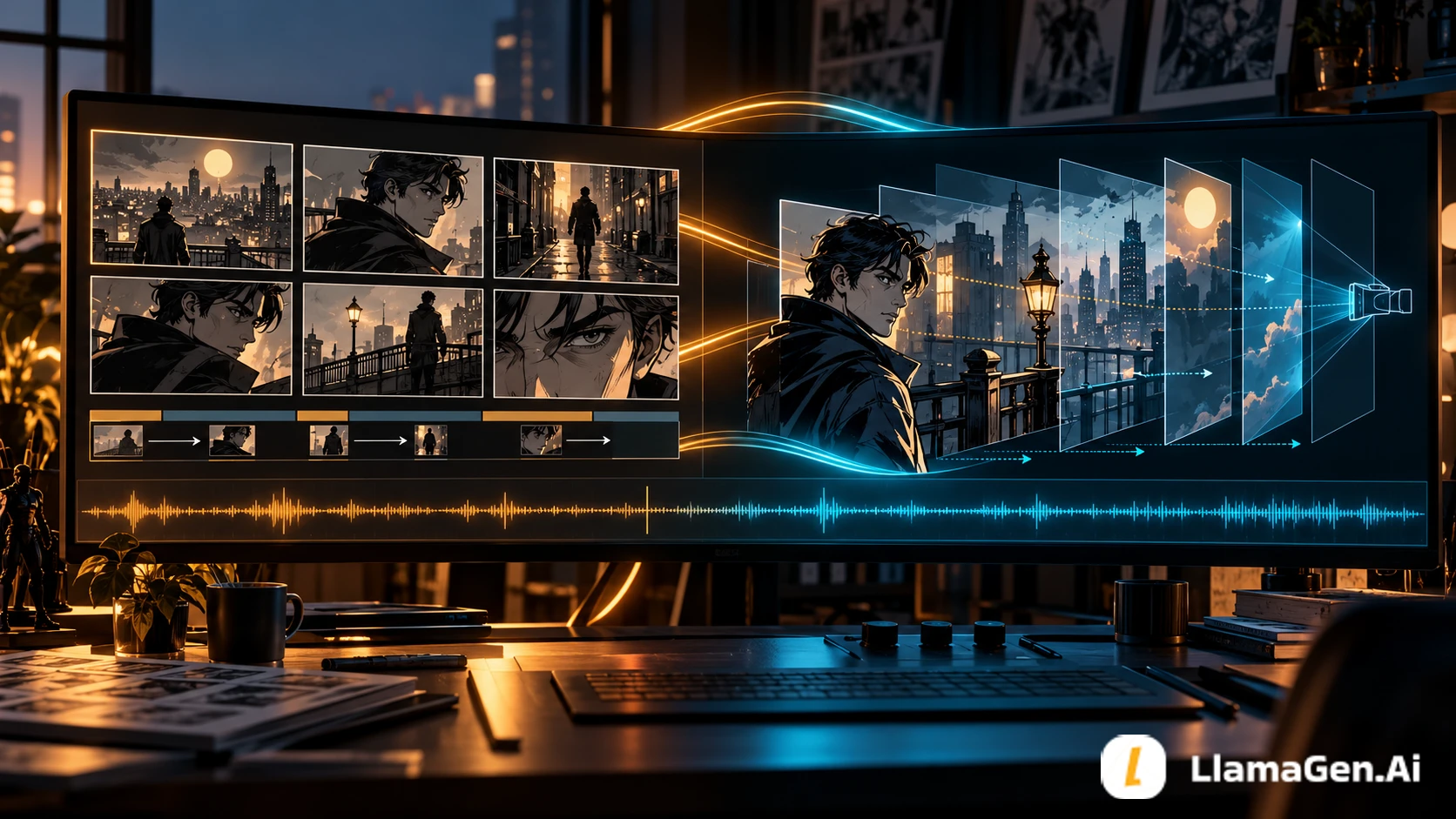
A post-production workstation comparing a timed comic animatic with a layered motion comic

Motion Comic vs Animatic at a Glance

DecisionAnimaticMotion comic
Primary purposeTest story timingPresent the story to an audience
Source artFlattened panels or rough boardsFinished art, preferably with separable elements
Typical motionCuts, holds, pans, zoomsParallax, character or prop motion, effects, reveals
AudioScratch dialogue, music, effects
Přehled změn

Zažehněte sny mladých
Kde ožívají miliony příběhů

Přehled nejnovějších vydání funkcí LlamaGen, vylepšení produktu, aktualizací designu a důležitých oprav chyb.

✦
✧
✦
✧

Nové médium pro vyprávění příběhů

Tvořte bez omezení příběhy, komiksy, animace, hry a další obsah—během několika sekund, který osloví moderní publikum

Edited dialogue, sound design, music
Revision speedFasterSlower because motion dependencies increase
Best stageBefore final deliveryAfter sequence approval
Best usePitch review, pacing test, production handoffTrailer, episode, campaign, social video

Neither format is automatically better. They answer different questions.

An animatic asks: "Does this sequence work over time?"

A motion comic asks: "Can this approved sequence become a compelling viewing experience?"

The Six-Panel Test

We used the same fictional detective sequence for both workflows:

  1. A detective enters a neon train station.
  2. He finds a broken pocket watch.
  3. He turns when someone passes behind him.
  4. A cloaked figure walks toward a departing train.
  5. The detective gives chase.
  6. The train door closes between them.

The test held story order, characters, panel art, and audio concept constant. We counted asset-preparation and motion decisions instead of publishing invented render time, file size, or credits. Encoding settings and account configuration would make those numbers misleading without a real exported project file.

Test detailValue
Date documentedOctober 10, 2026
SourceSix finished fictional comic panels
Animatic goalTest a 20-to-30-second sequence
Motion comic goalCreate a richer audience-facing version
Main CTALlamaGen.AI Comic to Video
DisclosureEditorial asset-preparation comparison, not a speed benchmark

Workflow A: Build the Animatic

The animatic keeps each panel flattened. Motion comes from duration, cuts, and a small number of camera moves.

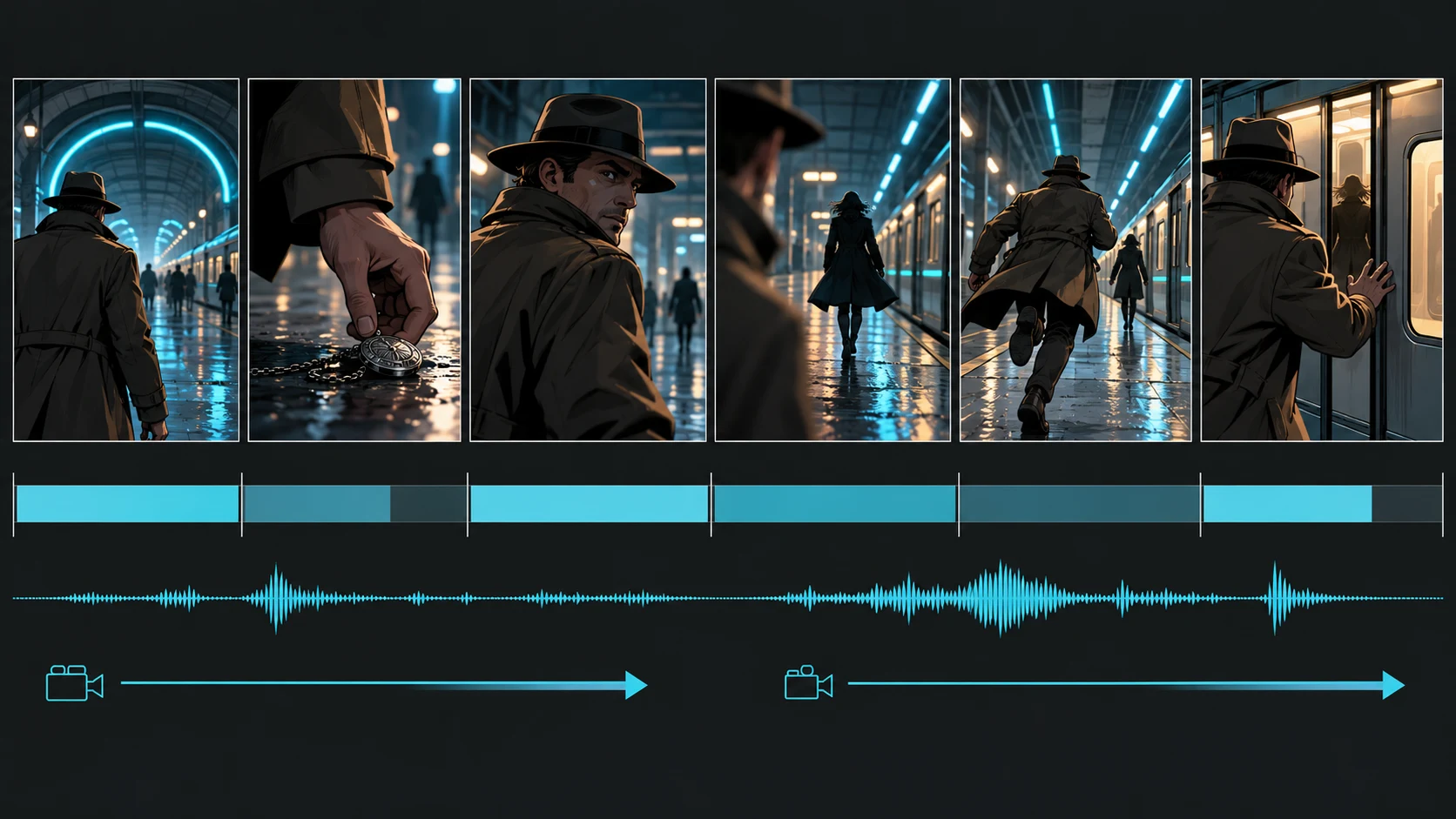
Six finished detective panels arranged on a timing track with an audio waveform

1. Put the Six Panels in Story Order

Do not animate yet. Watch the sequence as six still images.

Check whether the viewer can answer:

  • Where is the detective?
  • What object matters?
  • What makes him turn?
  • Who is he following?
  • Why does the final door closure matter?

If any answer is unclear, return to the storyboard or comic page. Motion should not be asked to repair missing story information.

2. Assign a Duration to Every Panel

Start from the amount of information in the frame:

Panel typeTiming tendency
Establishing shotLonger hold so viewers can orient themselves
Object insertShort but long enough to identify the clue
Reaction close-upHold for emotional recognition
Chase actionShorter cuts increase urgency
Final reveal or obstructionLonger hold to land the consequence

The exact seconds depend on dialogue, music, and audience. The useful habit is to make every hold deliberate.

3. Add Only Necessary Camera Movement

A slow push toward the pocket watch can direct attention. A horizontal pan can reveal the figure near the train. Applying a zoom to every panel makes the sequence feel mechanically restless.

For this test, the animatic plan used:

  • Six flattened panel assets
  • Six duration decisions
  • Two camera moves
  • One continuous audio bed
  • Three sound-effect cues
  • Zero character cutouts

4. Use Scratch Audio

An animatic does not need final voice acting. A temporary read and rough effects are enough to expose whether dialogue overlaps, a reaction has room to land, or a chase feels too slow.

The animatic is successful when it makes editing decisions cheap.

Workflow B: Build the Motion Comic

The motion comic begins after the sequence is approved. Instead of moving only the camera across a flat image, it separates selected scenes into depth and action layers.

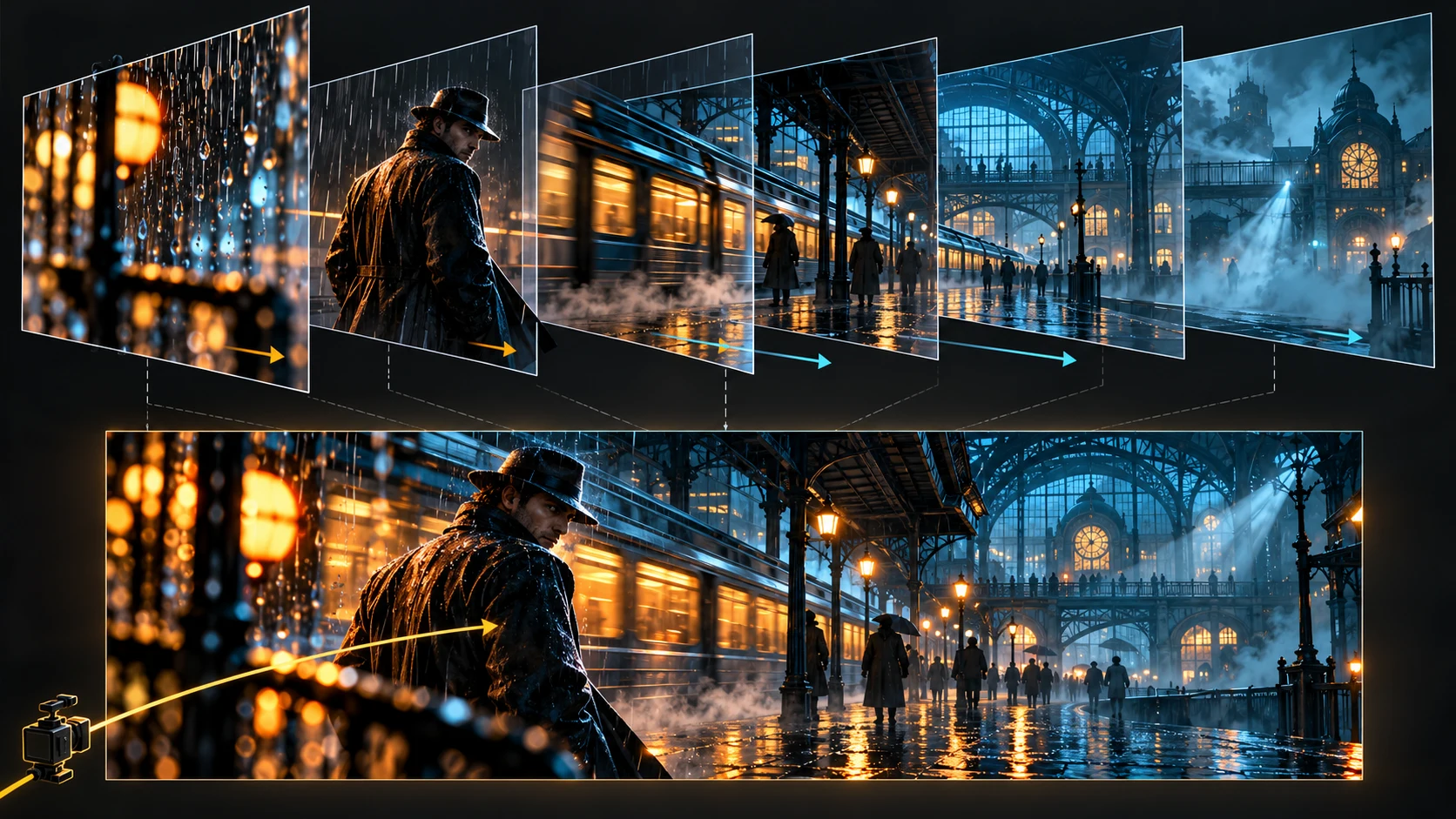
A rainy train-station comic panel separated into foreground, character, train, architecture, and atmosphere layers

1. Choose Hero Panels

Do not separate every panel into ten layers. Put the extra work where motion changes the experience.

For the detective sequence, three panels earned deeper treatment:

  • The station entrance, where foreground rain can move faster than the background.
  • The chase, where the detective, platform, and train can move at different rates.
  • The closing door, where the train, door, character, and light create the climax.

The remaining panels can use controlled camera movement and effects.

2. Separate Artwork by Motion Responsibility

A useful layer plan is:

foreground atmosphere
foreground object
character
moving prop or vehicle
midground architecture
background
light and effects
speech or caption reveal

Adobe's timeline layer guidance explains why layers and folders matter: they allow objects to be edited, hidden, locked, and organized without disturbing everything else. The principle applies even if you animate in another tool.

3. Add Motion That Expresses Story

Motion should clarify cause and attention.

Story eventUseful motion
Rainy entranceForeground rain and a slow camera push
Pocket watch clueSmall highlight and controlled scale-in
Figure appearsBackground reveal or lateral movement
ChaseTrain movement plus character parallax
Door closesDoor travel, light occlusion, then a hold

The motion-comic plan used:

  • The same six source panels
  • Eleven separated visual layers across three hero panels
  • Five object or effect motion cues
  • Three depth-aware camera moves
  • One edited audio bed
  • Three synchronized sound effects

These counts describe the disclosed editorial setup. They are not a claim that every motion comic requires eleven layers.

4. Refine Audio After Motion Locks

Once movement and holds are stable, refine dialogue, effects, and music. Audio can make modest visual motion feel intentional, but it should support the reading hierarchy rather than compete with it.

What Research Says About Motion-Comic Complexity

The 2025 paper DancingBoard: Streamlining the Creation of Motion Comics to Enhance Narratives studied motion-comic creation through a survey of 58 participants, four expert interviews, and analysis of 95 online motion comics. The authors describe a multi-stage workflow involving story structure, visual elements, layout, animation, audio, preview, and export.

That research supports a practical observation: a motion comic is not just a slideshow with more transitions. It introduces asset organization and motion decisions that an animatic can intentionally avoid.

The paper is evidence about workflow complexity and authoring support. It does not prove that one format performs better for every audience, genre, or platform.

Test Result

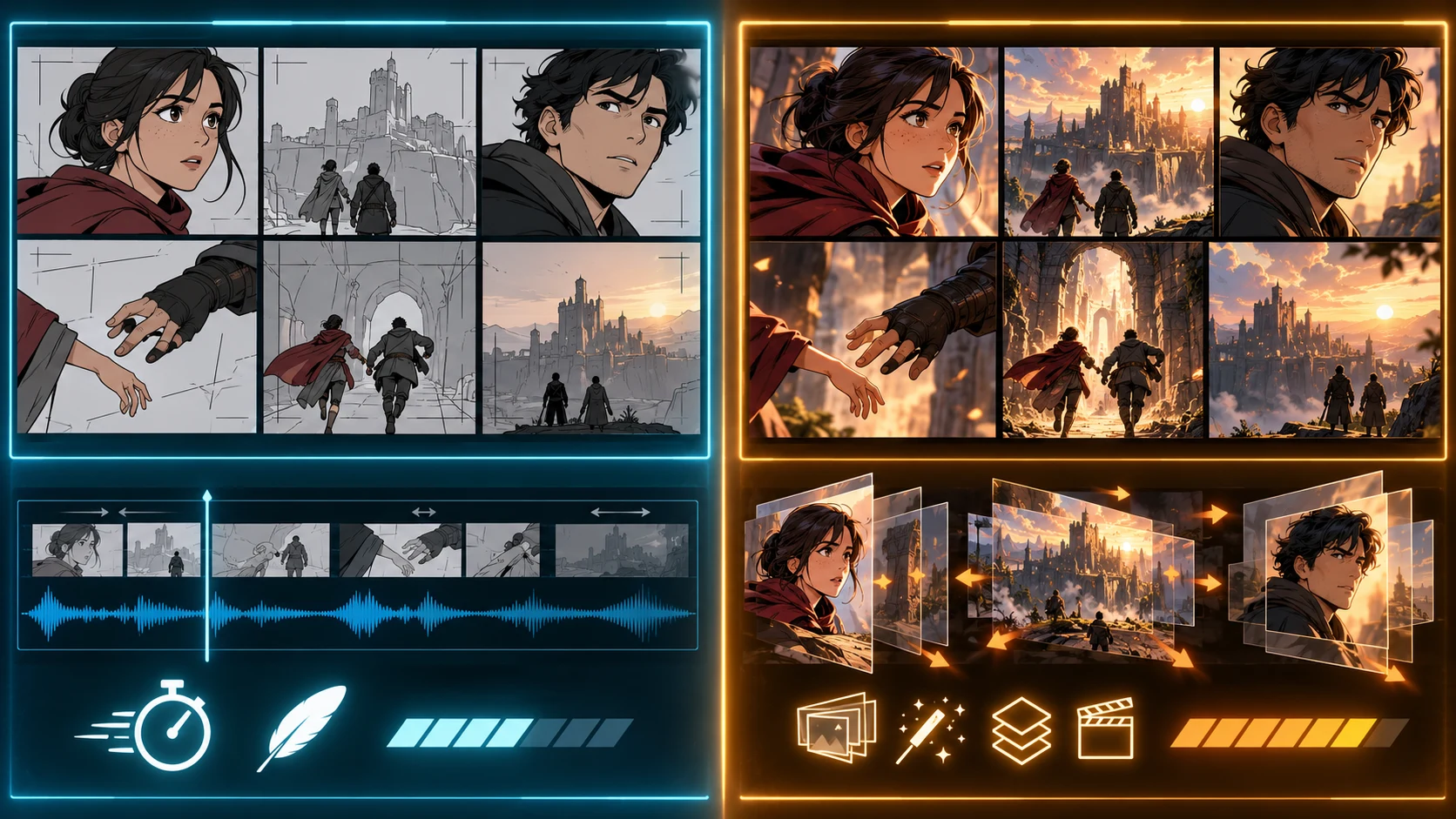
The same source panels presented as a lightweight animatic and a deeper layered motion comic
Test questionBetter choiceWhy
Does the scene pace correctly?AnimaticFewer asset dependencies make timing changes cheaper
Is the shot order clear?AnimaticSequence can be judged before layer work
Is dialogue too long?AnimaticScratch audio exposes timing pressure quickly
Is this ready for a pitch review?AnimaticReviewers can respond to story without waiting for polish
Should the comic feel immersive on video?Motion comicDepth, effects, and synchronized motion add presentation value
Is this a trailer or audience-facing episode?Motion comicRicher movement and audio support final delivery
Will panels need major story changes?Animatic firstMotion dependencies make late structural edits expensive

The safest production path is often:

comic panels -> animatic approval -> selected layer separation -> motion comic

This is not duplicate work. The animatic becomes the timing blueprint for the richer version.

Decision Checklist

Choose an animatic if three or more statements are true:

  • The story order is still changing.
  • Dialogue has not been timed aloud.
  • A director, editor, client, or co-creator must approve pacing.
  • The art exists only as flattened panels.
  • The deadline is for internal review.
  • You need to test several music or voice options.

Choose a motion comic if three or more statements are true:

  • The sequence is approved.
  • The output is audience-facing.
  • You have finished artwork at sufficient resolution.
  • Key panels can be separated into visual layers.
  • Sound design is part of the experience.
  • Parallax, object motion, or reveals improve specific story beats.

When both lists apply, build the animatic first and promote only the approved shots into motion-comic production.

A Practical Comic-to-Video Workflow

  1. Export panels in reading order at consistent dimensions.
  2. Open LlamaGen.AI Comic to Video and assemble the sequence.
  3. Set rough durations before adding decorative motion.
  4. Add dialogue or scratch audio and watch the whole sequence.
  5. Repair shot order and pacing.
  6. Mark two or three hero panels for deeper movement.
  7. Separate or regenerate useful foreground, character, prop, background, and effect elements.
  8. Add motion that reinforces story events.
  9. Lock motion, then refine audio.
  10. Export and review on the actual delivery screen, including mobile.

If the source panels are not yet approved, use the Storyboard Generator first. If they need programmatic creation and targeted repair, follow the Comic API quickstart.

FAQ

Is an animatic just a slideshow?

No. A useful animatic makes deliberate decisions about shot order, duration, camera movement, dialogue, music, and effects. A random slideshow does not test story timing.

Does a motion comic require full character animation?

No. It can use restrained motion: parallax, camera moves, object travel, effects, lighting changes, and speech reveals. The art can remain recognizably comic-based.

Can I make a motion comic from flattened JPG or PNG panels?

Yes, but depth control is limited. You can still use pans, zooms, masks, and transitions. For richer parallax, separate foreground, characters, props, and background in selected hero panels.

Which format is better for a book trailer?

Use an animatic to approve the trailer structure, then create a motion comic or richer video for the final audience-facing version.

Which format is cheaper?

An animatic normally has fewer preparation dependencies, but actual credits, labor, and render cost depend on your assets and tools. Measure your own source preparation, motion operations, revisions, and export settings.

Sources and Editorial Disclosure

  • DancingBoard: Streamlining the Creation of Motion Comics to Enhance Narratives
  • Adobe Animate: create and organize timeline layers
  • LlamaGen.AI Comic to Video

Written by Jay and reviewed by the LlamaGen.AI content team. The six-panel comparison is a disclosed editorial asset-preparation test, not a claim of universal render time, file size, credit usage, or audience performance.

Turn your finished panels into the right kind of video: open LlamaGen.AI Comic to Video, test the sequence as an animatic, and add motion depth only where the story earns it.

Related hot tags

Motion Comic

Animatic

Komiks do videa

Animace

Populární nástroje pro kreativce

Přeměňte inspiraci ve svůj další příběh

Vytvářejte komiksy, storybaordy a stylizované fotky s LlamaGen.

01

Generátor AI komiksů

Proměňte nápad v vyleštěné komiksové stripy během minut.

Vytvářet komiksy
02

AI generátor mangy

Vytvářejte expresivní manga umění a příběhy s více panely.

Vytvářejte mangu pomocí AI
03

AI generátor storyboardu

Vizualizujte každou scénu před zahájením produkce.

Vytvářejte storyboardy pomocí AI
04

Obrázek na komiks

Přetvořte jakoukoli fotku do ilustračního komiksového stylu.

Vytvářejte komiksy z obrázků
05

Tvorba AI komiksových stripů

Stavte sdílené stripy s konzistentními postavami.

Vytvářejte komiksové stripy pomocí AI

LlamaGen community

checkmark

Get hands-on help with your comics

checkmark

Showcase your comics to fellow LlamaGen creators

checkmark

Participate in special events to win gifts

Logo LlamaGen

Vedení budoucnosti AI generování komiksů

  • Podpora 24/7
  • Týdenní aktualizace
  • Bezpečné a v souladu s předpisy
  • 99,9% dostupnost

Stáhnout LlamaGen zdarma

iOSPočítač

Zeptejte se AI na LlamaGen

Produkt
  • Nejnovější uvedení na trh
  • Funkce
  • Tvorba komiksových stripů
  • Manga studioNový
  • Převést obrázek na komiks
  • Komiks do videa
  • AI továrna na komiksy
  • Komiksový agent
  • iOS & Android
  • Mac a Windows
  • Stáhnout
  • Comic ZapNový
  • Generátor AI komiksů
  • AI generátor kreslených postav
  • AI generátor webtoonů
  • Vytvářeč komiksových stripů
  • Převést obrázek na komiks
  • AI generátor mangy
  • Překladač manga
  • Foto na anime
  • Anime do skutečného života
  • Barevný převod manga
  • Generátor anime postav
  • Nástroje pro tvorbu pixelových herních assetů
  • AI Generátor sprite sheetů
  • Nejlepší nástroje pro pixelové hry 2026
  • Tvůrce komiksů z fotek
  • Alternativa k Comic Life
Plány
  • Ceník
  • Začátečník
  • Pro
  • Enterprise
  • Vzdělávání
  • Komiksové API
Společnost
  • Promluvte si s naším zakladatelem
  • O nás
  • Plán rozvoje produktu
  • Kariéra
  • Napište nám
  • Náš svět maskotů
Sesterské produkty
  • Rodina LlamaGen
  • CineoBoardNový
  • Comics API
  • Comic Zap
Komunita
  • Tvůrci
  • Affiliate Partneři
  • Partner
  • Reference
Zdroje
  • Přehled změn
  • Blog
  • Guides
  • Personalizované komiksy
  • Funkce
  • Alternativy
Nápověda
  • Centrum nápovědy
  • Důvěra
  • Bezpečná AI
  • Profesionální služby
  • FAQ
Nástroje
  • AI Generátor loga
  • Generátor postav ve stylu Grokbot
  • PNG na komiks
  • Text na komiks
  • PDF na komiks
  • Scénář na komiks
AI nástroje
  • AI extraktor oblečení
  • AI měnič účesu
  • AI měnič manga účesu
  • AI generátor větrného efektu
  • AI generátor hloubkové mapy

Produkt

  • Nejnovější uvedení na trh
  • Funkce
  • Tvorba komiksových stripů
  • Manga studio
Angličtina (Austrálie)Angličtina (Kanada)Angličtina (Spojené království)Angličtina (Indie)ŠpanělštinaFrancouzština (standardní)Italština (standardní)JaponštinaKorejštinaNěmčina (Standard)Tradiční čínštinaTradiční čínština (Hongkong)Zjednodušená čínštinaPortugalštinaTurečtinaPolštinaHolandština (standardní)DánštinaThajštinaIndonéštinaNorština BokmålRuština
LinkedInX (Twitter)
  • Domů
  • Články
  • Blog
  • Vytvořit
  • Ceník
  • API
Motion Comic vs Animatic: Which Should You Make? - LlamaGen.AI Blog
Kontaktovat obchodní oddělení
  • Vzdělávací plány
  • Učitelé
  • Studenti
  • Učitelé a studenti
  • Startupy
  • Slevy pro vzdělávání
  • Mediální sada
  • Partnerství s KOL
  • Obsah
  • Velika
  • Stěna oblíbených
  • LlamaGen MCPNový
  • LlamaGen Vývojář
  • Nejlepší AI aplikace
  • Průvodce kolorováním mangy GPT-6
  • Claude Komiksová knižní dovednost
  • Gemini Průvodce AI komiksem
  • Komiks That
  • Slevy pro vzdělávání
  • Sleva pro studenty
  • Zabezpečení
  • Přístupnost
  • Video tutoriál
  • Kontaktujte nás
  • Mapa stránek
  • Kniha do komiksu
  • Převést obrázek na komiks
  • AI Generátor Pixel Artu
  • Vzdělávací komiksy
  • AI generátor videí
  • Generátor videí Gemini AI
  • Zdarma AI generátor videa bez obličeje
  • Komiks do videa
  • Vytvořit software pro storyboardy
  • AI generátor storyboardu
  • Software pro psaní scénářů
  • Editor scénáře
  • AI pro příběhy
  • AI generátor příběhů
  • Generátor pohádek
  • Generátor AI obrázků
  • AI rozdělovač vrstev
  • AI Ovládání úhlu kamery
  • AI Generátor Pixel Artu
  • Nástroje pro tvorbu pixelových herních assetů
  • AI Generátor sprite sheetů
  • Nástroj na rozřezání sprite sheetů
  • Nejlepší nástroje pro pixelové hry 2026
  • Animace API
  • Plugin pro ChatGPT/Codex
  • ChatGPT Návod k instalaci
  • Plugin pro Claude Code
  • Návod k instalaci Claude Code
  • AI bílé pozadí
  • AI odstraňovač objektů
  • AI virtuální převlékání
  • AI Odpixelování obrázků
  • AI Odstranění šumu
  • AI Obnova fotografií
  • AI Produktové stíny
  • AI generátor pozadí
  • AI Generátor portrétů
  • AI Tvůrce emotikonů
  • AI Změna pozadí
  • AI Otevření očí pomocí AI
  • AI Krása
  • AI Produktová fotografie
  • Nový
  • Převést obrázek na komiks
  • Komiks do videa
  • AI továrna na komiksy
  • Komiksový agent
  • iOS & Android
  • Mac a Windows
  • Stáhnout
  • Comic ZapNový
  • Generátor AI komiksů
  • AI generátor kreslených postav
  • AI generátor webtoonů
  • Vytvářeč komiksových stripů
  • Převést obrázek na komiks
  • AI generátor mangy
  • Překladač manga
  • Foto na anime
  • Anime do skutečného života
  • Barevný převod manga
  • Generátor anime postav
  • Nástroje pro tvorbu pixelových herních assetů
  • AI Generátor sprite sheetů
  • Nejlepší nástroje pro pixelové hry 2026
  • Tvůrce komiksů z fotek
  • Alternativa k Comic Life
  • Sesterské produkty

    • Rodina LlamaGen
    • CineoBoardNový
    • Comics API
    • Comic Zap
    • Velika

    Plány

    • Ceník
    • Začátečník
    • Pro
    • Enterprise
    • Vzdělávání
    • Komiksové API
    • Kontaktovat obchodní oddělení
    • Vzdělávací plány
    • Učitelé
    • Studenti
    • Učitelé a studenti
    • Startupy
    • Slevy pro vzdělávání

    Společnost

    • Promluvte si s naším zakladatelem
    • O nás
    • Plán rozvoje produktu
    • Kariéra

    Nápověda

    • Centrum nápovědy
    • Důvěra
    • Bezpečná AI

    Komunita

    • Tvůrci
    • Affiliate Partneři
    • Partner
    • Reference
    • Stěna oblíbených
    • LlamaGen MCPNový
    • LlamaGen Vývojář

    Zdroje

    • Přehled změn
    • Blog
    • Guides
    • Personalizované komiksy

    Nástroje

    • AI Generátor loga
    • Generátor postav ve stylu Grokbot
    • PNG na komiks
    • Text na komiks

    AI nástroje

    • AI extraktor oblečení
    • AI měnič účesu
    • AI měnič manga účesu
    • AI generátor větrného efektu
    • AI generátor hloubkové mapy
    • AI bílé pozadí
    • AI odstraňovač objektů
    • AI virtuální převlékání
    • AI Odpixelování obrázků
    • AI Odstranění šumu
    • AI Obnova fotografií
    • AI Produktové stíny
    • AI generátor pozadí
    • AI Generátor portrétů
    • AI Tvůrce emotikonů
    • AI Změna pozadí
    • AI Otevření očí pomocí AI
    • AI Krása
    • AI Produktová fotografie
    Instagram
    YouTube
    Facebook skupina
    Reddit
    Discord
    E-mailová podpora
    Ochrana údajůPodmínky

    © 2026 LlamaGen.Ai Všechna práva vyhrazena

    LinkedInX (Twitter)InstagramYouTubeFacebook skupinaRedditDiscordE-mailová podpora
    Ochrana údajůPodmínkyStáhnout podklady značky© 2026 LlamaGen.Ai Všechna práva vyhrazenaVšechny služby jsou online

    Předchozí blogy

    Bible Comic Accuracy Checklist: Scripture, Context, Art, and Review

    Bible Comic Accuracy Checklist: Scripture, Context, Art, and Review

    A practical checklist for tracing every Bible comic panel to Scripture, reviewing context and visual

    Jay
    Jay
    16. října 2026
    How to Turn a Bible Lesson into a 6-Panel Sunday School Comic

    How to Turn a Bible Lesson into a 6-Panel Sunday School Comic

    A practical workflow for turning one Bible lesson into a six-panel comic, discussion prompts, and a

    Jay
    Jay
    15. října 2026
    Claude Code + Comic MCP: Turn a Youth Sports Lesson into Editable Comic Panels

    Claude Code + Comic MCP: Turn a Youth Sports Lesson into Editable Comic Panels

    A practical Claude Code and LlamaGen.AI Comic MCP workflow for turning a coach-approved youth basket

    Monica
    Monica
    13. října 2026
    How to Turn Couple Photos Into a Personalized Comic

    How to Turn Couple Photos Into a Personalized Comic

    Use two adults' photos and shared memories to create a personalized couple comic with stronger liken

    Jay
    Jay
    13. října 2026
    Napište nám
  • Náš svět maskotů
  • Mediální sada
  • Partnerství s KOL
  • Obsah
  • Profesionální služby
  • FAQ
  • Zabezpečení
  • Přístupnost
  • Video tutoriál
  • Kontaktujte nás
  • Mapa stránek
  • Funkce
  • Alternativy
  • Nejlepší AI aplikace
  • Průvodce kolorováním mangy GPT-6
  • Claude Komiksová knižní dovednost
  • Gemini Průvodce AI komiksem
  • Komiks That
  • Slevy pro vzdělávání
  • Sleva pro studenty
  • PDF na komiks
  • Scénář na komiks
  • Kniha do komiksu
  • Převést obrázek na komiks
  • AI Generátor Pixel Artu
  • Vzdělávací komiksy
  • AI generátor videí
  • Generátor videí Gemini AI
  • Zdarma AI generátor videa bez obličeje
  • Komiks do videa
  • Vytvořit software pro storyboardy
  • AI generátor storyboardu
  • Software pro psaní scénářů
  • Editor scénáře
  • AI pro příběhy
  • AI generátor příběhů
  • Generátor pohádek
  • Generátor AI obrázků
  • AI rozdělovač vrstev
  • AI Ovládání úhlu kamery
  • AI Generátor Pixel Artu
  • Nástroje pro tvorbu pixelových herních assetů
  • AI Generátor sprite sheetů
  • Nástroj na rozřezání sprite sheetů
  • Nejlepší nástroje pro pixelové hry 2026
  • Animace API
  • Plugin pro ChatGPT/Codex
  • ChatGPT Návod k instalaci
  • Plugin pro Claude Code
  • Návod k instalaci Claude Code
  • Zobrazit všechny blogy