A reliable four-panel comic integration needs more than one generation request. The minimum production loop is:
upload character reference -> create four panels -> poll terminal status -> inspect every panel -> repair only the failed panel
This quickstart implements that loop in TypeScript. It keeps the API key on the server, supplies a stable character record, uses an idempotency key for the create request, records elapsed time and failures, and targets one panel when continuity breaks.
Start with the LlamaGen.AI Comic API, then use the complete example below as a server-side integration baseline.

This article was contract-checked against the live Comic API documentation on October 10, 2026.
| Check | Verified behavior |
|---|---|
| Authentication | Bearer token on every request |
| Production base URL | https://api.llamagen.ai |
| Upload | POST /v1/comics/upload returns a reusable fileUrl |
| Create | POST /v1/comics/generations accepts fixPanelNum: 4 and comicRoles |
| Status | GET /v1/comics/generations/{generationId} returns status and panel output |
| Repair | PATCH /v1/comics/generations/{generationId} can regenerate one zero-based panel |
| Usage | Create and repair responses expose usage data for your own logs |
We did not invent a latency or success-rate benchmark. Those values vary by account, queue, model configuration, and input. The sample records your real elapsed time, API usage, terminal status, and failure details so you can produce a defensible benchmark in your own environment.
The prompt tells the model what happens. The character reference tells it who the story is happening to.
For a recurring role, keep these fields stable:
In this example, the role is a courier with short dark hair, a yellow rain jacket, and a red messenger bag. Those details are compact enough to repeat and distinct enough to audit.
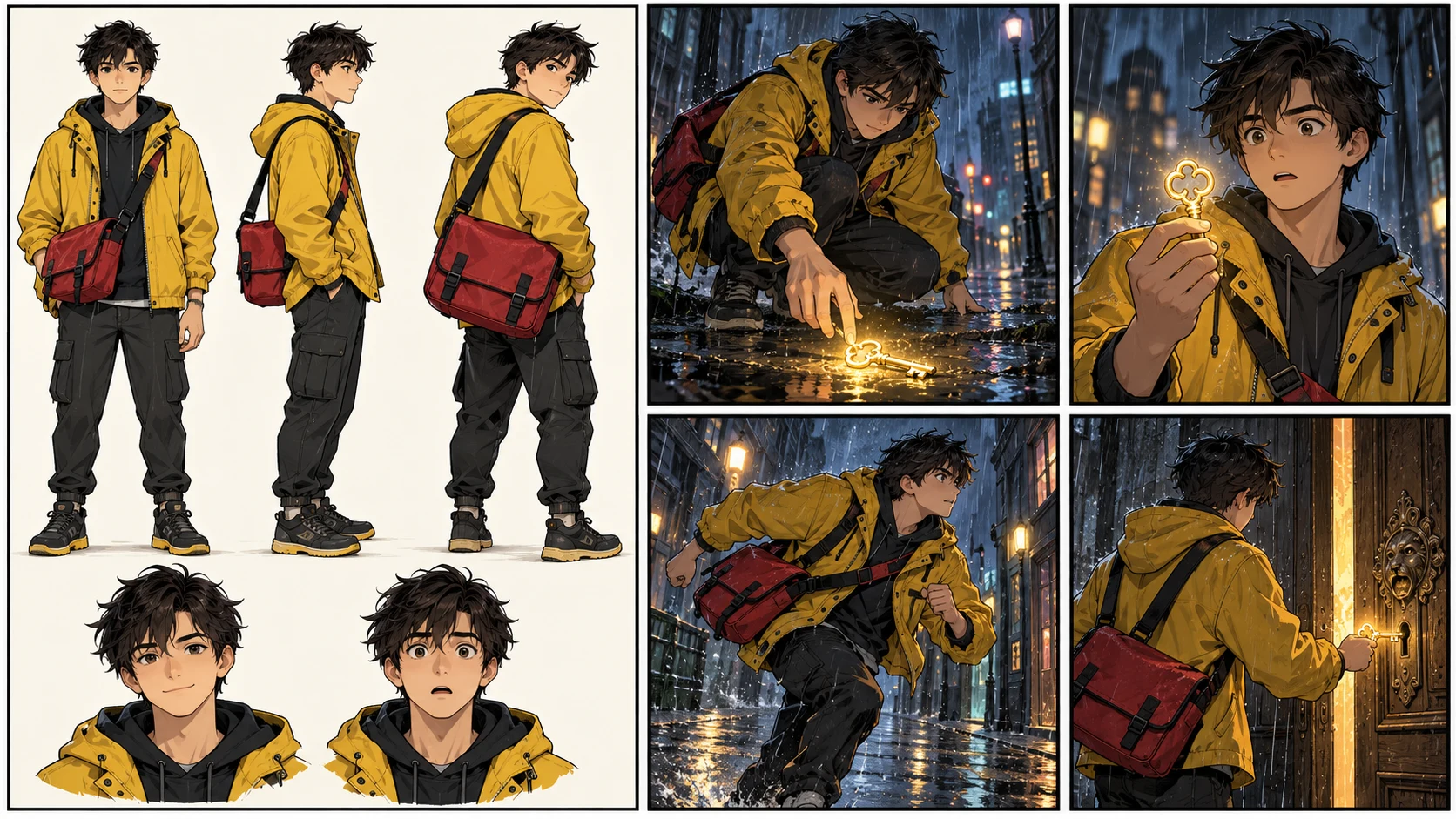
Use Node.js 20 or newer so fetch, FormData, and Blob are available. Keep the key in a server-only environment variable.
export LLAMAGEN_API_KEY="your_server_side_key"
Do not expose this key in a browser bundle, mobile application, public repository, or client-side request. If your product has a frontend, send the user's brief to your own backend and let that backend call LlamaGen.AI.
The workflow has four network operations:
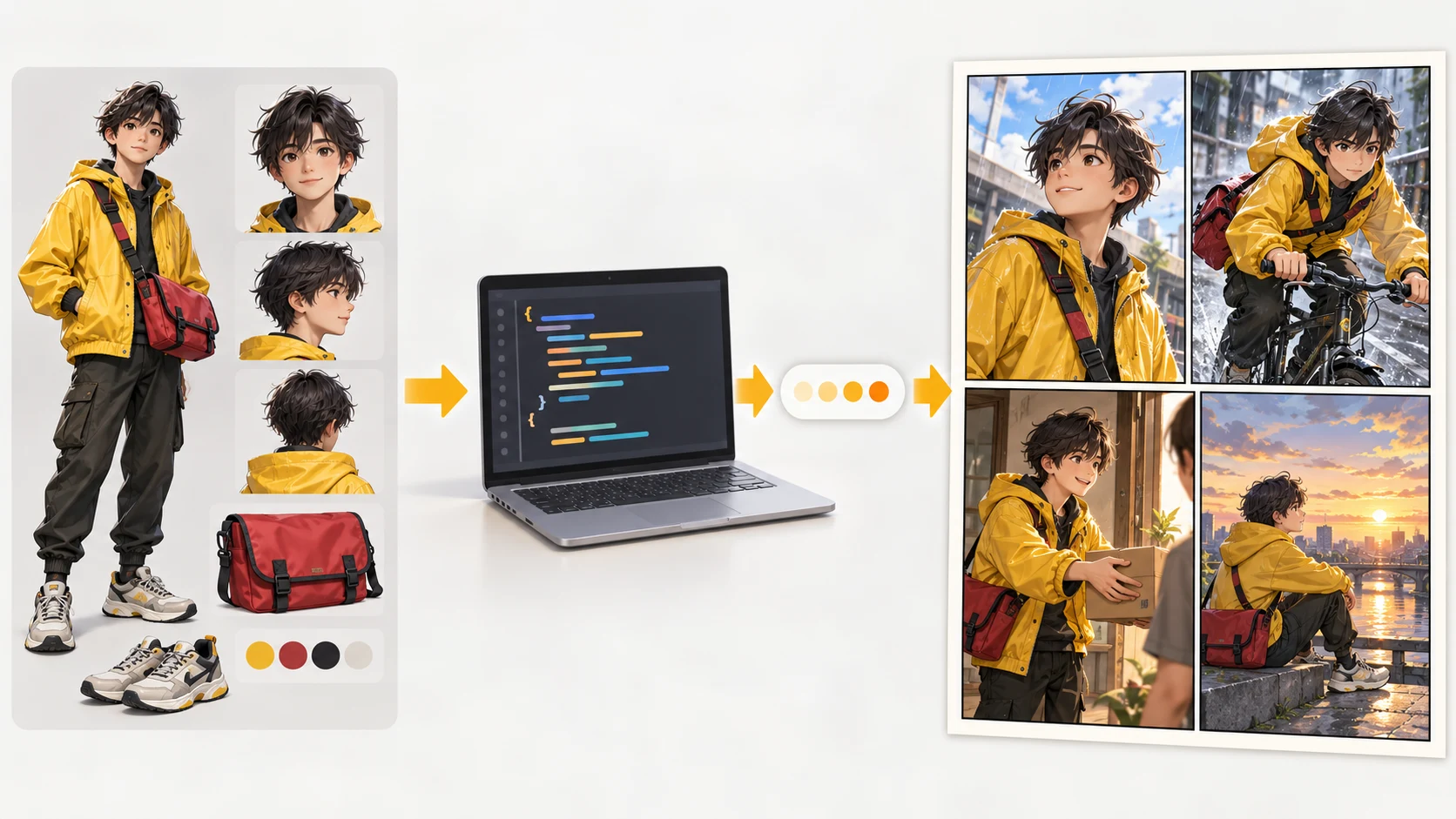
Save the following as comic-quickstart.ts, put a character image at ./courier-reference.png, and run it from your server environment.
A rundown of the latest LlamaGen feature releases, product enhancements, design updates, and important bug fixes.
import { basename } from "node:path";
import { readFile } from "node:fs/promises";
import { randomUUID } from "node:crypto";

const API_BASE = "https://api.llamagen.ai";
const API_KEY = process.env.LLAMAGEN_API_KEY;

if (!API_KEY) {
  throw new Error("Set LLAMAGEN_API_KEY before running this script.");
}

type UploadResponse = {
  code?: number;
  fileUrl: string;
};

type Usage = {
  total_comics?: number;
  redraw_panels?: number;
  amount?: number;
};

type Generation = {
  id: string;
  status: "LOADING" | "PROCESSED" | "FAILED" | "CANCELLED" | string;
  usage?: Usage;
  comics?: Array<{
    page?: number;
    panels?: Array<{
      panel?: number;
      image?: string;
      assetUrl?: string;
      caption?: string;
    }>;
  }>;
  error?: unknown;
};

async function api<T>(path: string, init: RequestInit = {}): Promise<T> {
  const response = await fetch(`${API_BASE}${path}`, {
    ...init,
    headers: {
      Authorization: `Bearer ${API_KEY}`,
      ...init.headers,
    },
  });

  const text = await response.text();
  const body = text ? JSON.parse(text) : null;

  if (!response.ok) {
    throw new Error(
      `Comic API ${response.status}: ${JSON.stringify(body)}`,
    );
  }

  return body as T;
}

async function uploadReference(filePath: string) {
  const bytes = await readFile(filePath);
  const form = new FormData();
  form.set("file", new Blob([bytes]), basename(filePath));

  return api<UploadResponse>("/v1/comics/upload", {
    method: "POST",
    body: form,
  });
}

async function waitForGeneration(
  generationId: string,
  timeoutMs = 10 * 60_000,
) {
  const startedAt = Date.now();

  while (Date.now() - startedAt < timeoutMs) {
    const job = await api<Generation>(
      `/v1/comics/generations/${generationId}`,
    );

    console.log(
      JSON.stringify({
        generationId,
        status: job.status,
        elapsedMs: Date.now() - startedAt,
        usage: job.usage,
      }),
    );

    if (job.status === "PROCESSED") return job;

    if (job.status === "FAILED" || job.status === "CANCELLED") {
      throw new Error(
        `Generation ended as ${job.status}: ${JSON.stringify(job.error)}`,
      );
    }

    await new Promise((resolve) => setTimeout(resolve, 4_000));
  }

  throw new Error(`Generation ${generationId} timed out.`);
}

async function main() {
  const startedAt = Date.now();

  try {
    const reference = await uploadReference("./courier-reference.png");

    const created = await api<Generation>("/v1/comics/generations", {
      method: "POST",
      headers: {
        "Content-Type": "application/json",
        "Idempotency-Key": randomUUID(),
      },
      body: JSON.stringify({
        prompt: [
          "Create one four-panel comic page in a restrained cinematic manga style.",
          "Panel 1: Ren enters a rain-soaked station and notices a golden key.",
          "Panel 2: Close view as Ren lifts the key and studies it.",
          "Panel 3: Ren runs toward an old locked service door.",
          "Panel 4: Ren opens the door and warm light spills into the station.",
          "Keep the same face, haircut, yellow jacket, and red messenger bag.",
          "Leave clean space for later lettering.",
        ].join("\n"),
        preset: "japanese_manga",
        size: "1024x1024",
        fixPanelNum: 4,
        language: "en",
        comicRoles: [
          {
            name: "Ren",
            age: 22,
            gender: "male",
            dress: "yellow rain jacket, black trousers, red messenger bag",
            image: reference.fileUrl,
          },
        ],
      }),
    });

    const firstPass = await waitForGeneration(created.id);
    console.log("first_pass_complete", {
      id: firstPass.id,
      elapsedMs: Date.now() - startedAt,
      usage: firstPass.usage,
      pages: firstPass.comics?.length ?? 0,
    });

    // Example review result: panel 3 lost the red bag.
    const repairQueued = await api<Generation>(
      `/v1/comics/generations/${created.id}`,
      {
        method: "PATCH",
        headers: { "Content-Type": "application/json" },
        body: JSON.stringify({
          page: 0,
          panel: 2,
          panelPrompt:
            "Ren runs toward the service door. Preserve his exact face, short dark hair, yellow rain jacket, and visible red messenger bag.",
          images: [reference.fileUrl],
        }),
      },
    );

    console.log("repair_queued", {
      id: repairQueued.id,
      usage: repairQueued.usage,
    });

    const repaired = await waitForGeneration(created.id);
    console.log("workflow_complete", {
      id: repaired.id,
      totalElapsedMs: Date.now() - startedAt,
      finalStatus: repaired.status,
    });
  } catch (error) {
    console.error("comic_workflow_failed", {
      elapsedMs: Date.now() - startedAt,
      message: error instanceof Error ? error.message : String(error),
    });
    process.exitCode = 1;
  }
}

await main();
Run it with:
npx tsx comic-quickstart.ts
The sample intentionally logs structured objects. In production, send the same fields to your observability system and include your own request or project identifier.
Do not approve a page because it looks attractive at thumbnail size. Audit each panel against the character lock:
| Check | Pass condition |
|---|---|
| Face | Same age, features, and proportions |
| Hair | Same silhouette, length, and color |
| Costume | Yellow jacket remains yellow and keeps the same construction |
| Prop | Red messenger bag remains present and correctly placed |
| Sequence | Key, door, weather, and direction of travel remain continuous |
| Composition | Every panel has a distinct story job |
| Lettering space | Faces and essential actions are not blocked |
Treat this as machine-readable quality control if you are building a larger pipeline. Store a pass/fail reason per panel, not just a page-level thumbs-up.
The fastest repair prompt names both the new action and the elements that may not change.
Panel 3 repair:
Ren runs toward the service door.
Preserve his exact face, short dark hair, yellow rain jacket,
and visible red messenger bag.
Keep the rainy station and left-to-right movement.
The panel indexes are zero-based, so the visible third panel is panel: 2. The update endpoint can accept panelPrompt, reference images, or a replacement caption.
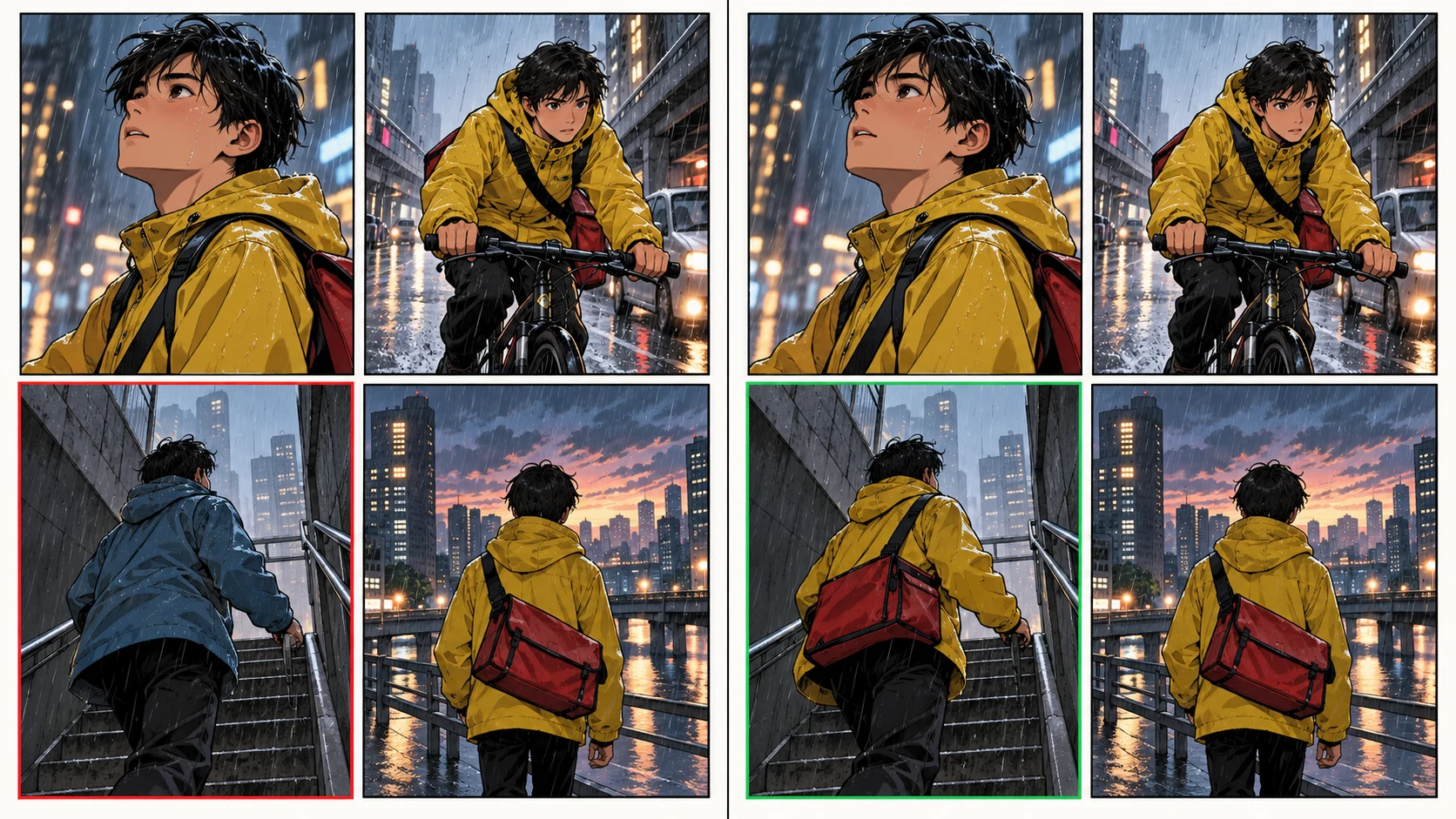
This matters operationally. Rebuilding all four panels can introduce three new continuity risks while fixing one old one. Targeted repair narrows the review surface.
Before shipping the integration, add these controls:
For longer sequences, switch from fixPanelNum to pagination.totalPages and pagination.panelsPerPage. Do not send both modes in one create request.
Use the Comic API when comics are generated inside your own product, batch job, educational tool, publishing pipeline, or customer workflow.
Use the visual editor when a creator wants to explore the story interactively, compare alternatives, or art-direct each page by hand. Many teams use both: the API creates and logs the repeatable first pass, while the editor handles exceptional revisions.
If your story structure is still changing, plan it before making finished panels. The next guide, Storyboard First or Comic Panels First?, shows how to measure the rework difference.
Yes. Send fixPanelNum: 4 for a single-page four-panel request. For multiple pages, use the pagination object instead.
Upload a clean reference image, pass its returned fileUrl in comicRoles[].image, keep the role name and costume description stable, and audit every returned panel before continuing the sequence.
Yes. Send a PATCH request with the zero-based page and panel indexes plus a new panelPrompt, optional reference images, or caption.
Use the idempotency behavior documented by LlamaGen.AI so network retries do not accidentally create duplicate work. Use a new key only when you intentionally want a new generation.
No. It exposes the instrumentation needed to capture your real numbers. Publish latency, usage, and failure rates only after running the same input repeatedly in your own account and recording the conditions.
Written by Jay and technically reviewed against the live endpoint contract by the LlamaGen.AI content team. Product behavior can change; the linked documentation is the source of truth.
Ready to build the workflow? Open the LlamaGen.AI Comic API, create a server-side key, and run the quickstart with your own character reference.
Popular creator tools
Go from comics and storyboards to stylized photos with LlamaGen.
Visualize every scene before production starts.
© 2026 LlamaGen.Ai All rights reserved
Leading the Future of AI Comic Generation