The strongest personalized couple comics use photos for identity and memories for story.
Use this workflow:
permission -> separate reference photos -> two character cards
-> six memory beats -> visual lock -> comic panels -> likeness review
-> editable lettering -> private approval -> export
Do not expect one crowded selfie to carry an entire relationship story. Build one reusable character reference for each partner, then use LlamaGen.AI Comic Studio to turn specific shared moments into sequential scenes.
Start With Consent, Not a Prompt
Only upload photos you own or have permission to use. Both people should understand how their images will be used, especially if the finished comic will be posted publicly, printed commercially, or given to other people.
Avoid uploading:
Private documents or screenshots
Home addresses, license plates, work badges, or travel tickets
Images that include people who did not consent
Intimate or sensitive photos
Photos of minors without guardian permission
Images you copied from a photographer without usage rights
For a surprise gift, use images you are already authorized to use and keep the draft private until the depicted partner has approved wider sharing.
Our Example Comic
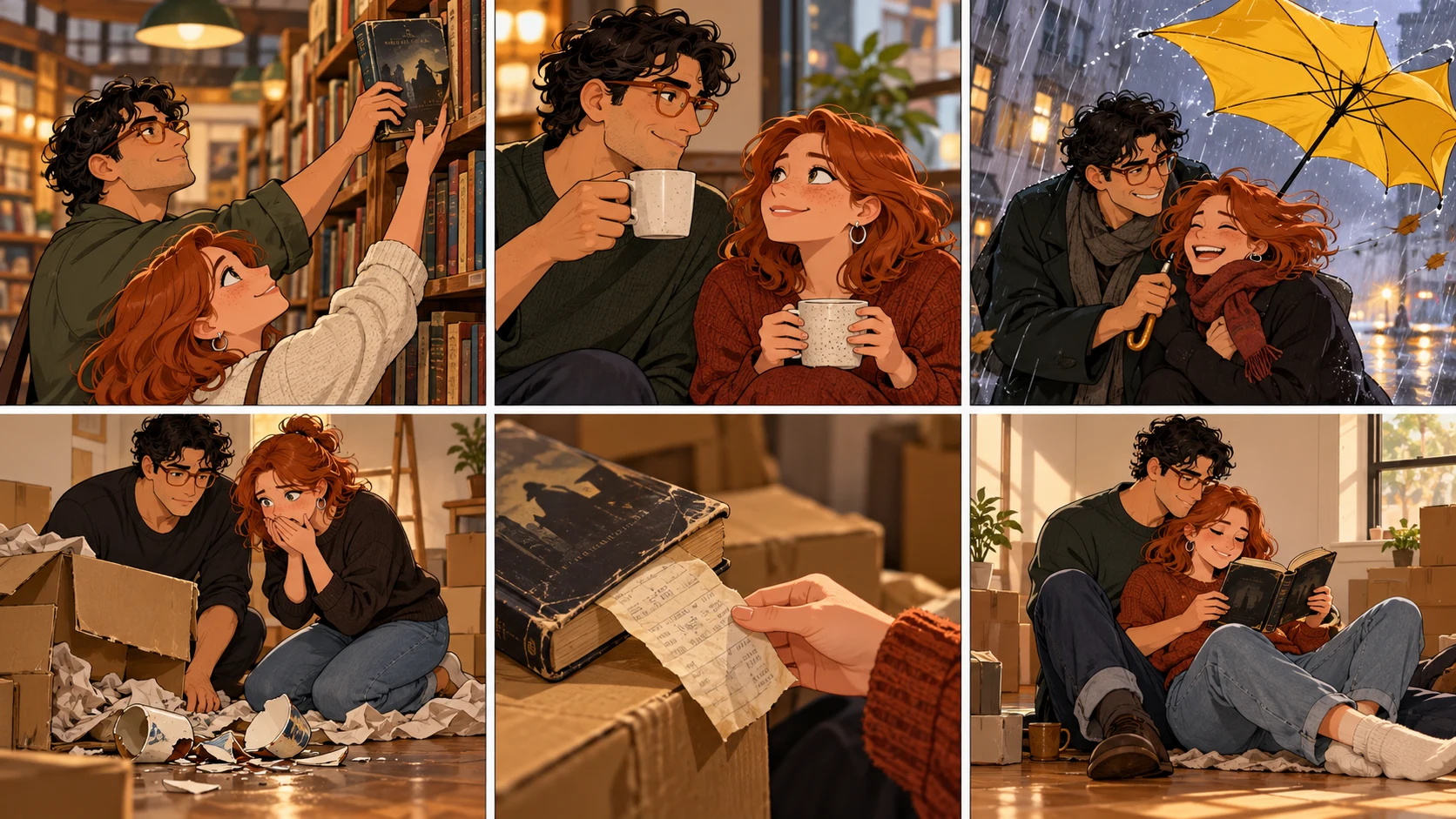
This tutorial uses an original fictional adult couple, Alex and Sam, and a six-panel anniversary story:
1. They meet while reaching for the same used mystery novel.
2. Their first date is interrupted by heavy rain.
3. They share one tiny umbrella and laugh all the way home.
4. Years later, a moving box breaks in the same rain.
5. The old mystery novel falls out, still carrying the bookstore receipt.
6. They read the first page together in their new apartment.
The story works because it has a recurring object, a visual motif, and a change over time. "A cute comic of us" is not yet a story.
A ComicBookCollabs anniversary request describes the same underlying desire: use real photos so the characters resemble the couple, then make the result feel like a meaningful gift rather than generic stock art.
Registro de cambios
Encendé sueños para los más chicos Donde millones de historias cobran vida
Un resumen de los últimos lanzamientos de funciones de LlamaGen, mejoras del producto, actualizaciones de diseño y correcciones importantes de errores.
✦
✧
✦
✧
Un nuevo medio para contar historias
Creá sin límites historias, cómics, animaciones, juegos y más, en segundos, que conectan con audiencias modernas
Step 1: Choose Better Reference Photos
Create a small reference set for each partner.
Reference
What it should show
Avoid
Front portrait
Face shape, eyes, hairline
Heavy beauty filters
Three-quarter portrait
Nose, jaw, cheek structure
Strong motion blur
Full or half body
Build, posture, usual clothing
Extreme wide-angle distortion
Signature detail
Glasses, curls, freckles, jacket
Temporary event props unless important
Use separate, clear images when possible. A group photo can be helpful for relative height and chemistry, but it often gives the system less clean identity information than two individual references.
LlamaGen.AI's Character Reference workflow accepts a clear photo, avatar, or character design for a reusable character. Multi-character input may also be available depending on the workflow and plan. Review extracted identities before building the comic.
Reference images guide generation. They do not guarantee a pixel-perfect replica in every pose, angle, or expression.
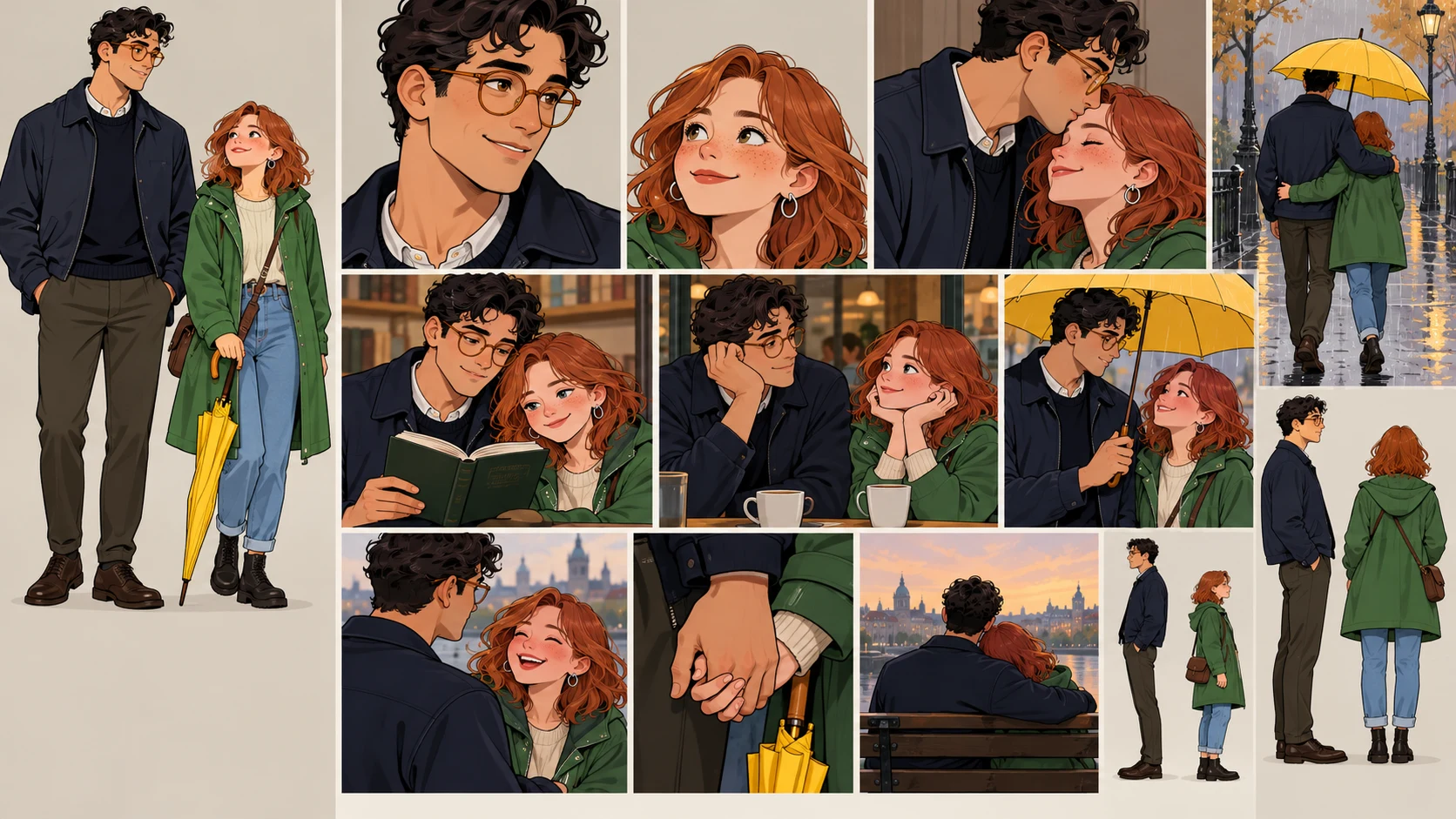
Step 2: Create Two Separate Character Locks
Keep identities separate in your notes.
CHARACTER A — ALEX
adult, tall, narrow face, short dark curls, round amber glasses,
navy field jacket, relaxed posture, expressive hands

CHARACTER B — SAM
adult, shorter, heart-shaped face, straight copper hair to the shoulders,
green raincoat, silver hoop earrings, upright posture, quick smile
Then add relationship-scale anchors:
Alex remains about one head taller than Sam.
Alex wears round amber glasses in every time period.
Sam's copper hair and green raincoat remain the strongest color anchors.
Their body language is affectionate but natural, not posed like a wedding advertisement.
Do not merge both descriptions into one vague line such as "a cute couple." Name the person performing each action in every panel.
Step 3: Turn Memories Into Visual Beats
Choose memories that can be seen.
Weak memory note
Visual beat
We knew it was meant to be
Both reach for the same marked book
Our first date was funny
Wind turns their umbrella inside out
We went through a lot
A moving box tears open in the rain
We still love each other
They read the old book on the apartment floor
Strong beats contain an action, object, place, or decision. The image can carry them without a paragraph of explanation.
Pick a style that supports the memory instead of simply looking fashionable.
Style direction
Works well for
Soft watercolor comic
Anniversary, proposal, quiet memories
Clean webcomic color
Humor, everyday relationship moments
Black-and-white manga
Dramatic first meetings, expressive reactions
Retro print comic
Playful action or superhero framing
Storybook gouache
Family keepsake or gentle travel memory
Use one style description across all panels. Change lighting and weather as the story requires, but keep line treatment, color logic, and facial stylization coherent.
Step 5: Prompt One Clear Moment Per Panel
Use this template:
Create panel [NUMBER] of a six-panel personalized couple comic.

Character A:
[LOCKED IDENTITY AND CURRENT ACTION]

Character B:
[LOCKED IDENTITY AND CURRENT ACTION]

Story moment:
[ONE VISIBLE CHANGE]

Continuity anchors:
[HEIGHT RELATIONSHIP, OUTFITS, RECURRING OBJECT]

Composition:
[SHOT SIZE, CAMERA ANGLE, IMPORTANT NEGATIVE SPACE]

Style:
[ONE CONSISTENT ART DIRECTION]

No readable text, logos, signatures, watermarks, extra people,
duplicate characters, or unexplained outfit changes.
Example for panel 3:
Create panel 3 of a six-panel personalized couple comic.

Alex: adult, tall, short dark curls, round amber glasses, navy field jacket.
Sam: adult, shorter, shoulder-length copper hair, green raincoat, silver hoops.

Story moment:
A sudden gust turns their one small yellow umbrella inside out. Alex and Sam
look at each other and start laughing instead of running.

Continuity anchors:
Alex remains one head taller. Keep amber glasses, navy jacket, copper hair,
green raincoat, yellow umbrella, and the used mystery novel under Sam's arm.

Composition:
Medium two-shot at street level, diagonal rain, both faces unobstructed,
clean upper-left space for one short caption.

Style:
warm clean-color webcomic, expressive natural faces, gentle ink line,
cinematic rain reflections.

No readable text, logos, signatures, watermarks, extra people,
duplicate characters, or outfit changes.
One action per panel reduces accidental duplicates and makes identity review easier.
Step 6: Review Likeness as a System
Do not ask only, "Does this look like us?" Break the review into observable parts.
Check
Alex
Sam
Pair continuity
Face shape
Stable across angles
Stable across angles
Distinct from each other
Hair
Short curls
Shoulder-length copper hair
No style swap
Anchor
Amber glasses
Silver hoops
Both remain visible when angle allows
Outfit
Navy jacket
Green raincoat
Time changes are intentional
Scale
Taller
Shorter
Relative height stays believable
Acting
Expressive hands
Quick smile, upright stance
Chemistry feels natural
Recurring prop
Mystery novel
Mystery novel
If one panel fails, repair that panel instead of rebuilding the entire comic. See How to Fix One Bad Comic Panel for the panel-level decision process.
Step 7: Add Personal Details Carefully
Small accurate details create more emotional value than a long biography.
Good details include:
A recurring book, mug, bicycle, scarf, or pet
A recognizable color combination
A harmless inside joke expressed through an object
A real type of location without exposing an address
A phrase both people already use and are comfortable sharing
Avoid asking the model to infer private facts from appearance. Write the memory yourself, and use photos only as visual reference.
Step 8: Add Editable Lettering
Keep captions and dialogue concise:
Panel 1 caption: We both reached for the last mystery.
Panel 2 Sam: Coffee?
Panel 3 Alex: I think the umbrella resigned.
Panel 4 caption: Years later, the weather had not improved.
Panel 5 Sam: You kept the receipt?
Panel 6 Alex: I kept the beginning.
Add this text after the art is approved. That makes it easier to correct names, localize the gift, change the date, or print a second version without regenerating faces.
What Failed in the First Attempt
The weak prompt was:
Turn our couple selfie into a romantic six-panel comic about our relationship.
Failure
Cause
Repair
Faces blended together
Both identities came from one vague group reference
Create separate character references
Height changed
Pair relationship was not locked
State relative height
Generic romance scenes appeared
No specific memories or objects
Write six observable beats
Outfits changed every panel
No continuity anchors
Lock one outfit per time period
Comic felt like a slideshow
No visual cause and effect
Use a recurring book and rain motif
Text was misspelled
Lettering was baked into art
Add editable text afterward
The strongest improvement came from better story information, not more romantic adjectives.
A Private Approval Checklist
Before sharing or printing the comic, confirm:
Both adults consent to the selected photos and final portrayal.
The comic contains no private address, workplace badge, ticket number, or license plate.
Each character remains distinct and recognizable.
A joke does not reveal something one partner considers private.
Photo and photographer rights permit the intended use.
Text spelling, names, and dates are correct.
Public sharing, if planned, has explicit approval.
FAQ
Is one couple selfie enough?
It can start the process, but separate clear portraits usually provide better identity information. Add a shared photo for relative height, clothing, or chemistry only after each character is distinguishable.
Will the comic reproduce our faces exactly?
No generated result should be treated as an exact biometric copy. References guide appearance, but pose, angle, expression, style, and model behavior can introduce variation.
Can I make this as a surprise anniversary gift?
Yes, if you already have permission to use the source photos. Keep the draft private, avoid sensitive material, and get approval before public posting or commercial distribution.
What length works best?
Six panels are enough for one memory with a setup, change, and payoff. Use multiple pages when you need several time periods or a larger story, but preserve one clear beat per panel.
Can I include a pet?
Yes. Treat the pet as another recurring character: create a clear reference, define size and markings, and include it only in panels where it serves the memory.
Final Takeaway
A personalized couple comic becomes meaningful when it preserves two distinct people and one specific shared story.
Get consent, build separate character references, choose six visible memories, lock relationship-scale details, add editable lettering, and review the comic privately before sharing it.
Open LlamaGen.AI Comic Studio and turn your photos and shared memories into a personalized comic with a beginning, change, and emotional payoff.
Editorial note: This tutorial was prepared on October 13, 2026 with fictional adult characters and purpose-built workflow illustrations. It documents a creative process, not a guarantee of exact likeness, privacy outcome, generation time, pricing, or output quality. Product controls, plan access, model behavior, and credit rules can change; review the current information shown in the product.
Related hot tags
Personalized Comic
Photo to Comic
Ideas de regalo
Cómic de IA
Herramientas populares de creadores
Convertí tu inspiración en tu próxima historia
Creá cómics, storyboards y fotos estilizadas con LlamaGen.