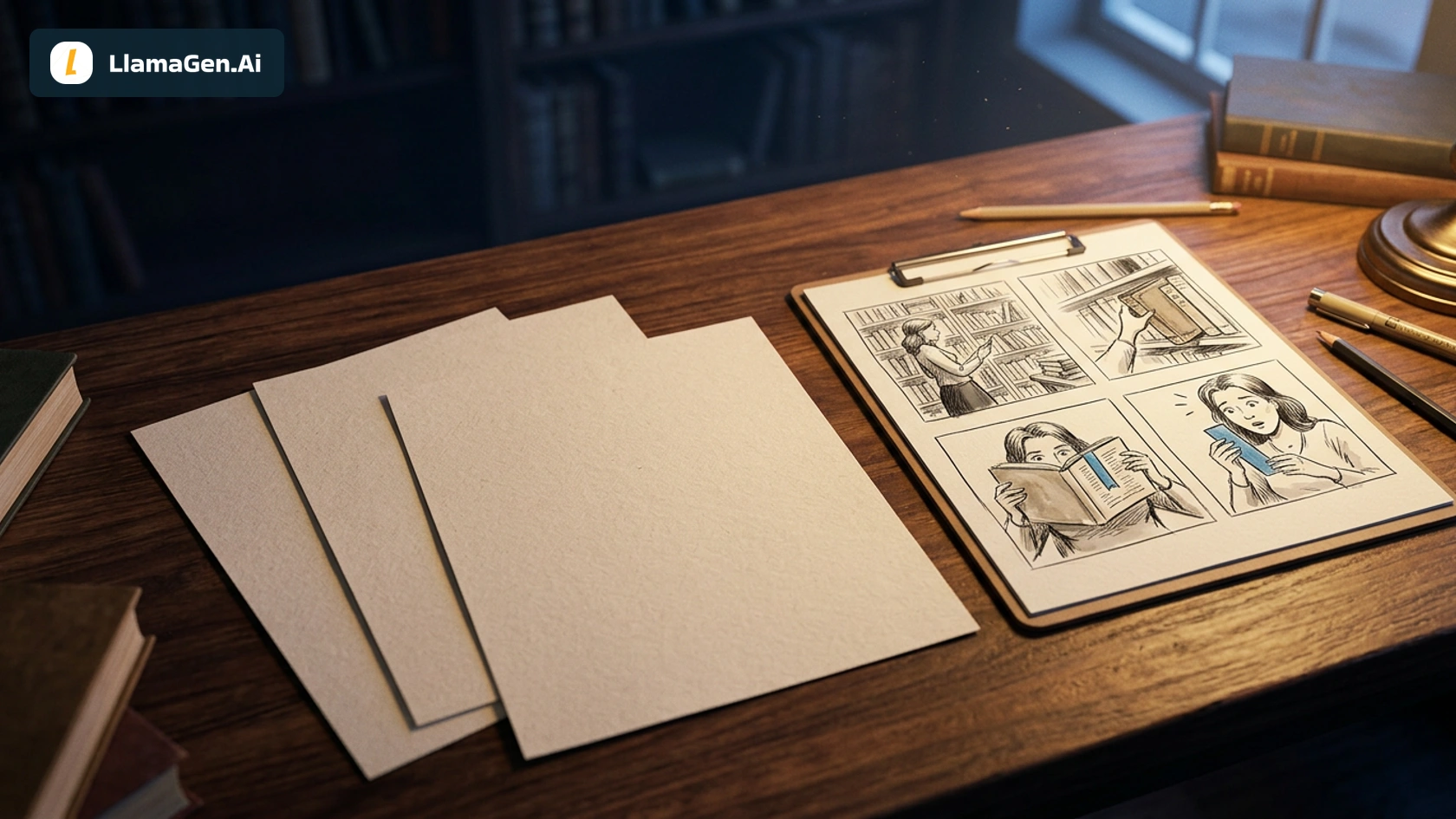
All posts
From a Three-Page PDF to a Four-Panel Comic: A Worked Example

Jay
November 13th, 2026
A strong PDF to comic example should let you inspect the source as well as the result. This worked case turns an original three-page library story into four panels: a discovery, a question, a direction, and a return. You can download the PDF, review the page-to-panel mapping, compare the first image with its repair, and open the finished reading copy.
If you want to try the product upload flow, start at LlamaGen.AI PDF to Comic. This article documents a more transparent preparation route: text extracted locally from all three PDF pages, an approved four-panel contract, and then image generation in LlamaGen.AI. It does not claim that the PDF was uploaded to or read by the native PDF-to-Comic tool in this run.
The source: The Blue Bookmark
Download the original three-page PDF. It is an owned fictional teaching source, written for this example; all characters are adults. The PDF has a selectable text layer and is 4,758 bytes. It contains one complete short scene rather than three pages excerpted from an undisclosed manuscript.
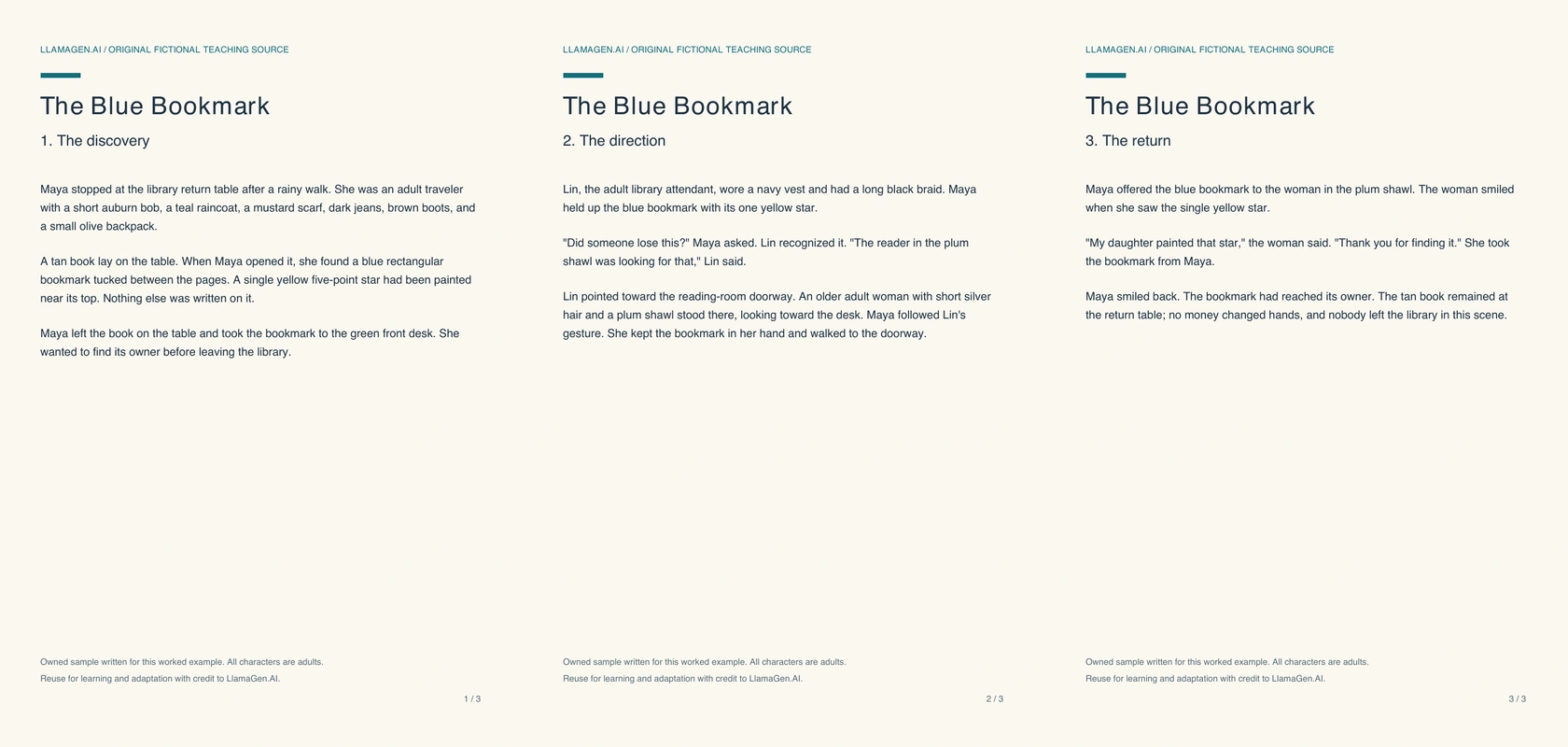
The PDF itself is the readable source. This overview simply shows its three-page structure. Download the extracted text to compare what was recovered from each page.
| Source page | What happens | Facts to preserve |
|---|---|---|
| 1: The discovery | Maya opens a returned tan book and finds a bookmark | Blue rectangle, exactly one yellow five-point star; library return table |
| 2: The direction | Maya asks Lin, who points out the reader looking for it | Lin has a black braid and navy vest; owner has silver hair and a plum shawl |
| 3: The return | Maya gives the bookmark back | Owner says her daughter painted the star; the book stays at the table |
The star is not decorative detail added for the comic. It is the recognition clue in the source and needs to stay visible. The owner is also not a new character invented to create a stronger ending.
What was tested, and what was not
Executed November 13, 2026. All three pages were extracted with a local PDF text reader and visually checked. The approved visual brief was then sent to LlamaGen.AI's image playground using Vertex Nano Banana 2.1 and an owned Maya reference sheet. The first four-panel output and a separately generated replacement for panel 1 were retained.
The repair was composited into the page locally, and lettering was added in a separate editable SVG. No native PDF upload, OCR accuracy benchmark, signed-in Studio project, native panel-lock edit, or native Studio export is claimed here. Settled generation charges and Studio credits were not available for this case, so there is no cost-per-page claim.
The public PDF-to-Comic page was checked in an anonymous browser on November 13. It accepts PDF files up to 50 MB, requires sign-in for upload, and uses account credits for generation. It also states that file upload does not guarantee understanding of every page or scanned word. Check the live page for current account requirements before starting.
1. Extract and verify the entire short source
This PDF's text was extracted page by page. The extraction contained the character descriptions, the blue bookmark and yellow star, Lin's direction, and the owner's final dialogue. No OCR was needed because the file already has a text layer.
This matters for document to comic work: if you miss a page, you can lose the payoff while still retaining enough prose to generate an attractive but inaccurate illustration. Before adapting a longer PDF, choose a self-contained passage and confirm that you have both its beginning and ending. If the source is scanned, validate the recognized text before treating it as a script.
The separate PDF comic source-readiness guide explains that preparation in more detail. Here, the downloadable input and extracted text let you inspect the exact material used.
2. Map three source pages to four comic panels
A three-page document does not need to become three comic pages. We used four panels because the scene contains four visible beats. Page 2 includes both the question at the desk and the direction toward the owner, so it supplies two panels.
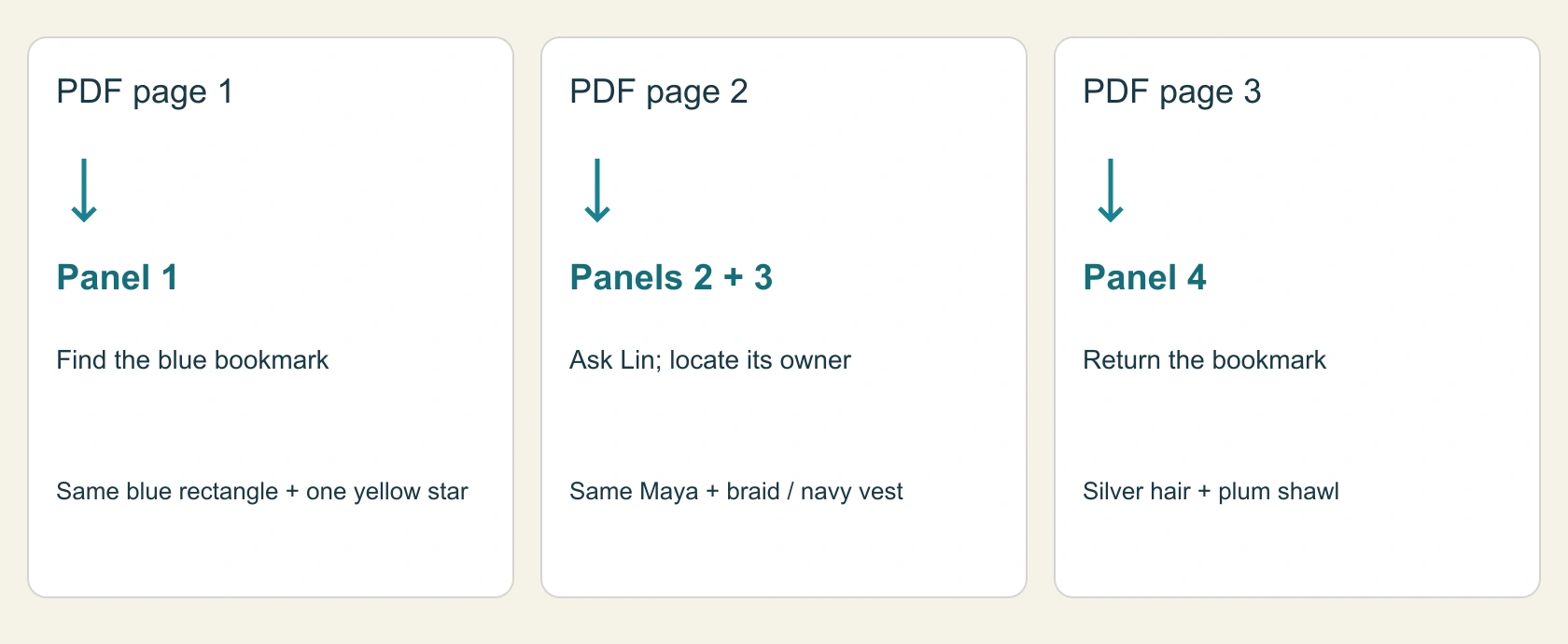
This is an editorial mapping diagram. It is not a screenshot of an automatic PDF segmentation feature.
| Panel | Source | Visible action | Exact text for the reading copy |
|---|---|---|---|
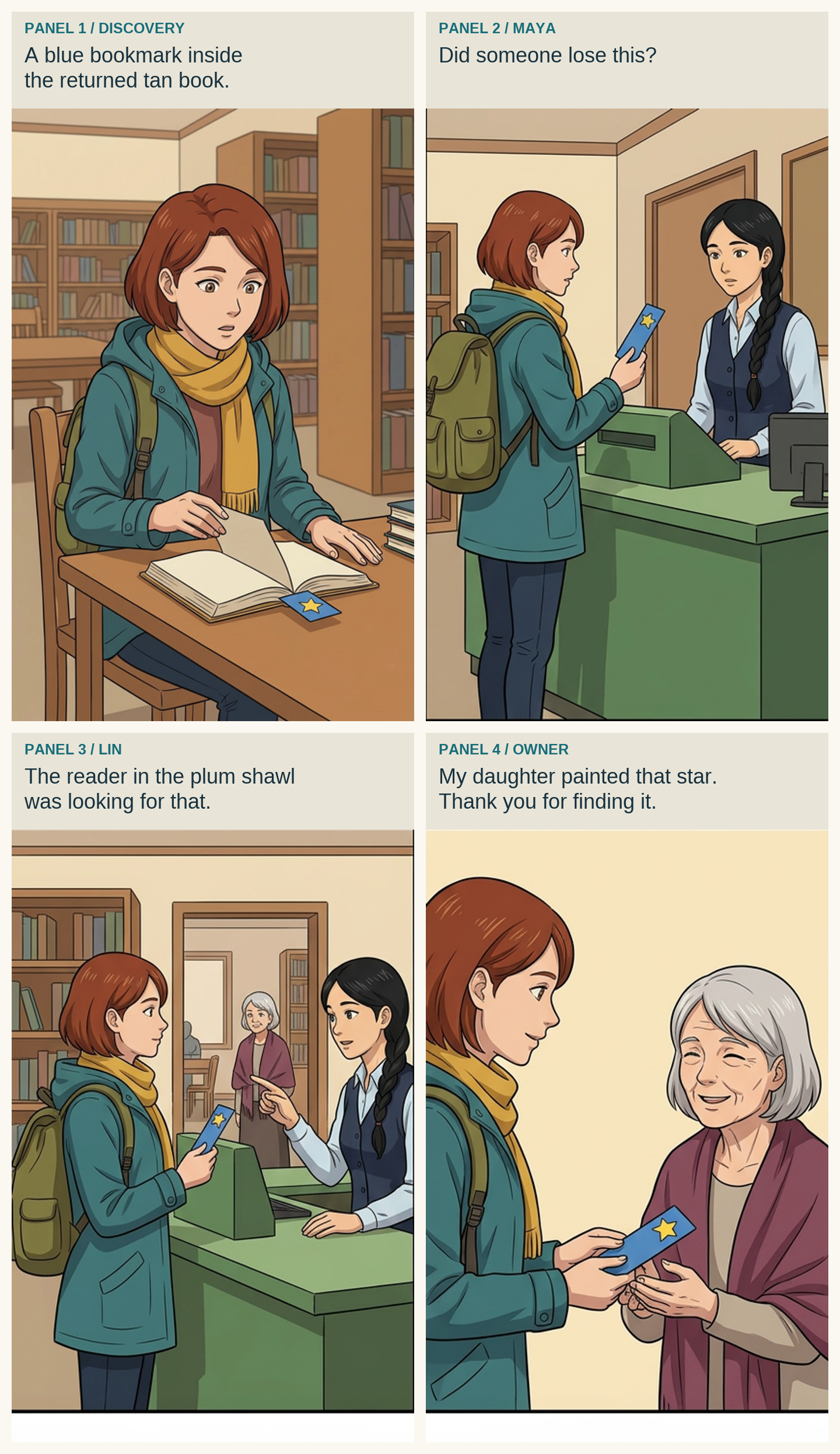
| 1 | Page 1 | Maya opens the tan book; blue star bookmark is tucked inside | Caption: “A blue bookmark inside the returned tan book.” |
| 2 | Page 2 | Maya shows the bookmark to Lin at the green desk | Maya: “Did someone lose this?” |
| 3 | Page 2 | Lin points toward the silver-haired reader in the doorway | Lin: “The reader in the plum shawl was looking for that.” |
| 4 | Page 3 | Maya offers the bookmark to its owner | Owner: “My daughter painted that star. Thank you for finding it.” |
The panel 1 caption is a concise adaptation. The spoken lines reproduce the short source dialogue. Walking from the table to the desk, and from the desk to the doorway, is compressed between panels. We did not change who owned the bookmark or why she recognized it.
Download the panel contract if you want to adapt the same scene in another style. For a longer adaptation, keep the source references beside each planned panel, as described in the source-fidelity guide.
3. Generate the artwork without baking in dialogue
The visual request specified a two-by-two page, left-to-right reading order, exactly four panels, the same Maya reference, the library setting, and the blue bookmark with its single yellow star. It requested no speech balloons or lettering. Keeping words out of the art makes it easier to correct a line or translate the comic later without redrawing the scene.
The first output preserved the main events, Lin's braid and vest, the owner's silver hair and plum shawl, and the blue-and-yellow bookmark. It also introduced a clear problem in panel 1: Maya appears to hold the book with two hands while an extra hand in the foreground displays the bookmark. That weakens both the anatomy and the discovery beat, which should show the bookmark still inside the book.
4. Repair the failed discovery panel
We requested one replacement panel, using the canonical Maya reference and the first page as visual context:
Redraw only the library discovery as a single panel.
Maya opens one tan book on the table.
A blue bookmark with one yellow five-point star stays tucked inside.
Exactly two hands, both attached to Maya.
No foreground hand, floating bookmark, extra person or inset.
No text, speech balloon, logo or watermark.
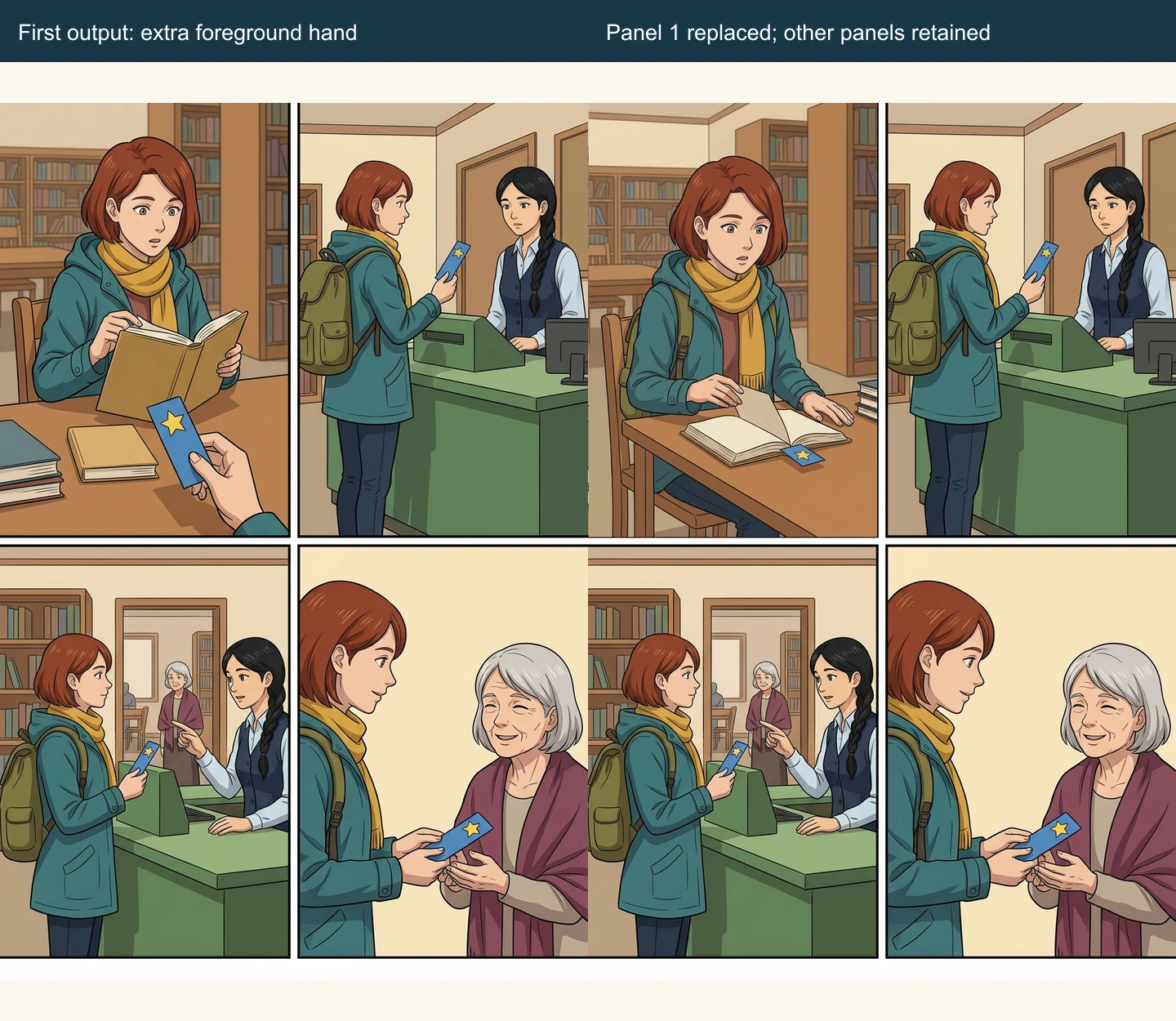
The replacement removes the detached foreground hand and places the bookmark at the open book's lower page edge. Panels 2–4 were kept from the original PNG during local assembly; their RGB pixel hashes match the first output. This verifies that those local crops were preserved. It does not establish a native Studio “lock all other panels” capability.
The bookmark's precise placement between pages is still less explicit than the source sentence. A stricter production pass could refine that detail further. The replacement is not pixel-identical to the old panel: camera angle, book placement, and clothing folds change. Review a replacement for the story requirement first, then check how well it transitions into the next accepted panel.
5. Letter and inspect the four-panel reading copy
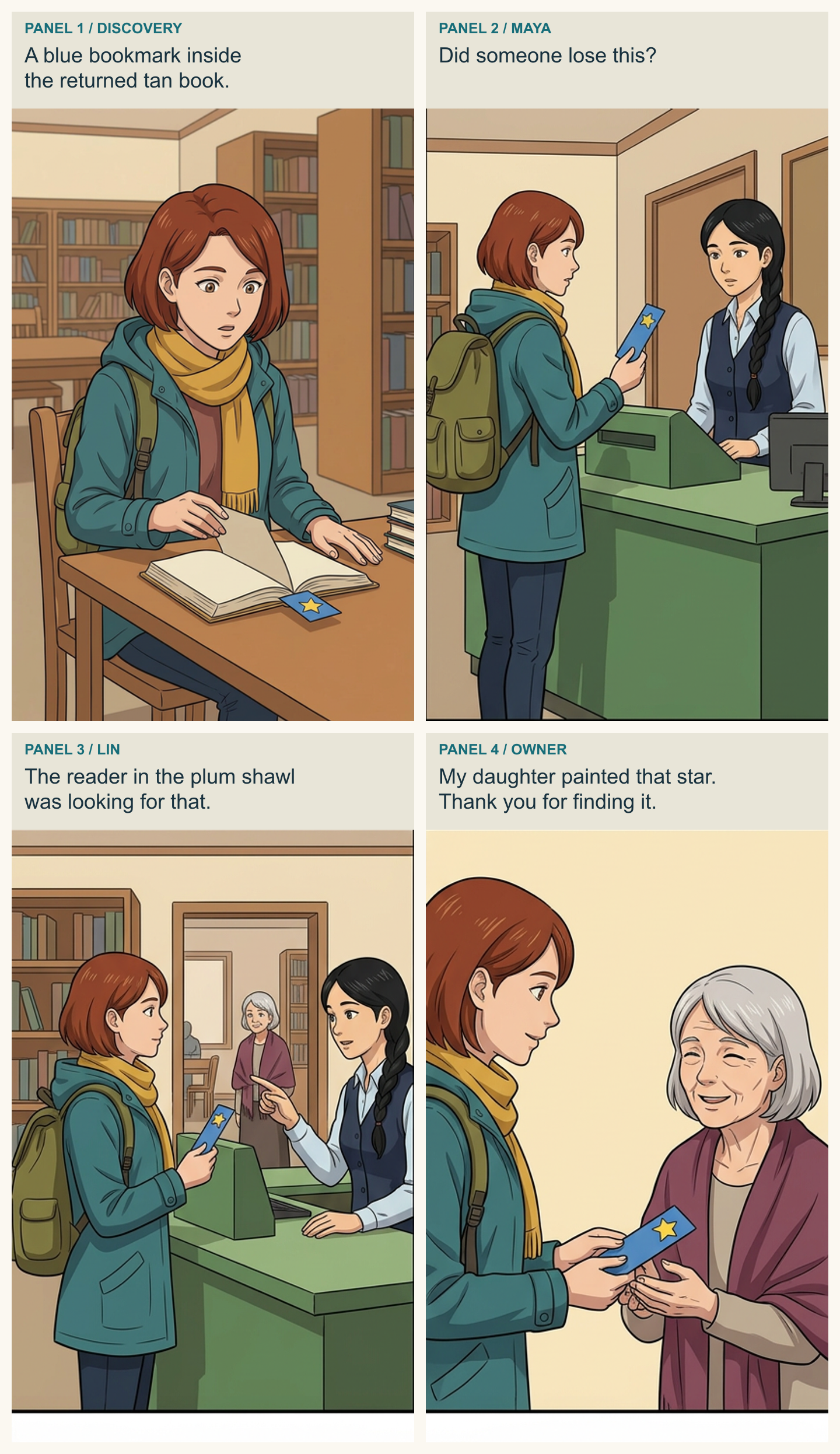
The reading copy uses four caption bands with explicit speaker labels. They are locally composed text, not generated lettering. Open the full PNG or download the editable SVG reading copy. The SVG contains embedded panel artwork and editable text; it is not a layered native Studio project.
The export is 1440 × 2492 pixels. Its panel crops are resized for the reading layout, so use the original retained image if you need the first page's unaltered proportions. The text remains separate in the SVG for revision or localization.
| Fidelity check | Result in this reading copy |
|---|---|
| Find before return | Discovery, question, direction, and handoff appear in order |
| Recognition detail | The blue bookmark and single yellow star remain visible |
| Correct owner | Silver-haired woman in plum shawl receives it |
| Correct speaker | Maya asks; Lin identifies the reader; the owner explains the star |
| No invented reward | No money or prize is introduced |
| Scope of compression | Travel between the four actions is omitted; the ending remains |
The page does not independently prove every sentence in the PDF. For example, the daughter's painting is conveyed through the owner's dialogue. Fidelity here means preserving important source facts through the combination of images and words, not claiming that the image alone contains every sentence.
Repeat the method with your own PDF
Choose a passage you are allowed to adapt, recover its text, identify the facts that cannot change, and assign each panel to a specific source passage. Generate the art, compare it against that contract, and keep the first output when a revision is needed. Add final words after the visual sequence works.
For the native upload route, open LlamaGen.AI PDF to Comic, sign in, and use a short readable PDF. State which scene and ending you want. The public page does not provide a verified page-range extraction result for this case, so extract the relevant pages beforehand when you need a tightly bounded source. Review what the product actually returns rather than assuming that one PDF page becomes one comic page.
If you are starting with a chapter rather than a short scene, continue with Novel to Comic Adaptation. As the project grows, keep the same source-to-panel record.
Related hot tags
PDF koomiksiks
Comic Tutorial
Document Adaptation
Worked Example
Populaarsed loojatööriistad
Muuda inspiratsioon oma järgmiseks looks
Loo LlamaGeniga koomikseid, süžeeskeeme ja stiliseeritud fotosid.
01
AI koomiksi generaator
Muuda idee mõne minutiga viimistletud koomiksiks.
Loo koomikseid02AI manga generaator
Loo väljendusrikast mangakunsti ja mitme paneeliga lugusid.
Loo mangat03AI-stsenaariumi generaator
Visualiseeri iga stseen enne tootmise algust.
Loo süžeeskeeme04Muuda pilt koomiksiks
Muuda iga foto koomiksistiilis illustratsiooniks.
Loo piltidest koomikseid05AI koomiksiribade looja
Loo jagatavaid koomikseid, kus tegelased püsivad järjepidevad.
Loo koomikseid
Süüta noorte unistused
Kus miljonid lood ärkavad ellu
Ülevaade LlamaGeni uusimatest funktsioonidest, tootetäiustustest, disainiuuendustest ja olulistest veaparandustest.