Smooth relative depth
Create a continuous grayscale map with coherent near-to-far ordering instead of a simple desaturated image.


AI depth map generator
Upload a photo or illustration, choose a depth or value mode, and create a clean grayscale map for parallax, ControlNet, compositing, and visual storytelling.
Generate a production-ready depth map
Use one clear source image with readable foreground, middleground, and background. Each generation uses 300 credits.
ನಿಮ್ಮ ಮೂಲ ಚಿತ್ರವನ್ನು ಅಪ್ಲೋಡ್ ಮಾಡಿ
Photo, illustration, comic panel, concept art, or storyboard frame
Output mode
Depth direction
Edge treatment
ಔಟ್ಪುಟ್ ಫ್ರೇಮಿಂಗ್
ಮೂಲ ಕ್ರಾಪ್ ಅನ್ನು ರಕ್ಷಿಸಲು ಮೊದಲ ಮೂಲ ಚಿತ್ರಕ್ಕೆ ಹೊಂದಿಸುತ್ತದೆ.
Uses 300 credits per generation.
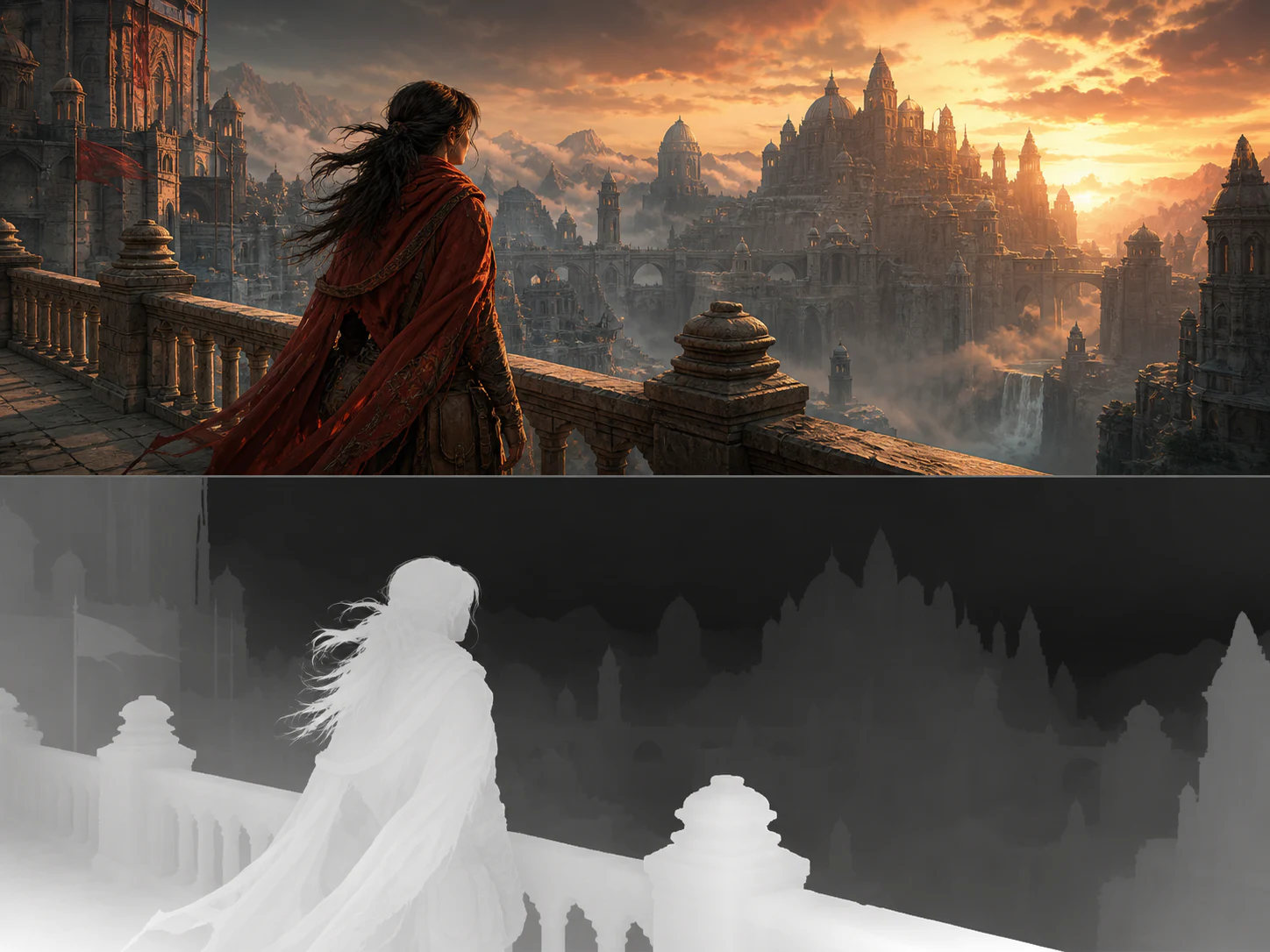
One upload, three useful analyses
A depth map describes how near or far each visible surface appears from the camera. The smooth mode creates continuous grayscale depth, while depth bands simplify the same spatial structure into foreground, middleground, and background.
The five-value composition mode solves a different artist task: it groups the image by luminance and focal hierarchy. Keeping these modes separate makes the output useful for both technical pipelines and visual development.
Create a continuous grayscale map with coherent near-to-far ordering instead of a simple desaturated image.
Compress a scene into three readable spatial layers for parallax, staging, and motion-comic planning.
Reduce visual noise and inspect focal hierarchy, large shapes, and contrast before committing to detail.
Keep the original camera, crop, subject pose, silhouettes, and object placement aligned with the output.
Original examples
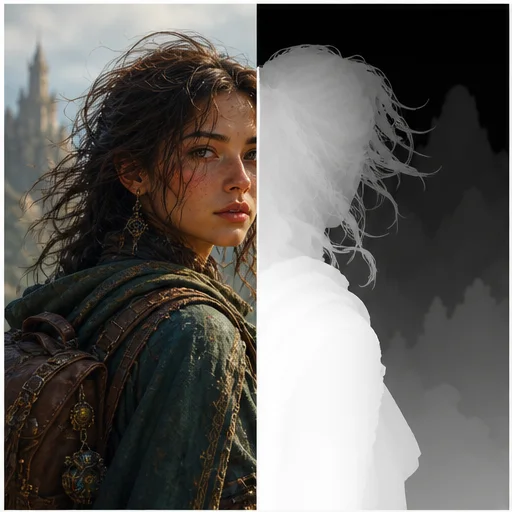
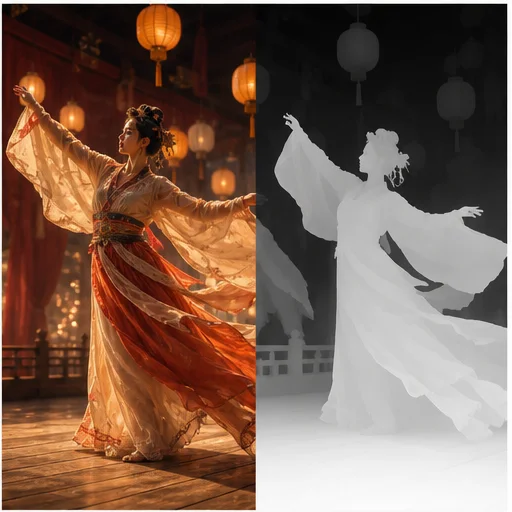
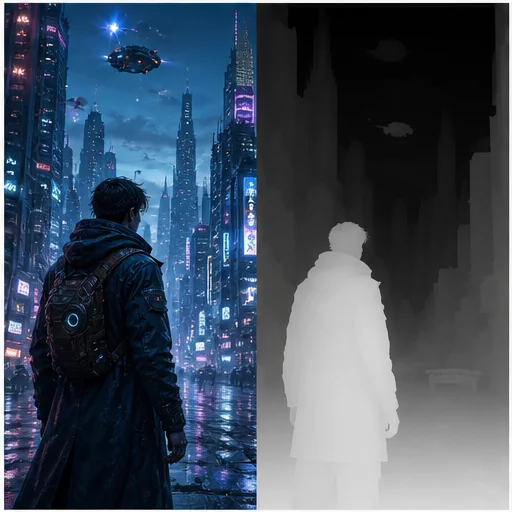
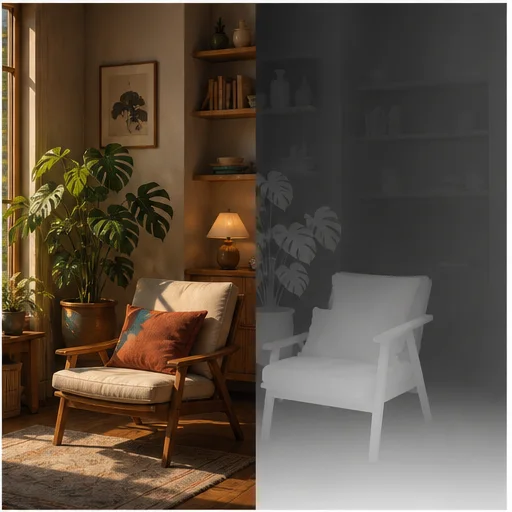
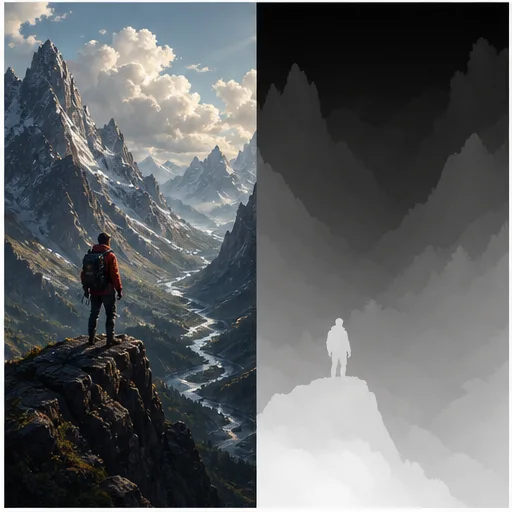
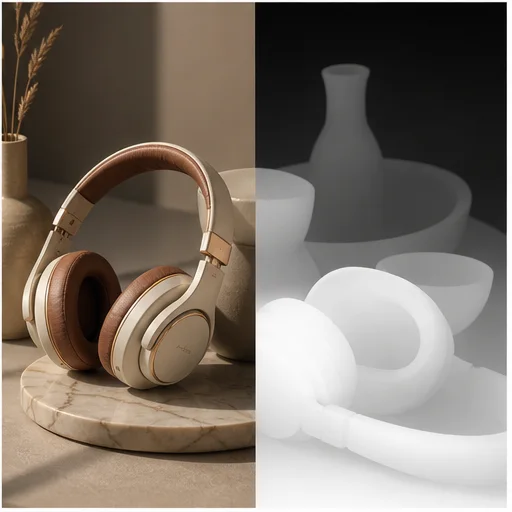
Six original synthetic cases show the source image beside an aligned grayscale depth interpretation, with white surfaces closer and dark surfaces farther away.
ಇದು ಹೇಗೆ ಕೆಲಸ ಮಾಡುತ್ತದೆ
ಸಂಕ್ಷಿಪ್ತ workflow ಅನ್ನು ಅನುಸರಿಸಿ, ನಂತರ ಫಲಿತಾಂಶವನ್ನು ಬಳಸುವ ಅಥವಾ ಪ್ರಕಟಿಸುವ ಮೊದಲು ರಚಿಸಲಾದ ವಿವರಗಳನ್ನು ಪರಿಶೀಲಿಸಿ.
Choose a scene with clear subjects and enough visual separation between near and far elements.
Generate smooth depth, three spatial bands, or a five-value composition study and set the grayscale direction.
Check silhouettes and depth ordering, then download the generated PNG for your next creative workflow.
Real creator feedback
Read what creators shared about making comics, characters, and visual stories with LlamaGen.

@jake-m
As an avid creator of comic book style graphics, I've struggled to find a tool that truly allows me to unleash my creativity at scale. llamagen.ai not only breaks limits but shatters them, offering endless possibilities for my projects. It's the ultimate AI-powered solution I've been waiting for!
@sarah-l
I've tried numerous AI tools for image generation. And they are quite fun to play with but llamagen.ai is the first app I've actually saw a potential use-case. The character consistency really grabbed my attention as it's something I hadn't seen before and I can see the appeal for professionals and amateurs alike. Truly a game-changer!

@michael-b
llamagen.ai has reignited my passion for storytelling. As a busy professional, finding time to pursue creative projects can be challenging. But this app has proven so easy to use... It's like having a creative companion by my side!

@alex-t
Being part of the creative industry demands efficiency without sacrificing quality. llamagen.ai not only meets but exceeds these expectations. Really loved playing with the storyboarding and having an AI to help with not only image generation, but also the text content - it's really a nice way to help enhance the overall experience.
@maya-s
I enjoy a great comic book and have been very sceptical about AI. For example the criticisms of the Batman AI comic saga where not without merit. But through the scepticism I do see a place for such tools. While I still value an authentic man-made production, the ability for me to create something on my own (with a little help from AI) is really empowering and exciting.
@taylor-h
Maintaining character consistency is a challenge that I did not expect to be overcome so fast. While not perfect at times, the results are impressive and I’m really looking forward to the chance to further customize my workflow and AI generation.
ಪ್ರಾಯೋಗಿಕ ವರ್ಕ್ಫ್ಲೋಗಳು
ಕೆಲಸದ ಅಗತ್ಯಕ್ಕೆ ಅನುಗುಣವಾಗಿ ರಚಿಸಿದ ಚಿತ್ರವನ್ನು ವಿಮರ್ಶಿಸಬಹುದಾದ ಕರಡು, ರೆಫರೆನ್ಸ್ ಅಥವಾ ಅಂತಿಮ ಆಸ್ತಿಯಾಗಿ ಇಟ್ಟುಕೊಳ್ಳಿ.
Motion comics
Use spatial bands to separate the visual planes that should move at different speeds in a camera push or pan.
ControlNet
Download a clean relative depth reference when an image-generation workflow needs the source scene geometry.
Concept art
Use five-value studies to judge readability, focal contrast, and large compositional masses without color distraction.
Compositing
Use grayscale distance to guide haze, blur, relighting, displacement, or depth-of-field experiments.
ಟಿಪ್ಪಣಿಗಳನ್ನು ಪರಿಶೀಲಿಸಿ
Single-image depth is an AI estimate. Inspect ambiguous surfaces and regenerate with a different edge treatment when needed.
the nearest subject follows the selected white-or-black convention
foreground, middleground, and background remain in a coherent order
hair, sleeves, props, and architecture keep readable silhouettes
the output matches the source camera, crop, pose, and object placement
glass, mirrors, fog, and reflections are reviewed for depth ambiguity
value-study output is not mistaken for metric or relative depth
ಪದೇಪದೇ ಕೇಳುವ ಪ್ರಶ್ನೆಗಳು
ಮೂಲ ಚಿತ್ರಗಳು, ಉತ್ಪಾದಿತ ಫಲಿತಾಂಶಗಳು, ಹಕ್ಕುಗಳು, ಮತ್ತು ಪರಿಶೀಲನೆ ಕುರಿತು ಪ್ರಾಯೋಗಿಕ ಉತ್ತರಗಳು.
The default mode uses white for near surfaces and black for far surfaces. Choose White is far when your downstream tool expects the opposite convention.
No. The tool creates relative depth from a single image, which describes what appears nearer or farther without claiming a real-world distance measurement.
Depth bands group pixels by spatial distance. A value study groups them by luminance and compositional importance, so the two outputs answer different creative questions.
Yes. Download the smooth depth map or three-layer version, then follow the grayscale convention required by the receiving tool.
Use sharp scenes with recognizable subjects, visible silhouettes, clear perspective, and distinct foreground and background elements.
Each AI Depth Map Generator run uses 300 credits and returns one 1K result matched to the source framing.
ಸಂಬಂಧಿತ ಉಪಕರಣಗಳು
ಈ ಕೇಂದ್ರೀಕೃತ ಎಡಿಟ್ನಿಂದ ಮುಂದಿನ ಫೋಟೋ ಅಥವಾ ಫ್ಯಾಷನ್ ಕಾರ್ಯಕ್ಕೆ ಸಾಗಿರಿ.
ಒಂದು ಸ್ಪಷ್ಟ ಪೋರ್ಟ್ರೇಟ್ ಅಪ್ಲೋಡ್ ಮಾಡಿ, ಹೇರ್ಕಟ್ ಮತ್ತು ಬೇಕಿದ್ದರೆ ಬಣ್ಣ ಆಯ್ಕೆ ಮಾಡಿ, ನಂತರ ನಿಮ್ಮ ಮುಖ, ಅಭಿವ್ಯಕ್ತಿ, ಉಡುಪು ಮತ್ತು ಹಿನ್ನೆಲೆಯನ್ನು ಗುರುತಿಸಬಹುದಂತೆ ಉಳಿಸುವ ನೈಜ ಪೂರ್ವಾವಲೋಕನ ರಚಿಸಿ.
ಉತ್ಪನ್ನ, ಪೋರ್ಟ್ರೇಟ್ ಅಥವಾ ಕ್ಯಾಟಲಾಗ್ ಚಿತ್ರವನ್ನು ಅಪ್ಲೋಡ್ ಮಾಡಿ; ವಿಷಯವನ್ನು ಹಾಗೆಯೇ ಉಳಿಸಿಕೊಂಡು ಮೂಲ ದೃಶ್ಯವನ್ನು ಸ್ವಚ್ಛವಾದ ಬಿಳಿ ಹಿನ್ನೆಲೆಯಿಂದ ಬದಲಿಸಿ.
Upload a photo, paint over the person, object, text mark, or clutter that should go, and let AI rebuild the selected part of the scene naturally.
ವ್ಯಕ್ತಿಯ ಫೋಟೋದಲ್ಲೇ ಕಾಣುವ ಉಡುಪನ್ನು ಸ್ವಚ್ಛ ಫ್ಯಾಷನ್ ಬೋರ್ಡ್ ಆಗಿ ಬೇರ್ಪಡಿಸಿ.
ನಿಮ್ಮ ಚಿತ್ರದೊಂದಿಗೆ ಪ್ರಾರಂಭಿಸಿ
Upload one image, choose the analysis you need, and create a depth or value reference in one focused workflow.