

AI manga creation template for your first original scene
Example preview
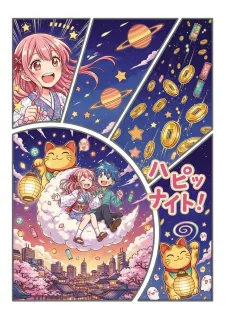
Start an original illustrative manga draft from a short brief. Define a character, a place, and one visible event before deciding whether the idea needs a single image or a longer sequence.
Help a first-time creator turn an idea into a specific visual scene instead of starting from an empty prompt.
When to use this template
- Testing the visual introduction of an original character.
- Drafting one manga-style discovery or everyday-life scene.
- Exploring a story idea before splitting it into a longer panel sequence.
Build your first draft
Write a four-part brief
Name the protagonist, setting, action, and feeling. Avoid summarizing a whole chapter in the first request.
Specify the image you need
Ask for an establishing scene, close-up, or panel sequence. This broad illustrative manga preset does not define a fixed panel count by itself.
Review the story signal
Check whether a viewer can identify who matters, what is happening, and why. Refine that image before expanding to a panel-specific template.
Try a complete example
The first rooftop garden visit
Highly detailed illustrative manga-style original scene. A shy teenage apprentice with short dark hair, round glasses, and a pale green work jacket opens a rooftop greenhouse door for the first time. Show a medium-wide view from inside the greenhouse, rows of seedlings in the foreground, a friendly older gardener turning toward the door, and a bright city skyline beyond the glass. The apprentice holds a small notebook against the chest and looks curious rather than frightened. Clear character silhouettes, gentle afternoon light, no readable text, no logos.
The brief supplies a protagonist, place, action, and feeling. A single establishing scene is easier to evaluate than an entire chapter compressed into one request.
Before you publish
- The source preset is broad; explicitly request color or monochrome, framing, and panel structure when those matter.
- Review generated text and character details. Add the exact dialogue in your editing workflow instead of assuming the image will spell it correctly.
Questions about this template
- Is AI Manga Generator a fixed page layout?
- The source prompt provides an illustrative manga-style direction without specifying a panel count. Use a layout template when a two-, four-, or six-panel structure is essential.
- What should I put in my first prompt?
- Start with a protagonist, location, visible action, and emotional tone. Add framing and a few recognizable clothing details rather than a long biography.
- Can I use my own story and characters?
- Yes. Describe your original cast and scene. Review the first result and keep a short reference brief for any details you need to reuse in later drafts.