

Večstransko pripovedovanje
Načrtujte povezane prizore namesto da bi prosili za nepovezane slike eno po eno. Zadržite zaplet, tempo, lokacije, rekvizite in vizualno smer od prve strani do naslednjega prizora ali poglavja.
LlamaGen Comics
Spremenite zgodbo ali scenarij v stripovske panele z dialogom, liki in postavitvijo, ki jo lahko urejate.
Deluje v brskalniku. V studiotu uredite vsak panel.
Prilepite svojo zgodbo, nato izberite število strani in postavitev.
Choose a reading format
Create connected pages or a vertical episode, then refine the characters and dialogue in the studio.
Strip
Generator AI stripov
Multi-page stories with a recurring cast
Manga
AI generator mange
Manga pages built from your story
Webtoon
Generator AI spletnih stripov
Vertical episodes for reading on a phone
Kaj ga dela drugačnega
LlamaGen je zasnovan za zaporedno delo: ponavljajoča se zasedba, povezani zgodbeni prehodi in format, ki mu bralci lahko sledijo. Cilj ni le ustvariti privlačen panel; cilj je dati vam uporaben stripovski projekt.
Načrtujte povezane prizore namesto da bi prosili za nepovezane slike eno po eno. Zadržite zaplet, tempo, lokacije, rekvizite in vizualno smer od prve strani do naslednjega prizora ali poglavja.
Določite ponavljajočo se zasedbo in ponovno uporabite potrjene vizualne reference. Preverjajte obraze, oblačila, barve in značilne podrobnosti, ko se zgodba premika med bližnjimi кадri, akcijo, dialogom in novimi lokacijami.
Bralski format določite od začetka: črno-bela manga, polnobarvne strani zahodnega stripa ali navpični Webtoon, zasnovan najprej za mobilne naprave. Ko zgodba potrebuje gibanje, izbrane panele nadaljujte v motion comic.
Preverjene zgodbe uporabnikov
Ustvarjalci stripov
Kar pri LlamaGen.Ai izstopa, je, kako natančno je prilagojen zaporednemu pripovedovanju in vizualni konsistentnosti. Keshav izpostavlja reference likov, ki zdržijo skozi kadre, poze in kote; tekoč pretok iz besedila v storyboard; ter nadzor nad kompozicijo, pozami in regionalnimi popravki na ravni panela.

Keshav S.
Pedagogi
LlamaGen spremeni zapisano idejo v celovito vizualno zgodbo, ohrani konsistentnost likov in odpravi potrebo po dodatnih veščinah montaže videa. Pri zgodbah za usposabljanje in izobraževanje pacientov skrajša čas produkcije in začetne stroške ter pospeši prototipiranje.

Parthik P.
Pripovedovalci blagovnih znamk
LlamaGen naši marketinški ekipi pomaga bistveno hitreje ustvarjati storyboarde v stripovskem slogu in ilustrirane kampanjske vsebine, brez da bi za vsako sredstvo potrebovali ločenega ilustratorja. Konsistentnost likov ohranja kampanje povezane, besedilni prompti in večjezična podpora pa pospešijo ideje za mešano občinstvo.

Muhammed A.
Resničen produktni tok dela
To so resnični pogledi izdelka LlamaGen: določite zasedbo, uredite stripovsko stran, nato pa projekt nadaljujte v izvoz, deljenje ali gibanje.

Nastavite prepoznavne lastnosti lika in odobrite vizualno referenco, preden lik znova vključite v poznejše panele.

Preglejte ustvarjeno stran v Comic Studio, nato popravite napise, govorne oblačke, razmerja ali samo panel, ki ni ustrezal briefu.

Nadaljujte zaporedje z isto zasedbo, odobreno delo izvozite ali delite, ali pa odprite potek Animatic, ko izbrani prizori potrebujejo gibanje.
Preverjene možnosti dostave
Trenutno stran izvozite kot datoteko PNG ali iz Comic Studio kopirajte izrisano stran kot PNG.
Uredbe panelov in platna se po kratki zamudi pri shranjevanju trajno zapišejo. Vaš paket še vedno določa, kako dolgo se hrani zgodovina projekta.
Paket Free ne obljublja HD izhoda ali odstranitve vodnega žiga; Studio višje ločljivosti izvoza rezervira za plačljive pakete.
Izbrane stripovske prizore pošljite v animacijski potek dela, ustvarite gibanje in prenesite nastalo video datoteko.
Trije formati plus gibanje
Vsak primer uporablja drugačen zaplet in cilj. Odprite statično sliko v polni velikosti ali predvajajte primer gibanja; nobena od teh kartic ne obrezuje vira, da bi ustvarila lepši predogled.
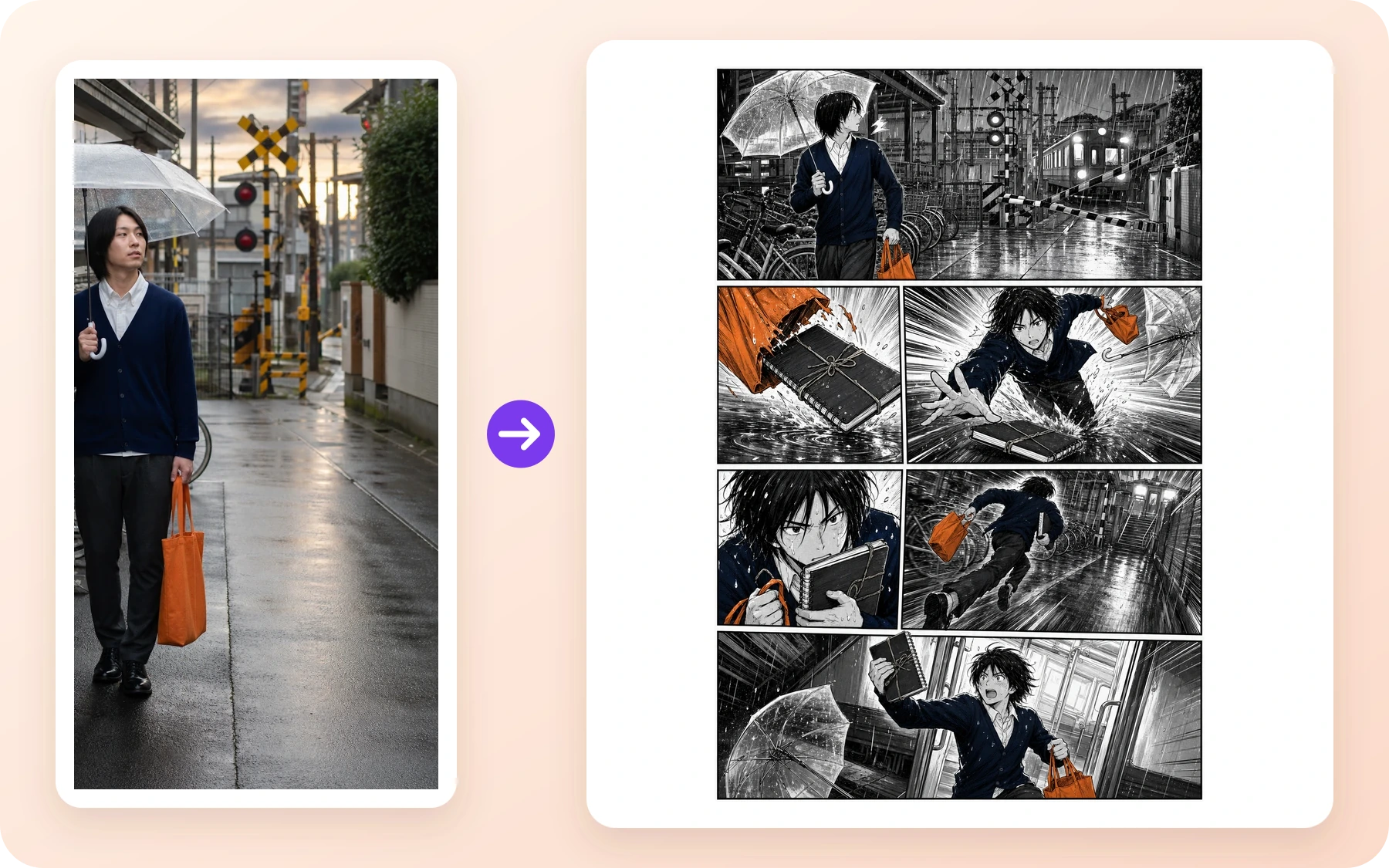
Manga · Ustvarjalci stripov
Deževen železniški motiv se spremeni v črno-belo akcijsko stran z jasnim uvodom, pregonom, bližnjim кадrom in zaključnim trenutkom.
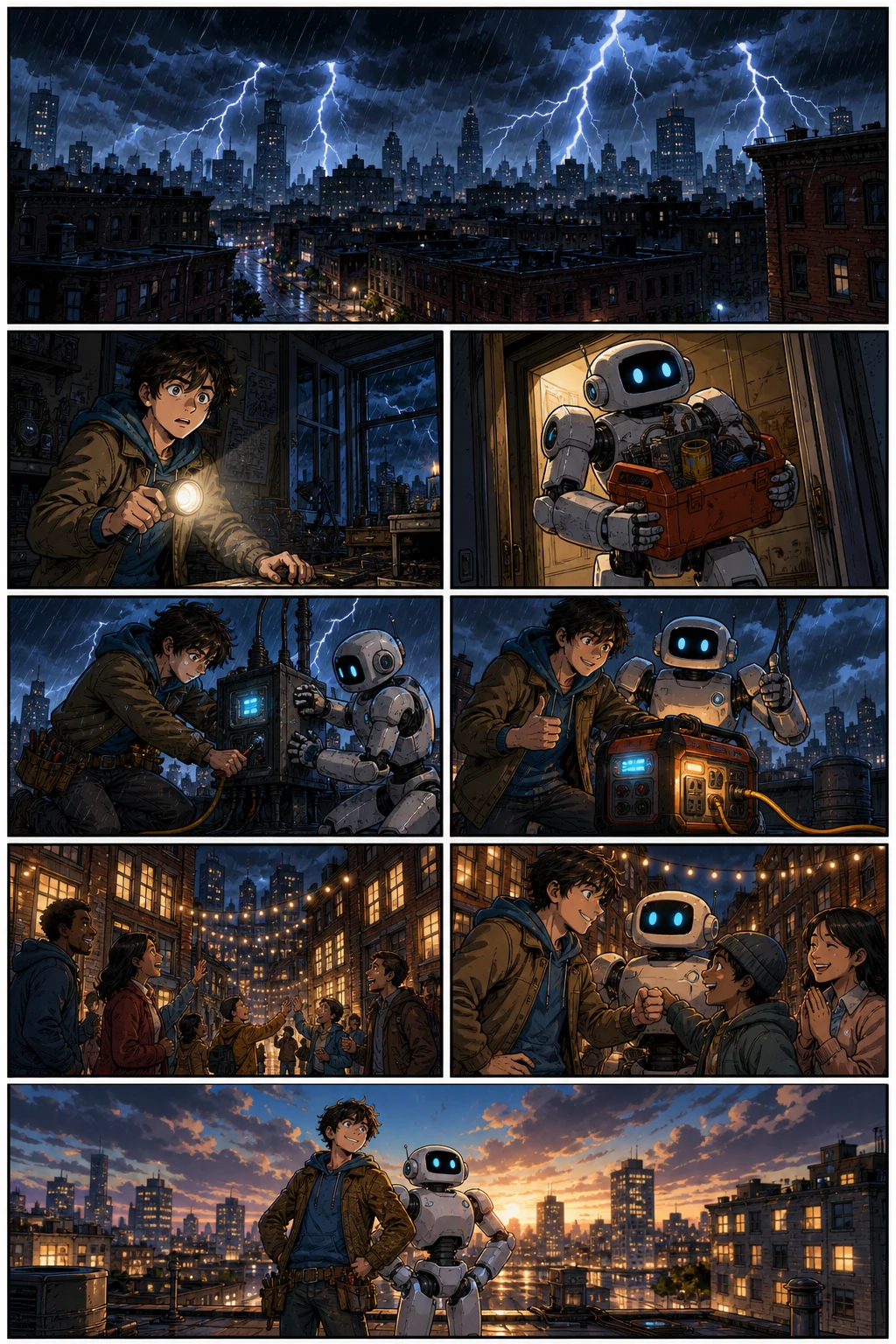
Zahodni strip · Pripovedovalci blagovnih znamk
Ponavljajoči se izumitelj in robot se premikata skozi polnobarvno reševanje ob izpadu elektrike z berljivo akcijo in spreminjajočimi se koti kamere.
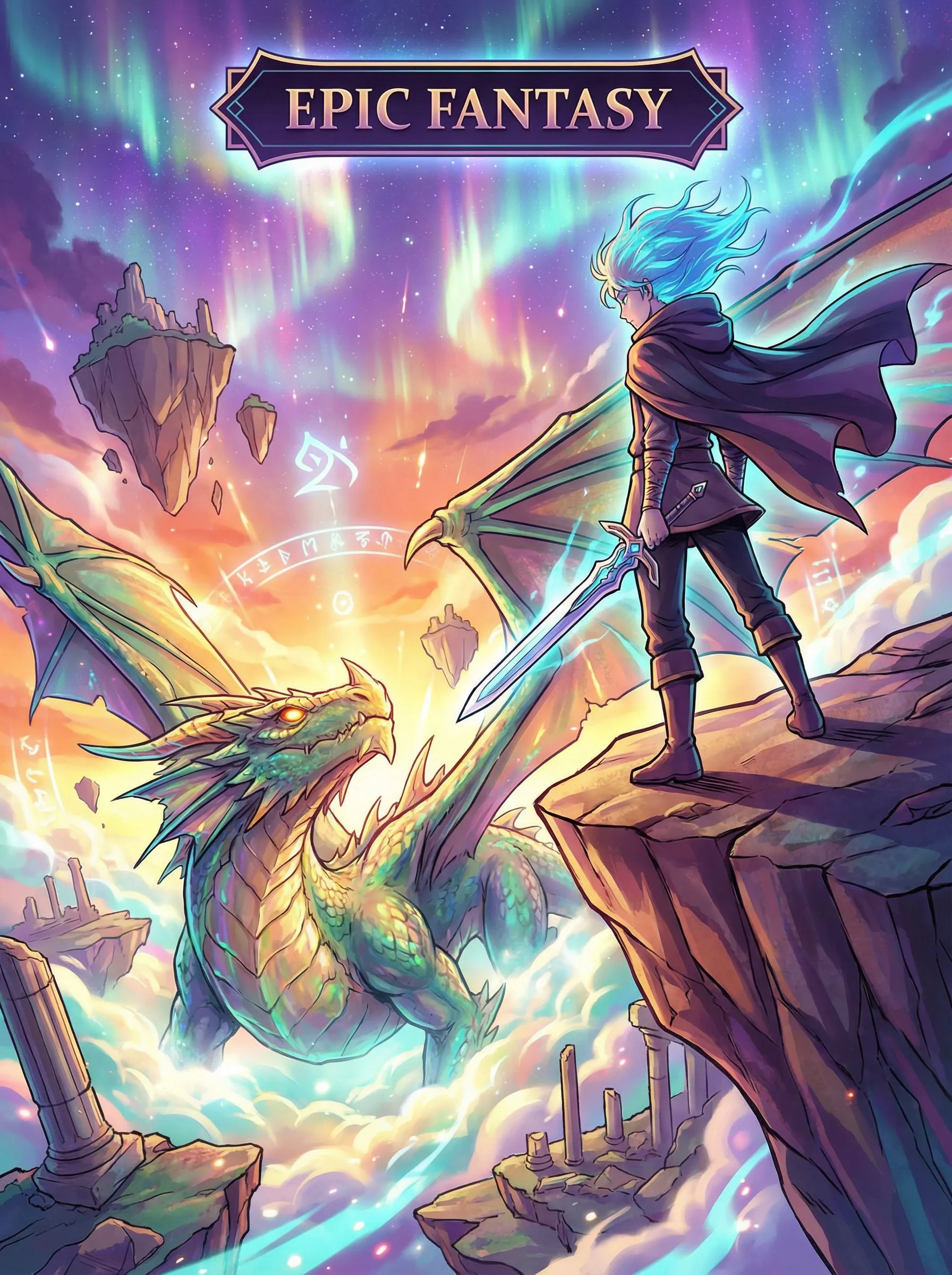
Navpični Webtoon · Pedagogi
Fantazijsko potovanje uporablja navpični razmik in dolgoročni tempo za mobilne naprave, da bralca vodi od odkritja v nevarnost.
Motion Comic · Storyboard ekipe
Zaključeni stripovski kader se nadaljuje v kratek animiran prizor z usmerjenim gibanjem kamere in premikanjem lika.
comic to video converterPopravite del, ki ni uspel
Izhod AI še vedno zahteva presojo. Vsako ustvarjeno stran obravnavajte kot osnutek: obdržite potrjeno, izolirajte težavo in popravite najmanjšo uporabno enoto. To je praktična pot, ko obraz odstopa, poza ne uspe ali besede ne ustrezajo več ritmu.
Ponovno uporabite potrjeno referenco lika in ponovno narišite prizadeti panel. Potrjene strani ohranite na mestu, medtem ko primerjate popravljeni obraz, obleko, rekvizite in paleto.
Spremenite prompt tega panela, kader, pozo ali ozadje in ustvarite ta panel znova, namesto da bi začeli celotno zaporedje od začetka.
Popravite napise in dialog, nato pa v Studiu prilagodite razmerja panelov in vrstni red branja. Stran potrdite šele, ko besede in vizualni elementi nosijo isti zgodbeni trenutek.
Preverjen povzetek dostave
Uporabili smo iste zgodbene prehode in isto ponavljajočo se zasedbo za tri ločene zagone formatov. To je dokaz ponovljivega poteka dela, ne trditev, da en klik samodejno pretvori končan strip v vsako postavitev.
36 potrjenih panelov kaže, da lahko isti načrt poglavja in štirje ponavljajoči se liki po pregledu preživijo več prizorov in bralnih formatov. Ne dokazujejo, da je vsak prvi izhod uporaben, da so tri postavitve medsebojno zamenljive ali da potek dela ne potrebuje človeškega urejanja. Podrobni zapis zato zavrne poskuse, čas modela, prompte, manifest sredstev in hash datotek zunaj te strani za pretvorbo, kjer jih je mogoče pregledati, ne da bi preobremenili nekoga, ki želi samo začeti strip.
Oglej si celotno študijo primeraPreden začnete
Prikazano stanje prijavljenega računa in potrditev pred generiranjem ostajata trenutno merilo, ker se krediti, promocije in paketi lahko spremenijo.
Free ne obljublja shranjene zgodovine stripov. Standard trenutno navaja 30 dni, Pro 90 dni, višje ravni pa neomejeno zgodovino. Komercialna uporaba ostaja podvržena Pogojem in pravicam tretjih oseb.
Primerjaj trenutne pakete in omejitveVarnost, pravice in objavljanje
To je povzetek v preprostem jeziku, ne nadomestilo za pravilnike. Vaša namera uporabe, izvorno gradivo, jurisdikcija in velikost podjetja lahko spremenijo odgovor, zato sledite povezanih dokumentom, ko je projekt komercialno pomemben.
Politika vsebine velja za promte, naložene datoteke, ustvarjeno ali urejeno izhodno vsebino, javne objave in uporabo API-ja. LlamaGen opisuje avtomatizirane preglede, nadzor ponudnika, pregled javnih območij, prijave in človeški pregled. To je tudi praktična meja sprejemljive uporabe za ta generator. Uporabite nadzor Prijavi na javni umetnini ali sledite navodilom za prijavo v Politiki vsebine. Ne prilagajte domnevnega gradiva o zlorabi otrok.
Pogoji vam v obsegu, ki ga dovoljuje zakon, dodelijo interes LlamaGen za izhodne rezultate, vključno s komercialno uporabo, ob upoštevanju Pogojev in pravic tretjih oseb. Še vedno ste odgovorni za dovoljenja za vnose ter za urejanje pravic zasebnosti, objave, avtorskih pravic, blagovnih znamk in drugih pravic. Podjetja nad navedenim pragom prihodkov potrebujejo zahtevani plačljivi paket.
Preberite PogojeLlamaGen ne obljublja, da je AI izhod edinstven, avtorskopravno zaščiten v vsaki državi ali brez zahtevkov tretjih oseb. Podobni prompti lahko ustvarijo podobne rezultate. Shranite dokaze o svojem človeškem avtorstvu in uredniških odločitvah, ne uporabljajte zaščitenih likov ali blagovnih znamk, ki jih ne nadzorujete, in za odločitve z visoko vrednostjo pri objavljanju ali licenciranju pridobite pravni nasvet.
Preberite pogoje o pravicah do izhodaVprašanja pred ustvarjanjem
Če ste uporabljali Komiko Comics Canvas za osnutke panelov in strani, je ta AI generator stripov ustrezen LlamaGen-ov potek dela: napišite zgodbo, ustvarite povezane strani, nato pa panele uredite v Comic Studio. Klepet z liki na tej strani ni vključen.
Uporabite OC Maker ali Anime OC Maker, nato pa istega lika prenesite v ta generator stripov. Če začnete s selfijem namesto z napisanim OC, je ustrezna stran Photo to anime.
Da. Določite ponavljajočo se zasedbo in smer zgodbe, ponovno uporabite potrjene vizualne reference ter preverjajte obraze, oblačila, rekvizite, okolje in slog, ko dodajate panele in strani. Konzistentnost AI še vedno zahteva pregled; panel, ki odstopa, popravite, preden razširite zaporedje.
Free je namenjen preizkusu kratkega stripa in uporablja kredite. Generiranje zahteva račun, trenutni paket Free navaja do štiri panele na stran in ne obljublja odstranitve vodnega žiga, HD izpisa ali shranjene zgodovine stripov. Preverite stran Cenik v živo, ker se lahko dodelitve kreditov, promocije in paketi spremenijo.
Ne. V Comic Studio lahko popravite prompt prizadetega panela, kader, pozo ali ozadje in ta panel ponovno ustvarite, medtem ko ohranite odobreno delo. Lahko tudi uredite napise ali dialog in prilagodite razmerja panelov, preden nadaljujete zgodbo.
Primeri na tej strani tega ne trdijo. Preverjena študija treh formatov je uporabila iste zgodbene prehode in reference likov v treh ločenih zagonih formatov. Vsak bralni smeri in postavitvi namenite svoj načrt, nato pa rezultat preverite posebej.
Da. Comic Studio ponuja urejevalno platno za napise, elemente dialoga, razmerja panelov, pregled strani in ponovno ustvarjanje izbranih panelov. Natančen izvoz, zgodovina in napredne možnosti urejanja so odvisne od trenutnega paketa.
Pogoji vam v obsegu, ki ga dovoljuje zakon, dodelijo interes LlamaGen za izhodne rezultate, vključno s komercialno uporabo, ob upoštevanju Pogojev in pravic tretjih oseb. Za dovoljenja za vnose in urejanje pravic ste odgovorni sami. Podjetja z več kot 500.000 USD letnih prihodkov morajo pri ustvarjanju sredstev uporabljati Pro ali Unlimited.
Politika vsebine velja za promte, naložene datoteke, ustvarjene ali urejene izhodne vsebine, javne objave in uporabo API-ja. LlamaGen opisuje avtomatizirane preglede, nadzor ponudnika, pregled javnih območij, prijave in človeški nadzor. Uporabite nadzor Prijavi na javni umetnini ali pošljite Content Safety Report z URL-jem strani in kratko razlago.
Ne. Obravnava avtorskih pravic se razlikuje glede na jurisdikcijo, izhod morda ni edinstven, in LlamaGen ne jamči nekršitve pravic. Shranite zapise svojega človeškega pisanja in uredniških sprememb, ne uporabljajte zaščitenih likov ali znamk, ki jih ne nadzorujete, in za visoko vredne založniške ali licenčne odločitve poiščite pravni nasvet.
No. Copyright treatment varies by jurisdiction, output may not be unique, and LlamaGen does not guarantee non-infringement. Keep records of your human writing and edits, avoid protected characters or brands you do not control, and seek legal advice for high-value publishing or licensing decisions.
You can create multi-page comics, comic strips, manga pages, and Webtoon episodes using AI. LlamaGen is an AI comic drawing generator and comic drawer AI — a complete comic using AI workflow that turns a story prompt into an AI made comic with consistent characters, editable panels, and export-ready pages.
Yes. LlamaGen works as an AI comic generator from photo and image references — upload a portrait, scene, or character sketch and generate comic panels from it. You can also write a story prompt and use the AI comic generator from text free for scripts, chapters, and original ideas.
Yes. You can use LlamaGen to make anime-style manga pages, action panels, and character-driven comics. Sign in to generate comics; generation uses credits, including on the Free plan. Check the current Pricing page for credit allowances and plan limits.
Določite zasedbo in naslednji zgodbeni prehod, ustvarite povezano stran, nato pa pred nadaljevanjem poglavja preglejte panele.
Ustvari strip