



Turli manga uslublarini sinab ko‘ring
Turli manga transformatsiya uslublarini ko‘ring va suratlaringiz uchun eng mos ko‘rinishni toping
Suratni manga uslubidagi tasvirga qanday aylantirish?
Referens yuklang, so‘rov narxini ko‘rib chiqing va manga uslubidagi natijani tekshiring.
Yuklash uchun bosing
JPG, PNG, WEBP
1‑bosqich: Suratni AI manga filterga yuklang
Yoqtirgan suratingizni tanlang va AI manga filterimizga yuklang

2‑bosqich: “Generate” tugmasini bosing
AI tizimimiz ishga tushib, suratingizni manga uslubiga aylantiradi

3‑bosqich: O‘zgargan tasvirni yuklab oling
Chiroyli manga uslubidagi artingizni saqlang va do‘stlar bilan bo‘lishing
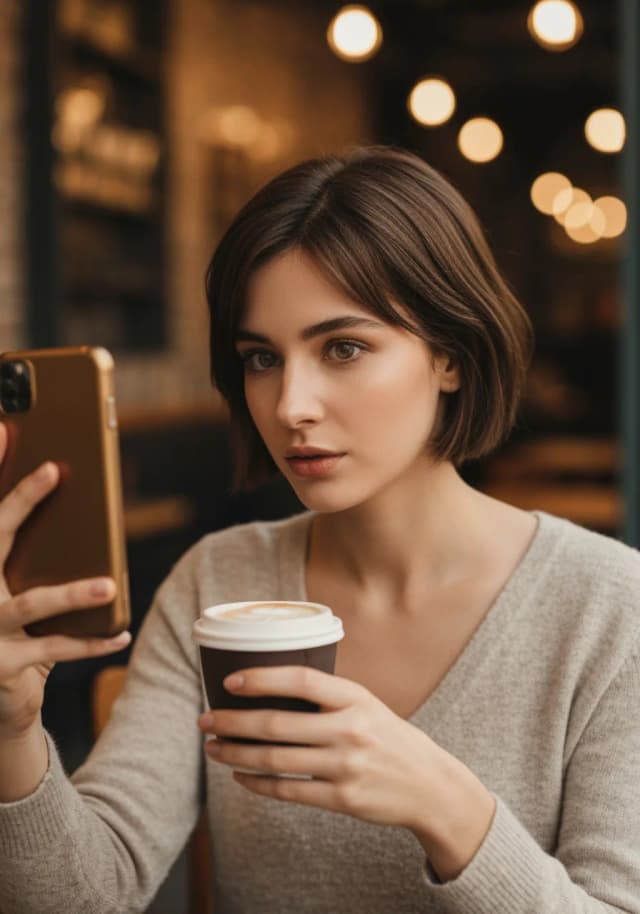
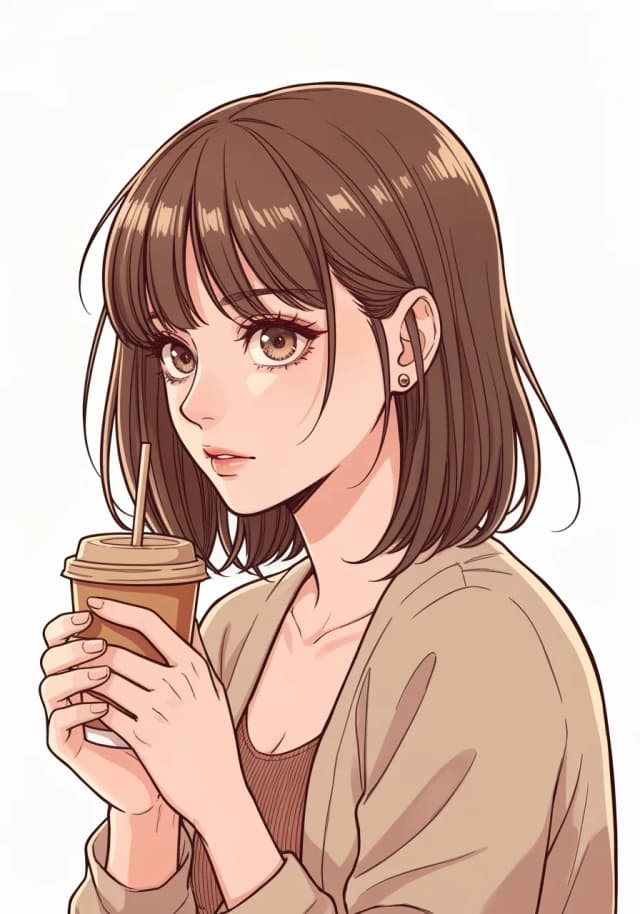
Portretlarni manga uslubidagi suratga oson aylantiring
AI Manga Filter yordamida portretlarni bir necha soniyada yorqin manga uslubidagi suratga bemalol aylantira olasiz. Masalan, namunaviy tasvirda qahva ichib, oddiy selfi qilayotgan ayol ko‘rsatilgan — qayta ishlangandan so‘ng uning surati ifodali chiziqlar, stilize q shading va klassik anime estetikasiga ega jonli manga qahramonga aylanadi.
Oddiy selfi bo‘lsin yoki batafsil portret, AI mohiyatni ushlab, unga ijodiy manga ohangini qo‘shadi — ijtimoiy tarmoqlar, profil suratlari yoki shunchaki suratlar bilan qiziqarli tajriba uchun juda mos.
Eng yaxshi manga filter natijalari uchun maslahatlar
Yuqori sifatli suratlardan foydalaning
Aniq, yaxshi yorug‘likka ega suratlar eng yaxshi manga transformatsiyalarni beradi. Xira yoki past sifatli tasvirlardan qoching.
Yuz chiziqlari aniq ko‘rinsin
Yuz chiziqlari yaqqol ko‘rinadigan va yorug‘ligi yaxshi suratlar ifodali ko‘zlarga ega batafsil manga qahramonlarni beradi.
Turli suratlarni sinab ko‘ring
Portretlar, selfilar, guruh suratlari va uy hayvonlarini sinab ko‘ring — har biri o‘ziga xos manga uslubidagi natija beradi.
Qattiq filtrlarni ishlatmang
Tabiiy suratlardan boshlang. Eng yaxshi natija uchun AI o‘zi manga estetikasini qo‘llaydi.
Turli rakurslarni sinang
Rostdan qaragan suratlar juda yaxshi ishlaydi; yon profil va uch chorak rakurslar esa dramatik qahramonlik qo‘shadi.
Kompozitsiyani hisobga oling
Oddiy fon va muvozanatli kadrlar toza, ko‘rkam manga artni ta’minlaydi.
LlamaGen AI Manga Filterni boshqa vositalar bilan solishtiring
Bir zumda manga natijalari va qo‘l bilan fotoni tahrirlashni taqqoslang
| Funksiya | LlamaGen.ai | Boshqa vositalar |
|---|---|---|
| Bir zumda ishlov | ✓ | ✗ |
| Haqiqiy manga uslubi | ✓ | ✗ |
| Bir nechta san’at uslublari | ✓ | ✗ |
| Yuqori aniqlikdagi natija | ✓ | ✓ |
| Yuklab olish shartlarini tekshirish | ✓ | ✗ |
| Hisob va kredit talab qilinadi | ✓ | ✗ |
| Kredit karta talab qilinmaydi | ✓ | ✗ |
| Tijoriy foydalanishga ruxsat | ✓ | ✗ |
Yordam markazi
AI Manga Filter bo‘yicha savol‑javoblar
AI Manga Filter nima?
AI Manga Filter suratlarni xarakterli chiziqlar, uslubiy soyalar va ifodali detallar bilan avtomatik ravishda manga uslubidagi asarga aylantiradi.
AI manga filtridan bepul foydalansam bo‘ladimi?
Ha. Hisobingizda yetarli mavjud boshlang‘ich yoki ishlab topilgan bepul kreditlar bo‘lsa, asosiy generatsiyani bepul sinab ko‘rishingiz mumkin. Generatsiyadan oldin tizimga kiring va narx hamda model mosligini tekshiring. Har bir so‘rov kredit sarflaydi; faqat pullik modellarda yoki keyingi generatsiyalarda pullik plan yoki sotib olingan kreditlar kerak bo‘lishi mumkin. Tizimga kirmasdan ham namunalarni bepul ko‘rishingiz mumkin.
Qaysi rasm formatlari qo‘llanadi?
Yuklash va yuqori aniqlikdagi yuklab olish uchun JPG, JPEG, PNG va WEBP qo‘llab-quvvatlanadi.
Ishlov berish qancha vaqt oladi?
Ko‘pchilik suratlar o‘lchami va server yukiga qarab 5–10 soniyada aylantiriladi.
Yaratilgan manga san’atidan tijoriy foydalanish mumkinmi?
Ha. Natijalar sizga tegishli bo‘ladi. Asl suratga huquqingiz borligiga ishonch hosil qiling.
Manga o‘tkazish uchun qanday surat yaxshi bo‘ladi?
Yaxshi yoritilgan, fonlari sodda bo‘lgan aniq portretlar eng yaxshi natija beradi.
LlamaGen AI Manga Filter va boshqa vositalar
Boshqaruv, ko‘rib chiqish vaqti hamda yaratish xarajatlariga qarab workflow tanlang.
| Funksiya | AI Manga Filter | An’anaviy vositalar |
|---|---|---|
| Yaratish shartlari | Kirish va kredit kerak; joriy narx vositada ko‘rsatiladi | Ko‘plab ilovalar to‘lov talab qiladi yoki reklamalar/watermark ko‘rsatadi |
| Aylantirish sifati | Toza chiziqlar va soyalar bilan yuqori sifatli manga uslubidagi aylantirish | Ko‘pincha haqiqiy mangadan ko‘ra loyqa yoki multfilmga o‘xshaydi |
| AI modeli | Haqiqiy manga san’ati bo‘yicha o‘qitilgan maxsus AI model | Manga uchun o‘qitilmagan umumiy filtrlar yoki presetlar |
| Yuklash va ishlov berish | Faqat surat yuklang va onlayn darhol manga natijasini oling | Bir nechta vositada qo‘lda tahrirlash |
| Foydalanish qulayligi | Boshlovchilar uchun qulay interfeys | Murakkab sozlamalar, oddiy foydalanuvchilar uchun qiyin |
| Natija formati | Yuqori aniqlikdagi PNG/JPG darhol | Ko‘pincha past aniqlik yoki watermarkli eksport |
AI Manga Filter bo‘yicha tez‑tez beriladigan savollar
AI manga filter nima?
AI Manga Filter oddiy suratlarni AI yordamida avtomatik ravishda manga uslubidagi rasmlarga aylantiradi. U yuzlar, fon va yoritishni tahlil qilib, keyin qalin konturlar va uslubiy soyalar kabi komiks effektlarini qo‘llaydi — selfi, uy hayvonlari va manzaralar uchun bir bosishda juda qulay.
AI bilan manga yarata olamanmi?
Ha. Matndan manga yaratish uchun AI manga generatorimizni sinab ko‘ring yoki panellar, dialog bulutlari va joylashuvlarni sozlash uchun onlayn manga makerimizdan foydalaning.
Yuklagan rasmlarim maxfiy saqlanadimi?
Ha. Biz rasmlarni xavfsiz qayta ishlaymiz va ularni doimiy saqlamaymiz. Fotosuratlaringiz faqat aylantirish uchun ishlatiladi, so‘ng o‘chirib tashlanadi.
AI manga filter qanday ishlaydi?
U asosiy elementlarni (yuzlar, chetlar, sahnalar) aniqlaydi, ularni manga uslubidagi xususiyatlarga (ifodali ko‘zlar, chiziqli san’at, cel shading) bog‘laydi va so‘ng tekstura, kontur hamda ohangni anime ilhomidagi tasvirga aylantiradi — odatda soniyalar ichida.
Manga yaratishlar cheksizmi?
Har bir yaratish kredit sarflaydi. Urinishlar hisob balansi, reja va amaldagi xizmat cheklovlariga bog‘liq.