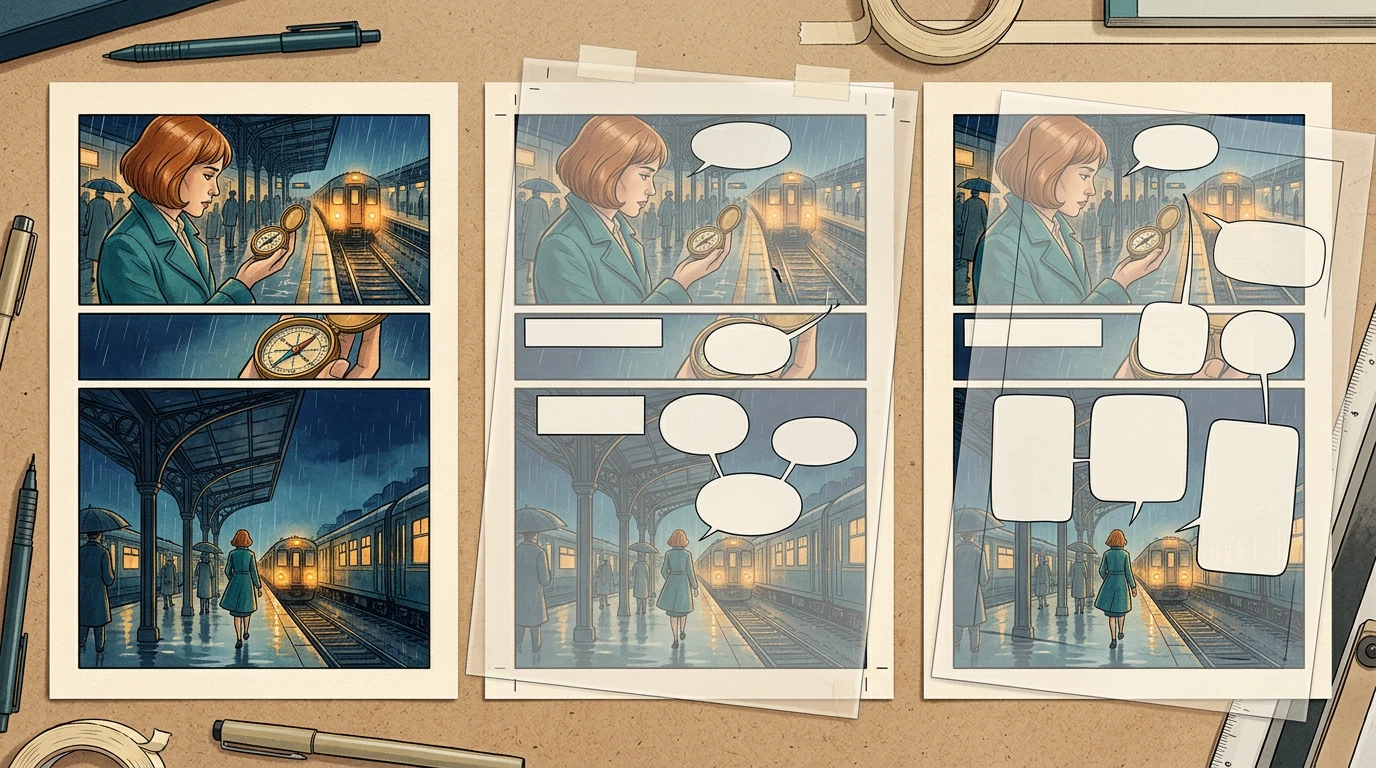
To localize a comic without redrawing its artwork, keep a clean art master and place each language's dialogue, balloons, and sound effects on separate editable layers. Translate the script, fit the lettering, and review the exported page as a reader would.
If you only have a flattened image, LlamaGen.AI Manga Translator can help you create a translated draft. Compare its output with the source. When exact pixel preservation matters, keep the original art locked and build separate text overlays instead of assuming an AI-translated image will leave every pixel untouched.
Why comic localization needs more than translated sentences
A short line may become longer in another language. A joke may depend on the speaker's voice. A new line break can hide an important face or change the order in which balloons are read.
A creator's Japanese localization workflow describes keeping the original page separate from copy and lettering. That separation is useful even when the first translation comes from an automated tool: the art can stay approved while language decisions change.
Our example uses an original station scene. Mira finds a brass compass and asks an attendant who owns it. The story action stays fixed while the language layer changes.
Step 1: Choose the right source workflow
What you have
Practical next step
What to inspect
Clean art plus live dialogue
Duplicate the language layers
Font, tone, line breaks, tails
Layered project with raster lettering
Rebuild the wording as live text
Text transcription and balloon fit
Flattened image with baked-in words
Related hot tags
Comic Localization
Manga Translation
Lettering
Populaarsed loojatööriistad
Muuda inspiratsioon oma järgmiseks looks
Loo LlamaGeniga koomikseid, süžeeskeeme ja stiliseeritud fotosid.
Süüta noorte unistused Kus miljonid lood ärkavad ellu
Ülevaade LlamaGeni uusimatest funktsioonidest, tootetäiustustest, disainiuuendustest ja olulistest veaparandustest.
✦
✧
✦
✧
Uus viis lugude jutustamiseks
Loo hetkega piiramatult lugusid, koomikseid, animatsioone, mänge ja muud, mis kõnetavad tänapäeva publikut
Produce a draft, then clean or reconstruct text regions
Art changes, missed text, cleanup
Artwork that must remain pixel-identical
Lock the art and composite separate overlays
Master checksum and layer visibility
Avoid erasing lettering from your only copy. Keep the source, the transcription, the translation, and the localized export as distinct assets.
Public tool page captured November 2, 2026. Check the current interface for available models, credits, and output behavior.
The translator page accepts a page and target language to generate a translated draft. Its image output still needs visual review; it does not guarantee a complete editable lettering project or unchanged source pixels.
Step 2: Give every line a stable ID
Track dialogue by page, panel, balloon, and speaker. This reduces the chance that a revised translation gets pasted into the wrong location.
id,speaker,source,translation_status
P003-02-B01,Mira,Someone lost this.,draft
P003-03-B01,Attendant,The last train leaves soon.,draft
P003-04-B01,Mira,Then we should hurry.,draft
Keep character names, recurring terminology, voice notes, and approved translations in a glossary. A compass should not become a watch halfway through the chapter just because the object looks small in one panel.
Also inventory captions, signs, handwritten notes, credits, and sound effects. Dialogue alone may not carry the full story for the new audience.
Step 3: Translate the meaning before fitting the balloon
For each line, record what the reader needs to learn and how the character should sound. Translate that intent first, then revise it for the available space.
Here is a short editorial example:
Language
Draft line
Review task
English
Someone lost this.
Establish that the compass belongs to another person
German
Das hat jemand verloren.
Check conversational voice and fit
Japanese
誰かの落とし物だ。
Check speaker voice and appropriate punctuation
Korean
누가 잃어버렸나 봐.
Check register and sentence ending
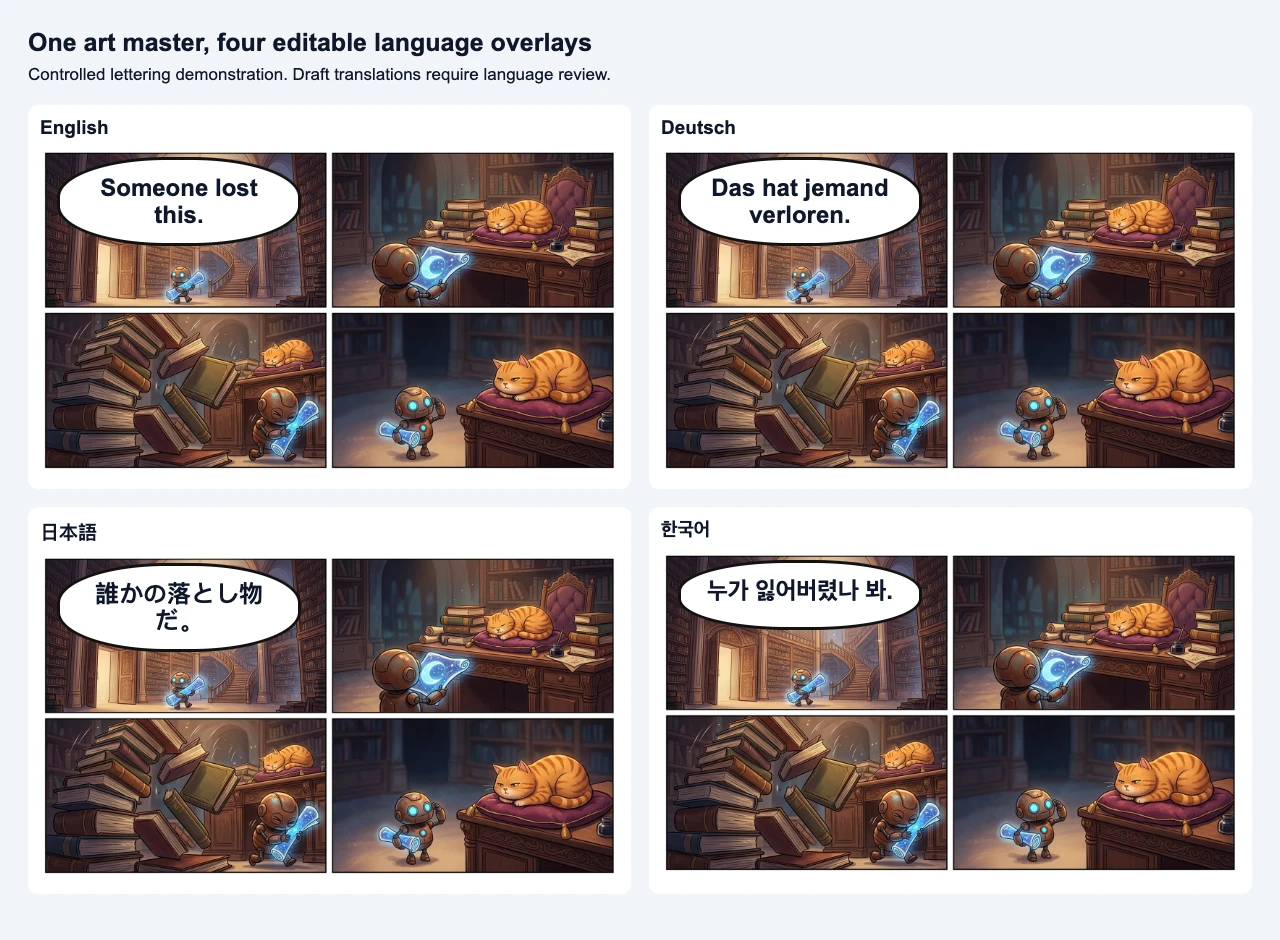
These are illustrative draft translations, not a substitute for native-language approval. Review each exchange in context, including the previous and next panel, rather than approving isolated sentences.
The illustration shows the separation of art and language. The localized text should remain editable in your working file even when the final published page is flattened.
Step 4: Fit the lettering without sacrificing the story
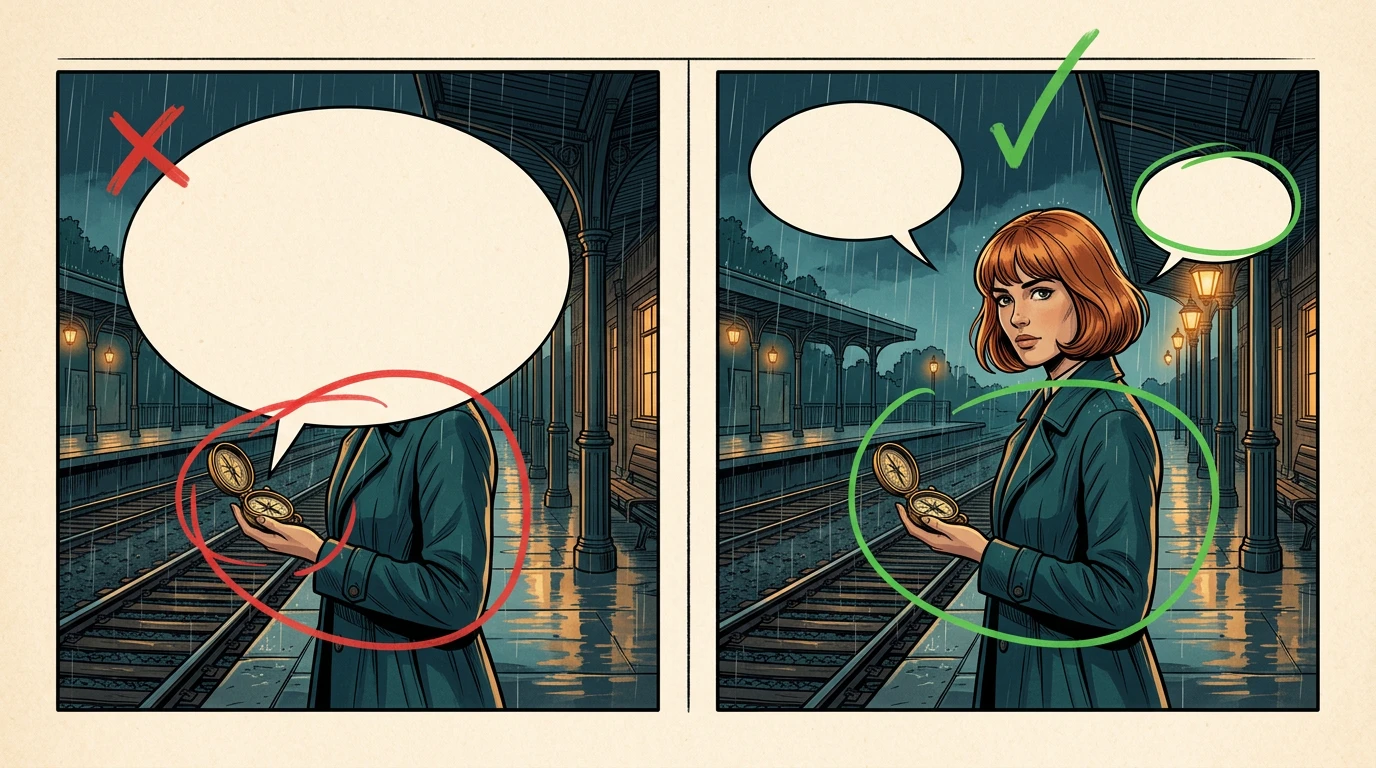
Start at the intended reading size. Keep faces, hands, and important props visible. If the translated line does not fit, shorten the wording with the translator, adjust line breaks, or reshape the balloon.
Do not shrink all text until it technically fits. A page that requires zooming to read is not ready for its audience.
Use a repeatable review order:
Read the page without inspecting individual words. Is the speaker order obvious?
Read each exchange aloud. Does the tone suit the characters?
Inspect line breaks and punctuation at publication size.
Check that balloon tails point to the intended speaker.
Review sound effects and environmental text.
For a longer chapter, approve one representative page before applying typography across the book. Include a crowded exchange and a quiet panel in that pilot.
Step 5: Keep reading direction a separate decision
Changing the language does not automatically require mirroring the art. A mirrored page can reverse a scar, move a prop to the other hand, or alter a direction that matters later.
Choose a reading convention for the edition and review the page structure accordingly. Discuss vertical text, punctuation, and balloon order with someone experienced in the target language. Treat right-to-left editions as a layout task, not a simple checkbox after translation.
When the original sequence is difficult to read under the new convention, adjust the page or lettering deliberately and record the decision.
Step 6: Verify that your art master stayed intact
For a layered workflow, keep a checksum of the clean art file before and after localization. Identical bytes confirm that the saved master did not change. They do not prove that the final composite has no visual problems, so also hide the language layers and compare the artwork.
In our separate library-scene lettering demonstration, the same art master is referenced by all four language overlays. A deliberately overflowing German line is corrected by changing the line break and balloon width, while the art file remains unchanged. This is a controlled typography example, not a benchmark of automatic translation quality.
The four variants share an unchanged art file. Text remains separate in the working demonstration; the image above is a flattened comparison for reading.
Record the time spent on transcription, translation, native review, typesetting, and export separately. For generated drafts, record the credits actually displayed or returned for your selected model. Do not treat a per-page estimate as the total localization budget.
Step 7: Export and proofread the actual edition
Open the export on a phone and at its intended print scale. Look for missing glyphs, clipped text, duplicate lines, incorrect page order, stale translations, and color or resolution changes.
Only export from the approved translation. An earlier draft can remain in the project, but it should not silently replace the final lettering layer.
Localization checklist
The source artwork is preserved.
Every visible text element is inventoried.
Names and terminology match the glossary.
A suitable reviewer has approved meaning, tone, and register.
Reading direction and speaker order are intentional.
Balloons preserve faces, hands, and story clues.
The actual export has correct glyphs, line breaks, and page order.
Translator and lettering credits are included as agreed.
Try one representative page in Manga Translator, then review the result against the original. If you already have clean art, use the same checklist with editable language overlays. The comic lettering workflow covers the broader layer structure.
FAQ
Can I translate a finished PNG?
Yes, but text cleanup and output inspection become more important. Preserve the source before generating or editing a localized version.
Does localization require regenerating the character?
Usually, no. The language work can often be handled separately. If your workflow changes the art, review that change explicitly rather than accepting it as an unavoidable part of translation.
Can I publish the first automatic translation?
Review it first. Natural wording, speaker identity, cultural context, punctuation, and lettering may all need correction.
Product workflow reviewed November 2, 2026. Generated figures are instructional illustrations. Example translations require target-language review before publication as a comic edition.