
Create comics with AI
How to Turn Couple Photos Into a Personalized Comic
All posts

How to Turn Couple Photos Into a Personalized Comic

Jay
Jay
October 13th, 2026
Kopyahin ang link
  • The Short Answer
  • Start With Consent, Not a Prompt
  • Our Example Comic
  • Step 1: Choose Better Reference Photos
  • Step 2: Create Two Separate Character Locks
  • Step 3: Turn Memories Into Visual Beats
  • Step 4: Choose One Visual Style
  • Step 5: Prompt One Clear Moment Per Panel
  • Step 6: Review Likeness as a System
  • Step 7: Add Personal Details Carefully
  • Step 8: Add Editable Lettering
  • What Failed in the First Attempt
  • A Private Approval Checklist
  • FAQ
  • Is one couple selfie enough?
  • Will the comic reproduce our faces exactly?
  • Can I make this as a surprise anniversary gift?
  • What length works best?
  • Can I include a pet?
  • Final Takeaway
elevate-your-comics.png
Elevate your Comics with LlamaGen

The Short Answer

The strongest personalized couple comics use photos for identity and memories for story.

Use this workflow:

permission -> separate reference photos -> two character cards
-> six memory beats -> visual lock -> comic panels -> likeness review
-> editable lettering -> private approval -> export

Do not expect one crowded selfie to carry an entire relationship story. Build one reusable character reference for each partner, then use LlamaGen.AI Comic Studio to turn specific shared moments into sequential scenes.

Two adult photo references transforming into a warm personalized couple comic

Start With Consent, Not a Prompt

Only upload photos you own or have permission to use. Both people should understand how their images will be used, especially if the finished comic will be posted publicly, printed commercially, or given to other people.

Avoid uploading:

  • Private documents or screenshots
  • Home addresses, license plates, work badges, or travel tickets
  • Images that include people who did not consent
  • Intimate or sensitive photos
  • Photos of minors without guardian permission
  • Images you copied from a photographer without usage rights

For a surprise gift, use images you are already authorized to use and keep the draft private until the depicted partner has approved wider sharing.

Our Example Comic

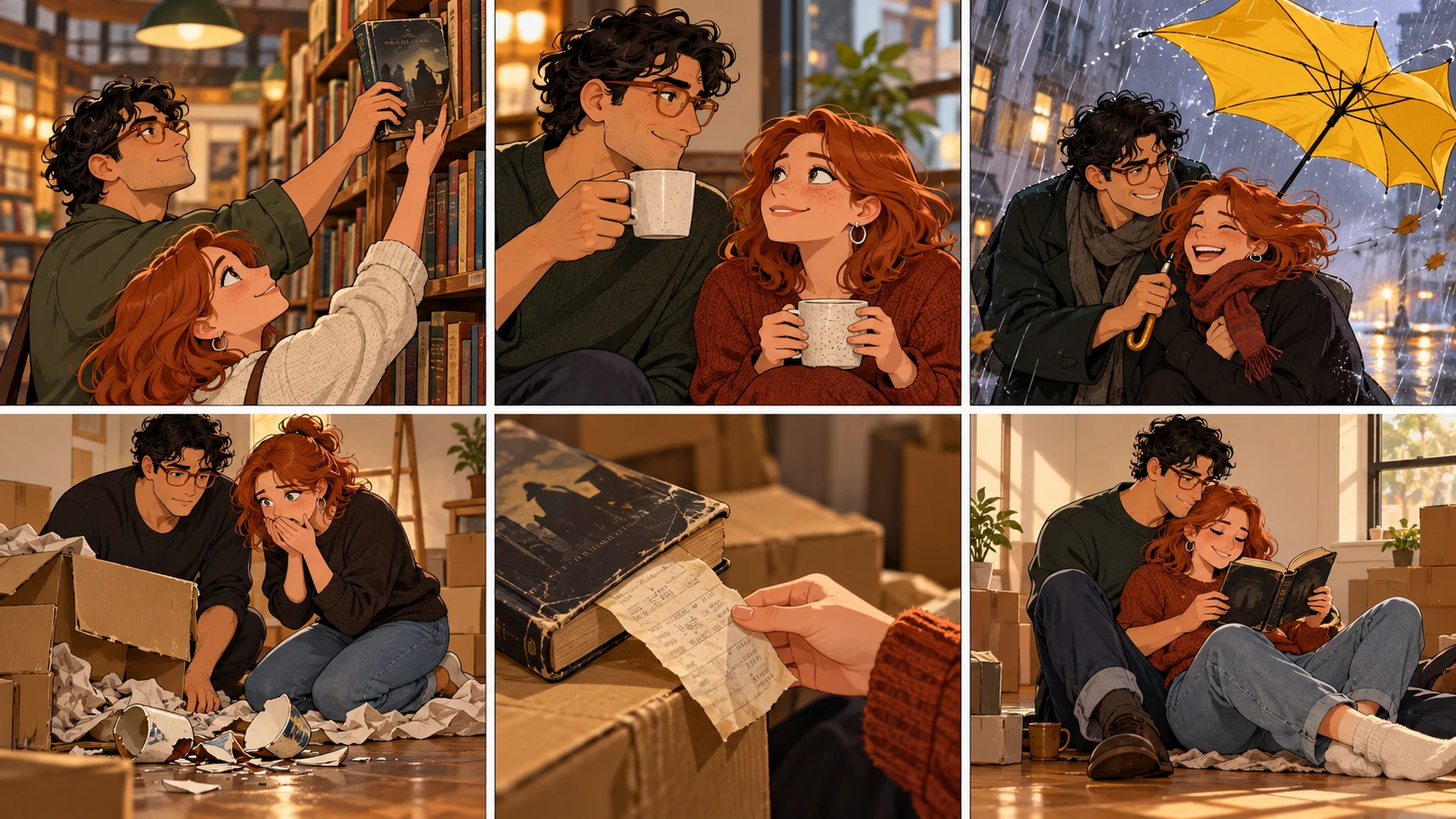
This tutorial uses an original fictional adult couple, Alex and Sam, and a six-panel anniversary story:

1. They meet while reaching for the same used mystery novel.
2. Their first date is interrupted by heavy rain.
3. They share one tiny umbrella and laugh all the way home.
4. Years later, a moving box breaks in the same rain.
5. The old mystery novel falls out, still carrying the bookstore receipt.
6. They read the first page together in their new apartment.

The story works because it has a recurring object, a visual motif, and a change over time. "A cute comic of us" is not yet a story.

A ComicBookCollabs anniversary request describes the same underlying desire: use real photos so the characters resemble the couple, then make the result feel like a meaningful gift rather than generic stock art.

Step 1: Choose Better Reference Photos

A reference setup comparing two clear individual portraits with an unsuitable crowded group photo

Create a small reference set for each partner.

ReferenceWhat it should showAvoid
Front portraitFace shape, eyes, hairlineHeavy beauty filters
Three-quarter portraitNose, jaw, cheek structureStrong motion blur
Full or half bodyBuild, posture, usual clothingExtreme wide-angle distortion
Signature detailGlasses, curls, freckles, jacketTemporary event props unless important

Use separate, clear images when possible. A group photo can be helpful for relative height and chemistry, but it often gives the system less clean identity information than two individual references.

LlamaGen.AI's Character Reference workflow accepts a clear photo, avatar, or character design for a reusable character. Multi-character input may also be available depending on the workflow and plan. Review extracted identities before building the comic.

Reference images guide generation. They do not guarantee a pixel-perfect replica in every pose, angle, or expression.

Step 2: Create Two Separate Character Locks

Keep identities separate in your notes.

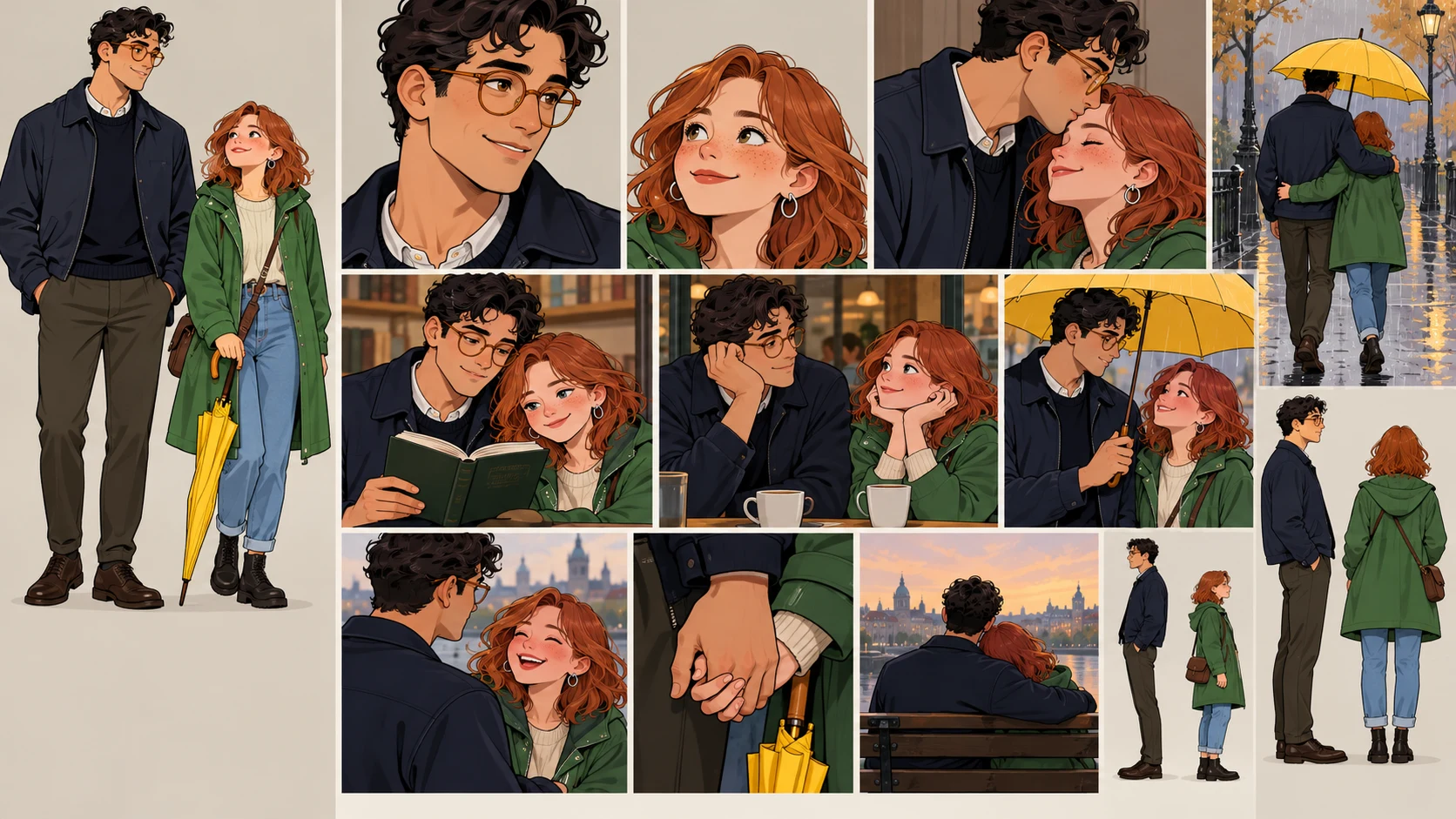
CHARACTER A — ALEX
adult, tall, narrow face, short dark curls, round amber glasses,
navy field jacket, relaxed posture, expressive hands

CHARACTER B — SAM
adult, shorter, heart-shaped face, straight copper hair to the shoulders,
green raincoat, silver hoop earrings, upright posture, quick smile

Then add relationship-scale anchors:

Alex remains about one head taller than Sam.
Alex wears round amber glasses in every time period.
Sam's copper hair and green raincoat remain the strongest color anchors.
Their body language is affectionate but natural, not posed like a wedding advertisement.

Do not merge both descriptions into one vague line such as "a cute couple." Name the person performing each action in every panel.
Step 3: Turn Memories Into Visual Beats

A six-beat memory board using a book, rain, umbrella, moving box, receipt, and new apartment

Choose memories that can be seen.

Weak memory noteVisual beat
We knew it was meant to beBoth reach for the same marked book
Our first date was funnyWind turns their umbrella inside out
We went through a lotA moving box tears open in the rain
We still love each otherThey read the old book on the apartment floor

Strong beats contain an action, object, place, or decision. The image can carry them without a paragraph of explanation.

For six panels, use this arc:

recognition -> connection -> shared obstacle -> time shift
-> meaningful callback -> emotional closing image

Step 4: Choose One Visual Style

Pick a style that supports the memory instead of simply looking fashionable.

Style directionWorks well for
Soft watercolor comicAnniversary, proposal, quiet memories
Clean webcomic colorHumor, everyday relationship moments
Black-and-white mangaDramatic first meetings, expressive reactions
Retro print comicPlayful action or superhero framing
Storybook gouacheFamily keepsake or gentle travel memory

Use one style description across all panels. Change lighting and weather as the story requires, but keep line treatment, color logic, and facial stylization coherent.

Step 5: Prompt One Clear Moment Per Panel

Use this template:

Create panel [NUMBER] of a six-panel personalized couple comic.

Character A:
[LOCKED IDENTITY AND CURRENT ACTION]

Character B:
[LOCKED IDENTITY AND CURRENT ACTION]

Story moment:
[ONE VISIBLE CHANGE]

Continuity anchors:
[HEIGHT RELATIONSHIP, OUTFITS, RECURRING OBJECT]

Composition:
[SHOT SIZE, CAMERA ANGLE, IMPORTANT NEGATIVE SPACE]

Style:
[ONE CONSISTENT ART DIRECTION]

No readable text, logos, signatures, watermarks, extra people,
duplicate characters, or unexplained outfit changes.

Example for panel 3:

Create panel 3 of a six-panel personalized couple comic.

Alex: adult, tall, short dark curls, round amber glasses, navy field jacket.
Sam: adult, shorter, shoulder-length copper hair, green raincoat, silver hoops.

Story moment:
A sudden gust turns their one small yellow umbrella inside out. Alex and Sam
look at each other and start laughing instead of running.

Continuity anchors:
Alex remains one head taller. Keep amber glasses, navy jacket, copper hair,
green raincoat, yellow umbrella, and the used mystery novel under Sam's arm.

Composition:
Medium two-shot at street level, diagonal rain, both faces unobstructed,
clean upper-left space for one short caption.

Style:
warm clean-color webcomic, expressive natural faces, gentle ink line,
cinematic rain reflections.

No readable text, logos, signatures, watermarks, extra people,
duplicate characters, or outfit changes.

One action per panel reduces accidental duplicates and makes identity review easier.
Step 6: Review Likeness as a System

A couple-comic review board comparing identity, height, outfit, prop, and emotional continuity

Do not ask only, "Does this look like us?" Break the review into observable parts.

CheckAlexSamPair continuity
Face shapeStable across anglesStable across anglesDistinct from each other
HairShort curlsShoulder-length copper hairNo style swap
AnchorAmber glassesSilver hoopsBoth remain visible when angle allows
OutfitNavy jacketGreen raincoatTime changes are intentional
ScaleTallerShorterRelative height stays believable
ActingExpressive handsQuick smile, upright stanceChemistry feels natural
Recurring propMystery novelMystery novel

If one panel fails, repair that panel instead of rebuilding the entire comic. See How to Fix One Bad Comic Panel for the panel-level decision process.

Step 7: Add Personal Details Carefully

Small accurate details create more emotional value than a long biography.

Good details include:

  • A recurring book, mug, bicycle, scarf, or pet
  • A recognizable color combination
  • A harmless inside joke expressed through an object
  • A real type of location without exposing an address
  • A phrase both people already use and are comfortable sharing

Avoid asking the model to infer private facts from appearance. Write the memory yourself, and use photos only as visual reference.

Step 8: Add Editable Lettering

Keep captions and dialogue concise:

Panel 1 caption: We both reached for the last mystery.
Panel 2 Sam: Coffee?
Panel 3 Alex: I think the umbrella resigned.
Panel 4 caption: Years later, the weather had not improved.
Panel 5 Sam: You kept the receipt?
Panel 6 Alex: I kept the beginning.

Add this text after the art is approved. That makes it easier to correct names, localize the gift, change the date, or print a second version without regenerating faces.

What Failed in the First Attempt

The weak prompt was:

Turn our couple selfie into a romantic six-panel comic about our relationship.
FailureCauseRepair
Faces blended togetherBoth identities came from one vague group referenceCreate separate character references
Height changedPair relationship was not lockedState relative height
Generic romance scenes appearedNo specific memories or objectsWrite six observable beats
Outfits changed every panelNo continuity anchorsLock one outfit per time period
Comic felt like a slideshowNo visual cause and effectUse a recurring book and rain motif
Text was misspelledLettering was baked into artAdd editable text afterward

The strongest improvement came from better story information, not more romantic adjectives.

A Private Approval Checklist

Before sharing or printing the comic, confirm:

  • Both adults consent to the selected photos and final portrayal.
  • The comic contains no private address, workplace badge, ticket number, or license plate.
  • Each character remains distinct and recognizable.
  • A joke does not reveal something one partner considers private.
  • Photo and photographer rights permit the intended use.
  • Text spelling, names, and dates are correct.
  • Public sharing, if planned, has explicit approval.

FAQ

Is one couple selfie enough?

It can start the process, but separate clear portraits usually provide better identity information. Add a shared photo for relative height, clothing, or chemistry only after each character is distinguishable.

Will the comic reproduce our faces exactly?

No generated result should be treated as an exact biometric copy. References guide appearance, but pose, angle, expression, style, and model behavior can introduce variation.

Can I make this as a surprise anniversary gift?

Yes, if you already have permission to use the source photos. Keep the draft private, avoid sensitive material, and get approval before public posting or commercial distribution.

What length works best?

Six panels are enough for one memory with a setup, change, and payoff. Use multiple pages when you need several time periods or a larger story, but preserve one clear beat per panel.

Can I include a pet?

Yes. Treat the pet as another recurring character: create a clear reference, define size and markings, and include it only in panels where it serves the memory.

Final Takeaway

A personalized couple comic becomes meaningful when it preserves two distinct people and one specific shared story.

Get consent, build separate character references, choose six visible memories, lock relationship-scale details, add editable lettering, and review the comic privately before sharing it.

Open LlamaGen.AI Comic Studio and turn your photos and shared memories into a personalized comic with a beginning, change, and emotional payoff.

Editorial note: This tutorial was prepared on October 13, 2026 with fictional adult characters and purpose-built workflow illustrations. It documents a creative process, not a guarantee of exact likeness, privacy outcome, generation time, pricing, or output quality. Product controls, plan access, model behavior, and credit rules can change; review the current information shown in the product.

Related hot tags

Personalized Comic

Photo to Comic

Mga Ideya sa Regalo

AI Comic

Popular creator tools

Turn inspiration into your next story

Create comics, storyboards and stylized photos with LlamaGen.

01

AI Comic Generator

Turn an idea into polished comic strips in minutes.

Gumawa ng comics
02

AI Manga Generator

Create expressive manga art and multi-panel stories.

Create manga with AI
03

AI Storyboard Generator

Visualize every scene before production starts.

Create storyboards with AI
04

Turn Picture into Comic

Transform any photo into a comic-style illustration.

Create comics from pictures
05

AI Comic Strips Maker

Build shareable strips with consistent characters.

Create comic strips with AI

LlamaGen community

checkmark

Get hands-on help with your comics

checkmark

Showcase your comics to fellow LlamaGen creators

checkmark

Participate in special events to win gifts

Talaan ng mga pagbabago

Sindihan ang mga pangarap ng kabataan
Kung saan nabubuhay ang milyun-milyong kuwento

Isang buod ng mga pinakabagong release ng feature ng LlamaGen, mga pagpapahusay ng produkto, mga update sa disenyo, at mahahalagang pag-aayos ng bug.


✦
✧
✦
✧

Isang bagong midyum para sa Pagkukuwento

Gumawa ng walang limitasyong mga kuwento, komiks, animasyon, laro, at higit pa—sa ilang segundo na tumatagos sa makabagong audience

LlamaGen logoLlamaGen brand
  • Home
  • Articles
  • Blog
  • Gumawa
Mag-log InMag-subscribe Ngayon20% Off
  1. Home
LlamaGen logo

Download LlamaGen for free

iOSDesktop

Magtanong sa AI tungkol sa LlamaGen

Produkto

Naunang blogs

Bible Comic Accuracy Checklist: Scripture, Context, Art, and Review

Bible Comic Accuracy Checklist: Scripture, Context, Art, and Review

A practical checklist for tracing every Bible comic panel to Scripture, reviewing context and visual

Jay
Jay
October 16th, 2026
How to Turn a Bible Lesson into a 6-Panel Sunday School Comic

How to Turn a Bible Lesson into a 6-Panel Sunday School Comic

A practical workflow for turning one Bible lesson into a six-panel comic, discussion prompts, and a

Jay
Jay
October 15th, 2026
Claude Code + Comic MCP: Turn a Youth Sports Lesson into Editable Comic Panels

Claude Code + Comic MCP: Turn a Youth Sports Lesson into Editable Comic Panels

A practical Claude Code and LlamaGen.AI Comic MCP workflow for turning a coach-approved youth basket

Monica
Monica
October 13th, 2026
How to Turn Couple Photos Into a Personalized Comic

How to Turn Couple Photos Into a Personalized Comic

Use two adults' photos and shared memories to create a personalized couple comic with stronger liken

Jay
Jay
October 13th, 2026
Tingnan lahat ng blogs
Same book and receipt
Latest launches
  • Mga Tampok
  • Comic strip maker
  • Manga StudioBago
  • Gawing Komiks ang Larawan
  • Comic Sa Video
  • AI Comic Factory
  • Comic Agent
  • iOS & Android
  • Mac at Windows
  • I-download
  • Comic ZapBago
  • AI Comic Generator
  • AI Cartoon Generator
  • AI Webtoon Generator
  • Comic Strip Maker
  • Gawing Komiks ang Larawan
  • AI Manga Generator
  • Manga Translator
  • Photo to Anime
  • Anime to Real Life
  • Manga Colorizer
  • Anime Character Generator
  • Pixel game asset tools
  • AI sprite sheet generator
  • Best pixel game tools 2026
  • Gumawa ng komiks mula sa litrato
  • Alternatibo sa Comic Life
  • Plans
    • Pagpepresyo
    • Pro
    • Enterprise
    • Education
    • Comic API
    • Makipag-ugnayan sa Sales
    • Education Plans
    • Mga Guro
    • Mga Estudyante
    • Mga Guro at Estudyante
    • Startups
    • Diskwento sa Edukasyon
    Kompanya
    • Talk to Our Founder
    • Tungkol
    • Roadmap ng Produkto
    • Careers
    • Email kami
    • Ang Mundo ng aming Mascot
    • Media Kit
    • KOL Partnership
    • Nilalaman
    Sister products
    • Pamilya ng LlamaGen
    • CineoBoardBago
    • Comics API
    • Comic Zap
    • Velika
    Komunidad
    • Mga Tagalikha
    • Mga Affiliate
    • Kasosyo
    • Mga Testimonial
    • Wall of Love
    • LlamaGen MCPBago
    • LlamaGen Developer
    Mga Resources
    • Talaan ng mga pagbabago
    • Blog
    • Guides
    • Personalized Comics
    • Mga Tampok
    • Alternatibo
    • Best AI Apps
    • GPT-6 Manga Coloring Guide
    • Claude Comic Book Skill
    • Gemini AI Comic Guide
    • Comic That
    • Diskwento sa Edukasyon
    • Diskuwento para sa Mag-aaral
    Help
    • Help Center
    • Trust
    • Safe AI
    • Professional Services
    • FAQ
    • Seguridad
    • Accessibility
    • Video Tutorial
    • Makipag-ugnayan sa amin
    • Sitemap
    Mga Tools
    • AI Logo Generator
    • Grokbot Style Character Generator
    • PNG to Comic
    • Teksto sa Comic
    • PDF to Comic
    • Script to Comic
    • Book to Comic
    • Gawing Komiks ang Larawan
    • AI Pixel Art Generator
    • Educational Comics
    • AI Video Generator
    • Gemini AI Video Generator
    • Libreng Faceless AI Video Generator
    • Comic Sa Video
    • Make Storyboard Software
    • AI Storyboard Generator
    • Screenwriting Software
    • Screenplay Editor
    • Story AI
    • AI Story Generator
    • Storybook Generator
    • AI Image Generator
    • AI Layer Splitter
    • AI Camera Angle Control
    • AI Pixel Art Generator
    • Pixel game asset tools
    • AI sprite sheet generator
    • Sprite sheet slicer
    • Best pixel game tools 2026
    • Animation API
    • ChatGPT/Codex Plugin
    • ChatGPT Install Guide
    • Claude Code Plugin
    • Claude Code Install Guide
    AI Tools
    • AI Outfit Extractor
    • AI Hairstyle Changer
    • AI Manga Hairstyle Changer
    • AI Wind Effect Generator
    • AI Depth Map Generator
    • AI White Background
    • AI Object Remover
    • AI Virtual Try-On
    • AI Unblur Images
    • AI Denoise
    • AI Photo Restoration
    • AI Product Shadows
    • AI Background Generator
    • AI Headshot Generator
    • AI Emoji Maker
    • AI Background Changer
    • AI Open Eyes
    • AI Beauty
    • AI Product Photography

    Produkto

    • Latest launches
    • Mga Tampok
    • Comic strip maker
    • Manga StudioBago
    • Gawing Komiks ang Larawan
    • Comic Sa Video
    • AI Comic Factory
    • Comic Agent
    • iOS & Android
    • Mac at Windows
    • I-download
    • Comic ZapBago
    • AI Comic Generator
    • AI Cartoon Generator
    • AI Webtoon Generator
    • Comic Strip Maker
    • Gawing Komiks ang Larawan
    • AI Manga Generator
    • Manga Translator
    • Photo to Anime
    • Anime to Real Life
    • Manga Colorizer
    • Anime Character Generator
    • Pixel game asset tools
    • AI sprite sheet generator
    • Best pixel game tools 2026
    • Gumawa ng komiks mula sa litrato
    • Alternatibo sa Comic Life

    Sister products

    • Pamilya ng LlamaGen
    • CineoBoardBago
    • Comics API

    Plans

    • Pagpepresyo
    • Pro
    • Enterprise
    • Education

    Komunidad

    • Mga Tagalikha
    • Mga Affiliate
    • Kasosyo

    AI Tools

    • AI Outfit Extractor
    • AI Hairstyle Changer
    • AI Manga Hairstyle Changer
    • AI Wind Effect Generator
    English (Australia)English (Canada)English (United Kingdom)English (India)SpanishFrench (Standard)Italian (Standard)JapaneseKoreanGerman (Standard)Chinese TraditionalChinese Traditional (Hong Kong)Chinese SimplifiedPortugueseTurkishPolishDutch (Standard)DanishThaiIndonesianNorwegian BokmålRussian
    LinkedInX (Twitter)InstagramYouTubeFacebook groupRedditDiscordEmail support
    PribadoMga Termino

    © 2026 LlamaGen.Ai Lahat ng karapatan ay nakalaan

    LinkedInX (Twitter)
  • Pagpepresyo
  • API
  • Nangunguna sa Hinaharap ng AI Comic Generation

    • 24/7 suporta
    • Lingguhang Update
    • Segurado at sumusunod
    • 99.9% uptime
    Comic Zap
  • Velika
  • Comic API
  • Makipag-ugnayan sa Sales
  • Education Plans
  • Mga Guro
  • Mga Estudyante
  • Mga Guro at Estudyante
  • Startups
  • Diskwento sa Edukasyon
  • Kompanya

    • Talk to Our Founder
    • Tungkol
    • Roadmap ng Produkto
    • Careers
    • Email kami
    • Ang Mundo ng aming Mascot
    • Media Kit
    • KOL Partnership
    • Nilalaman

    Help

    • Help Center
    • Trust
    • Safe AI
    • Professional Services
    • FAQ
    • Seguridad
    • Accessibility
    • Video Tutorial
    • Makipag-ugnayan sa amin
    • Sitemap
    Mga Testimonial
  • Wall of Love
  • LlamaGen MCPBago
  • LlamaGen Developer
  • Mga Resources

    • Talaan ng mga pagbabago
    • Blog
    • Guides
    • Personalized Comics
    • Mga Tampok
    • Alternatibo
    • Best AI Apps
    • GPT-6 Manga Coloring Guide
    • Claude Comic Book Skill
    • Gemini AI Comic Guide
    • Comic That
    • Diskwento sa Edukasyon
    • Diskuwento para sa Mag-aaral

    Mga Tools

    • AI Logo Generator
    • Grokbot Style Character Generator
    • PNG to Comic
    • Teksto sa Comic
    • PDF to Comic
    • Script to Comic
    • Book to Comic
    • Gawing Komiks ang Larawan
    • AI Pixel Art Generator
    • Educational Comics
    • AI Video Generator
    • Gemini AI Video Generator
    • Libreng Faceless AI Video Generator
    • Comic Sa Video
    • Make Storyboard Software
    • AI Storyboard Generator
    • Screenwriting Software
    • Screenplay Editor
    • Story AI
    • AI Story Generator
    • Storybook Generator
    • AI Image Generator
    • AI Layer Splitter
    • AI Camera Angle Control
    • AI Pixel Art Generator
    • Pixel game asset tools
    • AI sprite sheet generator
    • Sprite sheet slicer
    • Best pixel game tools 2026
    • Animation API
    • ChatGPT/Codex Plugin
    • ChatGPT Install Guide
    • Claude Code Plugin
    • Claude Code Install Guide
  • AI Depth Map Generator
  • AI White Background
  • AI Object Remover
  • AI Virtual Try-On
  • AI Unblur Images
  • AI Denoise
  • AI Photo Restoration
  • AI Product Shadows
  • AI Background Generator
  • AI Headshot Generator
  • AI Emoji Maker
  • AI Background Changer
  • AI Open Eyes
  • AI Beauty
  • AI Product Photography
  • Instagram
    YouTube
    Facebook group
    Reddit
    Discord
    Email support
    PribadoMga TerminoI-download ang Brand Assets© 2026 LlamaGen.Ai Lahat ng karapatan ay nakalaanLahat ng serbisyo ay online
    How to Turn Couple Photos Into a Personalized Comic - LlamaGen.AI Blog


