
Shared character and scene references
Keep character looks, outfits, locations and reference images accessible in the team workspace. Reuse them when preparing a new shot or revision.
A sound recordist in an amber rain jacket looks toward a lighthouse on a stormy coast
Give agencies and studios an enterprise AI workspace for image and video generation, creative assets, and pre-production. Plan seats, shared credits, security and integrations for your production workflow.
Last Light
Original concept art
Selected team customers




 GPT Image
 Nano Banana · Veo
 FLUX
 Seedream · Seedance
 Kling
 Hailuo
 Wan
 fal.ai
 Grok Imagine
 Claude · MCP
Explore AI models for image and video generation, plus connected tools for creative workflows. Availability and credits vary by model and tool.
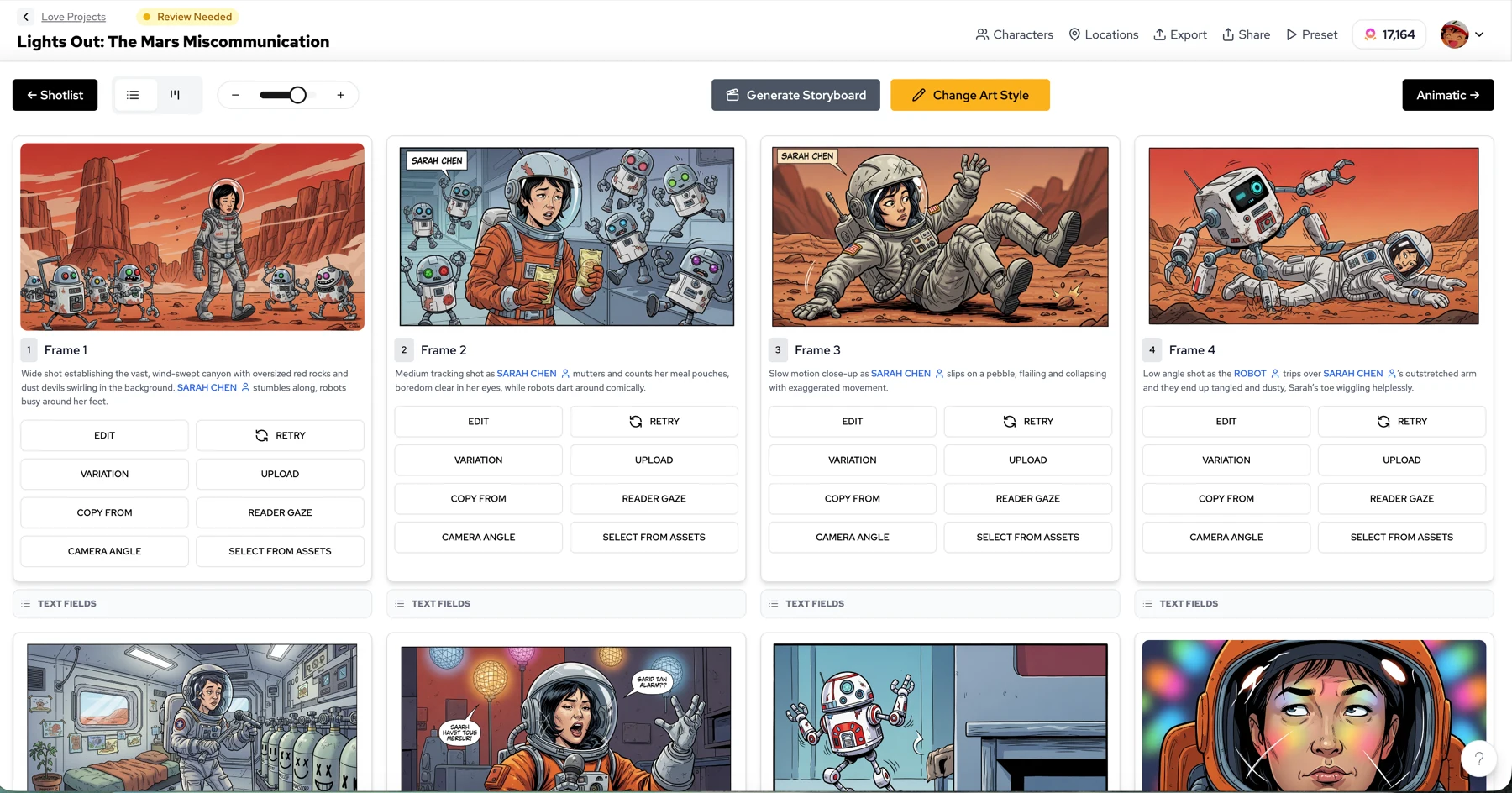
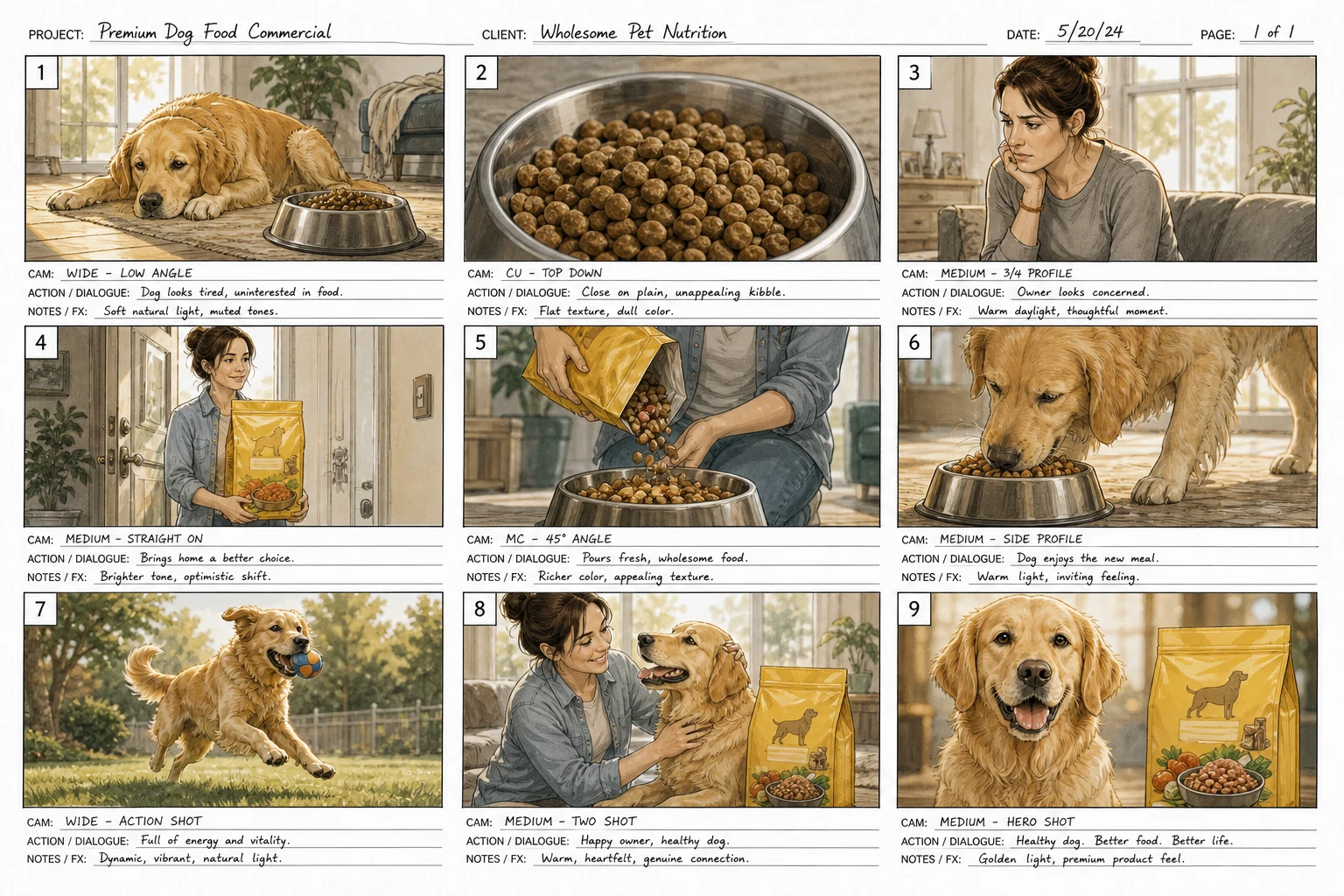
Browse AI modelsSee how a campaign takes shape across a shot plan and a video. This LlamaGen production example follows one character from the first scene to the final product shot.
Bring prompts, character designs, scene references and the people reviewing each production into one team workspace. Team Pro adds pooled credits, centralized seats and permissions to your Pro creative tools.
Create a free team workspace first. Team Pro creative tools and pooled credits require a separate paid subscription.

One visual foundation
Give each production a clear visual reference set. Choose the workflow and output that fit the project.
Keep character looks, outfits, locations and reference images accessible in the team workspace. Reuse them when preparing a new shot or revision.

Use a storyboard to agree on the sequence, then work on panels and dialogue in Comic Studio. Moving between formats requires creative review; this is not a one-click conversion.

Use storyboard frames to plan camera choices, pacing and handoff to an animation or video workflow. Confirm the available tools and export formats for your project.
A human-led production process
Agree on the brief, reuse visual references and record each review decision. Assign an approver and check the final assets; automated approvals are not included.
01
Scope and audience
02
Reusable references
03
Scenes and shots
04
Human decisions
05
Check available exports
Plan ads, campaigns, product demos or sales presentations from a shared brief. Review frames, logo and character consistency, and select an animatic or storyboard export for the handoff.
Build repeatable character and location references, revise panels and dialogue, and plan longer comic stories. Embedded app generation uses the separately priced Comic API; it is not included with Team Pro.
Start with learning goals, lesson material and an audience. Plan a visual narrative, reuse a cast and revise dialogue into learning stories ready for review.
Illustrative workflows, not customer testimonials or measured performance claims.
Check the current privacy, ownership and service terms for your intended use. Bring any additional requirements to the rollout discussion.
Team Plan is the self-serve option for a shared workspace, seats and pooled credits. Discuss Enterprise when your rollout needs procurement review, migration planning, training or custom commercial terms.
Yes. A free workspace can be created before upgrading, subject to the current account limits. Inviting teammates and preparing the workspace is separate from purchasing Team Pro creative tools and credits.
Clients can view an enabled public storyboard link. Your workspace team can review individual shots, leave comments and update the project’s approval status. Assign a person to confirm client sign-off and record the approved version with your delivery files.
Comic API has separate plans and usage. You can use it without an Enterprise workspace contract; integration scope and commercial terms are discussed separately.
Commercial use depends on the applicable terms, rights to your input materials and model-specific conditions. Review the ownership guidance and confirm your requirements before deployment.
Data handling varies by feature and service. Review the current privacy and trust documentation. Discuss data requirements during Enterprise scoping; this page does not promise zero training or private deployment.
These are not standard features in the Team Plan comparison. Tell sales which controls and service terms you need so availability and scope can be assessed.
Use the Team Plan pricing comparison for current monthly and annual totals, seat allowances and monthly shared credits. For a custom Enterprise contract, bring your expected usage, onboarding and procurement requirements to sales.
Explore GPT Image, Nano Banana, FLUX and Seedream for AI image creation. Video options include Veo, Seedance, Kling, Wan and Hailuo. Model and credit availability depends on the tool and plan you use.
Explore the integration directory for tools such as OpenAI, Google Drive and fal.ai. For custom workflows, review Comic API and MCP and bring your requirements to the rollout discussion.
Review the Trust Center, then share your SAML single sign-on (SSO), SOC 2, ISO 42001, GDPR, audit trail, data retention, data residency, MSA and Data Processing Agreement (DPA) requirements with sales. Confirm which controls, evidence and contract terms apply to your rollout.
Bring your expected generation volume, peak concurrency, timeline, seat count and AI credit requirements. Discuss dedicated GPU capacity, a pilot project, onboarding, account management, training and response expectations with the sales team so the agreed service matches the work.
Review the integration directory, Model Context Protocol (MCP), Storyboard API and separate Comic API. If your studio uses Adobe tools, Figma, Slack, or an existing DAM, bring a sample handoff and confirm native integration, file export or API requirements with sales.
Use shared character and scene references to plan campaign variations for marketing, design, sales enablement, and learning and development. Review the video and voiceover workflow, AI-generated output rights, and language requirements for each market before distribution.
Free → Team Plan → Enterprise
Start in your personal workspace, bring your team together, or shape a custom plan around your production needs.
Share public storyboard views, collect shot comments inside the workspace, and manage creative credits and seats in one plan.
For a producer or director working on their own.
50,000 shared credits/month
For a small studio team sharing work with its clients.
100,000 shared credits/month
For studio teams managing several productions.
160,000 shared credits/month
For larger studios running work for many clients at once.
300,000 shared credits/month
תכנית חינמית · אין צורך בכרטיס אשראי
Create a free workspace and invite your team. Creative tools and pooled credits are part of a paid upgrade.
Start free“השתייכות לתעשייה יצירתית דורשת יעילות בלי להתפשר על איכות. llamagen.ai לא רק עומדת בציפיות אלא גם מעבר לכך. מאוד נהניתי מהשימוש בכלי לבניית סטוריבורד ומהסיוע של הבינה המלאכותית בייצור תמונות וגם בתוכן טקסטואלי – זה באמת משדרג את כל החוויה.”

Alex T.
@alex-t
“Maintaining character consistency is a challenge that I did not expect to be overcome so fast. While not perfect at times, the results are impressive and I’m really looking forward to the chance to further customize my workflow and AI generation.”

Taylor H.
@taylor-h
“While the storytelling ability of AI seems not so creative, it does provide me with a great base to edit from and make it my own. And then the comic generation itself... simple, easy and truly impressive.”

Michael T.
@michael-t
Starter$39/חודש מחויב חודשי | Pro$79/חודש מחויב חודשי | Team$129/חודש מחויב חודשי | Agency$249/חודש מחויב חודשי | |
|---|---|---|---|---|
| Core Features | ||||
| Users | Up to 2 | Up to 5 | Up to 10 | Up to 30 |
| Storyboards | ||||
| AI images | 50,000 shared credits/month | 100,000 shared credits/month | 160,000 shared credits/month | 300,000 shared credits/month |
| Unlimited frames | Confirm availability for your workflow | |||
| No watermarks | Confirm availability for your workflow | |||
| Stock image library | Confirm availability for your workflow | |||
| Dropbox & Google Drive | Confirm availability for your workflow | |||
| Auto frame numbers | ||||
| Custom frame fields | Confirm availability for your workflow | |||
| Scripts | ||||
| Active Scripts | ||||
| Free-form and 2-column AV editing | Confirm availability for your workflow | |||
| Automatic voiceover timing | Confirm availability for your workflow | |||
| Client review and comments | Confirm availability for your workflow | |||
| היסטוריית גרסאות | Confirm availability for your workflow | |||
| Convert Script to Storyboard | ||||
| Sharing & Collaboration | ||||
| No-signup client reviews | Confirm availability for your workflow | |||
| Project sharing links | ||||
| Unlimited guest commenting | Confirm availability for your workflow | |||
| Real-time collaboration | Confirm availability for your workflow | |||
| Password protection | Confirm availability for your workflow | |||
| Production & Export | ||||
| Animatic editor | ||||
| PDF exports | ||||
| All export formats | Confirm availability for your workflow | |||
| Version control | Confirm availability for your workflow | |||
| Activity trail | Confirm availability for your workflow | |||
| Team Controls | ||||
| Client-hidden comments | Confirm availability for your workflow | |||
| Project-level permissions | Confirm availability for your workflow | |||
| Customizable templates | Confirm availability for your workflow | |||
| Team invite link | Confirm availability for your workflow | |||
| Custom subdomain | Confirm availability for your workflow | |||
| Two-factor authentication | Confirm availability for your workflow | |||
| Password rotation | Confirm availability for your workflow | |||
| Team onboarding call | Confirm availability for your workflow | |||
| Automation & Integrations | ||||
| MCP server | Confirm availability for your workflow | |||
| Public API | Confirm availability for your workflow | |||
| Webhookים | Confirm availability for your workflow | |||
| Slack notifications | Confirm availability for your workflow | |||
A concrete rollout discussion
Tell us what you make, who needs access and how the work is handed off. We can then scope a plan around the actual workflow.
Team size, roles, existing assets and who reviews the output.
Expected production volume, seats, pooled credits and any separate API usage.
Required outputs, migration, training and support needs. Availability and terms must be agreed.
Start with a self-serve workspace, or bring us a brief to discuss rollout and support.