

Photo to anime · Style guide
Choose an anime direction for your portrait
Compare cel anime, watercolor and monochrome manga directions, with creative briefs and practical criteria for portraits, avatars and group images.
By LlamaGenPublished
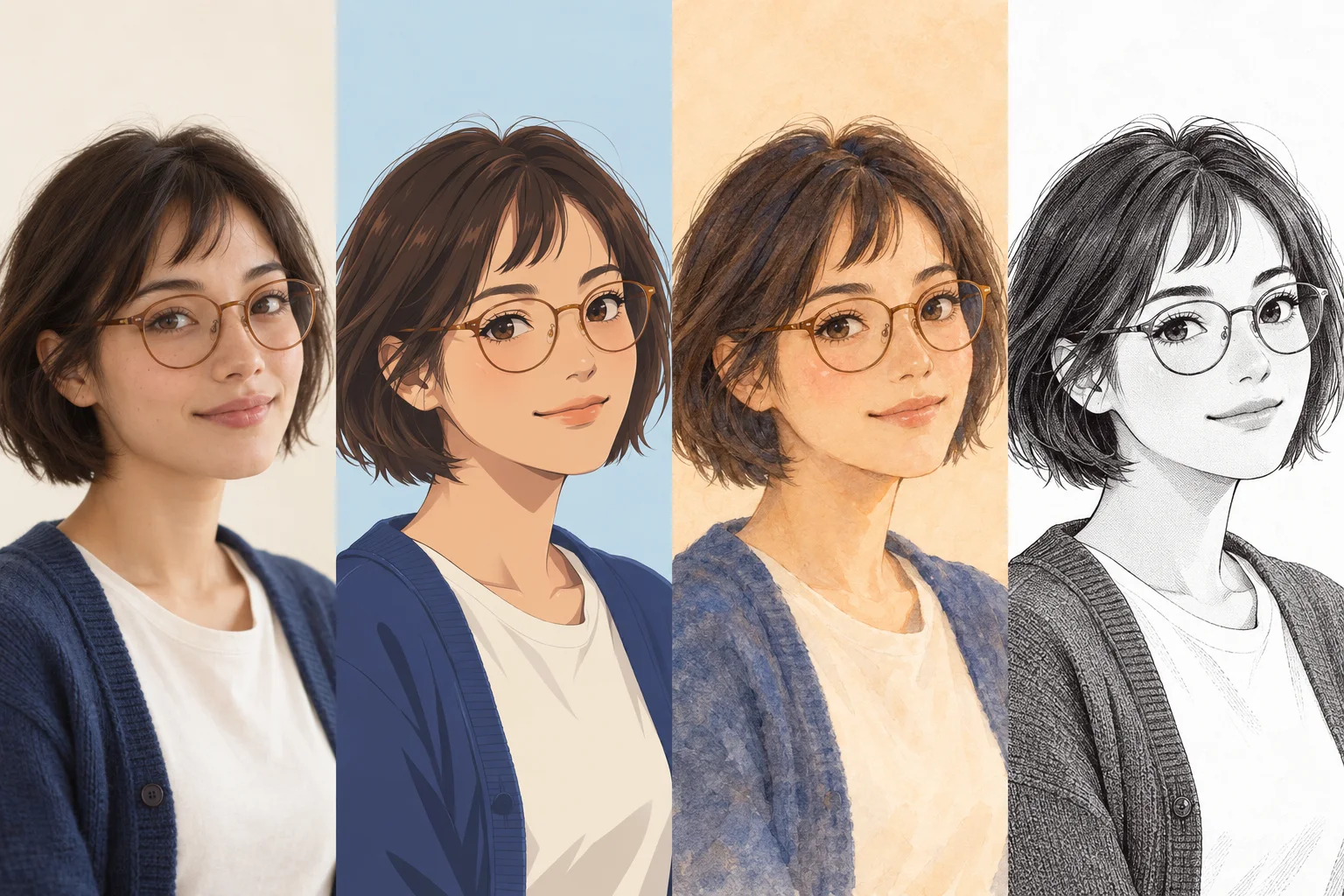
What changes across the three directions?
The illustrative board holds the fictional character’s hairstyle, glasses and clothing similar while changing line, color and shading. It is a visual explanation, not evidence of identity preservation or converter performance.
- Clean cel anime
- Defined outlines, flat color areas and distinct shadow shapes emphasize the silhouette. This can be useful when a portrait must stay readable at small size. Check that dark glasses, eyebrows and hair still separate from one another.
- Watercolor illustration
- Soft pigment edges and gentle tonal transitions create a looser portrait. Decide whether recognizable accessories or a softer atmosphere matter more, because small rims, earrings and hair strands may be less sharply defined.
- Monochrome manga
- Black linework, white space and gray tones carry the image without color. Look for separation between hair, clothing and background. A blue cardigan that was distinct in the source may need a different tone to remain readable in black and white.
Choose for the place the image will appear
For a small profile image, prioritize a strong facial outline and a simple background. Try viewing it at the actual avatar size before deciding. For a gift portrait or story character reference, a larger composition can leave room for clothing, gesture and setting. For a group, start with a restrained direction so every face has a similar level of detail.
A style name alone is an incomplete brief. State the line quality, shading, color palette, background and features to preserve. Avoid changing all five between attempts: if you want to compare shading, keep the crop and color direction as similar as possible.
Three creative briefs you can adapt
Use these as descriptions for planning an illustration. Check the current tool interface for available style controls and whether custom text is supported; these briefs are not documented preset names.
- Readable avatar
- Clean anime linework, two or three clear shading tones, a calm warm background and a centered head-and-shoulders crop. Preserve the hairstyle silhouette, round glasses and relaxed mouth shape. Check the eyes and frames at small size.
- Soft portrait
- A watercolor-inspired portrait with gentle color transitions and a quiet background. Keep the face and glasses more defined than the background. Preserve the expression and clothing color while allowing a softer edge around hair and shoulders.
- Manga character study
- Monochrome portrait with confident outlines, limited gray tones and a plain background. Keep light separation around dark hair and glasses. Preserve facial expression and clothing shape without relying on the original colors.
Reusable creative brief
Preserve: hairstyle, glasses, expression and clothing silhouette. Change: line quality and shading. Intended use: a small square avatar. Direction: clean cel anime with a simple background. Review: recognizable features, clear eye shapes and readable contrast.
Review a style change with consistent criteria
Place each result beside the same reference. First compare identity cues, then readability, then visual preference. A more detailed background can make an image feel richer while making a tiny avatar harder to read. Decide which outcome matters for the intended use.
If a style changes the face too much, reduce the number of requested changes or choose a simpler direction. If the result looks flat, first check whether the subject and background have enough tonal separation. If the image is blurry, return to the reference-quality guide before assuming another style will restore missing detail.
Keep the original file and note which direction you chose. Before publishing or selling the result, check consent, the rights to the source photo and LlamaGen’s current terms. A particular visual style does not by itself establish permission to use a person’s likeness or someone else’s photograph.
Frequently asked questions
Are these styles all available as LlamaGen presets?
This guide describes visual directions, not a verified preset menu. Open the current Photo to Anime tool to see its available controls. The creative briefs can help you plan what you want to preserve and change.
Which anime style is best for a profile picture?
A clean outline, simple background and clear contrast are useful at small sizes. Cel shading is one direction to try, but judge the result in the actual circular or square crop used by your profile.
Does a more detailed style preserve likeness better?
Not necessarily. Detail can emphasize background or texture without preserving facial proportions. Compare hairstyle, expression, glasses and face shape directly with the source rather than judging by detail alone.
What should I write if custom text is available?
Describe the features to preserve, the shading and line direction, and the intended use. Keep the request short enough to identify what changed. Follow the current tool’s instructions; this guide does not promise a custom prompt control.
How this guide was prepared
LlamaGen prepared this guide using its published product information and general portrait and illustration principles. The scenarios are practical editing suggestions, not documented hands-on tests. Illustrations are synthetic and do not demonstrate converter performance. Check the current tool, pricing and policies before uploading.
Sources and policies
Keep exploring
How to turn a photo into anime
Choose a clear portrait, plan the anime look, and review likeness with a practical photo-to-anime workflow for selfies, glasses and group photos.
Fix the starting point before repeating a conversion
Diagnose photo-to-anime issues such as lost likeness, blurry faces, distorted glasses and group-photo mistakes with specific, observable adjustments.