

Image prompt collection · Independent creator guide
Nano Banana Comic Prompts: Panels, Covers & Character Sheets
Copy Gemini Nano Banana comic prompts for four-panel strips, consistent character references, webtoon framing, cel-shading and manga covers.
Independent educational content. GPT-6 and Astra are OpenAI products; Claude is an Anthropic product; Gemini and Nano Banana are Google products. LlamaGen is not endorsed by those companies. Updated October 15, 2026
This page is partially translated. Detailed examples, prompts, and FAQs are still in English.
Quick answer
Build a reference sheet, prompt the cover or panel with a fixed art style, leave blank lettering zones, and review each output against the full sequence. Use your dedicated comic editor for dialogue and sequencing.
An effective image prompt gives the tool constraints that a comic artist would recognize: stable character identity, camera, negative space for text and a clear panel function. Start with original characters rather than existing franchise lookalikes.
What the evidence supports Google image docs explain model support and reference constraints. Recipes are illustrative prompt-writing advice, not a reported test. Verify the source ↗
Use estes prompts de quadrinhos com Nano Banana 2.1
Escolha uma referência de personagem original, uma batida de história clara e um formato de saída que possa ser revisado. O exemplo é uma saída direta do 2.1; as receitas de prompt traduzidas nesta página são pontos de partida, não registros literais daquela imagem.
- Informe o que deve mudar e quais detalhes do personagem devem continuar reconhecíveis.
- Confira a contagem real de painéis, a ordem de leitura e qualquer texto gerado.
- Mantenha a fonte aprovada e inspecione a saída antes de usá-la em outro workflow.
O Nano Banana 2.1 exige um plano pago da LlamaGen. Confira o custo atual em créditos e as opções de exportação antes de gerar. A cobrança direta da API do Google Cloud é separada. Planos e créditos
Conteúdo revisado:
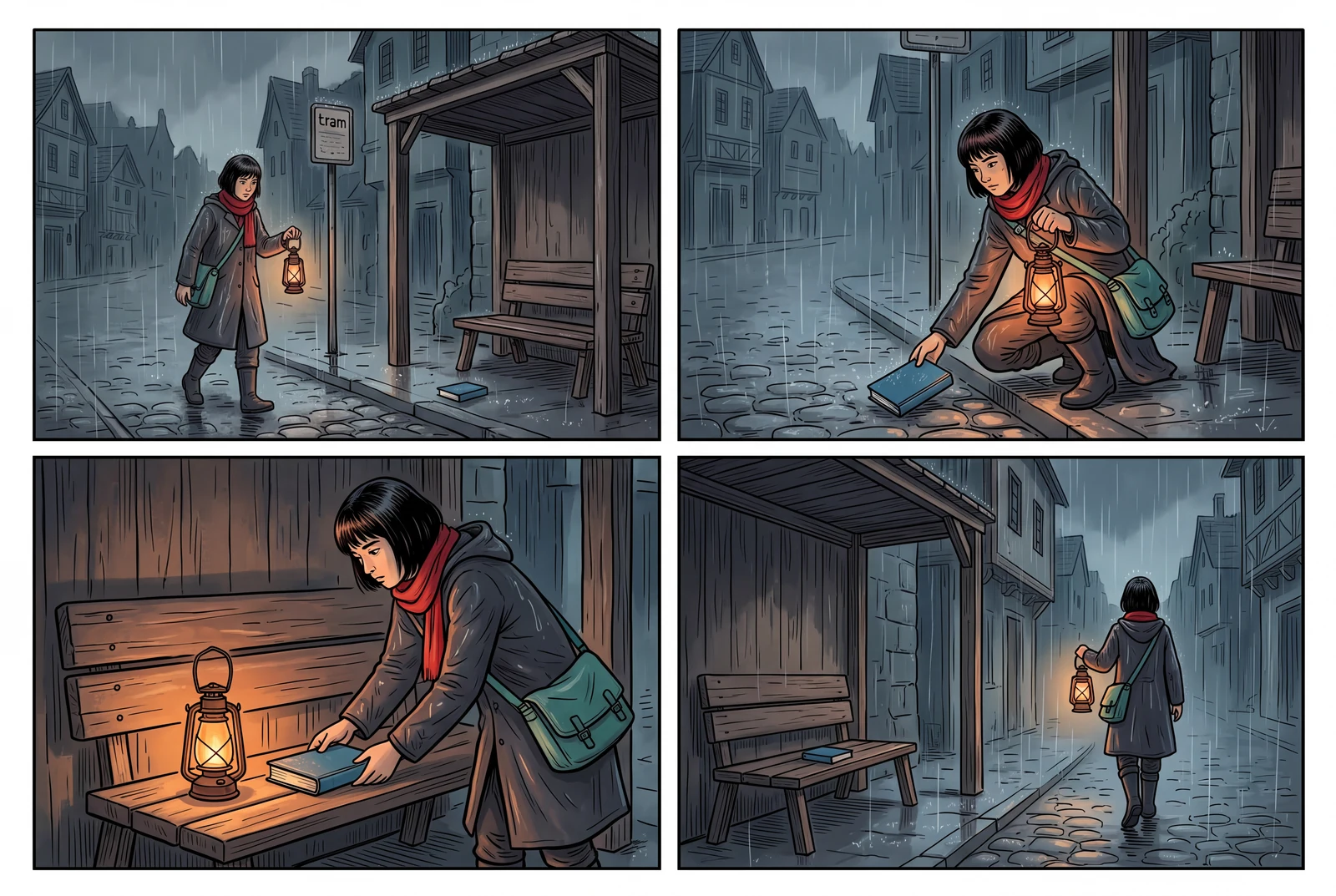
Worked example · editable production brief
Nano Banana comic prompt recipe
Build each comic prompt from controllable parts instead of stuffing the entire comic script into one image description.
| Prompt ingredient | Example value | Why it matters |
|---|---|---|
| Identity | C01: copper robot, teal eyes, yellow apron | Stable cast across scenes |
| Framing | Medium shot, waist-up, left third of panel | Leave space for dialogue |
| Ação | Tips watering can toward old boot | One clear narrative beat |
| Style & palette | Clean bold inks, muted teal/gold cel shading | Visual continuity |
| Constraints | No lettering, no logos, keep reference appearance | Reduce fix-up and IP confusion |
Use the same reference sheet whenever supported; add balloon text in an editor after the visual pass.
Practical walkthrough
Follow the sequence using an original or authorized project. The workshop above is an editorial plan, not output falsely attributed to a model.
Passo 1
Fix your image aspect ratio
Use a layout appropriate for portrait panels, a square strip or a tall webtoon rather than improvising the crop after generation.
Passo 2
Supply original reference artwork
Provide the same character sheet in every relevant generation where the tool supports it.
Passo 3
Describe the shot and emotional beat
Specify wide, medium or close-up, direction of gaze, scene action and contrast. Keep the story beat singular.
Passo 4
Reserve lettering zones
Prefer clean negative space for dialogue balloons; add exact text in the layout editor.
Passo 5
Evaluate the sequence, not one image
Lay out panels at the final intended reading size and inspect face consistency and visual pacing.
Copy-ready prompts
Replace placeholder details with your own original story and reference assets. Paste into a compatible model or workflow; available tools and results differ.
1. Four-panel slice-of-life strip
Create four distinct visual beats of an original comic with two recurring characters: a teal-haired bike mechanic in an orange jacket and a fluffy grey dog with a red bandana. Panel beats: flat tire, surprise pawprint, improvised repair, playful reunion. Keep cast, clothes, bicycle and dog markings consistent. No words or logos in the artwork.
2. Manga cover composition
Original sci-fi manga cover, portrait composition, confident mechanic hero centered slightly left, futuristic station background, controlled red/teal palette, dramatic rim lighting, large clear area at top for manually added title. No generated lettering, trademarks or recognizable existing characters.
3. Webtoon vertical panel
A single tall webtoon panel of an original detective in a rainy neon alley. Low camera angle; significant vertical breathing room for scroll pacing; blue rain reflections, cinematic shadows, reserved blank space for dialogue. Maintain the same coat, haircut and badge from the attached reference.
Failure → Cause → Fix
When your comic workflow goes wrong
Specific failure patterns matter more than a generic 'try again'. These fixes target the output you can inspect.
1. Text spelling is inconsistent
Likely cause Generated pixels are hard to retype.
What to do Request blank balloon space; letter manually.
2. Three different art styles appear
Likely cause Style varies from panel to panel.
What to do Carry a fixed palette and ink/lighting description.
3. Image crops off heads and balloons
Likely cause Aspect ratio and composition were underspecified.
What to do Lock output shape and blank-space requirements.
What to check before publishing
Review progress: 0 of 4 checks complete
A personal QA worksheet, not an automated pass/fail evaluation of your image.
Perguntas frequentes
Is Nano Banana the same as Gemini?
Nano Banana names Google's Gemini image-generation models; exact model versions and supported features can differ.
What is the best prompt for several comic panels?
A consistent character sheet and separate prompts for each beat are often easier to edit than a single sprawling page prompt.
Can I put lettering inside the prompt?
You can request text, but inspect accuracy closely; manual lettering is usually easier to correct and translate.
Sources and further reading
Primary documentation and public creator discussions; not a substitute for hands-on results.