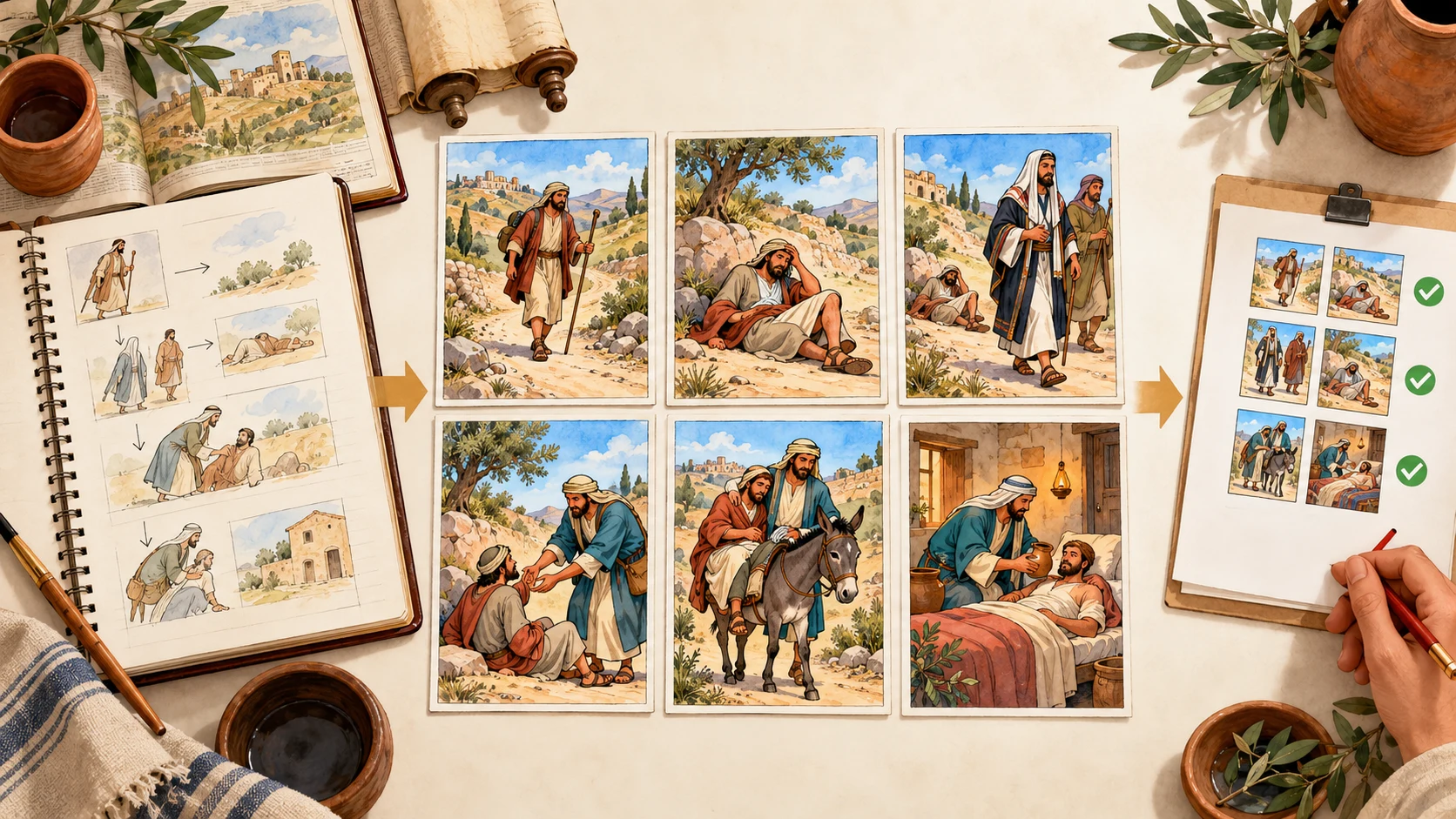
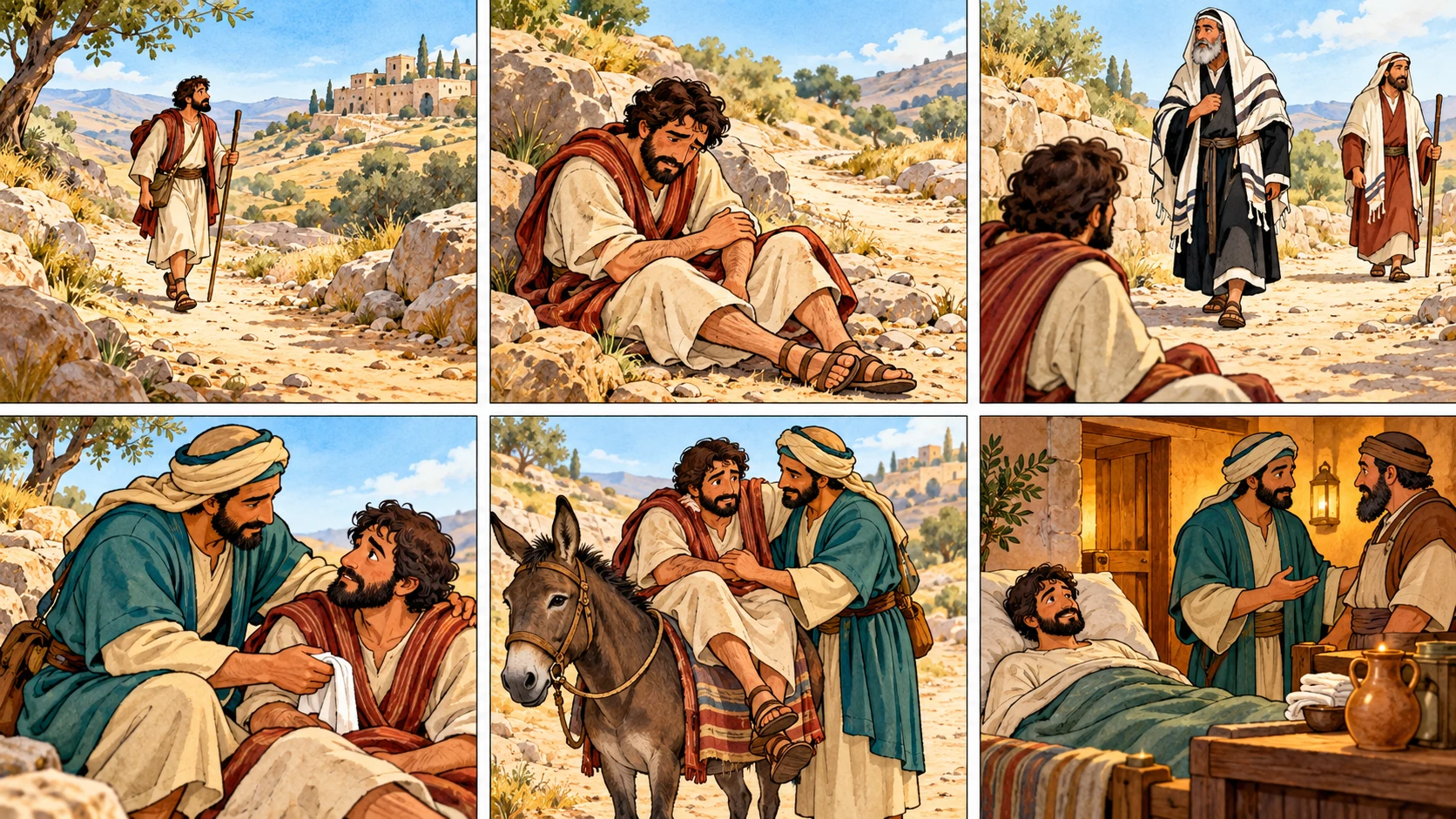
To turn a Bible lesson into a useful six-panel Sunday school comic, do not begin with image prompts. Begin with the lesson objective.
Use this order:
passage -> teaching objective -> six story beats -> visual safeguards
-> six-panel comic -> teacher review -> discussion questions
The comic is a teaching aid, not a replacement for reading Scripture. Read the passage from the translation approved by your church or organization, then use the comic to help children retell the sequence, notice choices, and discuss the lesson.
You can start from a familiar story card or enter your own lesson in the LlamaGen.AI Bible Comic Maker. For a short lesson, select six panels and keep each panel responsible for one visible moment.
What We Are Making
This tutorial uses the parable of the Good Samaritan in Luke 10:25-37 as an instructional example. It works well for demonstration because the story has a clear sequence, a concrete act of mercy, and strong discussion potential.
The target class is ages 7-11, with a 35-minute lesson:
Lesson element
Plan
Passage
Luke 10:25-37
Main idea
A neighbor is someone we choose to help with practical mercy
Visual outcome
One six-panel comic page
Classroom use
Story introduction, retelling, and discussion
سجل التغييرات
أوقد الأحلام لدى الصغار حيث تنبض ملايين القصص بالحياة
A rundown of the latest LlamaGen feature releases, product enhancements, design updates, and important bug fixes.
✦
✧
✦
✧
A new medium for Storytelling
إبداع قصص، كوميكس، رسوم متحركة، ألعاب، والمزيد غير محدود في ثوانٍ تتماشى مع الجماهير الحديثة
Text policy
Read Scripture from the ministry's approved translation; paraphrase only for scene planning
Review owner
Teacher or curriculum lead before the page reaches children
The images in this article are original editorial examples. They are not archaeological reconstructions, and they do not establish one required appearance for biblical people.
Start with a Raw Lesson Plan
Here is the compact source brief a teacher can prepare before opening an image tool:
LESSON TITLE
Who Acted Like a Neighbor?

PASSAGE
Luke 10:25-37

AGE GROUP
7-11

TEACHING OBJECTIVE
Students can identify the difference between noticing a need
and taking practical action to help.

MUST KEEP
- A traveler is left needing help on the road.
- Two people see the traveler and continue past.
- A Samaritan stops, gives care, and transports the traveler.
- The traveler is taken to an inn and further care is arranged.
- The lesson focuses on active mercy, not on making one group look evil.

DO NOT INVENT
- New words spoken by Jesus or the characters.
- A reason the two passersby did not stop.
- A race-coded visual shortcut for who is good or bad.
- Graphic violence for a children's lesson.

CLASS DISCUSSION
What did the helper notice?
What did helping cost him?
What is one safe, practical way we can show mercy this week?
This brief is short enough to review and specific enough to keep the comic from drifting into a generic kindness story.
Step 1: Reduce the Lesson to Six Visual Beats
One panel should show one primary change. If a panel contains three actions, children may not know which action matters most.
For this lesson, use these beats:
Panel
Story job
Visible moment
Teaching reason
1
Establish
A traveler walks on a difficult road
Establish ordinary movement before the need appears
2
Present the need
The traveler is sitting hurt and alone, without graphic injury
Make the need visible and age-appropriate
3
Show inaction
Two passersby see the traveler and continue
Contrast seeing with helping without inventing motives
4
Show compassion
A Samaritan stops and kneels beside the traveler
Make the turning point an action, not a slogan
5
Show practical help
The helper supports the traveler onto a donkey
Show that mercy takes effort and resources
6
Show continued care
The traveler is safe at an inn while care is arranged
Complete the action rather than ending at good intentions
Notice what the six beats leave out. The attack is not shown. The passersby's inner motives are not explained. No invented dialogue is placed in Jesus' mouth. Compression is allowed, but the lesson's cause-and-effect chain remains intact.
Step 2: Create a Visual Safeguard Sheet
Before generating the page, write down what must stay stable.
Character anchors
TRAVELER
cream tunic, rust-red outer wrap, dark curly hair

SAMARITAN HELPER
teal outer robe, light head wrap, brown travel bag

PASSERSBY
two distinct adults in period clothing, neutral expressions

INNKEEPER
brown work robe, shown only in the final panel
Setting anchors
rocky first-century road
dry hills and olive trees
simple cloth, leather, pottery, and wood materials
donkey appears only after the helper stops
stone-and-wood inn in the final panel
Safety and interpretation rules
No blood, weapons in the foreground, or frightening attack scene.
No halos or invented supernatural effects.
Do not use skin tone, facial exaggeration, or costume quality to label moral status.
Keep the helper and traveler recognizable across panels.
Leave exact Scripture quotations out of generated art.
Visuals communicate claims even when no caption is present. The Scripture Engagement guide on avoiding visual miscommunication recommends checking whether the intended audience reads an image the way its creators expect. That is why this workflow includes a child-facing review, not only an adult editorial check.
Use a prompt that separates the source, panel beats, and visual rules:
Create one child-friendly six-panel Bible lesson comic based on
the Good Samaritan in Luke 10:25-37.

TEACHING PURPOSE
Show the difference between noticing a person in need and taking
practical action to help. This is a visual aid, not replacement Scripture.

PANEL 1
Wide view. A traveler in a cream tunic and rust-red wrap walks alone
on a rocky road through dry hills.

PANEL 2
Medium view. The same traveler sits hurt and alone beside the road.
No blood, weapons, or graphic injury.

PANEL 3
Wide view. Two adults in period clothing notice the traveler and
continue along the road. Use neutral human expressions.

PANEL 4
Medium view. A Samaritan traveler in a teal robe stops, kneels,
and offers water and a clean cloth.

PANEL 5
Two-person action. The same helper carefully supports the traveler
onto a donkey. Keep both characters and clothing consistent.

PANEL 6
Warm interior. The traveler rests safely at a simple inn while the
helper speaks with the innkeeper about continued care.

PAGE RULES
- Exactly six panels, read left to right and top to bottom.
- Historically plausible road, clothing, containers, donkey, and inn.
- No readable words, invented quotations, logos, or watermarks in the art.
- No racial caricatures, moral color-coding, or graphic violence.
- Leave clean space for teacher-approved captions added later.
Treat the generated page as a draft. AI can omit an important beat, combine characters, introduce modern objects, or create an interpretation you did not intend. A polished page still needs review.
Step 4: Review the Page Before Adding Words
Review the image in this order:
Sequence: Are there exactly six panels in the intended reading order?
Source: Does each panel correspond to a moment supported by the passage?
Meaning: Did the images add a motive, doctrine, or moral label that the passage does not state?
Continuity: Do the traveler, helper, donkey, and location remain recognizable?
Audience: Is the page understandable and emotionally safe for the target age?
Practicality: Is there room for approved captions or discussion prompts?
The example uses no embedded dialogue. This is intentional. If your organization requires exact verse wording, add it only after choosing an approved Bible translation and checking its quotation and attribution rules. Biblica's permissions guidance is one example of why translation rights and acknowledgments should be part of the production checklist.
Step 5: Add Teacher-Approved Captions
Captions should clarify the sequence, not compete with the passage. Keep them descriptive and avoid putting new teaching claims inside speech bubbles.
A safe draft structure is:
Panel 1: A traveler went down the road.
Panel 2: He was left needing help.
Panel 3: Two people saw him and continued on.
Panel 4: A Samaritan stopped and cared for him.
Panel 5: The helper carried him toward safety.
Panel 6: At the inn, he arranged for more care.
These are scene summaries, not quotations. Read the actual passage aloud from your approved translation and clearly distinguish Scripture from teacher-written captions.
Step 6: Turn the Comic into a 35-Minute Lesson
0-5 minutes: Notice
Show the comic without captions. Ask children what they see and where their eyes move first. Do not correct every answer immediately. This reveals whether the visual sequence is clear.
5-12 minutes: Read
Read Luke 10:25-37 from the approved translation. Ask students to point to the panel that matches each major moment.
12-20 minutes: Retell
Mix six printed panel cards and let students restore the sequence. Ask what changed from one card to the next.
20-30 minutes: Discuss
Use questions that move from observation to application:
What did all three passersby notice?
Which actions show that the Samaritan's mercy was practical?
What would be missing if the story ended when he first stopped?
Why should we avoid guessing the motives of the two people who continued?
Who can we safely help at school, church, home, or in our neighborhood?
When should a child ask a trusted adult to help instead of acting alone?
30-35 minutes: Respond
Let each student draw or write one seventh panel showing a safe act of mercy in a modern setting. Make clear that the new panel is an application activity, not part of the biblical narrative.
A Fast Teacher Review Card
Before printing or projecting the comic, check:
The Bible reference and approved translation are recorded.
Every panel has a clear source or is labeled as application.
No invented quotation is presented as Scripture.
The sequence preserves the lesson's central meaning.
Clothing, objects, and setting do not contain distracting modern errors.
Moral contrast is communicated through actions, not ethnic stereotypes.
Violence and fear are appropriate for the age group.
Captions are readable and do not cover important art.
A teacher or curriculum lead approved the final page.
Copyright and permission requirements are satisfied.
Six panels are enough to show a beginning, need, choice, action, consequence, and resolution without turning one class into a long production project. A regular grid also makes it easy to:
print the page as a handout;
cut it into sequencing cards;
project it during a read-aloud;
ask students to retell one panel each;
translate teacher-written captions separately;
replace one weak panel without rebuilding the lesson.
Existing curricula often combine a core lesson with reproducible activities and age-aware materials. For example, Teach Us the Bible organizes chronological lessons with printable resources, while Crossway's Biggest Story Curriculum describes lesson packages that include visual and activity components. A comic fits best when it supports that larger teaching plan instead of trying to become the whole curriculum.
Start Your Own Lesson Comic
Open the LlamaGen.AI Bible Comic Maker, choose a story card or enter a custom Bible lesson, select six panels, and paste a reviewed six-beat prompt.
Start with one passage, one teaching objective, and one page. Generate the visual draft, check it against Scripture, then add teacher-approved captions and questions. The speed comes from the tool; the teaching responsibility stays with the people preparing the lesson.
FAQ
Can I paste a Bible verse directly into the generator?
You can enter a custom story or passage description, but first confirm your organization's translation policy and the copyright terms for the version you use. Record the translation name and keep exact quotation review separate from visual generation.
Should the comic replace reading the Bible passage?
No. Use it to introduce, sequence, retell, or discuss the story. Read the passage from an approved translation and distinguish source text from teacher-written summaries.
Can I make a comic for younger children?
Yes. Reduce the number of visual details, avoid frightening moments, use shorter captions, and test the page with an adult who knows the age group. For preschool learners, four panels may be easier than six.
What if one panel is inaccurate?
Correct or regenerate that panel instead of accepting the page because the rest looks good. Recheck neighboring panels after the replacement so identities, props, and reading order still match.
Can I use the page in a church, school, or paid curriculum?
Review the current LlamaGen.AI plan terms, the rights to any uploaded references, and the permissions for quoted Bible text. Organizations should also keep an approval record for the final version.
Editorial Note
Written by Jay and editorially reviewed by Monica on October 15, 2026. The Good Samaritan artwork and lesson materials are original teaching examples created for this guide. The workflow was checked against the public LlamaGen.AI Bible Comic Maker available on the review date. AI-generated biblical visuals can contain historical, cultural, visual, or theological errors; a qualified teacher or ministry reviewer should approve every page before classroom use.
Related hot tags
Bible Comic
Sunday School
التعليم
كوميكس الذكاء الاصطناعي
دليل
أدوات شائعة للمبدعين
حوّل إلهامك إلى قصتك القادمة
أنشئ القصص المصورة ولوحات المشاهد والصور الفنية باستخدام LlamaGen.