LlamaGen.AI 1.0.45: Story Production and Shot Planning | v1.0.45 - LlamaGen Release
LlamaGen logóLlamaGen márka
Kezdj beleIratkozz fel most20% kedvezmény
  1. Kezdőlap
Készíts képregényt AI-val
LlamaGen.AI 1.0.45: Story Production and Shot Planning

LlamaGen 1.0.45: LlamaGen.AI 1.0.45: Story Production and Shot Planning

Jay
Jay
November 19th, 2026
Link másolása
  • LlamaGen.AI 1.0.45: Story Production and Shot Planning
  • Build the story before making the chapter
  • Find a useful reference for the next shot
  • Present a storyboard as an editable pitch
  • Get oriented on the first visit
elevate-your-comics.png
Elevate your Comics with LlamaGen

LlamaGen.AI 1.0.45: Story Production and Shot Planning

Before a finished comic comes a series of smaller decisions: what happens, who appears, where the scene takes place, and how each moment should be framed. This release brings those planning steps into a clearer production flow and adds ways to explore shot references and present an existing storyboard.

Build the story before making the chapter

The comic production flow moves through Story, Cast & world, and Generate & read. Begin with your written story or an uploaded script, review the screenplay, and revise it before preparing the visual references.

In Cast & world, review the characters, locations, and props the story needs. Edit their details, add or generate reference images, and reuse suitable characters from your existing collection. Keeping those references beside the story makes it easier to settle the cast and setting before moving on to page creation.

Then choose Webtoon, Manga, or Comic, review the chapter's page count, panels, and proportions, and confirm generation when the plan is ready. The flow carries the same project from preparation into reading, with a handoff to the editor and export tools for the next round of work. Saving and reviewing the story gives you time to prepare; generation starts after the creation confirmation.
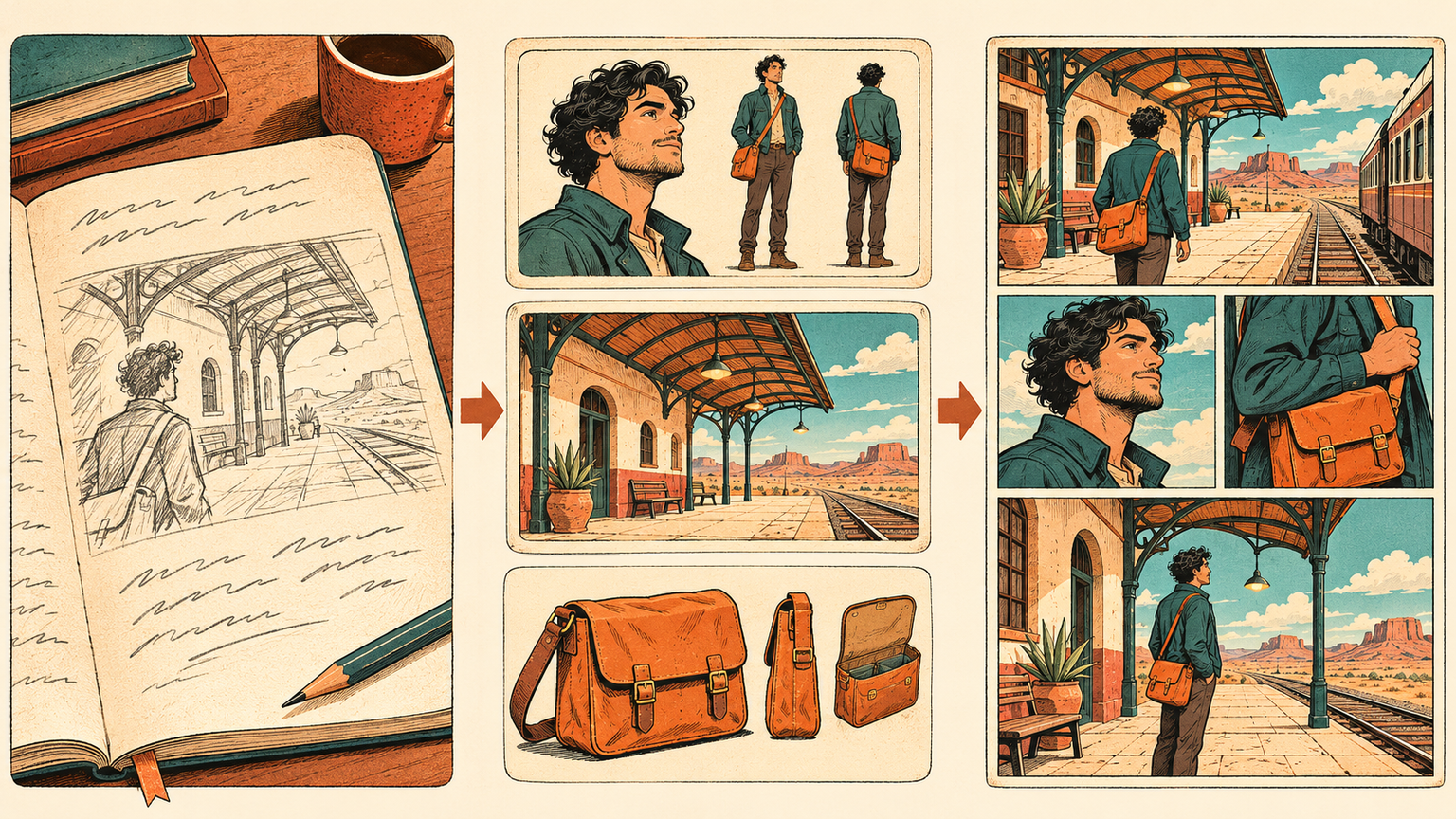
Shape the story, prepare the cast, then make the pages

Find a useful reference for the next shot

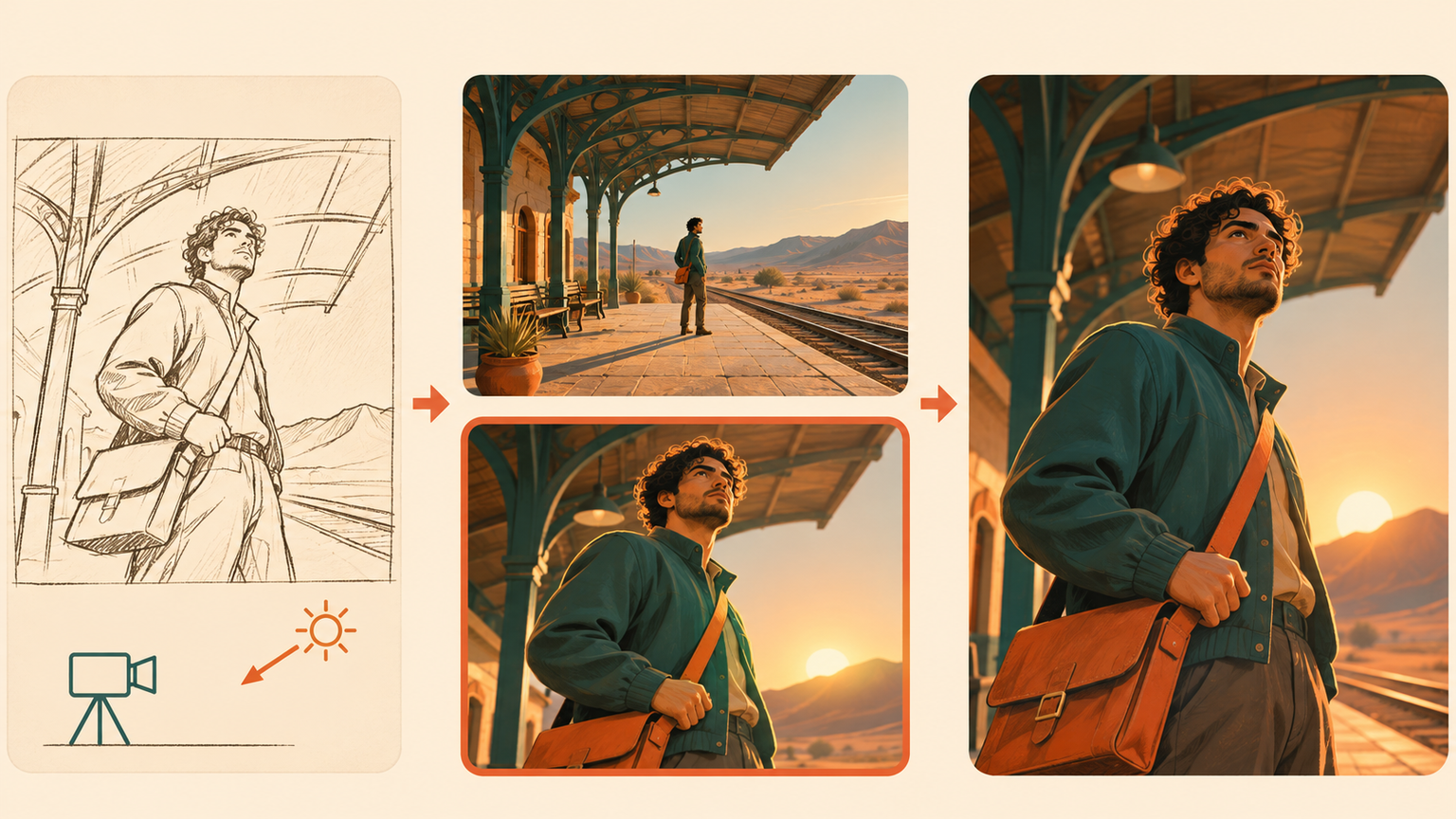
Open Shot Search to browse cinematic references or describe the shot you want to explore. Camera, framing, lighting, color, and scene filters help narrow the search when a general mood is not specific enough. Compare a wide establishing shot with a closer reaction, or explore how different light changes the same kind of scene.

Open a result for a closer look and use Find Similar to continue exploring nearby visual directions. The collection uses . These images provide material for studying a shot and communicating its direction before creating your own scene.

Változásnapló

Álmokat gyújt a fiataloknak
Ahol történetek milliói kelnek életre

A legújabb LlamaGen funkciók, termékfejlesztések, dizájnfrissítések és fontos hibajavítások összefoglalója.
✦
✧
✦
✧

Új médium a történetmeséléshez

Készíts korlátlan számú történetet, képregényt, animációt, játékot és még sok mást másodpercek alatt, modern közönségre hangolva

original synthetic references
Find a reference for the shot you have in mind

Present a storyboard as an editable pitch

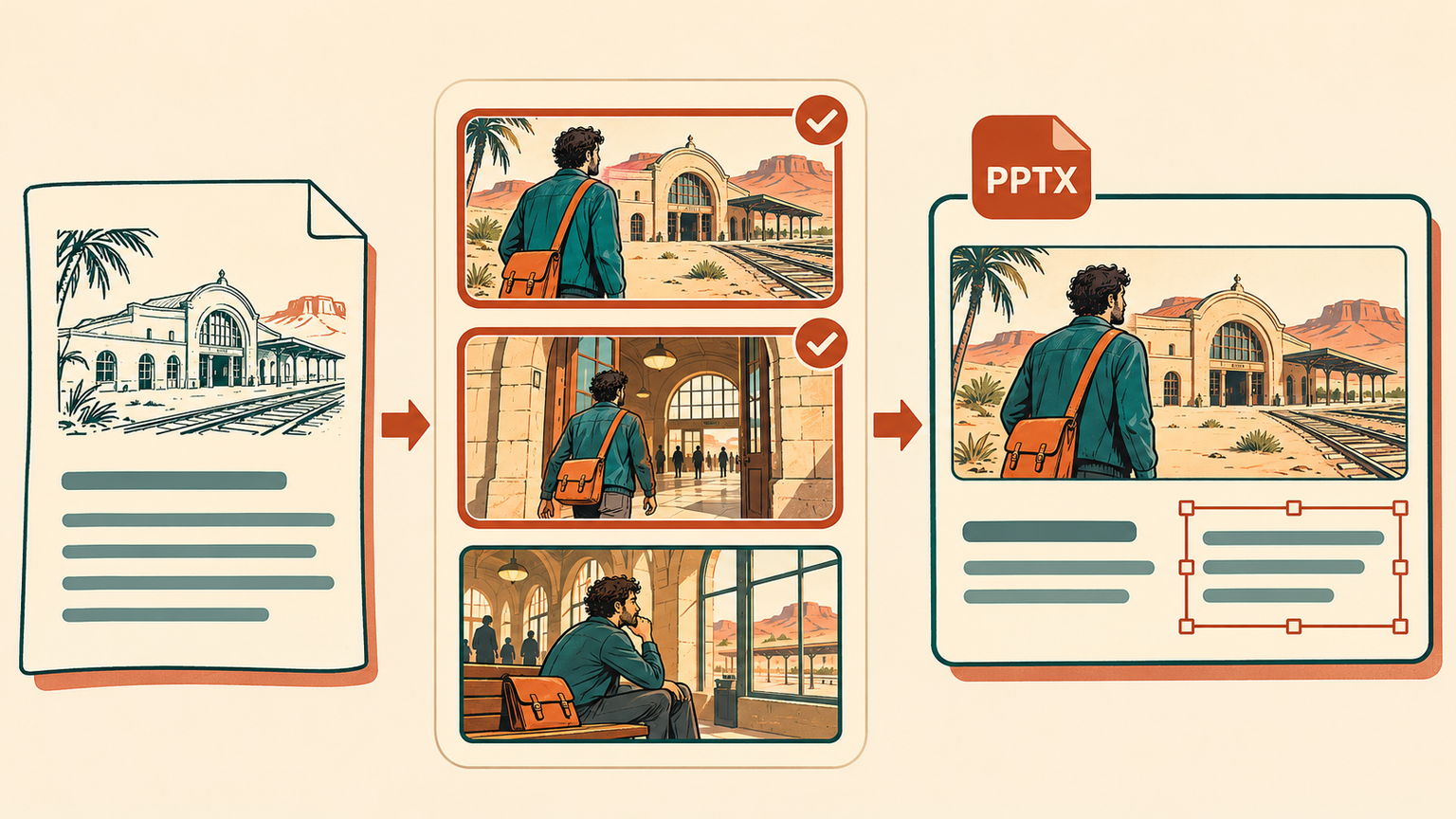
From a Storyboard detail page, open Pitch Deck to turn an existing project into a presentation. First review the title, logline, synopsis, audience, and character details. Then choose up to eight existing still-image frames to support the story you want to present.

Export an editable 16:9 PowerPoint (.pptx) with the selected images and editable text. Adjust the wording and presentation after download, using the frames you already have to explain the idea to collaborators or a prospective audience. Pitch Deck export requires an eligible paid plan.

Turn existing storyboard frames into an editable pitch

Get oriented on the first visit

New first-use guides point out the main creation choices in Mangaka and the comic upload flow, including story input, page and style choices, and optional character references. You can skip or close a guide, then return through Quick tour when you want another look.

Completing a tour leaves you in control of the next action. Review the story, references, and creation settings, then start the work when you are ready.

Related hot tags

comic-creation

Népszerű alkotói eszközök

Váltsd az inspirációt a következő történeteddé

Készíts képregényeket, storyboardokat és stílusos fotókat a LlamaGen segítségével.

01

AI Képregény Generátor

Alakíts egy ötletet kész, kidolgozott képregénysorokká percek alatt.

Képregények készítése
02

AI Manga Generátor

Készíts kifejező mangaalkotásokat és többpaneles történeteket.

Manga készítése
03

AI storyboard generátor

Lásd előre minden jelenetet még a gyártás indulása előtt.

Storyboardok készítése
04

Képből képregény

Alakíts bármilyen fotót képregény stílusú illusztrációvá.

Készíts képregényt képekből
05

AI Képregény Csíkkészítő

Készíts megosztható képregénysorokat következetesen megjelenő karakterekkel.

Képregénysorok készítése

LlamaGen community

checkmark

Get hands-on help with your comics

checkmark

Showcase your comics to fellow LlamaGen creators

checkmark

Participate in special events to win gifts

Previous releases

LlamaGen.AI 1.0.45: Story Production and Shot Planning

LlamaGen 1.0.45: LlamaGen.AI 1.0.45: Story Production and Shot Planning

Develop a story through cast and world preparation into comic production, find cinematic shot refere

Jay
Jay
November 19th, 2026
LlamaGen.AI 1.0.44: Mangaka, Immersive Reading and Chapter Exports

LlamaGen 1.0.44: LlamaGen.AI 1.0.44: Mangaka, Immersive Reading and Chapter Exports

Keep Comics and Manga together in Mangaka, choose the page count before creating, read with fewer di

Jay
Jay
November 12th, 2026
LlamaGen.AI 1.0.43: Scene Library and Sketch References

LlamaGen 1.0.43: LlamaGen.AI 1.0.43: Scene Library and Sketch References

Explore a larger scene library, carry selected backgrounds into comics and storyboards, and draw a q

Jay
Jay
November 5th, 2026
LlamaGen.AI 1.0.42: Layouts, Page Reuse and Export Updates

LlamaGen 1.0.42: LlamaGen.AI 1.0.42: Layouts, Page Reuse and Export Updates

Find the right comic layout, browse clearer creation categories, reuse selected pages in an independ

Jay
Jay
October 29th, 2026
See all releases
LlamaGen.Ai
  • United States
  • Español
  • Français (France)
  • 日本語
  • 한국어
  • Deutsch
  • 繁體中文 (台灣)
  • 繁體中文 (香港)
  • 简体中文
  • Português
  • Italiano
  • Español (México)
  • العربية
  • Русский
  • Português (Brasil)
  • Tiếng Việt
  • Magyar

Az AI képregénygenerálás jövőjének vezetője

  • 24/7 ügyfélszolgálat
  • Heti frissítések
  • Biztonságos és megfelelőségi
  • 99,9%-os rendelkezésre állás

Töltsd le a LlamaGen-t ingyen

AndroidiOSAsztali

Termék

  • Legújabb megjelenések
  • Funkciók
  • Képregénysor-készítő
  • Comic StoresÚj
  • Manga StúdióÚj
  • Kép átalakítása képregénnyé
  • Képregényből videó
  • AI képregénygyár
  • Képregény Ügynök
  • iOS és Android
  • Mac & Windows
  • Letöltés
  • Comic ZapÚj
  • AI Képregény Generátor
  • AI rajzfilm generátor
  • AI Webtoon Generátor
  • Képregénycsík-készítő
  • Kép átalakítása képregénnyé
  • AI Manga Generátor
  • Manga fordító
  • Fotóból anime
  • Képből Prompt
  • Animéből valóság
  • Manga színező
  • Anime karakter generátor
  • Pixeljáték-asset eszközök
  • AI sprite sheet generátor
  • A legjobb pixeljáték-eszközök 2026
  • Fotó képregénykészítő
  • Comic Life alternatíva

Kapcsolódó termékek

  • LlamaGen család
  • CineoBoardÚj
  • Comics API

Csomagok

  • Árazás
  • Kezdő
  • Pro

Közösség

  • Alkotók
  • Partnerek
  • Partner

AI-modellek

  • GPT Image 2.6 Flare
  • GPT Image 2.6 Sunburst
  • Grok Imagine Image 2.0
  • Wan 3.0
LinkedInX (Twitter)
  • Kezdőlap
  • Cikkek
  • Blog
  • Létrehozás
  • Árazás
  • API
  • Affiliate ProgramNEW

Kérdezz az AI-tól a LlamaGen-ről

  • Comic Zap
  • Velika
  • Vállalati
  • Oktatás
  • Képregény API
  • Értékesítési kapcsolat
  • Oktatási csomagok
  • Tanárok
  • Diákok
  • Tanárok és diákok
  • Startupok
  • Oktatási kedvezmények
  • Cég

    • Beszélj az alapítónkkal
    • Névjegy
    • Termékterv

    Súgó

    • Súgóközpont
    • Bizalom
    • Biztonságos AI
    Visszajelzések
  • Szeretetfal
  • LlamaGen MCPÚj
  • LlamaGen fejlesztő
  • Erőforrások

    • Változásnapló
    • Blog
    • Útmutatók

    Eszközök

    • AI logógenerátor
    • Grokbot stílusú karaktergenerátor
    • PNG-ből képregény
  • Wan 3.0 Prime
  • Seedance 2.5
  • MiniMax H3
  • Nano Banana 2.1
  • Nano Banana 2 Lite
  • Seedream 5.0 Flash
  • Seedream 5.0 Pro
  • Seedance 2.0 Mini
  • Kling 3.0 Turbo
  • Nano Banana 2
  • GPT Image 2
  • Gemini Omni Flash
  • All AI Models
  • AI eszközök

    • AI ruházat-kinyerő
    • AI frizuraváltó
    • AI manga frizuraváltó
    Instagram
    YouTube
    Facebook-csoport
    Reddit
    Discord
    E-mailes támogatás
    AdatvédelemFeltételekWebhelytérkép
    Márkaanyagok letöltése
    © 2026 LlamaGen.Ai Minden jog fenntartvaMinden szolgáltatás online
    Karrier
  • Írjon nekünk e-mailt
  • A mi figuravilágunk
  • Médiacsomag
  • KOL partnerség
  • Tartalom
  • Professzionális szolgáltatások
  • GYIK
  • Biztonság
  • Akadálymentesség
  • Videós útmutató
  • Lépjen kapcsolatba velünk
  • Webhelytérkép
  • Személyre szabott képregények
  • Funkciók
  • Alternatívák
  • Legjobb AI alkalmazások
  • GPT-6 manga színezési útmutató
  • Claude képregény-készítő készség
  • Gemini AI képregény útmutató
  • Képregény Ez
  • Oktatási kedvezmények
  • Diákkedvezmény
  • Text → képregény
  • PDF-ből képregény
  • Forgatókönyvből képregény
  • Könyvből képregény
  • Kép átalakítása képregénnyé
  • AI Pixel Art Generátor
  • Oktatási képregények
  • AI Videógenerátor
  • Gemini AI videógenerátor
  • Ingyenes arc nélküli AI videó generátor
  • Képregényből videó
  • Storyboard-készítő szoftver
  • AI storyboard generátor
  • Forgatókönyvíró szoftver
  • Forgatókönyvszerkesztő
  • AI történetírás
  • AI Történetgenerátor
  • Képeskönyv-generátor
  • AI Képgenerátor
  • AI réteg elválasztó
  • AI kameranézet-vezérlés
  • AI Pixel Art Generátor
  • Pixeljáték-asset eszközök
  • AI sprite sheet generátor
  • Sprite sheet szeletelő
  • A legjobb pixeljáték-eszközök 2026
  • Animáció API
  • ChatGPT/Codex bővítmény
  • ChatGPT telepítési útmutató
  • Claude Code bővítmény
  • Claude Code telepítési útmutató
  • AI szélhatás-generátor
  • AI mélységtérkép-generátor
  • AI fehér háttér
  • AI objektumeltávolító
  • AI virtuális próba
  • AI képkiegyenesítés
  • AI zajszűrés
  • AI fotórestaurálás
  • AI terméjárnyékok
  • AI háttér generátor
  • AI portrégenerátor
  • AI emoji készítő
  • AI háttércsere
  • AI szemnyitás
  • AI szépség
  • AI termékfotózás