LlamaGen.AI 1.0.45: Story Production and Shot Planning | v1.0.45 - LlamaGen Release
LlamaGen-logotypLlamaGen-varumärket
Kom igångPrenumerera nu20 % rabatt
  1. Hem
Skapa serier med AI
LlamaGen.AI 1.0.45: Story Production and Shot Planning

LlamaGen 1.0.45: LlamaGen.AI 1.0.45: Story Production and Shot Planning

Jay
Jay
19 november 2026
Kopiera länk
  • LlamaGen.AI 1.0.45: Story Production and Shot Planning
  • Build the story before making the chapter
  • Find a useful reference for the next shot
  • Present a storyboard as an editable pitch
  • Get oriented on the first visit
elevate-your-comics.png
Elevate your Comics with LlamaGen

LlamaGen.AI 1.0.45: Story Production and Shot Planning

Before a finished comic comes a series of smaller decisions: what happens, who appears, where the scene takes place, and how each moment should be framed. This release brings those planning steps into a clearer production flow and adds ways to explore shot references and present an existing storyboard.

Build the story before making the chapter

The comic production flow moves through Story, Cast & world, and Generate & read. Begin with your written story or an uploaded script, review the screenplay, and revise it before preparing the visual references.

In Cast & world, review the characters, locations, and props the story needs. Edit their details, add or generate reference images, and reuse suitable characters from your existing collection. Keeping those references beside the story makes it easier to settle the cast and setting before moving on to page creation.

Then choose Webtoon, Manga, or Comic, review the chapter's page count, panels, and proportions, and confirm generation when the plan is ready. The flow carries the same project from preparation into reading, with a handoff to the editor and export tools for the next round of work. Saving and reviewing the story gives you time to prepare; generation starts after the creation confirmation.
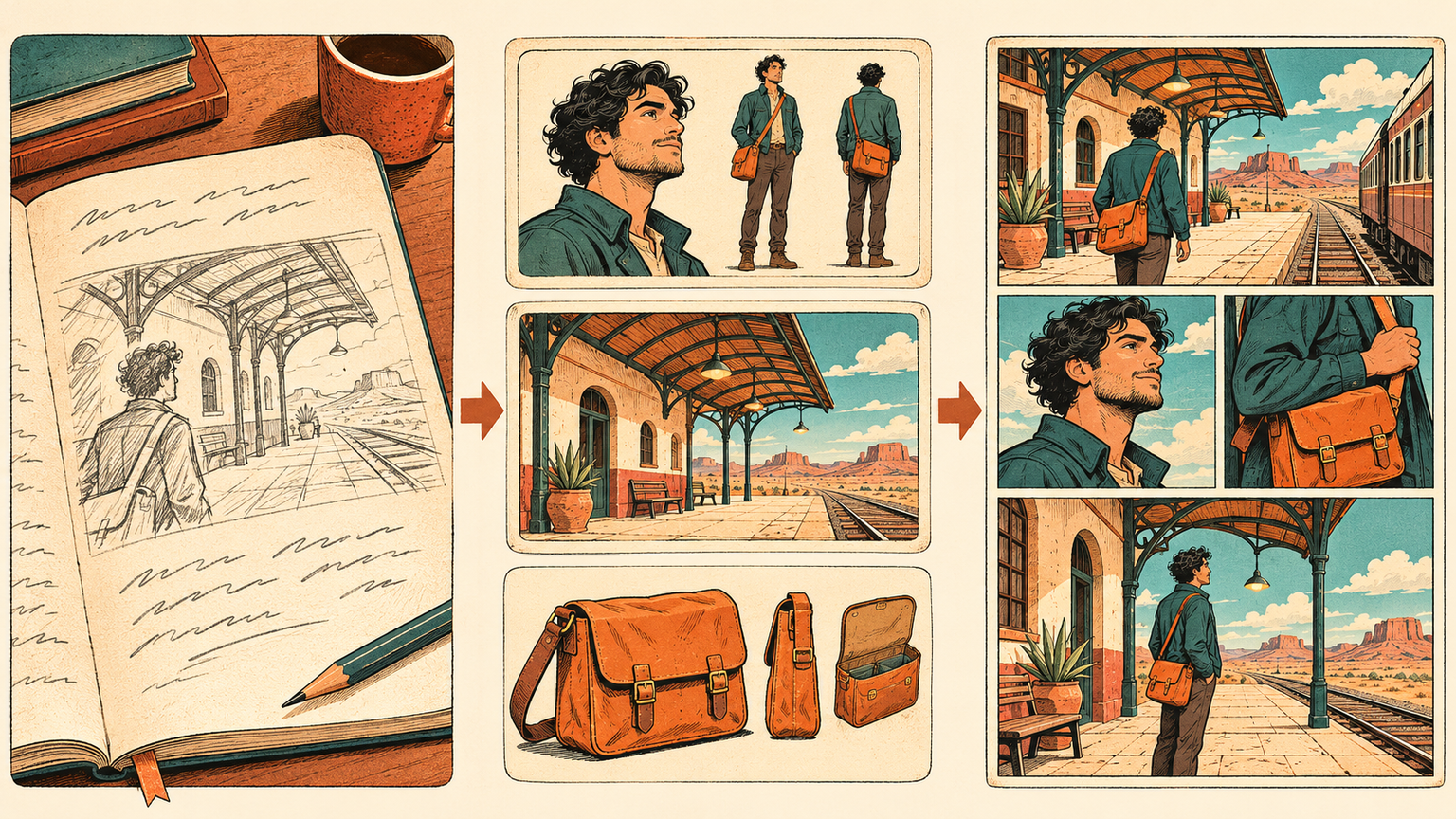
Shape the story, prepare the cast, then make the pages

Find a useful reference for the next shot

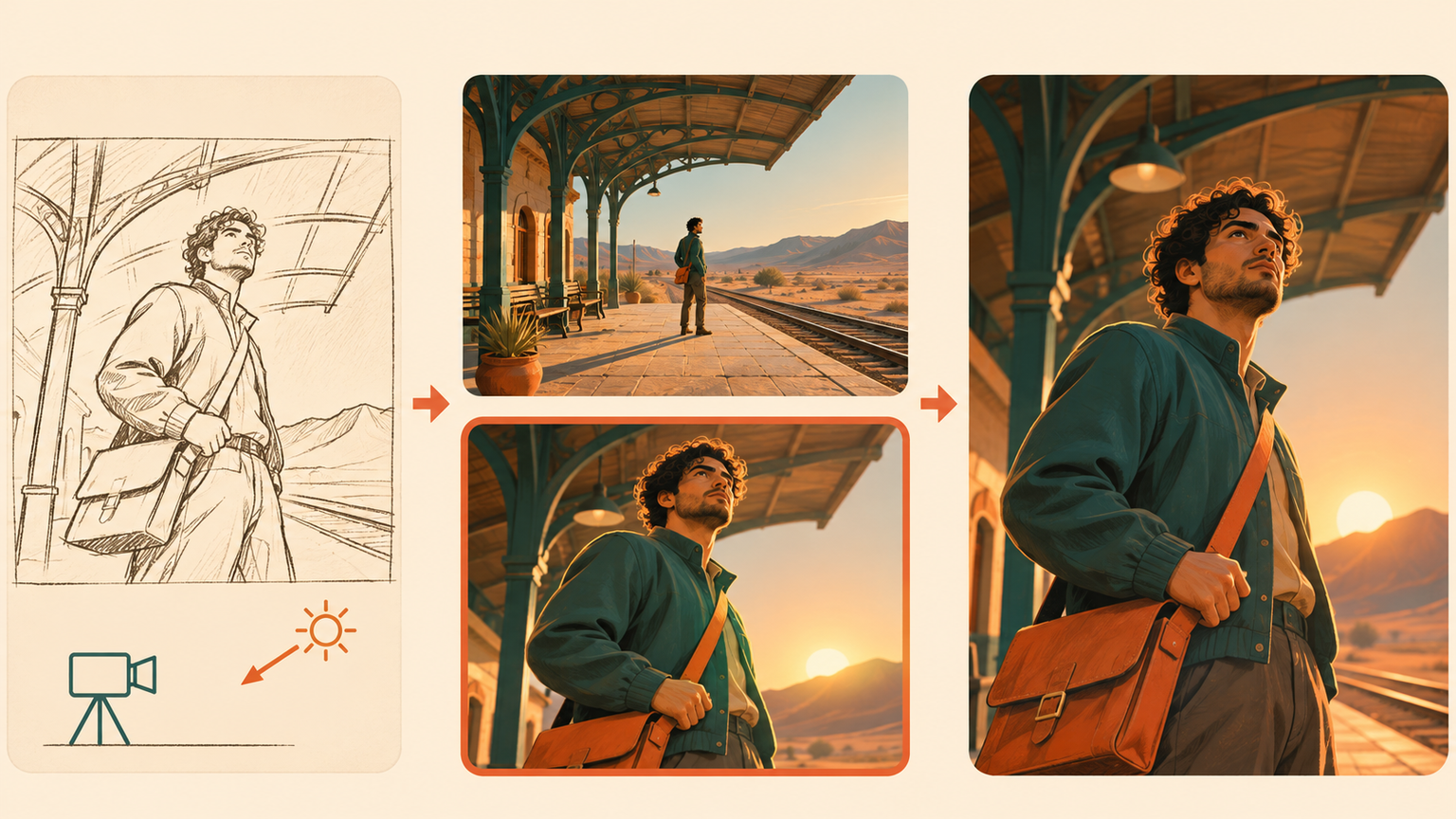
Open Shot Search to browse cinematic references or describe the shot you want to explore. Camera, framing, lighting, color, and scene filters help narrow the search when a general mood is not specific enough. Compare a wide establishing shot with a closer reaction, or explore how different light changes the same kind of scene.

Open a result for a closer look and use Find Similar to continue exploring nearby visual directions. The collection uses . These images provide material for studying a shot and communicating its direction before creating your own scene.

Ändringslogg

Tänd drömmar hos de unga
Där miljontals berättelser blir levande

En översikt över de senaste funktionssläppen i LlamaGen, produktförbättringar, designuppdateringar och viktiga buggfixar.
✦
✧
✦
✧

Ett nytt medium för Berättande

Skapa obegränsat med berättelser, serier, animationer, spel och mer på några sekunder som tilltalar moderna målgrupper

original synthetic references
Find a reference for the shot you have in mind

Present a storyboard as an editable pitch

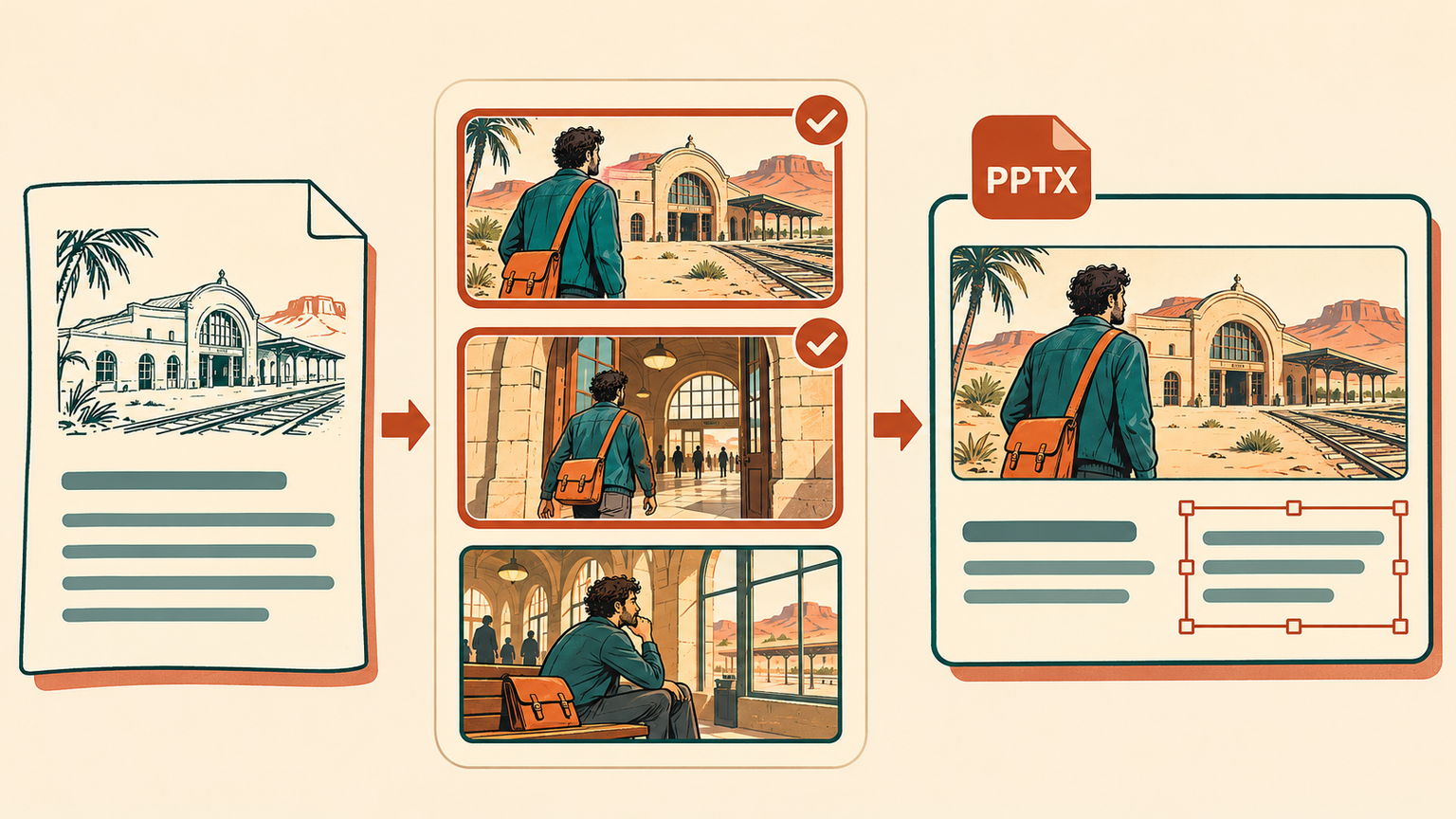
From a Storyboard detail page, open Pitch Deck to turn an existing project into a presentation. First review the title, logline, synopsis, audience, and character details. Then choose up to eight existing still-image frames to support the story you want to present.

Export an editable 16:9 PowerPoint (.pptx) with the selected images and editable text. Adjust the wording and presentation after download, using the frames you already have to explain the idea to collaborators or a prospective audience. Pitch Deck export requires an eligible paid plan.

Turn existing storyboard frames into an editable pitch

Get oriented on the first visit

New first-use guides point out the main creation choices in Mangaka and the comic upload flow, including story input, page and style choices, and optional character references. You can skip or close a guide, then return through Quick tour when you want another look.

Completing a tour leaves you in control of the next action. Review the story, references, and creation settings, then start the work when you are ready.

Related hot tags

comic-creation

Populära kreatörsverktyg

Förvandla inspiration till din nästa berättelse

Skapa serier, storyboardar och stiliserade foton med LlamaGen.

01

AI-seriegenerator

Förvandla en idé till välgjorda seriestrippar på några minuter.

Skapa serier
02

AI-mangagenerator

Skapa uttrycksfull manga och berättelser i flera paneler.

Skapa manga
03

AI-storyboardgenerator

Visualisera varje scen innan produktionen drar igång.

Skapa storyboardar
04

Gör bild till serie

Förvandla valfritt foto till en serielik illustration.

Skapa serier från bilder
05

AI-serierutskaper

Skapa delningsbara seriestrippar med konsekventa karaktärer.

Skapa seriestrippar

LlamaGen community

checkmark

Get hands-on help with your comics

checkmark

Showcase your comics to fellow LlamaGen creators

checkmark

Participate in special events to win gifts

Previous releases

LlamaGen.AI 1.0.45: Story Production and Shot Planning

LlamaGen 1.0.45: LlamaGen.AI 1.0.45: Story Production and Shot Planning

Develop a story through cast and world preparation into comic production, find cinematic shot refere

Jay
Jay
19 november 2026
LlamaGen.AI 1.0.44: Mangaka, Immersive Reading and Chapter Exports

LlamaGen 1.0.44: LlamaGen.AI 1.0.44: Mangaka, Immersive Reading and Chapter Exports

Keep Comics and Manga together in Mangaka, choose the page count before creating, read with fewer di

Jay
Jay
12 november 2026
LlamaGen.AI 1.0.43: Scene Library and Sketch References

LlamaGen 1.0.43: LlamaGen.AI 1.0.43: Scene Library and Sketch References

Explore a larger scene library, carry selected backgrounds into comics and storyboards, and draw a q

Jay
Jay
5 november 2026
LlamaGen.AI 1.0.42: Layouts, Page Reuse and Export Updates

LlamaGen 1.0.42: LlamaGen.AI 1.0.42: Layouts, Page Reuse and Export Updates

Find the right comic layout, browse clearer creation categories, reuse selected pages in an independ

Jay
Jay
29 oktober 2026
See all releases
LlamaGen-logotyp
  • United States
  • Español
  • Français (France)
  • 日本語
  • 한국어
  • Deutsch
  • 繁體中文 (台灣)
  • 繁體中文 (香港)
  • 简体中文
  • Português
  • Italiano
  • Español (México)
  • العربية
  • Русский
  • Português (Brasil)
  • Tiếng Việt
  • Svenska

Ledande inom AI-generering av serier

  • 24/7-support
  • Veckovisa uppdateringar
  • Säker och följer regler
  • 99,9 % drifttid

Ladda ner LlamaGen gratis

AndroidiOSSkrivbord

Produkt

  • Senaste lanseringarna
  • Funktioner
  • Skapa seriestrippar
  • Comic StoresNy
  • Studio för mangaNy
  • Förvandla bild till serie
  • Serie till video
  • AI-seriefabrik
  • Serieagent
  • iOS & Android
  • Mac & Windows
  • Ladda ner
  • Comic ZapNy
  • AI-seriegenerator
  • AI-tecknad generator
  • AI-webtoon-generator
  • Serieremsmakare
  • Förvandla bild till serie
  • AI-mangagenerator
  • Mangaöversättare
  • Foto till anime
  • Bild till prompt
  • Anime till verklighet
  • Manga-färgläggare
  • Anime-figurgenerator
  • Verktyg för pixelspelsresurser
  • AI-sprite sheet-generator
  • Bästa pixelspelsverktygen 2026
  • Foto-serie-skapare
  • Alternativ till Comic Life

Systerprodukter

  • LlamaGen-familjen
  • CineoBoardNy
  • Comics API

Planer

  • Prissättning
  • Start
  • Pro

Gemenskap

  • Skapare
  • Partners
  • Partner

AI-modeller

  • GPT Image 2.6 Flare
  • GPT Image 2.6 Sunburst
  • Grok Imagine Image 2.0
LinkedInX (Twitter)
  • Hem
  • Artiklar
  • Blogg
  • Skapa
  • Prissättning
  • API
  • Affiliate ProgramNEW

Fråga AI om LlamaGen

  • Comic Zap
  • Velika
  • För företag
  • Utbildning
  • Serie-API
  • Kontakta försäljning
  • Utbildningsplaner
  • Lärare
  • Studenter
  • Lärare och elever
  • Nystartade företag
  • Student-/lärrabatter
  • Företag

    • Prata med vår grundare
    • Om
    • Produktfärdplan

    Hjälp

    • Hjälpcenter
    • Förtroende
    • Säker AI
    Omdömen
  • Kärleksvägg
  • LlamaGen MCPNy
  • LlamaGen för utvecklare
  • Resurser

    • Ändringslogg
    • Blogg
    • Guider

    Verktyg

    • AI-logotypgenerator
    • Karaktärsgenerator i Grokbot-stil
    • PNG till serie
    Wan 3.0
  • Wan 3.0 Prime
  • Seedance 2.5
  • MiniMax H3
  • Nano Banana 2.1
  • Nano Banana 2 Lite
  • Seedream 5.0 Flash
  • Seedream 5.0 Pro
  • Seedance 2.0 Mini
  • Kling 3.0 Turbo
  • Nano Banana 2
  • GPT Image 2
  • Gemini Omni Flash
  • All AI Models
  • AI-verktyg

    • AI-outfitsutdragare
    • AI-frisyrändrare
    • AI-frisyrändrare för manga
    Instagram
    YouTube
    Facebook-grupp
    Reddit
    Discord
    Support via e-post
    IntegritetVillkorSidkarta
    Ladda ner varumärkesmaterial
    © 2026 LlamaGen.Ai Alla rättigheter förbehållsAlla tjänster är online
    Karriär
  • Maila oss
  • Vår maskotvärld
  • Mediakit
  • KOL-partnerskap
  • Innehåll
  • Professionella tjänster
  • Vanliga frågor
  • Säkerhet
  • Tillgänglighet
  • Videoguide
  • Kontakta oss
  • Sidkarta
  • Personliga serier
  • Funktioner
  • Alternativ
  • Bästa AI-appar
  • Guide för att färglägga manga med GPT-6
  • Claude-serieboksskicklighet
  • Guide till Gemini AI för serier
  • Den serien
  • Student-/lärrabatter
  • Studentrabatt
  • Text till serie
  • PDF till serie
  • Manus till serie
  • Bok till serie
  • Förvandla bild till serie
  • AI Pixelkonst-generator
  • Pedagogiska serier
  • AI-videogenerator
  • Gemini AI-videogenerator
  • Gratis AI-videogenerator utan ansikten
  • Serie till video
  • Storyboard-programvara
  • AI-storyboardgenerator
  • Manusprogramvara
  • Manusredigerare
  • Berättelse-AI
  • AI-berättelsegenerator
  • Generator för bilderbok
  • AI-bildgenerator
  • AI-lagersplitter
  • AI-styrning av kameravinkel
  • AI Pixelkonst-generator
  • Verktyg för pixelspelsresurser
  • AI-sprite sheet-generator
  • Sprite sheet-skärare
  • Bästa pixelspelsverktygen 2026
  • Animations-API
  • ChatGPT/Codex-plugin
  • Installationsguide för ChatGPT
  • Claude Code-plugin
  • Installationsguide för Claude Code
  • AI-generator för vindeffekt
  • AI-djupkarteringsgenerator
  • AI-vit bakgrund
  • AI-objektborttagare
  • AI-virtuell provning
  • AI-skärp bilder
  • AI-brusreducering
  • AI-fotorestaurering
  • AI-produktskuggor
  • AI-generator för bakgrunder
  • AI-porträttgenerator
  • AI-emoji-skapare
  • AI-bakgrundsändrare
  • AI-öppna ögon
  • AI-skönhetsförbättring
  • AI-produktfotografering