

Multi-page storytelling
Magplano ng magkakaugnay na eksena sa halip na manghingi ng hiwa-hiwalay na larawan isa-isa. Dalhin ang plot, pacing, lokasyon, props, at visual direction mula page one papunta sa susunod na eksena o chapter.
LlamaGen Comics
Gawing comic panels ang isang kuwento o script, kasama ang dialogue, mga character, at layout na maaari mong i-edit.
Gumagana sa browser mo. I-edit ang bawat panel sa studio.
I-paste ang kuwento mo, tapos piliin ang bilang ng page at layout.
Choose a reading format
Create connected pages or a vertical episode, then refine the characters and dialogue in the studio.
Komiks
AI Comic Generator
Multi-page stories with a recurring cast
Manga
AI Manga Generator
Manga pages built from your story
Webtoon
AI Webtoon Generator
Vertical episodes for reading on a phone
Ano ang nagpapakaiba rito
Dinisenyo ang LlamaGen para sa sequential work: paulit-ulit na cast, magkakaugnay na story beat, at format na madaling sundan ng mambabasa. Hindi lang basta lumikha ng magandang panel ang layunin nito; ang layunin ay bigyan ka ng comic project na puwedeng pagtrabahuhan.
Magplano ng magkakaugnay na eksena sa halip na manghingi ng hiwa-hiwalay na larawan isa-isa. Dalhin ang plot, pacing, lokasyon, props, at visual direction mula page one papunta sa susunod na eksena o chapter.
I-define ang paulit-ulit na cast at i-reuse ang aprubadong visual reference. Suriin ang mukha, damit, kulay, at signature details habang lumilipat ang kuwento sa close-up, aksyon, dialogue, at bagong lokasyon.
Itakda ang reading format mula sa simula: black-and-white manga, full-color Western comic page, o mobile-first vertical Webtoon. Ipagpatuloy ang piling panel bilang motion comic kapag kailangan ng kuwento ng galaw.
Mga na-verify na kwento ng customer
Mga comic creator
Ang nagpapatingkad sa LlamaGen.Ai ay kung gaano ito ka-tuned para sa sequential storytelling at visual consistency. Itinatampok ni Keshav ang character references na tumitibay sa bawat frame, pose, at angle; maayos na text-to-storyboard flow; at panel-level control sa composition, poses, at regional edits.

Keshav S.
Mga educator
Ginagawang kumpletong visual story ng LlamaGen ang isang nakasulat na ideya, pinananatiling pare-pareho ang mga character, at inaalis ang pangangailangan para sa dagdag na video-editing skills. Para sa training at patient-education stories, binabawasan nito ang production time at upfront costs habang pinapabilis ang prototyping.

Parthik P.
Mga brand storyteller
Tinutulungan ng LlamaGen ang marketing team namin na gumawa ng comic-style storyboard at illustrated campaign content nang mas mabilis nang hindi kailangan ng dedicated illustrator para sa bawat asset. Pinananatiling buo ng character consistency ang campaign, habang pinapabilis ng text prompts at multilingual support ang ideation para sa audience na halo-halo ang wika.

Muhammed A.
Tunay na product workflow
Mga totoong view ito ng produkto ng LlamaGen: itatag ang cast, i-edit ang comic page, tapos ipagpatuloy ang project sa export, sharing, o motion.

Itakda ang mga madaling makilalang katangian ng character at i-approve ang visual reference bago mo hayaang bumalik ang character na iyon sa mga susunod na panel.

Suriin ang generated page sa Comic Studio, tapos baguhin ang captions, speech bubbles, proporsyon, o ang panel lang na hindi tumama sa brief.

Ipagpatuloy ang sequence gamit ang parehong cast, i-export o i-share ang aprubadong gawa, o buksan ang Animatic workflow kapag kailangan ng galaw ang piling eksena.
Mga na-verify na opsyon sa delivery
I-export ang kasalukuyang page bilang PNG file o kopyahin ang rendered page bilang PNG mula sa Comic Studio.
Ang mga edit sa panel at canvas ay nai-store matapos ang maikling delay sa pag-save. Tinutukoy pa rin ng plan mo kung gaano katagal nananatili ang project history.
Hindi ipinapangako ng Free plan ang HD output o pag-alis ng watermark; inilaan ng Studio ang mas mataas na resolution na export options para sa mga bayad na plan.
Ipadala ang piling comic scene sa animation workflow, mag-generate ng motion, at i-download ang resultang video file.
Tatlong format plus motion
Bawat halimbawa ay gumagamit ng ibang premise at destinasyon. Buksan ang still sa buong laki o i-play ang motion example; wala sa mga card na ito ang nagpu-crop ng source para magmukhang mas maganda ang preview.
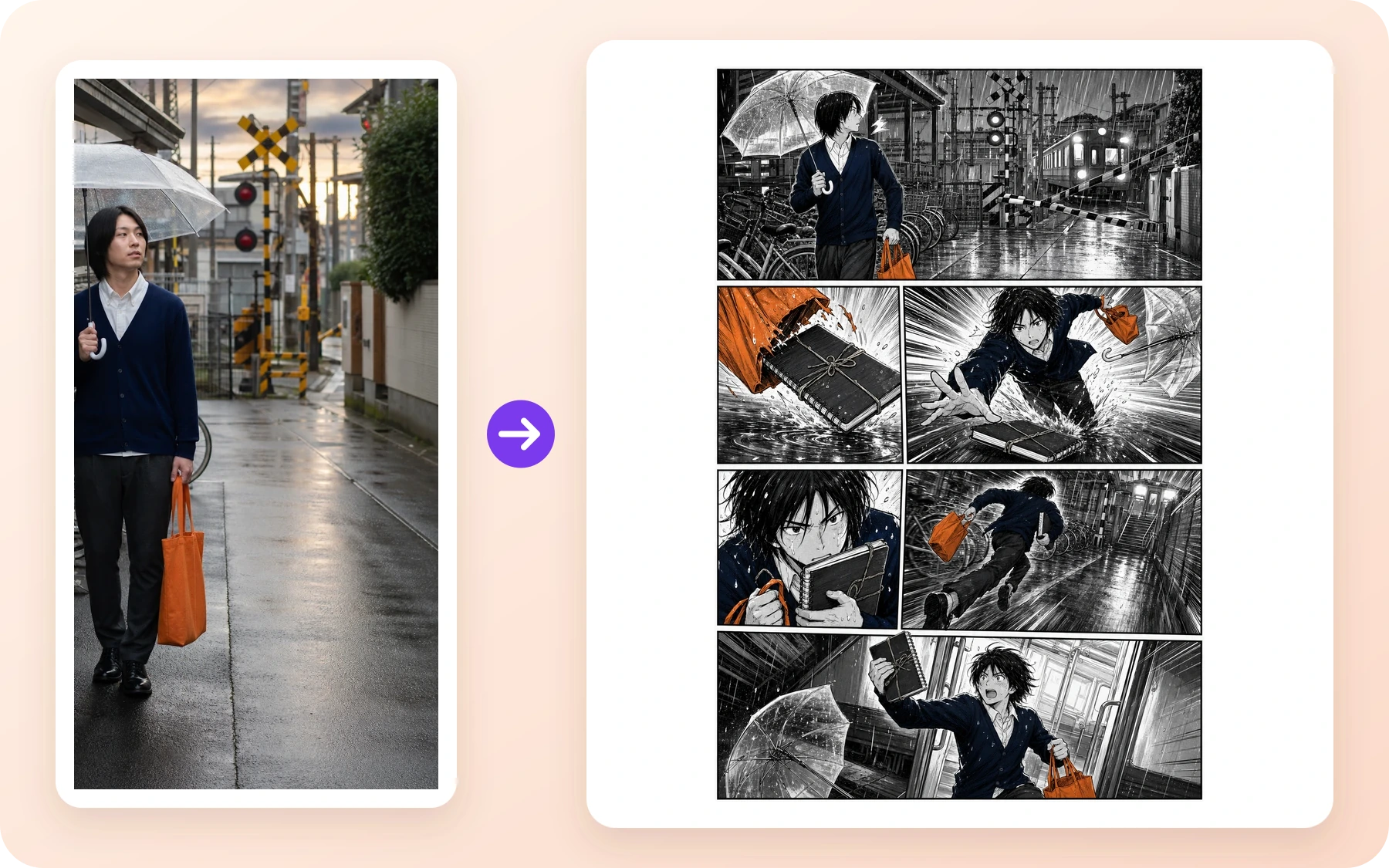
Manga · Mga comic creator
Ang reference sa tag-ulan na riles ay nagiging black-and-white action page na may malinaw na setup, habulan, close-up, at final beat.
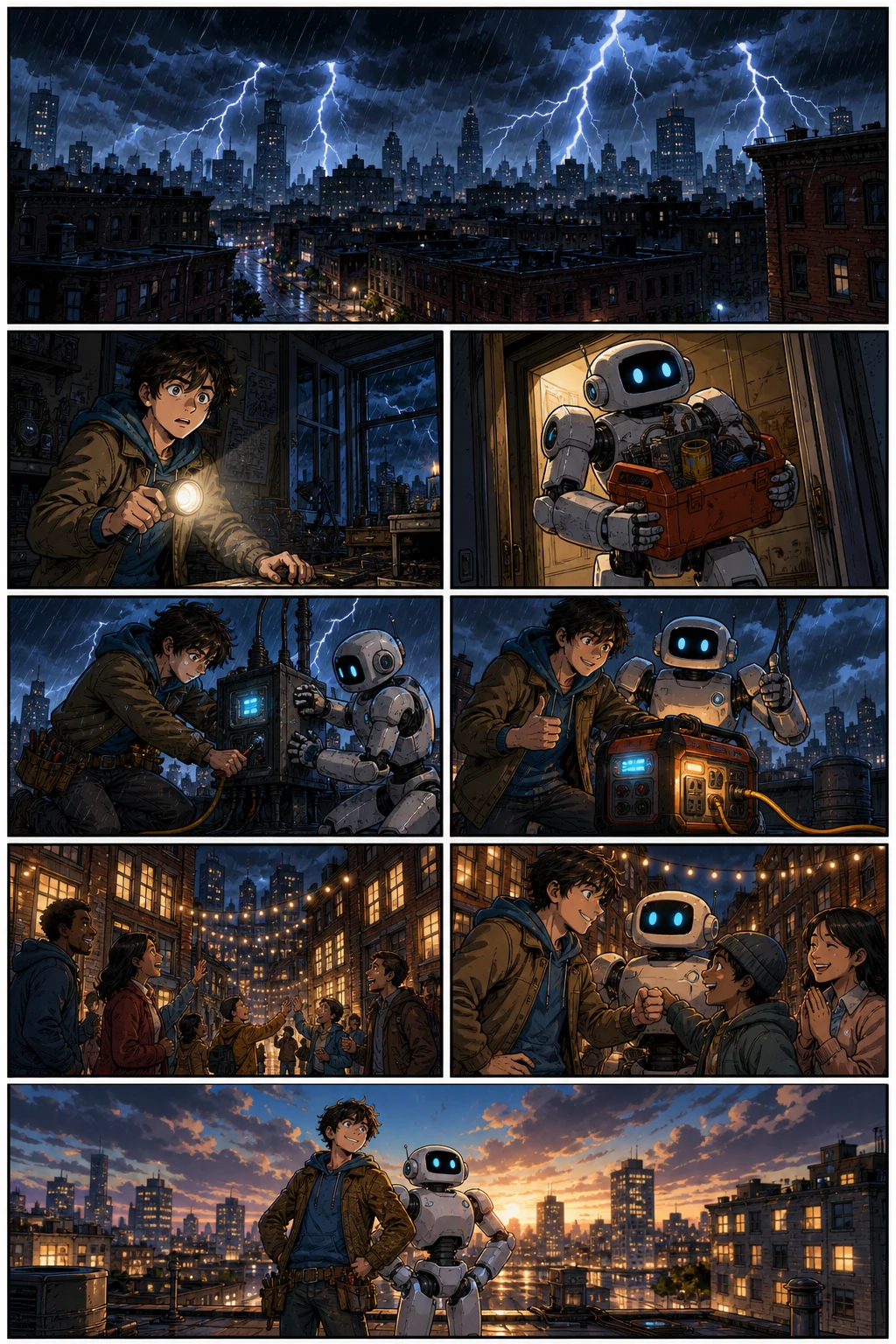
Western comic · Mga brand storyteller
Ang paulit-ulit na inventor at robot ay dumaraan sa full-color na blackout rescue na may nababasang aksyon at nagbabagong camera angle.
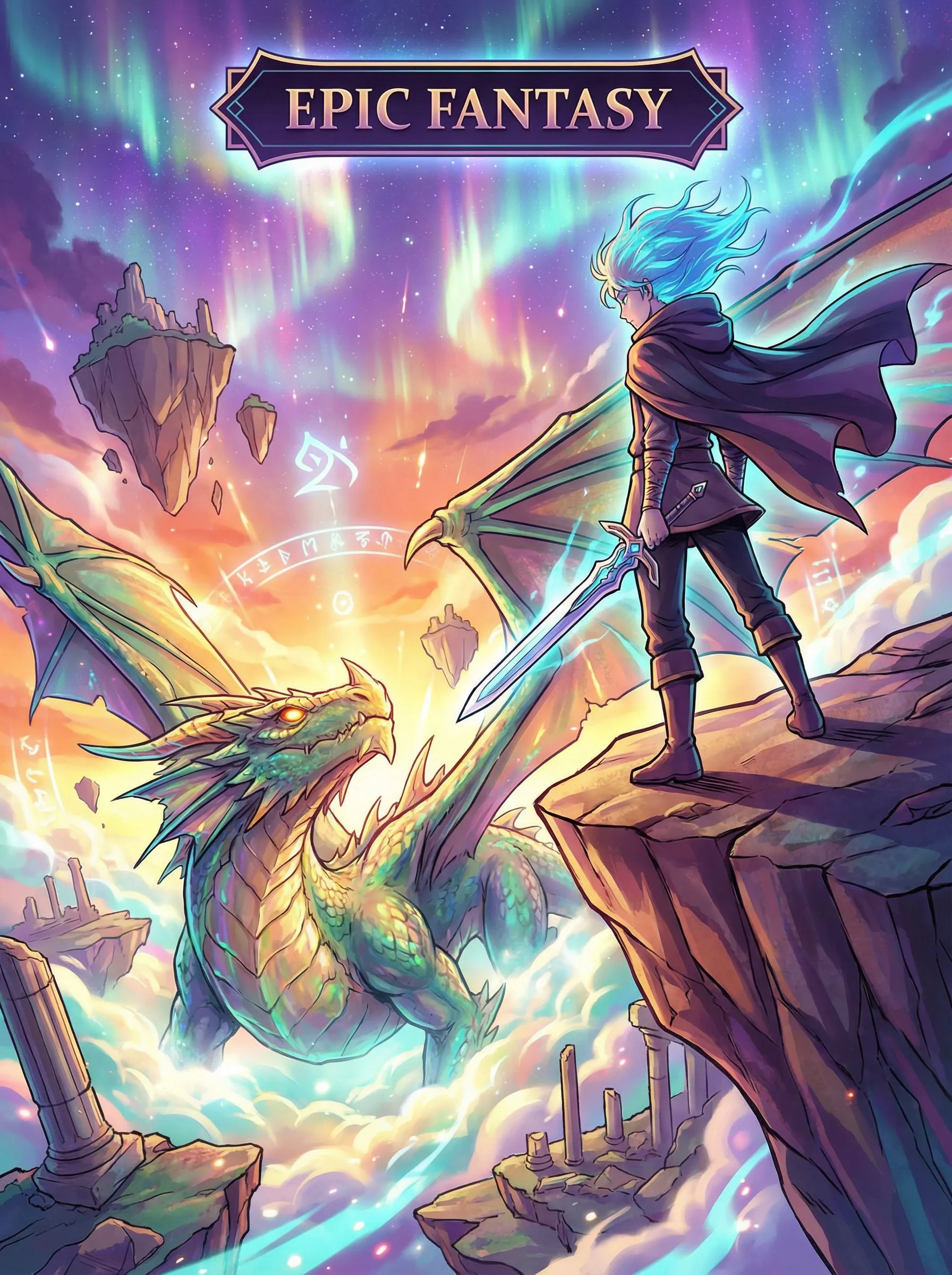
Vertical Webtoon · Mga educator
Ang fantasy journey ay gumagamit ng vertical spacing at mahabang mobile pacing para dalhin ang mambabasa mula sa discovery papunta sa panganib.
Motion Comic · Storyboard teams
Ang natapos na comic frame ay nagpapatuloy bilang maikling animated scene na may naka-direktang galaw ng camera at character.
comic to video converterAyusin ang bahaging pumalpak
Kailangan pa rin ng paghatol ang AI output. Ituring ang bawat generated page bilang draft: panatilihin ang aprubado, ihiwalay ang problema, at ayusin ang pinakamaliit na kapaki-pakinabang na unit. Ito ang praktikal na paraan kapag lumihis ang mukha, pumalpak ang pose, o hindi na tugma ang mga salita sa beat.
Gamitin muli ang aprubadong character reference at i-redraw ang apektadong panel. Panatilihin sa lugar ang mga tinanggap na page habang ikinukumpara mo ang naituwid na mukha, outfit, props, at palette.
Baguhin ang prompt, shot, pose, o background ng panel na iyon at i-regenerate ang panel sa halip na i-restart ang buong sequence.
Baguhin ang captions at dialogue, tapos i-adjust ang proporsyon ng panel at reading order sa Studio. I-approve lang ang page kapag magkasabay na ang kuwento ng mga salita at visual.
Na-verify na delivery summary
Ginamit namin ang parehong story beats at parehong paulit-ulit na cast para sa tatlong hiwalay na format run. Ebidensiya ito ng puwedeng uliting workflow, hindi claim na isang click lang ang awtomatikong nagko-convert ng tapos na comic sa bawat layout.
Ipinapakita ng 36 aprubadong panel na ang parehong chapter plan at apat na paulit-ulit na character ay puwedeng makaligtas sa maraming eksena at reading format pagkatapos ng review. Hindi nito pinapatunayang usable ang bawat unang output, na mapagpapalit ang tatlong layout, o na walang kailangan ng human editing ang workflow. Kaya inilalagay ng detalyadong record ang mga tinanggihang attempt, model time, prompts, asset manifest, at file hash sa labas ng conversion page na ito, kung saan puwede silang suriin nang hindi binabaha ang isang taong gusto lang magsimula ng comic.
Tingnan ang buong case studyBago ka magsimula
Ang naka-sign in na balance at confirmation na ipinapakita bago ang generation ang nananatiling current source of truth dahil puwedeng magbago ang credits, promotions, at plan packaging.
Hindi ipinapangako ng Free ang naka-save na comic history. Ang Standard ay kasalukuyang may 30 araw, ang Pro ay 90 araw, at ang mas mataas na tier ay may unlimited history. Ang commercial use ay nananatiling sakop ng Terms at third-party rights.
I-compare ang kasalukuyang plans at limitsKaligtasan, karapatan, at publishing
Ito ay plain-language summary, hindi kapalit ng mga polisiya. Maaaring mag-iba ang sagot depende sa inaasahang paggamit, source material, hurisdiksyon, at laki ng kumpanya, kaya sundin ang mga naka-link na dokumento kapag mahalaga ang proyekto sa komersyo.
Nalalapat ang Content Policy sa prompts, uploads, generated o edited output, public posts, at API use. Inilalarawan ng LlamaGen ang automated checks, provider controls, public-area scanning, reports, at human review. Praktikal din itong acceptable-use boundary para sa generator na ito. Gamitin ang Report control sa public artwork, o sundin ang mga tagubilin sa pagre-report ng Content Policy. Huwag mag-attach ng pinaghihinalaang child-abuse material.
Itinatakda ng Terms na ang interes ng LlamaGen sa output ay mapupunta sa iyo hangga't pinapayagan ng batas, kabilang ang commercial use, alinsunod sa Terms at third-party rights. Ikaw pa rin ang responsable sa pahintulot para sa inputs at sa pag-clear ng privacy, publicity, copyright, trademark, at iba pang rights. Ang mga kumpanyang lampas sa nakasaad na revenue threshold ay kailangan ang kinakailangang paid plan.
Basahin ang TermsHindi ipinapangako ng LlamaGen na ang AI output ay natatangi, maaaring i-copyright sa bawat bansa, o walang third-party claims. Puwedeng magresulta sa magkahawig na output ang magkaparehong prompt. Itago ang ebidensiya ng human authorship at editing decisions mo, iwasan ang protected na character o brand na hindi mo kontrolado, at kumuha ng legal advice para sa high-value publishing o licensing decisions.
Basahin ang terms ng output rightsMga tanong bago gumawa
Kung ginamit mo ang Comics Canvas ng Komiko para mag-draft ng panel at page, ang AI comic generator na ito ang katumbas na workflow ng LlamaGen: isulat ang kuwento, i-generate ang magkakaugnay na page, tapos i-edit ang mga panel sa Comic Studio. Hindi kasama sa page na ito ang character chat.
Gamitin ang OC Maker o Anime OC Maker, tapos dalhin ang parehong character sa comic generator na ito. Kung selfie ang panimula mo sa halip na nakasulat na OC, ang photo to anime ang katumbas na page.
Oo. I-define ang paulit-ulit na cast at direksyon ng kuwento, i-reuse ang aprubadong visual reference, at suriin ang mukha, damit, props, setting, at style habang nagdadagdag ka ng panel at page. Kailangan pa rin ng review ang AI consistency; ayusin ang panel na lumihis bago ipagpatuloy ang sequence.
Ang Free ay para sa pagsubok ng maikling comic at gumagamit ng credits. Kailangan ng account para makapag-generate, hanggang apat na panel bawat page ang kasalukuyang Free plan, at hindi nito ipinapangako ang pag-aalis ng watermark, HD output, o naka-save na comic history. Suriin ang live Pricing page dahil maaaring magbago ang credit grant, promotions, at packaging.
Hindi. Sa Comic Studio, puwede mong baguhin ang prompt, shot, pose, o background ng apektadong panel at i-regenerate lang ang panel na iyon habang pinananatili ang aprubadong gawa. Maaari mo ring baguhin ang caption o dialogue at ayusin ang proporsyon ng panel bago ipagpatuloy ang kuwento.
Hindi ito ang claim ng mga halimbawa sa page na ito. Ginamit ng verified three-format case study ang parehong story beat at character reference sa tatlong magkahiwalay na format run. Planuhin ang reading direction at layout para sa target na format, tapos i-review ang resulta nang hiwalay.
Oo. Nagbibigay ang Comic Studio ng editable canvas para sa captions, dialogue elements, proporsyon ng panel, page review, at regeneration ng napiling panel. Ang eksaktong export, history, at advanced editing option ay nakadepende sa kasalukuyang plan.
Itinatakda ng Terms na ang interes ng LlamaGen sa output ay mapupunta sa iyo hangga't pinapayagan ng batas, kabilang ang commercial use, alinsunod sa Terms at third-party rights. Ikaw ang may responsibilidad sa pahintulot para sa inputs at sa rights clearance. Ang mga kumpanyang lampas US$500,000 ang annual revenue ay kailangang gumamit ng Pro o Unlimited kapag gumagawa ng assets.
Ang Content Policy ay para sa prompts, uploads, generated o edited output, public posts, at API use. Inilalarawan ng LlamaGen ang automated checks, provider controls, public-area scanning, reports, at human review. Gamitin ang Report control sa public artwork o mag-email ng Content Safety Report na may page URL at maikling paliwanag.
Hindi. Nag-iiba ang treatment ng copyright depende sa hurisdiksyon, maaaring hindi natatangi ang output, at hindi ginagarantiya ng LlamaGen ang non-infringement. Itago ang record ng human writing at edits mo, iwasan ang protected na character o brand na hindi mo kontrolado, at humingi ng legal advice para sa high-value publishing o licensing decisions.
No. Copyright treatment varies by jurisdiction, output may not be unique, and LlamaGen does not guarantee non-infringement. Keep records of your human writing and edits, avoid protected characters or brands you do not control, and seek legal advice for high-value publishing or licensing decisions.
You can create multi-page comics, comic strips, manga pages, and Webtoon episodes using AI. LlamaGen is an AI comic drawing generator and comic drawer AI — a complete comic using AI workflow that turns a story prompt into an AI made comic with consistent characters, editable panels, and export-ready pages.
Yes. LlamaGen works as an AI comic generator from photo and image references — upload a portrait, scene, or character sketch and generate comic panels from it. You can also write a story prompt and use the AI comic generator from text free for scripts, chapters, and original ideas.
Yes. You can use LlamaGen to make anime-style manga pages, action panels, and character-driven comics. Sign in to generate comics; generation uses credits, including on the Free plan. Check the current Pricing page for credit allowances and plan limits.
Tukuyin ang cast at ang susunod na story beat, mag-generate ng magkakaugnay na page, tapos suriin ang mga panel bago mo ipagpatuloy ang chapter.
Gumawa ng comic