

Inirerekomenda
Quick Mode
Inirerekomenda bilang una. Isang nababasang PNG layer sheet mula sa isang image.
Mag-upload ng malinis na image at hatiin ito sa background, foreground, subject, text, objects, comic characters, anime art, props, o product graphics. Suriin ang unang layer sheet, tapos i-extract ang mga indibidwal na transparent PNG layer at i-export bilang ZIP o editable na panimulang PSD.
First pass · 300 credits
Generates one reviewable PNG asset sheet. It is not an editable set of transparent PNG layers.
First pass · 600 credits
Uses a higher-quality model to produce a cleaner PNG asset sheet, still delivered as a single image.
Paid second pass · +600 credits
Once the sheet is ready, a paid user can extract individual transparent PNG layers, download them or a ZIP, and export a starter PSD.
The extracted PNGs are actual second-pass outputs, not a crop of the sheet. Occluded regions or complex edges can need manual cleanup; PSD is an editable starting file.
or drop a file,
paste image or
No image? Try one of these:
Mag-upload ng totoong source image sa page. Gumagawa ang Quick Mode ng unang layer sheet na puwedeng i-review; mas pinapaganda ng PRO ang sheet na iyon kapag malinis ang source. Ang bayad na second pass ay nag-e-extract ng magkakahiwalay na transparent PNG layer na puwedeng i-download nang paisa-isa, bilang ZIP, o bilang editable na panimulang PSD.
Inirerekomenda bilang una. Isang nababasang PNG layer sheet mula sa isang image.
Advanced model. Mas malinis na separation sa loob ng asset sheet.
After creating a sheet, paid plans can extract real transparent PNG layer files and download individual PNGs, a ZIP, or an editable starter PSD. Complex images may need manual cleanup.
Ipinapakita ng bawat card ang totoong source at nabuong layer sheet. Ang mga label ay tumutukoy lang sa mga bahaging nakikita sa resultang iyon; ang live tool sa itaas ang lugar kung saan puwedeng magpatuloy ang angkop na source sa indibidwal na foreground, background, subject, text, at object layers.
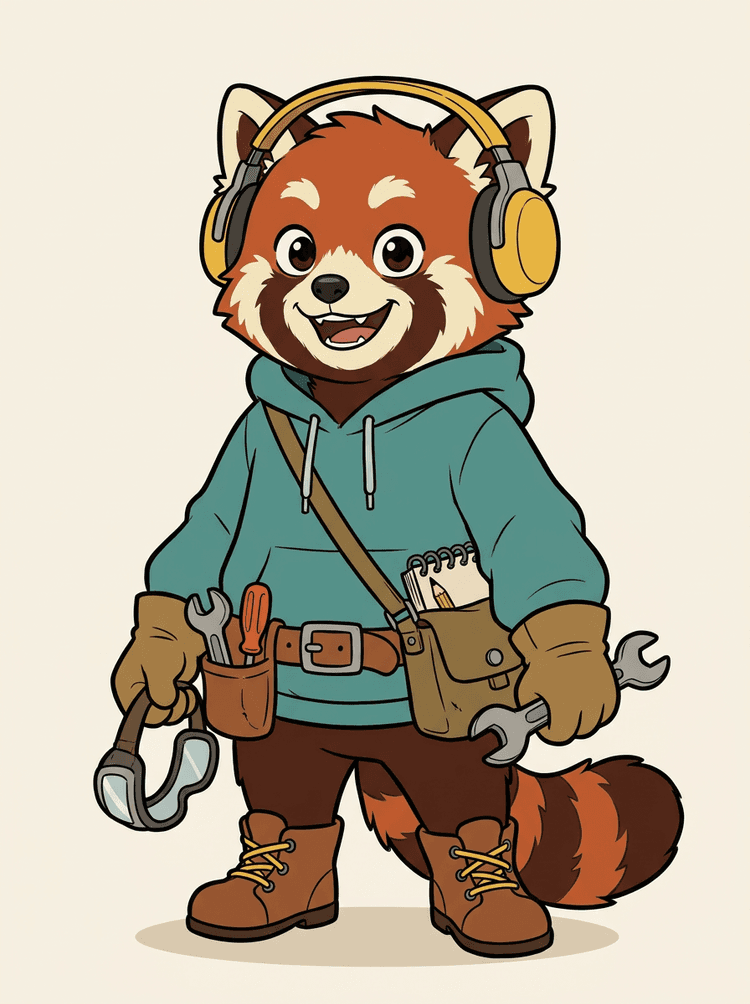
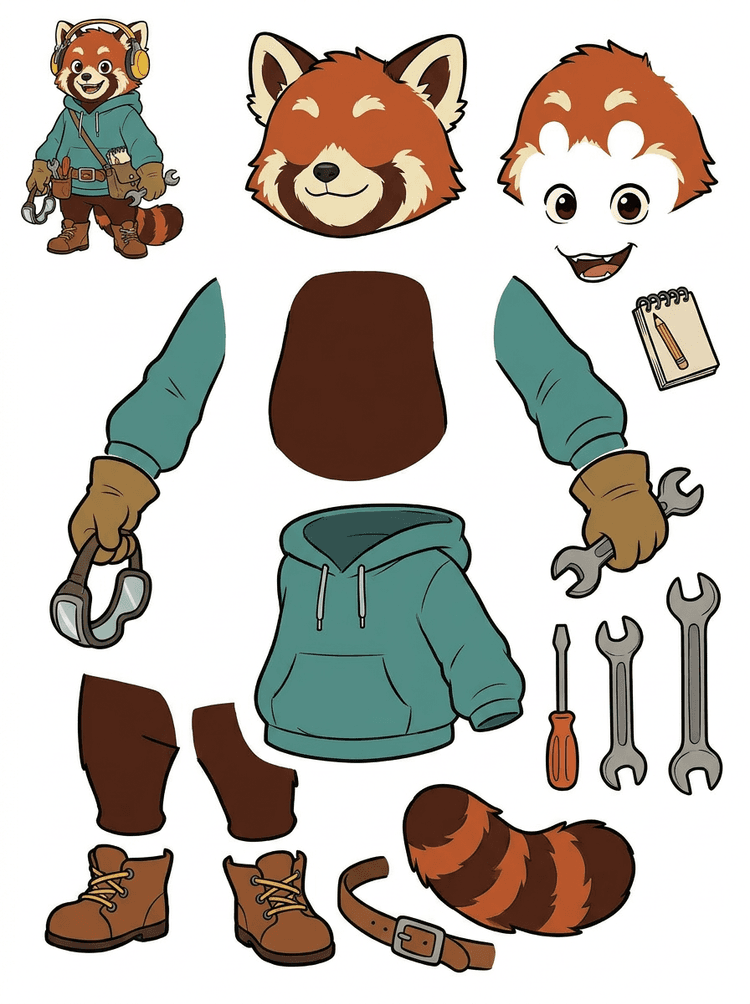
Ang character mascot na may headphones, hoodie, satchel, buntot, sapatos, at drawing tools ay nagiging praktikal na sheet para sa animation review.
Mga nakikitang bahagi sa totoong resultang ito
Production handoff
Ang nabuong sheet ang review step. Magpatuloy sa live tool para i-extract ang angkop na visible regions bilang magkakahiwalay na transparent PNG layer, tapos i-package bilang ZIP o editable na panimulang PSD.
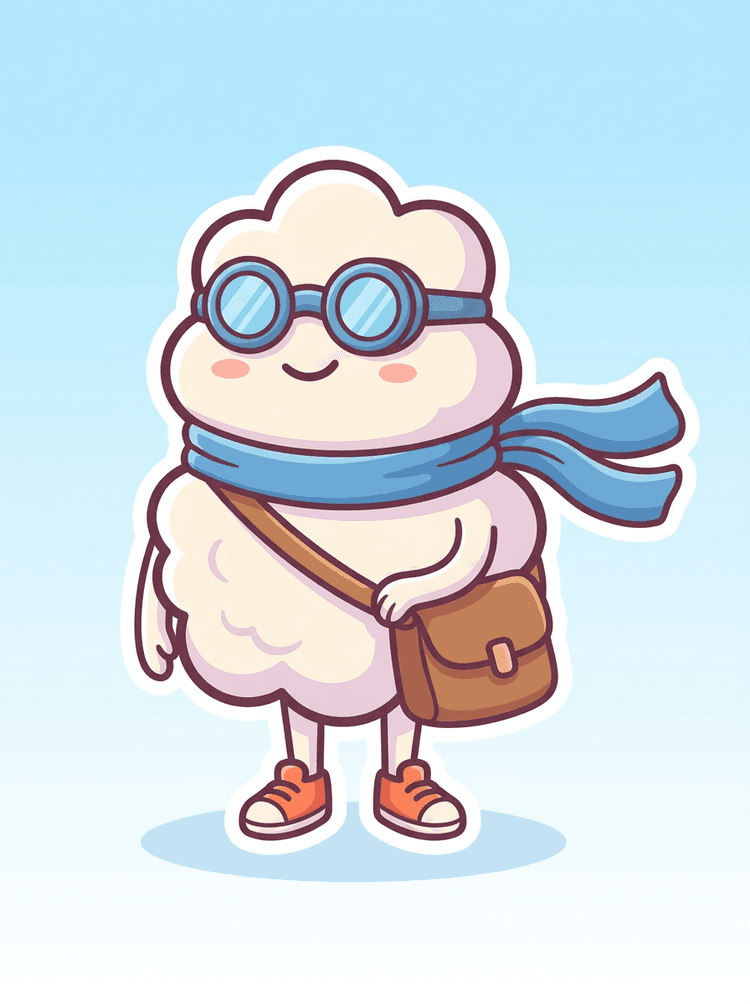
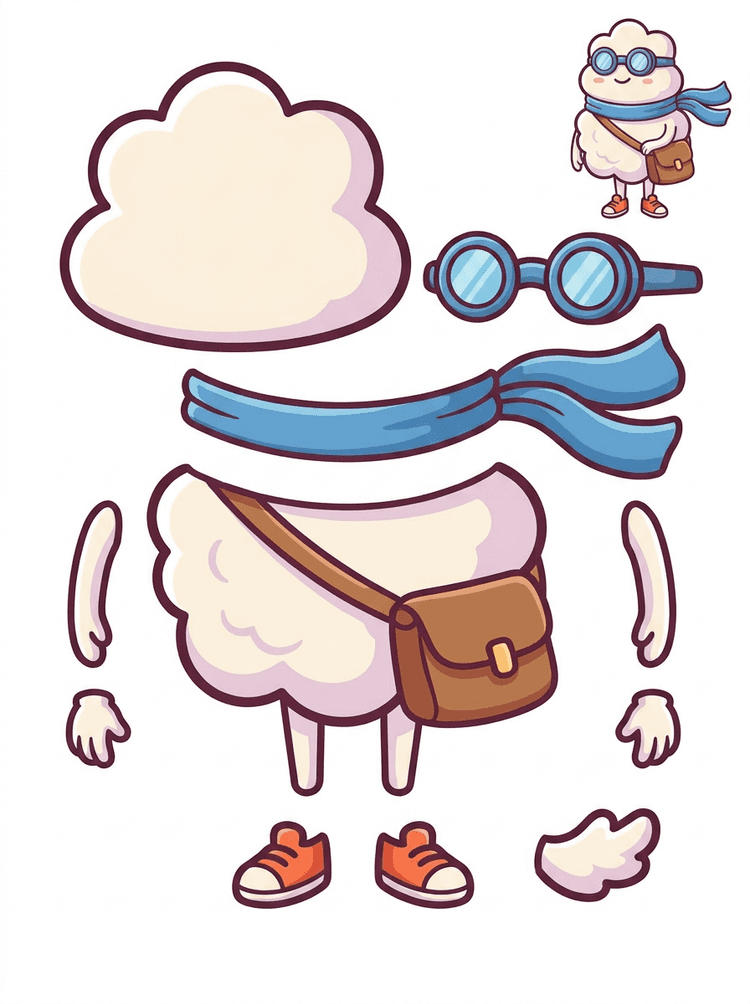
Ang sticker-like cartoon hero ay nagiging parts sheet na may scarf, bag, sapatos, goggles, kamay, at rounded body components.
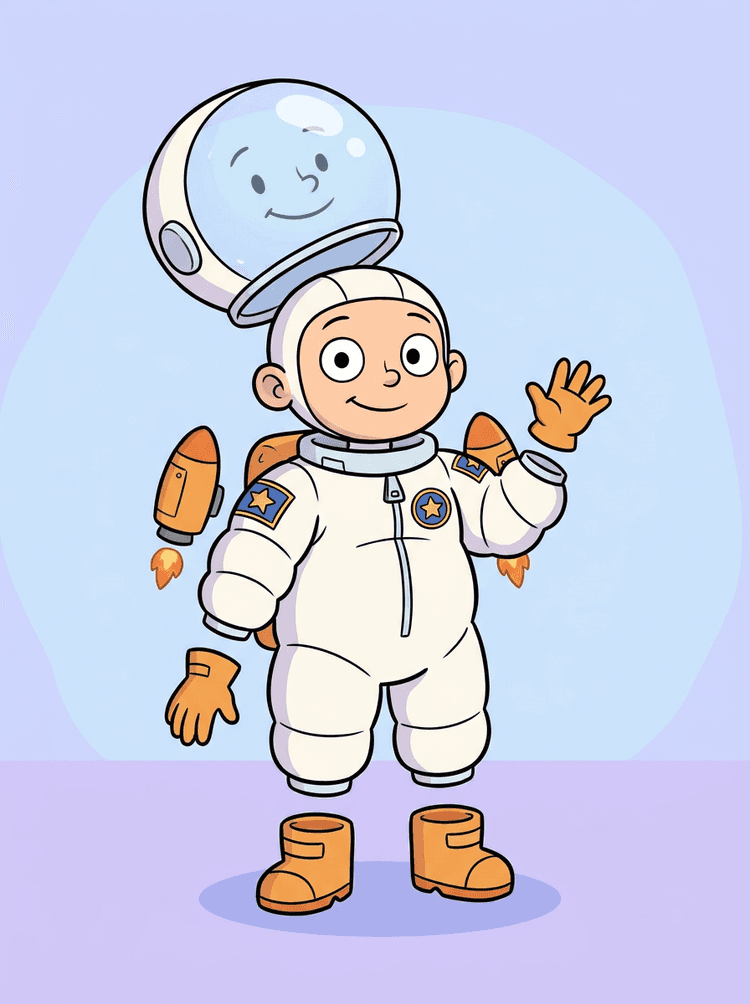
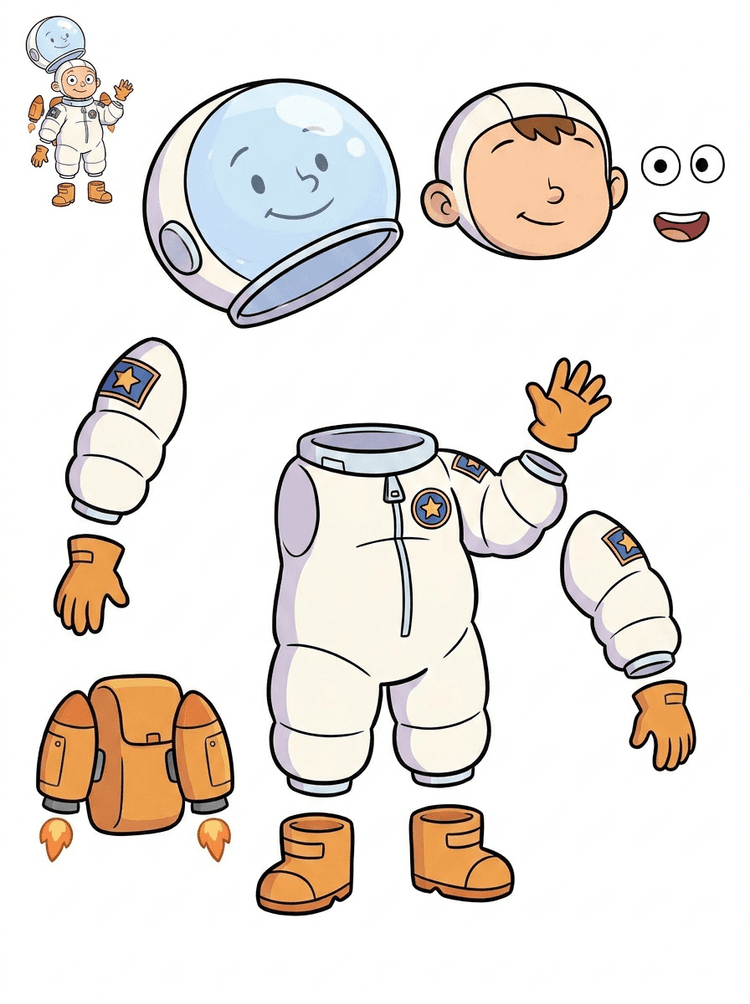
Ang illustration ng batang astronaut ay nagiging sheet para sa helmet, suit, gloves, boots, patches, backpack, at motion-comic pieces.
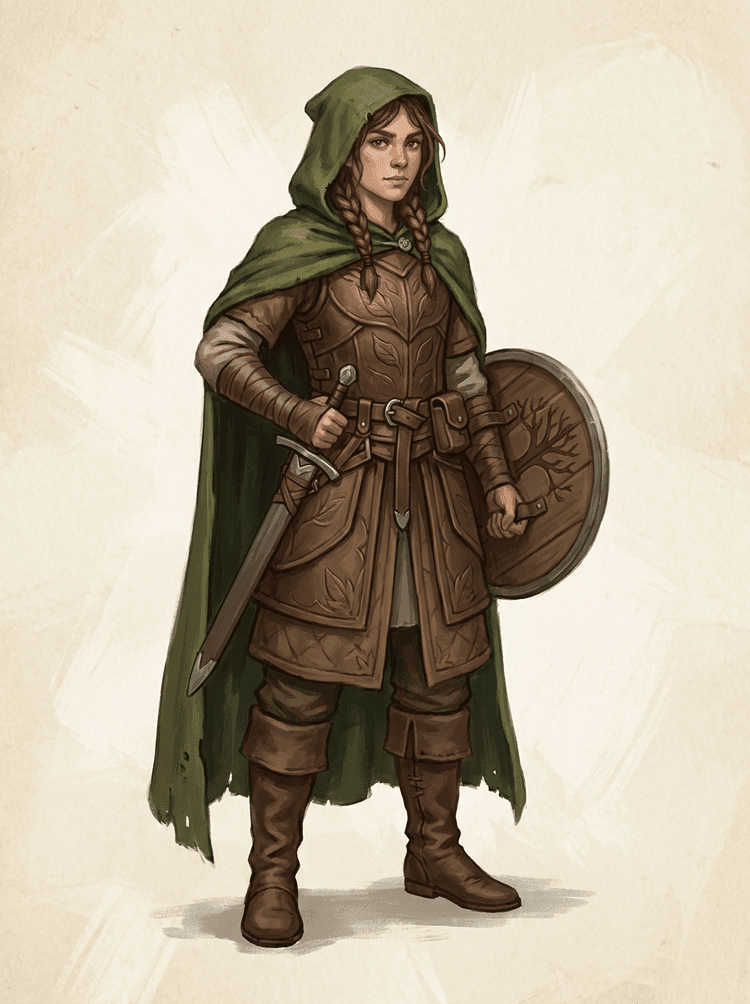
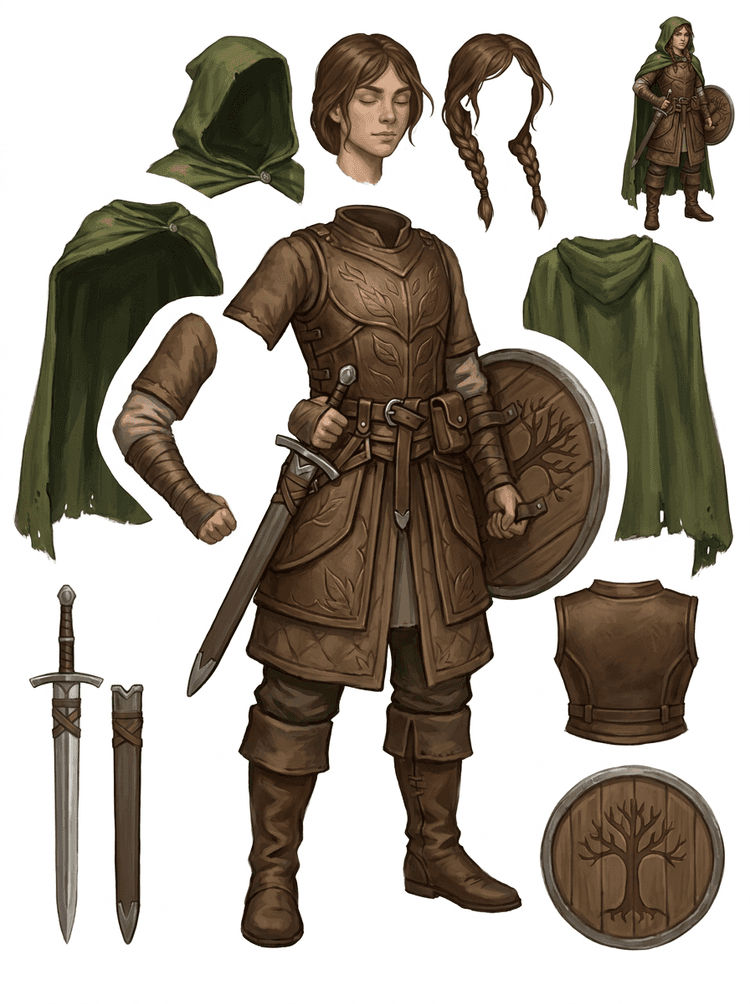
Ang fantasy game character ay hinihiwalay sa armor, cloak, sword, shield, pouches, boots, limbs, at reusable sprite references.
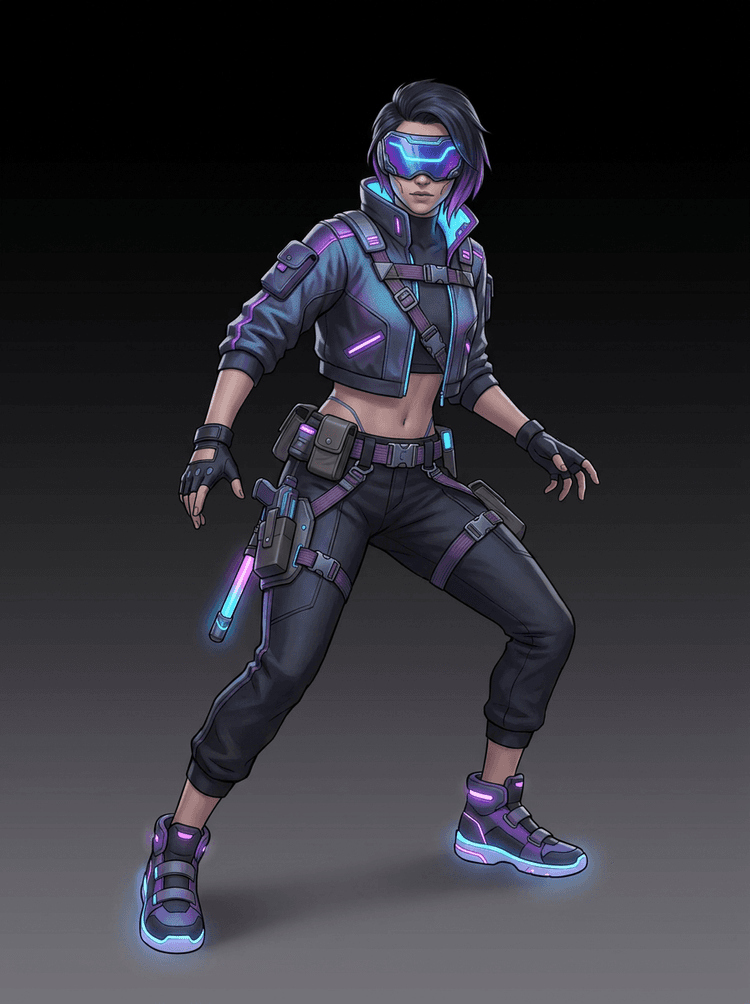
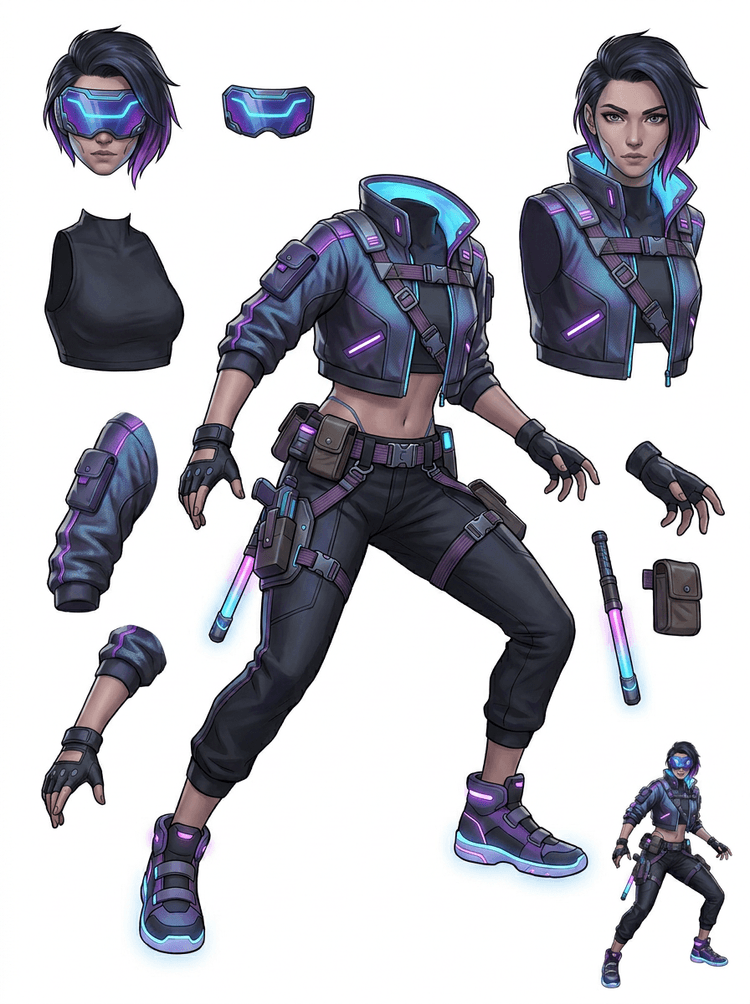
Ang cyberpunk action character ay nagiging high-detail parts reference para sa jacket, visor, gloves, sapatos, straps, baton, at body pieces.
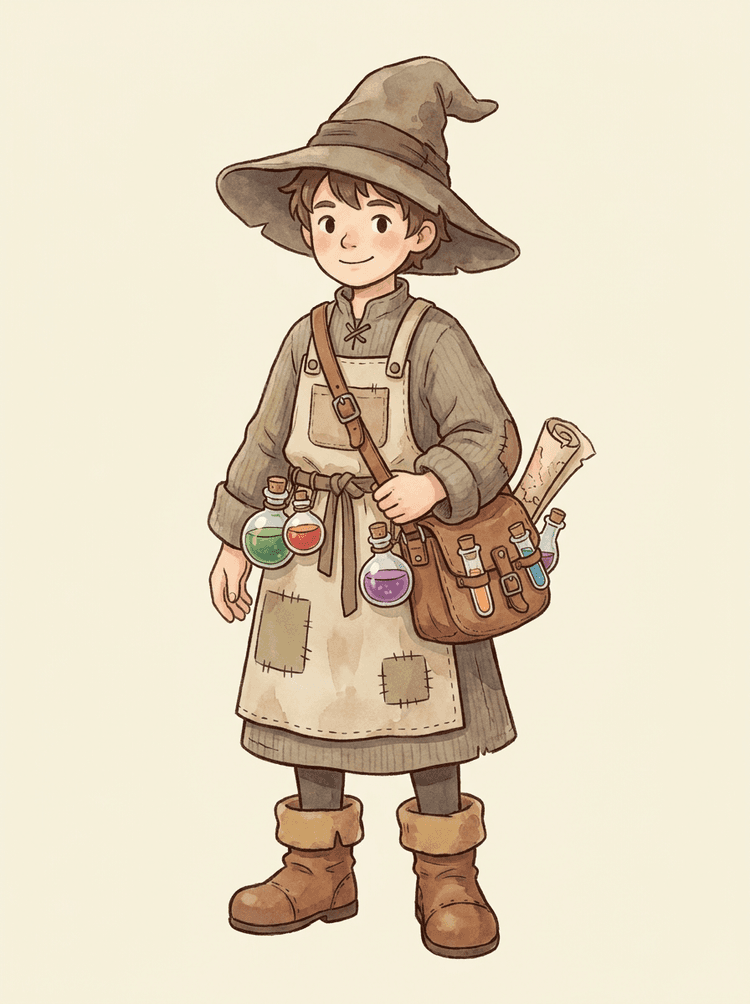
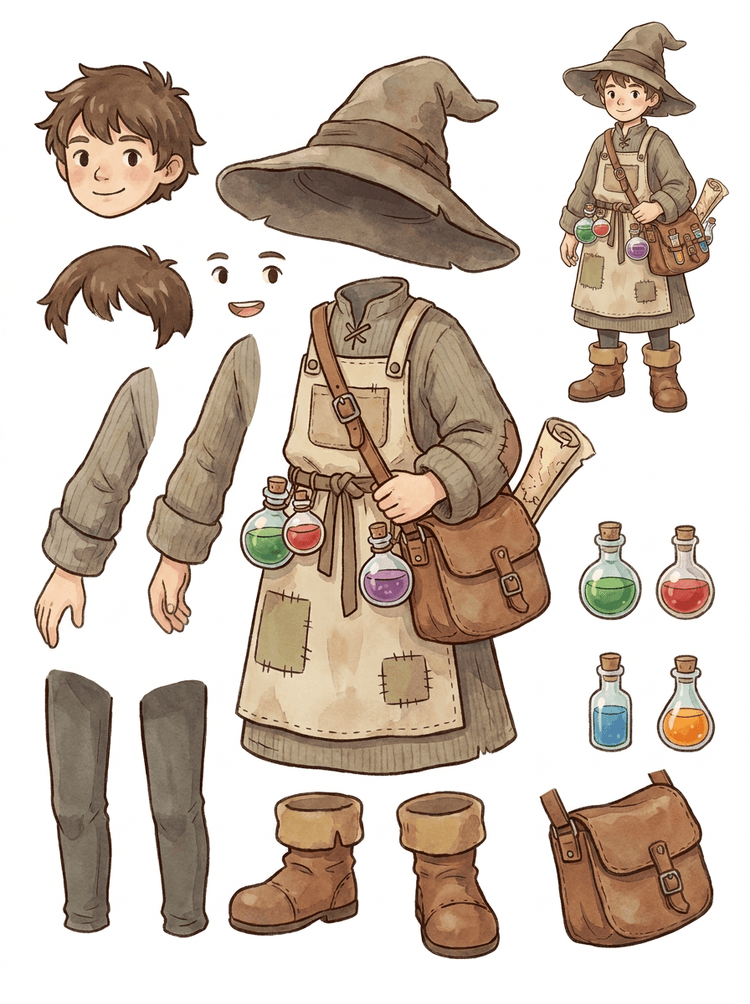
Ang cozy NPC na may hat, apron, potion satchel, bottles, map, boots, at warm clothing ay nagiging reusable na game-production sheet.
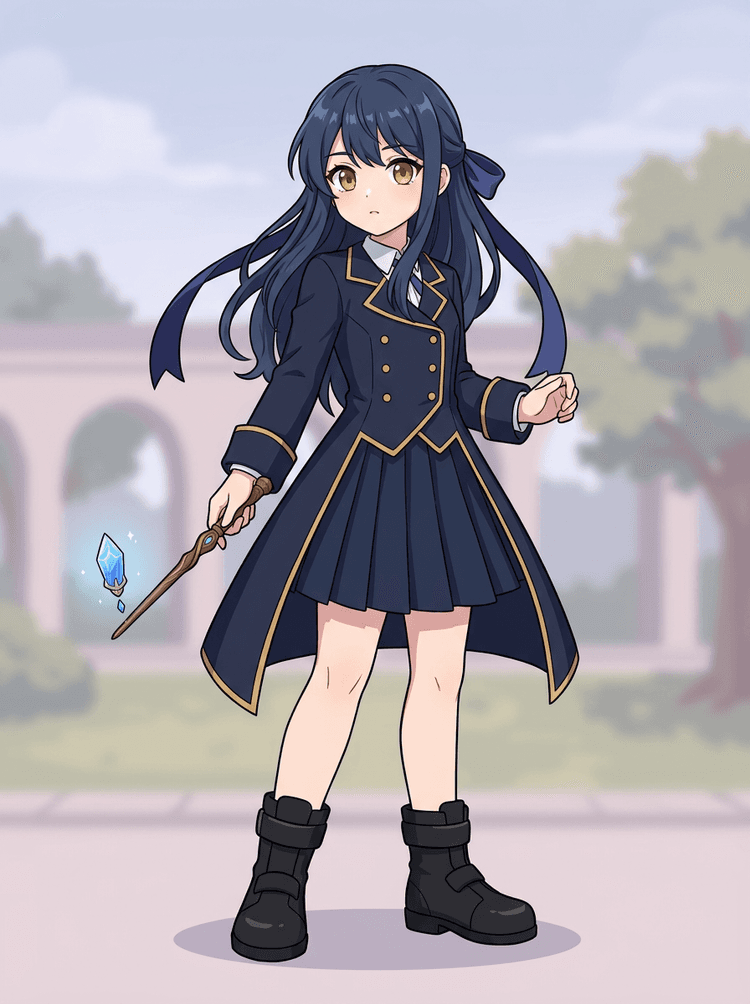
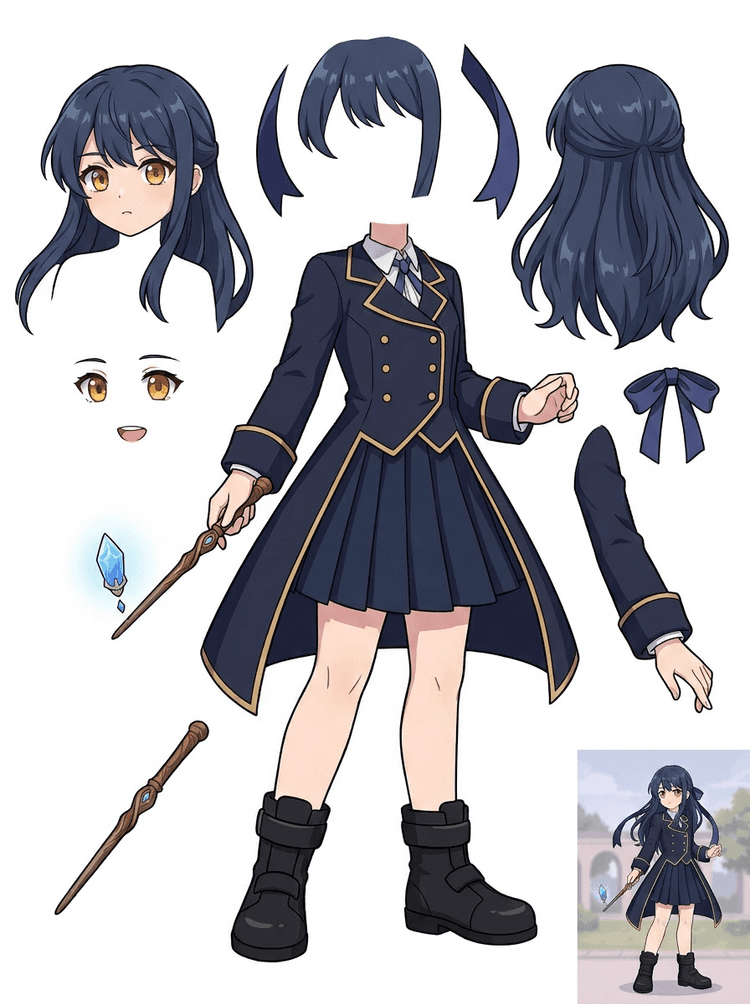
Ang anime key art na may uniform, ribbon, wand, buhok, charm, gloves, at boots ay nagiging parts sheet para sa edits at motion tests.
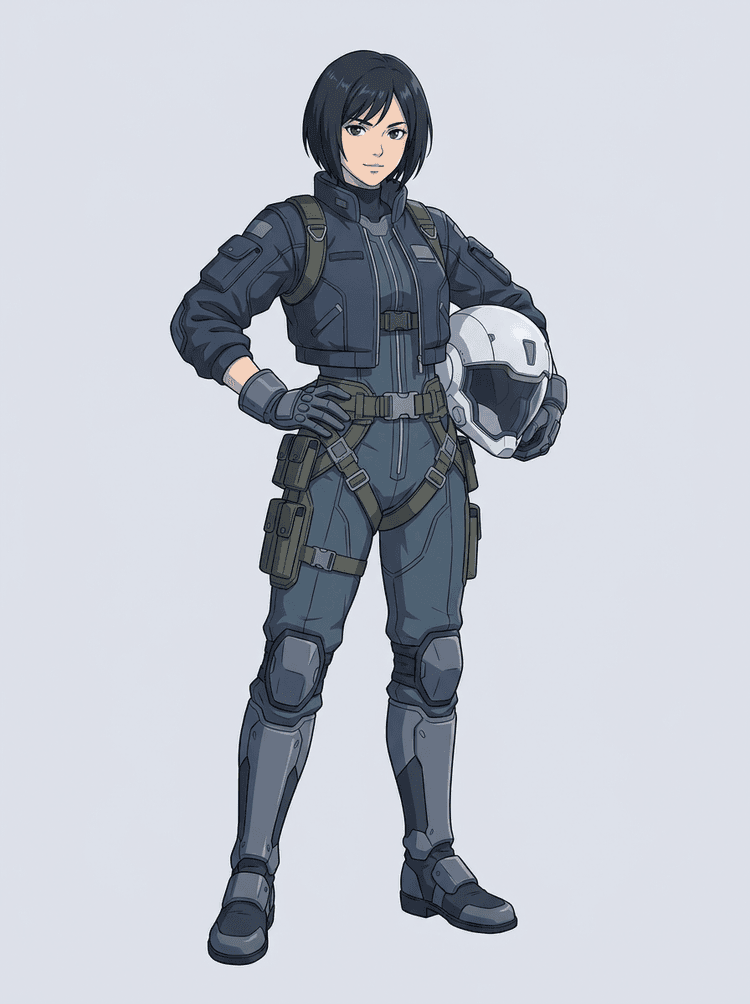
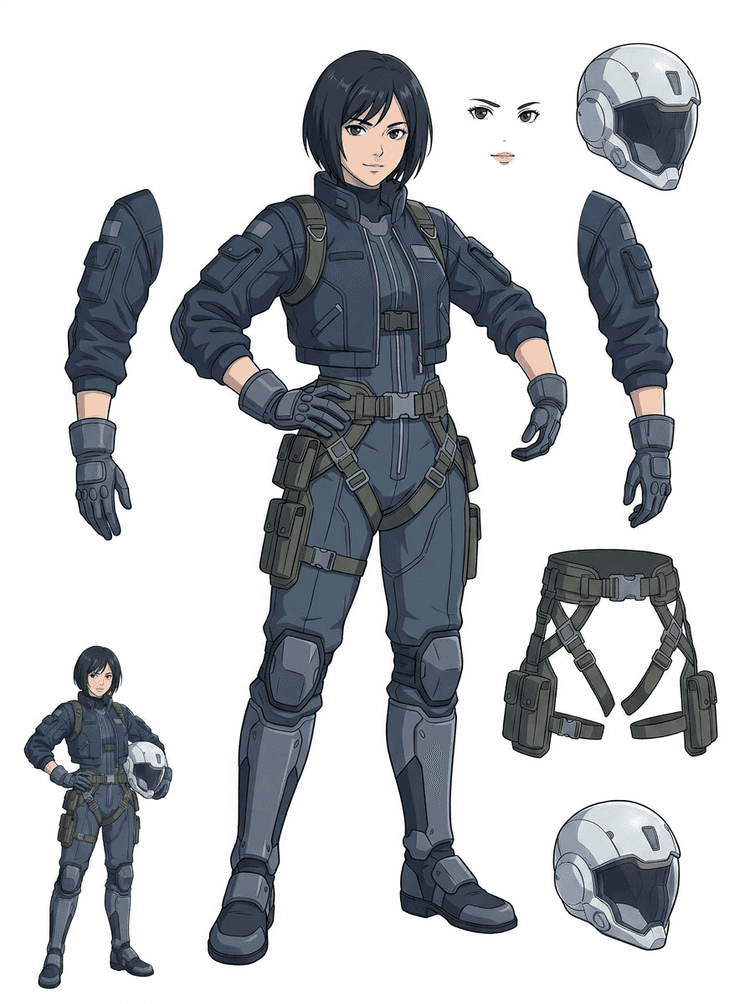
Ang sci-fi anime pilot ay hinihiwalay sa buhok, mukha, jacket, gloves, harness, boots, helmet, at body components.
Ang AI Layer Splitter ay isang image to layers tool para sa mga creator na may source image na pero kailangan ng mga praktikal na production piece sa likod nito: foreground, background, subject, characters, hair, face, outfit, limbs, text, objects, props, product details, at accessories.
Ginawa para sa mga artist, indie game team, animator, marketer, e-commerce team, at ACG creator na kailangang gawing reusable production assets ang isang flat image nang hindi ubos ang buong session sa masking.
Ang isang maayos na PNG ay hindi basta makakapag-blink, parallax, magpapalit ng props, mag-iisolate ng produkto, o magiging sprite hangga't hindi nahihiwalay ang mahahalagang bahagi.
Ang selection tools, edge cleanup, at layer naming ay puwedeng mas tumagal pa kaysa sa unang animation test.
Ang pagpapalit ng isang glove, bag, sapatos, buntot, helmet, o ribbon ay puwedeng mauwi sa buong repaint kapag magkakadikit ang lahat ng bahagi.
Bago
Isang magandang character image na mukhang kumpleto, pero naka-lock pa rin bilang iisang flat bitmap.
Pagkatapos
Isang nababasang asset sheet na may hiwalay na foreground, background, character, text, at objects para makapagplano ng motion, mag-edit ng detalye, at mag-turn over ng production references ang mga artist.
Gumawa ng reviewable separation pass bago magbukas ng full manual masking workflow.
Lumipat mula sa isang character image tungo sa mga bahagi para sa animation, game, at edit handoff.
Case study
Ang brand mascot ay puwedeng lumipat mula sa isang static illustration tungo sa hiwalay na head, buntot, sapatos, bag, damit, at accessory references para sa mabilis na animation planning.
Resulta
Makikita ng mga artist kung alin sa mga bahagi ang magagamit, magpapasya kung uulitin gamit ang PRO, at sisimulan ang cleanup mula sa konkretong sheet imbes na sa blangkong masking session.
LlamaGen layer workflow
cartoon, anime, at game asset prep
Ituring ang AI Layer Splitter bilang unang malinis na pass: mag-upload ng isang image, gumawa ng layer sheet, tapos gamitin ang resulta sa iyong editor, animation workflow, o game asset pipeline.
Gumamit ng full-body character art, mascot art, anime key art, game concepts, product shots, graphic designs, props, o product-style illustrations na may nakikitang edges.
Gumagawa ang Quick Mode ng mabilis na visual checkpoint para makita ng team ang buhok, mukha, damit, kamay, props, sapatos, background, text, objects, at accessories sa konteksto.
Pinakamainam ang PRO Mode pagkatapos mapatunayan ng unang sheet na nababasa ang source at kailangan ng project ng mas malinis na model pass.
Gamitin ang na-download na sheet para sa motion blocking, rig planning, sprite references, repainting, o creative compositing.
Ang goal ay isang reviewable na panimulang punto para sa production, hindi isang malabong AI demo.
Sinusuri ng AI layer splitter tool ang artwork mo at tinutukoy ang iba't ibang elemento tulad ng characters, background, at objects, na gumagawa ng magkakahiwalay na layers. Gumagamit ito ng AI para hatiin ang mga image habang pinapanatili ang layout, hierarchy, at design intent, at pinakamainam ito para sa graphic design, illustrated products, character art, at malilinis na game asset.
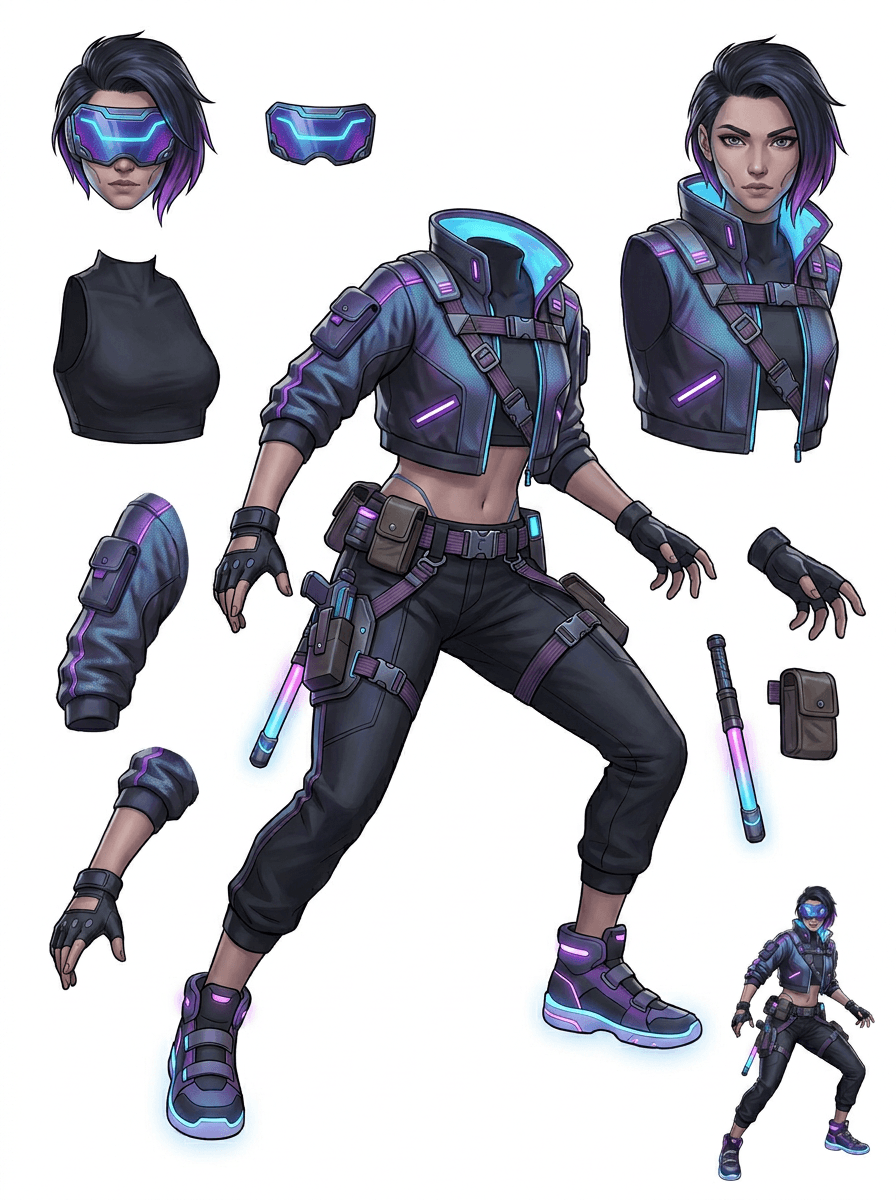
Ang Gallery ay inayos ayon sa mga pangunahing production scenario: cartoon mascots, game characters, anime characters, at object-based image to layers workflows. Bawat halimbawa ay gumagamit ng orihinal na AI-generated source image at katugmang split asset sheet.
Mga mascot, kid characters, sticker-like heroes, at motion-comic characters na may expressive na props at accessories.
Mga RPG hero, cyber runner, cozy NPC, equipment layers, weapons, inventory references, at sprite-prep sheets.
Modern anime key art na may paghihiwalay ng buhok, uniform, ribbon, helmet, glove, boot, harness, at charm.
Pinakakapaki-pakinabang ang AI Layer Splitter kapag may patutunguhan ang output. Ipinapaliwanag ng mga scenario na ito kung anong source image ang ia-upload, aling mga bahagi ang susuriin, at paano lilipat ang sheet sa animation, games, comics, e-commerce, o brand production.
Mascot animation
Gumamit ng malinis na pose ng mascot kapag kailangan mo ng social stickers, maiikling ad, motion sa landing page, o simpleng rig planning.
Source na ia-upload
Isang full-body mascot na kita ang mukha, kamay, sapatos, buntot, props, at mga gilid ng damit.
Mga kapaki-pakinabang na layer na susuriin
Production handoff
Bigyan ang mga animator ng reviewable parts sheet bago sila mag-trace, mag-redraw, o mag-rig ng final motion.
Indie game asset prep
Gumamit ng naaprubahang game art kapag kailangan ng team ng equipment variants, inventory icons, profile art, o mabilis na pose exploration.
Source na ia-upload
Isang mababasang character concept na may malinaw na armor, weapons, bag, cape, buhok, boots, at silhouette.
Mga kapaki-pakinabang na layer na susuriin
Production handoff
Gamitin ang sheet bilang panimulang reference para sa sprite cleanup, equipment swap, at art na pang-gameplay.
Anime at ACG edits
Gumamit ng anime-style character art kapag kailangan mo ng kontrol sa buhok, mukha, uniform, ribbon, glove, helmet, o accessory.
Source na ia-upload
Isang anime character na may malalakas na outline, nakikitang detalye ng outfit, at kaunting background noise.
Mga kapaki-pakinabang na layer na susuriin
Production handoff
Suriin ang sheet bago ang expression edits, outfit variations, character cards, o maiikling animatic test.
Comic at ad iteration
Gumamit ng campaign characters, props, o illustrated products kapag ang mga last-minute revision ay madalas tumatama sa maliliit na visual parts.
Source na ia-upload
Isang maayos na illustration na nasa gitna ang object, kita ang edges, at hindi natatakpan ang pangunahing revision targets.
Mga kapaki-pakinabang na layer na susuriin
Production handoff
Bigyan ang mga designer ng konkretong sheet para sa prop swap, copy-safe variants, at compositing experiments.
Pinakamalakas ang tool kapag malinis, buo, at malinaw na hiwalay ang subject. Hindi ito shortcut para sa lahat ng masisikip na photo, sketch sheet, natatakpang pose, o siksik na layout kung saan magkakapatong ang foreground, background, text, at objects.
Dapat tratuhin ang nabuong sheet bilang unang production pass, hindi bilang mahikang final file. Gamitin ang checklist para magpasya kung ida-download, i-rerun, i-crop ang source, o lilipat sa PRO matapos matukoy ng image layer separator ang magagamit na foreground, background, subject, object, at text areas.
Mahinang resulta
Ang mahahalagang bahagi ay pinaghalo, basta na-duplicate, o natatakpan ng visual clutter.
Resultang magagamit sa production
Madaling matukoy ng sheet ang pangunahing nakikitang bahagi sa isang tingin: ulo, limbs, damit, props, accessories, at mga piraso ng background.
Mahinang resulta
Parang bagong design ang character na may ibang proportions, kulay, line quality, o personality.
Resultang magagamit sa production
Ang mga nahating bahagi ay nananatiling konektado sa orihinal na art direction, na may nakikilalang silhouette, palette, at character identity.
Mahinang resulta
Kawili-wili ang sheet, pero hindi alam ng team kung ano ang susunod na ita-trace, ire-redraw, i-mask, o ite-test.
Resultang magagamit sa production
Makakapili agad ang mga artist ng mga bahagi para sa cleanup, rig blocking, sprite reference, prop swap, o compositing tests.
Mahinang resulta
Ang mahinang split ay hindi nagbibigay ng palatandaan kung ang problema ay galing sa model o sa in-upload na image.
Resultang magagamit sa production
Ipinapakita ng resulta kung ano ang susunod na aayusin: mag-crop nang mas malapit, alisin ang sketch marks, magbigay ng mas maraming margin, pasimplehin ang background, o gumamit ng PRO.
Gawing magkakahiwalay na visual parts ang isang finished image para mas madaling suriin, i-edit, i-animate, o buuing muli.
Mag-upload ng malinis na image at gumawa ng nababasang PNG layer sheet na may foreground, background, subject, objects, text, clothing, props, at accessories sa iisang resulta.
Tinutulungan ng image layer separator ang mga designer, marketer, animator, at game team na matukoy kung aling bahagi ng source image ang puwedeng maging editable assets. Sa halip na iguhit muli ang bawat elemento mula sa simula, puwedeng gumawa ang team ng PNG layer sheet, ikumpara ang original at ang separated result, at magpasya kung kailangan ng crop, cleanup, Quick Mode, o PRO pass ang source.
Gumawa ng downloadable sheet para sa sprite prep, rig planning, motion comics, e-commerce edits, sticker variants, o character handoff. Pinakamainam ito kapag isang malinaw na subject ang may nakikitang edges at kaunting overlap.
Ang pinakamahusay na layer-splitting workflow ay pinapanatili ang konteksto. Itabi ang source, ang nabuong sheet, at maikling review note para alam ng susunod na artist kung ano ang gagamitin at kung ano pa ang kailangang linisin.
Ipinapaliwanag ng orihinal na image ang intensyon kapag ni-review ng animator, game artist, o designer ang separated sheet sa ibang pagkakataon.
Mas nagiging mahalaga ang unang sheet kapag alam ng team kung aling mga bahagi ang handa na at alin ang kailangan pa ng manual finishing.
Gamitin ang sheet at na-export na transparent layers bilang praktikal na tulay papunta sa animation, sprite prep, comic edits, o compositing. Ang PSD ay editable na panimulang file, hindi guaranteed na final production asset.
Ang AI Layer Splitter ay nagbibigay sa mga team ng mas mabilis na unang pass; ang final shipping assets ay mas mainam pa ring sumailalim sa human review at cleanup.
Ginagawang nababasang PNG layer sheet ng AI Layer Splitter ang isang flat image, na may nakikitang backgrounds, subjects, text, props, objects, product details, at character parts na hiwalay para sa editing, animation, game art, motion comics, e-commerce, at compositing workflows.
Oo. Ang Quick Mode ang libreng panimulang point online para sa resultang image-to-layers na puwedeng i-review. Gamitin ito para subukan kung maayos bang naghihiwalay ang source image bago gumastos ng oras sa manual masking o mag-upgrade para sa mas malinis na PRO pass.
Oo. Gumagana ang AI Layer Splitter bilang web-based na AI image layer separator: mag-upload ng isang image, hayaang tukuyin ng model ang subjects, background, text, props, at objects, tapos i-download ang reviewable na image-to-layers sheet. Pinakamabilis ito para sa malilinis na photo, graphic design, illustrated products, game assets, at character art; ang mas kumplikadong image ay maaari pa ring mangailangan ng manual cleanup sa Photoshop, Figma, o ibang editor.
Mag-upload ng malinis na image, patakbuhin ang Quick Mode, at suriin ang nabuong image to layers sheet. Pinaghihiwalay ng resulta ang nakikitang foreground, background, subject, text, props, at objects sa isang praktikal na reference na puwede mong gamitin para sa editing, compositing, animation blocking, sprite prep, o manual cleanup.
Oo. Pagkatapos mabuo ang unang layer sheet, ang bayad na second pass ay puwedeng mag-extract ng indibidwal na transparent PNG layers. Puwede mong i-download ang mga ito nang hiwalay, i-package bilang ZIP, o i-export bilang editable na panimulang PSD. Ang mga kumplikadong edge at masisikip na source ay maaari pa ring mangailangan ng manual cleanup bago ang production delivery.
Ang Layer Decomposition ay kakayahan ng isang AI agent na naghihiwalay ng iisang image sa mga lohikal, editable na visual layer tulad ng foreground, background, subjects, text, at objects. Tinutulungan nito ang mga team na lumipat mula sa flat image tungo sa praktikal na layer sheet para sa review, editing, animation, at production handoff.
Oo. Ang LlamaGen AI Layer Splitter ay naghihiwalay ng background, text, subjects, at nakikitang objects sa browser at nagbibigay ng downloadable asset sheet para sa susunod na pag-edit.
Pinakamainam ang malilinis na illustrated subject: cartoon mascots, anime characters, game characters, product-style graphics, props, at full-body designs na may nakikitang buhok, damit, limbs, sapatos, weapons, bag, buntot, text, objects, o accessories.
Oo. Ang mga cartoon character at mascot ay isa sa pinakamalalakas na use case dahil kadalasang malinaw ang outline, props, clothing, hands, shoes, at facial parts para maging kapaki-pakinabang na sheet.
Oo. Ang AI Layer Splitter para sa game assets ay puwedeng gawing panimulang reference ang malilinis na character concept para sa sprite references, pose variants, inventory icons, equipment edits, UI portrait, at animation blocking.
Oo. Ang anime-style character ay puwedeng hatiin sa nakikitang buhok, mukha, outfit, ribbon, glove, boot, prop, helmet, at accessory references kapag malinis ang source image.
Ang Quick Mode ay gumagawa ng mabilis na layer sheet na puwedeng i-review. Ang PRO Mode ay gumagamit ng mas advanced na model para sa mas malinis na separation kapag mababasa ang source image at kailangan ng project ng mas mataas na kalidad na pass.
Hindi. Ang masisikip na eksena, nakatagong bahagi ng katawan, magkakapatong na subject, sketch marks, mabibigat na shadow, putol na limbs, o maliliit na accessories ay maaari pa ring mangailangan ng source cleanup o manual finishing.
Maaari mong gamitin ang mga nabuong output ayon sa iyong LlamaGen plan at mga tuntunin. Siguraduhin ding mayroon kang mga karapatan sa source image na ia-upload mo.
Magsimula sa preloaded sample, mag-upload ng sarili mong cartoon, anime, o game character, at gumawa ng layer sheet na puwedeng i-review sa loob ng ilang minuto. Gamitin ang unang resulta para magpasya kung sapat na ang Quick o sulit ang PRO pass.