LlamaGen.AI 1.0.45: Story Production and Shot Planning | v1.0.45 - LlamaGen Release
Logo ng LlamaGenBrand ng LlamaGen
SimulanMag-subscribe na20% Bawas
  1. Tahanan
Gumawa ng comic gamit ang AI
LlamaGen.AI 1.0.45: Story Production and Shot Planning

LlamaGen 1.0.45: LlamaGen.AI 1.0.45: Story Production and Shot Planning

Jay
Jay
November 19th, 2026
Kopyahin ang link
  • LlamaGen.AI 1.0.45: Story Production and Shot Planning
  • Build the story before making the chapter
  • Find a useful reference for the next shot
  • Present a storyboard as an editable pitch
  • Get oriented on the first visit
elevate-your-comics.png
Elevate your Comics with LlamaGen

LlamaGen.AI 1.0.45: Story Production and Shot Planning

Before a finished comic comes a series of smaller decisions: what happens, who appears, where the scene takes place, and how each moment should be framed. This release brings those planning steps into a clearer production flow and adds ways to explore shot references and present an existing storyboard.

Build the story before making the chapter

The comic production flow moves through Story, Cast & world, and Generate & read. Begin with your written story or an uploaded script, review the screenplay, and revise it before preparing the visual references.

In Cast & world, review the characters, locations, and props the story needs. Edit their details, add or generate reference images, and reuse suitable characters from your existing collection. Keeping those references beside the story makes it easier to settle the cast and setting before moving on to page creation.

Then choose Webtoon, Manga, or Comic, review the chapter's page count, panels, and proportions, and confirm generation when the plan is ready. The flow carries the same project from preparation into reading, with a handoff to the editor and export tools for the next round of work. Saving and reviewing the story gives you time to prepare; generation starts after the creation confirmation.
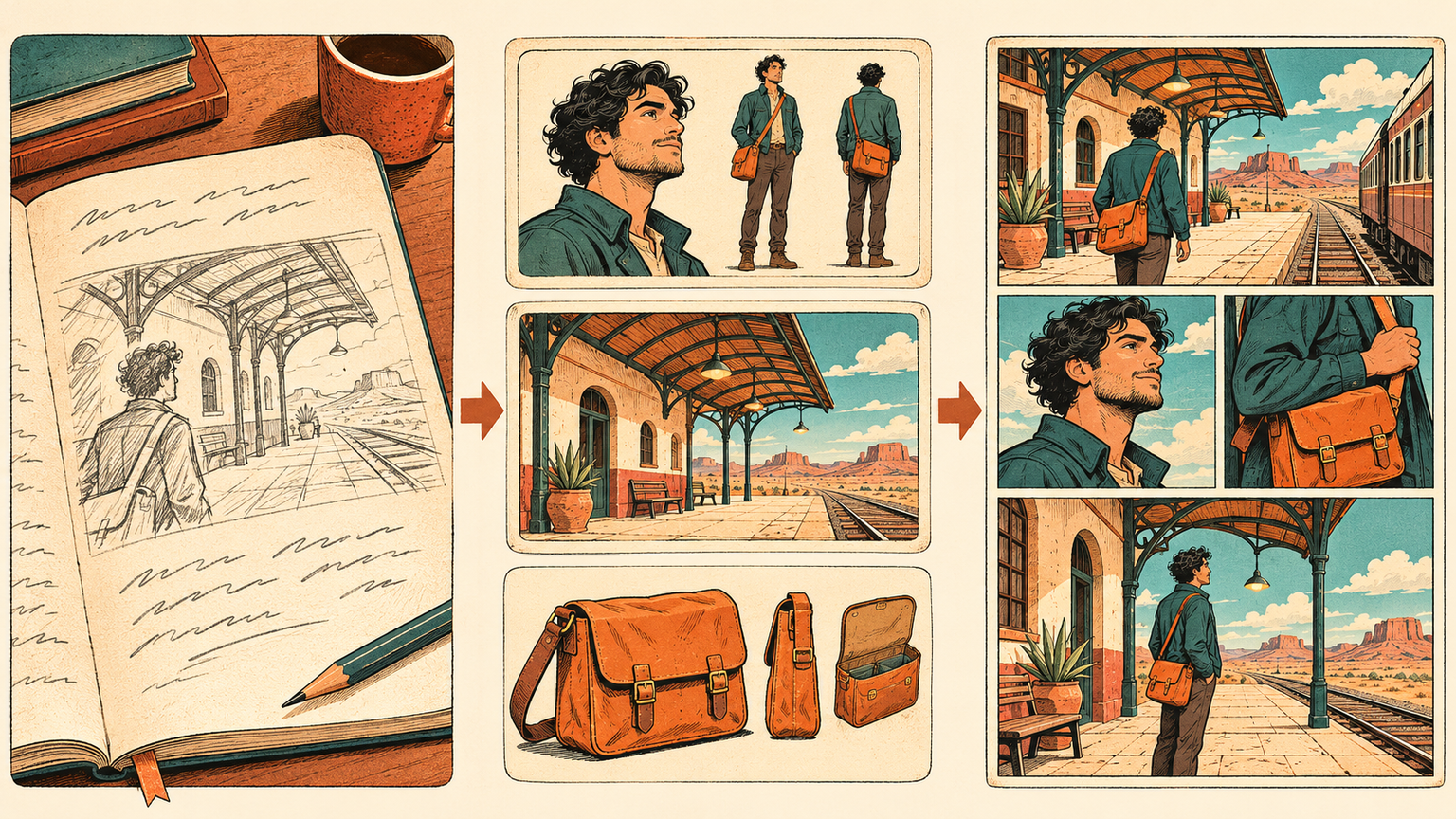
Shape the story, prepare the cast, then make the pages

Find a useful reference for the next shot

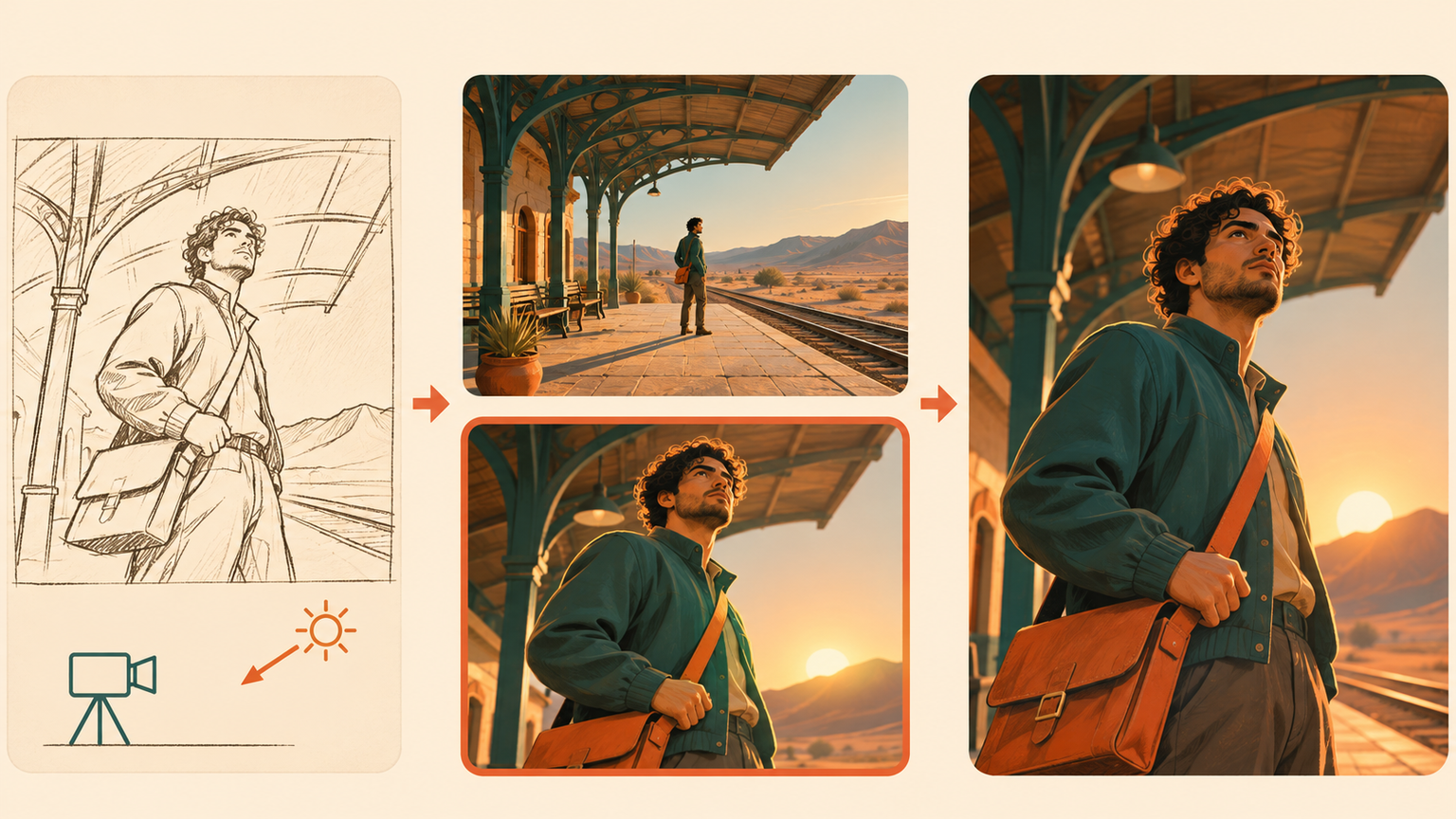
Open Shot Search to browse cinematic references or describe the shot you want to explore. Camera, framing, lighting, color, and scene filters help narrow the search when a general mood is not specific enough. Compare a wide establishing shot with a closer reaction, or explore how different light changes the same kind of scene.

Open a result for a closer look and use Find Similar to continue exploring nearby visual directions. The collection uses . These images provide material for studying a shot and communicating its direction before creating your own scene.

Talaan ng mga pagbabago

Sindihan ang mga pangarap ng kabataan
Kung saan nabubuhay ang milyun-milyong kuwento

Buod ng pinakabagong mga release ng feature ng LlamaGen, mga pagpapahusay ng produkto, mga update sa disenyo, at mahahalagang pag-aayos ng bug.
✦
✧
✦
✧

Isang bagong midyum para sa Pagkukuwento

Gumawa ng walang limitasyong mga kuwento, komiks, animasyon, laro, at higit pa—sa ilang segundo na tumatagos sa modernong audience

original synthetic references
Find a reference for the shot you have in mind

Present a storyboard as an editable pitch

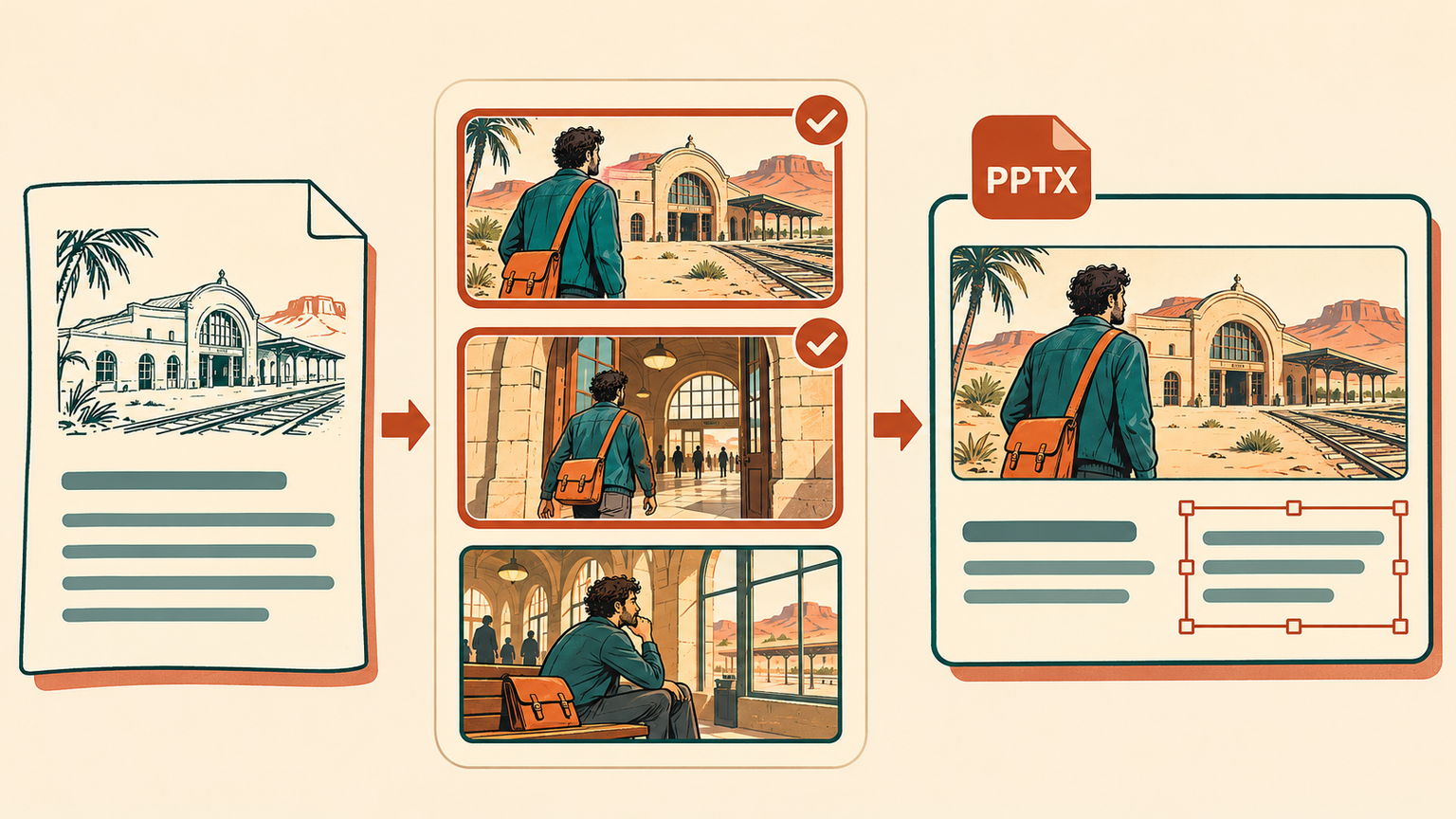
From a Storyboard detail page, open Pitch Deck to turn an existing project into a presentation. First review the title, logline, synopsis, audience, and character details. Then choose up to eight existing still-image frames to support the story you want to present.

Export an editable 16:9 PowerPoint (.pptx) with the selected images and editable text. Adjust the wording and presentation after download, using the frames you already have to explain the idea to collaborators or a prospective audience. Pitch Deck export requires an eligible paid plan.

Turn existing storyboard frames into an editable pitch

Get oriented on the first visit

New first-use guides point out the main creation choices in Mangaka and the comic upload flow, including story input, page and style choices, and optional character references. You can skip or close a guide, then return through Quick tour when you want another look.

Completing a tour leaves you in control of the next action. Review the story, references, and creation settings, then start the work when you are ready.

Related hot tags

comic-creation

Mga sikat na tool para sa creators

Gawing susunod mong kuwento ang inspirasyon

Gumawa ng comic, storyboard, at stylized na larawan gamit ang LlamaGen.

01

Tagagawa ng AI Comic

Gawing pulidong comic strip ang isang ideya sa loob ng ilang minuto.

Gumawa ng comics
02

Tagagawa ng AI Manga

Gumawa ng expressive na manga art at mga kuwento sa maraming panel.

Gumawa ng manga
03

Tagagawa ng AI Storyboard

I-visualize ang bawat eksena bago magsimula ang production.

Gumawa ng storyboard
04

Gawing Comic ang Larawan

Gawing illustration na comic-style ang anumang larawan.

Gumawa ng comic mula sa mga larawan
05

Tagagawa ng AI Comic Strip

Gumawa ng mga strip na puwedeng ibahagi, na consistent ang mga karakter.

Gumawa ng comic strip

LlamaGen community

checkmark

Get hands-on help with your comics

checkmark

Showcase your comics to fellow LlamaGen creators

checkmark

Participate in special events to win gifts

Previous releases

LlamaGen.AI 1.0.45: Story Production and Shot Planning

LlamaGen 1.0.45: LlamaGen.AI 1.0.45: Story Production and Shot Planning

Develop a story through cast and world preparation into comic production, find cinematic shot refere

Jay
Jay
November 19th, 2026
LlamaGen.AI 1.0.44: Mangaka, Immersive Reading and Chapter Exports

LlamaGen 1.0.44: LlamaGen.AI 1.0.44: Mangaka, Immersive Reading and Chapter Exports

Keep Comics and Manga together in Mangaka, choose the page count before creating, read with fewer di

Jay
Jay
November 12th, 2026
LlamaGen.AI 1.0.43: Scene Library and Sketch References

LlamaGen 1.0.43: LlamaGen.AI 1.0.43: Scene Library and Sketch References

Explore a larger scene library, carry selected backgrounds into comics and storyboards, and draw a q

Jay
Jay
November 5th, 2026
LlamaGen.AI 1.0.42: Layouts, Page Reuse and Export Updates

LlamaGen 1.0.42: LlamaGen.AI 1.0.42: Layouts, Page Reuse and Export Updates

Find the right comic layout, browse clearer creation categories, reuse selected pages in an independ

Jay
Jay
October 29th, 2026
See all releases
LlamaGen.Ai
  • United States
  • Español
  • Français (France)
  • 日本語
  • 한국어
  • Deutsch
  • 繁體中文 (台灣)
  • 繁體中文 (香港)
  • 简体中文
  • Português
  • Italiano
  • Español (México)
  • العربية
  • Русский
  • Português (Brasil)
  • Tiếng Việt
  • Tagalog

Nangunguna sa Hinaharap ng AI Comic Generation

  • 24/7 na suporta
  • Lingguhang pag-update
  • Segurado at sumusunod sa regulasyon
  • 99.9% natutuluyan

I-download ang LlamaGen nang libre

AndroidiOSPara sa computer

Produkto

  • Pinakabagong ilabas
  • Mga Tampok
  • Tagagawa ng comic strip
  • Comic StoresBago
  • Istudyo ng mangaBago
  • Gawing Komiks ang Larawan
  • Komiks Sa Video
  • Pabrika ng AI Comic
  • Ahente para sa komiks
  • iOS & Android
  • Mac at Windows
  • I-download
  • Comic ZapBago
  • Tagagawa ng AI Comic
  • Tagagawa ng AI Cartoon
  • Tagagawa ng AI Webtoon
  • Tagagawa ng Comic Strip
  • Gawing Komiks ang Larawan
  • Tagagawa ng AI Manga
  • Tagasalin ng Manga
  • Larawan papuntang Anime
  • Larawan patungo sa Prompt
  • Anime tungo sa Tunay na Buhay
  • Tagakulay ng Manga
  • Tagagawa ng Anime Character
  • Mga tool para sa pixel game asset
  • tagagawa ng AI sprite sheet
  • Pinakamahuhusay na pixel game tool 2026
  • Tagagawa ng Larawang Komiks
  • Alternatibo sa Comic Life

Mga kaugnay na produkto

  • Pamilya ng LlamaGen
  • CineoBoardBago
  • Comics API

Mga Plano

  • Pagpepresyo
  • Panimulang
  • Pro

Komunidad

  • Mga Tagalikha
  • Mga Affiliate
  • Kasosyo

Mga modelo ng AI

  • GPT Image 2.6 Flare
  • GPT Image 2.6 Sunburst
  • Grok Imagine Image 2.0
  • Wan 3.0
LinkedInX (Twitter)
  • Tahanan
  • Mga Artikulo
  • Blog
  • Gumawa
  • Pagpepresyo
  • API
  • Affiliate ProgramNEW

Magtanong sa AI tungkol sa LlamaGen

  • Comic Zap
  • Velika
  • Para sa mga negosyo
  • Edukasyon
  • API ng Comic
  • Makipag-ugnayan sa Sales
  • Mga Plano para sa Edukasyon
  • Mga Guro
  • Mga Estudyante
  • Mga Guro at Mag-aaral
  • Mga Startup
  • Edukasyonal na Diskuwento
  • Kompanya

    • Kausapin ang Aming Founder
    • Tungkol
    • Roadmap ng Produkto

    Tulong

    • Sentro ng Tulong
    • Tiwala
    • Ligtas na AI
    Mga Testimonial
  • Pader ng Pagmamahal
  • LlamaGen MCPBago
  • LlamaGen para sa mga developer
  • Mga Resources

    • Talaan ng mga pagbabago
    • Blog
    • Mga Gabay

    Mga Kasangkapan

    • Tagagawa ng AI Logo
    • Tagagawa ng Grokbot Style Character
    • PNG papuntang Comic
  • Wan 3.0 Prime
  • Seedance 2.5
  • MiniMax H3
  • Nano Banana 2.1
  • Nano Banana 2 Lite
  • Seedream 5.0 Flash
  • Seedream 5.0 Pro
  • Seedance 2.0 Mini
  • Kling 3.0 Turbo
  • Nano Banana 2
  • GPT Image 2
  • Gemini Omni Flash
  • All AI Models
  • Mga Tool ng AI

    • Tagakuha ng AI Outfit
    • Tagapagpalit ng AI Hairstyle
    • Tagapagpalit ng AI Manga Hairstyle
    Instagram
    YouTube
    Grupo sa Facebook
    Reddit
    Discord
    Suporta sa Email
    PribasiyaMga terminoMapa ng Site
    I-download ang Brand Assets
    © 2026 LlamaGen.Ai Lahat ng karapatan ay nakalaanLahat ng serbisyo ay online
    Karera
  • I-email kami
  • Ang Aming Mascot World
  • Mga materyal para sa media
  • Pakikipag-partner sa KOL
  • Nilalaman
  • Mga Professional na Serbisyo
  • FAQ
  • Seguridad
  • Aksesibilidad
  • Gabay na video
  • Makipag-ugnayan sa amin
  • Mapa ng Site
  • Personalized na Comic
  • Mga Tampok
  • Alternatibo
  • Pinakamahuhusay na AI App
  • Gabay sa Pangkulay ng Manga gamit ang GPT-6
  • Kakayahan sa Comic Book ng Claude
  • Gabay sa Komiks gamit ang Gemini AI
  • Comic na Gawa Ito
  • Edukasyonal na Diskuwento
  • Diskuwento para sa estudyante
  • Teksto sa Komiks
  • PDF papuntang Comic
  • Script papuntang Comic
  • Libro papuntang Comic
  • Gawing Komiks ang Larawan
  • Tagagawa ng AI Pixel Art
  • Edukasyonal na Komiks
  • Tagagawa ng AI Video
  • Tagagawa ng Gemini AI Video
  • Libreng Faceless AI Video Generator
  • Komiks Sa Video
  • Software para Gumawa ng Storyboard
  • Tagagawa ng AI Storyboard
  • Software sa Pagsulat ng Screenplay
  • Editor ng Screenplay
  • AI para sa Kuwento
  • Tagagawa ng AI Story
  • Tagagawa ng Storybook
  • Tagagawa ng AI Image
  • Tagahati ng AI Layer
  • Kontrol ng Anggulo ng Kamera ng AI
  • Tagagawa ng AI Pixel Art
  • Mga tool para sa pixel game asset
  • tagagawa ng AI sprite sheet
  • Panghiwa ng sprite sheet
  • Pinakamahuhusay na pixel game tool 2026
  • API ng Animation
  • Plugin para sa ChatGPT/Codex
  • Gabay sa Pag-install ng ChatGPT
  • Plugin para sa Claude Code
  • Gabay sa Pag-install ng Claude Code
  • Tagagawa ng AI Wind Effect
  • Tagagawa ng AI Depth Map
  • AI Puting Background
  • Tagatanggal ng AI Object
  • Virtual na pagsukat gamit ang AI
  • AI Paglinaw ng mga Larawan
  • AI Pag-alis ng Ingay
  • Pagpapanumbalik ng AI Photo
  • AI Anino ng Produkto
  • Tagagawa ng AI Background
  • Tagagawa ng AI Headshot
  • Tagagawa ng AI Emoji
  • Tagapagpalit ng AI Background
  • AI Pagbukas ng Mata
  • AI Pampaganda
  • AI Potograpiya ng Produkto