Canva AI: how to use AI tools to enhance your designs
LlamaGen 标志LlamaGen 品牌字标
登录立即订阅立减 20%
  1. 首页
  2. 文章
  3. Canva AI: how to use AI tools to enhance your designs
Best apps10 min read
所有文章

Canva AI: how to use AI tools to enhance your designs
作者: LlamaGen Team · 2026年4月29日
In this article
  1. Start creating in LlamaGen
  2. What Canva AI is good at
  3. Where LlamaGen fits differently
  4. Canva AI vs LlamaGen
  5. How to think about Canva AI's feature set
  6. Honest tradeoffs
  7. A practical hybrid workflow
  8. Should you use Canva AI?

We independently review every app we recommend.

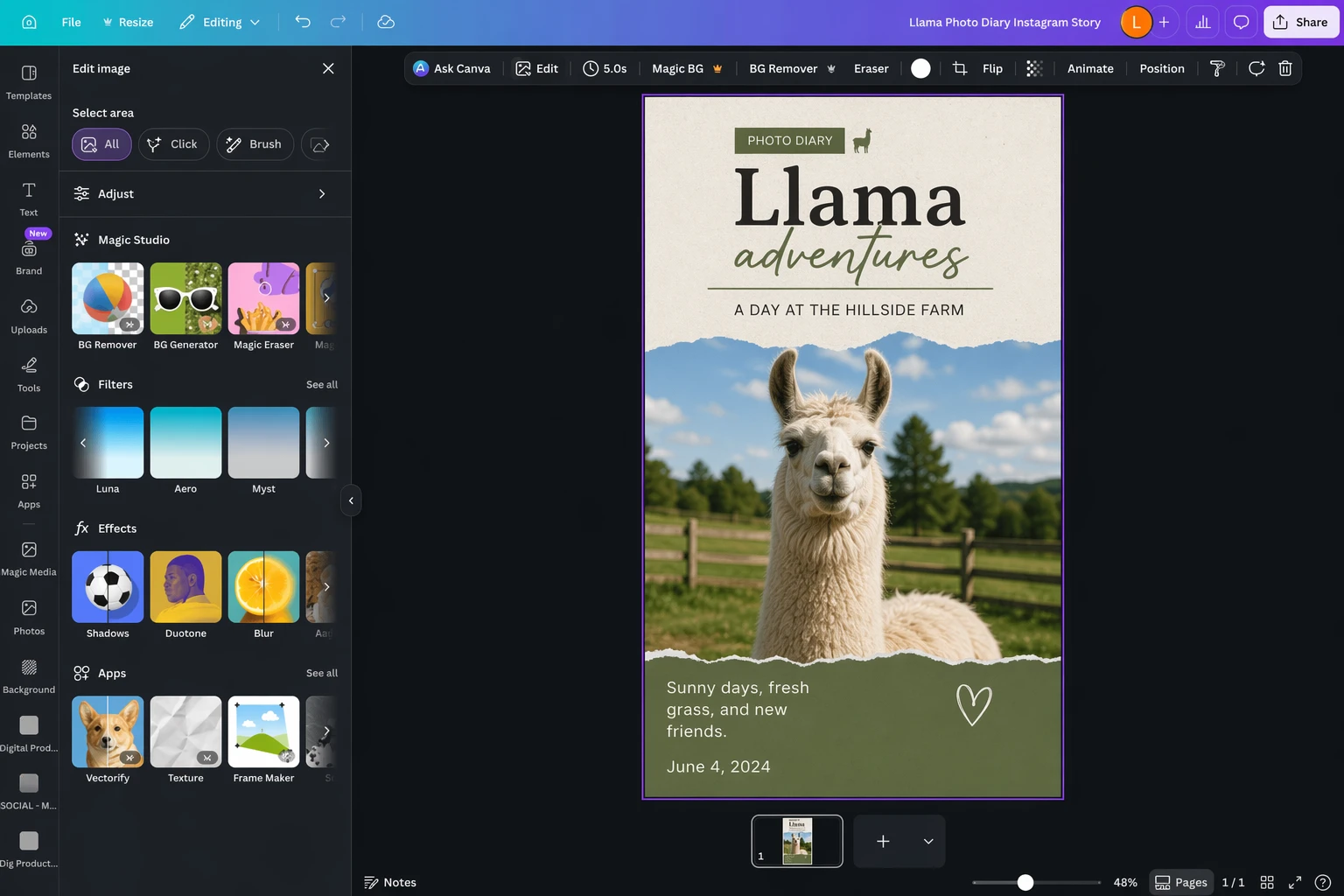
Canva AI is useful because it lowers the barrier to a lot of design tasks that used to feel slow, manual, or awkward. You can prompt your way into an image, remove a background, erase distractions, mock up a product, and reshape a basic layout without leaving one familiar workspace.

That convenience is real. But it also points to a bigger question for LlamaGen readers: when does "make this design faster" stop being enough? If the output needs to become a comic scene, a recurring character system, a storyboard, or a sequence of connected visuals, LlamaGen is often the better layer after Canva AI.

Canva AI is strongest when you want one design, one edit, or one fast variation. LlamaGen becomes more useful when you want those assets to stay consistent across multiple scenes, episodes, panels, or story beats.

Start creating in LlamaGen

  • Create a new comic
  • Create a new animation
  • Start a manga project
  • Generate AI images
  • Build AI characters
  • Plan a storyboard

What Canva AI is good at

Canva AI is really a bundle of AI features inside Canva rather than one single magic tool. In practice, people usually use it for a few recurring jobs:

  • generating a first draft image or graphic
  • removing backgrounds or unwanted objects
  • reframing and expanding images
  • producing quick social layouts and presentations
  • mocking up product or brand assets inside a familiar design editor

That makes Canva AI especially appealing for generalist creators, marketers, small teams, and anyone who needs a polished deliverable quickly.

Where LlamaGen fits differently

LlamaGen is not trying to be another broad design assistant inside a slide-and-template editor. It is more useful when the asset needs to keep working after the first edit.

Use LlamaGen when the real job is:

  • keeping a cast of characters consistent across multiple outputs
  • turning one visual idea into a comic strip or manga page
  • planning storyboards before animation or episodic content
  • building a sequence of campaign visuals that feel like one world
  • creating reusable story-first assets instead of isolated exports

That is the biggest difference between these products. Canva AI helps you finish a design faster. LlamaGen helps you extend a visual idea further.

标签
DesignAICanva
Mentioned Apps
CanvaLlamaGen.AIPhotoshopChatGPT

Canva AI vs LlamaGen

Workflow needCanva AILlamaGen
Fast social graphics and simple promosStrongPossible, but not the main reason to use it
One-click cleanup and background removalStrongNot the primary focus
Prompted design variations inside a template editorStrongMore focused on story and scene generation
Character consistency across many outputsLimitedStrong
Comic, manga, and storyboard workflowsLimitedCore strength
Turning one image into a repeatable narrative systemManualStrong

How to think about Canva AI's feature set

The source article is useful because it breaks Canva AI into practical jobs instead of treating it like a vague all-in-one assistant. That is still the right way to evaluate it.

Image generation

Canva's image tools are good enough for many everyday design needs, especially when the visual does not need to survive close scrutiny. If you need a quick concept image, a decorative graphic, or a social-friendly illustration, Canva AI can be convenient.

But if the image needs stronger continuity, more deliberate visual storytelling, or a character that will appear again and again, LlamaGen is a more natural fit.

Editing tools

This is one of Canva AI's strongest areas. Background removal, object cleanup, and quick layout-oriented edits save real time. For plenty of business and creator use cases, that is enough value on its own.

This is also a good handoff point. A team might clean or prep an image in Canva, then move to LlamaGen when the next task is to turn that image into scenes, storyboards, or connected visual episodes.

Presentations, docs, and content packaging

Canva AI stays appealing because it lives inside a product people already use for decks, docs, flyers, and social kits. That ecosystem advantage matters. It means the AI feature is not floating by itself; it is attached to real output formats.

LlamaGen does not replace that packaging layer. It complements it by generating the more narrative, character-led, and continuity-heavy visual assets those packages can use.

Honest tradeoffs

  • If you mostly need quick marketing graphics, Canva AI is still more direct.
  • If your team already works inside Canva every day, its AI tools are easier to adopt than a separate production workflow.
  • If the job is object removal, background cleanup, or fast visual formatting, Canva AI is often the simpler answer.

LlamaGen wins when the image is not the end of the job.

A practical hybrid workflow

For many teams, the realistic answer is not Canva AI or LlamaGen. It is Canva AI first, then LlamaGen when the project grows.

For example:

  • use Canva AI to draft a social concept
  • clean or resize the asset
  • move into LlamaGen for character continuity
  • expand the idea into a comic strip, manga sequence, or storyboard
  • bring the finished assets back into Canva for packaging, captions, slides, or campaign assembly

That is a far better production story than pretending one design assistant should do everything.

Should you use Canva AI?

Yes, if you want a fast, approachable AI layer inside a design tool you probably already know.

Also yes, if your work is mostly posters, decks, promo graphics, lightweight image edits, and template-based content.

But if your real goal is to create visual stories, recurring characters, storyboard logic, or comic-style sequences, Canva AI is only part of the answer. LlamaGen is the better place to continue once the design needs to become a world instead of a one-off.

This article was rewritten for LlamaGen readers on April 29, 2026. The editorial framing has been adapted for story-first workflows and local archive use.

LlamaGen 标志
  • United States
  • Español
  • Français (France)
  • 日本語
  • 한국어
  • Deutsch
  • 繁體中文 (台灣)
  • 繁體中文 (香港)
  • 简体中文
  • Português
  • Italiano
  • Español (México)
  • العربية
  • Русский
  • Português (Brasil)
  • Tiếng Việt
  • Türkçe
  • Polski
  • Nederlands
  • Dansk
  • ไทย
  • Bahasa Indonesia
  • Norsk

引领 AI 漫画生成的未来

  • 全天候支持
  • 每周更新
  • 安全合规
  • 99.9% 正常运行时间

免费下载 LlamaGen

iOS桌面版

向 AI 询问 LlamaGen

产品
  • 最新上线
  • 功能特性
  • 连环漫画制作器
  • 漫画工作室新
  • 图片转漫画
  • 漫画转视频
套餐
  • 定价
  • 入门
  • 专业版
  • 企业
  • 教育
公司
  • 与创始人聊聊
  • 关于我们
  • 产品路线图
  • 招聘
  • 给我们发邮件
关联产品
  • LlamaGen 系列
  • CineoBoard新
  • Comics API
  • Comic Zap
社区
  • 创作者
  • 联盟推广
  • 合作伙伴
  • 用户评价
资源
  • 更新日志
  • 博客
  • 指南
  • 个性化漫画
  • 功能特性
帮助
  • 帮助中心
  • 信任保障
  • 安全 AI
  • 专业服务
  • 常见问题
工具
  • AI 标志生成器
  • Grokbot 风格角色生成器
  • PNG 转漫画
  • Text生成漫画
  • PDF 转漫画
AI Models
  • Grok Imagine Image 2.0Soon
  • Wan 3.0
  • Wan 3.0 PrimeSoon
  • Seedance 2.5
  • MiniMax H3
  • Nano Banana 2.1
AI 工具
  • AI 服装提取工具
  • AI 发型更换工具
  • AI 漫画发型更换工具
  • AI 风效生成器
  • AI 深度图生成器

产品

  • 最新上线
  • 功能特性
  • 连环漫画制作器

AI 工具

  • AI 服装提取工具
  • AI 发型更换工具
  • AI 漫画发型更换工具
  • AI 风效生成器
  • AI 深度图生成器
LinkedInX (Twitter)
  • 首页
  • 文章
  • 博客
  • 创建
  • 定价
  • API

Related articles

Best AI Tools for Screenwriters in 2026: 12 Writing Apps Compared, Plus LlamaGen.AI for Visual Story Development
AI Screenwriting Tools
Best AI Tools for Screenwriters in 2026: 12 Writing Apps Compared, Plus LlamaGen.AI for Visual Story Development
The 8 best Canva alternatives
Best apps
The 8 best Canva alternatives
Photoshop alternatives: 8 best free photo editors
Best apps
Photoshop alternatives: 8 best free photo editors
The best free graphic design software to create social media posts
Best apps
The best free graphic design software to create social media posts
AI 漫画工厂
  • 漫画智能体
  • iOS和Android
  • Mac和Windows
  • 下载
  • Comic Zap新
  • AI漫画生成器
  • AI卡通生成器
  • AI网络漫画生成器
  • 条漫制作工具
  • 图片转漫画
  • AI日漫生成器
  • 日漫翻译器
  • 照片转动漫
  • 二次元转现实
  • 漫画上色工具
  • 动漫角色生成器
  • 像素游戏素材工具
  • AI 精灵图表生成器
  • 2026 年最佳像素游戏工具
  • 照片漫画制作器
  • Comic Life 替代方案
  • 漫画 API
  • 联系销售
  • 教育套餐
  • 教师
  • 学生
  • 教师和学生
  • 初创企业
  • 教育优惠
  • 我们的吉祥物世界
  • 媒体资料包
  • KOL 合作
  • 内容
  • 维利卡
  • 好评墙
  • LlamaGen MCP新
  • LlamaGen 开发者
  • 替代方案
  • 最佳 AI 应用
  • GPT-6 漫画上色指南
  • Claude 漫画创作技能
  • Gemini AI 漫画指南
  • 漫画秀
  • 教育优惠
  • 学生专属优惠
  • 安全
  • 无障碍
  • 视频教程
  • 联系我们
  • 网站地图
  • 脚本转漫画
  • 图书转漫画
  • 图片转漫画
  • AI 像素艺术生成器
  • 教育漫画
  • AI 视频生成器
  • Gemini AI 视频生成器
  • 免费无脸AI视频生成器
  • 漫画转视频
  • 分镜制作软件
  • AI故事板生成器
  • 剧本写作软件
  • 剧本编辑器
  • 故事AI
  • AI故事生成器
  • 绘本生成器
  • AI 图像生成器
  • AI图层分离器
  • AI 镜头角度控制
  • AI 像素艺术生成器
  • 像素游戏素材工具
  • AI 精灵图表生成器
  • 精灵图表切分工具
  • 2026 年最佳像素游戏工具
  • 动画 API
  • ChatGPT/Codex 插件
  • ChatGPT 安装指南
  • Claude Code 插件
  • Claude Code 安装指南
  • Nano Banana 2 Lite
    Soon
  • Seedream 5.0 FlashSoon
  • Seedream 5.0 ProSoon
  • Seedance 2.0 MiniSoon
  • Kling 3.0 TurboSoon
  • Nano Banana 2
  • GPT Image 2
  • Gemini Omni FlashSoon
  • All AI Models
  • AI 白色背景生成器
  • AI 对象移除工具
  • AI 虚拟试穿
  • AI 图片去模糊
  • AI 图片降噪
  • AI 照片修复
  • AI 商品阴影生成
  • AI 背景生成器
  • AI 职业头像生成器
  • AI 表情符号生成器
  • AI 背景更换工具
  • AI 睁眼修复
  • AI 美颜工具
  • AI 商品摄影
  • 漫画工作室
    新
  • 图片转漫画
  • 漫画转视频
  • AI 漫画工厂
  • 漫画智能体
  • iOS和Android
  • Mac和Windows
  • 下载
  • Comic Zap新
  • AI漫画生成器
  • AI卡通生成器
  • AI网络漫画生成器
  • 条漫制作工具
  • 图片转漫画
  • AI日漫生成器
  • 日漫翻译器
  • 照片转动漫
  • 二次元转现实
  • 漫画上色工具
  • 动漫角色生成器
  • 像素游戏素材工具
  • AI 精灵图表生成器
  • 2026 年最佳像素游戏工具
  • 照片漫画制作器
  • Comic Life 替代方案
  • 关联产品

    • LlamaGen 系列
    • CineoBoard新
    • Comics API
    • Comic Zap
    • 维利卡

    套餐

    • 定价
    • 入门
    • 专业版
    • 企业
    • 教育
    • 漫画 API
    • 联系销售
    • 教育套餐
    • 教师
    • 学生
    • 教师和学生
    • 初创企业
    • 教育优惠

    公司

    • 与创始人聊聊
    • 关于我们
    • 产品路线图
    • 招聘

    帮助

    • 帮助中心
    • 信任保障
    • 安全 AI

    社区

    • 创作者
    • 联盟推广
    • 合作伙伴
    • 用户评价
    • 好评墙
    • LlamaGen MCP新
    • LlamaGen 开发者

    资源

    • 更新日志
    • 博客
    • 指南
    • 个性化漫画

    工具

    • AI 标志生成器
    • Grokbot 风格角色生成器
    • PNG 转漫画

    AI Models

    • Grok Imagine Image 2.0Soon
    • Wan 3.0
    • Wan 3.0 PrimeSoon
    • Seedance 2.5
    • MiniMax H3
    • Nano Banana 2.1
    • Nano Banana 2 LiteSoon
    • Seedream 5.0 FlashSoon
    • Seedream 5.0 ProSoon
    • Seedance 2.0 MiniSoon
    • Kling 3.0 TurboSoon
    • Nano Banana 2
    • GPT Image 2
    • Gemini Omni FlashSoon
    • All AI Models
    AI 白色背景生成器
  • AI 对象移除工具
  • AI 虚拟试穿
  • AI 图片去模糊
  • AI 图片降噪
  • AI 照片修复
  • AI 商品阴影生成
  • AI 背景生成器
  • AI 职业头像生成器
  • AI 表情符号生成器
  • AI 背景更换工具
  • AI 睁眼修复
  • AI 美颜工具
  • AI 商品摄影
  • Instagram
    YouTube
    Facebook 群组
    Reddit
    Discord
    电子邮件支持
    隐私条款网站地图

    © 2026 LlamaGen.Ai 保留所有权利

    LinkedInX (Twitter)InstagramYouTubeFacebook 群组RedditDiscord电子邮件支持
    隐私条款网站地图下载品牌素材© 2026 LlamaGen.Ai 保留所有权利所有服务在线
  • 给我们发邮件
  • 我们的吉祥物世界
  • 媒体资料包
  • KOL 合作
  • 内容
  • 专业服务
  • 常见问题
  • 安全
  • 无障碍
  • 视频教程
  • 联系我们
  • 网站地图
  • 功能特性
  • 替代方案
  • 最佳 AI 应用
  • GPT-6 漫画上色指南
  • Claude 漫画创作技能
  • Gemini AI 漫画指南
  • 漫画秀
  • 教育优惠
  • 学生专属优惠
  • Text生成漫画
  • PDF 转漫画
  • 脚本转漫画
  • 图书转漫画
  • 图片转漫画
  • AI 像素艺术生成器
  • 教育漫画
  • AI 视频生成器
  • Gemini AI 视频生成器
  • 免费无脸AI视频生成器
  • 漫画转视频
  • 分镜制作软件
  • AI故事板生成器
  • 剧本写作软件
  • 剧本编辑器
  • 故事AI
  • AI故事生成器
  • 绘本生成器
  • AI 图像生成器
  • AI图层分离器
  • AI 镜头角度控制
  • AI 像素艺术生成器
  • 像素游戏素材工具
  • AI 精灵图表生成器
  • 精灵图表切分工具
  • 2026 年最佳像素游戏工具
  • 动画 API
  • ChatGPT/Codex 插件
  • ChatGPT 安装指南
  • Claude Code 插件
  • Claude Code 安装指南