To produce a 40-page comic reliably, approve a small pilot, generate in reviewable batches, repair failed panels, and assemble exports from approved versions. A successful generation request is only one stage of production.
Begin with the LlamaGen.AI Comic API when you need a repeatable integration. This guide provides a worked planning example for forty four-panel pages. It does not claim that forty finished pages were generated or benchmarked for this article.
The hard question is usually not whether one page changed, but which other pages depend on that change. A creator discussion about a 40-page comic describes how updating a character can leave teams unsure about affected pages and downstream assets.
Give each page a stable ID and connect it to the approved script, reference version, generation job, review decision, and export. That record makes corrections traceable and helps protect already approved work.
Our example follows Mira through a railway-station mystery. Her copper bob, teal coat, and brass compass remain fixed. The book contains forty pages with four planned panels per page: 160 planned panel slots. Covers and promotional crops are separate deliverables.
Write a short production brief before submitting work:
Project: Station Compass
Length: 40 story pages, 4 panels per page
Character: Mira, copper bob, teal coat, brass compass
Location: rainy station, blue train, warm lamps
Reading direction: left to right
Dialogue: maintained separately for final lettering
Approval owner: named editor
Then choose a batch schedule that leaves room for review:
| Stage | Pages | Purpose |
|---|---|---|
| Pilot | 1–3 | Verify identity, pacing, panel count, and lettering space |
| Batch A |
أدوات صناع المحتوى الشائعة
أنشئ كوميكس وستوريبورد وصور بأسلوب فني مع LlamaGen.
حوّل فكرتك لشرائط كوميدية جاهزة في دقائق.
أنشئ كوميكس02أنشئ مانجا معبّرة وقصص متعددة الإطارات.
أنشئ مانجا03تخيل كل مشهد قبل ما يبدأ الإنتاج.
أنشئ ستوريبورد04حوّل أي صورة إلى رسم توضيحي بأسلوب الكوميكس.
أنشئ كوميكس من الصور05اعمل شرائط قابلة للمشاركة بشخصيات ثابتة ومتناسقة.
أنشئ شرائط كوميديةA rundown of the latest LlamaGen feature releases, product enhancements, design updates, and important bug fixes.

| 4–11 |
| Establish a repeatable production rhythm |
| Batch B | 12–19 | Check the first major scene transition |
| Batch C | 20–27 | Review the central reveal and recurring props |
| Batch D | 28–35 | Protect continuity during the climax |
| Final batch | 36–40 | Resolve the story and check the complete sequence |
These are editorial batches, not a promise about the maximum pages accepted by an API request. Check current account limits before choosing request sizes.
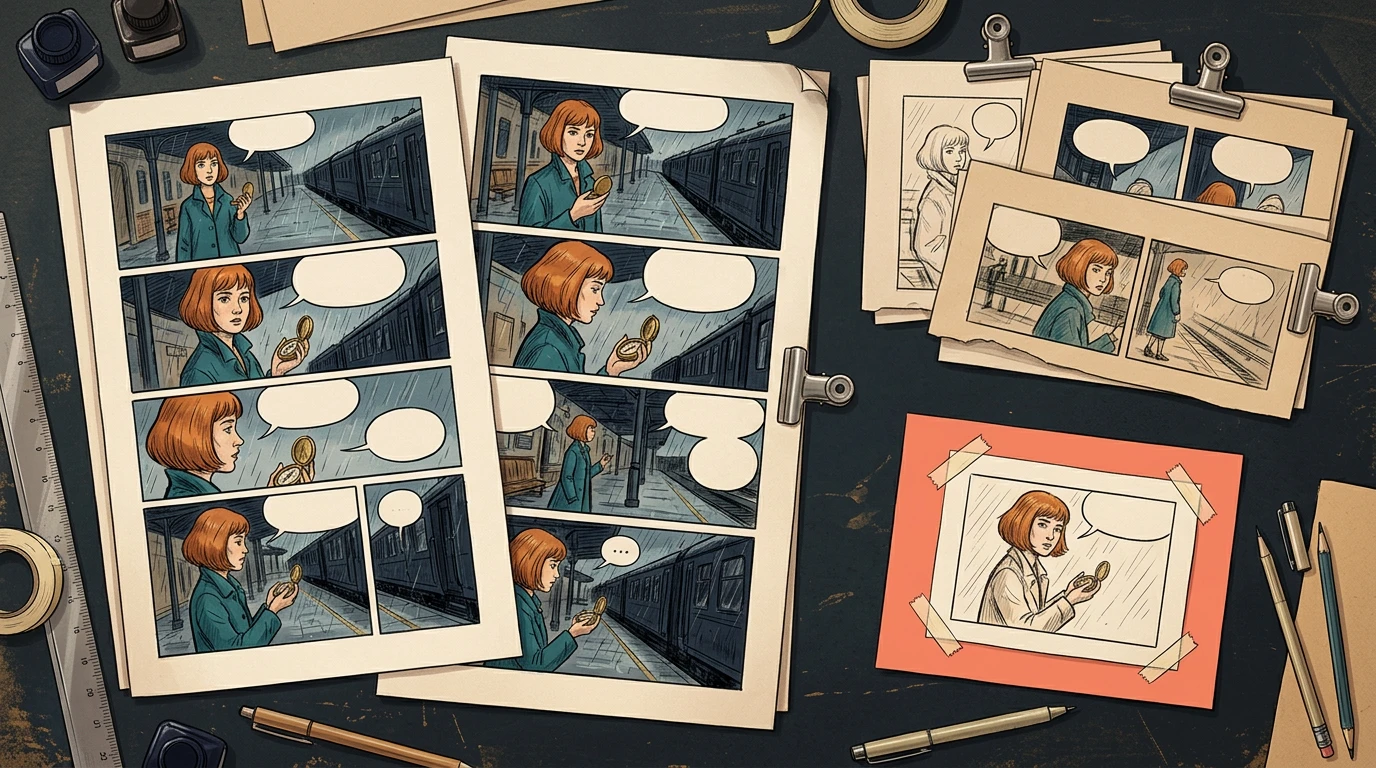
Include a wide establishing shot, a face close-up, a prop interaction, a two-character exchange, and a page turn somewhere in the first three pages. Three nearly identical portrait pages will not reveal the book's hardest problems.

The illustration shows the approval structure. It is not a screenshot of forty generated pages.
Review the pilot for story clarity as well as image quality. Check that the compass stays recognizable, the character does not drift between camera distances, and dialogue can fit without covering a hand or face. Save the approved references and script versions before expanding production.
If the pilot fails, record the cause and update the shared brief. Correcting a shared instruction during the pilot limits how many later pages can inherit the same problem.
The current Comic API documentation supports multi-page input through a nested pagination object. The following is a request-shape example, not a request executed by this article:
{
"prompt": "Create the first three pages of Station Compass from the approved panel script.",
"preset": "japanese_manga",
"pagination": {
"totalPages": 3,
"panelsPerPage": 4
}
}
Do not combine this pagination mode with fixPanelNum. Keep API tokens private. Store the returned generation ID, then retrieve status and assets using the documented status endpoint. Record returned usage rather than estimating a universal price per page.

For each submitted job, preserve the input and the response together. When a response is delayed, inspect the existing job before submitting another request. Follow the documented idempotency behavior; changing a retry key can create a separate job and additional cost.
A job can complete while a page still has a missing beat, an incorrect coat, or unreadable balloon space. Keep generation state and editorial state in separate fields.
page_id,batch,script_version,reference_version,job_id,review_state,export_version
P001,pilot,v03,mira-v02,record-returned-id,approved,v01
P002,pilot,v03,mira-v02,record-returned-id,repair-required,
P003,pilot,v03,mira-v02,record-returned-id,awaiting-review,
Use explicit decisions such as awaiting-review, repair-required, and approved. Assign an owner and a reason to every rejection. Keep earlier approved files until the replacement has passed review.
At the end of each batch, inspect the transition into the next one. A correct last panel and a correct first panel can still disagree about where a character is standing or which hand holds the prop.
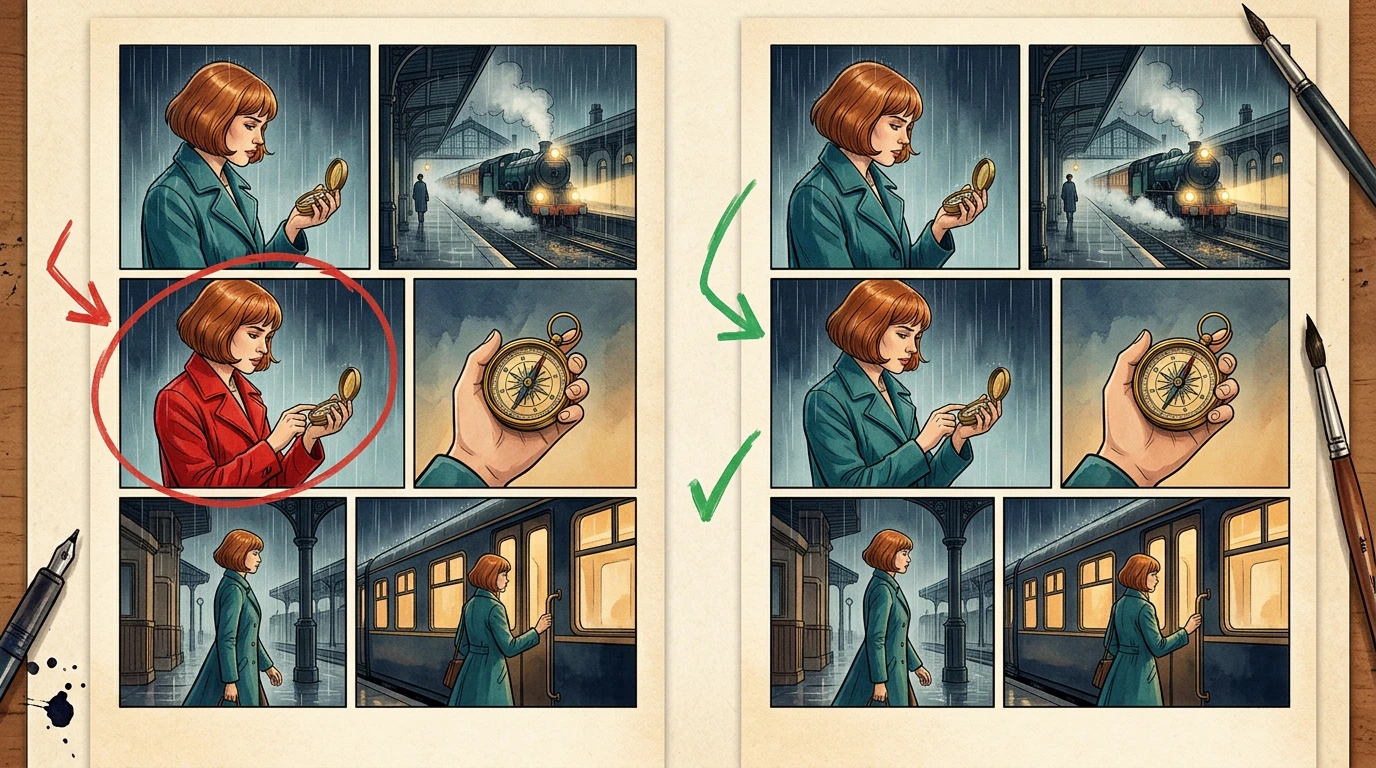
Suppose P017 has one panel where Mira wears a red coat. Record that single defect rather than rejecting every image in the batch.

The API documents a panel-update request on an existing generation. Page and panel indexes are zero-based. Map those indexes from the actual job result; P017 in your book is not automatically page index 16 inside every batch.
Use a repair brief such as:
Restore Mira's teal coat and copper bob in this panel.
Preserve the camera, station, compass, pose and other characters.
Do not revise the surrounding panels.
After repair, review the adjacent panels and refresh only the exports that use the changed page. The reference-change audit guide covers broader dependency changes.
Check uniqueness, complete page coverage, approval, and current export versions. A simple local planning check can catch missing records before anyone assembles the book:
expected = {f"P{i:03d}" for i in range(1, 41)}
actual = [row["page_id"] for row in pages]
assert len(actual) == len(set(actual)), "Duplicate page ID"
assert set(actual) == expected, "Missing or unexpected page"
assert all(row["review_state"] == "approved" for row in pages)
assert all(row["export_version"] for row in pages)
In the accompanying local planning exercise, one deliberately unapproved page blocks export until its review record is corrected. This tests the ledger rule, not the visual quality of forty comic pages. An editor still needs to read the full book.
Track generation, review, repair, lettering, assembly, and final reading separately. Save actual returned usage for each job and measure human review time with the same boundaries for each batch.
Use this budget structure:
Total production cost = pilot + accepted batches + repairs + export work
Total elapsed time = generation waits + review + repair + assembly
Do not extrapolate a whole book from one attractive panel. A useful pilot estimate includes rejected results and cleanup.
Start with a three-page brief in Comic API. Expand only after you can explain why those pages pass. For team production requirements, the enterprise route can help scope the integration.
Use the current API and account limits to determine what is accepted. Editorial batch size should also reflect how much your team can inspect before continuing.
No. Completion is a technical state. Approval requires review of the result against the brief.
First identify the cause. A local defect can often be repaired individually; a shared reference or script problem may affect several pages and should trigger an impact audit.
Product documentation reviewed November 2, 2026. Figures and the planning ledger are instructional examples; no forty-page speed or cost benchmark is claimed.