

לוגו LlamaGenמותג LlamaGen
התחילולהירשם עכשיו20% הנחה
  1. דף הבית
User Story: How a Japanese Creator’s Feedback Sparked a Major Speech Bubble Breakthrough
כל הפוסטים

User Story: How a Japanese Creator’s Feedback Sparked a Major Speech Bubble Breakthrough

Jay
Jay
27 בפברואר 2026
העתק קישור
  • Pinpointing the Core Problem: Why Most Comic Bubble Tools Fall Short
  • The LlamaGen.AI Solution: Building a Next-Generation Speech Bubble Editor (In 48 Hours!)
  • What Sets the LlamaGen.AI Bubble Editor Apart?
  • Step-by-Step Guide: Unlocking Advanced Speech Bubbles in Your Next Comic
  • Step 1: Choose Your Bubble Shape and Preset
  • Step 2: Tune Your Bubble’s Hand-Drawn Wobble
  • Step 3: Master Tail Customization
  • Step 4: Supercharge Your Text
  • Step 5: Apply Finishing Touches
  • Real-World Results: Before & After Using LlamaGen.AI’s New Bubble Tools
  • Practical Strategies for Mastering Fine-Grained Bubble Control
  • What’s Next: Iterative Improvements Based on Community Feedback
  • Addressing Common Concerns: Will These Advanced Tools Slow Me Down?
  • The Replicable Framework: How to Drive Feature Innovation with Community Insight
  • Conclusion
elevate-your-comics.png
שדרגו את הקומיקס שלכם עם LlamaGen

If you’ve ever felt the frustration of trying to craft expressive, professional-quality speech bubbles in your comics—only to be let down by clunky, inflexible tools—you’re not alone. I remember the countless hours spent fiddling with “round rectangles” that never felt quite right, wishing for the same creative control I’d seen in top-tier Japanese manga. That pain point came up again when one of our power users in Japan reached out, highlighting the limitations of our existing speech bubble system and urging us to develop more advanced, fine-grained features. What followed was a rapid, community-driven breakthrough at LlamaGen.AI: within 48 hours, we designed and shipped a new, highly customizable comic bubble editor, rivaling even Clip Studio Paint’s best-in-class toolset. In this in-depth case study, I’ll walk you through exactly how user feedback drove this transformation, what advanced features you can now access, and how you can master these tools to elevate your own comics—starting today.

Let’s start with the real story. A few weeks ago, we received detailed feedback from a Japanese manga creator who’d been using LlamaGen.AI for episodic webtoons. Their challenge was clear and relatable: “Your bubbles are good, but I need more shapes, more control, and that hand-drawn wobble that gives manga its soul.”

As a creator myself, I felt that pain viscerally. Whether you’re storytelling for fun or business, those subtle bubble details—ellipse vs. cloud, tail direction, expressive line wobble—can make or break the emotional impact of a scene. Our Japanese user’s request boiled down to three urgent needs:

  • Greater variety in bubble shapes and styles
  • Finer control over tail direction, length, and effect
  • Hand-drawn, manga-style “wobble” for authentic, professional feel

This wasn’t just a technical request. It was about empowering creators to tell stories with the same nuance as the pros—without the friction of traditional design tools.

Pinpointing the Core Problem: Why Most Comic Bubble Tools Fall Short

If you’ve ever tried to create comics online, you’ve probably run into these common frustrations:

  • Limited Shape Options: Stuck with generic ovals or rectangles, your dialogue never quite fits the mood.
  • Clumsy Tail Control: Tails snap to the wrong place, look unnatural, or can’t be fine-tuned for dramatic scenes.
  • Lack of “Hand-Drawn” Feel: Bubbles feel sterile, missing the expressive, wobbly outline that defines authentic manga.
  • Rigid Editing: Scaling, rotating, or moving text and bubbles is cumbersome, breaking your creative flow.
  • : Missing features like vertical text, bold outlines, or manga-style highlights.
יומן שינויים

להצית חלומות לצעירים
המקום שבו מיליוני סיפורים מתעוררים לחיים

סקירה של השקות התכונות האחרונות של LlamaGen, שיפורי מוצר, עדכוני עיצוב ותיקוני באגים חשובים.
✦
✧
✦
✧

מדיום חדש עבור סיפור סיפורים

צרו בקלות אינסוף סיפורים, קומיקס, אנימציות, משחקים ועוד—בשניות, באופן שמתחבר לקהלים מודרניים

User Story: How a Japanese Creator’s Feedback Sparked a Major Speech Bubble Breakthrough - LlamaGen.AI Blog
No Professional Effects

Our Japanese user summed it up best: “I want to make my bubbles shout, whisper, or even tremble—just like in real manga.”

This feedback echoed what I’d heard from other creators worldwide. Even the most popular platforms (looking at you, Canva, Pixso) only offer surface-level comic features. If you’re aiming to launch a polished, episodic series—or simply want to impress your audience—these limitations can stall your progress and creative confidence.

The LlamaGen.AI Solution: Building a Next-Generation Speech Bubble Editor (In 48 Hours!)

Here’s where the story gets exciting: powered by this community insight, our development team went into sprint mode. Within two days, we had built and shipped a professional-grade speech bubble editor, directly inspired by the needs of manga creators and fine-tuned for real-world use.

What Sets the LlamaGen.AI Bubble Editor Apart?

  • True Elliptical Bubbles: Not just rounded rectangles—support for any width/height ratio for classic manga look.
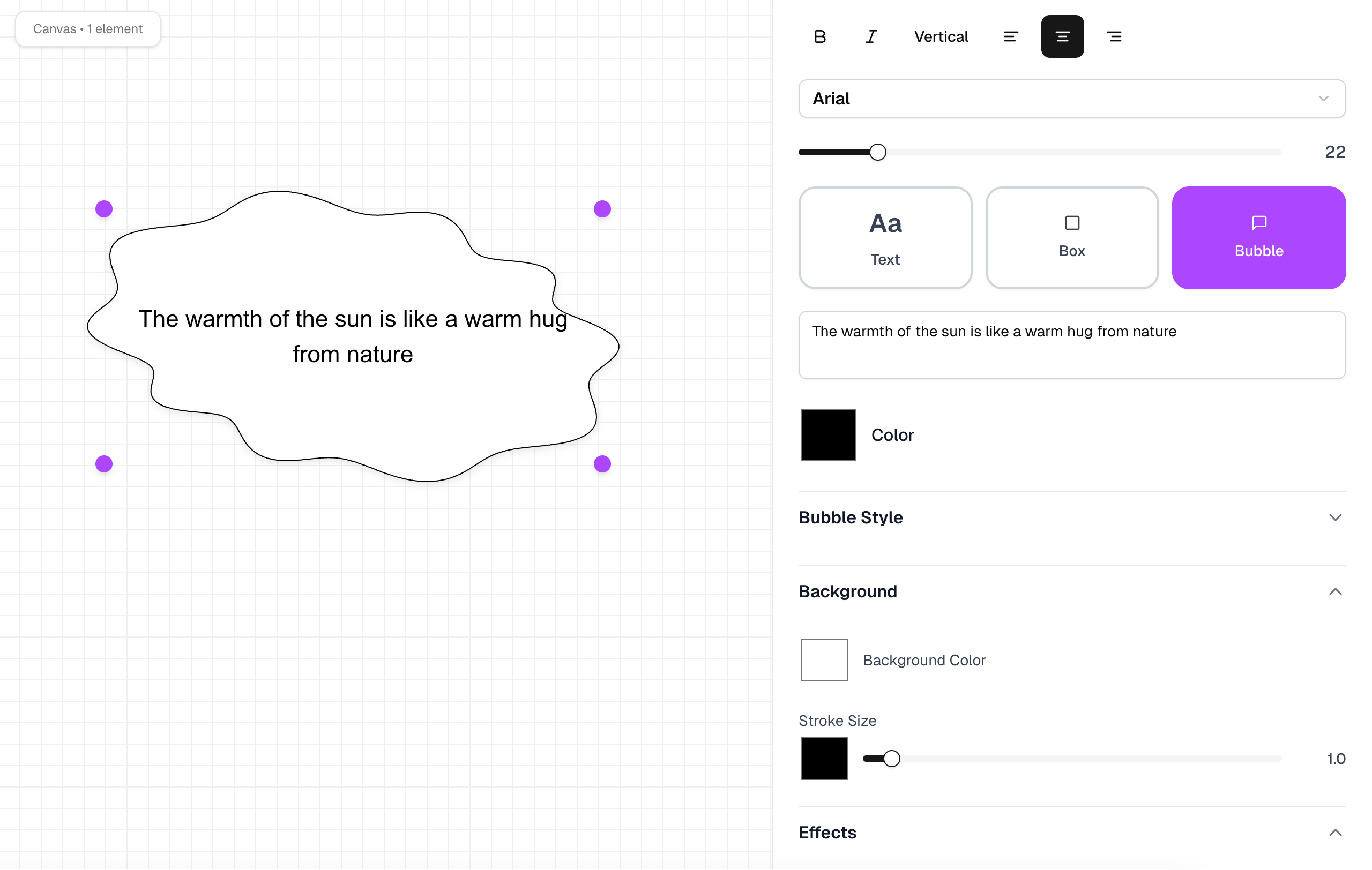
  • Hand-Drawn Wobble: Three fully adjustable parameters (Amplitude, Frequency, Phase) to control the expressive “wobble” of your bubble outlines.
  • Advanced Tail System: Fully customizable tails—angle, length, open width, and synchronized wobble for seamless, hand-drawn effects.
  • Vertical and Upright Text: Japanese-style vertical text (writing-mode: vertical-rl + upright), perfect for authentic manga panels.
  • Text Stroke Effects: Simulate bold, black-outlined manga lettering with -webkit-text-stroke.
  • Intuitive Drag, Scale, Rotate: Effortlessly position, resize, and angle bubbles and tails with real-time visual feedback.
  • Tail-to-Bubble Harmony: Tails morph in sync with bubble edge wobble, preserving visual integrity.
  • Panel-to-Panel Consistency: Maintain precise bubble styles and placements across multiple panels or even episodes.

“This new bubble editor is a game-changer for my webtoons. I can finally match the energy of my scenes—shouting, whispering, or trembling dialogue, just like I imagined.”
— @maya-s, LlamaGen.AI user

These features, now live and available, put LlamaGen.AI ahead of 95% of web-based comic tools—including Canva and Pixso—and right up there with professional desktop apps like Clip Studio Paint.

See it for yourself:
LlamaGen.AI Speech Bubble Editor Demo

Step-by-Step Guide: Unlocking Advanced Speech Bubbles in Your Next Comic

Ready to take your comics to the next level? Here’s how you can leverage the new LlamaGen.AI speech bubble editor to transform your storytelling—no art school required.

Step 1: Choose Your Bubble Shape and Preset

  • Select from 8–12 classic manga bubble shapes (ellipse, round, cloud, scream, thought, electric, ice, fire, etc.).
  • Start with a preset or create your own from scratch for maximum originality.

Step 2: Tune Your Bubble’s Hand-Drawn Wobble

  • Adjust the amplitude, frequency, and phase sliders to get just the right amount of “hand-drawn” imperfection.
  • Use subtle wobble for casual conversation, or crank it up for shouty, dramatic lines.

Step 3: Master Tail Customization

  • Instantly switch between 5 tail types (regular, cloud, wavy/thought, electric, multi-tail).
  • Drag the tail tip to point at your character’s mouth or head—the editor uses smart snapping to align perfectly.
  • Adjust tail length and opening width for nuanced directionality and emotional effect.

Step 4: Supercharge Your Text

  • Activate vertical writing mode for authentic Japanese manga dialog.
  • Enable text stroke for bold, legible outlines (ideal for white-on-black comics).
  • Drag, scale, and rotate your bubble or text as needed—everything stays crisp and aligned.

Step 5: Apply Finishing Touches

  • Add internal shadows or highlights with one click for that pro “depth” effect.
  • For dramatic scenes, try the “damaged” bubble effect for torn-paper edges.
  • Use double-bubble (inner/outer) for shouts, or add connector dots for thought bubbles.

Pro tip: Apply your favorite bubble style to an entire multi-panel scene for instant panel-to-panel consistency—a huge time-saver for episodic creators.

Real-World Results: Before & After Using LlamaGen.AI’s New Bubble Tools

Let’s look at what changed for our Japanese manga creator—and how you can replicate their results.

Before:

  • Spent 15–30 minutes per page hacking together bubbles in Photoshop
  • Bubbles looked generic and didn’t match the energy of the scene
  • Dialogue sometimes hard to read, especially in vertical or stylized layouts

After (in 48 hours):

  • Reduced bubble editing time to under 5 minutes per page
  • Achieved professional, hand-drawn effects for shouting, whispering, and emotive scenes
  • Maintained perfect tail alignment and character focus across 6+ panels
  • Received positive fan feedback: “Your bubbles finally look like real manga!”

“I finished my comic faster than ever and felt more confident sharing it. LlamaGen.AI’s editor just works.”
— Den, LlamaGen.AI user

Practical Strategies for Mastering Fine-Grained Bubble Control

If you want to get the most out of these advanced features, try these best practices—tested by our power users and myself over dozens of projects:

  • Batch Apply Bubble Styles: Once you dial in your wobble, tail, and color settings, save the preset and reuse it for all dialogue by a specific character.
  • Use Smart Tail Snapping: Let the tail auto-snap to character faces, then fine-tune the angle for dramatic effect.
  • Experiment with Layering: For action or shouting scenes, double up bubbles (outer/inner) with varying wobble for extra punch.
  • Leverage Internal Shadows: Add a manga-style inner shadow for instant depth—no Photoshop required.
  • Mix Bubble Types: Use cloud or wavy bubbles for thoughts, electric for panic, and fire for rage—matching mood to visual.
  • Keep Accessibility in Mind: Ensure text contrast and stroke thickness make dialogue readable on any device.

For a visual walkthrough, check out our step-by-step tutorial video or dive into the official documentation.

What’s Next: Iterative Improvements Based on Community Feedback

At LlamaGen.AI, we believe the best features come from real users. Here’s our public roadmap for even more granular control, prioritized by user value and feasibility:

  1. More Bubble Shape Presets: Expanding to 12+ iconic manga forms (ice, flame, jagged, etc.)
  2. Advanced Tail Types: Including multi-tails and animated tails for group scenes or layered emotions.
  3. Dynamic Edge Thickness: Adding variable stroke width and multi-layer outlines for deeper hand-drawn vibes.
  4. Bubble Interior Effects: Preset manga-style highlights, glows, and shadows.
  5. Damage & Tear Effects: Broken, torn, or frayed bubbles for intense scenes.
  6. Double-Layer Bubbles: Ideal for screams or echoing dialogue.
  7. Connector Dots & Curves: For classic “thought bubble” chains.
  8. 3D Perspective Bubbles: For experimental layouts or dynamic scenes.

We’re already testing several of these—watch for release notes and demos on our YouTube channel.

Addressing Common Concerns: Will These Advanced Tools Slow Me Down?

If you’re worried that more options mean more complexity, here’s what I’ve found in real use:

  • The editor is intuitive by design: Presets and smart snapping get you 90% there, while advanced sliders are optional.
  • You can save and reuse styles: No need to set up from scratch each time.
  • Performance is optimized: Even on older devices, editing is smooth.
  • You’re always in control: Unlike rigid template tools, everything is adjustable in real time.

Don’t just take my word for it—here’s what the community is saying:

“LlamaGen.AI offers endless possibilities for my projects. It’s the ultimate AI-powered solution I’ve been waiting for!”
— Jake M., LlamaGen.AI user

“I see a real place for these tools. The ability to create something on my own—with a little AI help—is empowering and exciting.”
— Maya S.

The Replicable Framework: How to Drive Feature Innovation with Community Insight

If you’re building creative tools (or using them in a team), here’s the framework we followed—and you can too:

  1. Listen deeply: Seek out detailed user stories, not just upvotes or star ratings.
  2. Identify the “pain behind the pain”: Is it about speed? Expression? Control?
  3. Prototype fast: Build and test with the actual users who requested the feature.
  4. Iterate in public: Share updates, gather feedback, and adjust priorities.
  5. Document best practices: Create guides, videos, and templates for the community.
  6. Celebrate feedback loops: Make users heroes of the improvement story.

This approach led us from simple feedback to a market-leading solution in under two days—a playbook any product team or creative studio can adapt.

Conclusion

The journey from user frustration to breakthrough feature is what keeps the LlamaGen.AI community vibrant and innovative. By listening closely to creators—like our Japanese manga artist who demanded more expressive, professional bubbles—we’re able to solve real problems in record time. The result? You get a suite of advanced, intuitive tools that empower your stories to leap off the page, whether you’re making comics, webtoons, or manga for fun or business.

Ready to upgrade your comic creation workflow?

  • Try the new speech bubble editor free (600 credits included)
  • Watch the in-depth tutorial videos
  • Join the LlamaGen.AI Discord community for live feedback and tips
  • Explore the full product documentation and roadmap

Your feedback could spark our next breakthrough. Start creating—and let your dialogue finally speak as boldly as your ideas.

Related hot tags

UserStory

כלי יוצרים פופולריים

הפוך השראה לסיפור הבא שלך

צור קומיקס, לוחות עלילה ותמונות בסגנון עם LlamaGen.

01

יוצר קומיקס בינה מלאכותית

הפוך רעיון לרצועות קומיקס מעוצבות בדקות.

יצירת קומיקס
02

יוצר מנגה בינה מלאכותית

צור אומנות מנגה והעלילות מרובות פאנלים.

צור מנגה עם AI
03

מחולל סטוריבורד AI

המחשה של כל סצנה לפני תחילת הפקה.

צור לוחות עלילה ב-AI
04

הפוך תמונה לקומיקס

המר כל תמונה לאיור בסגנון קומיקס.

צור קומיקס מתמונות
05

יוצר רצועות קומיקס בינה מלאכותית

בנה רצועות לשיתוף עם דמויות עקביות.

צור רצועות קומיקס עם AI

LlamaGen community

checkmark

Get hands-on help with your comics

checkmark

Showcase your comics to fellow LlamaGen creators

checkmark

Participate in special events to win gifts

LlamaGen.Ai
  • United States
  • Español
  • Français (France)
  • 日本語
  • 한국어
  • Deutsch
  • 繁體中文 (台灣)
  • 繁體中文 (香港)
  • 简体中文
  • Português
  • Italiano
  • Español (México)
  • العربية
  • Русский
  • Português (Brasil)
  • Tiếng Việt
  • עברית

מובילים את עתיד יצירת הקומיקס עם בינה מלאכותית

  • תמיכה 24/7
  • עדכונים שבועיים
  • מאובטח ותואם תקנות
  • זמינות 99.9%

הורידו את LlamaGen בחינם

AndroidiOSמחשב שולחני

מוצר

  • השקות חדשות
  • תכונות
  • יוצר רצועות קומיקס
  • Comic Storesחדש
  • אולפן מנגהחדש
  • הפוך תמונה לקומיקס
  • קומיקס לווידאו
  • מפעל קומיקס ב-AI
  • סוכן קומיקס
  • iOS ואנדרואיד
  • מק ו-ווינדוס
  • הורדה
  • Comic Zapחדש
  • יוצר קומיקס בינה מלאכותית
  • מחולל דמויות מצוירות ב-AI
  • יוצר וובטון בינה מלאכותית
  • יוצר רצועות קומיקס
  • הפוך תמונה לקומיקס
  • יוצר מנגה בינה מלאכותית
  • מתרגם מנגה
  • מֵתמונות לאנימה
  • תמונה לפקודה
  • אנימה לעולם האמיתי
  • מחולל צבע למנגה
  • מחולל דמויות אנימה
  • כלים לנכסי משחק פיקסל
  • מחולל גיליון ספרייט בינה מלאכותית
  • הכלים הטובים ביותר למשחקי פיקסלים 2026
  • יוצר קומיקס מתמונות
  • חלופה ל-Comic Life

מוצרים משיקים

  • משפחת LlamaGen
  • CineoBoardחדש
  • Comics API

תוכניות

  • תמחור
  • התחלה
  • פרו

קהילה

  • יוצרים
  • שותפים
  • שותף

מודלי בינה מלאכותית

  • GPT Image 2.6 Flare
  • GPT Image 2.6 Sunburst
  • Grok Imagine Image 2.0
  • Wan 3.0
LinkedInX (Twitter)
  • דף הבית
  • מאמרים
  • בלוג
  • צור
  • תמחור
  • API
  • Affiliate ProgramNEW

שאל את ה-AI על LlamaGen

  • Comic Zap
  • Velika
  • ארגוני
  • חינוך
  • קומיקס API
  • צור קשר עם מחלקת מכירות
  • תוכניות חינוכיות
  • מורים
  • סטודנטים
  • מורים ותלמידים
  • סטארט-אפים
  • הנחות לסטודנטים ומורים
  • חברה

    • דבר עם המייסד
    • אודות
    • מפת דרכים של המוצר

    עזרה

    • מרכז עזרה
    • אמון
    • בינה מלאכותית בטוחה
    המלצות
  • קיר אהבה
  • LlamaGen MCPחדש
  • LlamaGen למפתחים
  • משאבים

    • יומן שינויים
    • בלוג
    • מדריכים

    כלים

    • מחולל לוגו בינה מלאכותית
    • מחולל דמויות בסגנון Grokbot
    • PNG לקומיקס
  • Wan 3.0 Prime
  • Seedance 2.5
  • MiniMax H3
  • Nano Banana 2.1
  • Nano Banana 2 Lite
  • Seedream 5.0 Flash
  • Seedream 5.0 Pro
  • Seedance 2.0 Mini
  • Kling 3.0 Turbo
  • Nano Banana 2
  • GPT Image 2
  • Gemini Omni Flash
  • All AI Models
  • כלי AI

    • מחולל לוח השראה מהופעה
    • מחליף תספורות בינה מלאכותית
    • מחליף תסרוקות אנימה בינה מלאכותית
    Instagram
    YouTube
    קבוצת Facebook
    Reddit
    Discord
    תמיכה בדוא"ל
    פרטיותתנאיםמפת אתר
    הורד נכסי מותג
    © 2026 LlamaGen.Ai כל הזכויות שמורותכל השירותים זמינים אונליין

    פוסטים קודמים

    Human-Led AI Game Cutscenes: Keep the Script, Storyboards, and Timing Under Your Control

    Human-Led AI Game Cutscenes: Keep the Script, Storyboards, and Timing Under Your Control

    A practical, creator-led AI game cutscene workflow for selecting storyboard candidates, rejecting we

    Jay
    Jay
    23 בנובמבר 2026
    Make an AI Film Feel Real: Blocking, Reactions, and Continuity in a Quiet Scene

    Make an AI Film Feel Real: Blocking, Reactions, and Continuity in a Quiet Scene

    A worked quiet-scene repair case: room geography, prop behavior, reactions, and edit choices that im

    Jay
    Jay
    23 בנובמבר 2026
    How to Make an AI Drama: A Six-Shot Pilot and Series Continuity Plan

    How to Make an AI Drama: A Six-Shot Pilot and Series Continuity Plan

    Create a 30-second illustrated AI drama pilot, review real motion failures, and package continuity n

    Jay
    Jay
    23 בנובמבר 2026
    Two OCs in One Comic Panel: Keep Identities and Speakers Clear

    Two OCs in One Comic Panel: Keep Identities and Speakers Clear

    A six-panel Maya and Theo dialogue case showing separate references, a handoff repair, a reverse-sho

    Jay
    Jay
    20 בנובמבר 2026
    קריירות
  • כתבו לנו אימייל
  • עולם הקמעות שלנו
  • ערכת מדיה
  • שיתוף פעולה עם משפיענים
  • תוכן
  • שירותים מקצועיים
  • שאלות נפוצות
  • אבטחה
  • נגישות
  • מדריך וידאו
  • צור קשר
  • מפת אתר
  • קומיקס מותאם אישית
  • תכונות
  • אלטרנטיבות
  • האפליקציות המובילות בבינה מלאכותית
  • מדריך צביעת מנגה GPT-6
  • מיומנות קומיקס קלוד
  • Gemini מדריך בינה מלאכותית לקומיקס
  • קומיקס זה
  • הנחות לסטודנטים ומורים
  • הנחת סטודנטים
  • Text לקומיקס
  • PDF לקומיקס
  • תסריט לקומיקס
  • הפיכת ספר לקומיקס
  • הפוך תמונה לקומיקס
  • מחולל פיקסל ארט עם AI
  • קומיקס חינוכי
  • יוצר וידאו בינה מלאכותית
  • מחולל וידאו Gemini AI
  • מחולל וידאו סמוי (ללא פנים) חינמי בבינה מלאכותית
  • קומיקס לווידאו
  • תוכנת יצירת לוח תכנון
  • מחולל סטוריבורד AI
  • תוכנת כתיבת תסריטים
  • עורך תסריטים
  • בינה מלאכותית לסיפורים
  • יוצר סיפורים בינה מלאכותית
  • מחולל ספרי סיפורים
  • יוצר תמונות בינה מלאכותית
  • מפריד שכבות AI
  • שליטה בזווית מצלמה בינה מלאכותית
  • מחולל פיקסל ארט עם AI
  • כלים לנכסי משחק פיקסל
  • מחולל גיליון ספרייט בינה מלאכותית
  • חותך גיליון ספרייטים
  • הכלים הטובים ביותר למשחקי פיקסלים 2026
  • ממשק אנימציה API
  • ChatGPT/תוסף Codex
  • ChatGPT מדריך התקנה
  • תוסף קוד קלוד
  • מדריך התקנה לקוד קלוד
  • מחולל אפקט רוח בינה מלאכותית
  • מחולל מפת עומק בינה מלאכותית
  • רקע לבן אוטומטי בינה מלאכותית
  • מסיר אובייקטים בינה מלאכותית
  • מדידת אופנה וירטואלית בינה מלאכותית
  • חידוד תמונות בינה מלאכותית
  • הסרת רעשים בינה מלאכותית
  • שחזור תמונות בינה מלאכותית
  • צללים למוצר בינה מלאכותית
  • מחולל רקעים בינה מלאכותית
  • מחולל תמונות פורטרט בינה מלאכותית
  • יוצר אימוג'י בינה מלאכותית
  • מחליף רקעים בינה מלאכותית
  • פתיחת עיניים בתמונה בינה מלאכותית
  • יופי בינה מלאכותית
  • צילום מוצר בינה מלאכותית
  • ראה את כל הבלוגים




