

Multi-page storytelling
अलग-अलग images एक-एक करके माँगने के बजाय जुड़े हुए scenes प्लान करें। plot, pacing, locations, props और visual direction को page one से अगले scene या chapter तक ले जाएँ।
LlamaGen Comics
कहानी या स्क्रिप्ट को डायलॉग, पात्रों और एडिट करने योग्य लेआउट के साथ कॉमिक पैनलों में बदलें।
यह आपके ब्राउज़र में चलता है। स्टूडियो में हर पैनल एडिट करें।
अपनी कहानी पेस्ट करें, फिर पेज गिनती और लेआउट चुनें।
Choose a reading format
Create connected pages or a vertical episode, then refine the characters and dialogue in the studio.
कॉमिक
एआई कॉमिक जनरेटर
Multi-page stories with a recurring cast
मंगा
एआई मंगा जनरेटर
Manga pages built from your story
वेबटून
एआई वेबटून जनरेटर
Vertical episodes for reading on a phone
इसे अलग क्या बनाता है
LlamaGen sequential work के लिए बनाया गया है: recurring cast, जुड़े हुए story beats, और ऐसा format जिसे पाठक follow कर सकें। लक्ष्य सिर्फ़ एक सुंदर panel बनाना नहीं, बल्कि आपको एक workable comic project देना है।
अलग-अलग images एक-एक करके माँगने के बजाय जुड़े हुए scenes प्लान करें। plot, pacing, locations, props और visual direction को page one से अगले scene या chapter तक ले जाएँ।
Recurring cast तय करें और स्वीकृत visual references दोबारा इस्तेमाल करें। कहानी close-ups, action, dialogue और नई locations के बीच बढ़े, तब भी चेहरे, कपड़े, रंग और signature details की समीक्षा करें।
शुरुआत से ही reading format तय करें: black-and-white manga, full-color Western comic pages, या mobile-first vertical Webtoon। कहानी में movement चाहिए तो चुने गए panels को motion comic में आगे बढ़ाएँ।
सत्यापित ग्राहक कहानियाँ
Comic creators
LlamaGen.Ai की सबसे अलग बात यह है कि यह sequential storytelling और visual consistency के लिए कितनी सटीकता से tuned है। Keshav उन character references को highlight करते हैं जो frames, poses और angles में टिके रहते हैं; text-to-storyboard का smooth flow; और composition, poses तथा regional edits पर panel-level control।

Keshav S.
Educators
LlamaGen एक लिखे हुए विचार को पूरी visual story में बदल देता है, पात्रों को सुसंगत रखता है, और अतिरिक्त video-editing skills की ज़रूरत कम कर देता है। प्रशिक्षण और patient-education stories के लिए, यह production time और upfront costs कम करता है, साथ ही prototyping तेज़ करता है।

Parthik P.
Brand storytellers
LlamaGen हमारी marketing team को हर asset के लिए dedicated illustrator के बिना comic-style storyboards और illustrated campaign content बहुत तेज़ी से बनाने में मदद करता है। Character consistency campaigns को cohesive रखती है, जबकि text prompts और multilingual support mixed-language audience के लिए ideation तेज़ करते हैं।

Muhammed A.
असल product workflow
ये असली LlamaGen product views हैं: cast तय करें, comic page edit करें, फिर project को export, sharing या motion तक ले जाएँ।

किसी character को बाद के panels में वापस लाने से पहले उसकी पहचानी जाने वाली विशेषताएँ सेट करें और एक visual reference approve करें।

Comic Studio में जनरेट किए गए page की समीक्षा करें, फिर captions, speech bubbles, proportions, या केवल उस panel को revise करें जो brief से चूक गया।

उसी cast के साथ sequence जारी रखें, approved काम export या share करें, या जब चुने गए scenes को movement चाहिए तो Animatic workflow खोलें।
सत्यापित डिलीवरी विकल्प
Comic Studio से मौजूदा पेज को PNG file के रूप में export करें या rendered page को PNG के रूप में copy करें।
Panel और canvas edits थोड़ी save delay के बाद सुरक्षित हो जाते हैं। आपकी plan तय करती है कि project history कितने समय तक रहती है।
Free plan HD output या watermark removal का वादा नहीं करता; Studio उच्च-resolution export options paid plans के लिए रखता है।
चुने गए comic scenes को animation workflow में भेजें, motion जनरेट करें, और resulting video file डाउनलोड करें।
तीन formats + motion
हर example अलग premise और destination का उपयोग करता है। Full size पर still खोलें या motion example चलाएँ; इनमें से कोई भी card बेहतर दिखाने के लिए source crop नहीं करता।
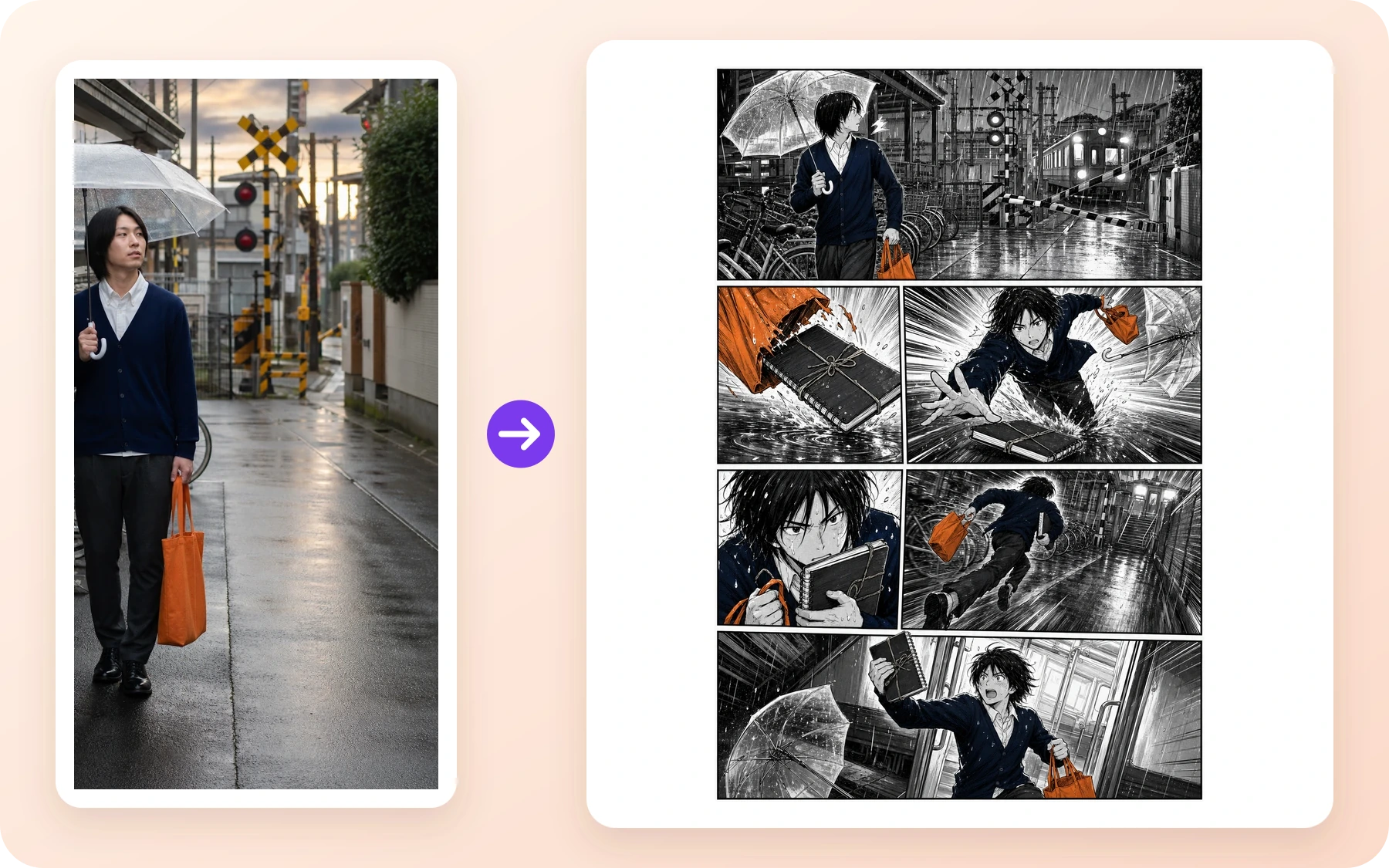
Manga · Comic creators
बारिश भरा रेलवे संदर्भ एक काले-सफेद action page में बदल जाता है, जिसमें स्पष्ट setup, chase, close-up और final beat है।
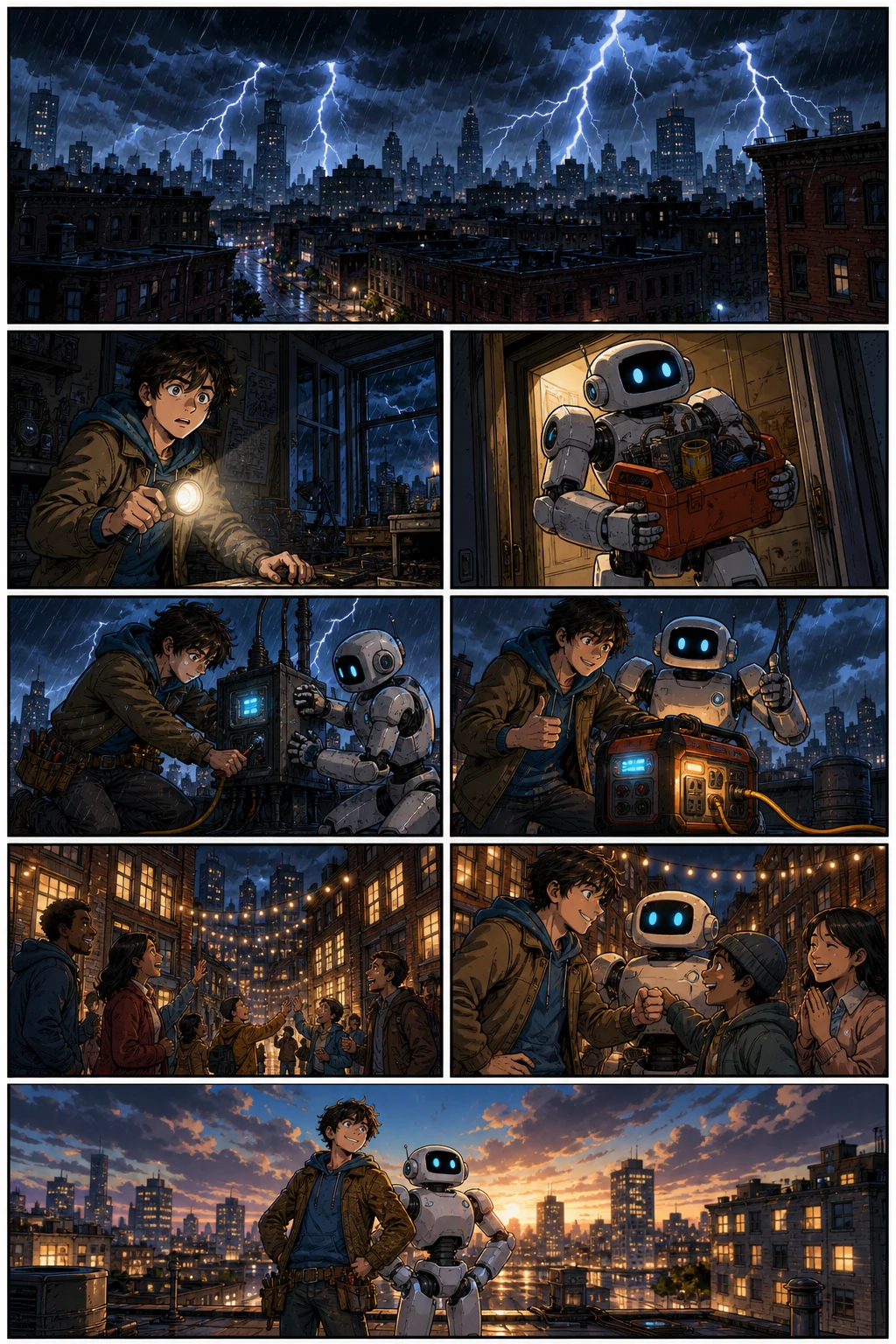
Western comic · Brand storytellers
बार-बार दिखने वाला inventor और robot एक full-color blackout rescue से गुजरते हैं, जिसमें action साफ़ है और camera angles बदलते हैं।
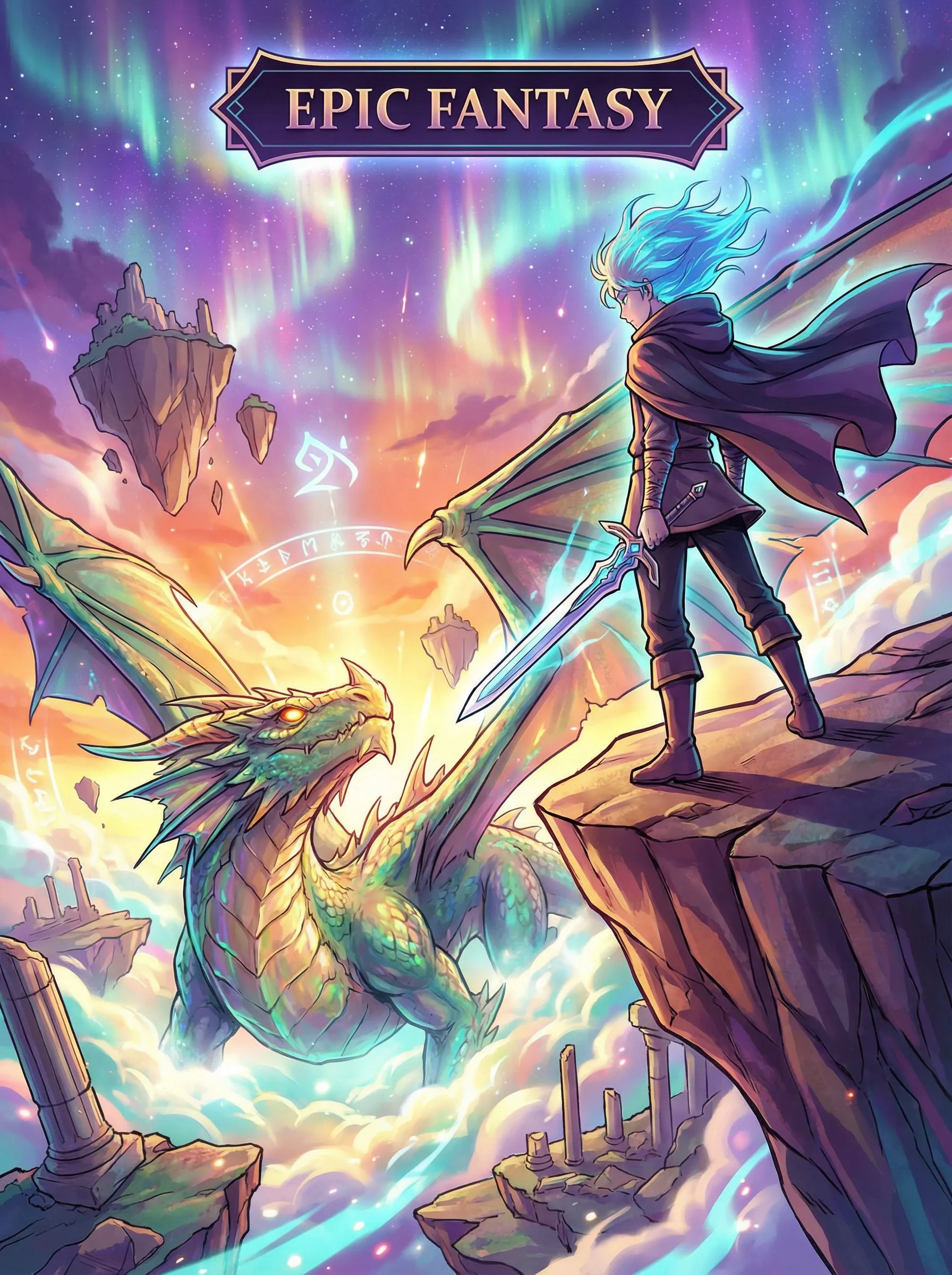
Vertical Webtoon · Educators
एक fantasy journey vertical spacing और long-form mobile pacing का उपयोग करके पाठक को खोज से खतरे तक ले जाती है।
Motion Comic · Storyboard teams
एक तैयार comic frame directed camera movement और character motion के साथ एक छोटे animated scene में आगे बढ़ता है।
comic to video converterजो हिस्सा fail हुआ, उसे ठीक करें
AI output को फिर भी judgment चाहिए। हर generated page को draft मानें: जो approve हो चुका है उसे रखें, समस्या अलग करें, और सबसे छोटा उपयोगी unit revise करें। जब face drift करे, pose fail हो, या शब्द beat से मेल न खाएँ, तब यही व्यावहारिक रास्ता है।
स्वीकृत character reference दोबारा इस्तेमाल करें और प्रभावित panel redraw करें। सही चेहरे, कपड़े, props और palette की तुलना करते हुए accepted pages बनाए रखें।
उस panel का prompt, shot, pose, या background बदलें और पूरे sequence को फिर से शुरू करने के बजाय सिर्फ़ वही panel regenerate करें।
Captions और dialogue revise करें, फिर Studio में panel proportions और reading order adjust करें। पेज तभी approve करें जब शब्द और visuals एक ही story beat दें।
सत्यापित डिलीवरी सारांश
हमने वही story beats और वही recurring cast तीन अलग-अलग format runs के लिए इस्तेमाल किए। यह repeatable workflow का प्रमाण है, न कि यह दावा कि एक क्लिक में finished comic हर layout में अपने आप बदल जाता है।
36 स्वीकृत panels दिखाते हैं कि वही chapter plan और चार recurring characters review के बाद कई scenes और reading formats में टिक सकते हैं। यह साबित नहीं करता कि हर first output उपयोगी है, तीनों layouts आपस में बदलने योग्य हैं, या workflow को human editing की ज़रूरत नहीं। विस्तृत रिकॉर्ड इसलिए rejected attempts, model time, prompts, asset manifest और file hashes को इस conversion page से बाहर रखता है, जहाँ उन्हें कोई भी व्यक्ति देखने के लिए समझ सकता है जो बस एक कॉमिक शुरू करना चाहता है।
पूरा case study देखेंशुरू करने से पहले
जनरेशन से पहले दिखाया गया signed-in balance और confirmation ही अभी का source of truth रहता है, क्योंकि credits, promotions और plan packaging बदल सकते हैं।
Free stored comic history का वादा नहीं करता। Standard में अभी 30 days, Pro में 90 days, और higher tiers में unlimited history है। Commercial use Terms और third-party rights के अधीन रहता है।
मौजूदा plans और limits की तुलना करेंसुरक्षा, अधिकार और प्रकाशन
यह आसान भाषा में सारांश है, policies का विकल्प नहीं। आपका intended use, source material, jurisdiction और company size जवाब बदल सकते हैं, इसलिए जब project commercial रूप से महत्वपूर्ण हो, तो linked documents का पालन करें।
Content Policy prompts, uploads, generated या edited output, public posts, और API use पर लागू होती है। LlamaGen automated checks, provider controls, public-area scanning, reports और human review का वर्णन करता है। यही इस generator के लिए व्यावहारिक acceptable-use boundary भी है। किसी public artwork पर Report control इस्तेमाल करें, या Content Policy के reporting instructions का पालन करें। संदिग्ध child-abuse material संलग्न न करें।
Terms, कानून द्वारा अनुमति दी गई सीमा तक, output में LlamaGen का हित आपको assign करते हैं, जिसमें commercial use भी शामिल है, लेकिन यह Terms और third-party rights के अधीन है। आप inputs के लिए अनुमति और privacy, publicity, copyright, trademark तथा अन्य अधिकारों की clearance के लिए स्वयं ज़िम्मेदार हैं। stated revenue threshold से ऊपर की companies को आवश्यक paid plan चाहिए।
Terms पढ़ेंLlamaGen यह वादा नहीं करता कि AI output हर देश में unique, copyrightable, या third-party claims से मुक्त होगा। समान prompts समान परिणाम दे सकते हैं। अपनी human authorship और editing decisions के प्रमाण रखें, ऐसे protected characters या brands से बचें जिन्हें आप नियंत्रित नहीं करते, और high-value publishing या licensing decisions के लिए legal advice लें।
Output-rights terms पढ़ेंबनाने से पहले सवाल
अगर आपने पैनल और पेज draft करने के लिए Komiko का Comics Canvas इस्तेमाल किया है, तो यह AI comic generator वही LlamaGen workflow है: कहानी लिखिए, जुड़ी हुई pages बनाइए, फिर Comic Studio में panels एडिट कीजिए। Character chat इस page का हिस्सा नहीं है।
OC Maker या Anime OC Maker का इस्तेमाल करें, फिर उसी character को इस comic generator में लाएँ। अगर आप लिखित OC की जगह selfie से शुरुआत कर रहे हैं, तो matching page Photo to anime है।
हाँ। recurring cast और story direction तय करें, स्वीकृत visual references दोबारा इस्तेमाल करें, और panels और pages बढ़ाते समय faces, outfits, props, settings और style की समीक्षा करें। AI consistency फिर भी review मांगती है; sequence आगे बढ़ाने से पहले जो panel हट रहा हो, उसे ठीक करें।
Free short comic का परीक्षण करने के लिए है और credit का उपयोग करता है। जनरेशन के लिए account चाहिए, current Free plan में प्रति page चार panels तक दिखाए गए हैं, और यह watermark हटाने, HD output, या stored comic history का वादा नहीं करता। Live Pricing page ज़रूर देखें, क्योंकि credit grants, promotions और packaging बदल सकती हैं।
नहीं। Comic Studio में आप प्रभावित panel का prompt, shot, pose, या background बदलकर सिर्फ़ वही panel regenerate कर सकते हैं, जबकि approved काम सुरक्षित रहता है। आप captions या dialogue भी revise कर सकते हैं और कहानी जारी रखने से पहले panel proportions adjust कर सकते हैं।
इस page के उदाहरण ऐसा दावा नहीं करते। सत्यापित three-format case study ने वही story beats और character references तीन अलग-अलग format runs में इस्तेमाल किए। हर reading direction और layout को अपने destination के लिए अलग से plan करें, फिर परिणाम को स्वतंत्र रूप से review करें।
हाँ। Comic Studio captions, dialogue elements, panel proportions, page review और selected-panel regeneration के लिए editable canvas देता है। Exact export, history और advanced editing विकल्प current plan पर निर्भर करते हैं।
Terms, कानून द्वारा अनुमति दी गई सीमा तक, output में LlamaGen का हित आपको assign करते हैं, जिसमें commercial use भी शामिल है, लेकिन यह Terms और third-party rights के अधीन है। आप input permissions और rights clearance के लिए ज़िम्मेदार हैं। US$500,000 से अधिक annual revenue वाली कंपनियों को assets बनाते समय Pro या Unlimited का उपयोग करना होगा।
Content Policy prompts, uploads, generated या edited output, public posts, और API use पर लागू होती है। LlamaGen automated checks, provider controls, public-area scanning, reports और human review का वर्णन करता है। किसी public artwork पर Report control इस्तेमाल करें या Content Safety Report में page URL और संक्षिप्त explanation भेजें।
नहीं। Copyright का treatment jurisdiction के हिसाब से बदलता है, output unique भी नहीं हो सकता, और LlamaGen non-infringement की गारंटी नहीं देता। अपनी human writing और edits के रिकॉर्ड रखें, ऐसे protected characters या brands से बचें जिन्हें आप नियंत्रित नहीं करते, और high-value publishing या licensing decisions के लिए legal advice लें।
No. Copyright treatment varies by jurisdiction, output may not be unique, and LlamaGen does not guarantee non-infringement. Keep records of your human writing and edits, avoid protected characters or brands you do not control, and seek legal advice for high-value publishing or licensing decisions.
You can create multi-page comics, comic strips, manga pages, and Webtoon episodes using AI. LlamaGen is an AI comic drawing generator and comic drawer AI — a complete comic using AI workflow that turns a story prompt into an AI made comic with consistent characters, editable panels, and export-ready pages.
Yes. LlamaGen works as an AI comic generator from photo and image references — upload a portrait, scene, or character sketch and generate comic panels from it. You can also write a story prompt and use the AI comic generator from text free for scripts, chapters, and original ideas.
Yes. You can use LlamaGen to make anime-style manga pages, action panels, and character-driven comics. Sign in to generate comics; generation uses credits, including on the Free plan. Check the current Pricing page for credit allowances and plan limits.
कास्ट और अगला story beat तय करें, एक जुड़ा हुआ पेज जनरेट करें, फिर chapter आगे बढ़ाने से पहले panels review करें।
कॉमिक बनाएं