

Лого на LlamaGenМарка LlamaGen
ЗапочнетеАбонирайте се сега20% отстъпка
  1. Начало
One Character Sheet, Three Formats: Comic, Webtoon, and Storyboard
All posts

One Character Sheet, Three Formats: Comic, Webtoon, and Storyboard

Monica
Monica
October 25th, 2026
Копирай връзка
  • The Short Answer
  • What This Article Tests
  • Verification Scope
  • The Shared Character: Mina Vale
  • Build an Identity Layer and a Format Layer
  • Identity layer: keep fixed
  • Format layer: change by deliverable
  • The Shared Scene
  • Format 1: Six-Panel Comic Page
  • What changes
  • Recommended layout
  • Character risk
  • Format 2: Vertical Webtoon
  • What changes
  • Recommended sequence
  • Character risk
  • Format 3: 16:9 Storyboard
  • What changes
  • Recommended shot plan
  • Character risk
  • Cross-Format Audit
  • What Should Change on Purpose
  • Failure Case: One Prompt for All Three Formats
  • Reusable Character Lock Template
  • Production Order
  • FAQ
  • Do I need a different character sheet for each format?
  • Should a webtoon use the same panels as a print comic?
  • Can storyboard frames be reused as comic panels?
  • How many reference views are enough?
  • Final Takeaway
  • Sources
elevate-your-comics.png
Elevate your Comics with LlamaGen

The Short Answer

One character sheet can support a comic page, a vertical webtoon, and a cinematic storyboard, but the layout cannot stay the same.

Lock the character's identity once:

face + hair + body cues + outfit logic + signature prop + palette

Then adapt the presentation for each format:

comic = page composition and simultaneous reading
webtoon = vertical pacing and mobile reveals
storyboard = shot continuity and screen direction

The character should remain recognizable while camera distance, pose, crop, panel rhythm, and lettering space change.

Explore the three production surfaces in the LlamaGen.AI Visual Suite, then start a visual story in LlamaGen.AI.
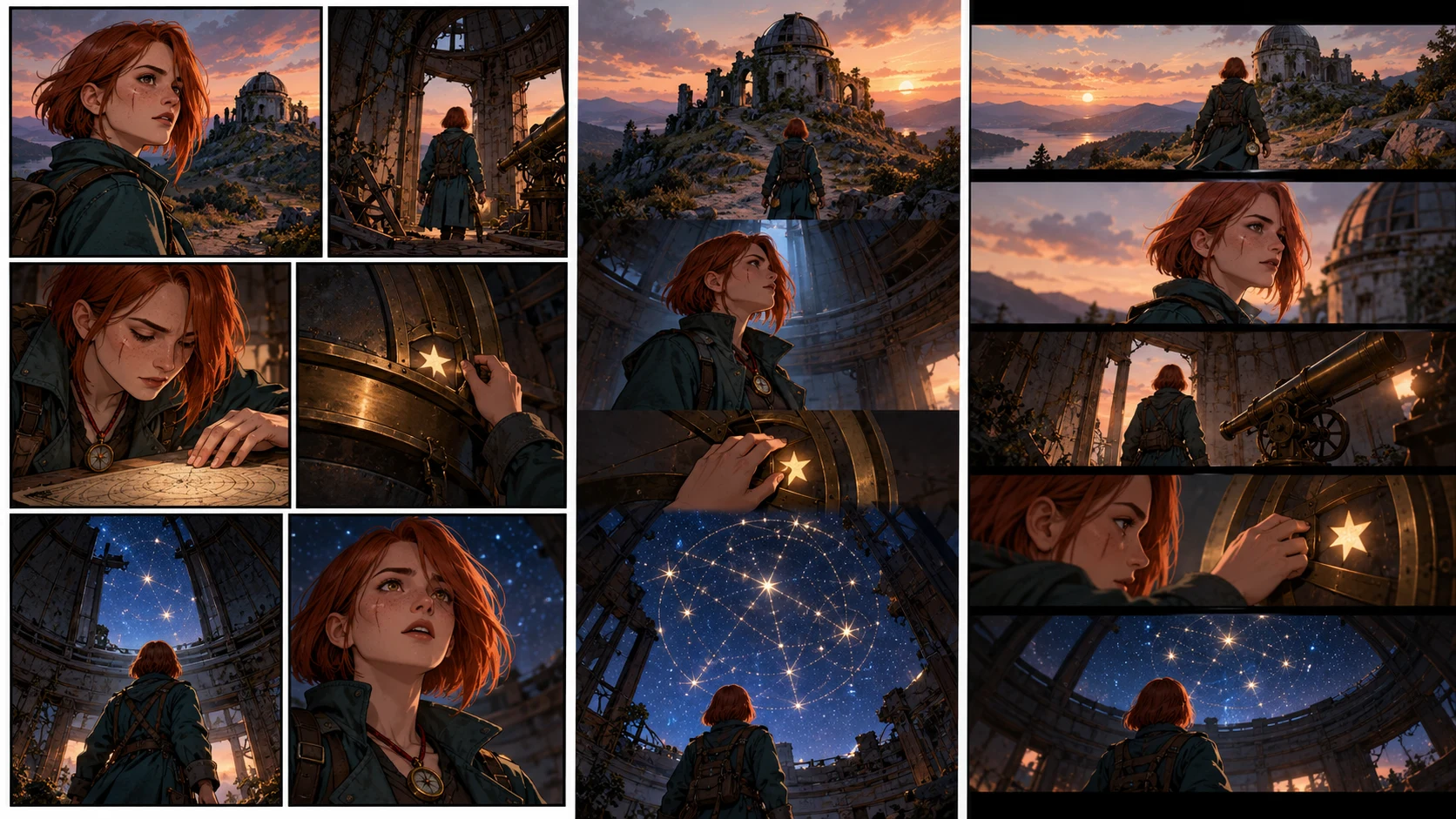
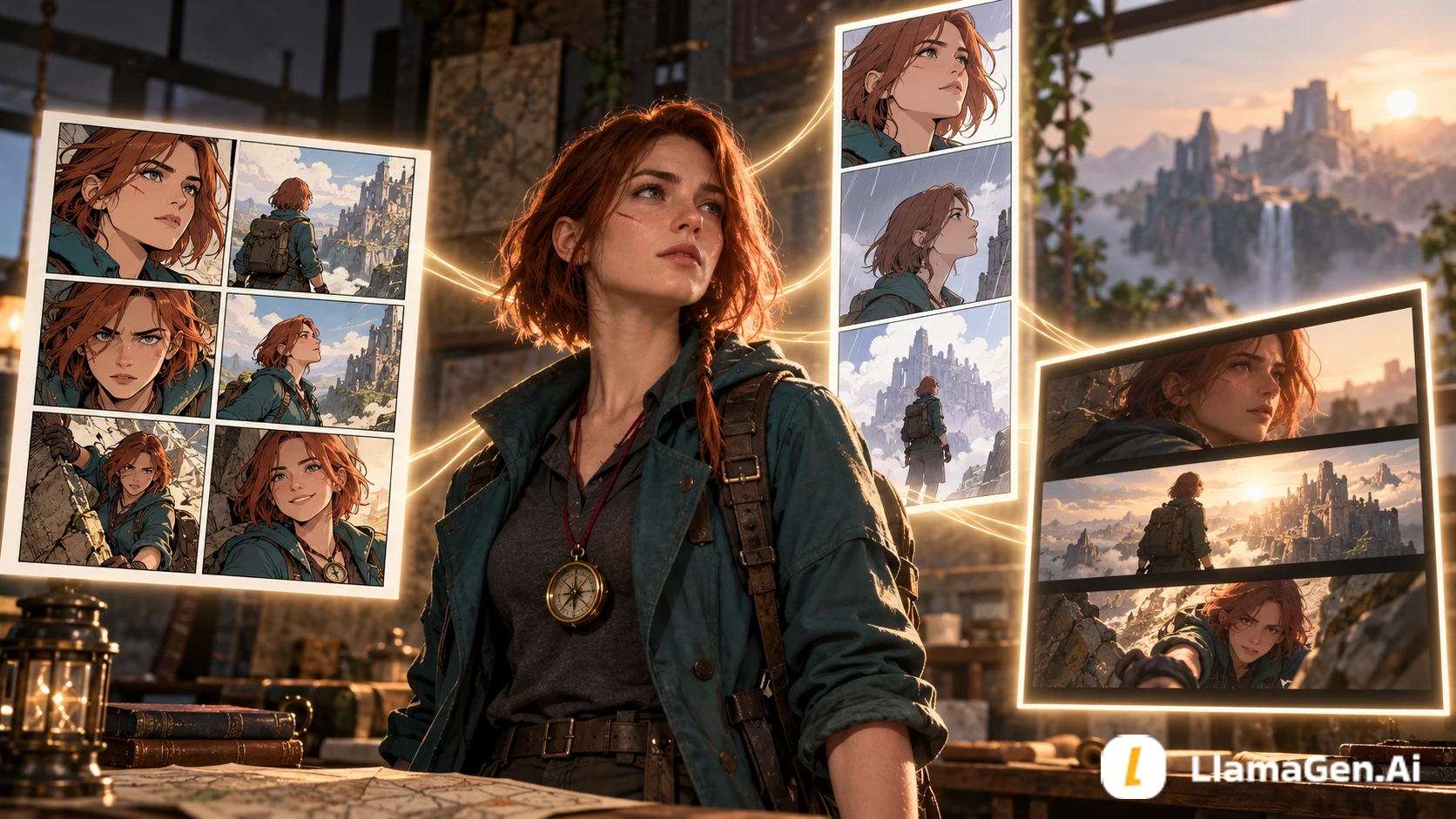
The same lead character appearing consistently in a comic page, a vertical webtoon, and a cinematic storyboard

What This Article Tests

This is not a replacement for the canonical Comic Character Consistency Checklist. That guide covers detecting and repairing drift across panels.

This test asks a narrower production question:

Which parts of a character reference should stay immutable, and which parts must adapt when the same story moves between comic, webtoon, and storyboard formats?

The answer matters to creators who reuse one cast across publishing, social, pitch, and video-preproduction assets.

Verification Scope

The workflow was checked on October 25, 2026 against the current LlamaGen.AI Visual Suite, Storyboard character guide, Story Workspace guide, and comic production workflow.

The images in this article are explanatory editorial visuals for the format test, not a benchmark of a specific model version. Generation settings and available tools can change, so verify the live product before planning a large series.

The Shared Character: Mina Vale

Дневник на промените

Разпалете мечтите на младите
Където милиони истории оживяват

Преглед на най-новите функции на LlamaGen, подобрения на продукта, обновления в дизайна и важни корекции на грешки.

✦
✧
✦
✧

Нова среда за Разказване на истории

Създавайте неограничени истории, комикси, анимации, игри и още — за секунди, които докосват съвременната публика

One Character Sheet, Three Formats: Comic, Webtoon, and Storyboard - LlamaGen.AI Blog

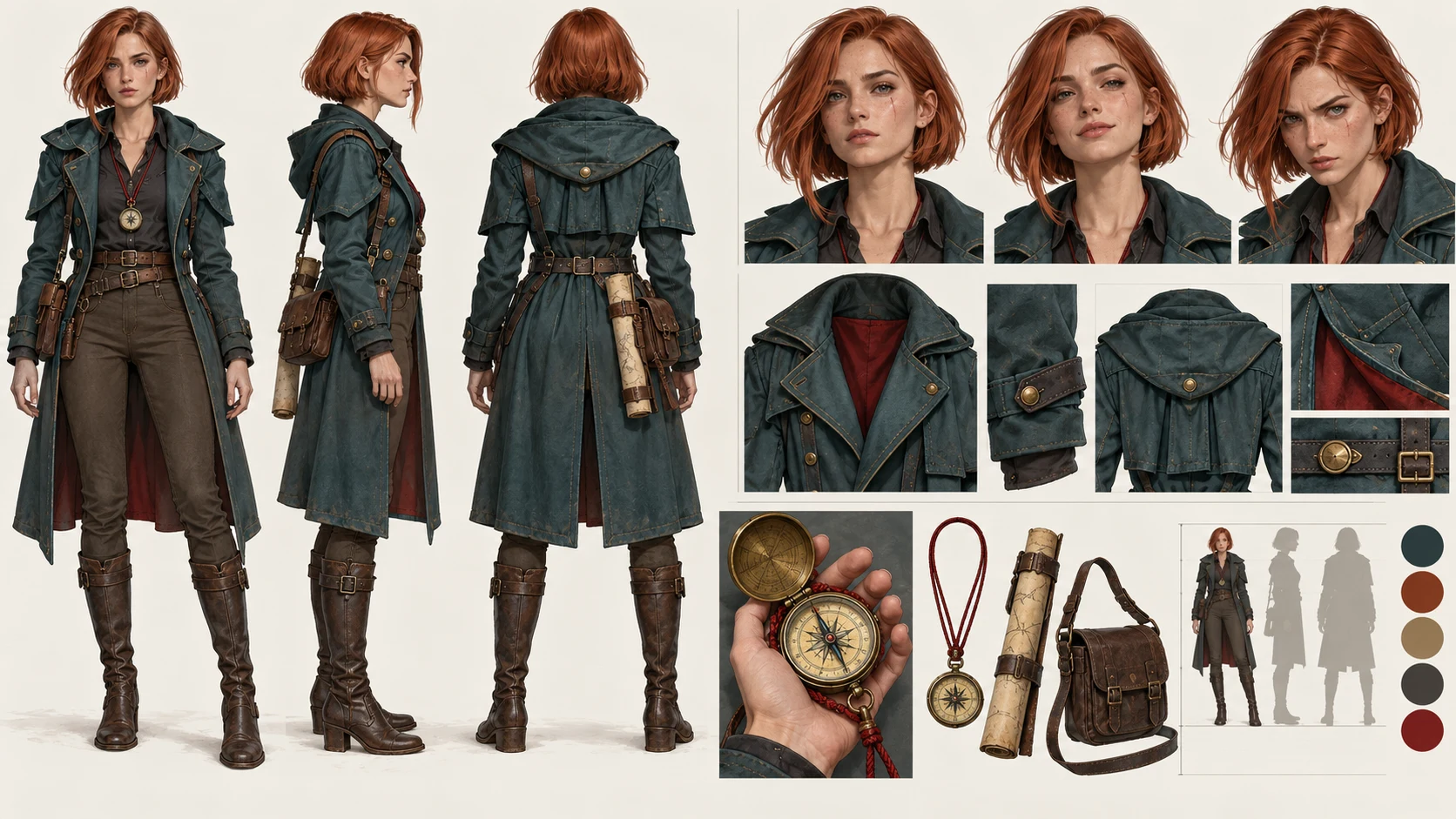
Mina is designed to be easy to identify at several camera distances without relying on tiny facial details.

FieldLocked definitionWhy it matters
Age and build28, tall, narrow shoulders, long limbskeeps silhouette distinct in wide shots
Faceoval face, straight brows, small scar under left eyeclose-up identity anchor
Haircopper bob, blunt ends, one longer lock on rightreadable shape from front and profile
Outfitteal field coat over charcoal shirtstable color and outer silhouette
Propround brass compass on a red cordplot object and continuity anchor
Paletteteal, copper, brass, charcoal, red accentsurvives format changes
Behaviortouches compass before making a risky choicerepeatable acting cue

The sheet also includes front, profile, back, three expressions, hand scale, coat closure, compass shape, and two lighting references.

A production-ready character sheet showing the same copper-haired explorer from multiple angles, expressions, and prop details

Build an Identity Layer and a Format Layer

Separate the instructions into two blocks.

Identity layer: keep fixed

Mina Vale, 28, tall with narrow shoulders and long limbs.
Oval face, straight brows, small scar under left eye.
Copper bob with blunt ends and one longer lock on her right.
Teal field coat, charcoal shirt.
Round brass compass on a red cord.
Teal/copper/brass/charcoal palette with one red accent.

Format layer: change by deliverable

COMIC PAGE:
six panels on one printable page, varied panel sizes,
clear left-to-right reading order, room for speech bubbles.

WEBTOON:
vertical mobile sequence, generous spacing,
one major reveal after a scroll gap, larger close-ups.

STORYBOARD:
16:9 frames, shot numbers, screen direction,
camera movement and action continuity.

Do not rewrite the identity layer just because the format changes. That is how “webtoon Mina” accidentally becomes a different person from “storyboard Mina.”

The Shared Scene

All three formats use the same six beats:

  1. Mina reaches an abandoned hill observatory at dusk.
  2. She finds a map symbol matching the mark on her compass.
  3. The compass needle points upward instead of north.
  4. She opens the roof mechanism.
  5. A hidden constellation appears across the dome.
  6. Mina realizes the stars form a route to the flooded city.

The plot, character, prop, and reveal are fixed. Only the reading experience changes.

Format 1: Six-Panel Comic Page

What changes

  • All six beats share one page.
  • Panel size communicates importance.
  • The reader can glimpse the bottom reveal before reading it.
  • Speech-bubble paths must coexist with the page composition.

Recommended layout

PanelShapeShotPurpose
1wide bannerobservatory exteriorestablish place
2small insetmap symbolevidence
3tall narrowcompass in Mina's handimpossible movement
4mediumMina pulls roof leveraction
5largedome opens to starsspectacle
6horizontal closestars reflected in Mina's eyes and compassemotional conclusion

Character risk

Small panels may erase the eye scar or distort the compass. Use silhouette, hair shape, coat color, and red cord as the primary anchors at distance. Save tiny facial details for close shots.

Format 2: Vertical Webtoon

What changes

  • Beats are separated by scrolling time, not page geography.
  • A blank gap can delay the constellation reveal.
  • Close-ups can be larger because the screen shows fewer panels at once.
  • Repeated full-body views feel slower than they do on a print page.

Recommended sequence

exterior panel
short gap
Mina enters
map-symbol close-up
compass close-up
long dark gap
hand pulls lever
long reveal panel of opening dome
reaction close-up
final route-shaped constellation

Character risk

Long gaps make readers compare Mina from memory rather than side by side. Repeat the strongest anchors near re-entry points: copper bob, teal coat, and red compass cord.

For episode length and pacing, see How Many Panels Should a Webtoon Episode Have?.

Format 3: 16:9 Storyboard

What changes

  • Every frame represents a shot or meaningful action state.
  • Screen direction must remain coherent.
  • The storyboard needs enough spatial information for staging and later animation.
  • Dialogue placement is less important than camera, action, and continuity notes.

Recommended shot plan

ShotFrameCamera/action noteContinuity anchor
116:9 wideslow push toward observatory, Mina enters frame leftteal coat silhouette
2over shouldermap symbol on consolecopper hair and compass cord edge
3insertcompass needle tilts upwardexact prop shape
4medium profileMina crosses right and pulls leverpreserve screen direction
5low wideroof opens above Minacoat and body proportion
6close-upreflected route crosses her eyesscar under left eye visible

Character risk

Camera changes can mirror the scar, hair lock, or prop hand. Label left/right features on the character sheet and check them after every profile or reversed shot.

Cross-Format Audit

Use the same pass/fail criteria after each adaptation.

Identity anchorComic pageWebtoonStoryboardPass rule
face and scarclear in panels 4 and 6clear after each long gapcorrect side in close/profile shotsno mirrored or missing scar where visible
copper bobstable silhouette in all panelsstable across scroll re-entrystable through angle changesblunt bob and long right lock remain
teal coatsame cut and closuresno unexplained costume changeback/profile construction matchescolor and structure stay canonical
compassreadable in insertsrepeated before revealscale and hand continuity preservedround brass case, red cord
body proportionconsistent panel to panelno height change after gapsconsistent relative to settall, narrow-shouldered silhouette
paletteprintable contrastmobile-readable contrastcinematic lighting still preserves anchorsteal/copper/brass remain identifiable

The test passes when Mina is immediately identifiable in all three outputs without making every image use the same pose or camera angle.

What Should Change on Purpose

Consistency is not cloning. These changes are healthy:

  • facial expression;
  • pose and gesture;
  • camera distance;
  • lighting and weather;
  • panel crop;
  • amount of background detail;
  • lettering-safe space;
  • pacing between images.

These changes need an explicit story reason:

  • hairstyle or hair length;
  • coat construction and color;
  • scar side;
  • body type;
  • compass shape or cord color;
  • age and facial proportions.

Failure Case: One Prompt for All Three Formats

A prompt such as “use this character to make a comic, webtoon, and storyboard” collapses identity, story, and layout into one request. Typical failures include:

  • the webtoon becoming a tall crop of the comic page;
  • the storyboard using decorative comic panels instead of shots;
  • Mina's coat and face changing with each format style;
  • identical poses repeated to force consistency;
  • dialogue baked into art with no editing space.

Instead, reuse the identity layer and rewrite only the format layer.

Reusable Character Lock Template

IDENTITY - DO NOT REINTERPRET
Name and age:
Body silhouette:
Face anchors:
Hair shape and side-specific details:
Outfit construction and palette:
Signature prop and scale:
Behavioral gesture:
Forbidden changes:

SCENE
Location:
Six story beats:
Emotional turn:

FORMAT
Comic, webtoon, or storyboard:
Aspect ratio / page size:
Reading direction:
Panel or shot budget:
Text-safe requirements:
Camera or scroll notes:

Production Order

  1. Approve the character sheet at useful angles.
  2. Approve the story beats once.
  3. Generate one format at a time.
  4. Review identity anchors before refining style.
  5. Repair isolated failures using the canonical reference.
  6. Export with format-specific dimensions and lettering.
  7. Archive the approved character sheet with the project.

When a single frame fails, use the one-panel repair workflow instead of changing the character definition everywhere.

FAQ

Do I need a different character sheet for each format?

Usually no. Keep one canonical identity sheet and add format-specific pose, crop, or expression references only when needed.

Should a webtoon use the same panels as a print comic?

Not automatically. The story beats can remain, but vertical pacing and reveal timing require a new composition.

Can storyboard frames be reused as comic panels?

Some can, but storyboards optimize camera and action continuity. Finished comic panels also need page rhythm, rendering, lettering space, and a deliberate reading path.

How many reference views are enough?

Start with front, profile, back, expressions, full-body scale, outfit construction, and the signature prop. Add a view only when production exposes an ambiguity.

Final Takeaway

The reusable asset is not one perfect portrait. It is a compact identity system that survives different crops, pacing models, and camera languages.

Create the character sheet once, lock the immutable features, and then build the comic, webtoon, or storyboard in the LlamaGen.AI Visual Suite.

Sources

  • LlamaGen.AI Visual Suite
  • LlamaGen.AI Storyboard characters
  • LlamaGen.AI Story Workspace: Getting started
  • LlamaGen.AI comic production workflow
  • LlamaGen.AI: How many panels should a Webtoon episode have?

Product capabilities and documentation were checked on October 25, 2026 and may change.

Related hot tags

Дизайн на героя

Webtoon

Сториборд

AI комикс

LlamaGen.AI

Популярни инструменти за творци

Превърнете вдъхновението в следващата си история

Създавайте комикси, сторибордове и стилизирани снимки с LlamaGen.

01

Генератор на AI комикси

Превърнете идея в завършени комикс ивици за минути.

Създай комикси
02

Генератор на AI манга

Създавайте изразителна манга и много панелни истории.

Създавайте манга
03

AI генератор на сториборд

Визуализирайте всяка сцена преди да започне продукцията.

Създавайте сторибордове
04

Превърнете снимка в комикс

Превърнете всяка снимка в илюстрация в комикс стил.

Създавайте комикси от снимки
05

Създател на AI комикс ленти

Създавайте лесни за споделяне ивици с последователни персонажи.

Създавайте комикс ивици

LlamaGen community

checkmark

Get hands-on help with your comics

checkmark

Showcase your comics to fellow LlamaGen creators

checkmark

Participate in special events to win gifts

Лого на LlamaGen
  • United States
  • Español
  • Français (France)
  • 日本語
  • 한국어
  • Deutsch
  • 繁體中文 (台灣)
  • 繁體中文 (香港)
  • 简体中文
  • Português
  • Italiano
  • Español (México)
  • العربية
  • Русский
  • Português (Brasil)
  • Tiếng Việt
  • Български

Водещи бъдещето на AI генерацията на комикси

  • Поддръжка 24/7
  • Седмични актуализации
  • Сигурно и съвместимо
  • 99.9% време на достъпност

Изтеглете LlamaGen безплатно

AndroidiOSДесктоп

Продукт

  • Последни стартирания
  • Функции
  • Създател на комикс ивици
  • Comic StoresНов
  • Манга студиоНов
  • Превърнете картинка в комикс
  • Комикс към Видео
  • AI комикс фабрика
  • Комик агент
  • iOS и Android
  • Mac & Windows
  • Изтегли
  • Comic ZapНов
  • Генератор на AI комикси
  • AI генератор на анимации
  • Генератор на AI уебтун
  • Генератор на комиксови ленти
  • Превърнете картинка в комикс
  • Генератор на AI манга
  • Преводач за манга
  • Снимка към аниме
  • Изображение към подсказка
  • Аниме към реален живот
  • Оцветяване на манга
  • Генератор на аниме герои
  • Инструменти за пикселни игрови ресурси
  • AI генератор на sprite sheet
  • Най-добрите инструменти за пикселни игри през 2026
  • Създател на фото комикси
  • Алтернатива на Comic Life

Свързани продукти

  • семейство LlamaGen
  • CineoBoardНов
  • Comics API

Планове

  • Ценообразуване
  • Стартер
  • Pro

Общност

  • Творци
  • Партньори
  • Партньор

Модели с ИИ

  • GPT Image 2.6 Flare
  • GPT Image 2.6 Sunburst
  • Grok Imagine Image 2.0
LinkedInX (Twitter)
  • Начало
  • Статии
  • Блог
  • Създай
  • Ценообразуване
  • API
  • Affiliate ProgramNEW

Попитайте AI за LlamaGen

  • Comic Zap
  • Velika
  • За предприятия
  • Образование
  • API за комикси
  • Свържете се с отдел Продажби
  • Образователни планове
  • Учители
  • Студенти
  • Учители и ученици
  • Стартъпи
  • Отстъпки за ученици и студенти
  • Компания

    • Говорете с нашия основател
    • За нас
    • Пътна карта на продукта

    Помощ

    • Център за помощ
    • Доверие
    • Безопасен AI
    Отзиви
  • Стена на любовта
  • LlamaGen MCPНов
  • LlamaGen за разработчици
  • Ресурси

    • Дневник на промените
    • Блог
    • Ръководства

    Инструменти

    • AI генератор на лога
    • Генератор на персонажи в стил Grokbot
    • PNG в комикс
    Wan 3.0
  • Wan 3.0 Prime
  • Seedance 2.5
  • MiniMax H3
  • Nano Banana 2.1
  • Nano Banana 2 Lite
  • Seedream 5.0 Flash
  • Seedream 5.0 Pro
  • Seedance 2.0 Mini
  • Kling 3.0 Turbo
  • Nano Banana 2
  • GPT Image 2
  • Gemini Omni Flash
  • All AI Models
  • AI инструменти

    • AI извличане на облекло
    • AI смяна на прическата
    • AI смяна на манга прическа
    Instagram
    YouTube
    Facebook група
    Reddit
    Discord
    Имейл поддръжка
    ПоверителностУсловияКарта на сайта
    Изтегли бранд материали
    © 2026 LlamaGen.Ai Всички права запазениВсички услуги са онлайн

    Предишни блогове

    Human-Led AI Game Cutscenes: Keep the Script, Storyboards, and Timing Under Your Control

    Human-Led AI Game Cutscenes: Keep the Script, Storyboards, and Timing Under Your Control

    A practical, creator-led AI game cutscene workflow for selecting storyboard candidates, rejecting we

    Jay
    Jay
    November 23rd, 2026
    Make an AI Film Feel Real: Blocking, Reactions, and Continuity in a Quiet Scene

    Make an AI Film Feel Real: Blocking, Reactions, and Continuity in a Quiet Scene

    A worked quiet-scene repair case: room geography, prop behavior, reactions, and edit choices that im

    Jay
    Jay
    November 23rd, 2026
    How to Make an AI Drama: A Six-Shot Pilot and Series Continuity Plan

    How to Make an AI Drama: A Six-Shot Pilot and Series Continuity Plan

    Create a 30-second illustrated AI drama pilot, review real motion failures, and package continuity n

    Jay
    Jay
    November 23rd, 2026
    Two OCs in One Comic Panel: Keep Identities and Speakers Clear

    Two OCs in One Comic Panel: Keep Identities and Speakers Clear

    A six-panel Maya and Theo dialogue case showing separate references, a handoff repair, a reverse-sho

    Jay
    Jay
    November 20th, 2026
    Кариери
  • Пишете ни на имейл
  • Нашият свят на талисмани
  • Медиен пакет
  • Партньорство с KOL
  • Съдържание
  • Професионални услуги
  • Често задавани въпроси
  • Сигурност
  • Достъпност
  • Видео урок
  • Свържете се с нас
  • Карта на сайта
  • Персонализирани комикси
  • Функции
  • Алтернативи
  • Най-добрите AI приложения
  • Ръководство за оцветяване на манга с GPT-6
  • Claude умение за комикс книга
  • Ръководство за комикси с Gemini AI
  • Този комикс
  • Отстъпки за ученици и студенти
  • Отстъпка за студенти
  • Text към комикс
  • PDF в комикс
  • Сценарий в комикс
  • Книга в комикс
  • Превърнете картинка в комикс
  • AI Генератор за пиксел арт
  • Образователни комикси
  • Генератор на AI видео
  • Генератор на видео с Gemini AI
  • Безплатен AI генератор на анонимни видеа
  • Комикс към Видео
  • Софтуер за сториборд
  • AI генератор на сториборд
  • Софтуер за сценарии
  • Редактор на сценарии
  • ИИ за истории
  • Генератор на AI истории
  • Генератор на книжка с истории
  • Генератор на AI изображения
  • AI инструмент за разделяне на слоеве
  • AI контрол на ъгъла на камерата
  • AI Генератор за пиксел арт
  • Инструменти за пикселни игрови ресурси
  • AI генератор на sprite sheet
  • Инструмент за нарязване на sprite sheet
  • Най-добрите инструменти за пикселни игри през 2026
  • API за анимация
  • ChatGPT/Codex плъгин
  • Ръководство за инсталиране на ChatGPT
  • Claude Code плъгин
  • Ръководство за инсталиране на Claude Code
  • AI генератор на ефект на вятър
  • AI генератор на дълбочинна карта
  • AI бял фон
  • AI премахване на обекти
  • AI виртуално пробване
  • AI изостряне на изображения
  • AI премахване на шум
  • AI възстановяване на снимки
  • AI продуктови сенки
  • AI генератор на фонове
  • AI генератор на портретни снимки
  • AI създател на емоджита
  • AI смяна на фона
  • AI отваряне на очи
  • AI красота
  • AI продуктова фотография
  • Вижте всички блогове



