

Organize PDF pages for free
Rearrange, rotate, delete, and combine PDF pages for free. Export your organized PDF privately without uploading files to a server.
Drop PDF files here or browse to get started
Loads our synthetic PDF sample from the CDN. Your own files are not uploaded.
PDF files only. Large or scanned PDFs may use significant device memory.
Password-protected PDFs are unsupported. Some interactive forms, bookmarks, annotations, and digital signatures might not survive copying pages. Preview cards show page numbers, not rendered page contents.
This tool does not upload your PDF. The website still requests scripts, fonts and site analytics. The PDF workspace uses Clarity's content-masking setting.
Reproducible example
5 pages into a reordered 4-page PDF
Controlled desktop Chrome check on , using original synthetic PDFs. These are LlamaGen's own checks, with downloadable inputs and outputs.
Load the 5-page sample, delete page 3, rotate page 1 clockwise once and move page 5 to the front. The downloaded order is O05, O01, O02, O04; O01 is rotated 90 degrees.
The output keeps the selected pages as PDF content. The rendered pages below show the actual order and rotation of the downloaded document.
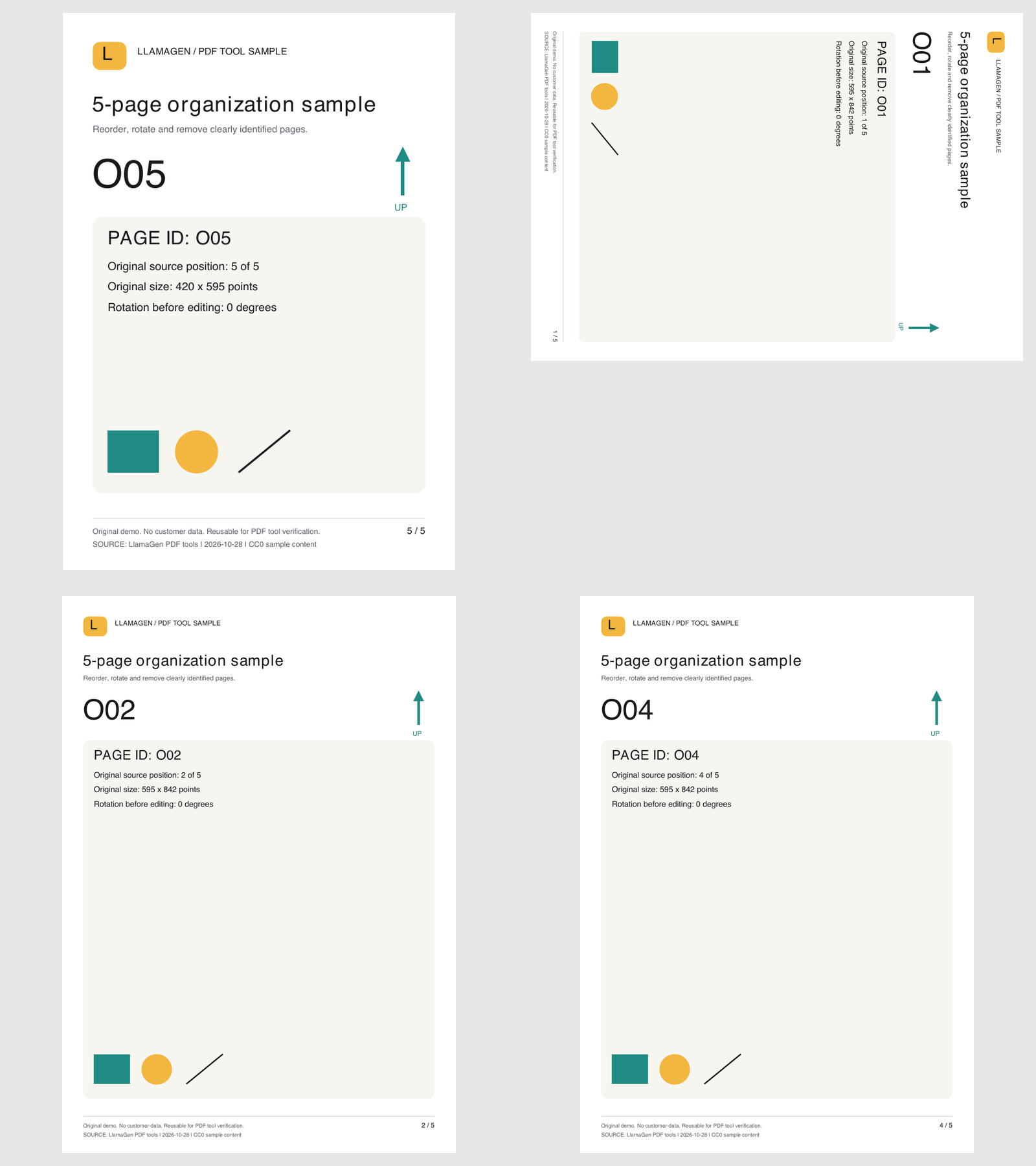
What was checked, and what is still unverified?
Across five exports, 11 output PDFs and 38 page instances were compared for page order, dimensions, rotation, text, fonts and decoded page content. The three main outputs were also rendered and visually reviewed. These images only arrange those rendered pages.
Pages are copied into a new PDF rather than flattened to screenshots. Text and vector content were retained in these checked outputs. Forms, bookmarks and digital signatures require separate review.
How pdf-lib copies pagesCoverage is limited to these small, synthetic PDFs in desktop Chrome on macOS. Mobile Safari, large-file memory pressure, interactive forms, signatures and production analytics payloads still need separate validation.
Read the verification recordView the actual workspace captureWhy use this PDF tool?
Split worksheets from answer keys, merge comic chapters or reorder printable pages. We process documents on your device, not on our servers.
How it works
- Choose PDF files from your device.
- Split by range, merge, or reorder, rotate and delete pages.
- Download the resulting PDF or ZIP. No upload required.
Privacy and compatibility
Password-protected PDFs are unsupported. Some interactive forms, bookmarks, annotations, and digital signatures might not survive copying pages. Preview cards show page numbers, not rendered page contents.
This tool does not upload your PDF. The website still requests scripts, fonts and site analytics. The PDF workspace uses Clarity's content-masking setting.
Who built this tool, and how does it handle my PDF?
This free browser tool is provided by LlamaGen. Page splitting, merging and rotation use the open-source pdf-lib library on your device; JSZip packages multiple output PDFs in your browser. The examples link to the inputs, archived outputs and limits of the controlled browser checks.