

तेज़ ऑनलाइन प्लानिंग के लिए मुफ़्त स्टोरीबोर्ड टेम्पलेट और स्टोरीबोर्ड टूल
स्टोरीबोर्ड शीट अपलोड करें, उसे दोबारा उपयोग किए जा सकने वाले शॉट्स में बाँटें, और रफ़ बोर्ड्स को ऑनलाइन स्टोरीबोर्ड सॉफ़्टवेयर के लिए ज़्यादा साफ़ workflow में बदलें। उन लोगों के लिए बनाया गया है जो free storyboard template विकल्प, Canva storyboard template boards, storyboard Celtx exports, Boords storyboard layouts, Milanote storyboard boards और Google story board setups की तुलना कर रहे हैं।
मुफ़्त स्टोरीबोर्ड टेम्पलेट। मुफ़्त ऑनलाइन स्टोरीबोर्ड। डायरेक्टर्स, एडिटर्स, प्रोड्यूसर्स और क्रिएटिव टीमों के लिए mobile-first frame cutter।
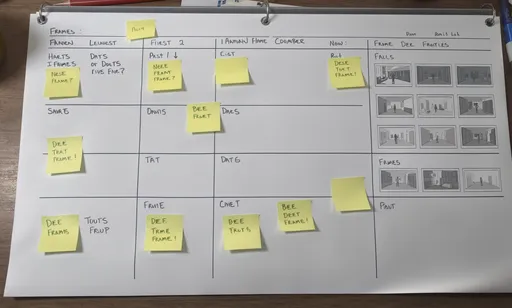

स्टोरीबोर्ड टेम्पलेट्स को शेयर करने लायक शॉट्स में बाँटें
स्टोरीबोर्ड शीट, प्रोडक्शन बोर्ड या एक्सपोर्ट किया हुआ टेम्पलेट अपलोड करें और हर फ़्रेम को तुरंत साफ़ शॉट में काटें। इसे storyboard Celtx workflows, Boords storyboard boards, Canva story board layouts, Milanote storyboard boards और Google story board files के साथ इस्तेमाल करें।
मुफ़्त स्टोरीबोर्ड टेम्पलेट टूल का उपयोग कैसे करें
स्टोरीबोर्ड शीट्स को दोबारा इस्तेमाल किए जा सकने वाले shot assets में बदलने का एक आसान ऑनलाइन workflow।
अपना स्टोरीबोर्ड टेम्पलेट अपलोड करें
स्टोरीबोर्ड टेम्पलेट, Celtx export, Boords storyboard board, Canva storyboard template, Milanote board या Google Slides storyboard screenshot से शुरुआत करें।
स्मार्ट डिटेक्ट या कस्टम ग्रिड चुनें
बॉर्डर वाले टेम्पलेट्स के लिए smart detection का उपयोग करें, या rows और columns तय करें जब आपको बोर्ड layout पहले से पता हो।
साफ़ स्टोरीबोर्ड शॉट्स डाउनलोड करें
हर फ़्रेम को PNG bundle के रूप में एक्सपोर्ट करें ताकि आपकी टीम शॉट्स को animatics, slide decks, approvals और production docs में दोबारा इस्तेमाल कर सके।
यह स्टोरीबोर्ड टेम्पलेट पेज किन कामों के लिए उपयोगी है
इसे सिर्फ़ इमेज को फ़्रेम में crop करने के लिए नहीं, बल्कि स्टोरीबोर्ड टेम्पलेट्स और स्टोरीबोर्ड प्लानिंग के लिए इस्तेमाल करें।
स्टोरीबोर्ड टेम्पलेट्स
तैयार स्टोरीबोर्ड टेम्पलेट्स लें और उन्हें रिव्यू, एडिटिंग और क्लाइंट डिलीवरी के लिए दोबारा उपयोग किए जा सकने वाले panels में बाँटें।
ऑनलाइन स्टोरीबोर्ड सॉफ़्टवेयर cleanup
जब आपका ऑनलाइन स्टोरीबोर्ड सॉफ़्टवेयर export बहुत भरा हुआ लगे, तो आसान approval और sorting के लिए फ़्रेम्स को अलग-अलग images में बाँटें।
Canva, Google Slides और Milanote से स्टोरीबोर्ड
canva story board, google story board और milanote storyboard sessions के बाद इस टूल का उपयोग करें, ताकि बड़े बोर्ड्स को ज़्यादा साफ़ shot assets में बदला जा सके।
Celtx और Boords handoff
storyboard celtx exports और boords storyboard layouts को editing, pre-vis या production planning में भेजने से पहले साफ़ करें।
Celtx, Boords, Canva, Milanote और Google Slides के साथ यह कहाँ फिट बैठता है
बोर्ड के लिए planning surface का उपयोग करें, फिर जब आप review या animate करने के लिए तैयार हों तो जल्दी से साफ़ फ़्रेम निकालें।
Storyboard Celtx workflow
Celtx script और production planning के लिए मज़बूत है। यह पेज तब मदद करता है जब आपके पास पहले से storyboard Celtx exports हों और आप बोर्ड दोबारा बनाए बिना साफ़ frame assets चाहते हों।
Boords storyboard workflow
Boords storyboard boards collaboration के लिए अच्छे हैं। यह टूल तब काम आता है जब आपको deck-ready images के लिए panels काटने वाला हल्का और मुफ़्त storyboard template step चाहिए।
Canva storyboard template workflow
Canva storyboard template layouts डिज़ाइन करना आसान है। यह पेज canva story board को individual shots में बदलने में मदद करता है, खासकर जब teammates को अलग frame files चाहिए हों।
Milanote storyboard और Google story board workflow
Milanote storyboard boards और Google story board slides ideation के लिए अच्छे हैं। जब आपको एक बड़े canvas के बजाय अलग-अलग फ़्रेम चाहिए हों, तब यह टूल तेज़ export path देता है।
अक्सर पूछे जाने वाले सवाल
क्या यह मुफ़्त स्टोरीबोर्ड टेम्पलेट है या स्टोरीबोर्ड टूल?
यह दोनों है। मुफ़्त स्टोरीबोर्ड टेम्पलेट से शुरुआत करें, फिर स्टोरीबोर्ड शीट्स को दोबारा उपयोग किए जा सकने वाली shot files में काटने के लिए टूल का इस्तेमाल करें।
क्या मैं इसे storyboard Celtx exports के साथ इस्तेमाल कर सकता हूँ?
हाँ। अगर आप Celtx storyboard board को export या screenshot करते हैं, तो उसे यहाँ अपलोड करके शीट को अलग-अलग फ़्रेम्स में बाँट सकते हैं।
क्या यह ऑनलाइन स्टोरीबोर्ड सॉफ़्टवेयर की तरह काम करता है?
यह स्टोरीबोर्ड फ़्रेम्स को साफ़ करने, बाँटने और एक्सपोर्ट करने के लिए एक हल्का ऑनलाइन स्टोरीबोर्ड सॉफ़्टवेयर utility की तरह काम करता है। यह बड़े planning tools के साथ खासतौर पर उपयोगी है।
अगर मैं Boords storyboard, Canva storyboard template, Milanote storyboard या Google story board workflows की तुलना कर रहा हूँ, तो क्या यह अच्छा विकल्प है?
हाँ। वे टूल layout और collaboration के लिए उपयोगी हैं। यह पेज तब मददगार है जब आपको तेज़ extraction step चाहिए, जो एक storyboard board को कई अलग-अलग shot files में बदल दे।
क्या मैं इसे मुफ़्त ऑनलाइन स्टोरीबोर्ड workflows के लिए इस्तेमाल कर सकता हूँ?
हाँ। आप स्टोरीबोर्ड शीट्स अपलोड कर सकते हैं, smart detect या custom grids आज़मा सकते हैं, और शुरुआत में भुगतान किए बिना निकाले गए स्टोरीबोर्ड शॉट्स डाउनलोड कर सकते हैं।
यह पेज किन लोगों के लिए बनाया गया है?
यह directors, editors, producers, storyboard artists, agencies, educators और उन सभी के लिए उपयोगी है जिन्हें बेहतर shot organization के लिए तेज़ स्टोरीबोर्ड टूल चाहिए।
Related tool
क्या आपको नए स्टोरीबोर्ड सीन भी जनरेट करने हैं?
जब आप सिर्फ़ मौजूदा टेम्पलेट्स को बाँटना नहीं, बल्कि scripts से नए स्टोरीबोर्ड visuals बनाना चाहते हैं, तो हमारा AI Storyboard Generator इस्तेमाल करें।
AI Storyboard Generator खोलेंRelated writing workflow
Move the draft into screenplay form.
Use the AI Screenplay Editor when a script, fiction draft, storyboard brief, video idea, or canvas note needs proper scene headings, action, dialogue, parentheticals, cover pages, outlines, beats, and collaboration-ready revisions.
INT. COMMUNITY CENTER - NIGHT
Folded chairs. A storm outside. MAYA stands at the microphone with a page of notes she no longer needs.
MAYA
If the city will not read the record, we will read it out loud.
क्या आप अपना स्टोरीबोर्ड टेम्पलेट साफ़-सुथरा करना चाहते हैं?
एक बोर्ड अपलोड करें, फ़्रेम्स बाँटें, और approvals, presentations और production planning के लिए ज़्यादा साफ़ shot assets डाउनलोड करें।
मुफ़्त स्टोरीबोर्ड टेम्पलेट से शुरू करें