Comic Lettering Workflow: Keep Art, Bubbles, and Translation Separate - LlamaGen.AI Blog
Comic Lettering Workflow: Keep Art, Bubbles, and Translation Separate
Todos los posts

Comic Lettering Workflow: Keep Art, Bubbles, and Translation Separate

Jay
Jay
28 de octubre de 2026
Copiar enlace
  • The Short Answer
  • Why This Becomes a Chapter-Level Problem
  • Our Layered Lettering Test
  • Test Conditions
  • The Four-Layer Contract
  • 1. Clean Art
  • 2. Bubble Shapes
  • 3. SFX
  • 4. Dialogue and Translation
  • What Changed in the German Export
  • Failure Test: Translating a Flattened Page
  • A Production File Structure That Survives Translation
  • Step-by-Step Workflow
  • Step 1. Generate Text-Free Panels
  • Step 2. Add Temporary Bubble Footprints Early
  • Step 3. Lock the Clean Art
  • Step 4. Build Editable Bubbles and Text Separately
  • Step 5. Isolate SFX
  • Step 6. Create One Locale Export at a Time
  • Step 7. Run Mobile and Print QA
  • Approval Gates
  • Common Failures and the Cheapest Repair
  • FAQ
  • Should I ask an image model to render final speech-bubble text?
  • Should bubbles be added early or late?
  • Should bubble shapes and dialogue be separate layers?
  • Should SFX be translated?
  • Did the layered workflow make translation faster?
  • What should the final deliverables include?
  • Sources and Editorial Disclosure
elevate-your-comics.png
Eleva tus cómics con LlamaGen

The Short Answer

Plan speech-bubble space while you thumbnail the page, but do not bake dialogue, bubbles, sound effects, or translations into the illustration.

Keep at least four editable production layers:

  1. Clean comic art
  2. Bubble shapes and tails
  3. Sound effects and display lettering
  4. Dialogue or translation text

Flatten those layers only when you create a delivery export. This gives the letterer room to change line breaks, enlarge a German bubble, redraw a translated sound effect, or fix a typo without regenerating the art.

In our October 28, 2026 test, we generated one 1600 x 900 clean comic master with Vertex gemini-nano-banana-2.1, then exported English and German versions from the same art. The German version changed bubble geometry, line breaks, SFX, and dialogue. It required zero art regenerations, and the clean-art SHA-256 remained unchanged.

Start with text-free panels in LlamaGen.AI Comic Strips, reserve negative space for lettering, and keep the production text editable until approval.

Why This Becomes a Chapter-Level Problem

One speech bubble is easy. A complete chapter is not.

A recent r/aicomicmakers lettering discussion highlighted the work that begins after the art is finished: bubble placement, font choice, line breaking, reading order, SFX, page-to-page consistency, and repeating the process for every language.

The most useful comments point in two directions that should not be confused:

  • One experienced creator said art and text must remain separate. They use generated pages for ideas but rebuild lettering and SFX manually.
  • Another creator said bubbles must be considered early because their first chapter repeatedly produced balloons that were too large or too small for the panels.

Both are right. Plan lettering early; preserve editability late.

If you postpone all bubble decisions until final art, dialogue may cover faces and actions. If you generate final text inside the art, every typo and translation becomes an image-repair problem.

Our Layered Lettering Test

We used the same four-panel library scene for every output:

Panel 1: A repair robot enters a giant library with a moon map.
Panel 2: It mistakes a sleeping orange cat for the head librarian.
Panel 3: A stack of books falls while the robot protects the map.
Panel 4: The robot salutes; the cat opens one unimpressed eye.

The clean-art prompt explicitly prohibited letters, speech bubbles, signs, logos, watermarks, and sound effects. It also requested blank areas near the upper edges of panels 1, 2, and 4.

Test Conditions

ItemTest value
Test dateOctober 28, 2026
Clean-art modelVertex gemini-nano-banana-2.1
Working size1600 x 900
Clean-art generations1
Clean-art gateway request21.862 seconds
English local composite export0.816 seconds
German local composite export0.537 seconds
Art regenerations for German0
Mobile QA width390 pixels

The image request and local export times describe this one run, on this machine and network. They are not product latency, pricing, or credit benchmarks.
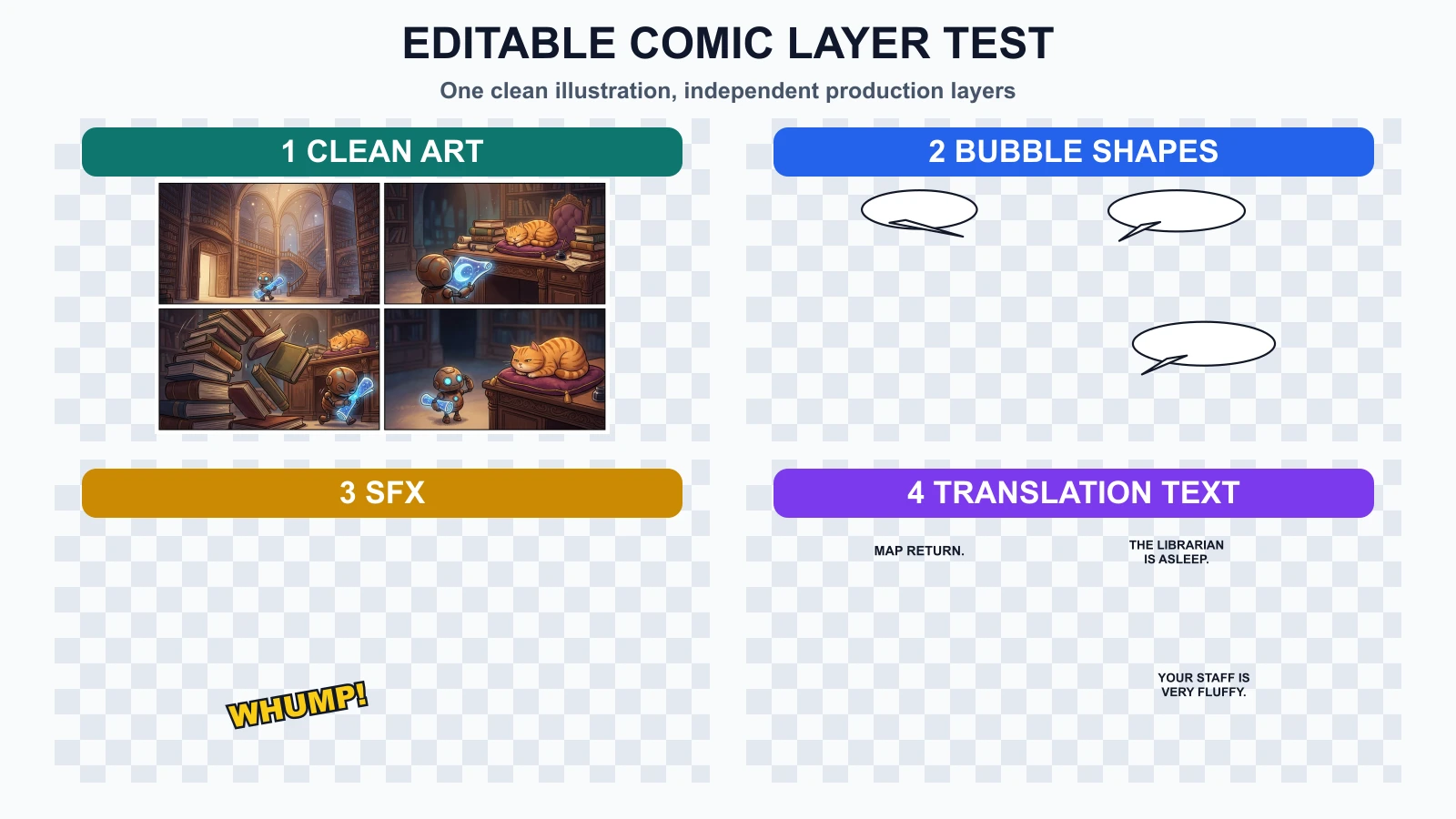
Four editable comic production layers: clean art, bubble shapes, SFX, and translation text

The experiment used one clean illustration layer, then added independent bubble, SFX, and dialogue layers. The checkerboard areas represent transparency, not missing art.

The Four-Layer Contract

1. Clean Art

The art layer contains only illustration pixels: characters, props, backgrounds, lighting, panel borders, and deliberate empty space.

It should not contain:

  • AI-generated dialogue
  • Empty white bubbles that cannot be moved
  • Sound effects fused with objects
  • Captions or translated text
  • Temporary review notes

This is the source you return to when a new language or revised script arrives.

2. Bubble Shapes

Bubble geometry is a layout decision, not part of the dialogue string.

Keep the outline, fill, and tail editable so you can change:

  • Width and height
  • Tail direction
  • Speaker assignment
  • Distance from faces
  • Reading order
  • Space for longer translations

Clip Studio Paint's official balloon documentation describes balloons as editable layers with adjustable shapes, tails, control points, line thickness, and fill. The exact tool is optional; the editable behavior is the requirement.

3. SFX

Sound effects sit between art and language. They may interact with the scene like illustration, but they may also need localization.

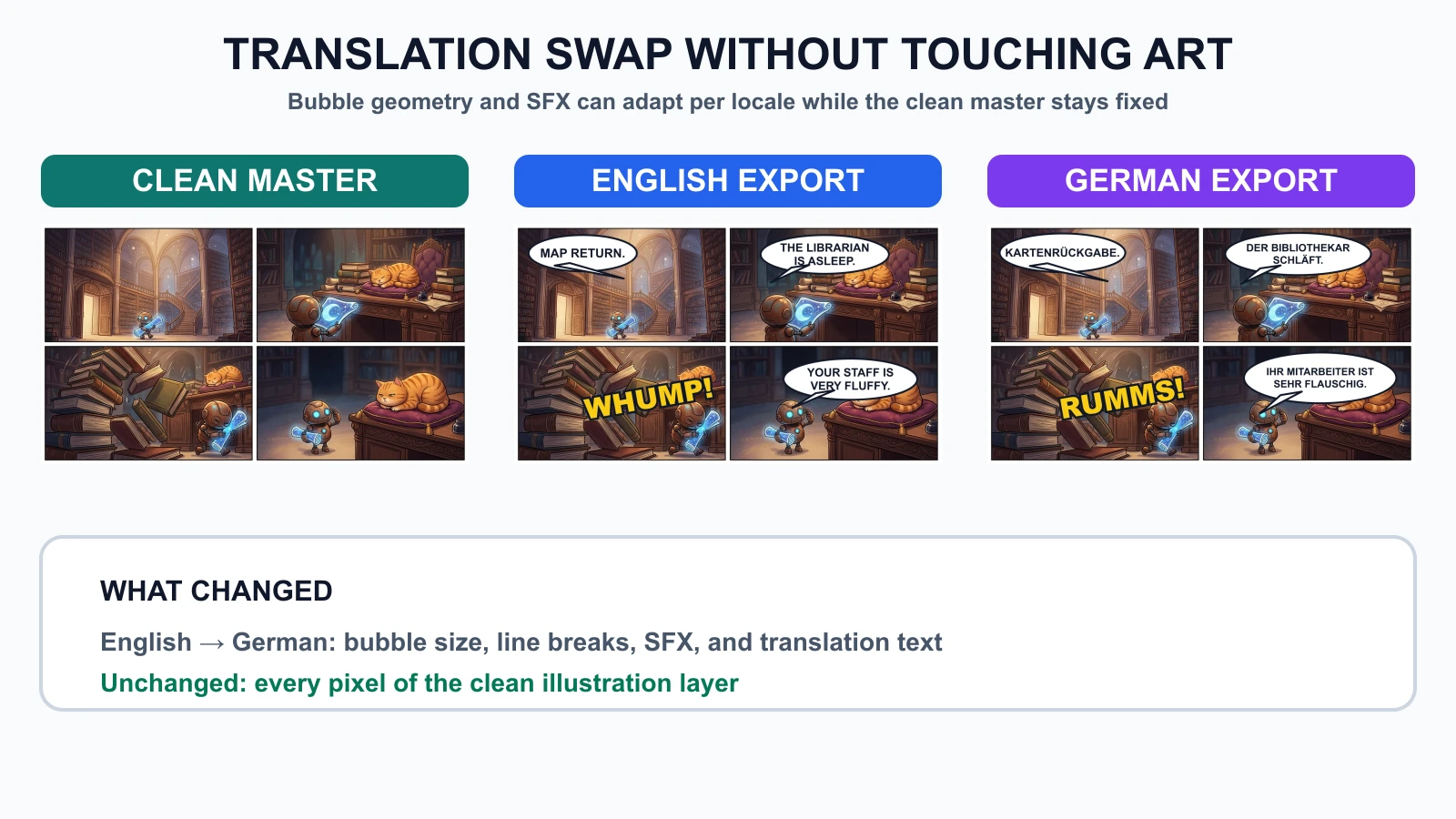
In our English export, the falling books use WHUMP!. In German, that layer changes to RUMMS!. The books, robot, and cat do not change.

Keep SFX separate when:

  • A translator may localize it.
  • The effect overlaps important art.
  • The client needs a text-free edition.
  • A print version needs a different crop.
  • You may replace display lettering later.

4. Dialogue and Translation

Store dialogue as editable text boxes, not pixels. A translation is not simply a string replacement: line length, word shape, punctuation, vertical rhythm, and font support can change.

The official Clip Studio Paint text documentation notes that wrapped text depends on the text frame and that text outside the frame can become invisible. That is why every locale needs a visual fit check after translation.

What Changed in the German Export

We changed four production decisions:

LayerEnglishGermanArt affected?
Bubble 1Short ovalWider oval for KARTENRÜCKGABENo
Bubble 2Two English linesTwo longer German linesNo
SFXWHUMP!RUMMS!No
Final dialogueTwo linesTwo longer lines in a taller bubbleNo
The same comic art exported as a clean master, English edition, and German edition

The clean-art checksum was 6ec0247c2cce... before and after both exports. We also resized the German export to 390 pixels wide and checked the smallest dialogue without zooming. It remained readable in the test preview.

This does not mean every translation can reuse the same page layout. It means the art can remain stable while the letterer adapts the editable layers.

Failure Test: Translating a Flattened Page

To reproduce the common failure, we flattened the English bubbles, SFX, and dialogue into the comic page. We then placed the German text over that flattened image without access to the clean art.

The result preserved the old English letters underneath the German translation. The new words collided with the old ones, and the English SFX remained behind the German SFX.
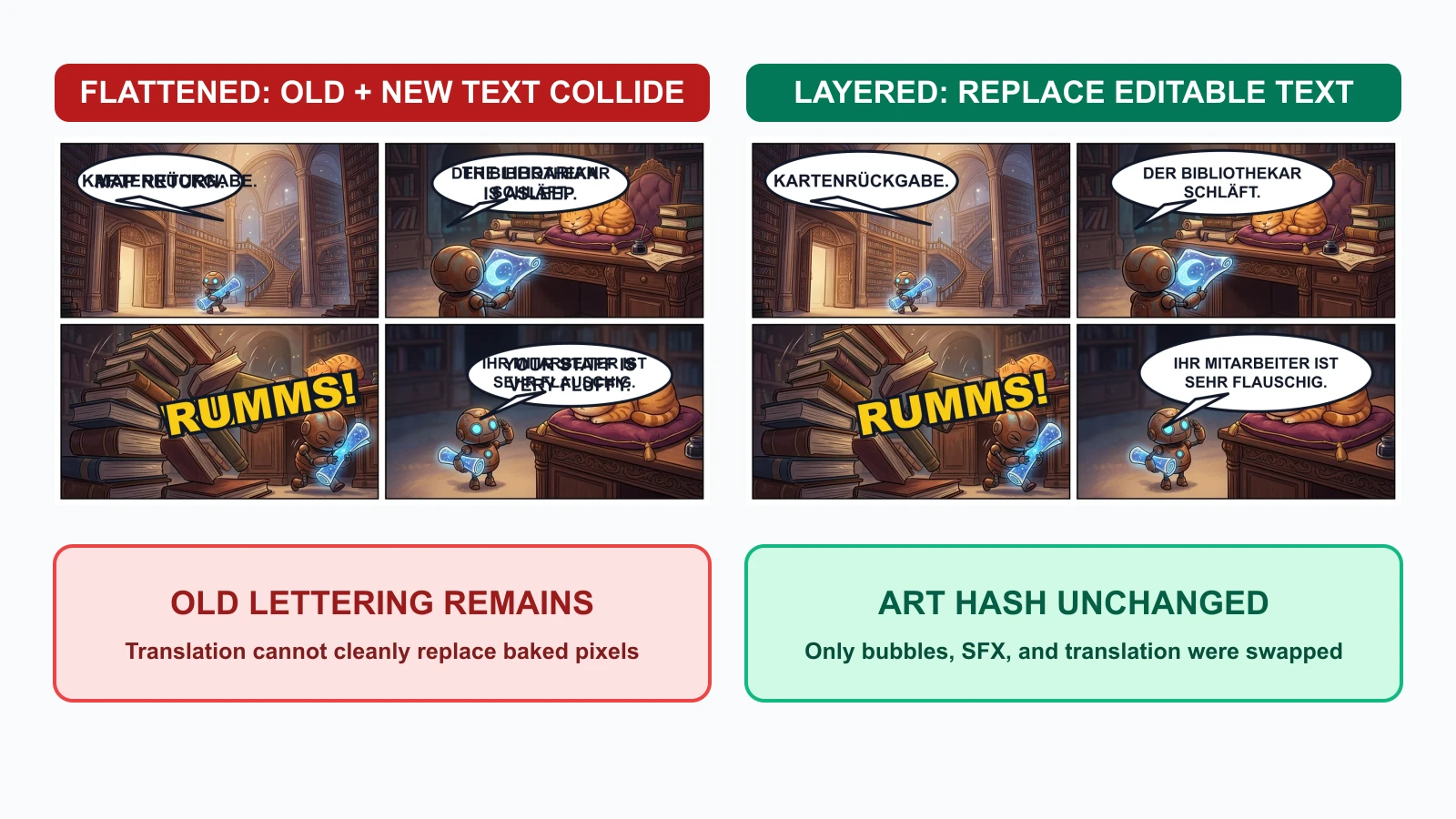
A flattened lettering failure compared with a clean layered German replacement

The layered version replaced only the editable production assets. The flattened version would require one of three repairs:

  1. Recover the clean source page.
  2. Paint over every old letter and reconstruct the art beneath it.
  3. Regenerate the affected panels and risk character or composition drift.

This is why a flattened PNG or JPEG should be a delivery artifact, not the master file.

A Production File Structure That Survives Translation

Keep predictable names and separate source from export files:

chapter-03/
  art/
    page-07-clean.webp
  bubbles/
    page-07-bubbles-en.svg
    page-07-bubbles-de.svg
  sfx/
    page-07-sfx-en.svg
    page-07-sfx-de.svg
  text/
    page-07-en.txt
    page-07-de.txt
  source/
    page-07-lettering.psd
  exports/
    page-07-en-web.webp
    page-07-de-web.webp
    page-07-en-print.pdf

PSD, CSP, SVG, or another editable format can work. The format matters less than preserving layer names, text editability, font information, and a clean art master.

Step-by-Step Workflow

Step 1. Generate Text-Free Panels

Use a prompt that reserves space but prohibits generated lettering:

Create a four-panel comic page with clear reading order.
Keep the same robot and orange cat in every panel.
Reserve clean negative space for future speech bubbles.
Do not render dialogue, captions, signs, letters, logos, watermarks, or SFX.

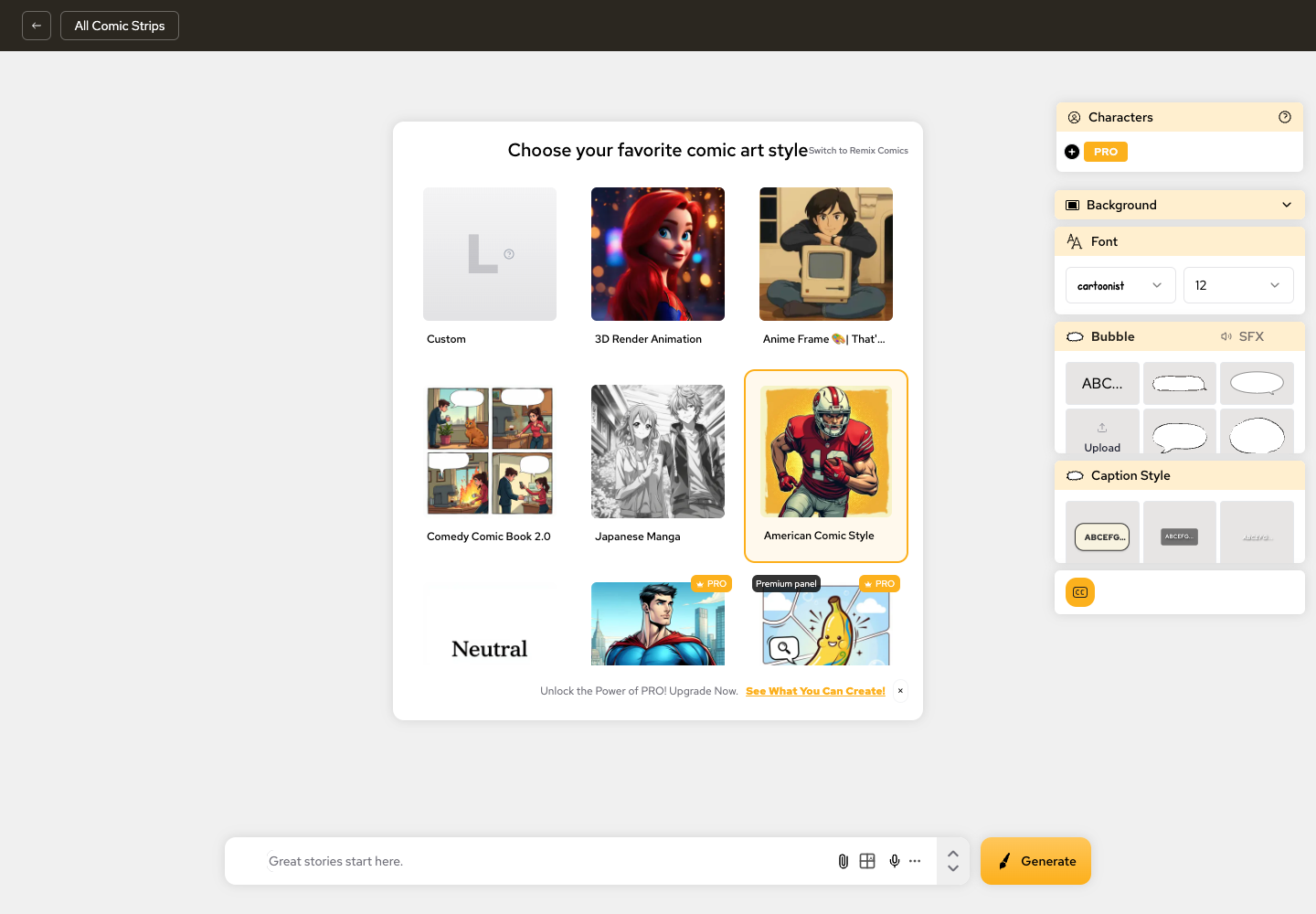
LlamaGen.AI Comic Strips can help you build the visual sequence and maintain story context before the final lettering pass.
LlamaGen.AI comic workspace with bubble and caption controls

Step 2. Add Temporary Bubble Footprints Early

During thumbnails or layout review, add rough bubbles with approximate dialogue volume. Do not polish them yet.

Approve:

  • Speaker order
  • Tail direction
  • Required negative space
  • Reading path
  • Maximum dialogue volume

This catches the "bubble is larger than the panel" problem before final art.

Step 3. Lock the Clean Art

Once panel composition is approved, export a text-free master and record its version or checksum. Future lettering edits should not silently modify it.

Step 4. Build Editable Bubbles and Text Separately

Keep bubble shape and text distinct when the tool allows it. A short English phrase may need a wider German balloon even when the font size stays the same.

Step 5. Isolate SFX

Treat SFX as a named layer or group. Decide per project whether it remains universal, is transliterated, or is localized.

Step 6. Create One Locale Export at a Time

For each language:

  1. Replace dialogue text.
  2. Review line breaks.
  3. Resize bubbles instead of shrinking type until it is unreadable.
  4. Check translated SFX.
  5. Verify fonts include every required glyph.
  6. Export web and print targets from the same approved source.

Step 7. Run Mobile and Print QA

Check the actual delivery size, not only the full-resolution canvas.

  • Can the smallest line be read at phone width?
  • Does any tail point to the wrong speaker?
  • Does text touch the bubble edge?
  • Does a translated bubble cover a face, hand, or prop?
  • Are SFX and dialogue in the correct language?
  • Is the exported file flattened while the source stays editable?

Approval Gates

GateApprover checksLocked after approval
Artcharacters, props, panel order, negative spaceclean art version
Bubble layoutreading order, size, tails, face clearancelocale bubble geometry
Source dialoguewording, speaker, punctuation, line intentsource-language text
SFXplacement, overlap, localization policylocale SFX layer
Translationmeaning, tone, line breaks, glyph coveragelocale text layer
Exportmobile, print, crop, color, filenamedelivery asset

If a translation forces a panel crop or character repositioning, return to the art gate. Do not hide an art change inside a lettering revision.

Common Failures and the Cheapest Repair

FailureWhy it happensCheapest repair
Fake AI text inside arttext was requested during image generationreturn to clean art and add editable text
Bubble covers a faceno footprint was reserved during layoutmove or resize bubble; regenerate only if no safe space exists
German copy becomes tinyoriginal bubble was treated as fixedenlarge bubble or rewrite line breaks
English SFX remains in translated pageSFX was fused with artuse clean master and replace SFX layer
Old and new dialogue overlaptranslation was placed over a flattened exportrecover source layers; do not paint over the master
Font misses glyphslocale coverage was not checkedchoose a font family with required characters

FAQ

Should I ask an image model to render final speech-bubble text?

Usually no. Generate clean art, then add dialogue with an editable text tool. Image models can create useful composition ideas, but final lettering needs exact spelling, line breaks, font control, and revision history.

Should bubbles be added early or late?

Plan their footprints early and finalize their geometry after the visual sequence works. Keep them editable until the locale export is approved.

Should bubble shapes and dialogue be separate layers?

Yes, when your tool supports it. A translator may need to change line breaks and bubble size independently. Some applications combine text and balloons into one editable object; that is still safer than rasterizing both into the art.

Should SFX be translated?

It depends on audience and editorial policy. Keep SFX separate so the decision remains reversible. A text-free international master is also useful for later localization.

Did the layered workflow make translation faster?

In this test, local English and German composites both rendered in under one second, and the German version required no art regeneration. That is one controlled run, not a universal speed claim. The durable benefit is that a text change did not put approved art at risk.

What should the final deliverables include?

Keep the editable source, clean art master, font list, locale text, and flattened delivery exports. Do not archive only the final JPEG or WebP.

Sources and Editorial Disclosure

  • Reddit: How do you handle lettering in your comic workflow?
  • Clip Studio Paint manual: Balloons
  • Clip Studio Paint manual: Adding text
  • Clip Studio Paint manual: Using layers

Written by Jay and reviewed by the LlamaGen.AI content team. The test illustration was generated once through Vertex with gemini-nano-banana-2.1. Bubble, SFX, translation, failure, and export layers were composited locally from the same clean art. Timings, checksums, and outputs describe this test only.

Create your text-free page in LlamaGen.AI Comic Strips, approve the visual sequence, and keep lettering editable until every language passes review.

Related hot tags

Cómics con IA

Lettering

Comic Translation

Speech Bubbles

Flujo de trabajo

Herramientas populares para creadores

Convierte tu inspiración en tu próxima historia

Crea cómics, storyboards y fotos estilizadas con LlamaGen.

01

Generador de Cómics de IA

Convierte una idea en tiras cómicas pulidas en minutos.

Crear cómics
02

Generador de Manga de IA

Crea arte manga expresivo y relatos de varias viñetas.

Crea manga con IA
03

Generador de Storyboard de IA

Visualiza cada escena antes de empezar la producción.

Crea storyboards con IA
04

Convierte imagen en cómic

Transforma cualquier foto en una ilustración estilo cómic.

Crea cómics a partir de imágenes
05

Creador de Tiras de Cómics de IA

Arma tiras listas para compartir con personajes consistentes.

Crea tiras cómicas con IA

LlamaGen community

checkmark

Get hands-on help with your comics

checkmark

Showcase your comics to fellow LlamaGen creators

checkmark

Participate in special events to win gifts

Registro de cambios

Enciende sueños para los jóvenes
Donde millones de historias cobran vida

Un resumen de los últimos lanzamientos de funciones de LlamaGen, mejoras del producto, actualizaciones de diseño y correcciones importantes de errores.


✦
✧
✦
✧

Un nuevo medio para contar historias

Crea historias, cómics, animaciones, juegos y más sin límite, en segundos y con un estilo que conecta con las audiencias modernas

Logotipo de LlamaGen
  • United States
  • Español
  • Français (France)
  • 日本語
  • 한국어
  • Deutsch
  • 繁體中文 (台灣)
  • 繁體中文 (香港)
  • 简体中文
  • Português
  • Italiano
  • Español (México)
  • العربية
  • Русский
  • Português (Brasil)
  • Tiếng Việt

Descarga LlamaGen gratis

iOSEscritorio

Producto

Logotipo de LlamaGenmarca LlamaGen
  • Inicio
  • Artículos
  • Blog
  • Crear
Iniciar SesiónSuscríbete ahora20% de descuento
  1. Inicio

Pregunta a la IA sobre LlamaGen

Últimos lanzamientos
  • Características
  • Creador de tiras cómicas
  • Estudio de mangaNuevo
  • Convierte Foto en Cómic
  • Cómic a Video
  • Fábrica de Cómics de IA
  • Agente de cómic
  • iOS y Android
  • Mac y Windows
  • Descargar
  • Comic ZapNuevo
  • Generador de Cómics de IA
  • Generador de Dibujos Animados de IA
  • Generador de Webtoon de IA
  • Creador de Tiras Cómicas
  • Convierte Foto en Cómic
  • Generador de Manga de IA
  • Traductor de Manga
  • Foto a anime
  • Anime a vida real
  • Coloreador de manga
  • Generador de personajes de anime
  • Herramientas para assets de juegos pixelados
  • Generador de hojas de sprites con IA
  • Mejores herramientas para juegos pixelados 2026
  • Creador de cómics con fotos
  • Alternativa a Comic Life
  • Productos relacionados

    • Familia LlamaGen
    • CineoBoardNuevo
    • API de Cómics

    Planes

    • Precios
    • Inicial
    • Pro

    Comunidad

    • Creadores
    • Afiliados
    • Socio

    AI Models

    • Grok Imagine Image 2.0
    • Wan 3.0
    • Wan 3.0 Prime
    • Seedance 2.5
    LinkedInX (Twitter)
  • Precios
  • API
  • Affiliate ProgramNEW
  • Liderando el futuro de la generación de cómics con IA

    • soporte 24/7
    • Actualizaciones semanales
    • Seguro y conforme
    • 99.9% de tiempo de actividad
  • Comic Zap
  • Velika
  • Empresa
  • Educación
  • API de cómics
  • Contactar con Ventas
  • Planes educativos
  • Profesores
  • Estudiantes
  • Profesores y estudiantes
  • Empresas emergentes
  • Descuentos educativos
  • Empresa

    • Habla con nuestro fundador
    • Acerca de
    • Hoja de Ruta del Producto
    • Carreras
    • Envíanos un correo electrónico
    • El mundo de nuestra mascota
    • Kit de medios
    • Colaboración con KOL
    • Contenido

    Ayuda

    • Centro de Ayuda
    • Confianza
    • IA segura
    • Servicios profesionales
    • Preguntas Frecuentes
    • Seguridad
    • Accesibilidad
    • Tutorial en video
    • Contáctanos
    • Mapa del sitio
    Testimonios
  • Muro del Amor
  • MCP de LlamaGenNuevo
  • Desarrollador de LlamaGen
  • Recursos

    • Registro de cambios
    • Blog
    • Guías
    • Cómics personalizados
    • Características
    • Alternativas
    • Mejores apps de IA
    • Guía de coloreo de manga con GPT-6
    • Habilidad de Claude para cómic
    • Guía de cómic con IA de Gemini
    • Cómic That
    • Descuentos educativos
    • Descuento para estudiantes

    Herramientas

    • Generador de logotipos con IA
    • Generador de personajes estilo Grokbot
    • PNG a cómic
    • Texto a cómic
    • PDF a cómic
    • Guion a cómic
    • Libro a cómic
    • Convierte Foto en Cómic
    • Generador de Pixel Art con IA
    • Cómics educativos
    • Generador de Video AI
    • Generador de videos Gemini AI
    • Generador Gratuito de Videos Anónimos con IA
    • Cómic a Video
    • Software para crear guiones gráficos
    • Generador de Storyboard de IA
    • Software de escritura de guiones
    • Editor de guiones
    • IA de historias
    • Generador de Historias de IA
    • Generador de cuentos ilustrados
    • Generador de Imagen de IA
    • Divisor de capas con IA
    • Control de ángulo de cámara con IA
    • Generador de Pixel Art con IA
    • Herramientas para assets de juegos pixelados
    • Generador de hojas de sprites con IA
    • Cortador de hojas de sprites
    • Mejores herramientas para juegos pixelados 2026
    • API de Animación
    • ChatGPT/Plugin de Codex
    • Guía de instalación de ChatGPT
    • Plugin de Claude Code
    • Guía de instalación de Claude Code
  • MiniMax H3
  • Nano Banana 2.1
  • Nano Banana 2 Lite
  • Seedream 5.0 Flash
  • Seedream 5.0 Pro
  • Seedance 2.0 Mini
  • Kling 3.0 Turbo
  • Nano Banana 2
  • Imagen GPT 2
  • Gemini Omni Flash
  • All AI Models
  • Herramientas AI

    • Extractor de atuendos con IA
    • Cambiador de peinados con IA
    • Cambiador de peinados de manga con IA
    • Generador de efecto viento con IA
    • Generador de mapas de profundidad con IA
    • Fondo blanco con IA
    • Eliminador de objetos con IA
    • Probar ropa virtual con IA
    • Desenfocar imágenes con IA
    • Reducir ruido con IA
    • Restauración de fotos con IA
    • Sombras de producto con IA
    • Generador de fondos con IA
    • Generador de fotos de perfil con IA
    • Creador de emojis con IA
    • Cambiador de fondo con IA
    • Abrir ojos con IA
    • Belleza con IA
    • Fotografía de productos con IA
    Instagram
    YouTube
    Grupo de Facebook
    Reddit
    Discord
    Soporte por correo electrónico
    PrivacidadTérminosMapa del sitio
    Descargar activos de marca
    © 2026 LlamaGen.Ai Todos los derechos reservadosTodos los servicios están en línea

    Blogs anteriores

    Bible Comic Accuracy Checklist: Scripture, Context, Art, and Review

    Bible Comic Accuracy Checklist: Scripture, Context, Art, and Review

    A practical checklist for tracing every Bible comic panel to Scripture, reviewing context and visual

    Jay
    Jay
    16 de octubre de 2026
    How to Turn a Bible Lesson into a 6-Panel Sunday School Comic

    How to Turn a Bible Lesson into a 6-Panel Sunday School Comic

    A practical workflow for turning one Bible lesson into a six-panel comic, discussion prompts, and a

    Jay
    Jay
    15 de octubre de 2026
    Claude Code + Comic MCP: Turn a Youth Sports Lesson into Editable Comic Panels

    Claude Code + Comic MCP: Turn a Youth Sports Lesson into Editable Comic Panels

    A practical Claude Code and LlamaGen.AI Comic MCP workflow for turning a coach-approved youth basket

    Monica
    Monica
    13 de octubre de 2026
    How to Turn Couple Photos Into a Personalized Comic

    How to Turn Couple Photos Into a Personalized Comic

    Use two adults' photos and shared memories to create a personalized couple comic with stronger liken

    Jay
    Jay
    13 de octubre de 2026
    Ver todos los blogs