Plan speech-bubble space while you thumbnail the page, but do not bake dialogue, bubbles, sound effects, or translations into the illustration.
Keep at least four editable production layers:
Flatten those layers only when you create a delivery export. This gives the letterer room to change line breaks, enlarge a German bubble, redraw a translated sound effect, or fix a typo without regenerating the art.
In our October 28, 2026 test, we generated one 1600 x 900 clean comic master with Vertex gemini-nano-banana-2.1, then exported English and German versions from the same art. The German version changed bubble geometry, line breaks, SFX, and dialogue. It required zero art regenerations, and the clean-art SHA-256 remained unchanged.
Start with text-free panels in LlamaGen.AI Comic Strips, reserve negative space for lettering, and keep the production text editable until approval.
One speech bubble is easy. A complete chapter is not.
A recent r/aicomicmakers lettering discussion highlighted the work that begins after the art is finished: bubble placement, font choice, line breaking, reading order, SFX, page-to-page consistency, and repeating the process for every language.
The most useful comments point in two directions that should not be confused:
Both are right. Plan lettering early; preserve editability late.
If you postpone all bubble decisions until final art, dialogue may cover faces and actions. If you generate final text inside the art, every typo and translation becomes an image-repair problem.
We used the same four-panel library scene for every output:
Panel 1: A repair robot enters a giant library with a moon map.
Panel 2: It mistakes a sleeping orange cat for the head librarian.
Panel 3: A stack of books falls while the robot protects the map.
Panel 4: The robot salutes; the cat opens one unimpressed eye.
The clean-art prompt explicitly prohibited letters, speech bubbles, signs, logos, watermarks, and sound effects. It also requested blank areas near the upper edges of panels 1, 2, and 4.
| Item | Test value |
|---|---|
| Test date | October 28, 2026 |
| Clean-art model | Vertex gemini-nano-banana-2.1 |
| Working size | 1600 x 900 |
| Clean-art generations | 1 |
| Clean-art gateway request | 21.862 seconds |
| English local composite export | 0.816 seconds |
| German local composite export | 0.537 seconds |
| Art regenerations for German | 0 |
| Mobile QA width | 390 pixels |
The image request and local export times describe this one run, on this machine and network. They are not product latency, pricing, or credit benchmarks.
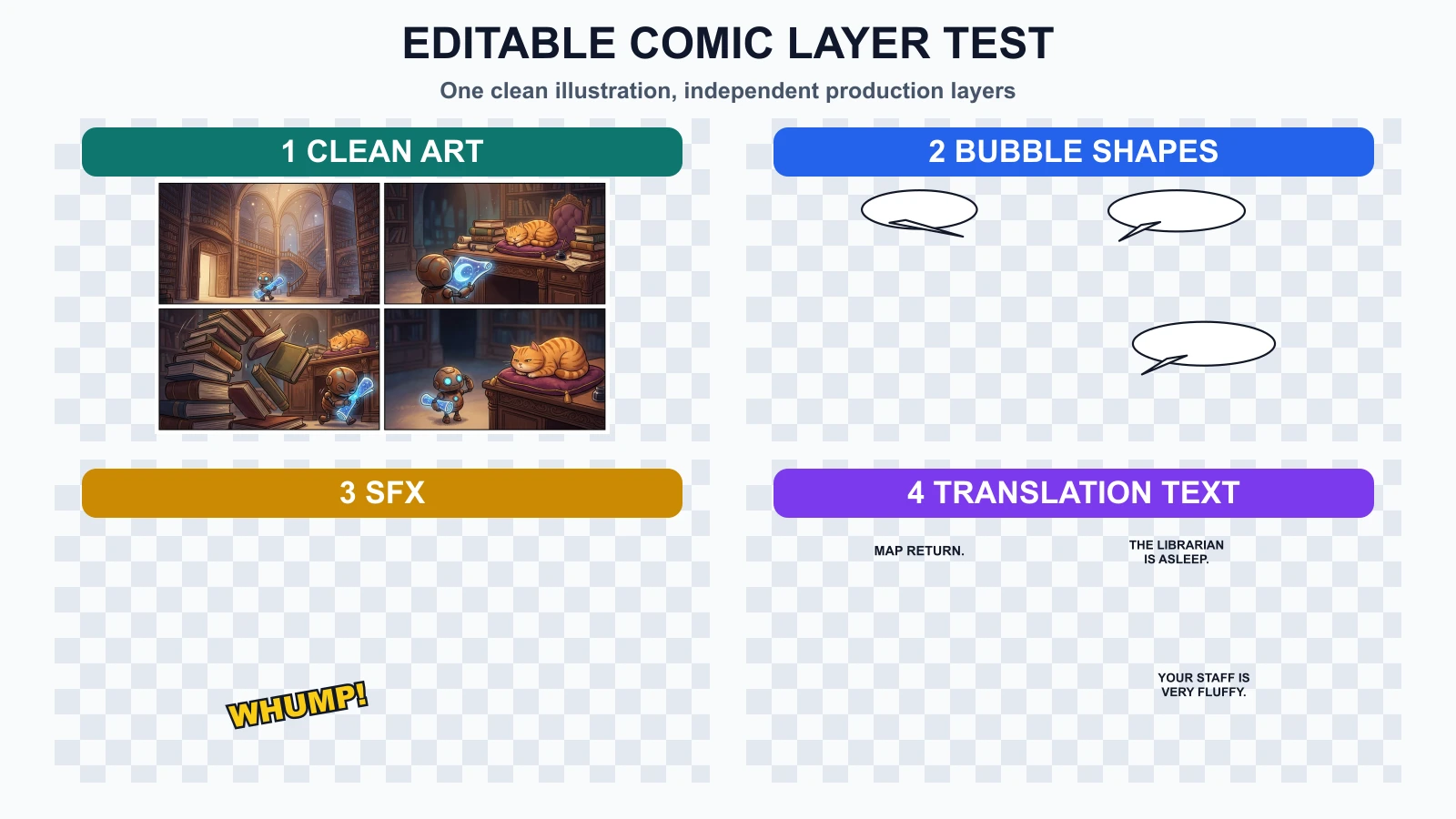
The experiment used one clean illustration layer, then added independent bubble, SFX, and dialogue layers. The checkerboard areas represent transparency, not missing art.
The art layer contains only illustration pixels: characters, props, backgrounds, lighting, panel borders, and deliberate empty space.
It should not contain:
This is the source you return to when a new language or revised script arrives.
Bubble geometry is a layout decision, not part of the dialogue string.
Keep the outline, fill, and tail editable so you can change:
Clip Studio Paint's official balloon documentation describes balloons as editable layers with adjustable shapes, tails, control points, line thickness, and fill. The exact tool is optional; the editable behavior is the requirement.
Sound effects sit between art and language. They may interact with the scene like illustration, but they may also need localization.
In our English export, the falling books use WHUMP!. In German, that layer changes to RUMMS!. The books, robot, and cat do not change.
Keep SFX separate when:
Store dialogue as editable text boxes, not pixels. A translation is not simply a string replacement: line length, word shape, punctuation, vertical rhythm, and font support can change.
The official Clip Studio Paint text documentation notes that wrapped text depends on the text frame and that text outside the frame can become invisible. That is why every locale needs a visual fit check after translation.
We changed four production decisions:
| Layer | English | German | Art affected? |
|---|---|---|---|
| Bubble 1 | Short oval | Wider oval for KARTENRÜCKGABE | No |
| Bubble 2 | Two English lines | Two longer German lines | No |
| SFX | WHUMP! | RUMMS! | No |
| Final dialogue | Two lines | Two longer lines in a taller bubble | No |
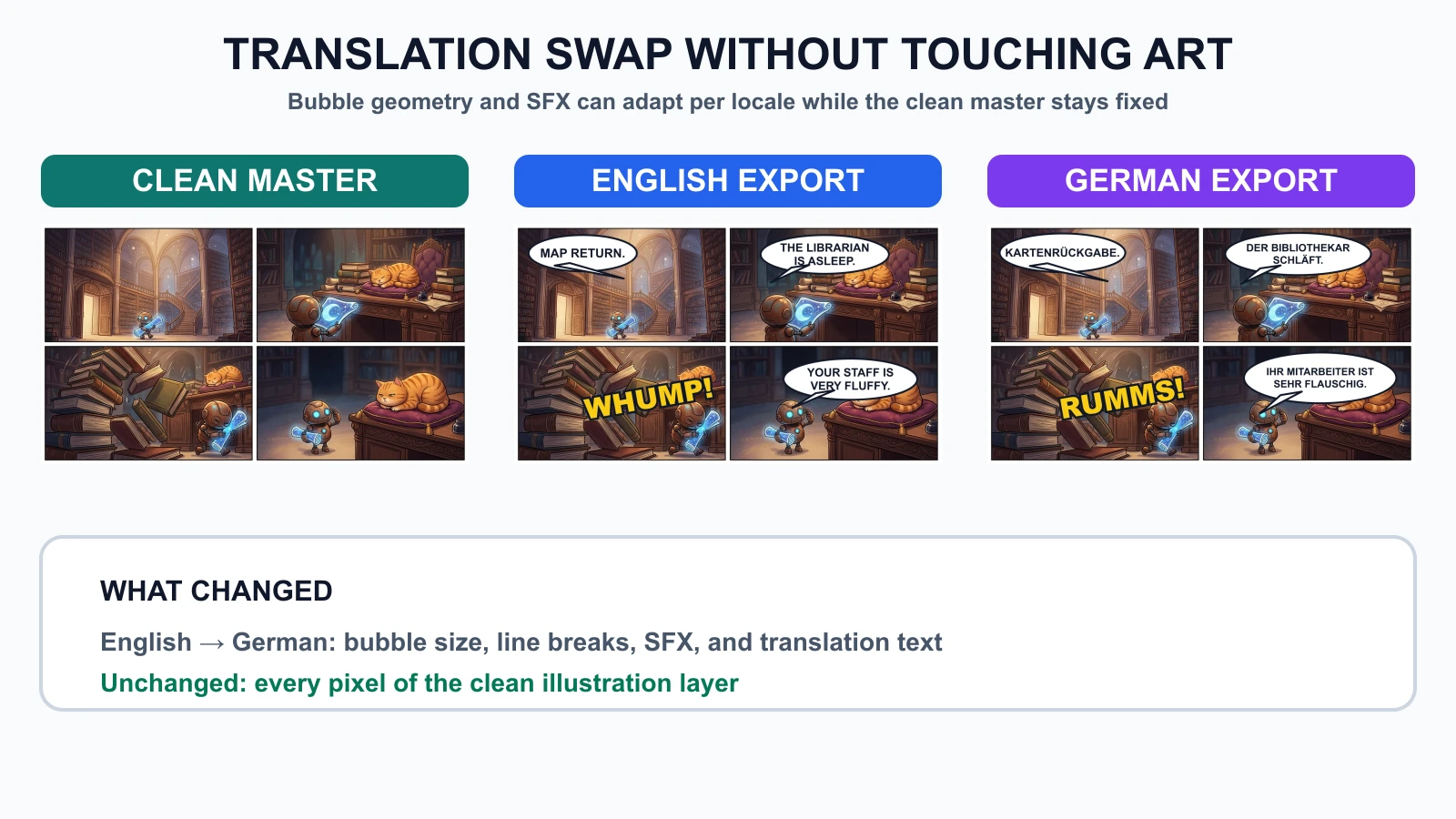
The clean-art checksum was 6ec0247c2cce... before and after both exports. We also resized the German export to 390 pixels wide and checked the smallest dialogue without zooming. It remained readable in the test preview.
This does not mean every translation can reuse the same page layout. It means the art can remain stable while the letterer adapts the editable layers.
To reproduce the common failure, we flattened the English bubbles, SFX, and dialogue into the comic page. We then placed the German text over that flattened image without access to the clean art.
The result preserved the old English letters underneath the German translation. The new words collided with the old ones, and the English SFX remained behind the German SFX.
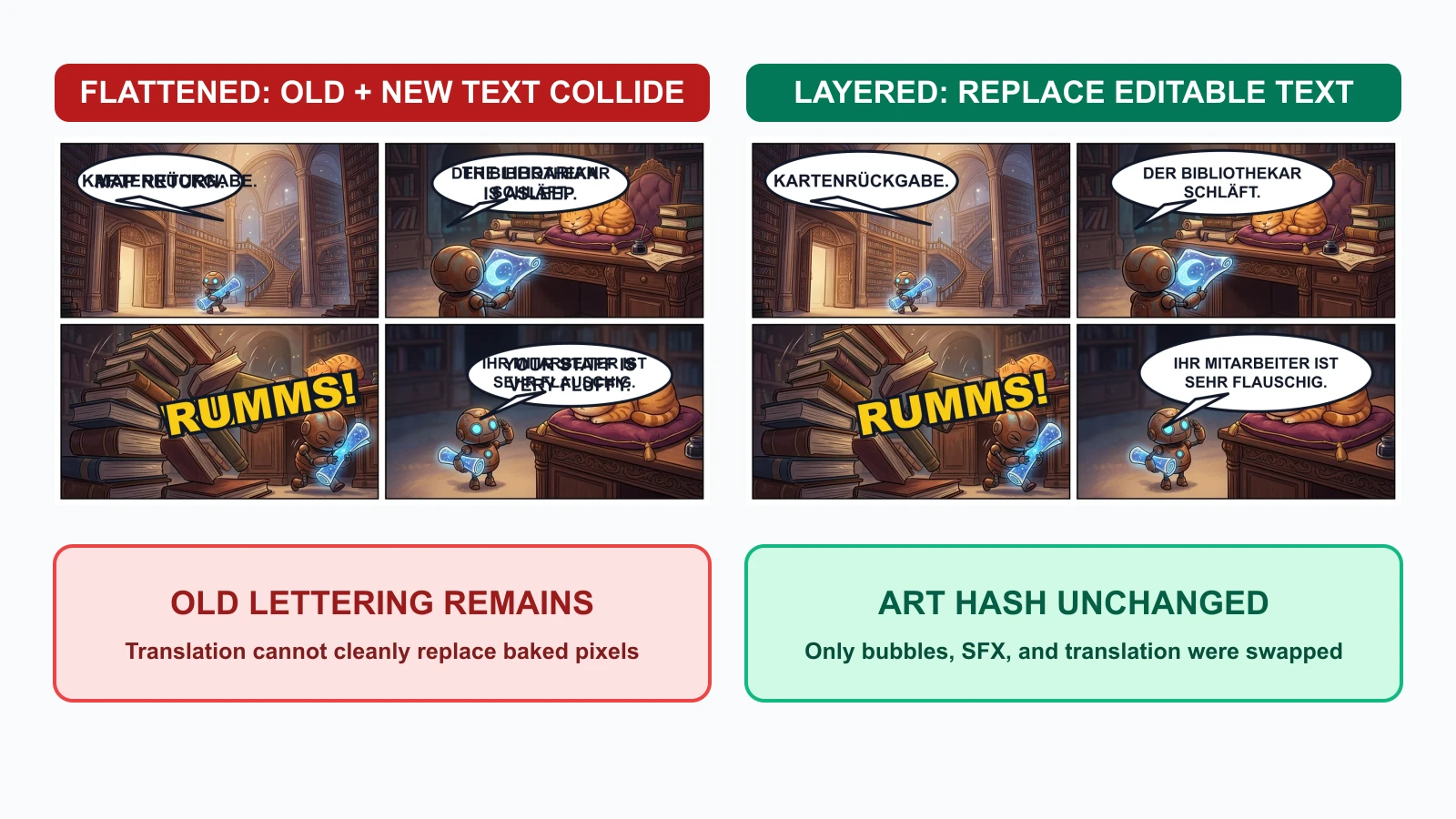
The layered version replaced only the editable production assets. The flattened version would require one of three repairs:
This is why a flattened PNG or JPEG should be a delivery artifact, not the master file.
Keep predictable names and separate source from export files:
chapter-03/
  art/
    page-07-clean.webp
  bubbles/
    page-07-bubbles-en.svg
    page-07-bubbles-de.svg
  sfx/
    page-07-sfx-en.svg
    page-07-sfx-de.svg
  text/
    page-07-en.txt
    page-07-de.txt
  source/
    page-07-lettering.psd
  exports/
    page-07-en-web.webp
    page-07-de-web.webp
    page-07-en-print.pdf
PSD, CSP, SVG, or another editable format can work. The format matters less than preserving layer names, text editability, font information, and a clean art master.
Use a prompt that reserves space but prohibits generated lettering:
Create a four-panel comic page with clear reading order.
Keep the same robot and orange cat in every panel.
Reserve clean negative space for future speech bubbles.
Do not render dialogue, captions, signs, letters, logos, watermarks, or SFX.
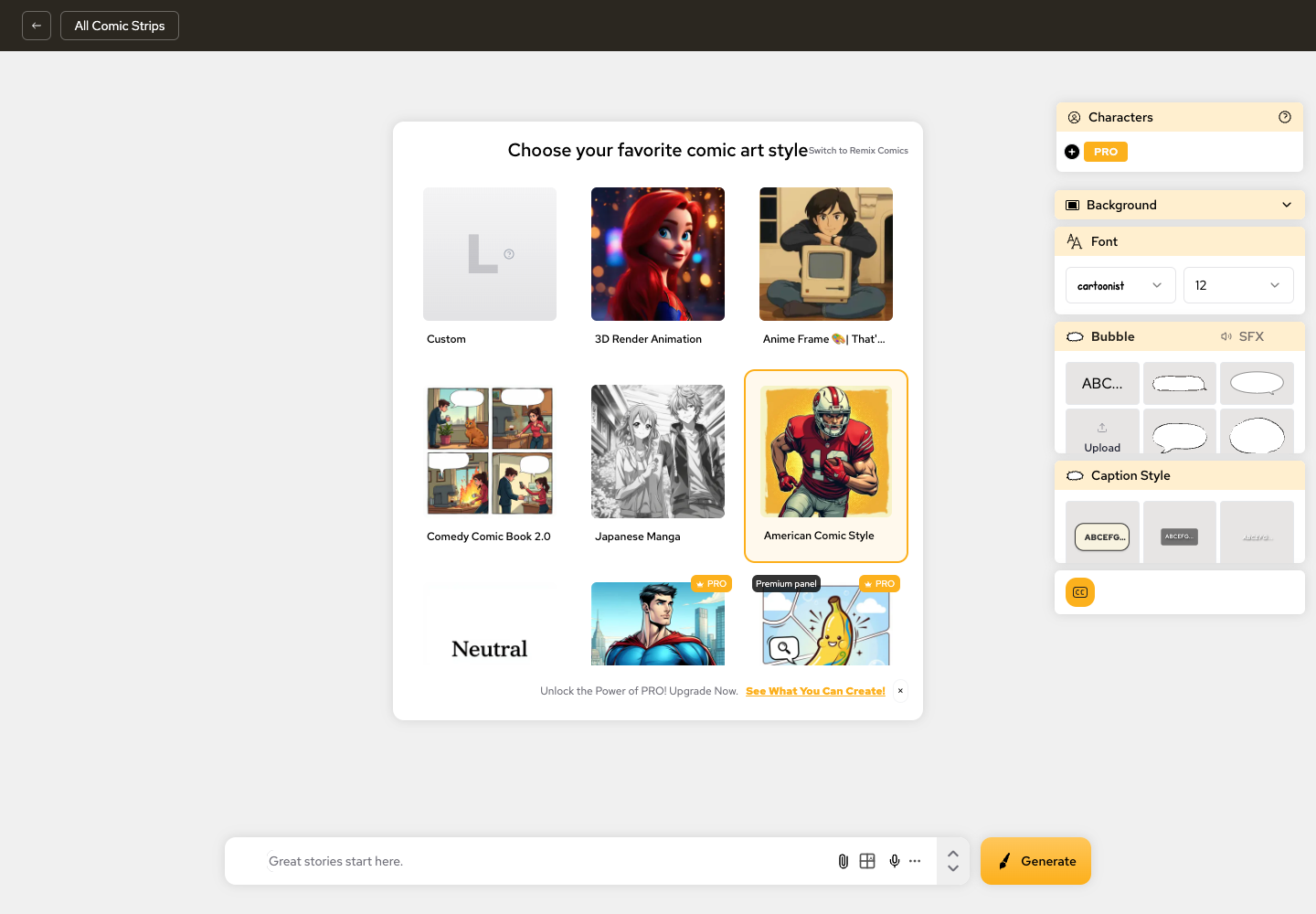
LlamaGen.AI Comic Strips can help you build the visual sequence and maintain story context before the final lettering pass.
During thumbnails or layout review, add rough bubbles with approximate dialogue volume. Do not polish them yet.
Approve:
This catches the "bubble is larger than the panel" problem before final art.
Once panel composition is approved, export a text-free master and record its version or checksum. Future lettering edits should not silently modify it.
Keep bubble shape and text distinct when the tool allows it. A short English phrase may need a wider German balloon even when the font size stays the same.
Treat SFX as a named layer or group. Decide per project whether it remains universal, is transliterated, or is localized.
For each language:
Check the actual delivery size, not only the full-resolution canvas.
| Gate | Approver checks | Locked after approval |
|---|---|---|
| Art | characters, props, panel order, negative space | clean art version |
| Bubble layout | reading order, size, tails, face clearance | locale bubble geometry |
| Source dialogue | wording, speaker, punctuation, line intent | source-language text |
| SFX | placement, overlap, localization policy | locale SFX layer |
| Translation | meaning, tone, line breaks, glyph coverage | locale text layer |
| Export | mobile, print, crop, color, filename | delivery asset |
If a translation forces a panel crop or character repositioning, return to the art gate. Do not hide an art change inside a lettering revision.
| Failure | Why it happens | Cheapest repair |
|---|---|---|
| Fake AI text inside art | text was requested during image generation | return to clean art and add editable text |
| Bubble covers a face | no footprint was reserved during layout | move or resize bubble; regenerate only if no safe space exists |
| German copy becomes tiny | original bubble was treated as fixed | enlarge bubble or rewrite line breaks |
| English SFX remains in translated page | SFX was fused with art | use clean master and replace SFX layer |
| Old and new dialogue overlap | translation was placed over a flattened export | recover source layers; do not paint over the master |
| Font misses glyphs | locale coverage was not checked | choose a font family with required characters |
Usually no. Generate clean art, then add dialogue with an editable text tool. Image models can create useful composition ideas, but final lettering needs exact spelling, line breaks, font control, and revision history.
Plan their footprints early and finalize their geometry after the visual sequence works. Keep them editable until the locale export is approved.
Yes, when your tool supports it. A translator may need to change line breaks and bubble size independently. Some applications combine text and balloons into one editable object; that is still safer than rasterizing both into the art.
It depends on audience and editorial policy. Keep SFX separate so the decision remains reversible. A text-free international master is also useful for later localization.
In this test, local English and German composites both rendered in under one second, and the German version required no art regeneration. That is one controlled run, not a universal speed claim. The durable benefit is that a text change did not put approved art at risk.
Keep the editable source, clean art master, font list, locale text, and flattened delivery exports. Do not archive only the final JPEG or WebP.
Written by Jay and reviewed by the LlamaGen.AI content team. The test illustration was generated once through Vertex with gemini-nano-banana-2.1. Bubble, SFX, translation, failure, and export layers were composited locally from the same clean art. Timings, checksums, and outputs describe this test only.
Create your text-free page in LlamaGen.AI Comic Strips, approve the visual sequence, and keep lettering editable until every language passes review.
熱門創作工具
使用 LlamaGen 創作漫畫、分鏡同風格化相片。
彙整最新的 LlamaGen 功能發布、產品強化、設計更新與重要錯誤修正。
引領 AI 漫畫生成的未來