


簡短答案
在頁面草圖階段就規劃對話框空間,但不要把對白、對話框、擬聲字或翻譯直接烘焙進插圖裡。
至少保留四個可編輯的製作圖層:
- 乾淨的漫畫圖稿
- 對話框形狀與尾巴
- 擬聲字與展示字體
- 對白或翻譯文字
只有在建立交付用匯出檔時,才將這些圖層扁平化。這樣一來,字體編排人員就能調整換行、放大德文對話框、重繪翻譯後的擬聲字,或修正錯字,而不需要重新生成圖稿。
在我們 2026 年 10 月 28 日的測試中,我們使用 Vertex gemini-nano-banana-2.1 生成了一張 1600 x 900 的乾淨漫畫母版,接著從同一份圖稿匯出英文版與德文版。德文版修改了對話框幾何形狀、換行、擬聲字與對白。它需要 零次圖稿重新生成,而且乾淨圖稿的 SHA-256 保持不變。
請從 LlamaGen.AI Comic Strips 中不含文字的分鏡開始,為字體編排保留留白空間,並在核准前讓製作文字保持可編輯狀態。
為什麼這會變成章節層級的問題
一個對話框很簡單,但完整一個章節就不是如此。
最近一則 r/aicomicmakers 的字體編排討論 點出了圖稿完成後才真正開始的工作:對話框擺放、字型選擇、換行、閱讀順序、擬聲字、頁與頁之間的一致性,以及為每種語言重複整個流程。
最有價值的留言指向兩個不該混為一談的方向:
- 一位有經驗的創作者表示,圖稿與文字必須分開。他們使用生成頁面來發想,但會手動重建字體編排與擬聲字。
- 另一位創作者表示,對話框必須及早納入考量,因為他們的第一章反覆出現氣球框對面板來說過大或過小的情況。
兩者都正確。字體編排要提早規劃;可編輯性要延後保留。
如果你把所有對話框決策都拖到最終圖稿完成後,對白可能會蓋住角色的臉和動作。如果你把最終文字直接生成在圖稿裡,每一個錯字與每一次翻譯都會變成影像修補問題。
我們的分層字體編排測試
我們對所有輸出都使用同一個四格圖書館場景:
Panel 1: A repair robot enters a giant library with a moon map.
Panel 2: It mistakes a sleeping orange cat for the head librarian.
Panel 3: A stack of books falls while the robot protects the map.
Panel 4: The robot salutes; the cat opens one unimpressed eye.
乾淨圖稿提示詞明確禁止出現字母、對話框、標誌、logo、水印與擬聲字。同時也要求在第 1、2、4 格面板上緣附近保留空白區域。
測試條件
| 項目 | 測試值 |
|---|---|
| 測試日期 | 2026 年 10 月 28 日 |
| 乾淨圖稿模型 | Vertex gemini-nano-banana-2.1 |
| 工作尺寸 | 1600 x 900 |
| 乾淨圖稿生成次數 | 1 |
| 乾淨圖稿 gateway 請求 | 21.862 秒 |
| 英文本機合成匯出 | 0.816 秒 |
| 德文本機合成匯出 | 0.537 秒 |
| 德文版圖稿重新生成次數 | 0 |
| 行動裝置 QA 寬度 | 390 像素 |
影像請求與本機匯出時間僅描述這一次執行、這台機器與此網路環境下的結果。它們不是產品延遲、價格或點數消耗的基準。
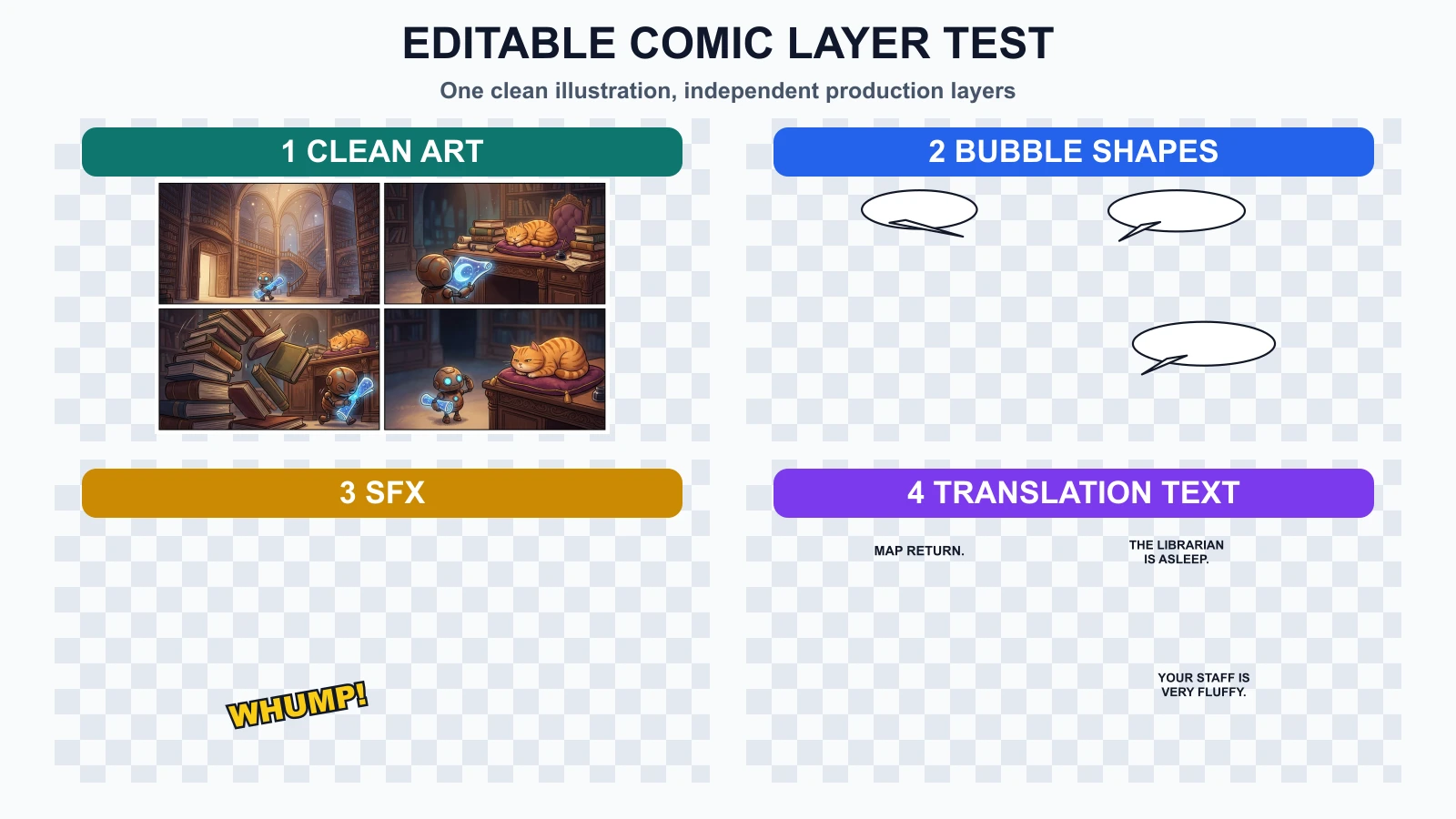
這項實驗使用了一個乾淨插圖圖層,然後再加入獨立的對話框、擬聲字與對白圖層。棋盤格區域代表透明,而不是缺失的圖稿。
四圖層契約
1. 乾淨圖稿
圖稿圖層只包含插圖像素:角色、道具、背景、光線、面板邊框,以及刻意保留的留白空間。
它不應包含:
- AI 生成的對白
- 無法移動的空白白色對話框
- 與物件融合的擬聲字
- 旁白框或翻譯文字
- 暫時性的審閱註記
當有新語言版本或修訂後的腳本到來時,這就是你要回頭使用的來源。
2. 對話框形狀
對話框幾何形狀是一項版面決策,不是對白字串的一部分。
請讓外框、填色與尾巴保持可編輯,以便你可以調整:
- 寬度與高度
- 尾巴方向
- 說話者指定
- 與臉部的距離
- 閱讀順序
- 給較長翻譯預留的空間
Clip Studio Paint 官方的對話框文件將對話框描述為可編輯圖層,能調整形狀、尾巴、控制點、線條粗細與填色。使用哪個工具並不重要;關鍵是必須具備可編輯的行為。
3. 擬聲字
擬聲字介於圖稿與語言之間。它們可能像插圖一樣與場景互動,但也可能需要在地化。
在我們的英文匯出版本中,掉落的書堆使用 WHUMP!。在德文版中,該圖層變成 RUMMS!。書本、機器人與貓都沒有改變。
在以下情況下,請將擬聲字分開處理:
- 翻譯者可能需要將其在地化。
- 效果字覆蓋了重要圖稿。
- 客戶需要無文字版本。
- 印刷版本需要不同裁切。
- 你之後可能會替換展示字體。
4. 對白與翻譯
請將對白儲存為可編輯文字框,而不是像素。翻譯不只是字串替換:行長、字形、標點、垂直節奏與字型支援都可能改變。
Clip Studio Paint 官方的文字文件指出,文字換行取決於文字框,而超出框外的文字可能會變成不可見。這就是為什麼每個語系在翻譯後都需要進行視覺適配檢查。
德文匯出版本中變更了什麼
我們改動了四項製作決策:
| 圖層 | 英文 | 德文 | 影響圖稿嗎? |
|---|---|---|---|
| 對話框 1 | 短橢圓 | 為 KARTENRÜCKGABE 加寬的橢圓 | 否 |
| 對話框 2 | 兩行英文 | 兩行較長的德文 | 否 |
| 擬聲字 | WHUMP! | RUMMS! | 否 |
| 最終對白 | 兩行 | 置於更高對話框中的兩行較長文字 | 否 |
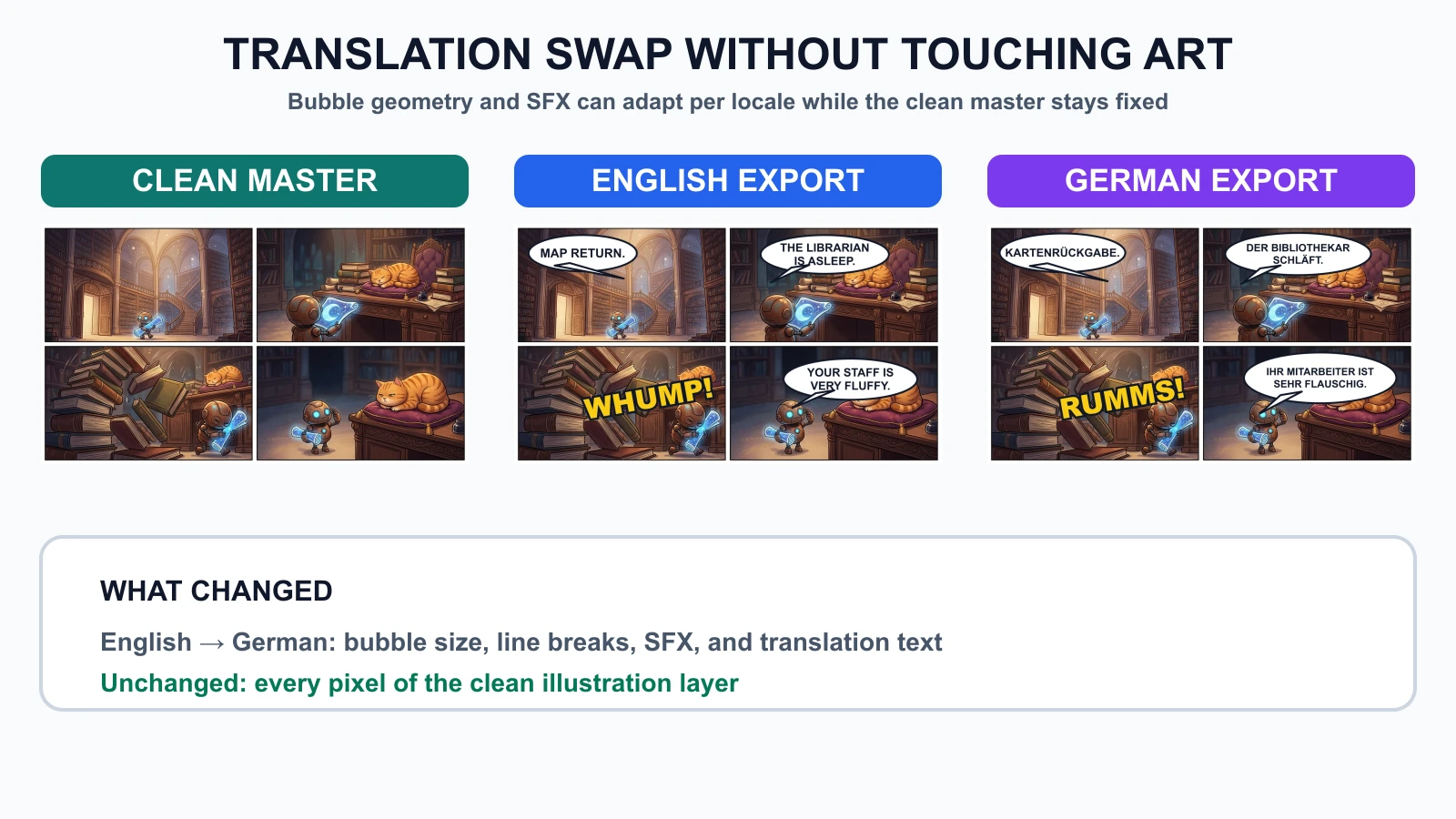
乾淨圖稿的 checksum 在兩次匯出前後都維持為 6ec0247c2cce...。我們也把德文匯出版本縮放到 390 像素寬,並檢查最小的對白在不縮放檢視下是否可讀。在測試預覽中,它仍然可讀。
這並不表示每一種翻譯都能重複使用同一個頁面版面。它的意思是,當字體編排人員調整可編輯圖層時,圖稿本身可以維持穩定。
失敗測試:翻譯一個已扁平化的頁面
為了重現常見失敗案例,我們把英文對話框、擬聲字與對白扁平化到漫畫頁面中。接著在無法存取乾淨圖稿的情況下,將德文文字疊加到那張扁平化影像上。
結果是,舊的英文文字仍保留在德文翻譯下方。新文字與舊文字互相碰撞,而英文擬聲字也仍殘留在德文擬聲字後面。
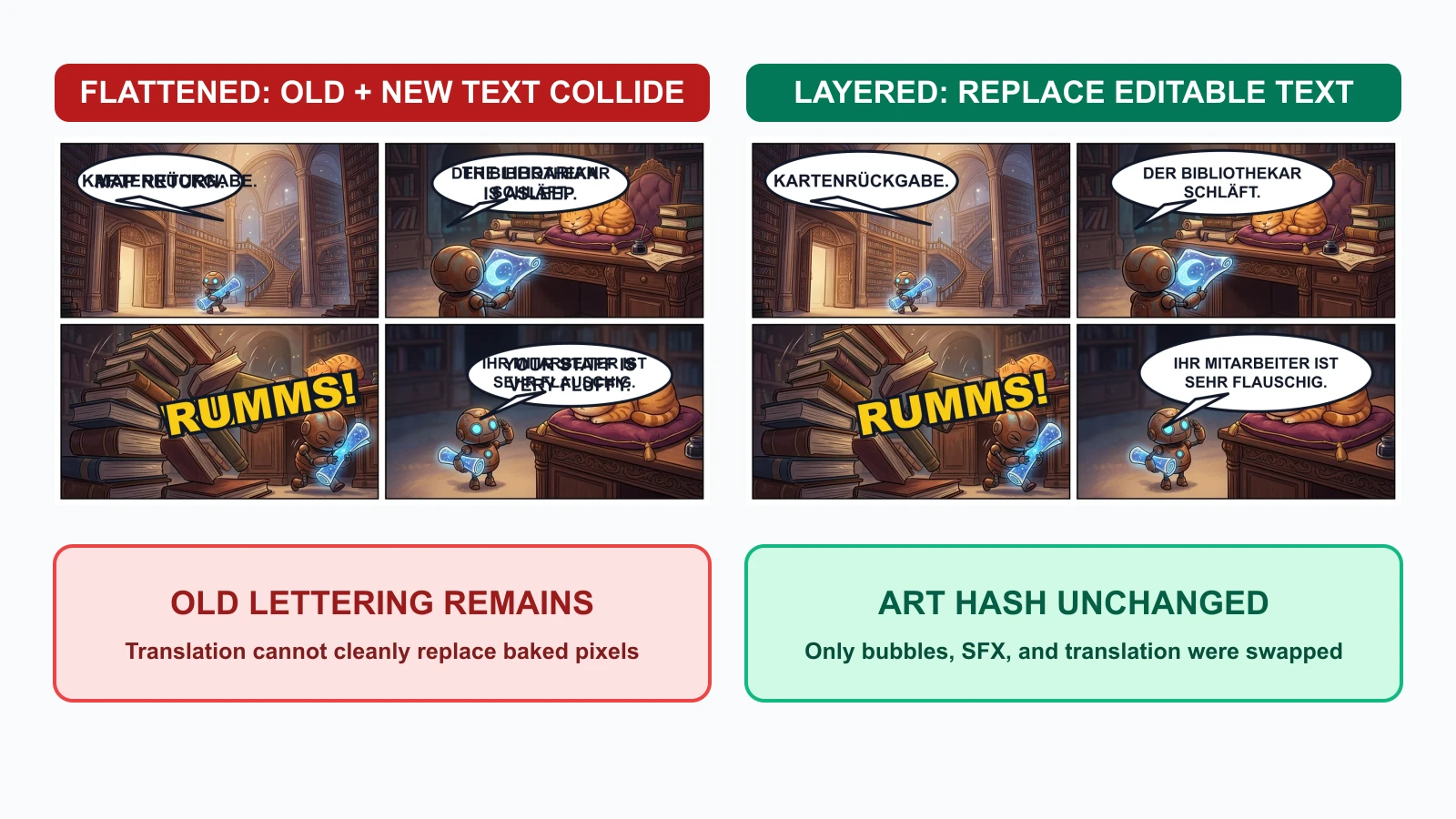
分層版本只替換了可編輯的製作資產。扁平化版本則需要以下三種修復方式之一:
- 取回乾淨的原始頁面。
- 蓋掉每一個舊文字,並重建其下方的圖稿。
- 重新生成受影響的面板,並承擔角色或構圖漂移的風險。
這就是為什麼扁平化的 PNG 或 JPEG 應該是交付產物,而不是母檔。
能經得起翻譯的製作檔案結構
請維持可預測的命名方式,並將來源檔與匯出檔分開:
chapter-03/
  art/
    page-07-clean.webp
  bubbles/
    page-07-bubbles-en.svg
    page-07-bubbles-de.svg
  sfx/
    page-07-sfx-en.svg
    page-07-sfx-de.svg
  text/
    page-07-en.txt
    page-07-de.txt
  source/
    page-07-lettering.psd
  exports/
    page-07-en-web.webp
    page-07-de-web.webp
    page-07-en-print.pdf
PSD、CSP、SVG 或其他可編輯格式都可以使用。格式本身的重要性不如保留圖層名稱、文字可編輯性、字型資訊與乾淨圖稿母版。
逐步工作流程
步驟 1:生成不含文字的面板
使用能保留空間但禁止生成字體編排的提示詞:
Create a four-panel comic page with clear reading order.
Keep the same robot and orange cat in every panel.
Reserve clean negative space for future speech bubbles.
Do not render dialogue, captions, signs, letters, logos, watermarks, or SFX.
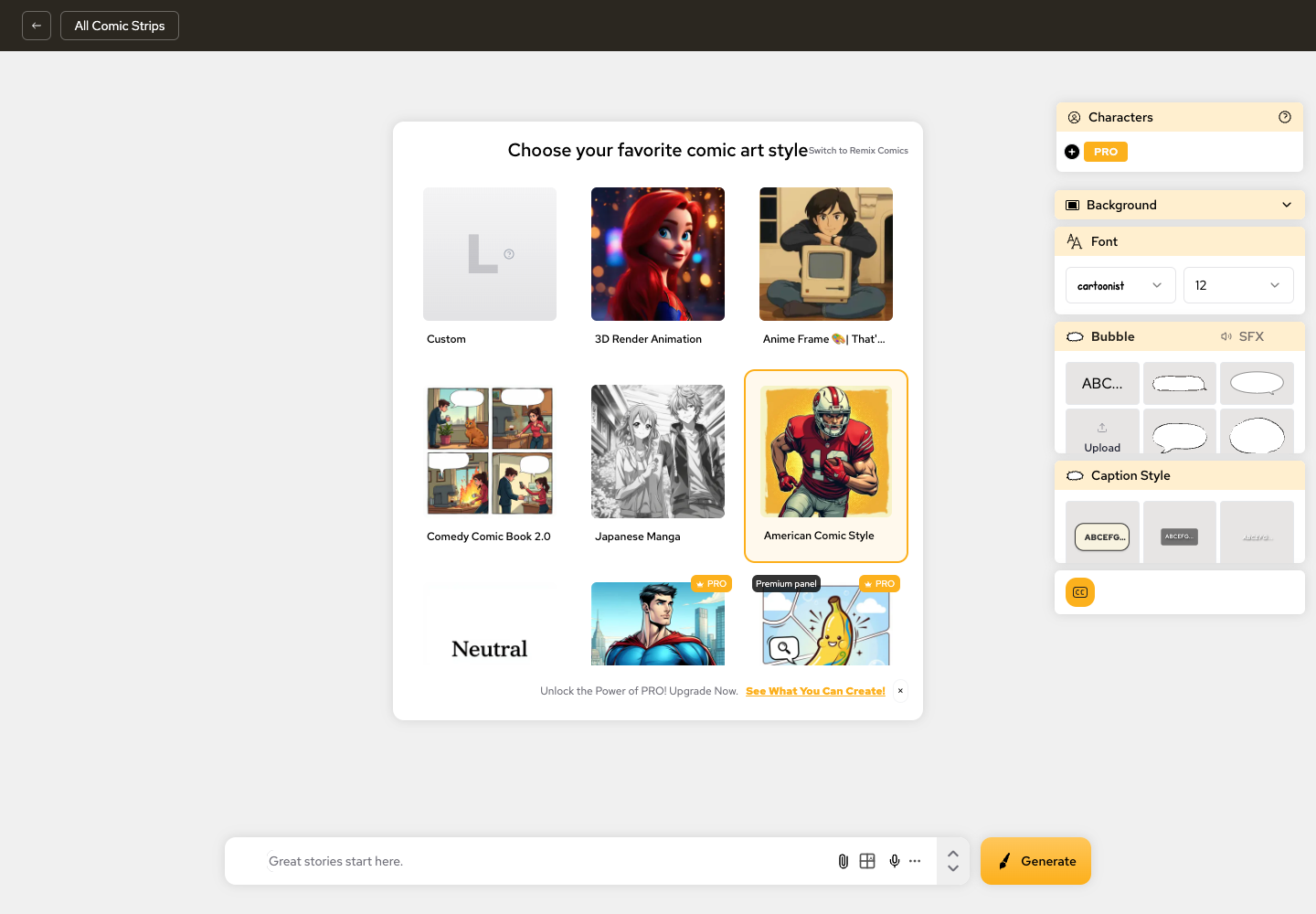
LlamaGen.AI Comic Strips 可以協助你在最終字體編排階段之前建立視覺敘事順序並維持故事脈絡。
步驟 2:及早加入暫時性的對話框佔位
在草圖或版面審查階段,先加入粗略的對話框與大致的對白量。先不要精修。
請核准:
- 說話者順序
- 尾巴方向
- 所需的留白空間
- 閱讀路徑
- 對白最大容量
這能在最終圖稿完成前,就先抓出「對話框比面板還大」的問題。
步驟 3:鎖定乾淨圖稿
一旦面板構圖核准,就匯出不含文字的母版,並記錄其版本或 checksum。之後的任何字體編排編修都不應悄悄修改它。
步驟 4:分開建立可編輯的對話框與文字
只要工具允許,就讓對話框形狀與文字分離。即使字型大小不變,簡短的英文片語也可能需要一個更寬的德文對話框。
步驟 5:隔離擬聲字
將擬聲字視為具名圖層或群組。依專案決定它是保持通用、做音譯,還是完全在地化。
步驟 6:一次建立一個語系匯出版本
對每一種語言:
- 替換對白文字。
- 檢查換行。
- 優先調整對話框大小,而不是把字縮小到無法閱讀。
- 檢查翻譯後的擬聲字。
- 確認字型包含所有必要字形。
- 從同一份已核准來源匯出網頁版與印刷版目標。
步驟 7:執行行動裝置與印刷 QA
檢查實際交付尺寸,而不只是完整解析度畫布。
- 在手機寬度下,最小的一行能讀清楚嗎?
- 有任何尾巴指向錯誤的說話者嗎?
- 文字有碰到對話框邊緣嗎?
- 翻譯後的對話框有蓋住臉、手或道具嗎?
- 擬聲字與對白是否使用正確語言?
- 匯出檔是否已扁平化,而來源檔仍保持可編輯?
核准關卡
| 關卡 | 核准者檢查內容 | 核准後鎖定 |
|---|---|---|
| 圖稿 | 角色、道具、面板順序、留白空間 | 乾淨圖稿版本 |
| 對話框版面 | 閱讀順序、大小、尾巴、與臉部的間距 | 語系對話框幾何 |
| 原始對白 | 措辭、說話者、標點、語氣意圖 | 原始語言文字 |
| 擬聲字 | 位置、重疊情況、在地化政策 | 語系擬聲字圖層 |
| 翻譯 | 意義、語氣、換行、字形覆蓋 | 語系文字圖層 |
| 匯出 | 行動裝置、印刷、裁切、顏色、檔名 | 交付資產 |
如果翻譯迫使你調整面板裁切或角色位置,請回到圖稿關卡。不要把圖稿變更藏在字體編排修訂裡。
常見失敗與最低成本修復方式
| 失敗情況 | 發生原因 | 最低成本修復 |
|---|---|---|
| 圖稿內有假的 AI 文字 | 在影像生成時要求了文字 | 回到乾淨圖稿並加入可編輯文字 |
| 對話框蓋住臉 | 版面階段沒有預留佔位 | 移動或調整對話框大小;只有在沒有安全空間時才重新生成 |
| 德文文案變得很小 | 原本的對話框被當成固定不變 | 放大對話框或重寫換行 |
| 翻譯頁面仍留著英文擬聲字 | 擬聲字與圖稿融合了 | 使用乾淨母版並替換擬聲字圖層 |
| 舊對白與新對白重疊 | 翻譯是疊在扁平化匯出檔上 | 取回來源圖層;不要直接塗蓋母檔 |
| 字型缺少字形 | 沒有檢查語系覆蓋 | 選擇包含所需字元的字型家族 |
常見問答
我應該要求影像模型直接渲染最終對話框文字嗎?
通常不建議。先生成乾淨圖稿,再使用可編輯文字工具加入對白。影像模型可以提供有用的構圖想法,但最終字體編排需要精確拼字、換行、字型控制與修訂紀錄。
對話框應該早點加還是晚點加?
及早規劃它們的佔位,在視覺敘事順序成立後再定稿其幾何形狀。請讓它們保持可編輯,直到語系匯出版本核准為止。
對話框形狀與對白應該分成不同圖層嗎?
是的,只要你的工具支援。翻譯者可能需要獨立調整換行與對話框大小。有些應用程式會把文字與氣球框合併成一個可編輯物件;這仍然比把兩者光柵化到圖稿裡安全。
擬聲字應該翻譯嗎?
這取決於受眾與編輯政策。請將擬聲字獨立處理,讓這個決定保有可逆性。無文字的國際母版對日後在地化也很有用。
分層工作流程有讓翻譯更快嗎?
在這次測試中,本機英文與德文合成版本都在一秒內完成渲染,而德文版不需要重新生成圖稿。這只是一次受控執行,不是普遍的速度主張。更持久的好處是,文字變更不會讓已核准的圖稿暴露於風險中。
最終交付內容應包含什麼?
請保留可編輯來源檔、乾淨圖稿母版、字型清單、語系文字,以及已扁平化的交付匯出檔。不要只封存最終 JPEG 或 WebP。
來源與編輯揭露
- Reddit:你如何處理漫畫工作流程中的字體編排?
- Clip Studio Paint 手冊:對話框
- Clip Studio Paint 手冊:加入文字
- Clip Studio Paint 手冊:使用圖層
本文由 Jay 撰寫,並由 LlamaGen.AI 內容團隊審閱。測試插圖透過 Vertex 與 gemini-nano-banana-2.1 僅生成一次。對話框、擬聲字、翻譯、失敗案例與匯出圖層皆以同一份乾淨圖稿在本機完成合成。文中的時間、checksum 與輸出結果僅描述這次測試。
請在 LlamaGen.AI Comic Strips 建立你的無文字頁面,核准視覺敘事順序,並在每一種語言都通過審查之前,讓字體編排保持可編輯。
Related hot tags
AI 漫畫
字體編排
漫畫翻譯
對話框
工作流程
熱門創作工具
將靈感變成下一個故事
使用 LlamaGen 創作漫畫、分鏡與風格化照片。

點燃年輕人的夢想
讓數百萬個故事活靈活現
彙整最新的 LlamaGen 功能發布、產品強化、設計更新與重要錯誤修正。



