

Accurate Image Analysis
Our AI deeply analyzes your image to capture key elements, themes, and styles.
Upload a picture. Get a description you can copy into a prompt, a script, or a note. The image stays on the left; the words appear beside it.
Instantly extract text from any image with our AI-powered OCR tool. Upload documents, screenshots, or photos to convert them into editable text for easy copying and sharing.
Bawat gawain ay nagkakahalaga ng 25 credits
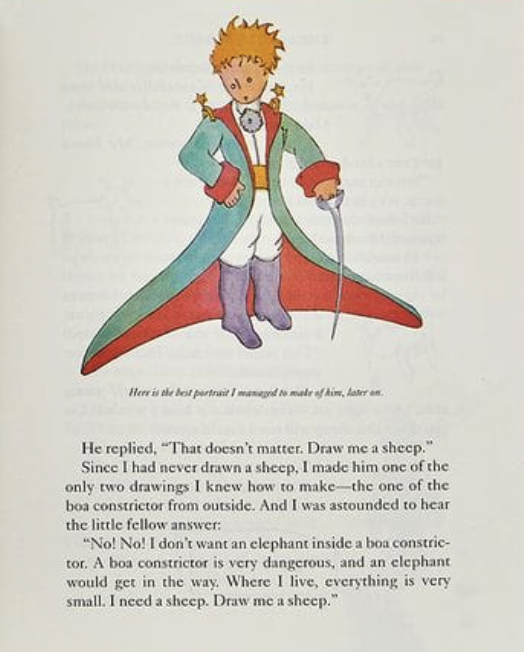
Sumagot siya, "Walang halaga iyon. Iguhit mo ako ng tupa."
Dahil hindi pa ako nakaguhit ng tupa, ginawa ko siya bilang isa sa dalawang guhit lang na kaya kong gawin—yung boa constrictor na mula sa labas. At namangha ako nang narinig ko ang sagot ng bata:
“Hindi! Hindi! Ayokong may elepante sa loob ng boa constrictor. Mapanganib ang boa constrictor, at makakaabala ang elepante. Sa lugar ko, lahat ay maliit. Kailangan ko ng tupa. Gumuhit ka ng tupa para sa akin.”
Our AI deeply analyzes your image to capture key elements, themes, and styles.
Receive rich, descriptive text that can be used directly with AI image generators or as a spark for your creative projects.
Tailor the generated text to fit specific artistic styles or desired levels of detail.
Skip writing a description from memory. The studio names the objects, style, and mood so you can edit the sentence instead of starting blank.
Simply click the upload button and select the image you want to transform into text.
Our AI analyzes the visual content, style, and potential themes of your image.
Get a detailed text description of your image, ready to use or customize for your needs.
'/%3E%3C/svg%3E)
Comics, manga, webtoon, storybooks, storyboards, and motion in one studio—with the same cast.
Turn one story into a connected, editable comic sequence instead of generating isolated comic images.
Create 4-panel and short comic strips from a prompt, joke, or lesson.
Create personalized bedtime picture books with one free preview and paid high-resolution PDF export.
Gumawa ng kamangha-manghang komiks kahit walang kakayahan sa pagguhit gamit ang advanced na AI Comic Generator namin.
Start free: turn a story into a full comic book with chapters, locked characters, and PDF export. Free results include a watermark; credits apply after.
Import PDF, CBZ, ZIP, EPUB, or project JSON and keep editing the ordered comic in Studio.
Import character sheets, ZIP turnarounds, PDF refs, or CSV rosters, then select them for comic generation.
Turn a story, script, or dialogue into an editable comic sequence with consistent characters.
Gumawa ng kamangha-manghang manga gamit ang AI
Buksan ang kakayahang lumikha ng kahanga-hangang mga video na tumatatak.
Sound in Motion