

Photographic-looking playful scene from a precise brief
Example preview
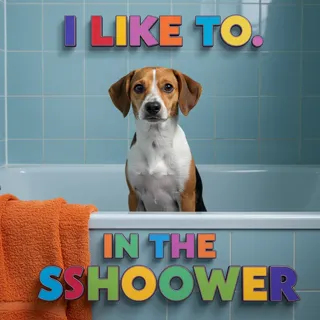
The stored direction is simply photographic, despite a mixed example title; supply your subject and materials rather than assuming a lettering preset. A starting point for creating and refining an image in LlamaGen.
Choose a single subject and lighting setup that can be inspected.
When to use this template
- Playful realistic image
- Pet-inspired scene
- Product mood concept
Build your first draft
Choose the story moment
Describe who is present and what changes before adding decorative details. Choose a single subject and lighting setup that can be inspected.
Direct the composition
Describe materials explicitly and avoid depending on exact typography.
Review the first draft
Check anatomy and reflections before using the image in a presentation. Check the focal point at a small size, then revise one issue at a time.
Try a complete example
Worked example — Photographic-looking playful scene from a precise brief
A photographic-looking small dog sits beside a blue wash basin while a towel hangs from a wooden stool. Soft bathroom window light, damp curly fur, realistic proportions, no text.
The towel and basin establish a bath-time moment without complex motion. Use this direction as a draft brief; inspect the result before relying on fine details.
Before you publish
- The title does not guarantee editable 3D letters or a fixed dog scene.
- Fur, paws, and water reflections can contain inconsistencies.
- Add captions after reviewing the image so the story remains readable.
Questions about this template
- Can I change the subject?
- Yes. Replace the example subject while retaining the visual choices described above; too many competing actions make the result harder to read.
- Is this a blank downloadable file?
- This is a creation preset, not a blank worksheet. Open it, describe a scene, and refine the generated draft.
- Will the prompt reproduce every detail exactly?
- No. The prompt gives direction. Layout, lettering, anatomy, and repeated character details can need correction.