LlamaGen.AI 1.0.45: Story Production and Shot Planning | v1.0.45 - LlamaGen Release
Logo LlamaGenThương hiệu LlamaGen
Đăng nhậpĐăng ký ngayGiảm 20%
  1. Trang chủ
Tạo truyện tranh
LlamaGen.AI 1.0.45: Story Production and Shot Planning
Tất cả bài đăng

LlamaGen 1.0.45: LlamaGen.AI 1.0.45: Story Production and Shot Planning

Jay
Jay
ngày 19 tháng 11 năm 2026
Sao chép liên kết
  • LlamaGen.AI 1.0.45: Story Production and Shot Planning
  • Build the story before making the chapter
  • Find a useful reference for the next shot
  • Present a storyboard as an editable pitch
  • Get oriented on the first visit
elevate-your-comics.png
Nâng tầm truyện tranh của bạn với LlamaGen

LlamaGen.AI 1.0.45: Story Production and Shot Planning

Before a finished comic comes a series of smaller decisions: what happens, who appears, where the scene takes place, and how each moment should be framed. This release brings those planning steps into a clearer production flow and adds ways to explore shot references and present an existing storyboard.

Build the story before making the chapter

The comic production flow moves through Story, Cast & world, and Generate & read. Begin with your written story or an uploaded script, review the screenplay, and revise it before preparing the visual references.

In Cast & world, review the characters, locations, and props the story needs. Edit their details, add or generate reference images, and reuse suitable characters from your existing collection. Keeping those references beside the story makes it easier to settle the cast and setting before moving on to page creation.

Then choose Webtoon, Manga, or Comic, review the chapter's page count, panels, and proportions, and confirm generation when the plan is ready. The flow carries the same project from preparation into reading, with a handoff to the editor and export tools for the next round of work. Saving and reviewing the story gives you time to prepare; generation starts after the creation confirmation.
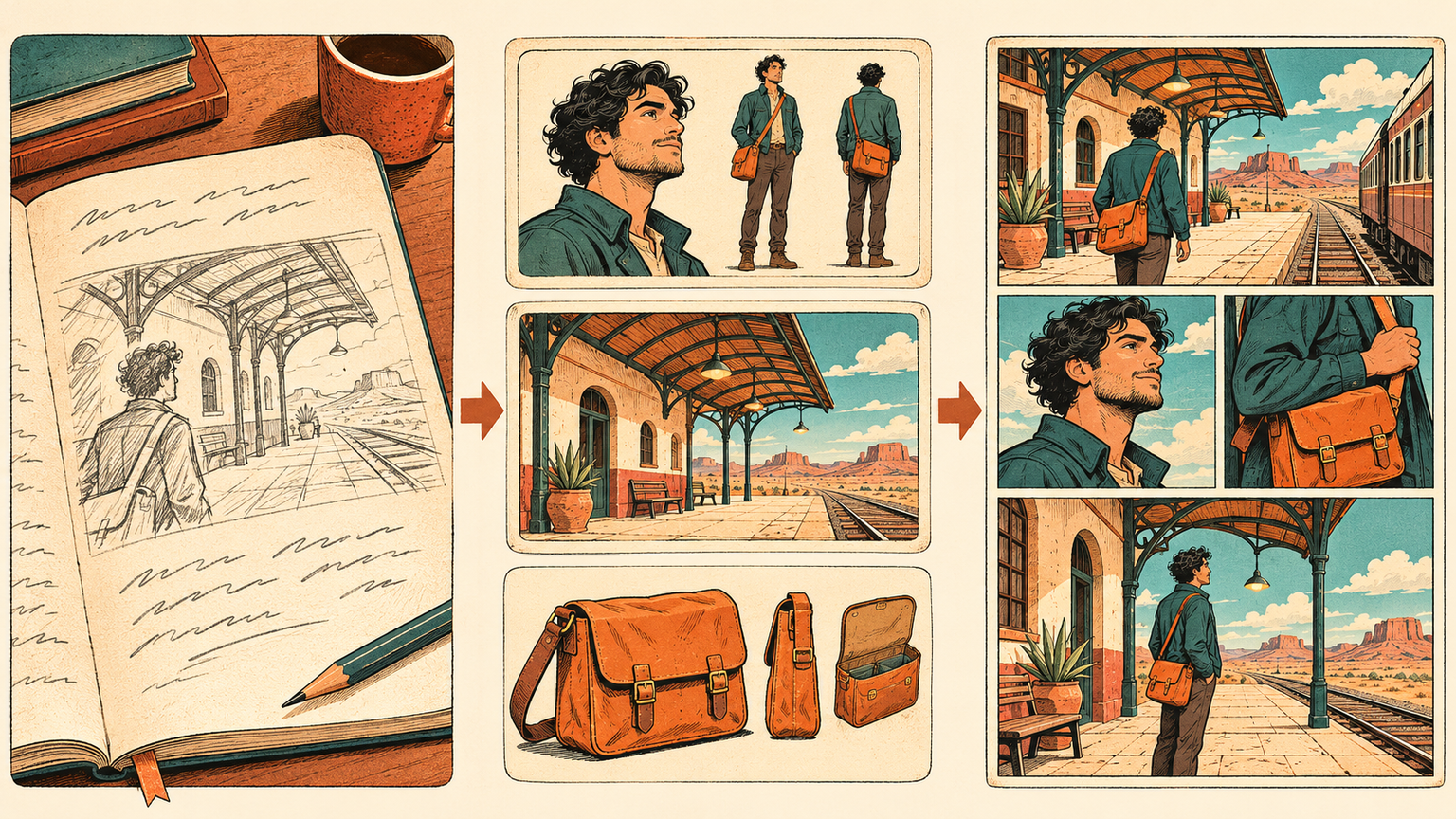
Shape the story, prepare the cast, then make the pages

Find a useful reference for the next shot

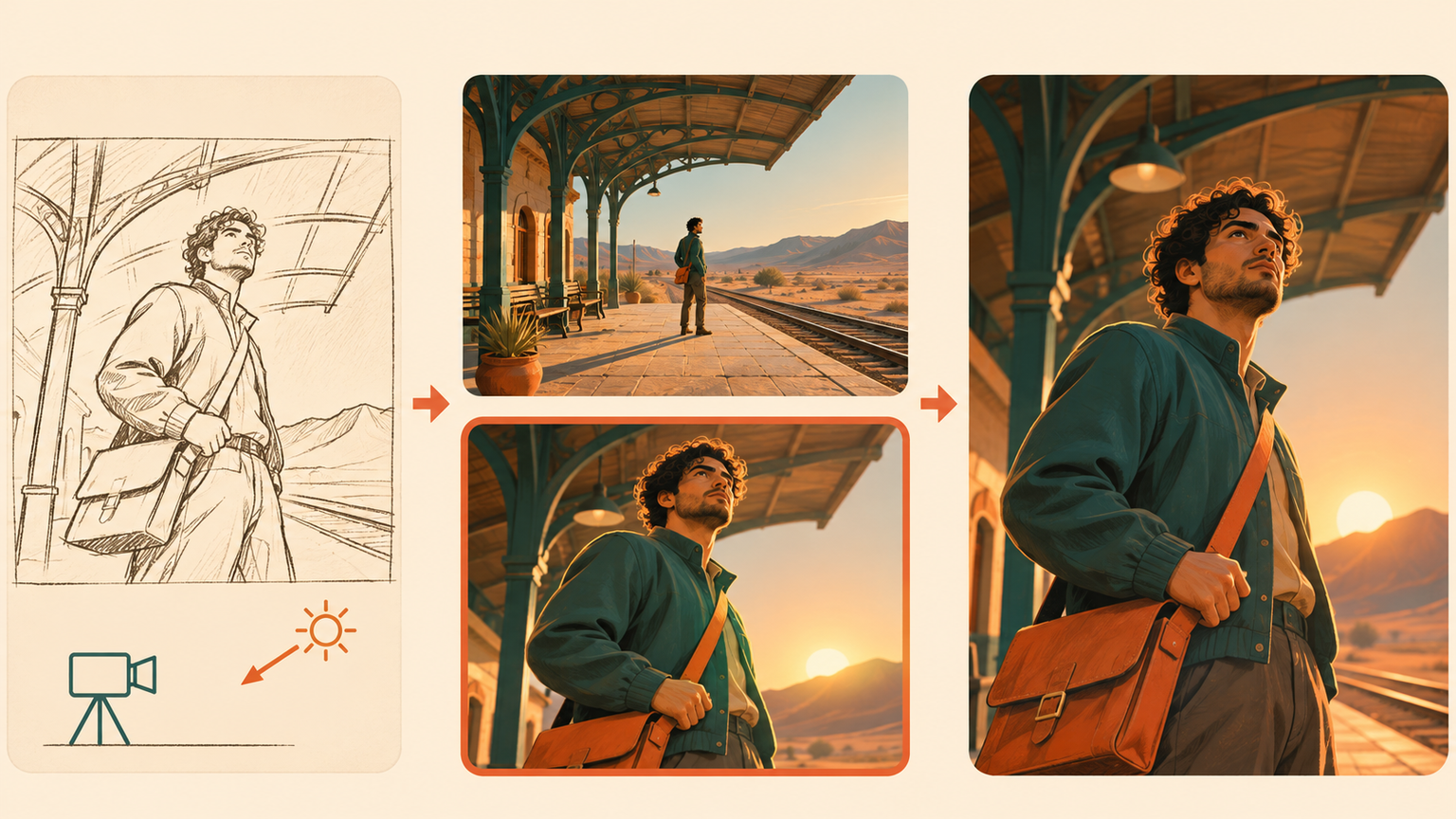
Open Shot Search to browse cinematic references or describe the shot you want to explore. Camera, framing, lighting, color, and scene filters help narrow the search when a general mood is not specific enough. Compare a wide establishing shot with a closer reaction, or explore how different light changes the same kind of scene.

Open a result for a closer look and use Find Similar to continue exploring nearby visual directions. The collection uses . These images provide material for studying a shot and communicating its direction before creating your own scene.

Nhật ký thay đổi

Khơi dậy ước mơ cho thế hệ trẻ
Nơi hàng triệu câu chuyện trở nên sống động

Tổng hợp các tính năng mới nhất của LlamaGen, cải tiến sản phẩm, cập nhật thiết kế và các bản sửa lỗi quan trọng.
✦
✧
✦
✧

Một phương tiện mới cho Kể chuyện

Thỏa sức tạo ra không giới hạn câu chuyện, truyện tranh, hoạt hình, trò chơi và hơn thế nữa—chỉ trong vài giây, phù hợp với khán giả hiện đại

original synthetic references
Find a reference for the shot you have in mind

Present a storyboard as an editable pitch

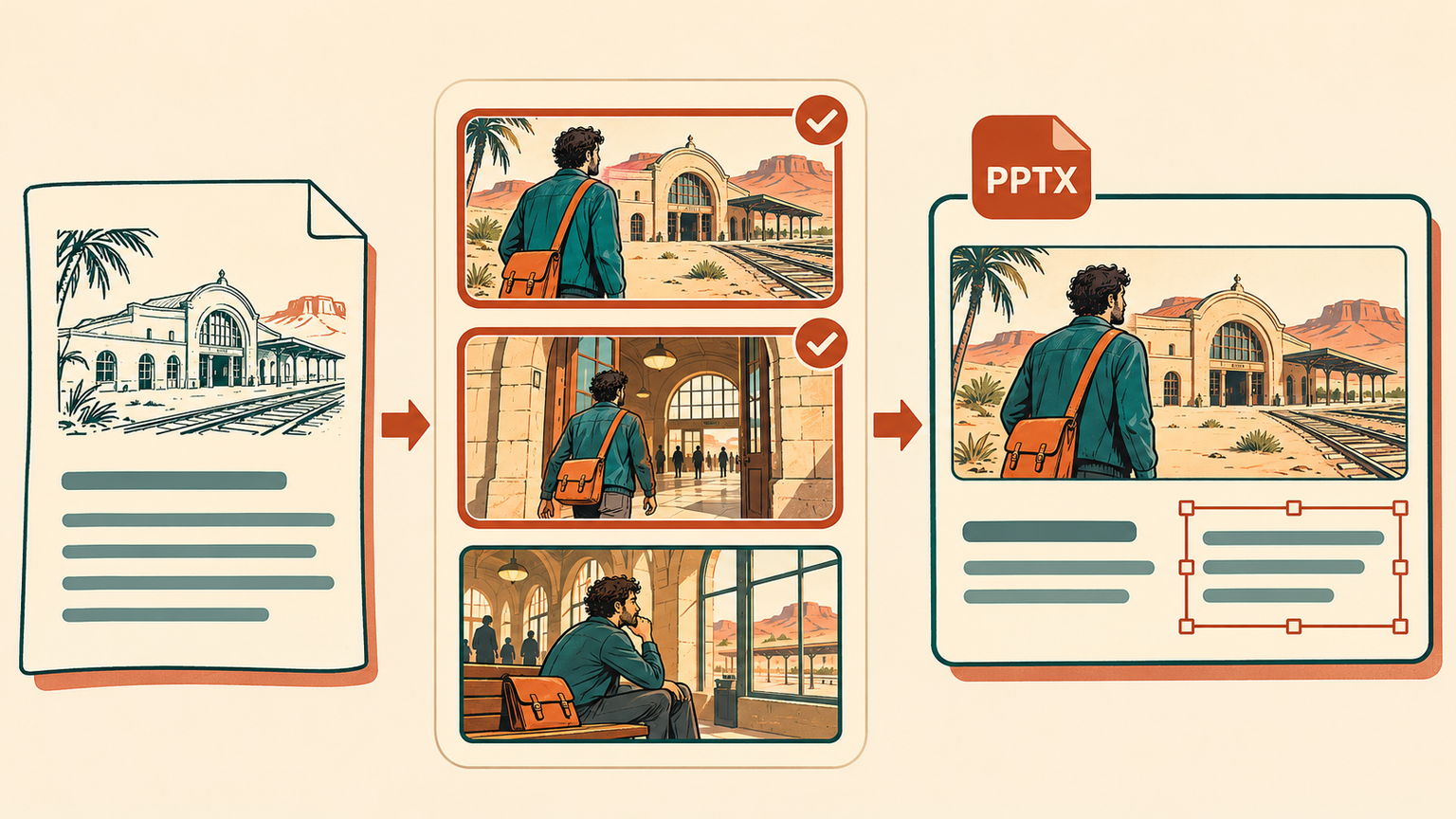
From a Storyboard detail page, open Pitch Deck to turn an existing project into a presentation. First review the title, logline, synopsis, audience, and character details. Then choose up to eight existing still-image frames to support the story you want to present.

Export an editable 16:9 PowerPoint (.pptx) with the selected images and editable text. Adjust the wording and presentation after download, using the frames you already have to explain the idea to collaborators or a prospective audience. Pitch Deck export requires an eligible paid plan.

Turn existing storyboard frames into an editable pitch

Get oriented on the first visit

New first-use guides point out the main creation choices in Mangaka and the comic upload flow, including story input, page and style choices, and optional character references. You can skip or close a guide, then return through Quick tour when you want another look.

Completing a tour leaves you in control of the next action. Review the story, references, and creation settings, then start the work when you are ready.

Related hot tags

comic-creation

Công cụ tạo nổi bật

Biến cảm hứng thành câu chuyện tiếp theo của bạn

Tạo truyện tranh, storyboard và ảnh phong cách với LlamaGen.

01

Trình tạo truyện tranh AI

Biến ý tưởng thành truyện tranh chất lượng chỉ trong vài phút.

Tạo truyện tranh
02

Trình tạo Manga AI

Tạo manga biểu cảm và câu chuyện nhiều khung hình.

Tạo manga với AI
03

Trình tạo storyboard AI

Hình dung mọi cảnh trước khi sản xuất bắt đầu.

Tạo bảng phân cảnh với AI
04

Biến Ảnh Thành Truyện Tranh

Biến bất kỳ ảnh nào thành tranh minh họa phong cách truyện tranh.

Tạo truyện tranh từ hình ảnh
05

Trình tạo dải truyện tranh AI

Tạo các dải truyện chia sẻ với nhân vật nhất quán.

Tạo truyện tranh bằng AI

LlamaGen community

checkmark

Get hands-on help with your comics

checkmark

Showcase your comics to fellow LlamaGen creators

checkmark

Participate in special events to win gifts

Previous releases

LlamaGen.AI 1.0.45: Story Production and Shot Planning

LlamaGen 1.0.45: LlamaGen.AI 1.0.45: Story Production and Shot Planning

Develop a story through cast and world preparation into comic production, find cinematic shot refere

Jay
Jay
ngày 19 tháng 11 năm 2026
LlamaGen.AI 1.0.44: Mangaka, Immersive Reading and Chapter Exports

LlamaGen 1.0.44: LlamaGen.AI 1.0.44: Mangaka, Immersive Reading and Chapter Exports

Keep Comics and Manga together in Mangaka, choose the page count before creating, read with fewer di

Jay
Jay
ngày 12 tháng 11 năm 2026
LlamaGen.AI 1.0.43: Scene Library and Sketch References

LlamaGen 1.0.43: LlamaGen.AI 1.0.43: Scene Library and Sketch References

Explore a larger scene library, carry selected backgrounds into comics and storyboards, and draw a q

Jay
Jay
ngày 5 tháng 11 năm 2026
LlamaGen.AI 1.0.42: Layouts, Page Reuse and Export Updates

LlamaGen 1.0.42: LlamaGen.AI 1.0.42: Layouts, Page Reuse and Export Updates

Find the right comic layout, browse clearer creation categories, reuse selected pages in an independ

Jay
Jay
ngày 29 tháng 10 năm 2026
See all releases
Logo LlamaGen
  • United States
  • Español
  • Français (France)
  • 日本語
  • 한국어
  • Deutsch
  • 繁體中文 (台灣)
  • 繁體中文 (香港)
  • 简体中文
  • Português
  • Italiano
  • Español (México)
  • العربية
  • Русский
  • Português (Brasil)
  • Tiếng Việt

Dẫn đầu xu hướng tạo truyện tranh AI tương lai

  • Hỗ trợ 24/7
  • Cập nhật hàng tuần
  • An toàn và tuân thủ
  • Hoạt động 99,9% thời gian

Tải LlamaGen miễn phí

AndroidiOSMáy tính

Hỏi AI về LlamaGen

Sản phẩm

  • Ra mắt mới nhất
  • Tính năng
  • Trình tạo strip truyện tranh
  • Comic StoresMới
  • Studio MangaMới
  • Biến hình ảnh thành truyện tranh
  • Truyện tranh thành video
  • Nhà máy truyện tranh AI
  • Người phụ trách truyện tranh
  • iOS & Android
  • Mac & Windows
  • Tải xuống
  • Comic ZapMới
  • Trình tạo truyện tranh AI
  • Trình tạo hoạt hình AI
  • Trình tạo Webtoon AI
  • Công cụ tạo dải truyện tranh
  • Biến hình ảnh thành truyện tranh
  • Trình tạo Manga AI
  • Dịch truyện tranh Manga
  • Chuyển ảnh thành Anime
  • Hình ảnh sang Lời nhắc
  • Anime thành người thật
  • Công cụ tô màu manga
  • Công cụ tạo nhân vật Anime
  • Công cụ tạo tài sản trò chơi pixel
  • Tạo bảng sprite bằng AI
  • Công cụ game pixel tốt nhất 2026
  • Công cụ tạo truyện tranh từ ảnh
  • Giải pháp thay thế Comic Life

Sản phẩm liên quan

  • Hệ sinh thái LlamaGen
  • CineoBoardMới
  • Comics API

Gói dịch vụ

  • Bảng giá
  • Khởi đầu
  • Chuyên nghiệp

Cộng đồng

  • Người sáng tạo
  • Đối tác liên kết
  • Đối tác

AI Models

  • GPT Image 2.6 Flare
  • GPT Image 2.6 Sunburst
  • Grok Imagine Image 2.0
LinkedInX (Twitter)
  • Trang chủ
  • Bài viết
  • Blog
  • Tạo
  • Bảng giá
  • API
  • Affiliate ProgramNEW
  • Comic Zap
  • Velika
  • Doanh nghiệp
  • Giáo dục
  • API truyện tranh
  • Liên hệ phòng kinh doanh
  • Gói giáo dục
  • Giáo viên
  • Học sinh
  • Giáo viên và Học sinh
  • Startup
  • Ưu đãi giáo dục
  • Công ty

    • Trò chuyện với nhà sáng lập
    • Giới thiệu
    • Lộ trình sản phẩm
    • Cơ hội nghề nghiệp
    • Gửi email cho chúng tôi
    • Thế giới Linh vật của chúng tôi
    • Bộ công cụ truyền thông
    • Hợp tác với KOL
    • Nội dung

    Trợ giúp

    • Trung tâm trợ giúp
    • Độ tin cậy
    • AI an toàn
    • Dịch vụ chuyên nghiệp
    • Câu hỏi thường gặp
    • Bảo mật
    • Khả năng tiếp cận
    • Hướng dẫn video
    • Liên hệ chúng tôi
    • Sơ đồ trang web
    Cảm nhận khách hàng
  • Bức tường lời yêu thương
  • LlamaGen MCPMới
  • LlamaGen Nhà phát triển
  • Tài nguyên

    • Nhật ký thay đổi
    • Blog
    • Hướng dẫn
    • Truyện tranh cá nhân hóa
    • Tính năng
    • Các lựa chọn thay thế
    • Ứng dụng AI tốt nhất
    • Hướng dẫn tô màu Manga GPT-6
    • Kỹ năng sáng tác truyện tranh Claude
    • Hướng dẫn truyện tranh AI Gemini
    • Truyện tranh đó
    • Ưu đãi giáo dục
    • Ưu đãi sinh viên

    Công cụ

    • Tạo logo bằng AI
    • Trình tạo nhân vật phong cách Grokbot
    • Chuyển PNG thành truyện tranh
    • Chuyển văn bản thành truyện tranh
    • Chuyển PDF thành truyện tranh
    • Chuyển kịch bản thành truyện tranh
    • Chuyển sách thành truyện tranh
    • Biến hình ảnh thành truyện tranh
    • Trình tạo pixel art AI
    • Truyện tranh giáo dục
    • Trình tạo video AI
    • Trình tạo Video Gemini AI
    • Trình tạo video AI không khuôn mặt miễn phí
    • Truyện tranh thành video
    • Phần mềm tạo bảng phân cảnh
    • Trình tạo storyboard AI
    • Phần mềm viết kịch bản
    • Trình chỉnh sửa kịch bản
    • AI Kể Chuyện
    • Trình tạo câu chuyện AI
    • Công cụ tạo truyện thiếu nhi
    • Trình tạo hình ảnh AI
    • Tách lớp AI
    • Điều chỉnh góc máy ảnh bằng AI
    • Trình tạo pixel art AI
    • Công cụ tạo tài sản trò chơi pixel
    • Tạo bảng sprite bằng AI
    • Cắt spritesheet
    • Công cụ game pixel tốt nhất 2026
    • API hoạt hình
    • Plugin ChatGPT/Codex
    • ChatGPT Hướng dẫn cài đặt
    • Plugin Claude Code
    • Hướng dẫn cài đặt Claude Code
    Wan 3.0
  • Wan 3.0 Prime
  • Seedance 2.5
  • MiniMax H3
  • Nano Banana 2.1
  • Nano Banana 2 Lite
  • Seedream 5.0 Flash
  • Seedream 5.0 Pro
  • Seedance 2.0 Mini
  • Kling 3.0 Turbo
  • Nano Banana 2
  • GPT Image 2
  • Gemini Omni Flash
  • All AI Models
  • Công cụ AI

    • AI Tách trang phục
    • AI Thay đổi kiểu tóc
    • AI Thay kiểu tóc manga
    • Trình tạo hiệu ứng gió AI
    • AI Tạo bản đồ độ sâu
    • AI Nền trắng
    • AI Xóa vật thể
    • AI Thử đồ ảo
    • Làm nét lại ảnh bằng AI
    • Khử nhiễu ảnh bằng AI
    • Khôi phục ảnh cũ bằng AI
    • Tạo bóng cho sản phẩm bằng AI
    • Bộ Tạo Phông Nền AI
    • Tạo ảnh chân dung chuyên nghiệp bằng AI
    • Tạo biểu tượng cảm xúc bằng AI
    • Trình thay đổi phông nền bằng AI
    • Mở mắt bằng AI
    • Làm đẹp bằng AI
    • Chụp ảnh sản phẩm bằng AI
    Instagram
    YouTube
    Nhóm Facebook
    Reddit
    Discord
    Hỗ trợ qua email
    Quyền riêng tưĐiều khoảnSơ đồ trang web
    Tải xuống tài sản thương hiệu
    © 2026 LlamaGen.Ai Bản quyền đã được bảo lưuTất cả dịch vụ đều trực tuyến