Create comics with AI
MCP vs Comic API vs Web App: Which LlamaGen.AI Workflow Should You Use?
All posts

MCP vs Comic API vs Web App: Which LlamaGen.AI Workflow Should You Use?

Monica
Monica
October 24th, 2026
Copy link
  • The Short Answer
  • Why This Choice Matters
  • Verification Scope
  • The Shared Four-Panel Test
  • Route 1: Web App
  • Best for
  • Workflow
  • Strength
  • Tradeoff
  • Route 2: Comic MCP
  • Best for
  • Workflow
  • Strength
  • Tradeoff
  • Route 3: Comic API
  • Best for
  • Workflow
  • Strength
  • Tradeoff
  • Side-by-Side Decision Table
  • What the Test Actually Tells You
  • A Practical Selection Rule
  • Security and Reliability Checklist
  • FAQ
  • Does MCP replace the Comic API?
  • Is MCP the same as a CLI?
  • Can the Web App repair one bad panel?
  • Which route should a first-time creator choose?
  • Final Recommendation
  • Sources
elevate-your-comics.png
Elevate your Comics with LlamaGen

The Short Answer

Choose by who controls the workflow:

  • Web App: best when a creator wants to see, edit, and approve the comic directly.
  • Comic MCP: best when an AI assistant should plan, call comic tools, check progress, and continue the conversation.
  • Comic API: best when your own product or backend must create, monitor, repair, and export comics at scale.

All three can lead to a comic. They are not three quality tiers. They are three control surfaces around the same production problem.

Start visually in the LlamaGen.AI Comic Studio, connect an agent through Comic MCP, or build a product integration with the Comic API.
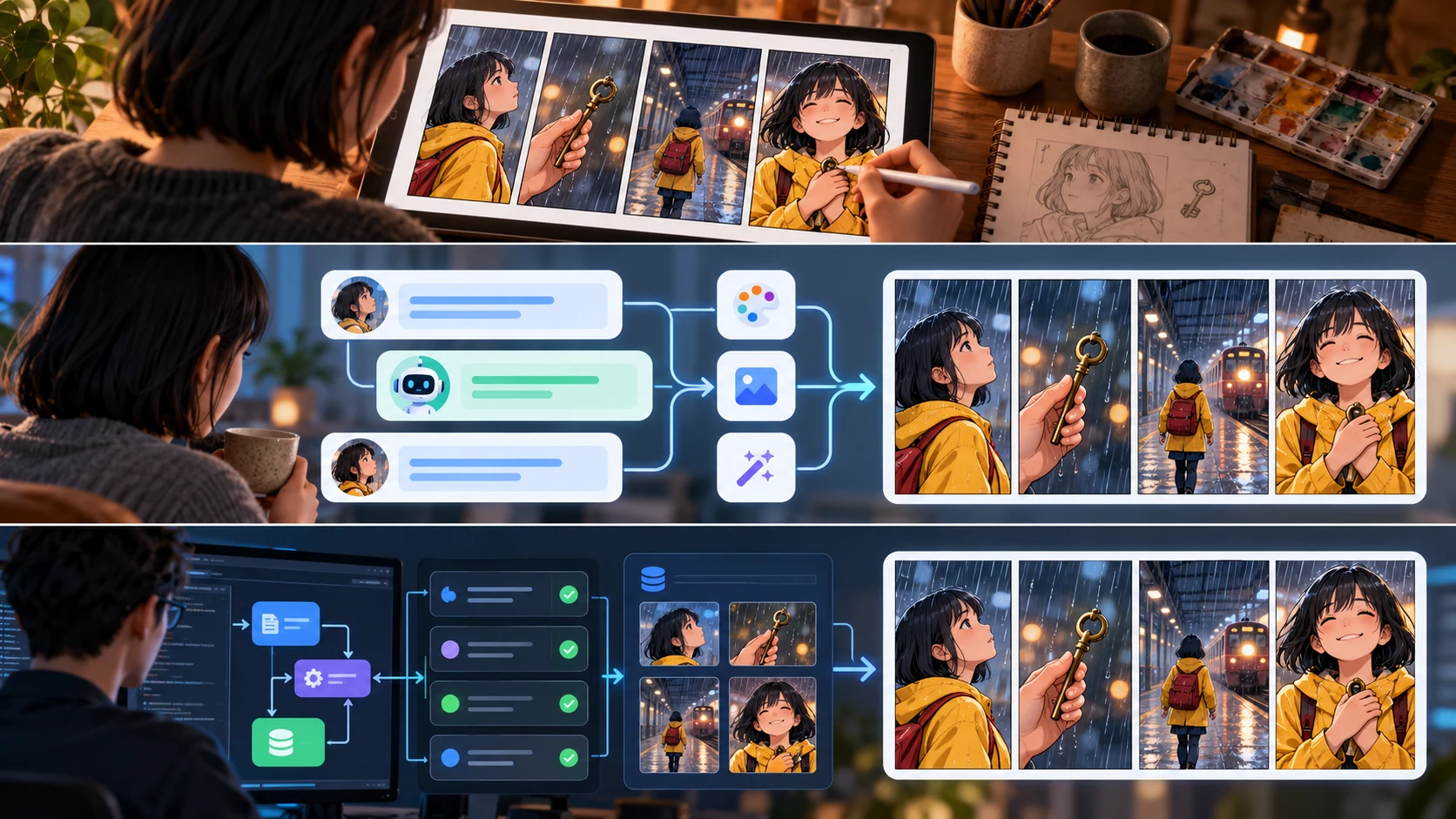
Three production routes—a visual editor, an AI agent connection, and a developer API—converging on the same four-panel comic

Why This Choice Matters

A visual creator, an AI-assisted operator, and a software team may ask for the same comic but need very different control.

The Web App optimizes direct manipulation. MCP exposes defined tools to a compatible AI client. The REST API exposes endpoints and data fields to software you own. Choosing the wrong route creates avoidable work: a solo artist may not need infrastructure, while a publishing system cannot depend on someone clicking through every job.

Verification Scope

This comparison was checked on October 24, 2026 against the live Comic API documentation, MCP page, ChatGPT and Codex setup guide, Claude Code plugin page, and Visual Suite.

The external article MCP vs CLI for AI image and video generation helped frame the control-surface question. It is not evidence for LlamaGen.AI capabilities; the LlamaGen.AI claims below come from LlamaGen.AI's own live documentation.

The Shared Four-Panel Test

Each route receives the same production contract:

Title: The Last Key
Format: four-panel comic, left-to-right
Style: cinematic watercolor, rainy evening, restrained blue and amber palette

Character:
Aya, 22, short black bob, yellow raincoat, red canvas backpack.

Panel 1:
Wide shot. Aya waits alone on an almost empty train platform.
Keep open space at upper left for a caption.

Panel 2:
Insert shot. A brass key lies beside the yellow safety line.
No dialogue.

Panel 3:
Medium shot. Aya picks up the key while the last train doors begin closing.
One bubble: “Not mine.”

Panel 4:
Inside the departing train, a child presses both hands to the window and points at the key.
Aya remains outside. No explanatory caption.

Acceptance rules:

  1. Aya's hair, raincoat, and backpack stay stable.
  2. The key is brass in panels 2–4.
  3. The train action reads in the correct order.
  4. Panel 4 preserves the unresolved choice.
  5. A failed panel can be addressed without restarting the whole sequence.

This is an operational comparison, not a claim that one interface automatically produces prettier art.

Route 1: Web App

Best for

Writers, artists, educators, marketers, and small teams who want to make the page while looking at it.

Workflow

  1. Open AI Comic Strips.
  2. Add or approve Aya's character reference.
  3. Paste the four-panel contract.
  4. Select the format and visual direction.
  5. Generate the draft.
  6. Review reading order, continuity, and lettering space.
  7. Edit or regenerate only the failed panel.
  8. Add final lettering and export.

Strength

The human sees the result at every important decision. Visual comparison, panel selection, lettering, and composition are naturally reviewable.

Tradeoff

Repeated batches require repeated human operations. The interface is the product, so it is not the right foundation for an unattended publishing backend.

Route 2: Comic MCP

Best for

Creators and operators already working in a compatible AI client who want the assistant to turn conversation into tool calls.

The current hosted endpoint documented by LlamaGen.AI is:

https://llamagen.ai/api/mcp

The live setup guide documents bearer-token authentication and recommends checking usage before a generation run. Tool names and availability can change, so read the live setup page rather than copying an old social post.

Workflow

  1. Connect the hosted MCP endpoint in a supported client.
  2. Store the API token privately; never paste it into a public prompt or article.
  3. Ask the client to check current Comic API usage.
  4. Give the agent the exact four-panel contract.
  5. Require it to show the normalized request before generation.
  6. Approve the request.
  7. Let the agent create the comic and poll status.
  8. Review the returned asset or project link.
  9. Ask for a targeted panel update only after identifying the failed panel.

Strength

The assistant can keep the creative context and the production action in one conversation. This is useful when the prompt must be derived from a script, story bible, or review discussion.

Tradeoff

MCP behavior depends on the host client, its permission model, and which tool actions it supports. LlamaGen.AI's public pages currently describe the hosted MCP as live while some packaged plugin or marketplace experiences remain previews. Confirm the current setup before promising a one-click install.

Route 3: Comic API

Best for

Product teams, publishers, agencies, education platforms, and internal tools that need repeatable jobs, status tracking, metadata, and targeted updates.

The current REST documentation covers operations for uploading source assets, creating a comic, reading status, continuing a project, and updating a panel. Documented request fields include items such as prompt, preset, size, pagination, comicRoles, panelReferences, locations, attachments, language, and upscale.

Workflow

authenticate
-> upload approved references when needed
-> create comic job
-> store project and task identifiers
-> poll status with backoff
-> present result for human review
-> update a selected panel when required
-> export and record provenance

Strength

Your application controls job creation, persistence, review states, retries, and downstream publishing. Structured fields are easier to validate than ad hoc copy-and-paste instructions.

Tradeoff

Your team owns the surrounding system: secure token storage, request validation, retry policy, logs, rate-limit handling, user consent, and human review. An API removes clicks; it does not remove production responsibility.

Side-by-Side Decision Table

RequirementWeb AppComic MCPComic API
Fastest start for a non-developerstrongestdepends on client setupweakest
Direct visual editingstrongestopens or returns assets for reviewmust be built into your product
Conversation-to-action workflowmanual handoffstrongestpossible through your own agent layer
Batch automationlimiteduseful for agent-driven runsstrongest
Custom product integrationnoagent integrationstrongest
Targeted panel repairvisual selectionagent requests the updateendpoint-driven update
Human approvalbuilt into the working session
The same rainy-station four-panel brief reviewed in a visual studio, an agent conversation, and a production API dashboard

What the Test Actually Tells You

With a stable character reference and the same panel contract, the main difference is not the story. It is where decisions, state, and recovery live.

Test momentWeb AppMCPAPI
Clarify ambiguous panel 4creator edits prompt directlyagent asks or proposes a clarificationproduct must expose a validation step
Preserve Aya's referencecreator selects itagent includes approved reference contextrequest sends stored reference identifiers
Find job progressvisible in productagent polls a status toolbackend polls status endpoint
Fix panel 3 onlycreator selects panelagent invokes targeted updatebackend calls panel-update operation
Record the final decisionmanual/project historyconversation plus tool resultapplication database and logs

This is why “Which one has the best output?” is the wrong first question. Ask, “Who needs to see and approve each production decision?”

A Practical Selection Rule

Choose the Web App if you are making comics yourself and want immediate visual control.

Choose MCP if your work already begins in ChatGPT, Codex, Claude Code, or another compatible agent client and you want the assistant to carry an approved brief into comic tools.

Choose the Comic API if the comic workflow is a feature inside your own product, course platform, publishing operation, or content pipeline.

Use a hybrid when appropriate:

API creates and tracks batches
-> human opens flagged jobs in the Web App
-> MCP helps diagnose or coordinate revisions

Security and Reliability Checklist

  • Keep API tokens in environment secrets or an approved credential store.
  • Check usage before expensive generation runs.
  • Validate panel count, format, language, and references before submission.
  • Poll with backoff instead of sending rapid status requests.
  • Store job identifiers and source versions.
  • Require human approval before public or customer-facing publication.
  • Retry idempotently where the live API contract supports it.
  • Do not claim a plugin is generally available when the live page calls it a preview.

FAQ

Does MCP replace the Comic API?

No. MCP gives an AI client a tool-oriented interface. The REST API is the direct integration surface for software you build. An MCP server may use service APIs behind the scenes, but the operator experience is different.

Is MCP the same as a CLI?

No. A CLI is a command-line interface for a person or script. MCP is a protocol for exposing tools and context to compatible AI clients.

Can the Web App repair one bad panel?

The current editor workflow supports selecting and editing comic content. For a focused methodology, use the existing single-panel repair guide.

Which route should a first-time creator choose?

Start with the Web App. You will learn the production decisions before deciding which ones are safe to automate.

Final Recommendation

Do not choose MCP because it sounds newer or the API because it sounds more powerful. Choose the smallest control surface that fits the operator.

  • Make and edit one comic: open the Web App.
  • Work from an AI conversation: configure Comic MCP.
  • Build comic creation into a product: use the Comic API.

Sources

  • LlamaGen.AI Comic API documentation
  • LlamaGen.AI Comic MCP
  • LlamaGen.AI ChatGPT and Codex MCP setup
  • LlamaGen.AI Claude Code plugin
  • LlamaGen.AI Visual Suite
  • OpenArt: MCP vs CLI for AI image and video generation

Capabilities and setup details were checked on October 24, 2026 and may change. Use the live documentation as the final source of truth.

Related hot tags

MCP

Comic API

AI Comic

Developer Workflow

LlamaGen.AI

Popular creator tools

Turn inspiration into your next story

Create comics, storyboards and stylized photos with LlamaGen.

01

AI Comic Generator

Turn an idea into polished comic strips in minutes.

Create comics with AI
02

AI Manga Generator

Create expressive manga art and multi-panel stories.

Create manga with AI
03

AI Storyboard Generator

Visualize every scene before production starts.

Create storyboards with AI
04

Turn Picture into Comic

Transform any photo into a comic-style illustration.

Create comics from pictures with AI
05

AI Comic Strips Maker

Build shareable strips with characters that stay consistent.

Create comic strips with AI

LlamaGen community

checkmark

Get hands-on help with your comics

checkmark

Showcase your comics to fellow LlamaGen creators

checkmark

Participate in special events to win gifts

Changelog

Spark dreams for the young
Where millions of stories come alive

A rundown of the latest LlamaGen feature releases, product enhancements, design updates, and important bug fixes.


✦
✧
✦
✧

A new medium for Storytelling

Vibe creating unlimited stories, comics, animations, games, and more—in seconds that resonate with modern audiences

LlamaGen logoLlamaGen brand
  • Home
  • Articles
  • Blog
  • Create
Log InSubscribe Now20% Off
  1. Home
LlamaGen logo

Download LlamaGen for free

iOSDesktop

Ask AI about LlamaGen

Product

Previous blogs

Bible Comic Accuracy Checklist: Scripture, Context, Art, and Review

Bible Comic Accuracy Checklist: Scripture, Context, Art, and Review

A practical checklist for tracing every Bible comic panel to Scripture, reviewing context and visual

Jay
Jay
October 16th, 2026
How to Turn a Bible Lesson into a 6-Panel Sunday School Comic

How to Turn a Bible Lesson into a 6-Panel Sunday School Comic

A practical workflow for turning one Bible lesson into a six-panel comic, discussion prompts, and a

Jay
Jay
October 15th, 2026
Claude Code + Comic MCP: Turn a Youth Sports Lesson into Editable Comic Panels

Claude Code + Comic MCP: Turn a Youth Sports Lesson into Editable Comic Panels

A practical Claude Code and LlamaGen.AI Comic MCP workflow for turning a coach-approved youth basket

Monica
Monica
October 13th, 2026
How to Turn Couple Photos Into a Personalized Comic

How to Turn Couple Photos Into a Personalized Comic

Use two adults' photos and shared memories to create a personalized couple comic with stronger liken

Jay
Jay
October 13th, 2026
See all blogs
must be requested explicitly
must be designed explicitly
Token handlingaccount/sessionMCP client configurationserver-side secret management
Best ownercreatorAI-assisted operatorengineering/product team
Latest launches
  • Features
  • Comic strip maker
  • Manga StudioNew
  • Turn Picture Into Comic
  • Comic To Video
  • AI Comic Factory
  • Comic Agent
  • iOS & Android
  • Mac & Windows
  • Download
  • Comic ZapNew
  • AI Comic Generator
  • AI Cartoon Generator
  • AI Webtoon Generator
  • Comic Strip Maker
  • Turn Picture Into Comic
  • AI Manga Generator
  • Manga Translator
  • Photo to Anime
  • Anime to Real Life
  • Manga Colorizer
  • Anime Character Generator
  • Pixel game asset tools
  • AI sprite sheet generator
  • Best pixel game tools 2026
  • Photo Comic Maker
  • Comic Life Alternative
  • Plans
    • Pricing
    • Pro
    • Enterprise
    • Education
    • Comic API
    • Contact Sales
    • Education Plans
    • Teachers
    • Students
    • Teachers and Students
    • Startups
    • Educational Discounts
    Company
    • Talk to Our Founder
    • About
    • Product Roadmap
    • Careers
    • Email us
    • Our Mascot World
    • Media Kit
    • KOL Partnership
    • Content
    Sister products
    • LlamaGen family
    • CineoBoardNew
    • Comics API
    • Comic Zap
    • Velika
    Community
    • Creators
    • Affiliates
    • Partner
    • Testimonials
    • Wall of Love
    • LlamaGen MCPNew
    • LlamaGen Developer
    Resources
    • Changelog
    • Blog
    • Guides
    • Personalized Comics
    • Features
    • Alternatives
    • Best AI Apps
    • GPT-6 Manga Coloring Guide
    • Claude Comic Book Skill
    • Gemini AI Comic Guide
    • Comic That
    • Educational Discounts
    • Student discount
    Help
    • Help Center
    • Trust
    • Safe AI
    • Professional Services
    • FAQ
    • Security
    • Accessibility
    • Video Tutorial
    • Contact us
    • Sitemap
    Tools
    • AI Logo Generator
    • Grokbot Style Character Generator
    • PNG to Comic
    • Text to Comic
    • PDF to Comic
    • Script to Comic
    • Book to Comic
    • Turn Picture Into Comic
    • AI Pixel Art Generator
    • Educational Comics
    • AI Video Generator
    • Gemini AI Video Generator
    • Free Faceless AI Video Generator
    • Comic To Video
    • Make Storyboard Software
    • AI Storyboard Generator
    • Screenwriting Software
    • Screenplay Editor
    • Story AI
    • AI Story Generator
    • Storybook Generator
    • AI Image Generator
    • AI Layer Splitter
    • AI Camera Angle Control
    • AI Pixel Art Generator
    • Pixel game asset tools
    • AI sprite sheet generator
    • Sprite sheet slicer
    • Best pixel game tools 2026
    • Animation API
    • ChatGPT/Codex Plugin
    • ChatGPT Install Guide
    • Claude Code Plugin
    • Claude Code Install Guide
    AI Tools
    • AI Outfit Extractor
    • AI Hairstyle Changer
    • AI Manga Hairstyle Changer
    • AI Wind Effect Generator
    • AI Depth Map Generator
    • AI White Background
    • AI Object Remover
    • AI Virtual Try-On
    • AI Unblur Images
    • AI Denoise
    • AI Photo Restoration
    • AI Product Shadows
    • AI Background Generator
    • AI Headshot Generator
    • AI Emoji Maker
    • AI Background Changer
    • AI Open Eyes
    • AI Beauty
    • AI Product Photography

    Product

    • Latest launches
    • Features
    • Comic strip maker
    • Manga StudioNew
    • Turn Picture Into Comic
    • Comic To Video
    • AI Comic Factory
    • Comic Agent
    • iOS & Android
    • Mac & Windows
    • Download
    • Comic ZapNew
    • AI Comic Generator
    • AI Cartoon Generator
    • AI Webtoon Generator
    • Comic Strip Maker
    • Turn Picture Into Comic
    • AI Manga Generator
    • Manga Translator
    • Photo to Anime
    • Anime to Real Life
    • Manga Colorizer
    • Anime Character Generator
    • Pixel game asset tools
    • AI sprite sheet generator
    • Best pixel game tools 2026
    • Photo Comic Maker
    • Comic Life Alternative

    Sister products

    • LlamaGen family
    • CineoBoardNew
    • Comics API

    Plans

    • Pricing
    • Pro
    • Enterprise
    • Education

    Community

    • Creators
    • Affiliates
    • Partner

    AI Tools

    • AI Outfit Extractor
    • AI Hairstyle Changer
    • AI Manga Hairstyle Changer
    • AI Wind Effect Generator
    English (Australia)English (Canada)English (United Kingdom)English (India)SpanishFrench (Standard)Italian (Standard)JapaneseKoreanGerman (Standard)Chinese TraditionalChinese Traditional (Hong Kong)Chinese SimplifiedPortugueseTurkishPolishDutch (Standard)DanishThaiIndonesianNorwegian BokmålRussian
    LinkedInX (Twitter)InstagramYouTubeFacebook groupRedditDiscordEmail support
    PrivacyTerms

    © 2026 LlamaGen.Ai All rights reserved

    LinkedInX (Twitter)
  • Pricing
  • API
  • Leading the Future of AI Comic Generation

    • 24/7 support
    • Weekly updates
    • Secure and compliant
    • 99.9% uptime
    Comic Zap
  • Velika
  • Comic API
  • Contact Sales
  • Education Plans
  • Teachers
  • Students
  • Teachers and Students
  • Startups
  • Educational Discounts
  • Company

    • Talk to Our Founder
    • About
    • Product Roadmap
    • Careers
    • Email us
    • Our Mascot World
    • Media Kit
    • KOL Partnership
    • Content

    Help

    • Help Center
    • Trust
    • Safe AI
    • Professional Services
    • FAQ
    • Security
    • Accessibility
    • Video Tutorial
    • Contact us
    • Sitemap
    Testimonials
  • Wall of Love
  • LlamaGen MCPNew
  • LlamaGen Developer
  • Resources

    • Changelog
    • Blog
    • Guides
    • Personalized Comics
    • Features
    • Alternatives
    • Best AI Apps
    • GPT-6 Manga Coloring Guide
    • Claude Comic Book Skill
    • Gemini AI Comic Guide
    • Comic That
    • Educational Discounts
    • Student discount

    Tools

    • AI Logo Generator
    • Grokbot Style Character Generator
    • PNG to Comic
    • Text to Comic
    • PDF to Comic
    • Script to Comic
    • Book to Comic
    • Turn Picture Into Comic
    • AI Pixel Art Generator
    • Educational Comics
    • AI Video Generator
    • Gemini AI Video Generator
    • Free Faceless AI Video Generator
    • Comic To Video
    • Make Storyboard Software
    • AI Storyboard Generator
    • Screenwriting Software
    • Screenplay Editor
    • Story AI
    • AI Story Generator
    • Storybook Generator
    • AI Image Generator
    • AI Layer Splitter
    • AI Camera Angle Control
    • AI Pixel Art Generator
    • Pixel game asset tools
    • AI sprite sheet generator
    • Sprite sheet slicer
    • Best pixel game tools 2026
    • Animation API
    • ChatGPT/Codex Plugin
    • ChatGPT Install Guide
    • Claude Code Plugin
    • Claude Code Install Guide
  • AI Depth Map Generator
  • AI White Background
  • AI Object Remover
  • AI Virtual Try-On
  • AI Unblur Images
  • AI Denoise
  • AI Photo Restoration
  • AI Product Shadows
  • AI Background Generator
  • AI Headshot Generator
  • AI Emoji Maker
  • AI Background Changer
  • AI Open Eyes
  • AI Beauty
  • AI Product Photography
  • Instagram
    YouTube
    Facebook group
    Reddit
    Discord
    Email support
    PrivacyTermsDownload Brand Assets© 2026 LlamaGen.Ai All rights reservedAll services are online
    MCP vs Comic API vs Web App: Which LlamaGen.AI Workflow Should You Use? - LlamaGen.AI Blog