

Comic-making fundamentals
Black-and-white AI manga: control ink, tones, and readability
A monochrome manga page is not a color image with saturation removed. It needs intentional black shapes, clean line hierarchy, restrained screentones, readable faces, and spacing that survives export and print.
Published by LlamaGen Editorial TeamUpdated
Quick answer
Plan the page in values first: decide what stays paper white, what becomes solid black, and where tones carry depth. Keep line art and lettering legible, inspect gradients for moiré, and compare the exported page at screen and delivery size before keeping it.
These references explain the underlying craft. The original exercises below are LlamaGen examples; the authors do not endorse LlamaGen.
Tone added without hierarchy
Equal gray everywhere
Busy tone behind the face
Fine pattern lost after scaling
Readable monochrome system
Protect paper white
Anchor with solid black
Use one controlled tone family
Original instructional illustration with fictional characters; not a customer comic or a product screenshot.
Design the page as black, white, and controlled gray
Monochrome clarity comes from hierarchy, not from filling every surface with texture.
- Choose the darkest anchor
- Use one dominant black mass, silhouette, or foreground shape to stabilize the page instead of scattering equal black detail everywhere.
- Protect faces and actions
- Keep important eyes, hands, props, and motion edges distinct from background tones. Reduce texture where it competes with the story beat.
- Use tones for a purpose
- Assign tones to depth, material, time, or mood. Avoid adding random gray just because the page feels empty.
- Separate effect lines from contours
- Speed lines should support direction and force without merging into the character silhouette or panel border.
Proof the exported page, not only the canvas
Resampling can change lines and dot patterns. Review the file in the same conditions in which readers will see it.
- Check at target size
- Zoom out to the intended phone or page size. Fine hatching that looks elegant at 200 percent may become noise when reduced.
- Inspect tone geometry
- Look for interference patterns, broken gradients, and tones that merge into a flat gray after scaling.
- Keep an editable master
- Retain layers and high-resolution source data separately from the flattened delivery export.
- Follow the publisher specification
- Trim, bleed, resolution, file type, and monochrome settings depend on the destination. Use its current template rather than a universal preset.
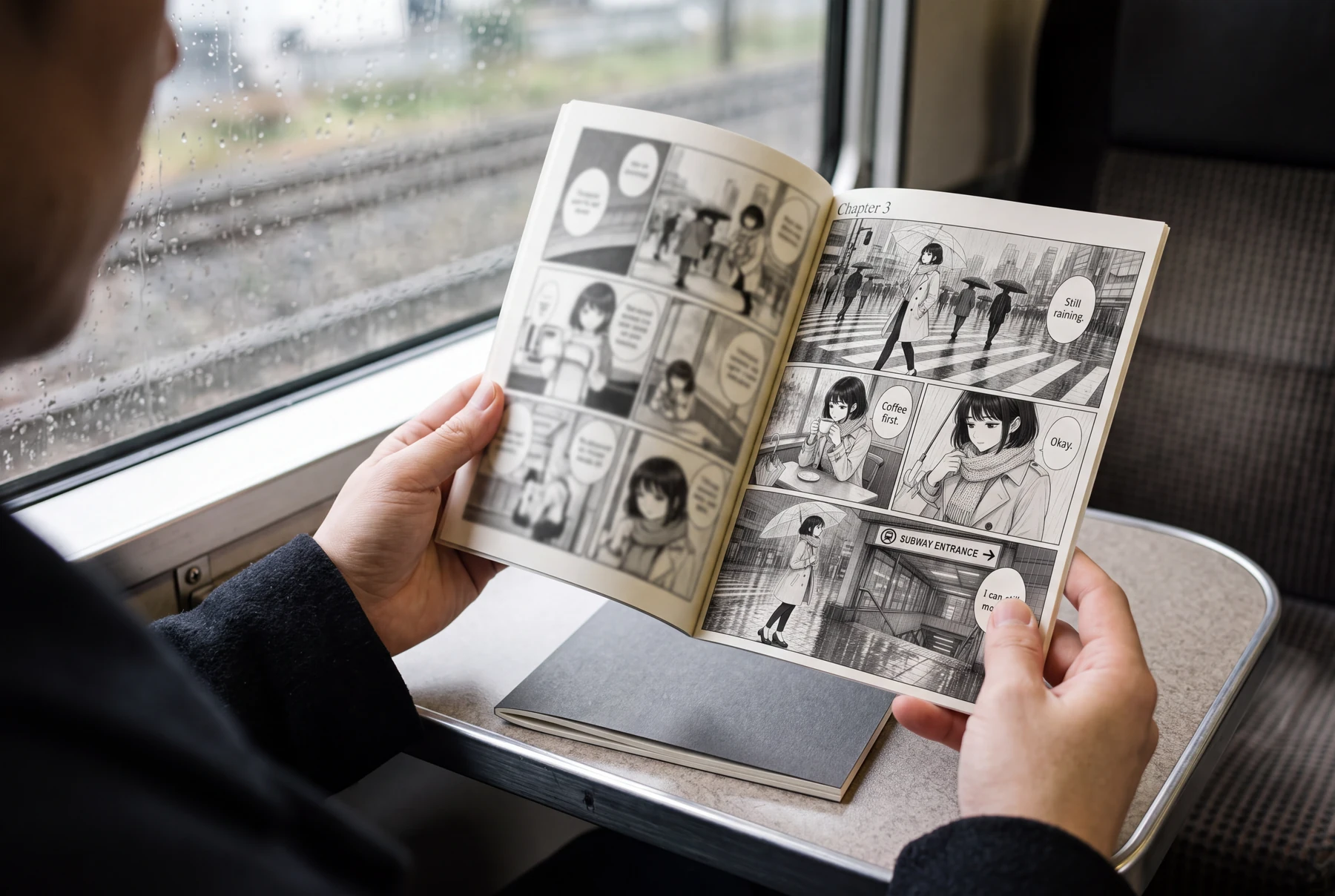
Worked example: a rainy station page
A commuter crosses a reflective street, pauses in a cafe, and reaches a subway entrance.
Panel 1
Keep the rain and road reflections in middle gray while the commuter silhouette remains clear.
Panel 2
Use lighter cafe tones so the cup and hands stay readable.
Panel 3
Reserve solid black for hair, deep coat folds, and selected architecture.
Panel 4
Reduce background detail around the station sign and final movement.
The page uses different value roles for weather, character, and location. More tone would not automatically make the scene richer.
Comic pages in everyday use
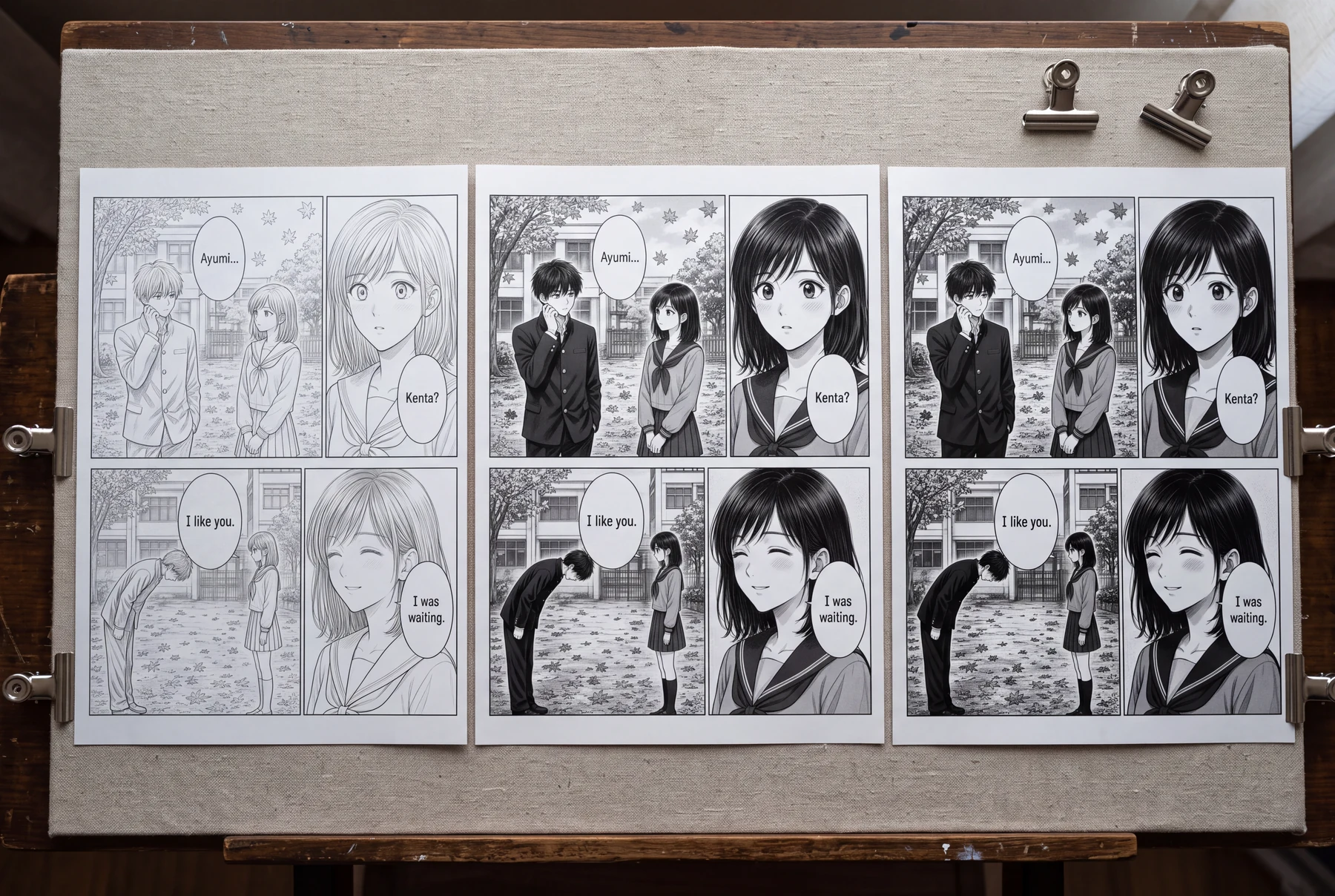
Compare three tonal treatments at reading size
Keep the same school scene and panel composition; change only the black-and-gray strategy.
Tone added without hierarchy
- Every background surface uses a similar gray.
- Hair, uniform, trees, and school wall compete equally.
- Fine tones look clean only when enlarged.
Readable monochrome system
- Paper white separates faces and dialogue space.
- Solid black anchors hair and selected clothing shapes.
- One restrained tone family describes background depth.
How to compare
- Export clean-line, balanced-tone, and dark versions at the same dimensions.
- View each at phone size and intended page size.
- Mark lost eyes, merged hands, and noisy gradients.
- Keep the simplest version that preserves the intended mood.
What to look for
The strongest version should retain the story beat without forcing every object to carry texture.
What this exercise cannot prove
A screen comparison cannot replace a printer proof or a publisher's current technical requirements.
Before you publish: review the page
- Solid blacks have a clear role.
- Faces, hands, and story props remain readable.
- Tones do not create visible moiré at delivery size.
- Lettering stays separate from busy textures.
- The editable master and delivery export are both retained.
Frequently asked questions
Can I convert a color manga page to black and white?
You can start from color, but a good monochrome result usually needs manual value, line, and tone decisions rather than simple desaturation.
Are screentones required for manga?
No. Clean line art, solid blacks, hatching, wash, or restrained tones can all work. Choose a system that supports the story and final output.
Why do tones show moiré after export?
Dot patterns can interfere with resampling or reproduction. Test the actual export size and follow the destination's monochrome guidance.
Sources and further reading
- Clip Studio Paint — Monochrome Manga Guide: Inking the Background ↗
Official tutorial material covers perspective rulers and inking a monochrome manga background.
- KDP — Fix Paperback and Hardcover Formatting Issues ↗
Primary publishing guidance includes manga-specific cautions for moiré. Requirements are platform-specific and may change.
Take the next step in your comic workflow
Plan a visible story beat, try the relevant tool, and review the result yourself. These guides do not promise to automatically analyze or repair your comic.