Storyboard first when a scene's pacing, shot order, dialogue density, or reveal size is still uncertain. Generate finished panels first only when those decisions are already locked.
In our controlled eight-beat test, the direct-to-panel workflow needed 13 finished-panel generations to reach the approved sequence. The storyboard-first workflow needed 9. That is a 31% reduction in finished-panel generation work for this specific scenario, not a universal platform benchmark.
The October 27 timed rerun added an important correction: storyboarding did not make the review itself faster. Writing the late finished-panel correction brief took 36 seconds; writing the storyboard-stage correction list took 41 seconds. One Vertex Nano Banana 2.1 image request took 23.2 seconds for the finished-page repair and 24.3 seconds for the revised storyboard. The time was almost the same. The risk was not.
The practical value of a storyboard is not “thinking faster.” It is creating an approval gate before expensive work exists.
You can run the same test with your own scene in the LlamaGen.AI Storyboard Generator before committing to polished comic art.
AI makes a finished-looking panel quickly. That speed can hide a planning problem.
If beat three should come before beat two, the reveal needs twice as much space, or a speech balloon covers the only readable action, the issue is not just image quality. It is sequence design. Regenerating prettier versions of the same weak sequence does not solve it.
Comic creators often describe thumbnailing as the stage where pacing, page layout, and dialogue become visible. In a ComicBookCollabs workflow discussion, one creator noted that thumbnails save the cost of redrawing full panels when visual storytelling changes. Another discussion about difficult production stages focused on how panel size, dialogue, page turns, and time all shape pacing.
Those are exactly the decisions a storyboard should expose early.
A useful ComicBookCollabs case study shows why a visually competent result can still be structurally wrong.
The writer described a scribe, an assistant entering through an open door, a table covered by a large parchment sheet, and shelves around the room. The storyboard artist followed the instructions. The problem was in the instructions: the writer pictured the master scribe in front of the door, but the wording placed him to the side.
That position mattered later, when an enemy needed to enter through the same door and the table-to-door relationship became part of the action. The storyboard was not bad. It correctly exposed a staging mistake before finished art.
The assistant stands in front of the open study door.
The master scribe is on the left side of the room beside a table.
He turns his head toward the assistant, but we do not see his face.
This describes objects but does not lock their relationship. “Left side” can mean left of the panel, left of the table, or left from the assistant's point of view.
Camera: inside the study, facing the open doorway.
Assistant: framed inside the doorway.
Table: centered in the foreground, long edge parallel to the bottom of the panel.
Master scribe: seated between the table and doorway, back toward the reader.
He turns his head toward the assistant without revealing his face.
Keep a clear path from the doorway to the master's position for the later enemy entrance.
The correction is not more decorative. It defines camera position, object relationships, and the future action path. Those are Gate 2 decisions in the approval system below.
We used one original eight-beat station scene and took it through two workflows.
1. A courier enters a crowded station.
2. He notices an unattended bag.
3. A child reaches toward it.
4. The courier stops the child.
5. He signals station staff.
6. The crowd moves back.
7. Staff checks the bag and finds a harmless costume prop.
8. The train leaves as the child waves goodbye.
The narrative goal was simple: build tension, keep the action readable, and release the tension without making the courier look reckless.
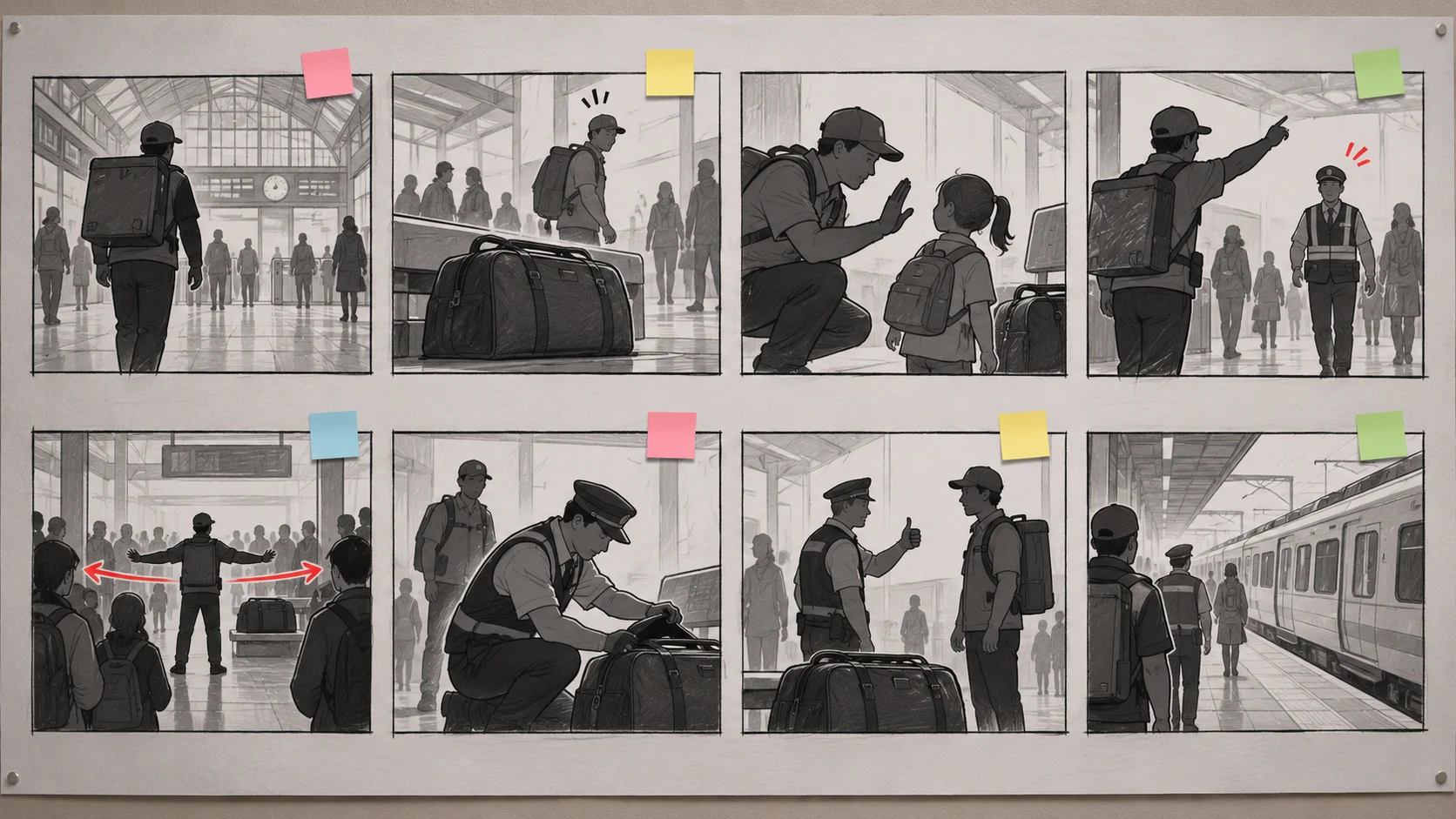
We counted production decisions instead of inventing dollars, model latency, or account-specific credits.
| Metric | Definition |
|---|---|
| Finished-panel generations | New polished panel outputs created |
| Thumbnail revisions | Rough frames moved, redrawn, merged, or resized |
| Layout passes | Full-page or sequence arrangements rebuilt |
| Dialogue cuts | Lines shortened after testing available space |
| Late repairs | Changes made after polished panels existed |
The original eight-beat editorial workflow test was conducted on October 10, 2026. On October 27, we reran the rejection-and-rewrite step with a stopwatch and generated two new verification visuals through Vertex Nano Banana 2.1. The frames document the scenario and revision logic. This is not a claim about guaranteed savings for every comic, model, subscription, or network condition.
“Storyboard first” is too vague unless the team knows who can approve it and what becomes locked. Use five explicit gates.
| Gate | Approve only when | Locked after approval | If it fails, return to |
|---|---|---|---|
| 1. Story beats | Every beat changes story state; no beat repeats information | beat purpose and order | script or beat list |
| 2. Staging and geography | entrances, exits, eyelines, props, screen direction, and future action paths are coherent | camera axis and spatial relationships | rough storyboard |
| 3. Page or scroll layout | panel hierarchy, reveal size, reading order, and dialogue-safe space work at thumbnail size | panel count, sizes, and order | layout thumbnails |
| 4. Character and prop continuity | approved references, costumes, carried objects, and handoffs remain consistent | reference versions and continuity anchors | targeted panel brief |
| 5. Final art and lettering | rendering, balloons, captions, crop, export size, and mobile/print readability pass | publication asset | lettering, crop, or one-panel repair |
Do not approve Gate 3 while Gate 2 is unresolved. A strong page layout cannot rescue contradictory room geography.
Store a short record with the project instead of relying on chat history:
gate: 2-staging-and-geography
version: storyboard-v04
status: approved
approved_by: editor-name
approved_at: 2026-10-27
locked:
  - door position
  - table position
  - character entrances
  - camera axis
allowed_changes:
  - facial expression
  - hand gesture
blocked_items: []
If a later request changes a locked field, reopen that gate and list every affected downstream panel. Do not disguise a structural change as a “small art tweak.”
The first workflow converted all eight beats directly into polished panels.
The initial page looked complete, but review exposed three structural problems:
Fixing those problems touched five finished panels. The page also needed a second layout pass and three dialogue cuts because the first balloons competed with faces and hand actions.
| Direct-to-panel result | Count |
|---|---|
| Initial finished panels | 8 |
| Finished panels regenerated after sequence review | 5 |
| Total finished-panel generations | 13 |
| Full layout passes | 2 |
| Dialogue cuts after art existed | 3 |
| Thumbnail revisions | 0 |
The problem was not that the first images were unattractive. They had been polished before the sequence earned that polish.
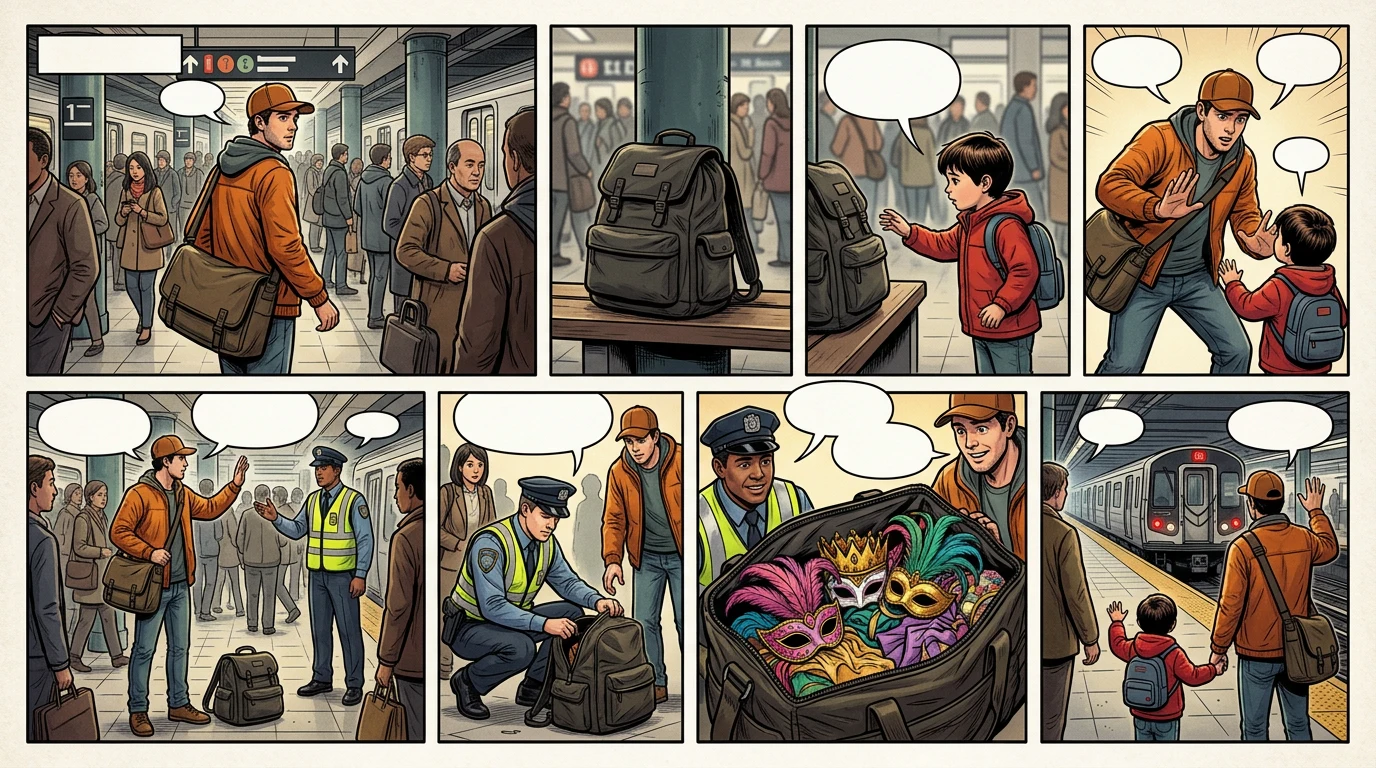
This October 27 replacement page makes the bag visible before the child reaches, combines staff response with crowd movement, and gives the harmless reveal enough scale. It is a stronger result, but those decisions arrived after finished-looking work already existed.
The second workflow began with eight low-detail frames in the AI Storyboard Generator.
Before generating finished art, we made five cheap changes:
Then we generated the eight approved panels. One final panel still needed a targeted repair because the courier's bag disappeared.
| Storyboard-first result | Count |
|---|---|
| Initial rough thumbnails | 8 |
| Thumbnail revisions | 5 |
| Approved finished panels generated | 8 |
| Late finished-panel repairs | 1 |
| Total finished-panel generations | 9 |
| Full layout passes after final art | 0 |
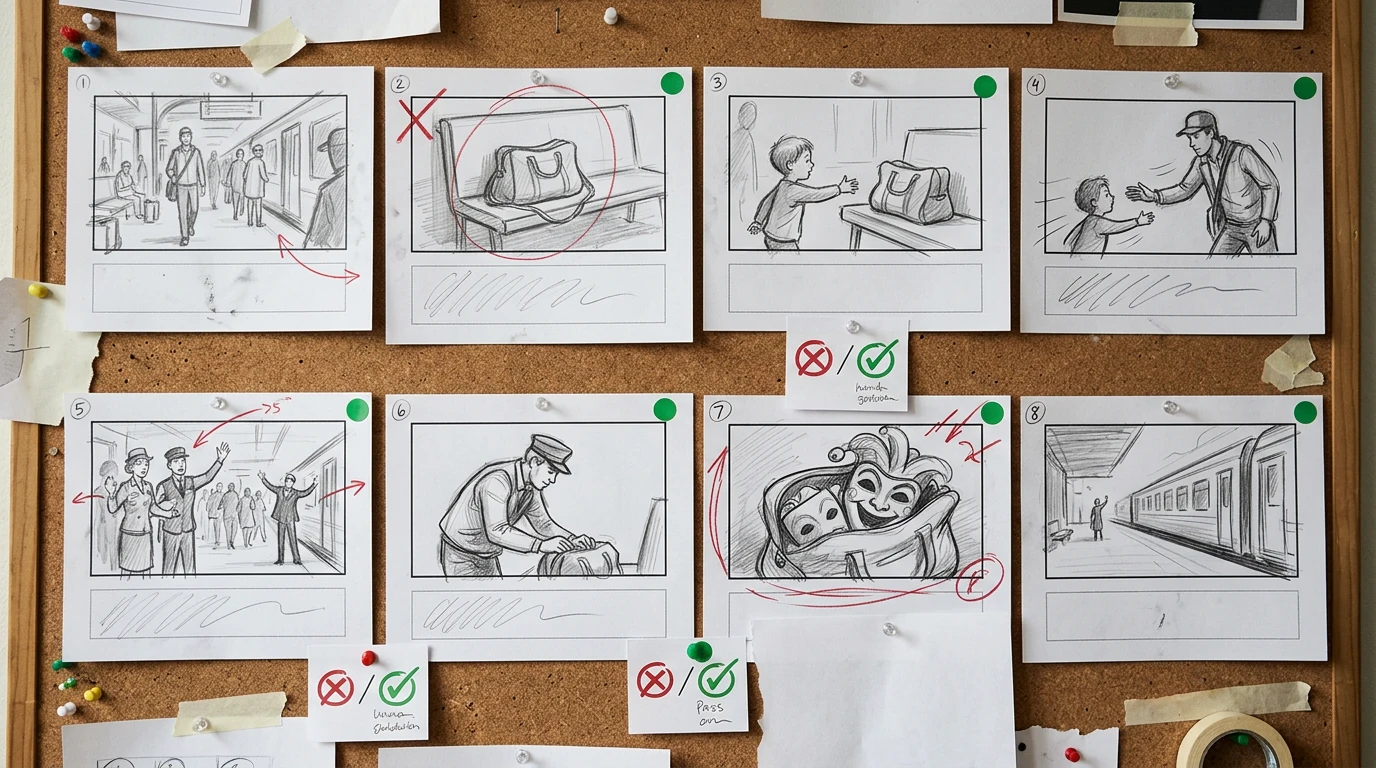
At this stage, the same structural changes affect pencil-level thumbnails. The green markers mean the sequence may advance; they do not mean the final art is already approved.
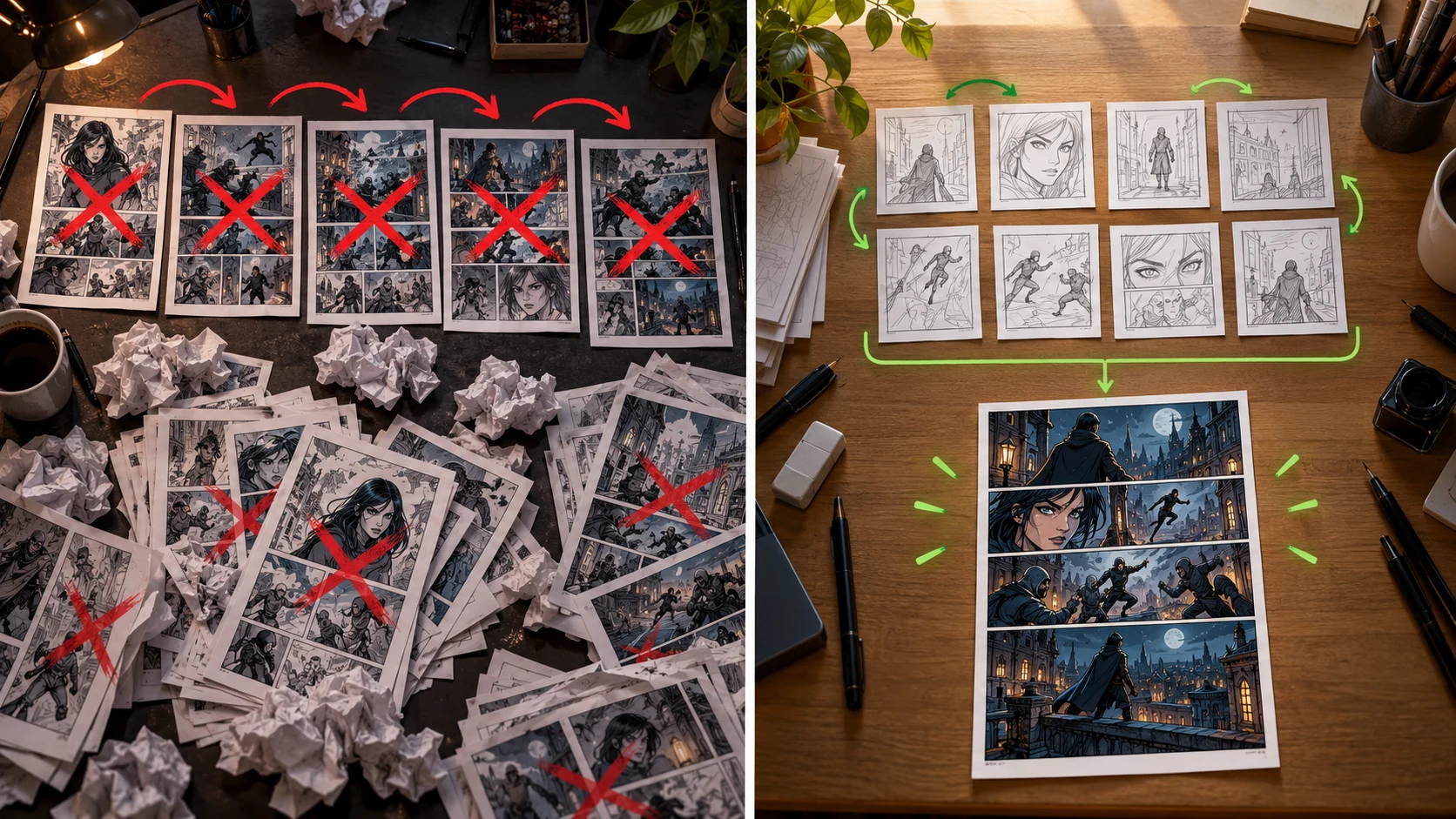
The test did not eliminate revision. It moved revision earlier, when each change affected a rough frame instead of polished art.
For this eight-beat scene:
direct-to-panel: 13 finished-panel generations
storyboard-first: 9 finished-panel generations
reduction: (13 - 9) / 13 = 30.8%
We separately timed one correction loop at each stage. The timer began with the rejected visual open. Active time ended when the correction brief was executable; generation time came from the image gateway log.
| Measured item | Late finished-panel correction | Storyboard-stage correction |
|---|---|---|
| Active diagnosis and correction brief | 36.0 s | 41.0 s |
| One Vertex Nano Banana 2.1 image request | 23.2 s | 24.3 s |
| Observed correction loop before QA | 59.2 s | 65.3 s |
| Assets made stale by the rejection | 5 finished panels, 1 layout, 3 dialogue placements | 5 rough thumbnail operations |
| Finished panels discarded | 5 | 0 |
The storyboard loop was 6.1 seconds slower in this small run. That matters to disclose. A storyboard is not automatically faster, and this was not an end-to-end benchmark: the storyboard column stops at a revised rough board, while the direct column returns a replacement finished-looking page.
The durable result is the scope of rework. Nearly identical review and request time exposed the problem before final art in one workflow and after final art in the other. Model latency, queue time, credits, and human review speed will vary; the number of approved assets put at risk is the more portable metric.
The important result is not the exact percentage. It is where the savings came from.
| Change type | Cheapest stage |
|---|---|
| Reorder story beats | Beat list or storyboard |
| Change shot size | Storyboard |
| Merge two actions | Storyboard |
| Reserve room for dialogue | Storyboard |
| Correct a face or costume detail | Targeted panel repair |
| Improve final lighting or texture | Final panel stage |
Storyboarding is valuable when the expected cost of a late structural change is higher than the cost of making rough frames.
Use this worksheet before deciding whether to storyboard:
expected late rework
= uncertain beats
* affected panels per beat
* cost per finished-panel attempt
Now compare it with:
storyboard cost
= number of rough frames
+ expected thumbnail revisions
You do not need perfect estimates. If the scene has a reveal, multiple characters, crowded dialogue, action geography, or a page-turn surprise, the uncertainty is usually high enough to justify rough planning.
Keep each beat focused on a state change:
weak: The station is busy and the courier is walking and thinking.
strong: The courier spots an unattended bag beside a child.
The stronger version tells you why the frame exists.
For each frame, write down:
Zoom out until details disappear. The sequence should still communicate:
If every frame is a close-up, the reader loses location and action geography. If every frame is wide, emotion disappears.
Reject the layout when it repeats faces, crowds provisional balloons, or gives the resolution less visual weight than the setup. The repaired layout should use an establishing shot, varied framing, protected dialogue space, and a larger resolution beat.
Write the reason for rejection in production language:
Reject Gate 3.
Panel 2 does not establish the bag before panel 3 action.
Panels 5 and 6 repeat staff response.
Panel 7 reveal is too small to resolve the tension.
Revise layout only; preserve approved beats and character references.
That instruction tells the next person what can change and what must stay locked.
Mark a storyboard as approved only when these are stable:
The approval record should name the version, approver, approval date, locked fields, open exceptions, and whether downstream work may begin. A green comment without a version ID is not an approval record.
Suggested ownership:
| Decision | Primary approver |
|---|---|
| Beat purpose and order | writer or story editor |
| Staging, geography, and eyelines | storyboard artist or visual editor |
| Page hierarchy and dialogue-safe space | layout editor |
| Character and prop continuity | character owner or continuity editor |
| Final art, lettering, and export | producer or publishing editor |
Then move into finished AI comic panels. If an approved storyboard changes, reopen the earliest affected gate, identify every downstream asset that depends on it, and repeat approval before regeneration. For longer projects, use a character-reference change audit instead of checking pages from memory.
Storyboarding is not mandatory for every job.
Generate finished panels first when:
For a one-off social post, rough planning can become overhead. For an eight-page scene with dialogue and a reveal, skipping it usually moves the same decisions into a more expensive stage.
Record your model, date, settings, request duration, and account usage if you publish the result. Do not present a rough-board request and a finished-page request as equivalent outputs. A credible case study explains both its conditions and where the comparison stops.
No. It needs to make sequence, framing, character placement, and dialogue space understandable. A beautiful storyboard that hides a pacing problem is less useful than an ugly one that exposes it.
They overlap, but a comic must also solve page or scroll rhythm, panel size, reading order, and static dialogue placement. A film storyboard primarily anticipates time-based shots and edits.
Start with one frame per story beat. Split a beat only when the reader must see two distinct changes. Merge frames that repeat the same information.
Add provisional dialogue during storyboard review. You need its approximate volume to reserve space, but polish the exact wording after the visual sequence works.
No. Savings depend on how uncertain the scene is and how your tools charge. This test reduced finished-panel attempts for one eight-beat scenario. Run the same count with your own workflow.
The writer or story editor should approve beat purpose and order. A storyboard or visual editor should approve staging and geography. A layout editor should approve page hierarchy and dialogue space. A character owner should approve continuity, and a producer or publishing editor should approve final art and export. One person may hold several roles on a small team, but each decision still needs a named owner.
Reopen the earliest affected gate. A changed door position returns to staging; a changed panel count returns to layout; a changed costume or reference image returns to continuity. List every downstream panel that depends on the change before regenerating anything. This prevents a local request from silently invalidating an entire chapter.
Written by Jay and reviewed by the LlamaGen.AI content team. The two October 27 comparison visuals were generated through Vertex with gemini-nano-banana-2.1. Gateway request durations were 23.186 seconds for the finished-page repair and 24.309 seconds for the storyboard repair. These observations are not product latency guarantees, credit benchmarks, or claims of universal time or cost savings.
If you want to test the tradeoff on your own scene, open the LlamaGen.AI Storyboard Generator, keep the input fixed, and count how many expensive decisions move into the rough stage.
熱門創作工具
使用 LlamaGen 創作漫畫、分鏡同風格化相片。
彙整最新的 LlamaGen 功能發布、產品強化、設計更新與重要錯誤修正。
引領 AI 漫畫生成的未來