
Build a Location Bible for AI Comics: Return to the Same Place Without Reinventing It - LlamaGen.AI Blog
LlamaGen logoLlamaGen brand
Get startedSubscribe Now20% Off
  1. Home
Build a Location Bible for AI Comics: Return to the Same Place Without Reinventing It
All posts

Build a Location Bible for AI Comics: Return to the Same Place Without Reinventing It

Jay
Jay
November 28th, 2026
Copy link
  • 1. Give the place an ID and one visual authority
  • 2. Separate geography from screen direction
  • 3. Keep movable props in a different record
  • 4. Reattach the right location reference when you return
  • 5. Approve useful views, not an imaginary complete room
  • 6. Review the return against the story, not just the picture
  • Download the example location bible
  • Does a location bible stop all background drift?
  • Should every panel use the master image?
  • What if the place changes during the story?
elevate-your-comics.png
Elevate your Comics with LlamaGen

A recurring location needs an identity just as much as a recurring character does. If the station window changes shape, the door jumps to another wall, or the notebook reappears after somebody carried it away, the next panel can contradict the story even when the face is correct.

Build a comic location bible before a place becomes a regular set: one approved master image, a short description of its geography, the views you actually need, and a separate record of movable props. You can start a character or scene in LlamaGen.AI, then keep the approved references and state notes with your project.

This guide responds to a Reddit discussion about revisiting locations across an AI-generated episode. The useful production question is specific: when the story returns, are the landmarks and props still where the previous scene left them?

Example scope — November 28, 2026: the station below is our original generated teaching set. We made an exterior departure image and two new indoor returns through direct Google Vertex image calls. These are still-image examples assembled locally for review; they are not a native LlamaGen.AI location-memory feature, a ComfyUI workflow, or a video test. The calls supplied references explicitly. Nothing here establishes persistent model memory.
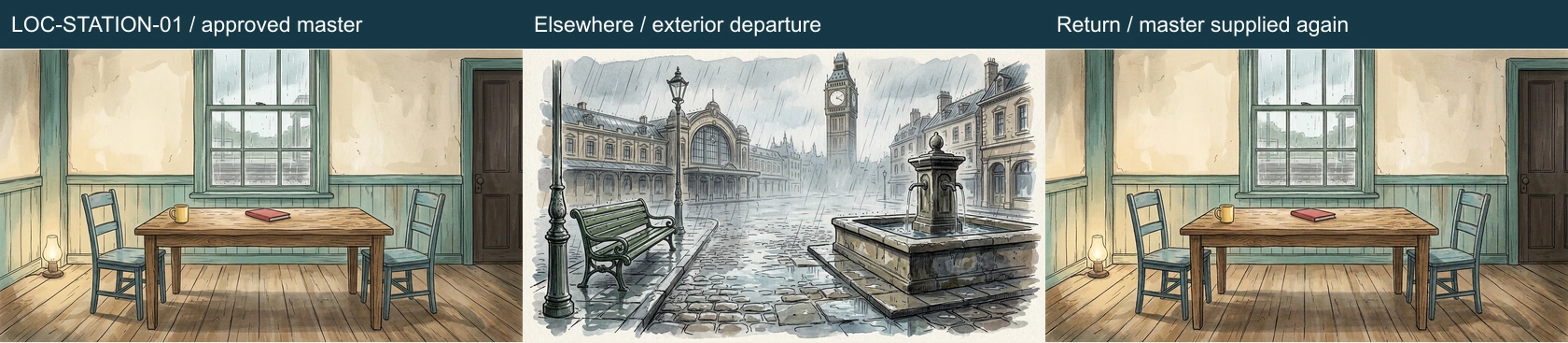
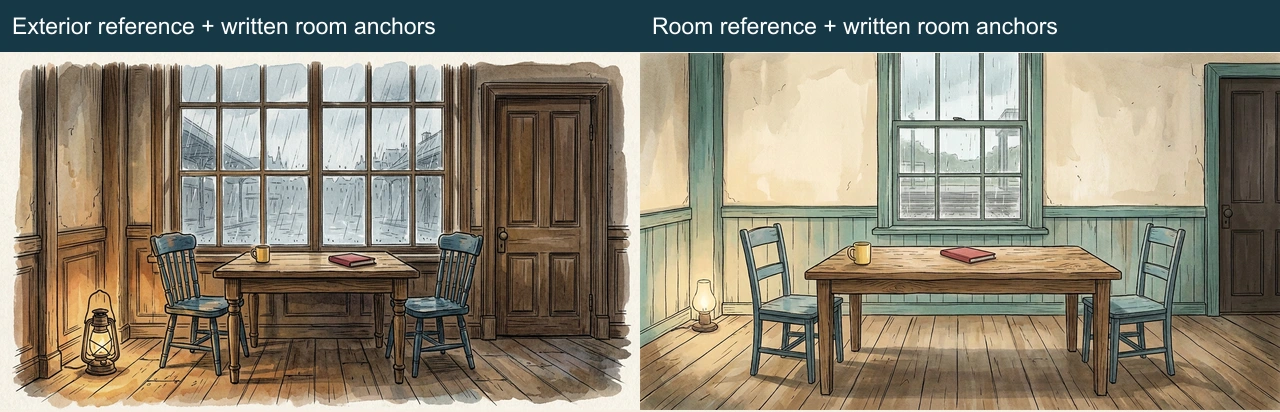
Approved station interior, exterior departure and a return generated with the interior master supplied again

The middle image is another place. For the third image, we supplied the original interior again instead of expecting the outdoor frame to preserve indoor construction details.

1. Give the place an ID and one visual authority

Our room is LOC-STATION-01, version 01. Its approved master shows a wooden table under a rainy window, a wooden door on the right, two blue chairs, green wainscoting, and an oil lamp on the left floor. A yellow mug sits on the left side of the tabletop; a closed red notebook sits near the center.

Use the master as the authority for this version. A later attractive image does not automatically become the new room. If you approve an architectural change, issue a new version and identify which future panels should use it.

Save the original at a readable resolution. A small contact sheet is useful for orientation, but the next artist or reference-aware generator may need the actual window, chair, and door details.

A practical folder might contain:

Related hot tags

AI Comics

OC Maker

Tutorial

Comic Production

Popular creator tools

Turn inspiration into your next story

Create comics, storyboards and stylized photos with LlamaGen.

01

AI Comic Generator

Turn an idea into polished comic strips in minutes.

Create comics with AI
02

AI Manga Generator

Create expressive manga art and multi-panel stories.

Create manga with AI
03

AI Storyboard Generator

Visualize every scene before production starts.

Create storyboards with AI
04

Turn Picture into Comic

Transform any photo into a comic-style illustration.

Create comics from pictures with AI
05

AI Comic Strips Maker

Build shareable strips with characters that stay consistent.

Create comic strips with AI

LlamaGen community

checkmark

Get hands-on help with your comics

checkmark

Showcase your comics to fellow LlamaGen creators

checkmark

Participate in special events to win gifts

Changelog

Spark dreams for the young
Where millions of stories come alive

A rundown of the latest LlamaGen feature releases, product enhancements, design updates, and important bug fixes.
✦
✧
✦
✧

A new medium for Storytelling

Vibe creating unlimited stories, comics, animations, games, and more—in seconds that resonate with modern audiences

LOC-STATION-01/v01/ station-master.png location-bible.json location-map.svg approved-views/ scene-state/ candidates-not-approved/

Those names are an editorial organization example, not a required product folder structure. The downloadable source pack contains the master and the actual candidates used here.

2. Separate geography from screen direction

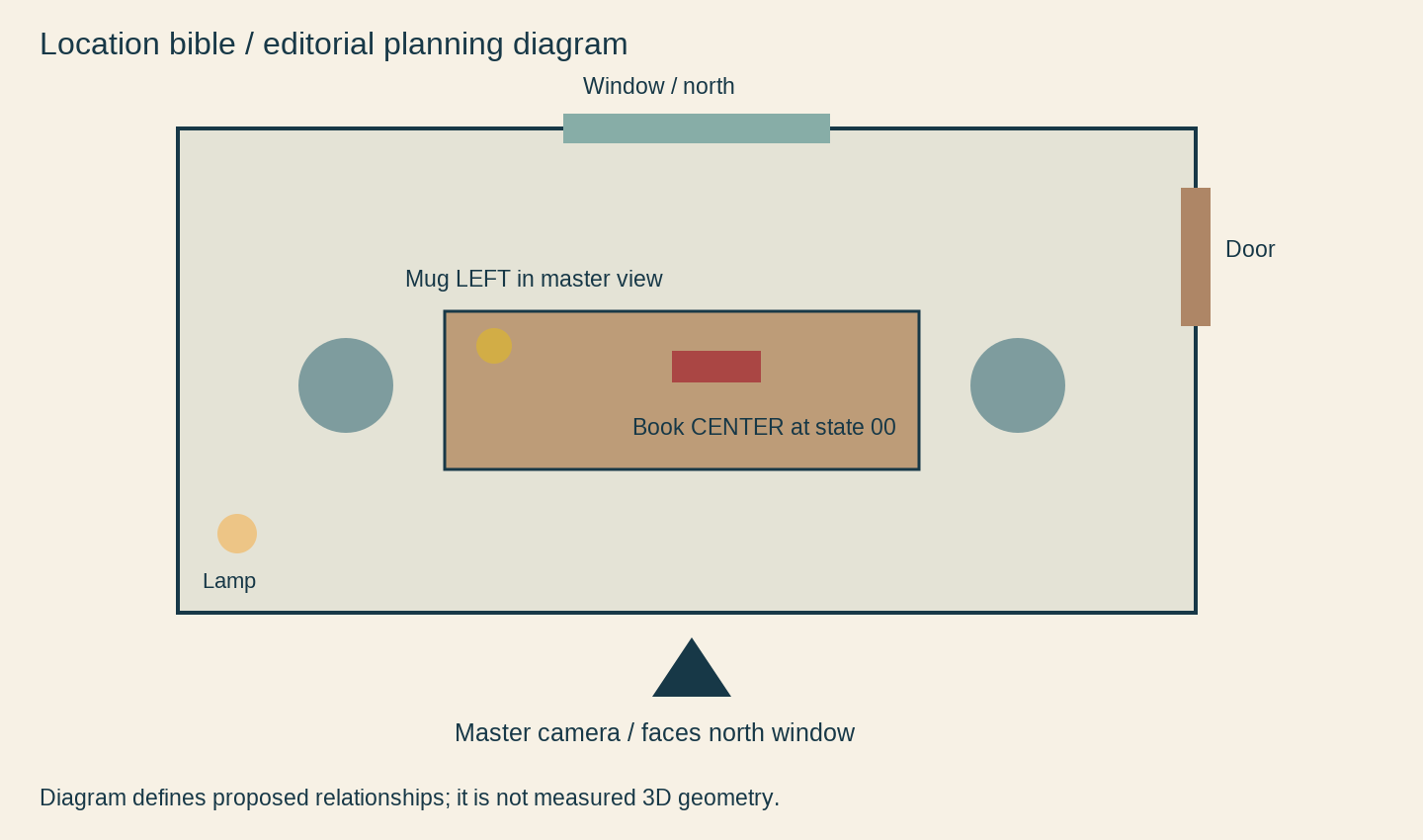
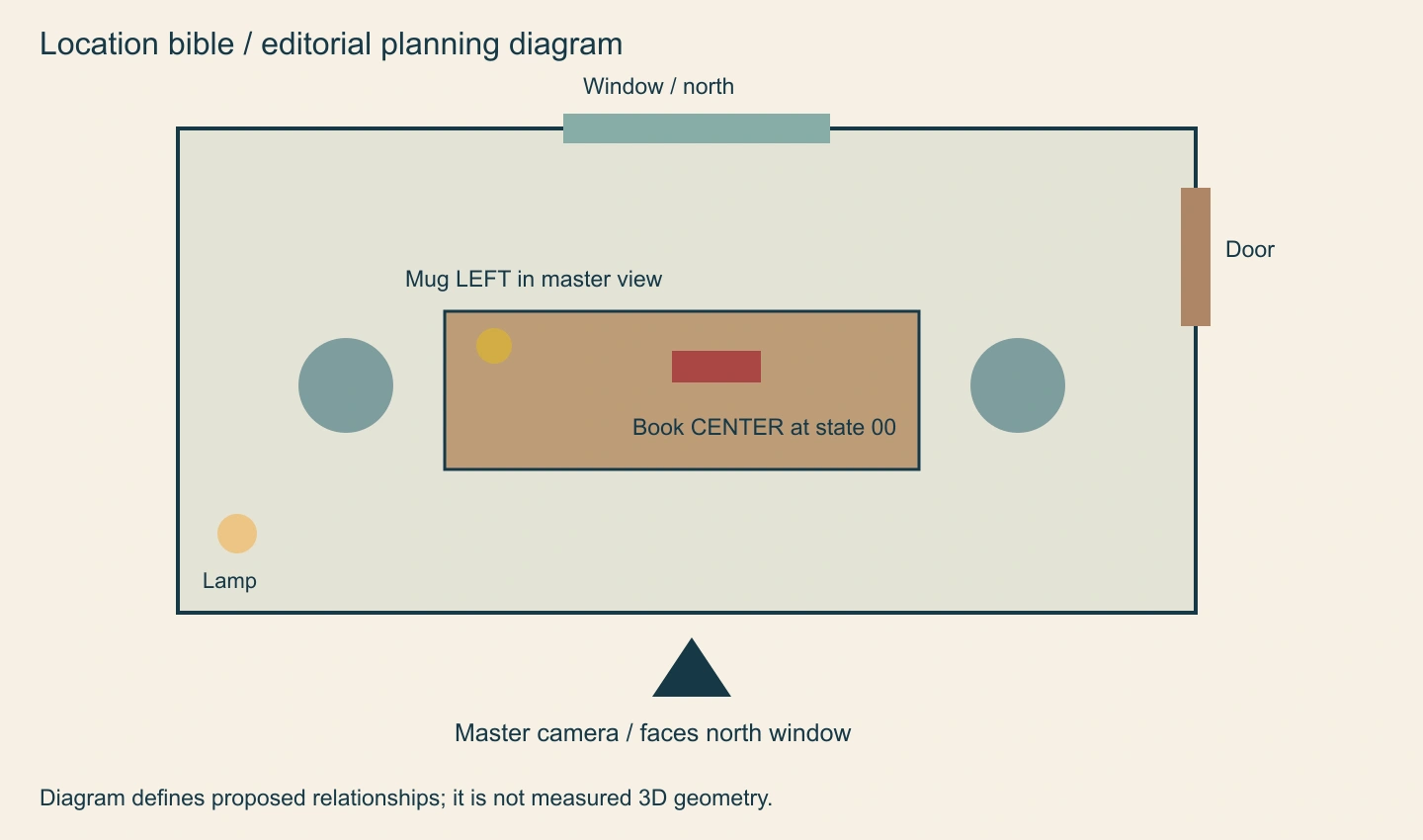
Write relationships that survive a camera change. “The door is on the room's east wall” is more durable than “the door is always on the right.” In our master view the camera faces the north window, so the east door appears on screen right. A reverse view could legitimately put it on screen left.

Editorial top-down location diagram with the north window, east door, table, chairs and master camera

This is a proposed planning diagram drawn locally from the approved illustration. It is not a measured reconstruction, a depth map, or a guarantee that generated perspectives share consistent 3D geometry.

Location anchorFixed relationshipWhat to check in another view
WindowNorth wall behind the tableSame frame design and relation to table
DoorEast wallCorrect wall and plausible direction from the camera
TableBetween the two chairsShape, scale and clearance from the wall
ChairsOpposite ends of tableCount, blue finish and readable placement
Oil lampWest side on floorNo unrequested wall lamp or extra duplicate
Wall and floorCream wall, green paneling, wood planksRecognizable materials and proportions

Do not force every anchor into every close-up. If the window is outside the frame, it cannot be checked visually. Record it as not visible rather than declaring it correct.

3. Keep movable props in a different record

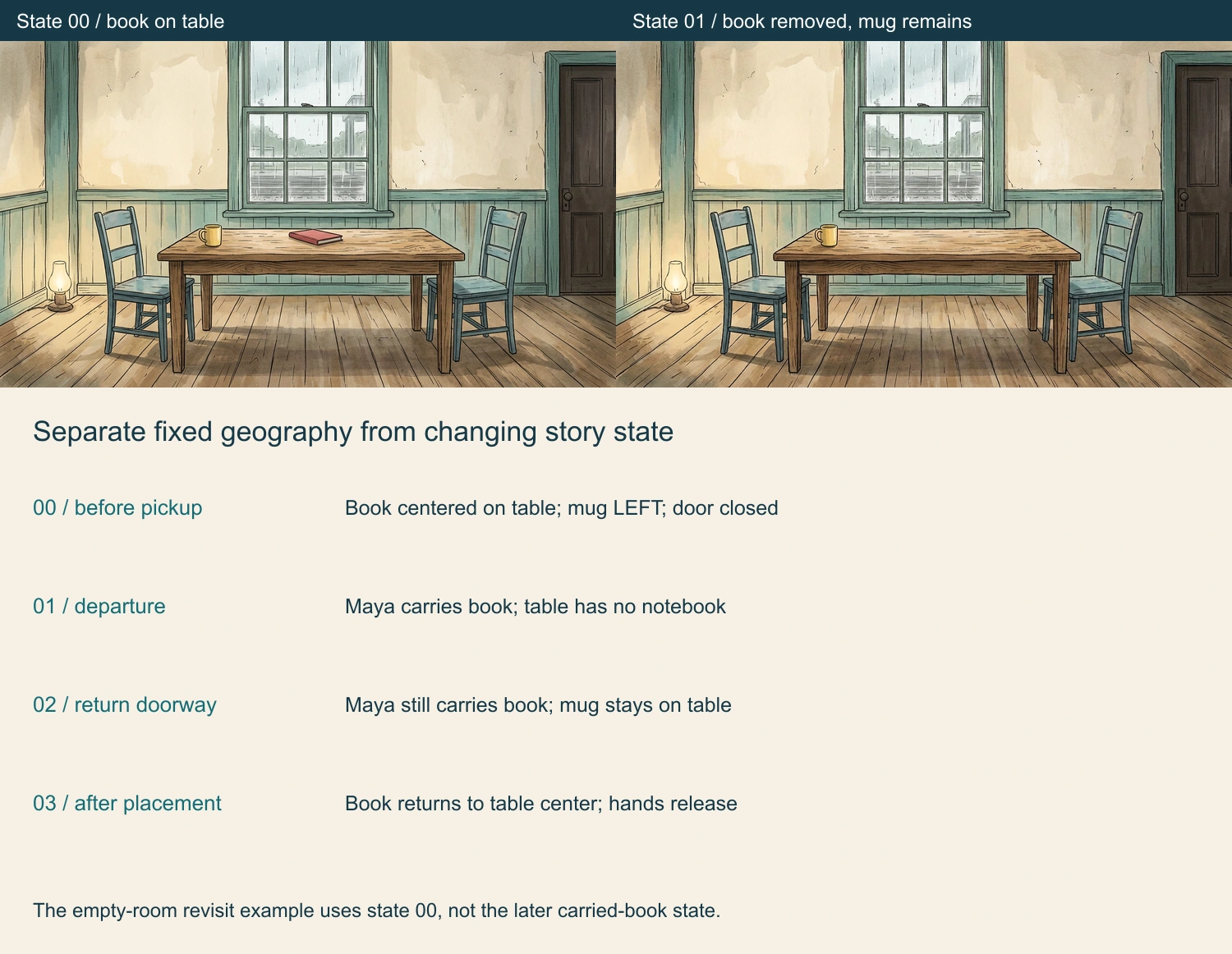
The notebook's starting position is not a permanent part of the architecture. If Maya takes it outside, a return panel must not reset it onto the table unless the story shows her putting it back.

Four scene-state entries distinguish notebook on the table, carried outside, carried back and replaced on the table

The empty-room return experiment in this article uses starting state 00. The later character-and-book sequence in the cost example uses changing states. Do not treat these as one uninterrupted filmed take.

StateNotebookMugDoor
00: before pickupClosed, table centerTable leftClosed
01: departureCarried by MayaUnchangedOpens for departure
02: returnStill carriedUnchangedOpens for entry
03: after placementClosed, table centerUnchangedSpecify in the next shot brief

A good state entry names an owner and a transition: who moved the object, in which panel, from where to where? “Same room” cannot answer that question.

For an action sequence, add the chair pulled out, the broken glass, or the wet footprints. These details can be temporary while still being essential to continuity.

4. Reattach the right location reference when you return

We generated two indoor candidates after making the outdoor image:

  • Exterior-reference condition: supplied the exterior departure image and a written description of the indoor anchors.
  • Interior-reference condition: supplied the approved room master and the written indoor anchors, with an instruction to return to that room.

The prompts share the room description but differ in their return instruction. There is one output per condition. Reference content, prompt wording, and available visual information differ; this is an illustrative comparison, not an isolated causal benchmark.

Two return candidates: an exterior-referenced room with changed construction and an interior-referenced room closer to the master

Both candidates retain the basic requested arrangement: window behind table, door right, two blue chairs, mug left, red notebook near center, and lamp left. The exterior-referenced image nevertheless reinvents the window divisions, chair construction, wall finish, and table proportions. The interior-referenced image is closer to the approved green paneling, window frame, and blue chair design, with smaller proportion changes still visible.

That observation supports a modest workflow decision: supply the approved set again when its construction matters. It does not prove that this model always needs a particular number of images or that another reference system will behave the same way.

A readable prompt template is:

Location: LOC-STATION-01, version 01.
Use the attached approved interior as the visual authority.
Camera: master view facing the north window.
Keep the window frame, green wainscoting, oak table and two blue chairs.
The east-wall wooden door appears screen right in this view.
State: 00. Yellow mug at table left; closed red notebook at center.
One oil lamp on the west-side floor. No additional lamps or objects.
Empty room, no captions, no inset views.

This is an improved reusable template, not a claim that the exact formatted text above produced the pictured outputs. The raw prompts and reference hashes are in the source archive.

5. Approve useful views, not an imaginary complete room

Start with the shots on your panel list: master, doorway approach, table insert, and any needed reverse. Generate or draw each view, compare it with the location bible, and approve it separately.

Do not infer an unseen corridor from a single interior and then treat every generated corridor as established canon. If the next chapter needs the corridor, design it deliberately and link it to the station room.

A rough 3D blockout can be a useful option when camera geometry is central. Our example did not build or test one. The map here describes intended relationships; it does not replace the validation a 3D pipeline would require.

For each approved view, record the camera description, visible anchors, story state, reference version, and unresolved differences. An image can be useful for a mood board while still being unsuitable as a continuity authority.

6. Review the return against the story, not just the picture

Run this short check before accepting a recurring location:

  1. Match the location ID and approved version.
  2. Compare the major visible architecture and furniture.
  3. Interpret left and right from the actual camera direction.
  4. Compare props with the latest story-state entry.
  5. Check for duplicates, missing objects, and unexplained changes.
  6. Keep the candidate or request one specific repair; inspect the whole repair again.

That last step matters. In our small-batch comic cost example, a repair fixed Maya's gaze but added an unwanted second lamp. A locally correct action can still produce an unusable continuity result.

Pair the location record with a shot-ready OC reference pack. Character identity, room geography, and current prop state are separate inputs, even when they meet in one panel.

Download the example location bible

Use the location bible JSON, editable SVG map and original location source pack. The archive includes the approved set, departure image, both return outputs, and sanitized generation receipts. It contains no 3D scene or native Studio project.

Does a location bible stop all background drift?

No. It gives you a visual and written standard for finding drift. Our interior-referenced return is closer to the master, but table and room proportions still vary.

Should every panel use the master image?

Use the reference that best describes the intended view and state. A master may be insufficient for an unseen reverse angle; approve that view before relying on it.

What if the place changes during the story?

Record the change as a state transition or a new set version. A notebook moved by a character is scene state; a rebuilt wall is a location revision.

If you start the scene in LlamaGen.AI, keep the approved location pack beside your cast references before you generate the return panel.

LlamaGen.Ai
  • United States
  • Español
  • Français (France)
  • 日本語
  • 한국어
  • Deutsch
  • 繁體中文 (台灣)
  • 繁體中文 (香港)
  • 简体中文
  • Português
  • Italiano
  • Español (México)
  • العربية
  • Русский
  • Português (Brasil)
  • Tiếng Việt

Leading the Future of AI Comic Generation

  • 24/7 support
  • Weekly updates
  • Secure and compliant
  • 99.9% uptime

Download LlamaGen for free

AndroidiOSDesktop

Product

  • Latest launches
  • Features
  • Comic strip maker
  • Comic StoresNew
  • Manga StudioNew
  • Turn Picture Into Comic
  • Comic To Video
  • AI Comic Factory
  • Comic Agent
  • iOS & Android
  • Mac & Windows
  • Download
  • Comic ZapNew
  • AI Comic Generator
  • AI Cartoon Generator
  • AI Webtoon Generator
  • Comic Strip Maker
  • Turn Picture Into Comic
  • AI Manga Generator
  • Manga Translator
  • Photo to Anime
  • Image to Prompt
  • Anime to Real Life
  • Manga Colorizer
  • Anime Character Generator
  • Pixel game asset tools
  • AI sprite sheet generator
  • Best pixel game tools 2026
  • Photo Comic Maker
  • Comic Life Alternative

Sister products

  • LlamaGen family
  • CineoBoardNew
  • Comics API

Plans

  • Pricing
  • Starter
  • Pro

Community

  • Creators
  • Affiliates
  • Partner

AI Models

  • GPT Image 2.6 Flare
  • GPT Image 2.6 Sunburst
  • Grok Imagine Image 2.0
  • Wan 3.0
LinkedInX (Twitter)
  • Home
  • Articles
  • Blog
  • Create
  • Pricing
  • API
  • Affiliate ProgramNEW

Ask AI about LlamaGen

  • Comic Zap
  • Velika
  • Enterprise
  • Education
  • Comic API
  • Contact Sales
  • Education Plans
  • Teachers
  • Students
  • Teachers and Students
  • Startups
  • Educational Discounts
  • Company

    • Talk to Our Founder
    • About
    • Product Roadmap

    Help

    • Help Center
    • Trust
    • Safe AI
    Testimonials
  • Wall of Love
  • LlamaGen MCPNew
  • LlamaGen Developer
  • Resources

    • Changelog
    • Blog
    • Guides

    Tools

    • AI Logo Generator
    • Grokbot Style Character Generator
    • PNG to Comic
  • Wan 3.0 Prime
  • Seedance 2.5
  • MiniMax H3
  • Nano Banana 2.1
  • Nano Banana 2 Lite
  • Seedream 5.0 Flash
  • Seedream 5.0 Pro
  • Seedance 2.0 Mini
  • Kling 3.0 Turbo
  • Nano Banana 2
  • GPT Image 2
  • Gemini Omni Flash
  • All AI Models
  • AI Tools

    • AI Outfit Extractor
    • AI Hairstyle Changer
    • AI Manga Hairstyle Changer
    Instagram
    YouTube
    Facebook group
    Reddit
    Discord
    Email support
    PrivacyTermsSitemap
    Download Brand Assets
    © 2026 LlamaGen.Ai All rights reservedAll services are online

    Previous blogs

    Planning 240 Comic Panels a Week: Measure Cost per Approved Panel

    Planning 240 Comic Panels a Week: Measure Cost per Approved Panel

    Audit an 18-panel comic sample and two repair calls. Track approved panels, rejected candidates, usa

    Jay
    Jay
    November 28th, 2026
    Build a Location Bible for AI Comics: Return to the Same Place Without Reinventing It

    Build a Location Bible for AI Comics: Return to the Same Place Without Reinventing It

    Create a comic location bible with a master image, map, and prop-state ledger so recurring AI-genera

    Jay
    Jay
    November 28th, 2026
    Human-Led AI Game Cutscenes: Keep the Script, Storyboards, and Timing Under Your Control

    Human-Led AI Game Cutscenes: Keep the Script, Storyboards, and Timing Under Your Control

    A practical, creator-led AI game cutscene workflow for selecting storyboard candidates, rejecting we

    Jay
    Jay
    November 23rd, 2026
    Make an AI Film Feel Real: Blocking, Reactions, and Continuity in a Quiet Scene

    Make an AI Film Feel Real: Blocking, Reactions, and Continuity in a Quiet Scene

    A worked quiet-scene repair case: room geography, prop behavior, reactions, and edit choices that im

    Jay
    Jay
    November 23rd, 2026
    Careers
  • Email us
  • Our Mascot World
  • Media Kit
  • KOL Partnership
  • Content
  • Professional Services
  • FAQ
  • Security
  • Accessibility
  • Video Tutorial
  • Contact us
  • Sitemap
  • Personalized Comics
  • Features
  • Alternatives
  • Best AI Apps
  • GPT-6 Manga Coloring Guide
  • Claude Comic Book Skill
  • Gemini AI Comic Guide
  • Comic That
  • Educational Discounts
  • Student discount
  • Text to Comic
  • PDF to Comic
  • Script to Comic
  • Book to Comic
  • Turn Picture Into Comic
  • AI Pixel Art Generator
  • Educational Comics
  • AI Video Generator
  • Gemini AI Video Generator
  • Free Faceless AI Video Generator
  • Comic To Video
  • Make Storyboard Software
  • AI Storyboard Generator
  • Screenwriting Software
  • Screenplay Editor
  • Story AI
  • AI Story Generator
  • Storybook Generator
  • AI Image Generator
  • AI Layer Splitter
  • AI Camera Angle Control
  • AI Pixel Art Generator
  • Pixel game asset tools
  • AI sprite sheet generator
  • Sprite sheet slicer
  • Best pixel game tools 2026
  • Animation API
  • ChatGPT/Codex Plugin
  • ChatGPT Install Guide
  • Claude Code Plugin
  • Claude Code Install Guide
  • AI Wind Effect Generator
  • AI Depth Map Generator
  • AI White Background
  • AI Object Remover
  • AI Virtual Try-On
  • AI Unblur Images
  • AI Denoise
  • AI Photo Restoration
  • AI Product Shadows
  • AI Background Generator
  • AI Headshot Generator
  • AI Emoji Maker
  • AI Background Changer
  • AI Open Eyes
  • AI Beauty
  • AI Product Photography
  • See all blogs