

Story to episodic animation

How to make an anime series with AI

Build one repeatable episode pipeline before attempting a season. AI can help generate character visuals and short video shots, but story structure, editorial timing, continuity and final sound still need direction. This guide starts with an original pilot rather than promising a one-click television episode.

For solo creators and small teams making an original anime pilot or recurring web series.

Original case · 2026-11-13 · The Observatory Note

A small pilot scene study

Two independently generated shots from one original cast and observatory setting. These are editable scene studies, not an automatically completed anime episode.

Generated directly through Google Vertex AI. These are Veo examples; the creation tool uses Seedance 2.5 with different duration and resolution. This case does not verify LlamaGen account credits, billing or mobile-browser behavior.

continuity second shot

veo-3.1-fast-generate-001 · 8s · 1920 × 1080 · 24 fps · Silent MP4 · 17.7 MB
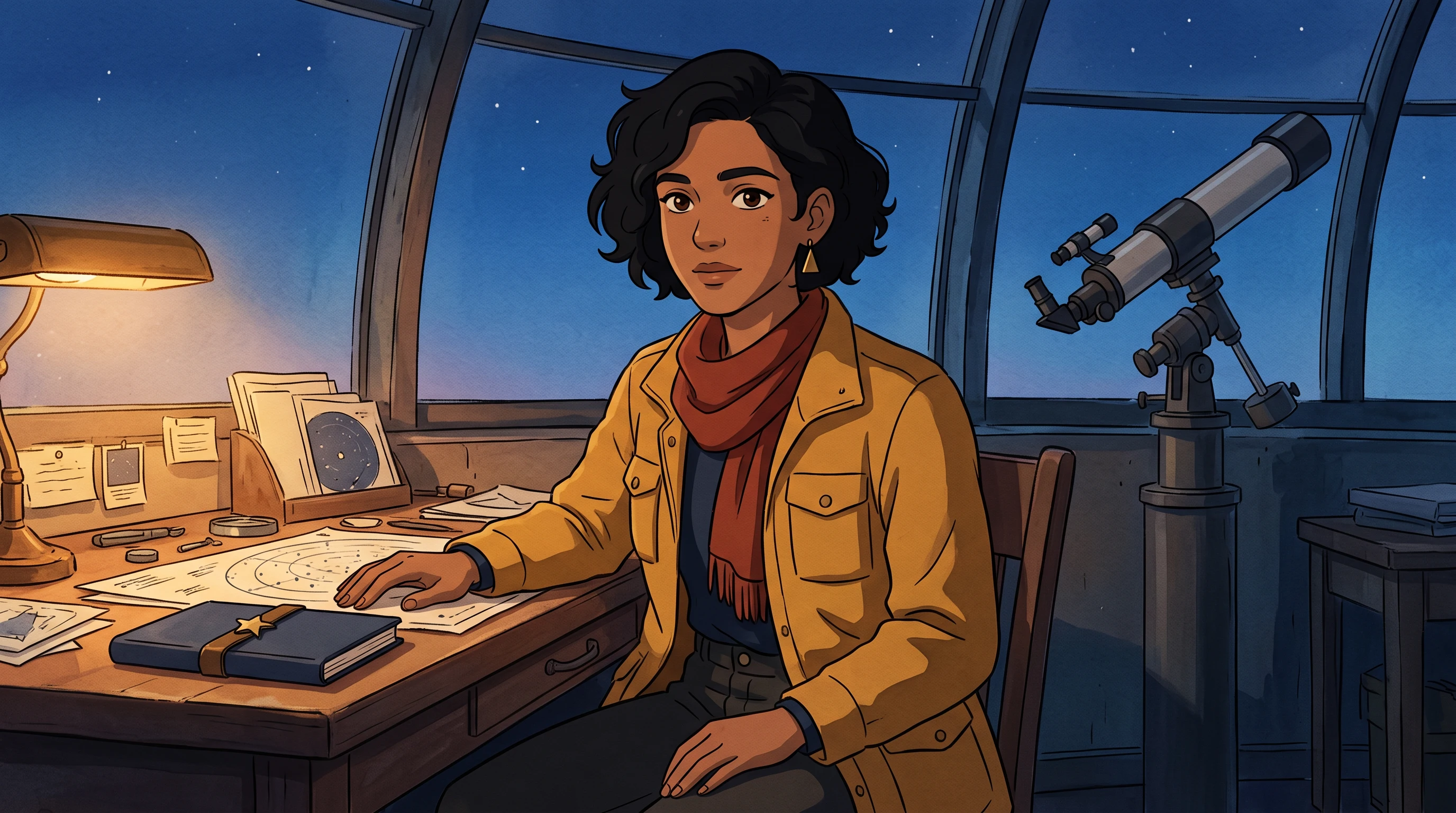
Original color reference for continuity second shot
Source frame · AI-generated original artwork · 2K
Open the exact input PNG
Actual Vertex output · No autoplay · Silent audio track setting
Open MP4 to play or save

Frame review: The push-in and smile are visible. The table hand also moves, contrary to the fixed-hand instruction. Usable as an animatic study, not strict motion compliance.
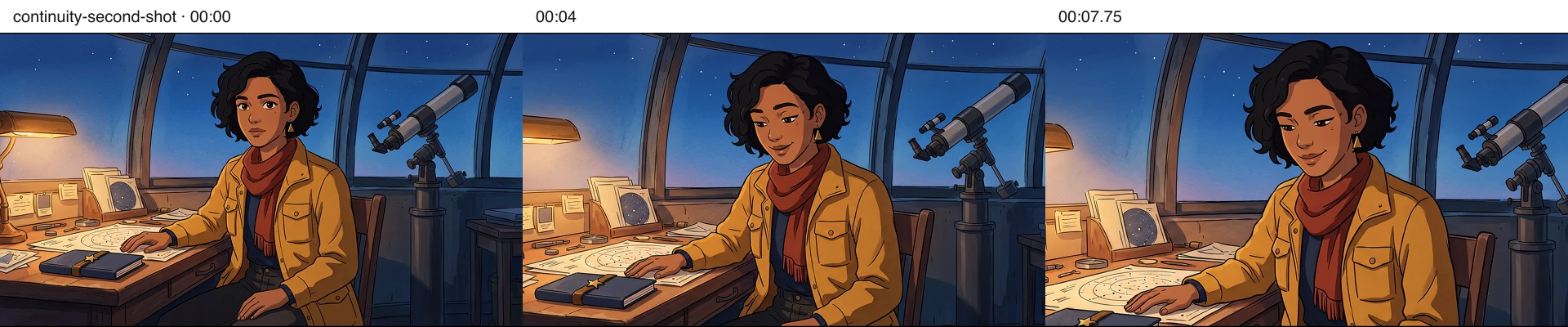
continuity second shot at zero, four and 7.75 seconds
Actual decoded frames at 00:00, 00:04 and 00:07.75. Open at full size to inspect; three checkpoints cannot prove perfect continuity throughout a clip.
Read the exact motion prompt and provenance

One continuous eight-second hand-painted anime shot. The adult woman looks down at the closed navy notebook and briefly smiles. Keep both hands stationary. Very slow, subtle camera push in. Preserve the exact original face, short curly bob, triangular earring, mustard jacket, red scarf and navy shirt, fixed notebook clasp and telescope placement. No cuts, no new people, no extra props or text, no speech or music.

Generated 2026-11-13T08:49:55.371Z. Exact input PNG SHA-256: 095d0384b8186dd38bc65346bfd7f41f50ac6ca900442075d5d8197c5c1a7960. One request for this listed take; the two-character retake is separately labeled. Invoice cost is unavailable from the generation response, so no exact spend or cost-per-approved-shot is claimed.
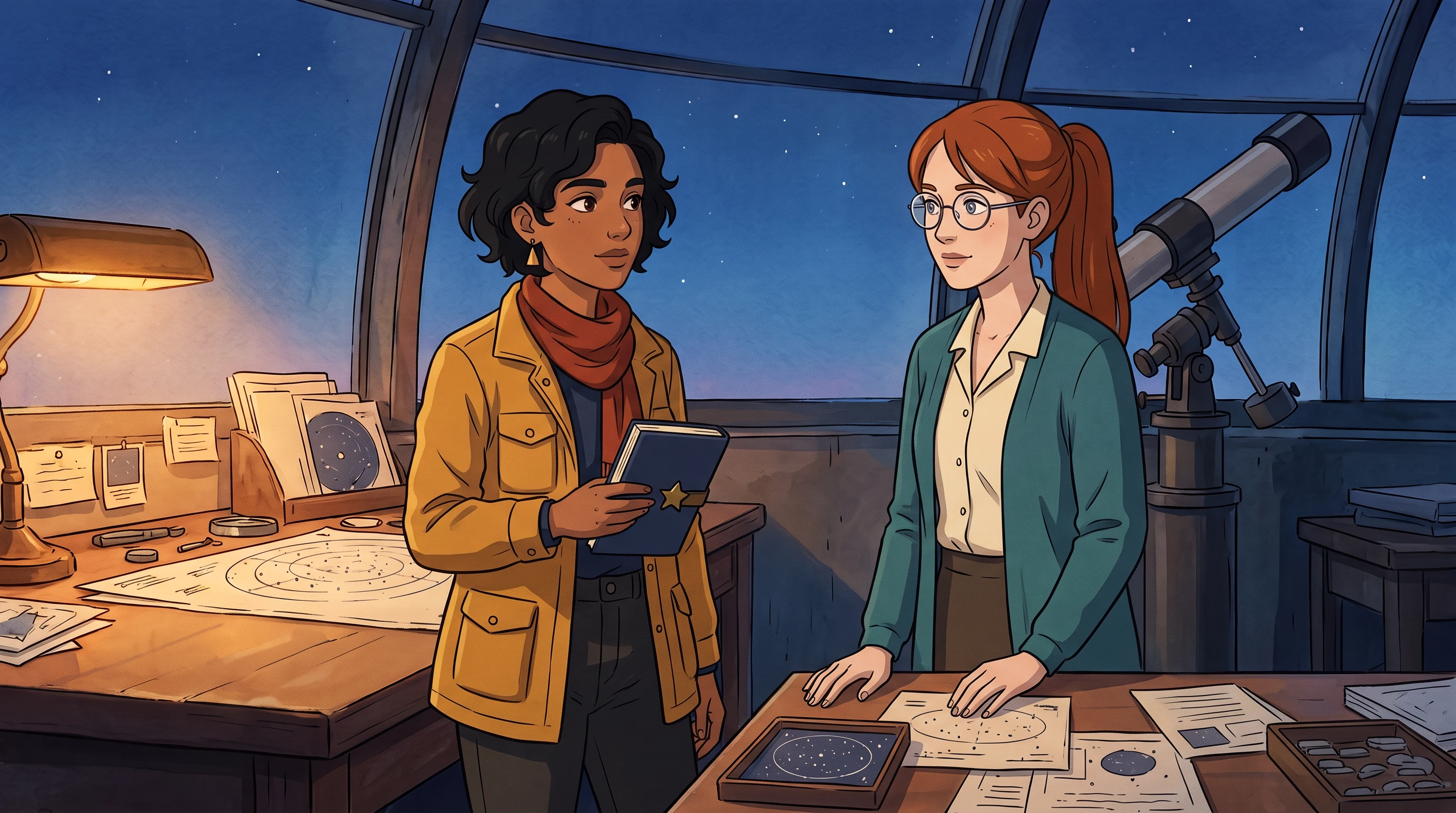
two character retake

veo-3.1-fast-generate-001 · 8s · 1920 × 1080 · 24 fps · Silent MP4 · 7.4 MB

Original color reference for two character retake
Source frame · AI-generated original artwork · 2K
Open the exact input PNG
Actual Vertex output · No autoplay · Silent audio track setting
Open MP4 to play or save

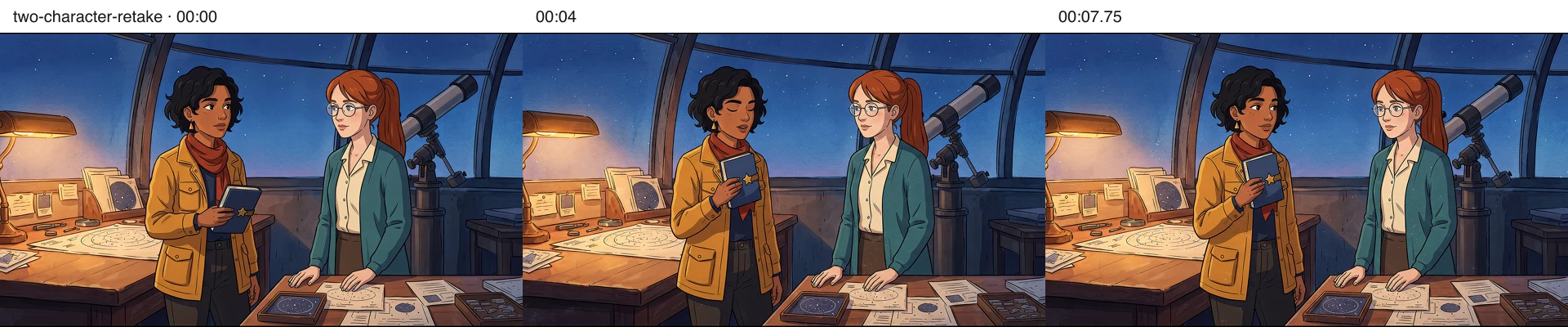
Frame review: At the reviewed checkpoints, both of June's palms remain on the table while Mira lifts the notebook; screen sides and prop ownership are retained. This improves the initial gesture error in this one scene, not a guarantee for other casts or every frame. Small mouth movements remain despite the closed-mouth direction.

two character retake at zero, four and 7.75 seconds
Actual decoded frames at 00:00, 00:04 and 00:07.75. Open at full size to inspect; three checkpoints cannot prove perfect continuity throughout a clip.
Read the exact motion prompt and provenance

A quiet, silent eight-second animated illustration, ONE action only. CAMERA completely locked. The dark-haired woman on SCREEN LEFT lifts her closed blue notebook only a few inches toward her chest, then holds it still. The red-haired woman with glasses on SCREEN RIGHT remains in exactly her starting pose: BOTH palms are planted flat on the table for every frame, elbows unmoving, no arm gesture, no nod, closed mouth, no talking. Both women keep closed mouths. Preserve all first-frame facial features, original clothing and left/right order. No other animation except tiny natural blinks. Keep the background and telescope entirely still. No cut, camera pan, zoom, new prop, text, music or speech. Preserve original watercolor/ink artwork.

Generated 2026-11-13T08:58:57.006Z. Exact input PNG SHA-256: dd488613a838f346ccd82949e6b74eb1caa1d3afc86185ae5cadd933ba4ac689. One request for this listed take; the two-character retake is separately labeled. Invoice cost is unavailable from the generation response, so no exact spend or cost-per-approved-shot is claimed.
One original scene and cast, with explicit failures and a revised request. No private user photos, competitor footage or customer results were used. Videos were fully decoded and checkpoint images inspected locally; browser interaction review is separate.

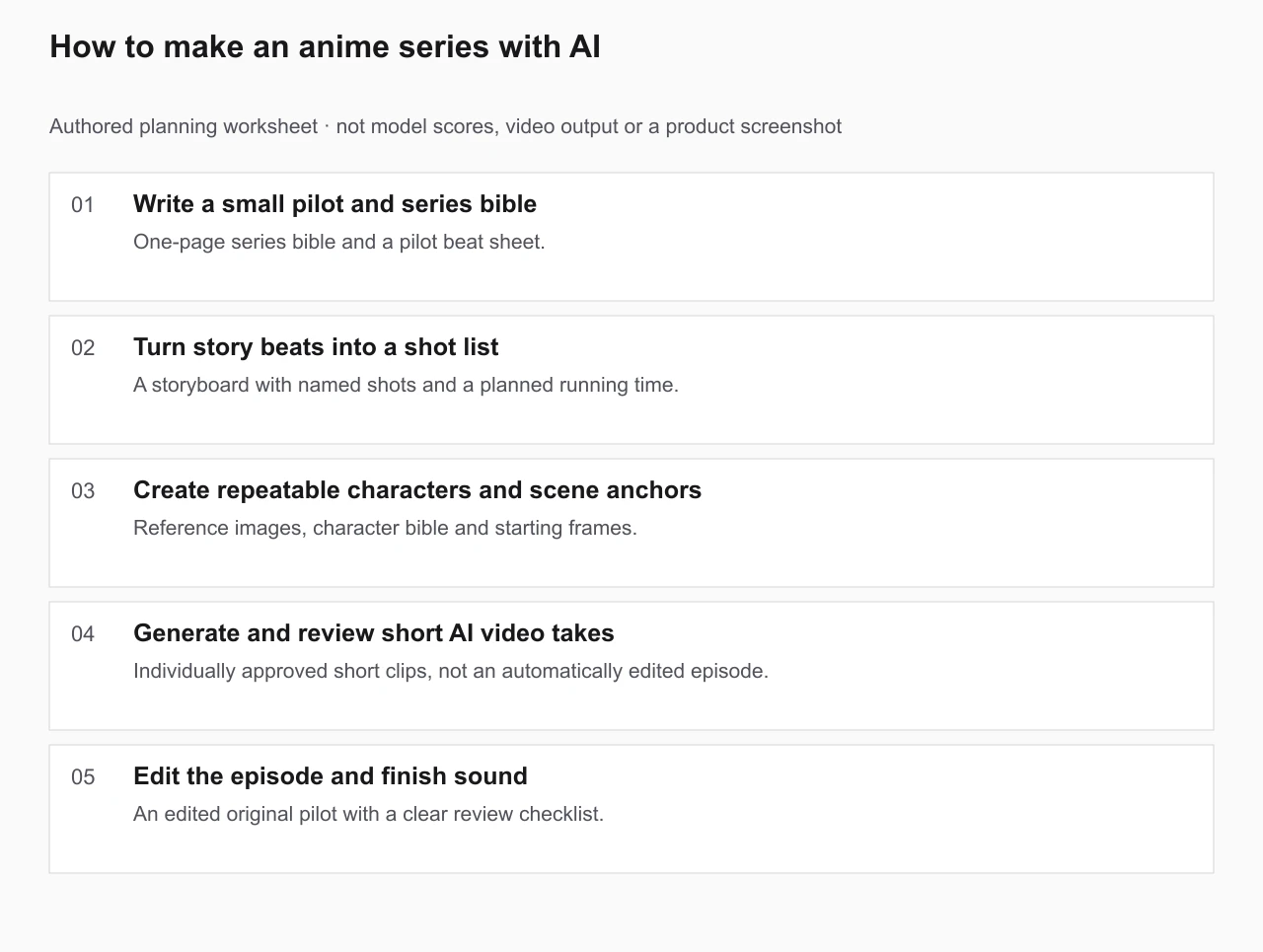
How to make an anime series with AI: authored workflow with a concrete deliverable at each stage
Original planning worksheet. This diagram illustrates the guide's method; it is not a generated video, measured model ranking or independently verified benchmark. Use the editable brief below to record your own outputs and failed takes.
Open the full-size worksheet ↗

The working process

  1. Step 1 of 5

    Write a small pilot and series bible

    Set genre, audience, character goals, recurring locations, art direction and episode length. Write an opening problem, a change and an ending before prompting video models.

    You should have: One-page series bible and a pilot beat sheet.

  2. Step 2 of 5

    Turn story beats into a shot list

    Divide the pilot into short shots with a subject, action, camera move and duration. Use LlamaGen storyboarding for composition and shot order, then inspect the sequence as a viewer.

    You should have: A storyboard with named shots and a planned running time.

  3. Step 3 of 5

    Create repeatable characters and scene anchors

    Approve a visual reference for each original character, including face, outfit and palette. Produce a first-frame image for difficult shots; keep a location and prop continuity list.

    You should have: Reference images, character bible and starting frames.

  4. Step 4 of 5

    Generate and review short AI video takes

    For each shot, use a supported image-to-video model, choose one movement, check the credit quote and render. Keep successful takes; repeat only the shots that fail continuity or composition.

    You should have: Individually approved short clips, not an automatically edited episode.

  5. Step 5 of 5

    Edit the episode and finish sound

    Arrange clips in the planned order, fix timing, add dialogue/voice where you have rights, mix sound and export in your preferred editor. Rewatch on a phone and check that cuts, captions and continuity remain readable.

    You should have: An edited original pilot with a clear review checklist.

Copy a pilot episode production brief

This is an authored starting template, not an automatically generated result. Replace the square-bracket fields with your own story, characters and assets before running a paid AI generation.

SERIES TITLE: [Original title]
FORMAT: [Short web episodes; target duration]
AUDIENCE / GENRE / MOOD: [Three decisions]
CAST: [Character name, goal, face/outfit anchors]
RECURRING WORLD: [Location, lighting, palette]
PILOT HOOK: [What changes in the first ten seconds?]
BEATS: 1. Setup  2. Conflict  3. Decision  4. Reveal
SHOT 01: [First-frame image], [one subject action], [one camera move], [5–10s]
SHOT 02: [First-frame image], [one subject action], [one camera move], [5–10s]
CONTINUITY CHECK: Face / costume / props / camera axis / sequence order
FINAL ASSEMBLY: Edit approved takes; add properly licensed dialogue and sound.

Review before spending more credits

  • Plan a complete story before purchasing many generations.
  • Separate character-reference creation from video takes and final editing.
  • Verify costs, aspect ratio and current supported durations in the live generator.

Frequently asked questions

Can one AI prompt create an entire consistent anime episode?

An individual text or image-to-video request creates a short clip. For an episode, plan and generate separate shots, review their consistency, then assemble and edit them.

How do I keep an anime character consistent between scenes?

Approve a fixed character reference and keep visual anchors in a series bible. Use the same first-frame reference where supported and review each generated take.

Do I need to pay to generate video?

Available AI video models have their own plan and credit requirements. LlamaGen displays the selected model, estimated credits and upgrade paths in its existing generator.

Production note: AI video results vary by model, starting frame, motion and prompt. Generating each take may require a paid plan and credits. Reuse only characters, art and audio you have the right to use.