


LlamaGen logotipsLlamaGen zīmols
SāktAbonē jau tagad20% atlaide
  1. Sākumlapa
Storyboard-to-Video Handoff Checklist: Shots, Timing, Audio, and Continuity
Visi ieraksti

Storyboard-to-Video Handoff Checklist: Shots, Timing, Audio, and Continuity

Jay
Jay
2026. gada 1. novembrī
Kopēt saiti
  • What changes between a storyboard and a video brief?
  • Step 1: Freeze a reviewable sequence
  • Step 2: Specify the timebase and duration
  • Step 3: Describe what moves and what stays fixed
  • Step 4: Include references and audio decisions
  • Step 5: Check continuity at the cuts
  • Step 6: Send a package another person can open
  • Step 7: Approve a short motion test before scaling
  • Final handoff checklist
  • FAQ
  • Is an animatic the final video?
  • Should every storyboard frame become one video clip?
  • What should I do if a generated shot changes the character?
elevate-your-comics.png
Uzlabojiet savus komiksus ar LlamaGen

A storyboard is ready for video when the next person can identify the approved shots, understand timing and motion, find the correct assets, and see which decisions still need approval.

Build the handoff around shot IDs, frame files, a timing sheet, motion notes, audio cues, and a revision log. You can start with LlamaGen.AI Storyboard to plan the sequence, then prepare a production package that can be reviewed independently of the creation tool.

What changes between a storyboard and a video brief?

A storyboard frame captures a moment. A video brief also needs duration, transitions, opening and closing states, and instructions for what moves.

A filmmaking discussion about prep methods shows how boards and animatics can help test staging and pacing. Different projects need different levels of detail. A quiet interview and an animated chase should not use the same handoff template without adjustment.

The Storyboard overview describes a workflow from story and scene breakdown through shots, revisions, and animatic export. Use the options available in your workspace. A planning export does not automatically guarantee compatibility with every video editor or generation model.
The public LlamaGen.AI storyboard feature page captured during preparation

Public product page captured November 2, 2026. The following production illustrations are conceptual examples, not screenshots of a completed video job.

Step 1: Freeze a reviewable sequence

Read the storyboard in order before preparing individual video requests. Check what the viewer knows at each point, where the scene changes, and whether each reaction has enough context.

The running example is a 24-second station sequence. Mira enters, sees a compass, picks it up, notices a train, approaches an attendant, and reacts to a new clue. Her copper bob, teal coat, and brass compass remain consistent throughout.

Assign stable shot IDs such as ST01-S010. Keep those IDs when inserting or revising shots. Do not rename every later shot just because one image was added.

Step 2: Specify the timebase and duration

Confirm the delivery aspect ratio, frame dimensions, and frame rate with the editor before production starts. The example below uses 24 fps and six shots totaling 24 seconds. It is a planning example, not a claim about any model's supported clip length.

Izmaiņu žurnāls

Iededz sapņus jaunajiem
Kur miljoniem stāstu atdzīvojas

Pārskats par jaunākajām LlamaGen funkcijām, produkta uzlabojumiem, dizaina atjauninājumiem un svarīgiem kļūdu labojumiem.
✦
✧
✦
✧

Jauns medijs Stāstu veidošanai

Veido neierobežoti daudz stāstu, komiksu, animāciju, spēļu un vēl vairāk — sekundēs, kas uzrunā mūsdienu auditoriju

ShotStory beatSecondsFrames at 24 fps
S010Mira enters the station372
S020She notices the compass496
S030She picks it up372
S040A train catches her attention5120
S050She approaches the attendant496
S060She recognizes a clue5120
TotalComplete sequence24576

Use one explicit convention in the timing sheet. For example, start frames can be inclusive and end frames exclusive: S010 occupies frames 0 through 71, with an end boundary of 72.

Do not mix that convention with an editor's inclusive In/Out interpretation without converting the numbers first. Adobe's timecode documentation is a useful reference when aligning frame counts and display choices with the receiving editor.

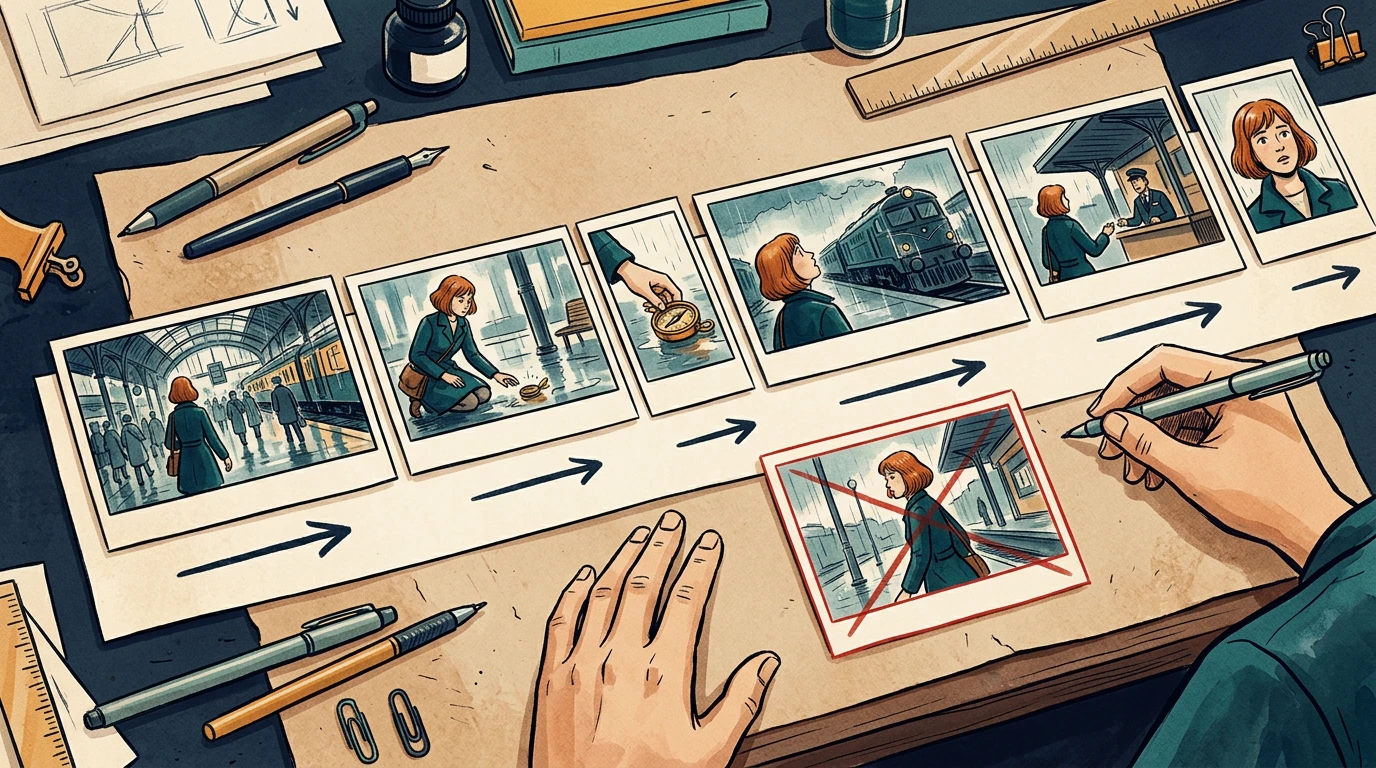
A conceptual six-shot sequence with varied timeline widths and continuity directions

The card widths illustrate pacing. Use the timing sheet, not visual card width, as the numeric source of truth.

Step 3: Describe what moves and what stays fixed

Separate subject motion from camera motion. Phrases like "make it cinematic" leave too many decisions unresolved.

For each shot, write:

Shot: ST01-S030
Start: Mira crouches; compass rests on the wet floor.
Action: her right hand lifts the compass toward her face.
Camera: low medium shot, restrained push-in.
End: compass is held still at chest height.
Preserve: face, copper bob, teal coat, compass shape, station lighting.
Avoid: added people, extra hands, changing train direction.

A clear start and end state helps the next shot connect. If your selected video tool cannot deliver the requested camera behavior, simplify the shot or replace it with an editorial move instead of repeatedly regenerating without a clear diagnosis.

Step 4: Include references and audio decisions

Provide the approved character reference, recurring prop reference, and location reference alongside the frames. Include only the versions the recipient should use.

For audio, distinguish final dialogue, temporary voice, sound effects, ambience, and music. Record cue positions and whether an audio file is approved for publication. Do not let a temporary track become the final soundtrack just because it was attached to the animatic.

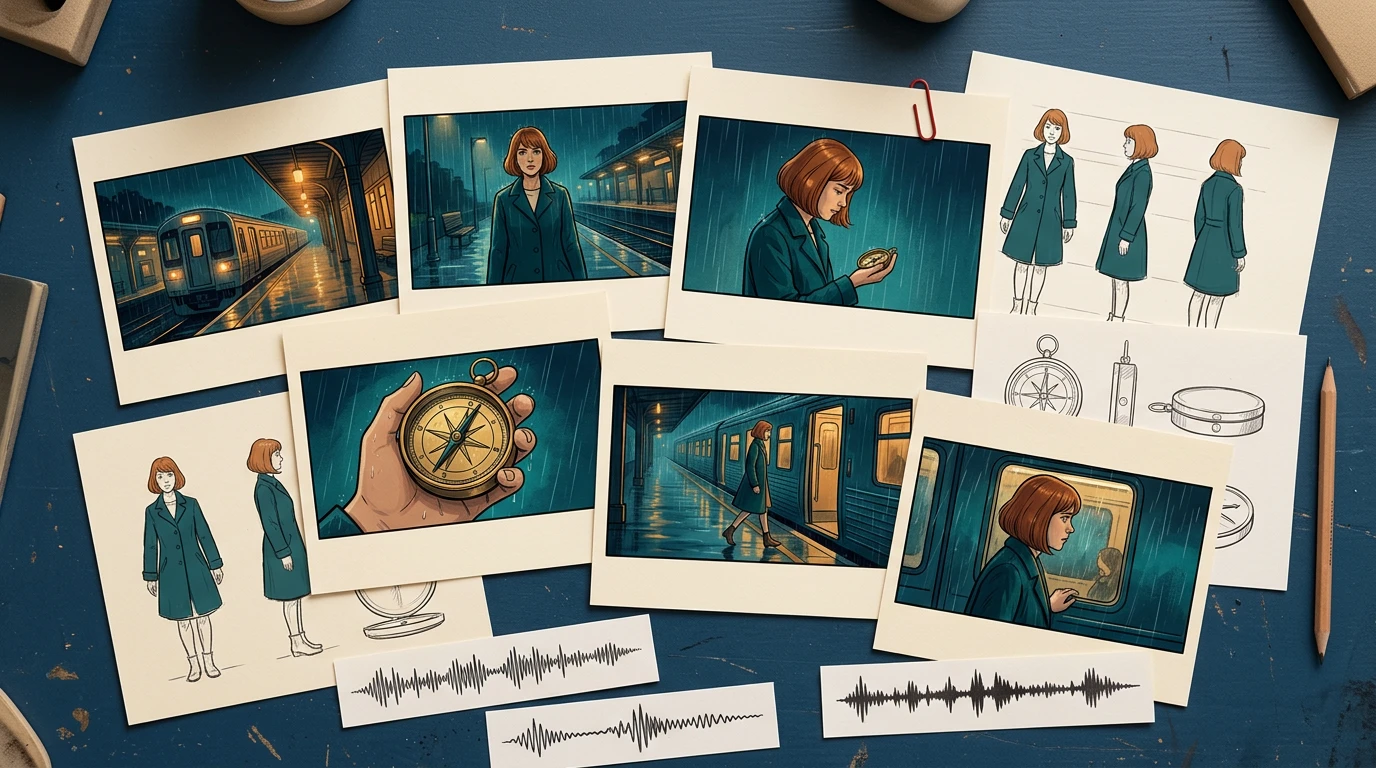
A conceptual handoff kit with storyboard cards, character and prop references, and audio cue strips

The package should explain the scene even if the recipient has not watched earlier iterations.

Step 5: Check continuity at the cuts

Review the last useful frame of each shot beside the first useful frame of the next. Watch for changes in hand position, prop scale, screen direction, eyeline, lighting, and background geography.

In the local timing-sheet exercise, an intentionally missing S040 entry creates a 120-frame gap. The corrected sheet restores the six-shot sequence to 576 continuous frames. That validates the schedule structure; it does not validate motion quality or editorial pacing.

For visual continuity, run a separate review. A repaired timing row cannot fix a character suddenly holding the compass in the other hand.

Step 6: Send a package another person can open

A simple handoff structure is easier to inspect than a folder full of filenames containing "final."

station-sequence/
  brief-and-delivery-spec.txt
  shot-list.csv
  frames/
    ST01-S010-v03.png
    ST01-S020-v02.png
  references/
    mira-approved-v02.png
    compass-approved-v01.png
  audio/
  animatic-review-v04.mp4
  revision-log.csv

List every expected file in a manifest, including version and approval state. Use relative paths inside the package when practical. Open it from a clean folder or a second machine to catch missing references.

When exporting XML or another interchange format, test it in the receiving application before promising a seamless transfer. For a small production, a frame sequence plus CSV may be a more predictable fallback.

Step 7: Approve a short motion test before scaling

Choose one difficult representative shot: a face, a hand interacting with the compass, or a camera move across overlapping layers. Review that test before converting every frame into video.

Track preparation time, generation wait, review, revision, and assembly separately. Record the actual credits or cost reported by the selected tool. Static storyboard generation time does not predict a finished video's production budget.

Use a specific rejection reason: hand changed, compass melted, direction reversed, timing too short, or dialogue obscured. Repair the affected shot and recheck its cuts while keeping the other approved material available.

Final handoff checklist

  • Shot IDs and intended order are unambiguous.
  • Every shot points to an approved frame and reference version.
  • Duration, frame rate, aspect ratio, and frame-count convention agree.
  • Subject motion, camera motion, and start/end states are separate.
  • Screen direction, eyelines, hands, and props match across cuts.
  • Dialogue and audio cues are versioned and cleared for their intended use.
  • The animatic and manifest match the same revision.
  • Another person can open the package without missing assets.
  • Outstanding decisions have an owner and approval deadline.

Prepare your next sequence in Storyboard, then use this checklist before motion production. If the sequence still changes substantially during review, return to the storyboard-first workflow before committing more shots.

FAQ

Is an animatic the final video?

No. An animatic mainly tests sequence and timing. The final video may still require motion generation, editing, sound work, and additional quality review.

Should every storyboard frame become one video clip?

No. Match clips to the intended shots and your tool's capabilities. Several storyboard drawings can describe one shot, and one drawing may still need added start and end planning.

What should I do if a generated shot changes the character?

Compare it with the approved references, simplify conflicting motion instructions, and retest that shot. Then recheck its neighboring cuts before accepting the replacement.

Product workflow reviewed November 2, 2026. The timing exercise is a local planning check; this article does not claim that the illustrative sequence was generated as a finished video.

Related hot tags

Stāsta plāns

Video veidošana

Production Checklist

Populārākie radošie rīki

Pārvērt iedvesmu nākamajā stāstā

Veidojiet komiksus, stāstu paneļus un stilizētas fotogrāfijas ar LlamaGen.

01

AI komiksu ģenerators

Pārvērtiet ideju par izstrādātām komiksu joslām minūšu laikā.

Izveidot komiksus
02

AI manga ģenerators

Veidojiet izteiksmīgu manga mākslu un vairāku paneļu stāstus.

Veidot mangu ar AI
03

AI sižetu ģenerators

Vizualizējiet katru ainu pirms ražošanas uzsākšanas.

Izveido stāstu dēļus ar mākslīgo intelektu
04

Pārvērt attēlu par komiksu

Pārvērt jebkuru fotogrāfiju komiksa stila ilustrācijā.

Izveido komiksus no attēliem
05

AI komiksu strēmelīšu veidotājs

Veido dalāmus komiksu kadrus ar konsekventiem tēliem.

Izveido komiksu lentes ar mākslīgo intelektu

LlamaGen community

checkmark

Get hands-on help with your comics

checkmark

Showcase your comics to fellow LlamaGen creators

checkmark

Participate in special events to win gifts

LlamaGen logotips
  • United States
  • Español
  • Français (France)
  • 日本語
  • 한국어
  • Deutsch
  • 繁體中文 (台灣)
  • 繁體中文 (香港)
  • 简体中文
  • Português
  • Italiano
  • Español (México)
  • العربية
  • Русский
  • Português (Brasil)
  • Tiếng Việt
  • Latviešu

Vadošā loma AI komiksu ģenerēšanas nākotnē

  • Atbalsts 24/7
  • Nedēļas jauninājumi
  • Droši un atbilstoši prasībām
  • 99,9% darba laiks

Lejupielādēt LlamaGen bez maksas

AndroidiOSDatora versija

Produkts

  • Jaunākās palaišanas
  • Funkcijas
  • Komiksu joslu veidotājs
  • Comic StoresJauns
  • Manga StudijaJauns
  • Pārvērt attēlu par komiksu
  • Komikss uz video
  • AI Komiksu fabrika
  • Komiksu aģents
  • iOS un Android
  • Mac un Windows
  • Lejupielādēt
  • Komiksu zibsnisJauns
  • AI komiksu ģenerators
  • AI multfilmas ģenerators
  • AI webtoon ģenerators
  • Komiksu sēriju veidotājs
  • Pārvērt attēlu par komiksu
  • AI manga ģenerators
  • Manga tulkotājs
  • Foto uz Anime
  • Attēls uz norādi
  • Anime uz reālo dzīvi
  • Mangas krāsošanas rīks
  • Anime tēlu ģenerators
  • Pikseļspēļu resursu rīki
  • AI sprite lokšņu ģenerators
  • Labākie pikseļu spēļu rīki 2026
  • Foto komiksu veidotājs
  • Comic Life alternatīva

Saistītie produkti

  • LlamaGen saime
  • CineoBoardJauns
  • Komiksu API

Plāni

  • Cenu politika
  • Sākums
  • PRO

Kopiena

  • Radītāji
  • Partneri
  • Partneris

MI modeļi

  • GPT Image 2.6 Flare
  • GPT Image 2.6 Sunburst
  • Grok Imagine Image 2.0
LinkedInX (Twitter)
  • Sākumlapa
  • Raksti
  • Blogs
  • Izveidot
  • Cenu politika
  • API
  • Affiliate ProgramNEW

Uzdod jautājumus AI par LlamaGen

  • Komiksu zibsnis
  • Velika
  • Uzņēmumu
  • Izglītība
  • Komiksu API
  • Sazinieties ar pārdošanas nodaļu
  • Izglītības plāni
  • Skolotāji
  • Studenti
  • Skolotāji un skolēni
  • Jaunuzņēmumi
  • Izglītības atlaides
  • Uzņēmums

    • Sazinies ar mūsu dibinātāju
    • Par
    • Produkta attīstības plāns

    Palīdzība

    • Palīdzības centrs
    • Uzticība
    • Drošs AI
    Atsauksmes
  • Atsauksmju Sienā
  • LlamaGen MCPJauns
  • LlamaGen izstrādātājs
  • Resursi

    • Izmaiņu žurnāls
    • Blogs
    • Ceļveži

    Rīki

    • AI logotipu ģenerators
    • Grokbot stila tēlu ģenerators
    • PNG uz komiksu
    Wan 3.0
  • Wan 3.0 Prime
  • Seedance 2.5
  • MiniMax H3
  • Nano Banana 2.1
  • Nano Banana 2 Lite
  • Seedream 5.0 Flash
  • Seedream 5.0 Pro
  • Seedance 2.0 Mini
  • Kling 3.0 Turbo
  • Nano Banana 2
  • GPT Attēls 2
  • Gemini Omni Flash
  • All AI Models
  • AI rīki

    • AI apģērbu izdalītājs
    • AI frizūru mainītājs
    • AI manga frizūru mainītājs
    Instagram
    YouTube
    Facebook grupa
    Reddit
    Discord
    Atbalsts e-pastā
    PrivātumsNoteikumiVietnes karte
    Lejupielādēt zīmola materiālus
    © 2026 LlamaGen.Ai Visas tiesības aizsargātasVisi pakalpojumi ir tiešsaistē

    Iepriekšējie blogi

    Human-Led AI Game Cutscenes: Keep the Script, Storyboards, and Timing Under Your Control

    Human-Led AI Game Cutscenes: Keep the Script, Storyboards, and Timing Under Your Control

    A practical, creator-led AI game cutscene workflow for selecting storyboard candidates, rejecting we

    Jay
    Jay
    2026. gada 23. novembrī
    Make an AI Film Feel Real: Blocking, Reactions, and Continuity in a Quiet Scene

    Make an AI Film Feel Real: Blocking, Reactions, and Continuity in a Quiet Scene

    A worked quiet-scene repair case: room geography, prop behavior, reactions, and edit choices that im

    Jay
    Jay
    2026. gada 23. novembrī
    How to Make an AI Drama: A Six-Shot Pilot and Series Continuity Plan

    How to Make an AI Drama: A Six-Shot Pilot and Series Continuity Plan

    Create a 30-second illustrated AI drama pilot, review real motion failures, and package continuity n

    Jay
    Jay
    2026. gada 23. novembrī
    Two OCs in One Comic Panel: Keep Identities and Speakers Clear

    Two OCs in One Comic Panel: Keep Identities and Speakers Clear

    A six-panel Maya and Theo dialogue case showing separate references, a handoff repair, a reverse-sho

    Jay
    Jay
    2026. gada 20. novembrī
    Karjeras
  • Raksti mums uz e-pastu
  • Mūsu talismanu pasaule
  • Mediju komplekts
  • KOL sadarbība
  • Saturs
  • Profesionāli pakalpojumi
  • BUJ
  • Drošība
  • Pieejamība
  • Video pamācība
  • Sazinieties ar mums
  • Vietnes karte
  • Personalizēti komiksi
  • Funkcijas
  • Alternatīvas
  • Labākās AI lietotnes
  • GPT-6 mangas iekrāsošanas ceļvedis
  • Claude komiksu grāmatas prasme
  • Gemini AI komiksu ceļvedis
  • Komikss, kas...
  • Izglītības atlaides
  • Studentu atlaide
  • Text uz komiksu
  • PDF uz komiksu
  • Scenārijs uz komiksu
  • Grāmata uz komiksu
  • Pārvērt attēlu par komiksu
  • AI pikseļu mākslas ģenerators
  • Izglītojoši komiksi
  • AI video ģenerators
  • Gemini AI video ģenerators
  • Bezmaksas bezsejas AI video ģenerators
  • Komikss uz video
  • Izveidot storyboard programmatūru
  • AI sižetu ģenerators
  • Scenāriju rakstīšanas programmatūra
  • Scenārija redaktors
  • AI stāstu ģenerators
  • AI stāstu ģenerators
  • Stāstu grāmatas ģenerators
  • AI attēlu ģenerators
  • AI slāņu sadalītājs
  • AI kameras leņķa vadība
  • AI pikseļu mākslas ģenerators
  • Pikseļspēļu resursu rīki
  • AI sprite lokšņu ģenerators
  • Sprite sheet griezējs
  • Labākie pikseļu spēļu rīki 2026
  • Animācijas API
  • ChatGPT/Codex spraudnis
  • ChatGPT instalēšanas ceļvedis
  • Claude Code spraudnis
  • Claude Code instalēšanas ceļvedis
  • AI vēja efekta ģenerators
  • AI dziļuma kartes ģenerators
  • AI baltais fons
  • AI objektu noņēmējs
  • AI virtuālās pielaikošanas rīks
  • AI attēlu asuma atjaunošana
  • AI trokšņu samazināšana
  • AI foto atjaunošana
  • AI produktu ēnas
  • AI fonu ģenerators
  • AI portretu ģenerators
  • AI emociju izveidotājs
  • AI fona maiņa
  • AI atvērtas acis
  • AI skaistuma uzlabošana
  • AI produktu fotogrāfija
  • Skatīt visus blogus
    Storyboard-to-Video Handoff Checklist: Shots, Timing, Audio, and Continuity - LlamaGen.AI Blog




