Storyboard-to-Video Handoff Checklist: Shots, Timing, Audio, and Continuity - LlamaGen.AI Blog
LlamaGen 標誌LlamaGen 品牌
登入立即訂閱八折優惠
  1. 首頁
Storyboard-to-Video Handoff Checklist: Shots, Timing, Audio, and Continuity
所有文章

Storyboard-to-Video Handoff Checklist: Shots, Timing, Audio, and Continuity

Jay
Jay
2026年11月1日
複製連結
  • What changes between a storyboard and a video brief?
  • Step 1: Freeze a reviewable sequence
  • Step 2: Specify the timebase and duration
  • Step 3: Describe what moves and what stays fixed
  • Step 4: Include references and audio decisions
  • Step 5: Check continuity at the cuts
  • Step 6: Send a package another person can open
  • Step 7: Approve a short motion test before scaling
  • Final handoff checklist
  • FAQ
  • Is an animatic the final video?
  • Should every storyboard frame become one video clip?
  • What should I do if a generated shot changes the character?
elevate-your-comics.png
用 LlamaGen 提升你的漫畫質素

A storyboard is ready for video when the next person can identify the approved shots, understand timing and motion, find the correct assets, and see which decisions still need approval.

Build the handoff around shot IDs, frame files, a timing sheet, motion notes, audio cues, and a revision log. You can start with LlamaGen.AI Storyboard to plan the sequence, then prepare a production package that can be reviewed independently of the creation tool.

What changes between a storyboard and a video brief?

A storyboard frame captures a moment. A video brief also needs duration, transitions, opening and closing states, and instructions for what moves.

A filmmaking discussion about prep methods shows how boards and animatics can help test staging and pacing. Different projects need different levels of detail. A quiet interview and an animated chase should not use the same handoff template without adjustment.

The Storyboard overview describes a workflow from story and scene breakdown through shots, revisions, and animatic export. Use the options available in your workspace. A planning export does not automatically guarantee compatibility with every video editor or generation model.
The public LlamaGen.AI storyboard feature page captured during preparation

Public product page captured November 2, 2026. The following production illustrations are conceptual examples, not screenshots of a completed video job.

Step 1: Freeze a reviewable sequence

Read the storyboard in order before preparing individual video requests. Check what the viewer knows at each point, where the scene changes, and whether each reaction has enough context.

The running example is a 24-second station sequence. Mira enters, sees a compass, picks it up, notices a train, approaches an attendant, and reacts to a new clue. Her copper bob, teal coat, and brass compass remain consistent throughout.

Assign stable shot IDs such as ST01-S010. Keep those IDs when inserting or revising shots. Do not rename every later shot just because one image was added.

Step 2: Specify the timebase and duration

Confirm the delivery aspect ratio, frame dimensions, and frame rate with the editor before production starts. The example below uses 24 fps and six shots totaling 24 seconds. It is a planning example, not a claim about any model's supported clip length.

Related hot tags

故事板

影片製作

Production Checklist

熱門創作工具

將靈感變成下一個故事

使用 LlamaGen 創作漫畫、分鏡同風格化相片。

01

AI漫畫生成器

幾分鐘內將構思變成精美條漫。

製作漫畫
02

AI漫畫生成器

創作生動漫畫畫面同多格故事。

用 AI 創作日漫
03

AI 故事板生成器

製作前預覽每個場景。

用 AI 製作分鏡
04

相片轉漫畫

將相片轉成漫畫風格插畫。

將相片轉成漫畫
05

AI漫畫製造器

保持角色一致性,製作方便分享嘅條漫。

用 AI 創作條漫

LlamaGen community

checkmark

Get hands-on help with your comics

checkmark

Showcase your comics to fellow LlamaGen creators

checkmark

Participate in special events to win gifts

更新日誌

點燃年輕人的夢想
讓數百萬個故事活靈活現

彙整最新的 LlamaGen 功能發布、產品強化、設計更新與重要錯誤修正。
✦
✧
✦
✧

全新的媒介,為了 故事創作

用靈感在幾秒內創作無限的故事、漫畫、動畫、遊戲等內容,打動現代觀眾

ShotStory beatSecondsFrames at 24 fps
S010Mira enters the station372
S020She notices the compass496
S030She picks it up372
S040A train catches her attention5120
S050She approaches the attendant496
S060She recognizes a clue5120
TotalComplete sequence24576

Use one explicit convention in the timing sheet. For example, start frames can be inclusive and end frames exclusive: S010 occupies frames 0 through 71, with an end boundary of 72.

Do not mix that convention with an editor's inclusive In/Out interpretation without converting the numbers first. Adobe's timecode documentation is a useful reference when aligning frame counts and display choices with the receiving editor.

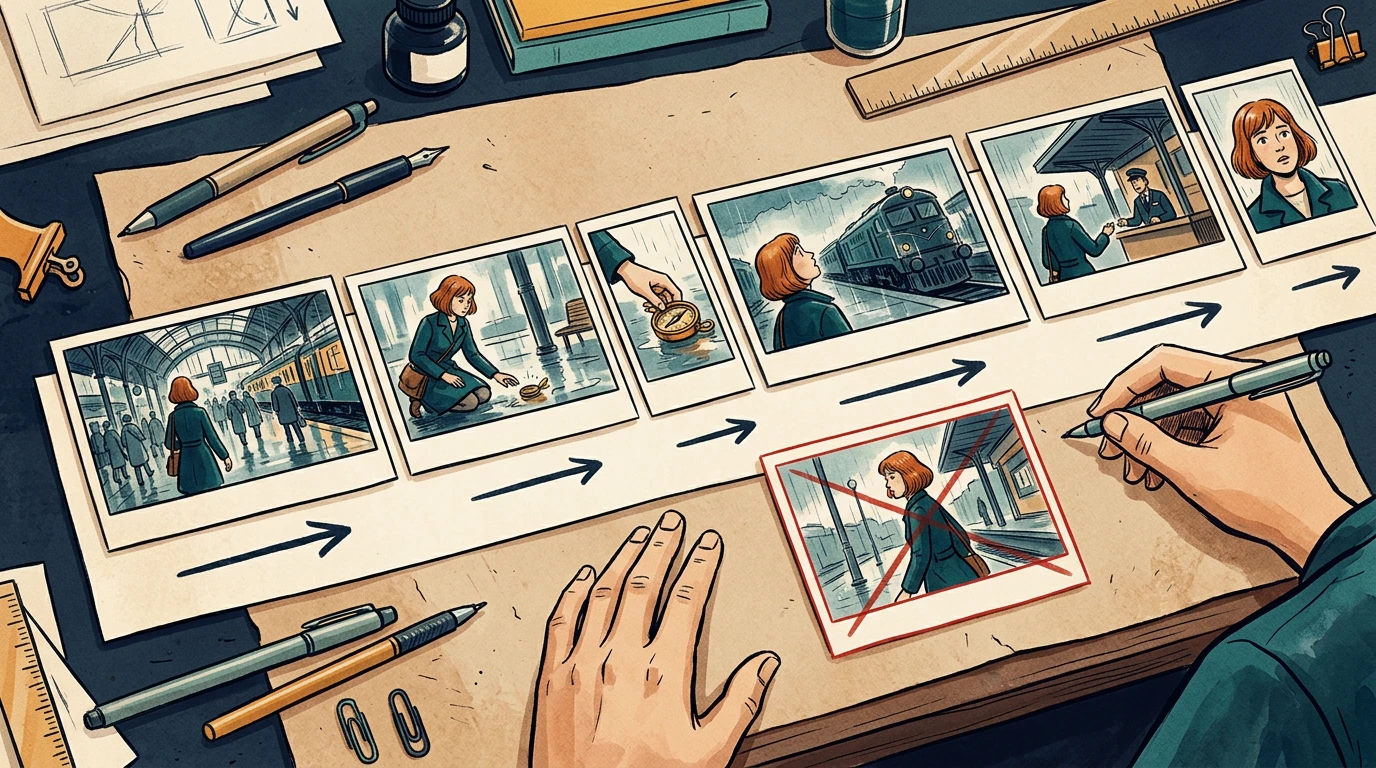
A conceptual six-shot sequence with varied timeline widths and continuity directions

The card widths illustrate pacing. Use the timing sheet, not visual card width, as the numeric source of truth.

Step 3: Describe what moves and what stays fixed

Separate subject motion from camera motion. Phrases like "make it cinematic" leave too many decisions unresolved.

For each shot, write:

Shot: ST01-S030
Start: Mira crouches; compass rests on the wet floor.
Action: her right hand lifts the compass toward her face.
Camera: low medium shot, restrained push-in.
End: compass is held still at chest height.
Preserve: face, copper bob, teal coat, compass shape, station lighting.
Avoid: added people, extra hands, changing train direction.

A clear start and end state helps the next shot connect. If your selected video tool cannot deliver the requested camera behavior, simplify the shot or replace it with an editorial move instead of repeatedly regenerating without a clear diagnosis.

Step 4: Include references and audio decisions

Provide the approved character reference, recurring prop reference, and location reference alongside the frames. Include only the versions the recipient should use.

For audio, distinguish final dialogue, temporary voice, sound effects, ambience, and music. Record cue positions and whether an audio file is approved for publication. Do not let a temporary track become the final soundtrack just because it was attached to the animatic.

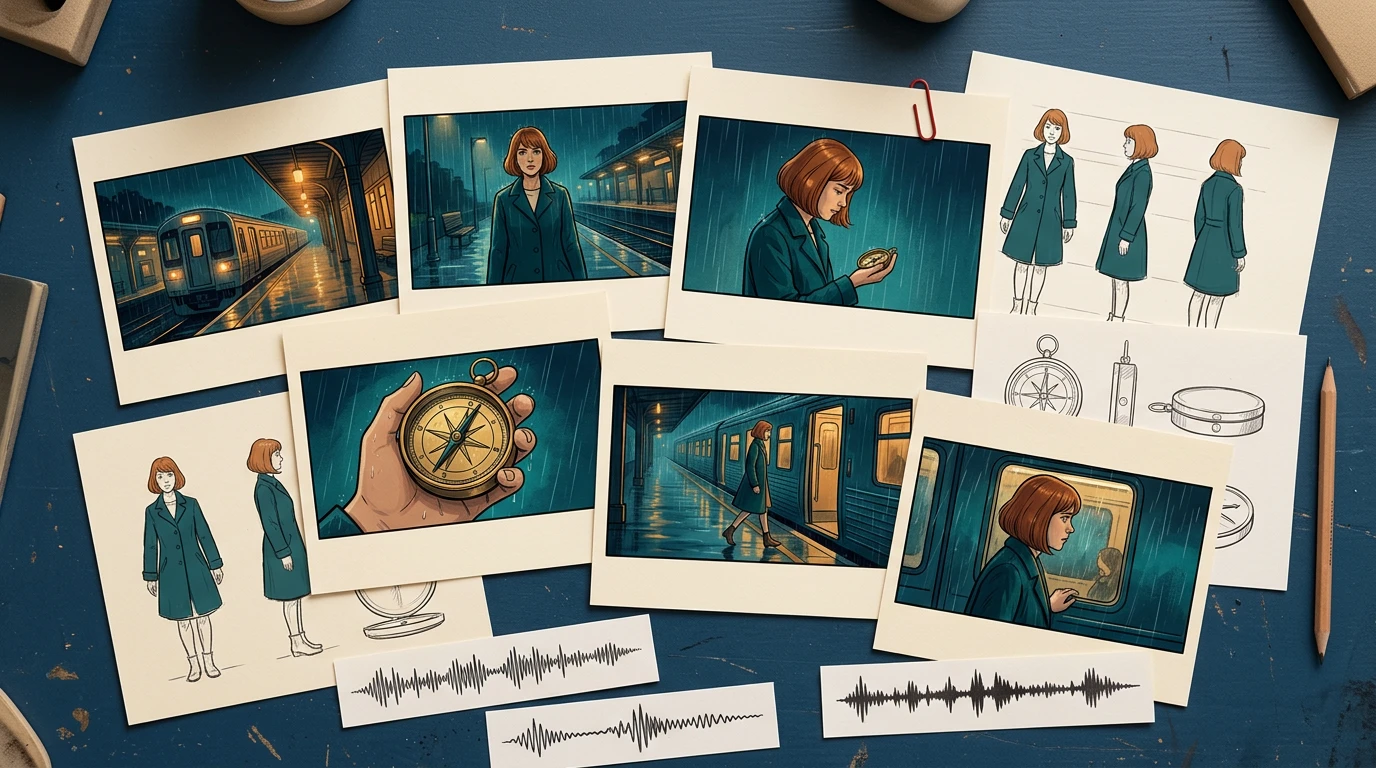
A conceptual handoff kit with storyboard cards, character and prop references, and audio cue strips

The package should explain the scene even if the recipient has not watched earlier iterations.

Step 5: Check continuity at the cuts

Review the last useful frame of each shot beside the first useful frame of the next. Watch for changes in hand position, prop scale, screen direction, eyeline, lighting, and background geography.

In the local timing-sheet exercise, an intentionally missing S040 entry creates a 120-frame gap. The corrected sheet restores the six-shot sequence to 576 continuous frames. That validates the schedule structure; it does not validate motion quality or editorial pacing.

For visual continuity, run a separate review. A repaired timing row cannot fix a character suddenly holding the compass in the other hand.

Step 6: Send a package another person can open

A simple handoff structure is easier to inspect than a folder full of filenames containing "final."

station-sequence/
  brief-and-delivery-spec.txt
  shot-list.csv
  frames/
    ST01-S010-v03.png
    ST01-S020-v02.png
  references/
    mira-approved-v02.png
    compass-approved-v01.png
  audio/
  animatic-review-v04.mp4
  revision-log.csv

List every expected file in a manifest, including version and approval state. Use relative paths inside the package when practical. Open it from a clean folder or a second machine to catch missing references.

When exporting XML or another interchange format, test it in the receiving application before promising a seamless transfer. For a small production, a frame sequence plus CSV may be a more predictable fallback.

Step 7: Approve a short motion test before scaling

Choose one difficult representative shot: a face, a hand interacting with the compass, or a camera move across overlapping layers. Review that test before converting every frame into video.

Track preparation time, generation wait, review, revision, and assembly separately. Record the actual credits or cost reported by the selected tool. Static storyboard generation time does not predict a finished video's production budget.

Use a specific rejection reason: hand changed, compass melted, direction reversed, timing too short, or dialogue obscured. Repair the affected shot and recheck its cuts while keeping the other approved material available.

Final handoff checklist

  • Shot IDs and intended order are unambiguous.
  • Every shot points to an approved frame and reference version.
  • Duration, frame rate, aspect ratio, and frame-count convention agree.
  • Subject motion, camera motion, and start/end states are separate.
  • Screen direction, eyelines, hands, and props match across cuts.
  • Dialogue and audio cues are versioned and cleared for their intended use.
  • The animatic and manifest match the same revision.
  • Another person can open the package without missing assets.
  • Outstanding decisions have an owner and approval deadline.

Prepare your next sequence in Storyboard, then use this checklist before motion production. If the sequence still changes substantially during review, return to the storyboard-first workflow before committing more shots.

FAQ

Is an animatic the final video?

No. An animatic mainly tests sequence and timing. The final video may still require motion generation, editing, sound work, and additional quality review.

Should every storyboard frame become one video clip?

No. Match clips to the intended shots and your tool's capabilities. Several storyboard drawings can describe one shot, and one drawing may still need added start and end planning.

What should I do if a generated shot changes the character?

Compare it with the approved references, simplify conflicting motion instructions, and retest that shot. Then recheck its neighboring cuts before accepting the replacement.

Product workflow reviewed November 2, 2026. The timing exercise is a local planning check; this article does not claim that the illustrative sequence was generated as a finished video.

LlamaGen 標誌
  • United States
  • Español
  • Français (France)
  • 日本語
  • 한국어
  • Deutsch
  • 繁體中文 (台灣)
  • 繁體中文 (香港)
  • 简体中文
  • Português
  • Italiano
  • Español (México)
  • العربية
  • Русский
  • Português (Brasil)
  • Tiếng Việt

引領 AI 漫畫生成的未來

  • 全天候支援
  • 每週更新
  • 安全且符合規定
  • 99.9%的運行時間

免費下載 LlamaGen

iOS桌面版

向 AI 詢問 LlamaGen 相關問題

產品

  • 最新推出
  • 特性
  • 漫畫條製作器
  • 日漫工作室新
  • 圖片轉漫畫
  • 漫畫轉視頻
  • AI漫畫工廠
  • 漫畫代理
  • iOS和Android
  • Mac和Windows
  • 下載
  • Comic Zap新
  • AI漫畫生成器
  • AI卡通生成器
  • AI 網絡漫畫生成器
  • 條漫製作工具
  • 圖片轉漫畫
  • AI漫畫生成器
  • 日漫翻譯器
  • 照片轉動漫
  • 動漫角色真實化
  • 漫畫上色工具
  • 動漫角色產生器
  • 像素遊戲素材工具
  • AI 精靈圖表生成器
  • 2026 年最佳像素遊戲工具
  • 相片漫畫製作器
  • Comic Life 替代方案

相關產品

  • LlamaGen 系列
  • CineoBoard新
  • Comics API

計劃

  • 價格
  • 入門
  • 專業版

社區

  • 創作者
  • 聯盟
  • 合作夥伴

AI Models

  • Grok Imagine Image 2.0
  • Wan 3.0
  • Wan 3.0 Prime
  • Seedance 2.5
LinkedInX (Twitter)
  • 首頁
  • 文章
  • 博客
  • 建立
  • 價格
  • API
  • Affiliate ProgramNEW

先前的網誌

Storyboard-to-Video Handoff Checklist: Shots, Timing, Audio, and Continuity

Storyboard-to-Video Handoff Checklist: Shots, Timing, Audio, and Continuity

Turn approved storyboard frames into a clear video handoff with stable shot IDs, timing, motion note

Jay
Jay
2026年11月1日
How to Localize a Comic Without Redrawing the Artwork

How to Localize a Comic Without Redrawing the Artwork

Preserve approved comic art while translating dialogue, rebuilding editable lettering, checking read

Jay
Jay
2026年10月31日
Batch Comic Production Workflow: Draft, Approve, Repair, and Export 40 Pages

Batch Comic Production Workflow: Draft, Approve, Repair, and Export 40 Pages

Plan a 40-page AI comic with a pilot, reviewable batches, a page ledger, selective repairs, and expo

Jay
Jay
2026年10月30日
From a Flat AI Image to an Editable Comic Page

From a Flat AI Image to an Editable Comic Page

Turn a finished comic image into an editable comic page by reviewing an asset sheet, extracting tran

Jay
Jay
2026年10月28日
  • Comic Zap
  • Velika
  • 企業
  • 教育
  • 漫畫 API
  • 聯絡銷售
  • 教育方案
  • 教師
  • 學生
  • 教師和學生
  • 新創企業
  • 教育折扣
  • 公司

    • 與創辦人傾偈
    • 關於
    • 產品路線圖
    • 職業
    • 電郵我們
    • 我們的吉祥物世界
    • 媒體套件
    • KOL 合作
    • 內容

    幫助

    • 幫助中心
    • 信賴
    • 安全 AI
    • 專業服務
    • 常見問題
    • 安全
    • 無障礙
    • 視頻教程
    • 聯繫我們
    • 網站地圖
    推薦
  • 愛之牆
  • LlamaGen MCP新
  • LlamaGen 開發者
  • 資源

    • 更新日誌
    • 博客
    • 指南
    • 個人化漫畫
    • 特性
    • 替代方案
    • 最佳 AI 應用
    • GPT-6 漫畫上色指南
    • Claude 漫畫創作技能
    • Gemini AI 漫畫指南
    • 漫畫作品
    • 教育折扣
    • 學生優惠

    工具

    • AI 標誌生成器
    • Grokbot 風格角色生成器
    • PNG 轉漫畫
    • Text 轉漫畫
    • PDF 轉漫畫
    • 劇本轉漫畫
    • 書本轉漫畫
    • 圖片轉漫畫
    • AI 像素藝術生成器
    • 教育漫畫
    • AI 影片產生器
    • Gemini AI 影片生成器
    • 免費無臉AI影片生成器
    • 漫畫轉視頻
    • 分鏡製作軟件
    • AI 故事板生成器
    • 劇本寫作軟件
    • 劇本編輯器
    • 故事 AI
    • AI故事生成器
    • 繪本生成器
    • AI圖像生成器
    • AI圖層分離器
    • AI 鏡頭角度控制
    • AI 像素藝術生成器
    • 像素遊戲素材工具
    • AI 精靈圖表生成器
    • 精靈圖表切分工具
    • 2026 年最佳像素遊戲工具
    • 動畫 API
    • ChatGPT/Codex 插件
    • ChatGPT 安裝指南
    • Claude Code 插件
    • Claude Code 安裝指南
  • MiniMax H3
  • Nano Banana 2.1
  • Nano Banana 2 Lite
  • Seedream 5.0 Flash
  • Seedream 5.0 Pro
  • Seedance 2.0 Mini
  • Kling 3.0 Turbo
  • Nano Banana 2
  • GPT Image 2
  • Gemini Omni Flash
  • All AI Models
  • AI工具

    • AI 服裝擷取工具
    • AI 髮型更換工具
    • AI 漫畫髮型更換工具
    • AI 風效生成器
    • AI 深度圖生成器
    • AI 白色背景生成器
    • AI 物件移除工具
    • AI 虛擬試穿
    • AI 圖片去模糊
    • AI 圖片降噪
    • AI 相片修復
    • AI 商品陰影生成
    • AI背景生成器
    • AI 專業頭像生成器
    • AI 表情符號生成器
    • AI 背景更換工具
    • AI 睜眼修復
    • AI 美顏工具
    • AI 商品攝影
    Instagram
    YouTube
    Facebook 群組
    Reddit
    Discord
    電郵支持
    隱私條款網站地圖
    下載品牌資產
    © 2026 LlamaGen.Ai 版權所有所有服務均在線
    查看所有網誌