

Five shadow directions
ทดลองรูปแบบ natural, drop, hard drop, reflection และ floating
AI shadow generator
Upload a product cutout or clean product photo, choose a shadow style and strength, then generate studio-like depth without redesigning the product. Try for free with free credits. Check in daily to earn more. No credit card required.
Add a product shadow
PNG โปร่งใสและพื้นหลังที่สะอาดช่วยให้ตีความขอบสินค้าและจุดสัมผัสได้ง่ายขึ้น
อัปโหลดภาพสินค้า
PNG โปร่งใส หรือ JPG, PNG, WebP, HEIC, HEIF ที่สะอาด
Shadow type
Shadow intensity
กรอบภาพผลลัพธ์
จับคู่กับภาพต้นฉบับภาพแรกเพื่อรักษาการครอปเดิม
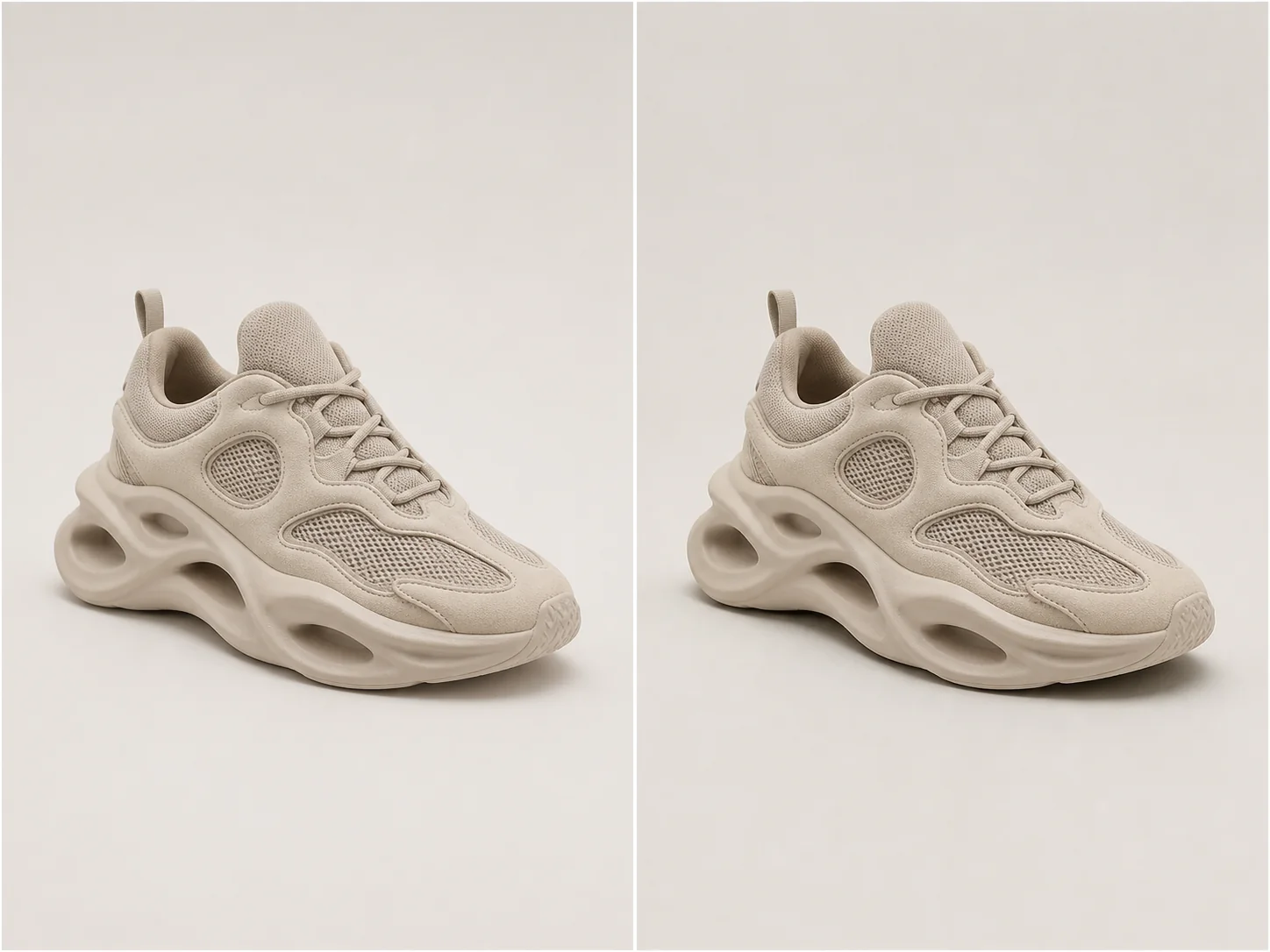
มิติแบบสตูดิโอ
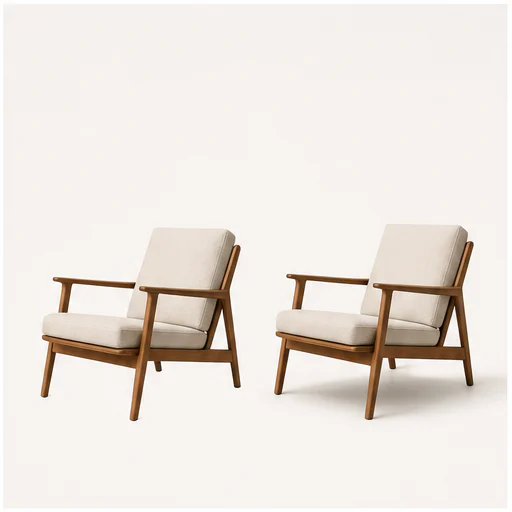
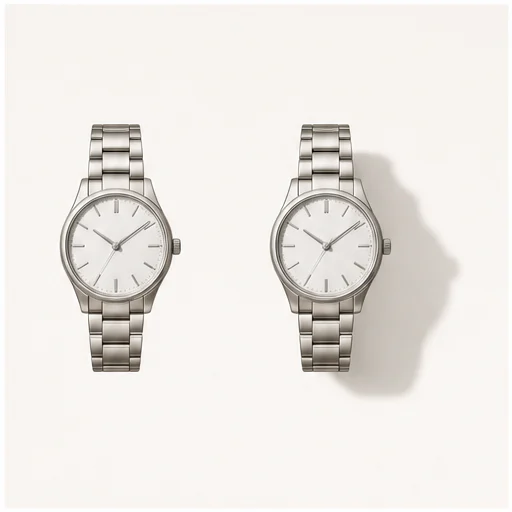
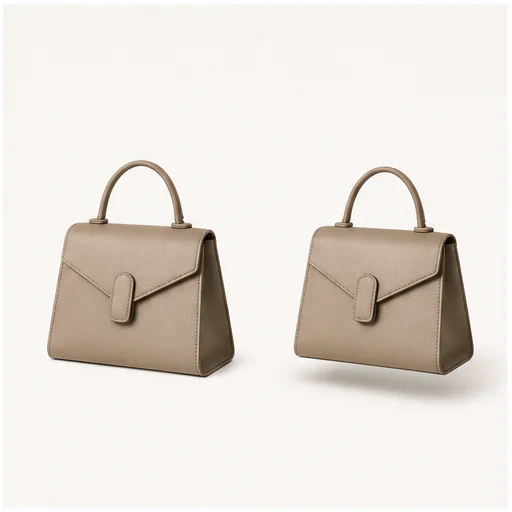
A useful product shadow follows object geometry, contact points, camera perspective, and the existing light direction.
Choose natural softness for most catalog work, a directional drop shadow for graphic layouts, or a controlled reflection for glossy studio treatments.
ทดลองรูปแบบ natural, drop, hard drop, reflection และ floating
ควบคุมน้ำหนักของภาพโดยไม่เปลี่ยนตัวสินค้า
Infer contact points and perspective so the shadow follows the object.
คงรูปทรง วัสดุ สี ฉลาก และการครอปเดิมไว้โดยไม่เปลี่ยน
ตัวอย่างจริง
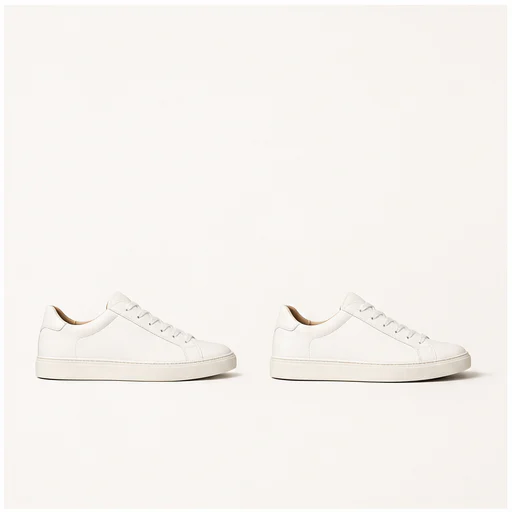
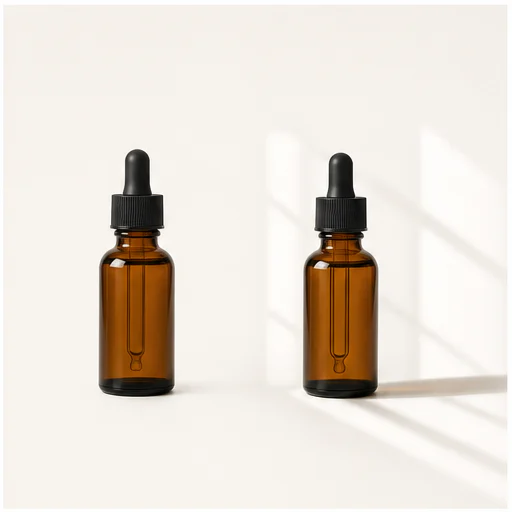
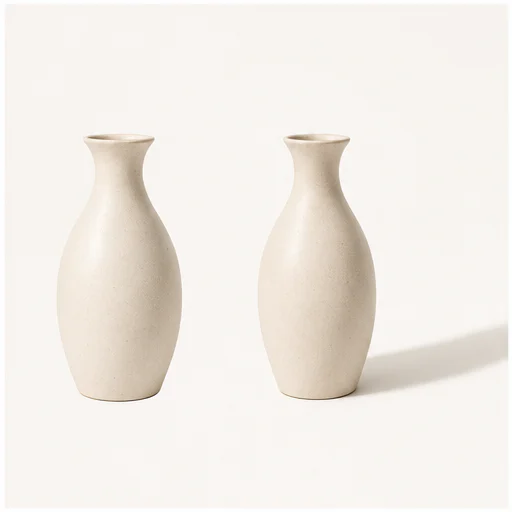
Each example keeps the full product visible before and after adding a physically plausible shadow. Material, angle, scale, and background remain consistent.
วิธีใช้งาน
ทำตามเวิร์กโฟลว์สั้น ๆ แล้วตรวจรายละเอียดที่สร้างขึ้นก่อนนำไปใช้หรือเผยแพร่
เลือกภาพตัดสินค้าที่ชัดเจน หรือภาพสะอาดที่เห็นเส้นรอบรูปครบ
ปรับรูปแบบให้เข้ากับแคตตาล็อก โฆษณา มาร์เก็ตเพลส หรือเลย์เอาต์แคมเปญ
ตรวจจุดสัมผัส ทิศทางแสง ความทึบ และขอบสินค้า
เสียงจริงจากผู้ใช้
อ่านประสบการณ์จริงของผู้สร้างคอมิก ตัวละคร และเรื่องภาพด้วย LlamaGen

@jake-m
ในฐานะผู้สร้างกราฟิกสไตล์หนังสือการ์ตูนที่หลงใหล ฉันได้พยายามค้นหาเครื่องมือที่จริงๆ ให้ฉันสามารถปลดปล่อยความคิดสร้างสรรค์ของฉันได้ในระดับที่กว้างขวาง llamagen.ai ไม่เพียงแต่ทำลายขีดจำกัด แต่ยังทำลายมัน ซึ่งเสนอความเป็นไปได้ที่ไม่มีที่สิ้นสุดสำหรับโปรเจคของฉัน มันเป็นโซลูชันที่ขับเคลื่อนด้วย AI ที่ฉันรอคอย!
@sarah-l
ฉันได้ลองใช้เครื่องมือ AI หลายตัวสำหรับการสร้างภาพ และมันสนุกมาก แต่ llamagen.ai เป็นแอปแรกที่ฉันเห็นว่าใช้งานได้จริง ความสม่ำเสมอของตัวละครดึงดูดความสนใจของฉันมาก เพราะเป็นสิ่งที่ฉันไม่เคยเห็นมาก่อน และฉันสามารถเห็นความน่าสนใจสำหรับมืออาชีพและมือสมัครเล่นได้เลย เป็นตัวเปลี่ยนเกมจริงๆ!

@michael-b
llamagen.ai ได้เริ่มต้นความหลงใหลในการเล่าเรื่องของฉันใหม่ ในฐานะมืออาชีพที่ยุ่งยาก การหาเวลาที่จะทำโครงการสร้างสรรค์อาจเป็นที่ท้าทาย แต่แอปนี้ได้พิสูจน์ว่าง่ายต่อการใช้งาน... มันเหมือนมีเพื่อนสร้างสรรค์อยู่ข้างๆฉัน!

@alex-t
การเป็นส่วนหนึ่งของอุตสาหกรรมสร้างสรรค์ต้องการประสิทธิภาพโดยไม่สูญเสียคุณภาพ llamagen.ai ไม่เพียงแค่ตอบสนองความคาดหวังเหล่านี้ แต่ยังเกินกว่านั้น ชอบมากที่ได้เล่นกับการสร้างบอร์ดเรื่องราวและมี AI ช่วยในการสร้างภาพและเนื้อหาข้อความ - มันเป็นวิธีที่ดีในการช่วยเพิ่มประสบการณ์ทั้งหมด

@maya-s
ฉันชอบหนังสือการ์ตูนที่ดีและมีความสงสัยเกี่ยวกับ AI ตัวอย่างเช่น การวิจารณ์เรื่อง Batman AI comic saga ไม่ได้ไม่มีความคุ้มค่า แต่ผ่านความสงสัยฉันก็เห็นที่มาของเครื่องมือเหล่านี้ ทั้งนี้ฉันยังคงคุ้มค่าการผลิตที่ทำโดยมนุษย์ที่แท้จริง ความสามารถในการสร้างสิ่งใดสิ่งหนึ่งด้วยตัวเอง (ด้วยความช่วยเหลือเล็ก ๆ น้อย ๆ จาก AI) นั้นเป็นแรงบันดาลใจและน่าตื่นเต้นจริง ๆ
@taylor-h
การควบคุมคาแรกเตอร์ให้เหมือนกันทุกช่องเป็นความท้าทายที่ไม่คิดว่าจะทำได้เร็วขนาดนี้ แม้จะยังไม่สมบูรณ์บ้างแต่ผลลัพธ์ก็ประทับใจ รอคอยปรับแต่งเวิร์กโฟลว์กับ AI เพิ่มเติม
เวิร์กโฟลว์ใช้งานจริง
เก็บภาพที่สร้างไว้เป็นร่างสำหรับตรวจสอบ เป็นภาพอ้างอิง หรือเป็นไฟล์งานเสร็จตามความต้องการ
มาร์เก็ตเพลส
เพิ่มมิติเล็กน้อยให้ภาพประกาศขาย โดยไม่เพิ่มความรกของฉาก
แค็ตตาล็อก
Use one shadow language across unrelated product photos.
แคมเปญ
ใช้เงาตกทิศทางหรือเงาลอยสำหรับกราฟิกโซเชียล
ความงาม
สร้างมิติแบบสตูดิโอที่เงางามสำหรับขวด กระปุก และแพ็กเกจที่สะท้อนแสง
บันทึกการตรวจทาน
A shadow should support the product quietly. If it competes with the object, reduce intensity or try another type.
the shadow begins at believable contact points
มุมมองสอดคล้องกับสินค้าและกล้อง
ทิศทางแสงยังคงสม่ำเสมอ
ขอบโปร่งใสและขอบสะท้อนแสงยังคงสะอาด
ฉลากและรูปทรงของสินค้ายังคงเดิม
ยังเห็นเฟรมต้นฉบับครบ
คำถามที่พบบ่อย
คำตอบใช้งานจริงเกี่ยวกับภาพต้นฉบับ ผลลัพธ์ที่สร้างขึ้น สิทธิ์การใช้งาน และการตรวจทาน
Yes. Start your free trial with free credits and earn more free credits through daily check-ins. No credit card is required. Sign in to manage your credits. Generation costs and model availability vary; paid plans offer more credits and additional export options.
PNG แบบโปร่งใส หรือภาพสินค้าที่สะอาดและเห็นวัตถุครบ จะให้ขอบและจุดสัมผัสที่ดีที่สุด
แบบธรรมชาติเหมาะกับภาพสินค้าส่วนใหญ่ เงาตกกระทบจะดูกราฟิกขึ้น เงาสะท้อนดูเนี๊ยบ และเงาลอยช่วยแยกตัวสินค้าออกมา
พรอมป์ตจะปกป้องรูปทรง สี วัสดุ ป้าย มุมกล้อง และการครอปของสินค้า
เครื่องมือที่เกี่ยวข้อง
ไปต่อจากงานแก้ไขเฉพาะจุดนี้สู่ภาพถัดไปหรือภารกิจด้านแฟชั่น
Upload a blurry portrait, product, document, or memory and recover cleaner edges and natural detail without changing the original composition. Try for free with free credits. Check in daily to earn more. No credit card required.
Upload a portrait, selfie, or group photo and reconstruct naturally open eyes while preserving identity, expression, lighting, people, and the original crop. Try for free with free credits. Check in daily to earn more. No credit card required.
Upload a noisy low-light, compressed, scanned, or generated image and reduce grain while preserving edges, texture, and the source atmosphere. Try for free with free credits. Check in daily to earn more. No credit card required.
Upload a faded, scratched, blurry, or timeworn photo and create a clearer restoration that protects faces, clothing, history, and the original composition. Try for free with free credits. Check in daily to earn more. No credit card required.
เริ่มจากรูปของคุณ
Choose a shadow type and strength, then create a more grounded product image.