

Compare video models, not production steps

Which AI video model is best for your recurring character?

This is a buyer's comparison framework, not another animation workflow tutorial or an untested ranking. The model that wins for your character must pass the same test as the alternatives. Compare reference support, visible identity drift, retries and the total credits required to accept a usable shot; make the choice only after reviewing actual output.

For creators deciding between video models before spending credits on recurring-character shots. For the episode-by-episode continuity method, use the separate animated-series guide.

Original case · 2026-11-13 · The Observatory Note

The same input, two tested model versions

Veo 3.1 Fast and Veo 3.1 received the same image bytes, prompt, aspect ratio, duration, resolution and no-audio setting. One take each is a narrow comparison, not a model leaderboard. Neither perfectly followed the stationary-hand and camera brief.

Generated directly through Google Vertex AI. These are Veo examples; the creation tool uses Seedance 2.5 with different duration and resolution. This case does not verify LlamaGen account credits, billing or mobile-browser behavior.

continuity fast

veo-3.1-fast-generate-001 · 8s · 1920 × 1080 · 24 fps · Silent MP4 · 14.5 MB
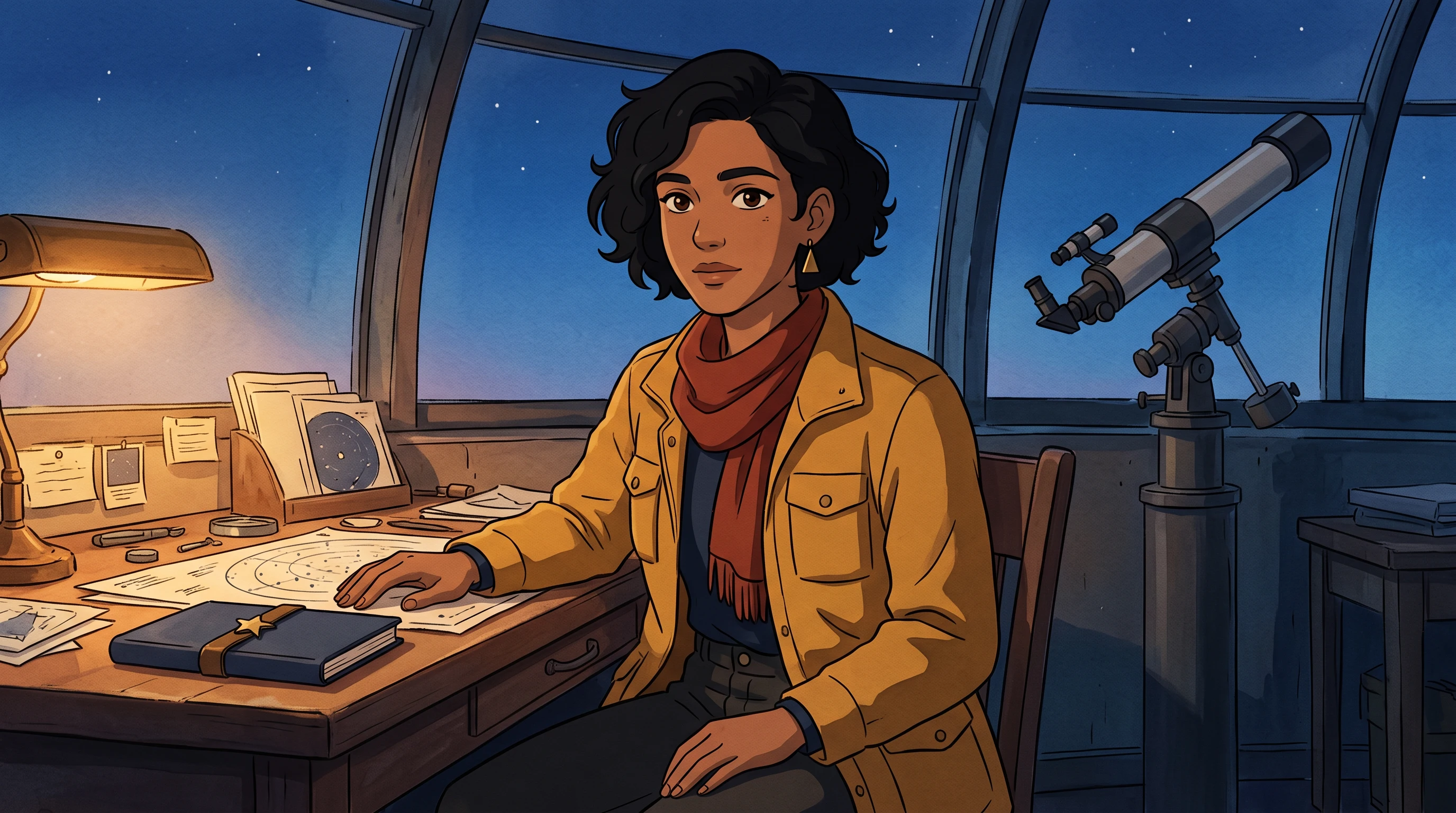
Original color reference for continuity fast
Source frame · AI-generated original artwork · 2K
Open the exact input PNG
Actual Vertex output · No autoplay · Silent audio track setting
Open MP4 to play or save

Frame review: The character palette and notebook remain recognizable. The hand moves toward the notebook near the end despite the stationary-hand instruction; the requested telescope look is not clear in the three checkpoints. Retake for that strict brief.
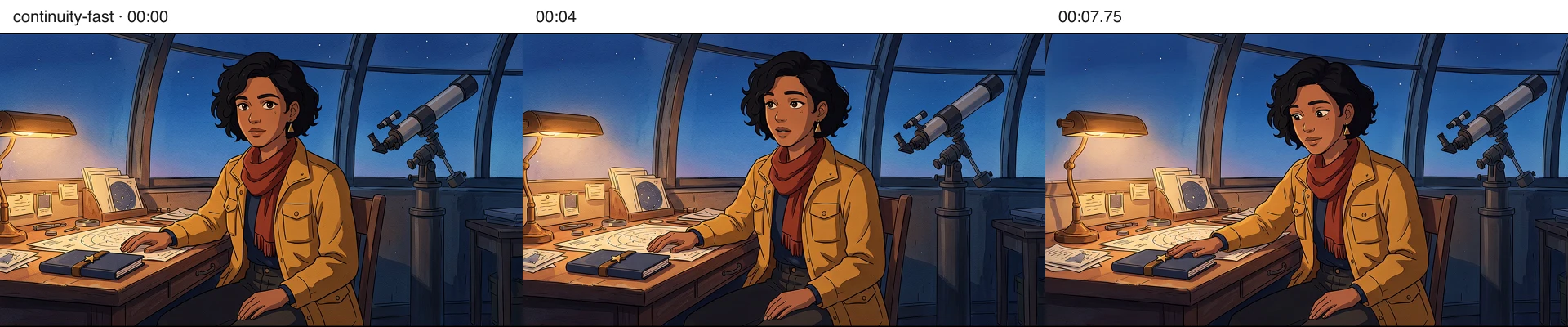
continuity fast at zero, four and 7.75 seconds
Actual decoded frames at 00:00, 00:04 and 00:07.75. Open at full size to inspect; three checkpoints cannot prove perfect continuity throughout a clip.
Read the exact motion prompt and provenance

One continuous eight-second hand-painted anime shot. The adult woman slowly turns her head toward the telescope, blinks once, then returns her gaze to the closed notebook. Both hands remain in their starting positions, one on the table and one in her lap; the notebook stays still on the table. Locked camera, no cut. Preserve the exact face, short curly bob, triangular earring, mustard jacket, red scarf and navy shirt from the first frame; maintain watercolor and ink style. No additional people, text or new props. No speech or music.

Generated 2026-11-13T08:49:46.057Z. Exact input PNG SHA-256: 095d0384b8186dd38bc65346bfd7f41f50ac6ca900442075d5d8197c5c1a7960. One request for this listed take; the two-character retake is separately labeled. Invoice cost is unavailable from the generation response, so no exact spend or cost-per-approved-shot is claimed.
continuity standard

veo-3.1-generate-001 · 8s · 1920 × 1080 · 24 fps · Silent MP4 · 16.8 MB

Original color reference for continuity standard
Source frame · AI-generated original artwork · 2K
Open the exact input PNG
Actual Vertex output · No autoplay · Silent audio track setting
Open MP4 to play or save

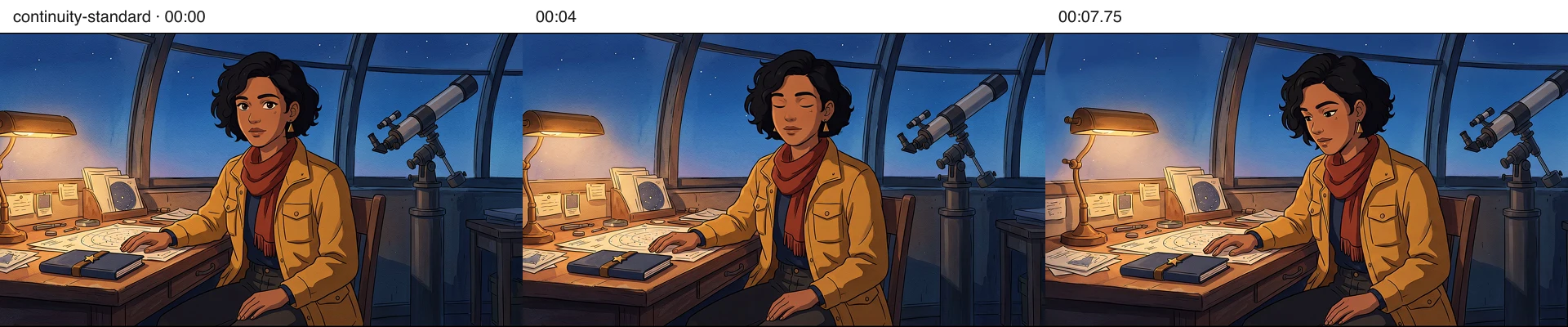
Frame review: The sampled frames retain the outfit and face anchors, with a blink and downward gaze. The requested telescope look is not fully delivered and framing shifts. This is a draft, not an approved locked-camera result.

continuity standard at zero, four and 7.75 seconds
Actual decoded frames at 00:00, 00:04 and 00:07.75. Open at full size to inspect; three checkpoints cannot prove perfect continuity throughout a clip.
Read the exact motion prompt and provenance

One continuous eight-second hand-painted anime shot. The adult woman slowly turns her head toward the telescope, blinks once, then returns her gaze to the closed notebook. Both hands remain in their starting positions, one on the table and one in her lap; the notebook stays still on the table. Locked camera, no cut. Preserve the exact face, short curly bob, triangular earring, mustard jacket, red scarf and navy shirt from the first frame; maintain watercolor and ink style. No additional people, text or new props. No speech or music.

Generated 2026-11-13T08:49:50.269Z. Exact input PNG SHA-256: 095d0384b8186dd38bc65346bfd7f41f50ac6ca900442075d5d8197c5c1a7960. One request for this listed take; the two-character retake is separately labeled. Invoice cost is unavailable from the generation response, so no exact spend or cost-per-approved-shot is claimed.

One original scene and cast, with explicit failures and a revised request. No private user photos, competitor footage or customer results were used. Videos were fully decoded and checkpoint images inspected locally; browser interaction review is separate.

Which AI video model is best for your recurring character?: authored workflow with a concrete deliverable at each stage
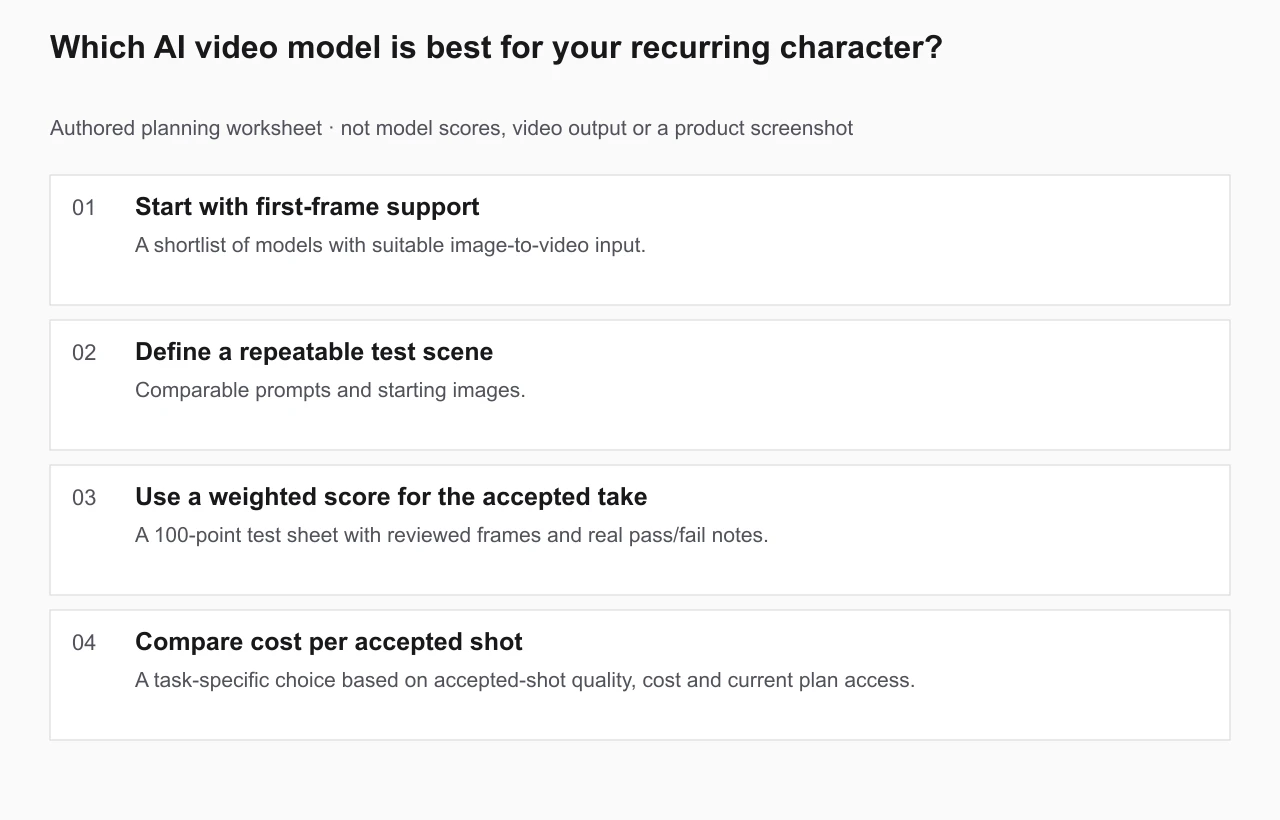
Original planning worksheet. This diagram illustrates the guide's method; it is not a generated video, measured model ranking or independently verified benchmark. Use the editable brief below to record your own outputs and failed takes.
Open the full-size worksheet ↗

The working process

  1. Step 1 of 4

    Start with first-frame support

    Prefer a model that accepts the approved character image when identity matters. LlamaGen's video model directory lists image-input support; check each model's current live capabilities.

    You should have: A shortlist of models with suitable image-to-video input.

  2. Step 2 of 4

    Define a repeatable test scene

    Use the same original character drawing and a simple five-second prompt across options. Ask for a blink, head turn and fixed camera to isolate facial stability.

    You should have: Comparable prompts and starting images.

  3. Step 3 of 4

    Use a weighted score for the accepted take

    Score identity stability (40 points), costume and props (20), motion and camera obedience (20), and practical export quality (20). Inspect beginning, midpoint and end; record both the score and rejected takes. These weights are a suggested evaluation rubric, not a published benchmark of any model.

    You should have: A 100-point test sheet with reviewed frames and real pass/fail notes.

  4. Step 4 of 4

    Compare cost per accepted shot

    For each model, divide all credits spent (including retries) by the number of accepted takes. Record the model version, duration and resolution. A model with a low sticker quote can be more expensive if you reject most attempts. Never infer a universal ranking from one character test.

    You should have: A task-specific choice based on accepted-shot quality, cost and current plan access.

Copy a character-consistency model test

This is an authored starting template, not an automatically generated result. Replace the square-bracket fields with your own story, characters and assets before running a paid AI generation.

COMPARISON: [Original character / intended shot / target format]
COMMON INPUT: [Same approved image, prompt, duration and resolution]
MODELS: A [name/version]  B [name/version]  C [name/version]
TEST PROMPT: One slow head turn and blink, locked camera, preserve approved identity and outfit.
MODEL A: IDENTITY __/40 | COSTUME+PROPS __/20 | MOTION __/20 | EXPORT __/20
MODEL B: IDENTITY __/40 | COSTUME+PROPS __/20 | MOTION __/20 | EXPORT __/20
MODEL C: IDENTITY __/40 | COSTUME+PROPS __/20 | MOTION __/20 | EXPORT __/20
FRAME REVIEW: Opening / midpoint / end; note exact failures.
MODEL A COST: [Credits per attempt × total attempts] / [Accepted takes]
MODEL B COST: [Credits per attempt × total attempts] / [Accepted takes]
MODEL C COST: [Credits per attempt × total attempts] / [Accepted takes]
DECISION: [Best for this particular task, with method/date and limits].

Review before spending more credits

  • Use identical inputs across video models; publish the tested model version and date if sharing results.
  • Report both rejected attempts and credits per accepted shot, not only a sample thumbnail.
  • This page provides a scoring worksheet, not a first-hand benchmark or ranked winner.

Frequently asked questions

Does an image-to-video model lock the face?

A source image anchors the opening frame, but later frames can still drift. Sample and compare frames before accepting the take.

Which model wins for anime versus realistic characters?

There is no verified winner presented here. Compare the same prompt and first frame using the models your plan currently supports, then score all three frame checkpoints and the total cost of accepted shots.

How do I keep testing costs controlled?

Begin with the shortest supported duration and lowest suitable resolution, check the displayed credits, and reject bad takes before rendering longer shots.

Production note: AI video results vary by model, starting frame, motion and prompt. Generating each take may require a paid plan and credits. Reuse only characters, art and audio you have the right to use.