LlamaGen ಲೋಗೋLlamaGen ಬ್ರ್ಯಾಂಡ್
ಲಾಗಿನ್ ಆಗಿಈಗಲೇ ಚಂದಾದಾರರಾಗಿ20% ರಿಯಾಯಿತಿ
  1. ಮುಖಪುಟ
Storyboard-to-Video Handoff Checklist: Shots, Timing, Audio, and Continuity
All posts

Storyboard-to-Video Handoff Checklist: Shots, Timing, Audio, and Continuity

Jay
Jay
November 1st, 2026
ಲಿಂಕ್ ನಕಲಿಸಿ
  • What changes between a storyboard and a video brief?
  • Step 1: Freeze a reviewable sequence
  • Step 2: Specify the timebase and duration
  • Step 3: Describe what moves and what stays fixed
  • Step 4: Include references and audio decisions
  • Step 5: Check continuity at the cuts
  • Step 6: Send a package another person can open
  • Step 7: Approve a short motion test before scaling
  • Final handoff checklist
  • FAQ
  • Is an animatic the final video?
  • Should every storyboard frame become one video clip?
  • What should I do if a generated shot changes the character?
elevate-your-comics.png
Elevate your Comics with LlamaGen

A storyboard is ready for video when the next person can identify the approved shots, understand timing and motion, find the correct assets, and see which decisions still need approval.

Build the handoff around shot IDs, frame files, a timing sheet, motion notes, audio cues, and a revision log. You can start with LlamaGen.AI Storyboard to plan the sequence, then prepare a production package that can be reviewed independently of the creation tool.

What changes between a storyboard and a video brief?

A storyboard frame captures a moment. A video brief also needs duration, transitions, opening and closing states, and instructions for what moves.

A filmmaking discussion about prep methods shows how boards and animatics can help test staging and pacing. Different projects need different levels of detail. A quiet interview and an animated chase should not use the same handoff template without adjustment.

The Storyboard overview describes a workflow from story and scene breakdown through shots, revisions, and animatic export. Use the options available in your workspace. A planning export does not automatically guarantee compatibility with every video editor or generation model.
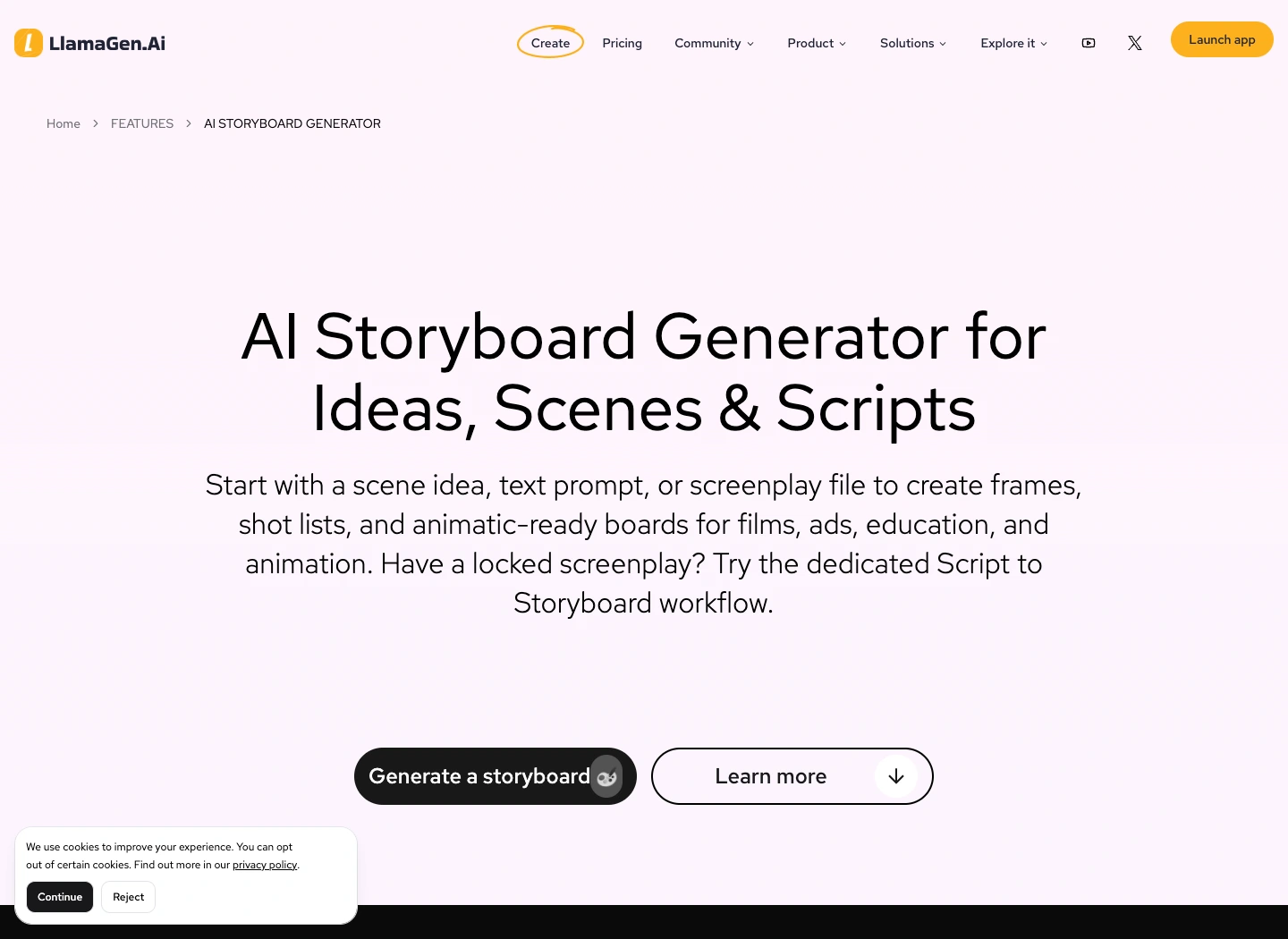
The public LlamaGen.AI storyboard feature page captured during preparation

Public product page captured November 2, 2026. The following production illustrations are conceptual examples, not screenshots of a completed video job.

Step 1: Freeze a reviewable sequence

Read the storyboard in order before preparing individual video requests. Check what the viewer knows at each point, where the scene changes, and whether each reaction has enough context.

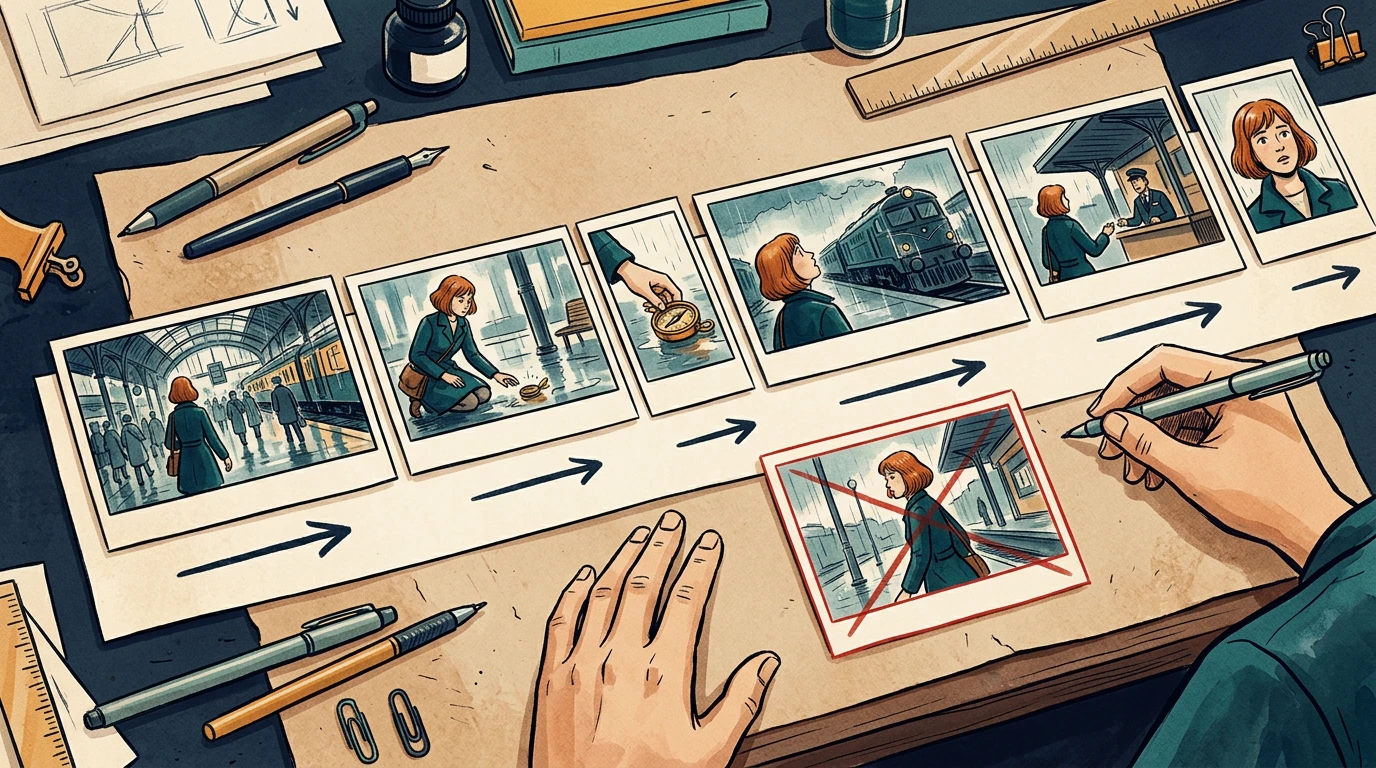
The running example is a 24-second station sequence. Mira enters, sees a compass, picks it up, notices a train, approaches an attendant, and reacts to a new clue. Her copper bob, teal coat, and brass compass remain consistent throughout.

Assign stable shot IDs such as ST01-S010. Keep those IDs when inserting or revising shots. Do not rename every later shot just because one image was added.

Step 2: Specify the timebase and duration

Confirm the delivery aspect ratio, frame dimensions, and frame rate with the editor before production starts. The example below uses 24 fps and six shots totaling 24 seconds. It is a planning example, not a claim about any model's supported clip length.

Related hot tags

ಸ್ಟೋರಿಬೋರ್ಡ್

ವೀಡಿಯೋ ನಿರ್ಮಾಣ

Production Checklist

ಜನಪ್ರಿಯ ಸೃಜನಶೀಲ ಸಾಧನಗಳು

ಪ್ರೇರಣೆಯನ್ನು ನಿಮ್ಮ ಮುಂದಿನ ಕಥೆಯಾಗಿ ರೂಪಿಸಿ

LlamaGen ಬಳಸಿ ಕಾಮಿಕ್‌ಗಳು, ಸ್ಟೋರಿ‌ಬೋರ್ಡ್‌ಗಳು ಮತ್ತು ಶೈಲೀಕರಿಸಿದ ಫೋಟೋಗಳನ್ನು ರಚಿಸಿ.

01

AI ಕಾಮಿಕ್ ರಚನಾ ಸಾಧನ

ಒಂದು ಆಲೋಚನೆಯನ್ನು ಕೆಲ ನಿಮಿಷಗಳಲ್ಲಿ ಹೊಳೆಯುವ ಕಾಮಿಕ್ ಸ್ಟ್ರಿಪ್‌ಗಳಾಗಿ ಮಾಡಿ.

ಕಾಮಿಕ್‌ಗಳನ್ನು ರಚಿಸಿ
02

AI ಮಾಂಗಾ ರಚನಾ ಸಾಧನ

ಅಭಿವ್ಯಕ್ತಿಪೂರ್ಣ ಮಂಗಾ ಕಲೆಯನ್ನೂ ಬಹು-ಪ್ಯಾನೆಲ್ ಕಥೆಗಳನ್ನೂ ರಚಿಸಿ.

ಮಂಗಾ ರಚಿಸಿ
03

AI ಸ್ಟೋರಿ ಬೋರ್ಡ್ ಜನರೇಟರ್

ಪ್ರೊಡಕ್ಷನ್ ಆರಂಭಕ್ಕೂ ಮುನ್ನ ಪ್ರತಿಯೊಂದು ದೃಶ್ಯವನ್ನೂ ದೃಶ್ಯೀಕರಿಸಿ.

ಸ್ಟೋರಿ‌ಬೋರ್ಡ್‌ಗಳನ್ನು ರಚಿಸಿ
04

ಚಿತ್ರವನ್ನು ಕಾಮಿಕ್‌ಗೆ ಪರಿವರ್ತಿಸಿ

ಯಾವುದೇ ಫೋಟೋವನ್ನು ಕಾಮಿಕ್-ಶೈಲಿಯ ಇಲುಸ್ಟ್ರೇಶನ್ ಆಗಿ ಪರಿವರ್ತಿಸಿ.

ಚಿತ್ರಗಳಿಂದ ಕಾಮಿಕ್‌ಗಳನ್ನು ರಚಿಸಿ
05

AI ಕಾಮಿಕ್ ಸ್ಟ್ರಿಪ್ಸ್ ತಯಾರಕ

ಸ್ಥಿರವಾಗಿರುವ ಪಾತ್ರಗಳೊಂದಿಗೆ ಹಂಚಿಕೊಳ್ಳಬಹುದಾದ ಸ್ಟ್ರಿಪ್‌ಗಳನ್ನು ರಚಿಸಿ.

ಕಾಮಿಕ್ ಸ್ಟ್ರಿಪ್‌ಗಳನ್ನು ರಚಿಸಿ

LlamaGen community

checkmark

Get hands-on help with your comics

checkmark

Showcase your comics to fellow LlamaGen creators

checkmark

Participate in special events to win gifts

ಬದಲಾವಣೆಗಳ ದಾಖಲೆ

ಯುವ ಮನಗಳಲ್ಲಿ ಕನಸುಗಳನ್ನು ಹೊತ್ತಿಸಿ
ಲಕ್ಷಾಂತರ ಕಥೆಗಳು ಜೀವಂತವಾಗುವ ಸ್ಥಳ

ಇತ್ತೀಚಿನ LlamaGen ವೈಶಿಷ್ಟ್ಯ ಬಿಡುಗಡೆಗಳು, ಉತ್ಪನ್ನ ಸುಧಾರಣೆಗಳು, ವಿನ್ಯಾಸ ನವೀಕರಣಗಳು ಮತ್ತು ಪ್ರಮುಖ ದೋಷ ಪರಿಹಾರಗಳ ಸಂಕ್ಷಿಪ್ತ ವಿವರ.
✦
✧
✦
✧

ಇದಕ್ಕಾಗಿ ಹೊಸ ಮಾಧ್ಯಮ ಕಥೆ ಹೇಳುವಿಕೆ

ಆಧುನಿಕ ಪ್ರೇಕ್ಷಕರಿಗೆ ತಟ್ಟುವ ಅನಿಯಮಿತ ಕಥೆಗಳು, ಕಾಮಿಕ್ಸ್, ಅನಿಮೇಷನ್‌ಗಳು, ಆಟಗಳು ಮತ್ತು ಇನ್ನಷ್ಟು—ಕೆಲವೇ ಕ್ಷಣಗಳಲ್ಲಿ ರಚಿಸಿ

ShotStory beatSecondsFrames at 24 fps
S010Mira enters the station372
S020She notices the compass496
S030She picks it up372
S040A train catches her attention5120
S050She approaches the attendant496
S060She recognizes a clue5120
TotalComplete sequence24576

Use one explicit convention in the timing sheet. For example, start frames can be inclusive and end frames exclusive: S010 occupies frames 0 through 71, with an end boundary of 72.

Do not mix that convention with an editor's inclusive In/Out interpretation without converting the numbers first. Adobe's timecode documentation is a useful reference when aligning frame counts and display choices with the receiving editor.

A conceptual six-shot sequence with varied timeline widths and continuity directions

The card widths illustrate pacing. Use the timing sheet, not visual card width, as the numeric source of truth.

Step 3: Describe what moves and what stays fixed

Separate subject motion from camera motion. Phrases like "make it cinematic" leave too many decisions unresolved.

For each shot, write:

Shot: ST01-S030
Start: Mira crouches; compass rests on the wet floor.
Action: her right hand lifts the compass toward her face.
Camera: low medium shot, restrained push-in.
End: compass is held still at chest height.
Preserve: face, copper bob, teal coat, compass shape, station lighting.
Avoid: added people, extra hands, changing train direction.

A clear start and end state helps the next shot connect. If your selected video tool cannot deliver the requested camera behavior, simplify the shot or replace it with an editorial move instead of repeatedly regenerating without a clear diagnosis.

Step 4: Include references and audio decisions

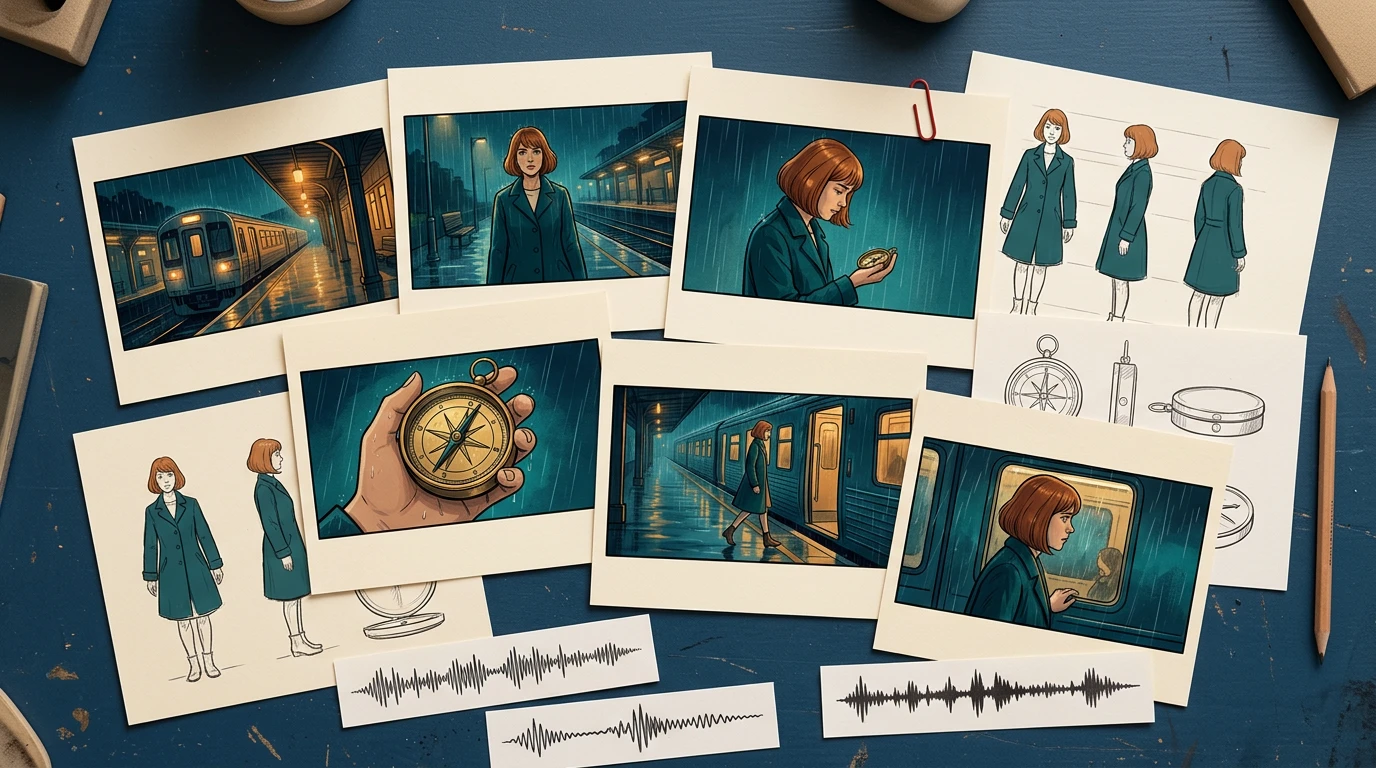
Provide the approved character reference, recurring prop reference, and location reference alongside the frames. Include only the versions the recipient should use.

For audio, distinguish final dialogue, temporary voice, sound effects, ambience, and music. Record cue positions and whether an audio file is approved for publication. Do not let a temporary track become the final soundtrack just because it was attached to the animatic.

A conceptual handoff kit with storyboard cards, character and prop references, and audio cue strips

The package should explain the scene even if the recipient has not watched earlier iterations.

Step 5: Check continuity at the cuts

Review the last useful frame of each shot beside the first useful frame of the next. Watch for changes in hand position, prop scale, screen direction, eyeline, lighting, and background geography.

In the local timing-sheet exercise, an intentionally missing S040 entry creates a 120-frame gap. The corrected sheet restores the six-shot sequence to 576 continuous frames. That validates the schedule structure; it does not validate motion quality or editorial pacing.

For visual continuity, run a separate review. A repaired timing row cannot fix a character suddenly holding the compass in the other hand.

Step 6: Send a package another person can open

A simple handoff structure is easier to inspect than a folder full of filenames containing "final."

station-sequence/
  brief-and-delivery-spec.txt
  shot-list.csv
  frames/
    ST01-S010-v03.png
    ST01-S020-v02.png
  references/
    mira-approved-v02.png
    compass-approved-v01.png
  audio/
  animatic-review-v04.mp4
  revision-log.csv

List every expected file in a manifest, including version and approval state. Use relative paths inside the package when practical. Open it from a clean folder or a second machine to catch missing references.

When exporting XML or another interchange format, test it in the receiving application before promising a seamless transfer. For a small production, a frame sequence plus CSV may be a more predictable fallback.

Step 7: Approve a short motion test before scaling

Choose one difficult representative shot: a face, a hand interacting with the compass, or a camera move across overlapping layers. Review that test before converting every frame into video.

Track preparation time, generation wait, review, revision, and assembly separately. Record the actual credits or cost reported by the selected tool. Static storyboard generation time does not predict a finished video's production budget.

Use a specific rejection reason: hand changed, compass melted, direction reversed, timing too short, or dialogue obscured. Repair the affected shot and recheck its cuts while keeping the other approved material available.

Final handoff checklist

  • Shot IDs and intended order are unambiguous.
  • Every shot points to an approved frame and reference version.
  • Duration, frame rate, aspect ratio, and frame-count convention agree.
  • Subject motion, camera motion, and start/end states are separate.
  • Screen direction, eyelines, hands, and props match across cuts.
  • Dialogue and audio cues are versioned and cleared for their intended use.
  • The animatic and manifest match the same revision.
  • Another person can open the package without missing assets.
  • Outstanding decisions have an owner and approval deadline.

Prepare your next sequence in Storyboard, then use this checklist before motion production. If the sequence still changes substantially during review, return to the storyboard-first workflow before committing more shots.

FAQ

Is an animatic the final video?

No. An animatic mainly tests sequence and timing. The final video may still require motion generation, editing, sound work, and additional quality review.

Should every storyboard frame become one video clip?

No. Match clips to the intended shots and your tool's capabilities. Several storyboard drawings can describe one shot, and one drawing may still need added start and end planning.

What should I do if a generated shot changes the character?

Compare it with the approved references, simplify conflicting motion instructions, and retest that shot. Then recheck its neighboring cuts before accepting the replacement.

Product workflow reviewed November 2, 2026. The timing exercise is a local planning check; this article does not claim that the illustrative sequence was generated as a finished video.

LlamaGen ಲೋಗೋ
  • United States
  • Español
  • Français (France)
  • 日本語
  • 한국어
  • Deutsch
  • 繁體中文 (台灣)
  • 繁體中文 (香港)
  • 简体中文
  • Português
  • Italiano
  • Español (México)
  • العربية
  • Русский
  • Português (Brasil)
  • Tiếng Việt
  • ಕನ್ನಡ

AI ಕಾಮಿಕ್ ನಿರ್ಮಾಣದ ಭವಿಷ್ಯವನ್ನು ಮುನ್ನಡೆಸುತ್ತಿದೆ

  • 24/7 ಬೆಂಬಲ
  • ವಾರ್ಷಿಕ ನವೀಕರಣಗಳು
  • ಭದ್ರ ಮತ್ತು ಅನುಸರಣೆಗೊಳಿಸಿಕೊಂಡಿದೆ
  • 99.9% ಅಪ್‌ಟೈಮ್

LlamaGen ಅನ್ನು ಉಚಿತವಾಗಿ ಡೌನ್‌ಲೋಡ್ ಮಾಡಿ

AndroidiOSಡೆಸ್ಕ್‌ಟಾಪ್

ಉತ್ಪನ್ನ

  • ಇತ್ತೀಚಿನ ಬಿಡುಗಡೆಗಳು
  • ವೈಶಿಷ್ಟ್ಯಗಳು
  • ಕಾಮಿಕ್ ಸ್ಟ್ರಿಪ್ ನಿರ್ಮಾಪಕ
  • Comic Storesಹೊಸದು
  • ಮಾಂಗಾ ಸ್ಟುಡಿಯೋಹೊಸದು
  • ಚಿತ್ರವನ್ನು ಕಾಮಿಕ್ ಆಗಿ ಮಾಡಿ
  • ಕಾಮಿಕ್‌ನಿಂದ ವೀಡಿಯೋಗೆ
  • AI ಕಾಮಿಕ್ ಫ್ಯಾಕ್ಟರಿ
  • ಕಾಮಿಕ್ ಏಜೆಂಟ್
  • iOS ಮತ್ತು ಆಂಡ್ರಾಯ್ಡ್
  • ಮ್ಯాక్ & ವಿಂಡೋಸ್
  • ಡೌನ್‌ಲೋಡ್
  • Comic Zapಹೊಸದು
  • AI ಕಾಮಿಕ್ ರಚನಾ ಸಾಧನ
  • AI ಕಾರ್ಟೂನ್ ಜನರೆಟರ್
  • AI ವೆಬ್‌ಟೂನ್ ರಚನಾ ಸಾಧನ
  • ಕಾಮಿಕ್ ಸ್ಟ್ರಿಪ್ ತಯಾರಕ
  • ಚಿತ್ರವನ್ನು ಕಾಮಿಕ್ ಆಗಿ ಮಾಡಿ
  • AI ಮಾಂಗಾ ರಚನಾ ಸಾಧನ
  • ಮಂಗಾ ಭಾಷಾಂತರಕರ
  • ಫೋಟೋವನ್ನು ಅನಿಮೆಗೆ ಪರಿವರ್ತಿಸಿ
  • ಚಿತ್ರದಿಂದ ಪ್ರಾಂಪ್ಟ್
  • ಅನಿಮೆಯಿಂದ ನೈಜ ಜೀವನಕ್ಕೆ
  • ಮಂಗಾ ಕಲರೈಜರ್
  • ಅನಿಮೆ ಪಾತ್ರ ಜನರೇಟರ್
  • ಪಿಕ್ಸೆಲ್ ಗೇಮ್ ಅಸೆಟ್ ಸಾಧನಗಳು
  • AI ಸ್ಪ್ರೈಟ್ ಶೀಟ್ ಜನರೇಟರ್
  • 2026ರ ಅತ್ಯುತ್ತಮ ಪಿಕ್ಸೆಲ್ ಗೇಮ್ ಸಾಧನಗಳು
  • ಫೋಟೋ ಕಾಮಿಕ್ ನಿರ್ಮಾಪಕ
  • Comic Life ಪರ್ಯಾಯ

ಸಹೋದರ ಉತ್ಪನ್ನಗಳು

  • LlamaGen ಕುಟುಂಬ
  • CineoBoardಹೊಸದು
  • Comics API

ಯೋಜನೆಗಳು

  • ಬ್ಯಾಲಿಗೊಂಡು
  • ಸ್ಟಾರ್ಟರ್
  • ಪ್ರೊ

ಸಮುದಾಯ

  • ರಚನಾಕಾರರು
  • ಹೊಸಾಡಿಕೊಂಡಿರುವವರು
  • ಪಾರ್ಟ್ನರ್

AI Models

  • GPT Image 2.6 Flare
  • GPT Image 2.6 Sunburst
  • Grok Imagine Image 2.0
LinkedInX (Twitter)
  • ಮುಖಪುಟ
  • ಲೇಖನಗಳು
  • ಬ್ಲಾಗ್
  • ರಚಿಸಿ
  • ಬ್ಯಾಲಿಗೊಂಡು
  • API
  • Affiliate ProgramNEW

ಹಿಂದಿನ ಬ್ಲಾಗ್‍ಗಳು

Two OCs in One Comic Panel: Keep Identities and Speakers Clear

Two OCs in One Comic Panel: Keep Identities and Speakers Clear

A six-panel Maya and Theo dialogue case showing separate references, a handoff repair, a reverse-sho

Jay
Jay
November 20th, 2026
Turn a Photo Album into a Comic Story Without Losing Who Is Who

Turn a Photo Album into a Comic Story Without Losing Who Is Who

A six-scene synthetic album example showing how to separate character identity from scene references

Jay
Jay
November 20th, 2026
From Six Panels to a 20-Second Comic Book Trailer

From Six Panels to a 20-Second Comic Book Trailer

A worked 20-second comic trailer: choose a clear hook, reuse owned clips, withhold the ending, and r

Jay
Jay
November 20th, 2026
Build an OC Wardrobe for a Three-Scene Comic

Build an OC Wardrobe for a Three-Scene Comic

Review six outfit references, approve three wardrobe versions, and apply one OC consistently across

Jay
Jay
November 19th, 2026
ಎಲ್ಲಾ ಬ್ಲಾಗ್‌ಗಳನ್ನು ನೋಡಿ

LlamaGen ಕುರಿತು AIಗೆ ಕೇಳಿ

  • Comic Zap
  • Velika
  • ಎಂಟರ್ಪ್ರೈಸ್
  • ಶಿಕ್ಷಣ
  • ಕಾಮಿಕ್ API
  • ಮಾರಾಟ ವಿಭಾಗವನ್ನು ಸಂಪರ್ಕಿಸಿ
  • ಶಿಕ್ಷಣ ಯೋಜನೆಗಳು
  • ಶಿಕ್ಷಕರು
  • ವಿದ್ಯಾರ್ಥಿಗಳು
  • ಶಿಕ್ಷಕರು ಮತ್ತು ವಿದ್ಯಾರ್ಥಿಗಳು
  • ಸ್ಟಾರ್ಟ್ಅಪ್ಸ್
  • ಶೈಕ್ಷಣಿಕ ರಿಯಾಯಿತಿ
  • ಕಂಪನಿ

    • ನಮ್ಮ ಸ್ಥಾಪಕರೊಂದಿಗೆ ಮಾತನಾಡಿ
    • ವಿವರ
    • ಉತ್ಪನ್ನ ರೂಪರೇಷೆ

    ಸಹಾಯ

    • ಸಹಾಯ ಕೇಂದ್ರ
    • ವಿಶ್ವಾಸ
    • ಸುರಕ್ಷಿತ AI
    ಪ್ರತ್ಯಾಯಗಳು
  • ಪ್ರೇಮ ಗೋಡೆ
  • LlamaGen MCPಹೊಸದು
  • LlamaGen ಡೆವಲಪರ್
  • ವನರಗಳು

    • ಬದಲಾವಣೆಗಳ ದಾಖಲೆ
    • ಬ್ಲಾಗ್
    • ಮಾರ್ಗದರ್ಶಿಗಳು

    ಉಪಕರಣಗಳು

    • AI ಲೋಗೋ ಜನರೇಟರ್
    • Grokbot ಶೈಲಿ ಪಾತ್ರ ಜನರೇಟರ್
    • PNG ಅನ್ನು ಕಾಮಿಕ್‌ಗೆ
    Wan 3.0
  • Wan 3.0 Prime
  • Seedance 2.5
  • MiniMax H3
  • Nano Banana 2.1
  • Nano Banana 2 Lite
  • Seedream 5.0 Flash
  • Seedream 5.0 Pro
  • Seedance 2.0 Mini
  • Kling 3.0 Turbo
  • Nano Banana 2
  • GPT Image 2
  • Gemini Omni Flash
  • All AI Models
  • AI ಉಪಕರಣಗಳು

    • AI ಉಡುಪು ಎಕ್ಸ್‌ಟ್ರಾಕ್ಟರ್
    • AI ಕೂದಲು ಶೈಲಿ ಬದಲಾವಣೆ ಸಾಧನ
    • AI ಮಂಗಾ ಕೂದಲು ಶೈಲಿ ಬದಲಾವಣೆ ಸಾಧನ
    Instagram
    YouTube
    Facebook ಗುಂಪು
    Reddit
    Discord
    ಇಮೇಲ್ ಬೆಂಬಲ
    ಗೌಪ್ಯತೆನಿಯಮಗಳುಸೈಟ್‌ಮ್ಯಾಪ್
    ಬ್ರ್ಯಾಂಡ್ ಆಸ್ತಿ ಡೌನ್‌ಲೋಡ್ ಮಾಡಿ
    © 2026 LlamaGen.Ai ಎಲ್ಲ ಹಕ್ಕುಗಳನ್ನು ಕಾಯ್ದಿರಿಸಲಾಗಿದೆಎಲ್ಲ ಸೇವೆಗಳು ಆನ್ಲೈನ್‌ನಲ್ಲಿ ಲಭ್ಯವಿದೆ
    Storyboard-to-Video Handoff Checklist: Shots, Timing, Audio, and Continuity - LlamaGen.AI Blog
    ಉದ್ಯೋಗಾವಕಾಶಗಳು
  • ನಮಗೆ ಇಮೇಲ್ ಮಾಡಿ
  • ನಮ್ಮ ಮಾಸ್ಕಾಟ್ ಪ್ರಪಂಚ
  • ಮಾಧ್ಯಮ ಕಿಟ್
  • KOL ಪಾಲುದಾರಿಕೆ
  • ವಿಷಯ
  • ವೃತ್ತಿಪರ ಸೇವೆಗಳು
  • ಪದೇಪದೇ ಕೇಳುವ ಪ್ರಶ್ನೆಗಳು
  • ಭದ್ರತೆ
  • ಪ್ರವೇಶಿಸಬಹುದಾಗಿದ್ದು
  • ವೀಡಿಯೊ ಪಾಠ
  • ನಮ್ಮನ್ನು ಸಂಪರ್ಕಿಸಿ
  • ಸೈಟ್‌ಮ್ಯಾಪ್
  • ವೈಯಕ್ತಿಕೃತ ಕಾಮಿಕ್‌ಗಳು
  • ವೈಶಿಷ್ಟ್ಯಗಳು
  • ಪರ್ಯಾಯಗಳು
  • ಅತ್ಯುತ್ತಮ AI ಅಪ್ಲಿಕೇಶನ್‌ಗಳು
  • GPT-6 ಮಂಗಾ ಬಣ್ಣಿಸುವ ಮಾರ್ಗದರ್ಶಿ
  • Claude ಕಾಮಿಕ್ ಪುಸ್ತಕ ಕೌಶಲ್ಯ
  • Gemini AI ಕಾಮಿಕ್ ಮಾರ್ಗದರ್ಶಿ
  • ಆ ಕಾಮಿಕ್
  • ಶೈಕ್ಷಣಿಕ ರಿಯಾಯಿತಿ
  • ವಿದ್ಯಾರ್ಥಿಗಳ ರಿಯಾಯಿತಿ
  • ಪಠ್ಯದಿಂದ ಕಾಮಿಕ್
  • PDF ಅನ್ನು ಕಾಮಿಕ್‌ಗೆ
  • ಸ್ಕ್ರಿಪ್ಟ್‌ನಿಂದ ಕಾಮಿಕ್‌ಗೆ
  • ಪುಸ್ತಕದಿಂದ ಕಾಮಿಕ್‌ಗೆ
  • ಚಿತ್ರವನ್ನು ಕಾಮಿಕ್ ಆಗಿ ಮಾಡಿ
  • AI ಪಿಕ್ಸೆಲ್ ಆರ್ಟ್ ಜನರೆಟರ್
  • ಶೈಕ್ಷಣಿಕ ಕಾಮಿಕ್ಸ್
  • AI ವೀಡಿಯೊ ರಚನಾ ಸಾಧನ
  • Gemini AI ವೀಡಿಯೊ ಜನರೇಟರ್
  • ಉಚಿತ ಮುಖವಿಲ್ಲದ AI ವೀಡಿಯೋ ರಚನೆ
  • ಕಾಮಿಕ್‌ನಿಂದ ವೀಡಿಯೋಗೆ
  • ಸ್ಟೋರಿ‌ಬೋರ್ಡ್ ಸಾಫ್ಟ್‌ವೇರ್ ತಯಾರಿಸಿ
  • AI ಸ್ಟೋರಿ ಬೋರ್ಡ್ ಜನರೇಟರ್
  • ಸ್ಕ್ರೀನ್‌ರೈಟಿಂಗ್ ಸಾಫ್ಟ್‌ವೇರ್
  • ಸ್ಕ್ರೀನ್‌ಪ್ಲೇ ಎಡಿಟರ್
  • ಸ್ಟೋರಿ AI
  • AI ಕಥಾ ರಚನಾ ಸಾಧನ
  • ಸ್ಟೋರಿ‌ಬುಕ್ ಜನರೇಟರ್
  • AI ಚಿತ್ರ ರಚನಾ ಸಾಧನ
  • AI ಲೇಯರ್ ಸ್ಪ್ಲಿಟರ್
  • AI ಕ್ಯಾಮೆರಾ ಆಂಗಲ್ ನಿಯಂತ್ರಣ
  • AI ಪಿಕ್ಸೆಲ್ ಆರ್ಟ್ ಜನರೆಟರ್
  • ಪಿಕ್ಸೆಲ್ ಗೇಮ್ ಅಸೆಟ್ ಸಾಧನಗಳು
  • AI ಸ್ಪ್ರೈಟ್ ಶೀಟ್ ಜನರೇಟರ್
  • ಸ್ಪ್ರೈಟ್ ಶೀಟ್ ಸ್ಲೈಸರ್
  • 2026ರ ಅತ್ಯುತ್ತಮ ಪಿಕ್ಸೆಲ್ ಗೇಮ್ ಸಾಧನಗಳು
  • ಅನಿಮೇಶನ್ API
  • ChatGPT/Codex ಪ್ಲಗಿನ್
  • ChatGPT ಸ್ಥಾಪನಾ ಮಾರ್ಗದರ್ಶಿ
  • Claude Code ಪ್ಲಗಿನ್
  • Claude Code ಸ್ಥಾಪನಾ ಮಾರ್ಗದರ್ಶಿ
  • AI ಗಾಳಿಯ ಪರಿಣಾಮ ಜನರೇಟರ್
  • AI ಆಳ ನಕ್ಷೆ ಜನರೇಟರ್
  • AI ಬಿಳಿ ಹಿನ್ನೆಲೆ
  • AI ವಸ್ತು ತೆಗೆದುಹಾಕುವ ಸಾಧನ
  • AI ವರ್ಚುವಲ್ ಟ್ರೈ-ಆನ್
  • AI ಚಿತ್ರ ಮಸುಕು ತೆಗೆಯುವುದು
  • AI ಶಬ್ದ ನಿವಾರಣೆ
  • AI ಫೋಟೋ ಪುನರುಜ್ಜೀವನ
  • AI ಉತ್ಪನ್ನ ನೆರಳುಗಳು
  • AI ಹಿನ್ನೆಲೆ ಜನರೇಟರ್
  • AI ಹೆಡ್‌ಶಾಟ್ ಜನರೇಟರ್
  • AI ಎಮೋಜಿ ಮೇಕರ್
  • AI ಹಿನ್ನೆಲೆ ಬದಲಾವಣೆ ಸಾಧನ
  • AI ಕಣ್ಣು ತೆರೆಯುವಿಕೆ
  • AI ಸೌಂದರ್ಯ
  • AI ಉತ್ಪನ್ನ ಫೋಟೋಗ್ರಫಿ